android auto PEUGEOT 208 2021 User Guide
[x] Cancel search | Manufacturer: PEUGEOT, Model Year: 2021, Model line: 208, Model: PEUGEOT 208 2021Pages: 276, PDF Size: 8.02 MB
Page 213 of 276
2 11
PEUGEOT Connect Nav
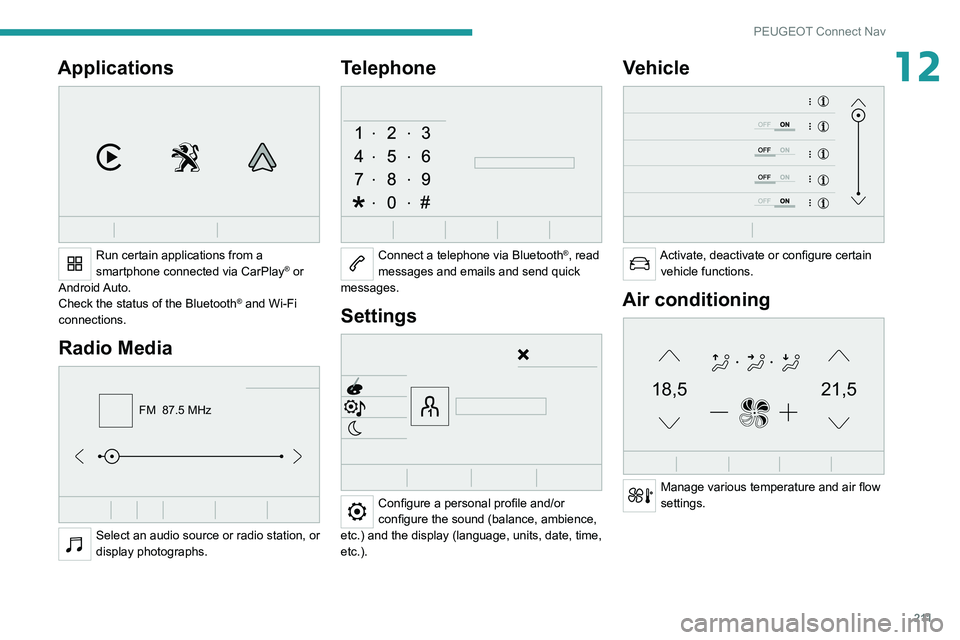
12Applications
Run certain applications from a
smartphone connected via CarPlay® or
Android Auto.
Check the status of the
Bluetooth
® and Wi-Fi
connections.
Radio Media
FM 87.5 MHz
Select an audio source or radio station, or
display photographs.
Telephone
Connect a telephone via Bluetooth®, read
messages and emails and send quick
messages.
Settings
Configure a personal profile and/or
configure the sound (balance, ambience,
etc.) and the display (language, units, date, time,
etc.).
Vehicle
Activate, deactivate or configure certain vehicle functions.
Air conditioning
21,518,5
Manage various temperature and air flow
settings.
Page 222 of 276
220
PEUGEOT Connect Nav
From the system, press "Applications" to
display the main page.
Press "Connectivity" to access the "CarPlay
®”
function.
Press "CarPlay" to display the CarPlay®
interface.
When the USB cable is disconnected
and the ignition is switched off then back
on, the system will not automatically switch to
Radio Media mode; the source must be
changed manually.
Android Auto smartphone connection
Depending on country.
Install the "Android Auto" application on
the smartphone via "Google Play".
The "Android Auto" function requires the use
of a compatible smartphone and compatible
applications.
Connect the USB cable. The smartphone
charges when connected by the USB
cable.
From the system, press "Applications " to
display the main page.
Press "Connectivity" to access the "Android
Auto” function.
Press "Android Auto" to start the
application in the system.
Displaying charging station
details
Press Navigation to display the main
page.
Press this button to display the list of
services.
Press "POI on map" to display the list
of points of interest.
Press one of the buttons to search for
"Stations".
Activate/deactivate "Stations".
Press this button to display a secondary
page.
Select the "Settings" tab.
Select the desired connector type.
Press "OK" to save.
Displaying weather
information
Press Navigation to display the main
page.
Press this button to display the list of
services.
Select "View map".
Select "Weather".
Press this button to display basic
information.
Press this button to display detailed
weather information.
The temperature displayed at 6 a.m. will be the maximum temperature for the day.
The temperature displayed at 6 p.m. will be
the minimum temperature for the night.
Applications
USB sockets
Depending on equipment, for more information
on the USB sockets compatible with CarPlay® or
Android Auto applications, refer to the "Ease of
use and comfort" section.
For the list of compatible smartphones,
visit the Manufacturer's website in your
country.
Synchronising a smartphone enables
users to display applications that support
the smartphone’s CarPlay
® or Android Auto
technology on the vehicle’s screen. For
CarPlay
® technology, the CarPlay® function
must first be activated on the smartphone.
Unlock the smartphone for the communication
process between the smartphone and the
system to work.
As principles and standards are constantly
changing, we recommend keeping the
smartphone's operating system up-to-
date, together with the date and time on
the smartphone and the system.
Connectivity
Press Applications to display the main
page.
Press "Connectivity" to access the CarPlay
® or
Android Auto functions.
CarPlay® smartphone
connection
Depending on country.
On connecting the USB cable, the
CarPlay® function deactivates the
system's Bluetooth® mode.
The "CarPlay " function requires the use of
a compatible smartphone and compatible
applications.
Connect the USB cable. The smartphone
charges when connected by the USB
cable.
Press "Telephone" to display the
CarPlay® interface.
Or
Connect the USB cable. The smartphone
charges when connected by the USB
cable.
Page 223 of 276
221
PEUGEOT Connect Nav
12From the system, press "Applications" to
display the main page.
Press "Connectivity" to access the "CarPlay
®”
function.
Press "CarPlay" to display the CarPlay®
interface.
When the USB cable is disconnected
and the ignition is switched off then back
on, the system will not automatically switch to
Radio Media mode; the source must be
changed manually.
Android Auto smartphone connection
Depending on country.
Install the "Android Auto" application on
the smartphone via "Google Play".
The "Android Auto" function requires the use
of a compatible smartphone and compatible
applications.
Connect the USB cable. The smartphone
charges when connected by the USB
cable.
From the system, press "Applications " to
display the main page.
Press "Connectivity" to access the "Android
Auto” function.
Press "Android Auto" to start the
application in the system.
During the procedure, several screen
pages relating to certain features are
displayed.
Accept to start and complete the connection.
Access to the different audio sources remains
available in the margin of the Android Auto
display, using the touch buttons located in the
upper bar.
Access to the menus for the system is possible
at any time using the dedicated buttons.
In Android Auto mode, the function that
displays rolling menus by briefly pressing
the screen with three fingers is disabled.
There may be a pause before applications become available,
depending on the quality of the network.
Car Apps
Press Applications to display the main
page.
Press "Car Apps" to display the applications
home page.
Internet Browser
Press Applications to display the main
page.
Press "Connectivity" to access the "Connected
Apps” function.
Press "Connected Apps" to display the browser
home page.
Select the country of residence.
Press "OK" to save and start the browser.
Connection to the internet is via one of
the network connections provided by the
vehicle or the user.
Bluetooth connection®
The services available depend on the network, the SIM card and the
compatibility of the Bluetooth devices used.
Consult the smartphone user guide and the
service provider to check which services are
available.
The Bluetooth function must be activated and the smartphone configured as
"Visible to all".
To complete the pairing, whichever procedure is
used (from the smartphone or from the system),
ensure that the code is the same in the system
and in the smartphone.
If the pairing procedure fails, we
recommend deactivating and then
reactivating the Bluetooth function on the
smartphone.
Page 234 of 276
232
PEUGEOT Connect Nav
The system reads a variety of data (folder, title,
artist, etc.). This can take from a few seconds to
a few minutes.
This is perfectly normal.
Some characters in information about the
currently playing media may not be displayed
correctly.
The audio system is unable to process certain
types of character.
►
Use standard characters to name tracks and
folders.
Playback of streaming files does not start.
The connected device does not automatically
launch playback.
►
Start playback from the device.
T
rack names and playing times are not
displayed on the audio streaming screen.
The Bluetooth profile does not allow the transfer
of this information.
Telephone
I am unable to connect my Bluetooth
telephone.
The telephone's Bluetooth function may be
switched off or the device may not be visible.
►
Check that the telephone has Bluetooth
switched on.
►
Check in the telephone settings that it is
"visible to all".
►
Deactivate then reactivate the telephone’
s
Bluetooth function.
The Bluetooth telephone is not compatible with
the system. ►
Y
ou can check the compatibility of the
telephone on the Brand's website (services).
Android Auto and/or CarPlay do not work.
Android Auto and CarPlay may not activate if the
USB cables are of poor quality.
►
Use genuine USB cables to ensure
compatibility
.
Android Auto and/or CarPlay do not work.
Android Auto and CarPlay are not available in all
countries.
►
Check the list of supported countries via
these
websites: Google Android Auto or Apple.
The volume of the telephone connected via
Bluetooth is too low.
The volume depends on both the system and the
telephone.
►
Increase the volume of the audio system, to
maximum if required, and increase the volume of
the telephone if necessary
.
Ambient noise affects the quality of the
telephone call.
► Reduce ambient noise (e.g. close the
windows, reduce ventilation, slow down).
Some contacts are duplicated in the list.
The options for synchronising contacts are:
synchronise the contacts on the SIM card, the
contacts on the telephone, or both. When both
synchronisations are selected, some contacts
may be duplicated.
►
Select "Display SIM card contacts" or
"Display telephone contacts".
The contacts are not listed in alphabetical
order
.Some telephones offer display options.
Depending on the settings chosen, contacts can
be transferred in a specific order.
►
Modify the telephone directory display
settings.
The system is not receiving SMS text
messages.
Bluetooth mode does not allow SMS text
messages to be sent to the system.
Settings
When the treble and bass settings are
changed, the ambience is deselected.
When the ambience is changed, the treble
and bass settings are reset.
Selecting an ambience imposes the treble and
bass settings, and vice versa.
►
Modify the treble and bass or ambience
settings to obtain the desired musical ambience.
When the balance settings are changed, the
distribution is deselected.
When the distribution setting is changed, the
balance settings are deselected.
Selecting a distribution setting imposes the
balance settings, and vice versa.
►
Modify the balance setting or the distribution
setting to obtain the desired sound quality
.
There is a difference in sound quality
between audio sources.
To allow for optimal listening quality, the sound
settings can be tailored to different audio
sources, which can generate audible differences
when changing source.
Page 236 of 276
234
Event data recorders
Event data recorders
Electronic control units are installed in your
vehicle. Control units process data which is
received by vehicle sensors, for example, or
which they generate themselves or exchange
amongst themselves. Some control units are
necessary for the safe functioning of your
vehicle, others assist you while you drive (driver
assistance systems), while others provide
comfort or infotainment functions.
The following contains general information about
data processing in the vehicle. You will find
additional information as to which specific data is
uploaded, stored and passed on to third parties
and for what purpose in your vehicle under
the key word Data Protection closely linked
to the references for the affected functional
characteristics in the relevant owner's manual
or in the general terms of sale. These are also
available online.
Operating data in the
vehicle
Control units process data for operation of the
vehicle.
This data includes, for example:
–
vehicle status information (e.g. speed,
movement delay
, lateral acceleration, wheel
rotation rate, "seat belts fastened" display)
–
ambient conditions (e.g. temperature, rain
sensor
, distance sensor) As a rule such data is transient and is not stored
for longer than an operational cycle, and only
processed on board the vehicle itself. Often
control units include data storage (including the
vehicle key). This is used to allow information
to be documented temporarily or permanently
on vehicle condition, component stress,
maintenance requirements and technical events
and errors.
Depending on technical equipment levels, the
data stored is as follows:
–
system component operating states (e.g. fill
level, tyre pressure, battery status)
–
faults and defects in important system
components (e.g. lights, brakes)
–
system reactions in special driving situations
(e.g. triggering of an airbag, actuation of the
stability control systems)
–
information on events damaging the vehicle
–
for electric vehicles the amount of charge in
the high-voltage battery
, estimated range
In special cases (e.g. if the vehicle has detected
a malfunction), it may be necessary to save data
that would otherwise just be volatile.
When you use services (e.g. repairs,
maintenance), the operating data saved can
be read together with the vehicle identification
number and used where necessary. Staff
working for the service network (e.g. garages,
manufacturers) or third parties (e.g. breakdown
services) can read the data from the vehicle.
The same applies to warranty work and quality
assurance measures. Data is generally read via the OBD (On-Board
Diagnostics) port prescribed by law in the
vehicle. The operating data read documents the
technical condition of the vehicle or individual
components and assists with fault diagnosis,
compliance with warranty obligations and quality
improvement. This data, in particular information
on component stress, technical events, operator
errors and other faults, is transmitted to the
manufacturer where appropriate, together
with the vehicle identification number. The
manufacturer is also subject to product liability.
The manufacturer potentially also uses operating
data from vehicles for product recalls. This data
can also be used to check customer warranty
and guarantee claims.
Fault memories in the vehicle can be reset by a
service company when carrying out servicing or
repairs or at your request.
Comfort and infotainment
functions
Comfort settings and custom settings can be
stored in the vehicle and changed or reset at any
time.
Depending on the equipment level in question,
these include
–
seat and steering wheel position settings
–
chassis and air conditioning settings
–
custom settings such as interior lighting
You can input your own data in the infotainment
functions for your vehicle as part of the selected
features.
Depending on the equipment level in question,
these include
– multimedia data such as music, videos or
photos for playback in an integrated multimedia
system
– address book data for use with an integrated
hands-free system or an integrated navigation
system
– input destinations
– data on the use of online services
This data for comfort and infotainment functions
can be stored locally in the vehicle or be kept on
a device that you have connected to the vehicle
(e.g. a smartphone, USB stick or MP3 player).
Data that you have input yourself can be deleted
at any time.
This data can only be transmitted out of the
vehicle at your request, particularly when using
online services in accordance with the settings
selected by you.
Smartphone integration,
e.g. Android Auto or Apple
CarPlay
If your vehicle is equipped accordingly, you can
connect your smartphone or another mobile
device to the vehicle so that you can control it
via the controls integrated in the vehicle. The
smartphone image and sound can be output
Page 237 of 276
235
Event data recorders
13You can input your own data in the infotainment
functions for your vehicle as part of the selected
features.
Depending on the equipment level in question,
these include
–
multimedia data such as music, videos or
photos for playback in an integrated multimedia
system
–
address book data for use with an integrated
hands-free system or an integrated navigation
system
–
input destinations
–
data on the use of online services
This data for comfort and infotainment functions
can be stored locally in the vehicle or be kept on
a device that you have connected to the vehicle
(e.g. a smartphone, USB stick or MP3 player).
Data that you have input yourself can be deleted
at any time.
This data can only be transmitted out of the
vehicle at your request, particularly when using
online services in accordance with the settings
selected by you.
Smartphone integration,
e.g. Android Auto or Apple
CarPlay
If your vehicle is equipped accordingly, you can
connect your smartphone or another mobile
device to the vehicle so that you can control it
via the controls integrated in the vehicle. The
smartphone image and sound can be output via the multimedia system in this case. At the
same time, specific information is transmitted
to your smartphone. Depending on the type of
integration, this includes data such as position
data, day
/ night mode and other general vehicle
information. For more information, please
see the operating instructions for the vehicle /
infotainment system.
Integration allows selected smartphone apps to
be used, such as navigation or music playback.
No further integration is possible between
smartphone and vehicle, in particular active
access to vehicle data. The nature of further
data processing is determined by the provider of
the app used. Whether you can define settings,
and if so which ones, is dependent on the app
in question and your smartphone's operating
system.
Online services
If your vehicle has a radio network connection,
this allows data to be exchanged between your
vehicle and other systems. The radio network
connection is made possible by means of a
transmitter device in your vehicle or a mobile
device provided by you (e.g. a smartphone).
Online functions can be used via this radio
network connection. These include online
services and applications
/ apps provided to you
by the manufacturer or other providers.
Proprietary services
In the case of the manufacturer's online services,
the relevant functions are described by the
manufacturer in an appropriate location (e.g.
Owner's Manual, the manufacturer's website)
and the associated data protection information is
provided. Personal data may be used to provide
online services. Data exchange for this purpose
takes place via a protected connection, e.g.
using the manufacturer's IT systems provided
for the purpose. Collection, processing and use
of personal data for the purposes of preparation
of services take place solely on the basis of
legal permission, e.g. in the case of a legally
prescribed emergency communication system or
a contractual agreement, or by virtue of consent.
You can activate or deactivate the services and
functions (which are subject to charges to some
extent) and, in some cases, the vehicle's entire
radio network connection. This does not include
statutory functions and services such as an
emergency communication system.
Third party services
If you make use of online services from other
providers (third parties), these services are
subject to the liability and data protection and
usage conditions of the provider in question. The
manufacturer frequently has no influence over
the content exchanged in this regard.
Therefore, please note the nature, scope and
purpose of the collection and use of personal
Page 239 of 276
237
Alphabetical index
3D digital instrument panel 10
A
ABS 68
Accelerated charging unit (Wallbox)
139
Accessories
65
Active Safety Brake
123–126
AdBlue®
20, 159
AdBlue® tank
160
Additive, Diesel
157
Adjusting headlamps
59
Adjusting head restraints
41
Adjusting seat
41–42
Adjusting the air distribution
47–48
Adjusting the air flow
47–48
Adjusting the date
207, 229
Adjusting the height and reach of
the steering wheel
43
Adjusting the lumbar support
42
Adjusting the seat angle
42
Adjusting the temperature
47–48
Adjusting the time
194, 206, 230
Advice on care and maintenance
55, 138, 162
Advice on driving
7, 84–85
Airbags
72–75
Airbags, curtain
73–74
Airbags, front
72–73, 76
Airbags, lateral
73
Air conditioning
46, 49
Air conditioning, automatic
48, 50
Air conditioning, manual
47
Air intake 49
Air vents
46
Alarm
38–39
Android Auto connection
203, 221
Anti-lock braking system (ABS)
68
Antitheft / Immobiliser
31
Apple CarPlay connection
203, 220
Applications
221
Assistance call
66–67
Assistance, emergency braking
68, 125
Audible warning
66
Audio streaming (Bluetooth)
191, 202, 225
B
Battery, 12 V 152, 157, 175–177
Battery, ancillaries
175
Battery, charging
176–177
Battery, remote control
35–36
Blanking screen (snow shield)
151
Blind
54
Blind spot sensors
122
BlueHDi
20, 157, 164
Bluetooth (hands-free)
192–193, 204, 226
Bluetooth (telephone)
192–193, 204–205, 226–227
Bodywork
162
Bonnet
153–154
Boot
37, 55
Brake discs
158
Brake lamps
174
Brakes
158
Braking 98
Braking assistance system
68
Braking, automatic emergency
123–126
Braking, dynamic emergency
90–91
Brightness
194, 206
Bulbs
173
Bulbs (changing)
171–173
C
Cable, audio 224
Cable, Jack
224
Capacity, fuel tank
136
Cap, fuel filler
136
Care of the bodywork
162
Central locking
33–34
Changing a bulb
171–173
Changing a fuse
175
Changing a wheel
165, 168
Changing a wiper blade
63
Changing the remote control battery
35
Changing to free-wheeling
178
Charge level indicator (Electric)
22
Charger, induction
52
Charger, wireless
52
Charging cable
140
Charging cable (Electric)
139
Charging connector (Electric)
139, 143, 145–146
Charging flap (Electric)
139, 143, 145–146
Charging system (Electric)
5, 8, 28, 137, 155