door lock PEUGEOT 208 2021 Owner's Guide
[x] Cancel search | Manufacturer: PEUGEOT, Model Year: 2021, Model line: 208, Model: PEUGEOT 208 2021Pages: 276, PDF Size: 8.02 MB
Page 147 of 276
145
Practical information
7Connection
► Before charging, check that the drive selector
is in mode P, otherwise charging is not possible.
►
Open the charging flap by pressing the
push-button, and check that there are no foreign
bodies on the charging connector
.
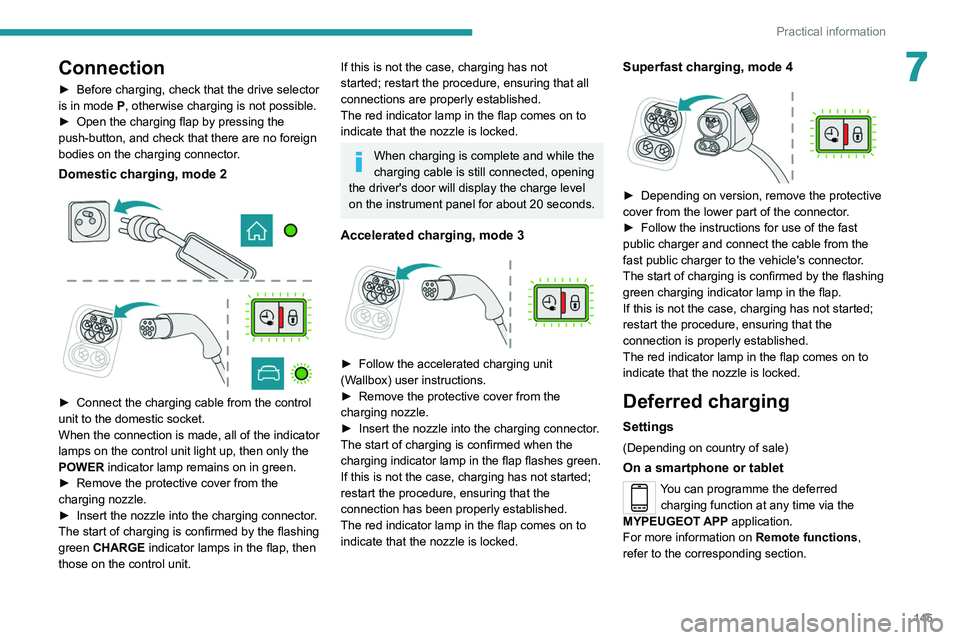
Domestic charging, mode 2
► Connect the charging cable from the control
unit to the domestic socket.
When the connection is made, all of the indicator
lamps on the control unit light up, then only the
POWER
indicator lamp remains on in green.
►
Remove the protective cover from the
charging nozzle.
►
Insert the nozzle into the charging connector
.
The start of charging is confirmed by the flashing
green CHARGE indicator lamps in the flap, then
those on the control unit.
If this is not the case, charging has not
started; restart the procedure, ensuring that all
connections are properly established.
The red indicator lamp in the flap comes on to
indicate that the nozzle is locked.
When charging is complete and while the
charging cable is still connected, opening
the driver's door will display the charge level
on the instrument panel for about 20 seconds.
Accelerated charging, mode 3
► Follow the accelerated charging unit
(W allbox) user instructions.
►
Remove the protective cover from the
charging nozzle.
►
Insert the nozzle into the charging connector
.
The start of charging is confirmed when the
charging indicator lamp in the flap flashes green.
If this is not the case, charging has not started;
restart the procedure, ensuring that the
connection has been properly established.
The red indicator lamp in the flap comes on to
indicate that the nozzle is locked.
Superfast charging, mode 4
► Depending on version, remove the protective
cover from the lower part of the connector .
►
Follow the instructions for use of the fast
public charger and connect the cable from the
fast public charger
to the vehicle's connector.
The start of charging is confirmed by the flashing
green charging indicator lamp in the flap.
If this is not the case, charging has not started;
restart the procedure, ensuring that the
connection is properly established.
The red indicator lamp in the flap comes on to
indicate that the nozzle is locked.
Deferred charging
Settings
(Depending on country of sale)
On a smartphone or tablet
You can programme the deferred charging function at any time via the
MYPEUGEOT APP application.
For more information on Remote functions,
refer to the corresponding section.
Page 148 of 276
146
Practical information
In the vehicle, with PEUGEOT Connect
Nav
Depending on version, the Energy menu can be
accessed either:
– directly, by pressing the button near the
touch screen (with 10" touch screen).
– via the Applications menu.
► In the Energy touch screen menu,
select the Charge page.
►
Set the charging start time.
►
Press
OK.
The setting is saved in the system.
Activation
Deferred charging is only possible with
modes 2 and 3.
►
After programming the deferred charging,
connect your vehicle to the desired charging
equipment.
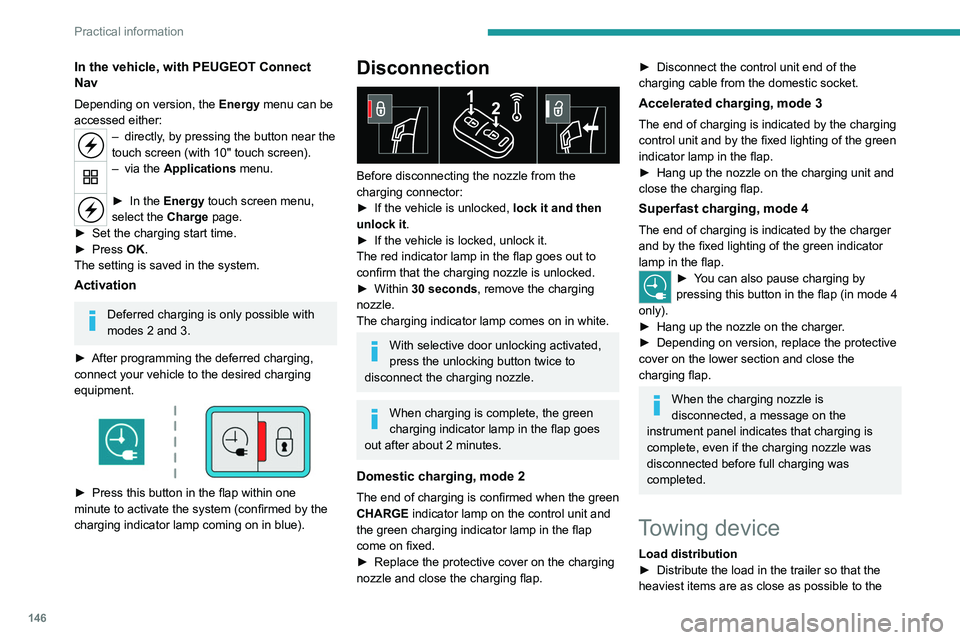
► Press this button in the flap within one
minute to activate the system (confirmed by the
charging indicator lamp coming on in blue).
Disconnection
Before disconnecting the nozzle from the
charging connector:
►
If the vehicle is unlocked, lock it and then
unlock it .
►
If the vehicle is locked, unlock it.
The red indicator lamp in the flap goes out to
confirm that the charging nozzle is unlocked.
►
Within
30 seconds, remove the charging
nozzle.
The charging indicator lamp comes on in white.
With selective door unlocking activated,
press the unlocking button twice to
disconnect the charging nozzle.
When charging is complete, the green
charging indicator lamp in the flap goes
out after about 2 minutes.
Domestic charging, mode 2
The end of charging is confirmed when the green
CHARGE indicator lamp on the control unit and
the green charging indicator lamp in the flap
come on fixed.
►
Replace the protective cover on the charging
nozzle and close the charging flap.
► Disconnect the control unit end of the
charging cable from the domestic socket.
Accelerated charging, mode 3
The end of charging is indicated by the charging
control unit and by the fixed lighting of the green
indicator lamp in the flap.
►
Hang up the nozzle on the charging unit and
close the charging flap.
Superfast charging, mode 4
The end of charging is indicated by the charger
and by the fixed lighting of the green indicator
lamp in the flap.
► You can also pause charging by
pressing this button in the flap (in mode 4
only).
►
Hang up the nozzle on the charger
.
►
Depending on version, replace the protective
cover on the lower section and close the
charging flap.
When the charging nozzle is
disconnected, a message on the
instrument panel indicates that charging is
complete, even if the charging nozzle was
disconnected before full charging was
completed.
Towing device
Load distribution
► Distribute the load in the trailer so that the
heaviest items are as close as possible to the
Page 156 of 276
154
Practical information
All work must be carried out only by a
PEUGEOT dealer or a qualified workshop
Electric motor
1.Screenwash fluid reservoir
2. Engine coolant reservoir (level only)
3. Brake fluid reservoir
4. Battery/Fuses
5. Remote earth point (-)
6. Fusebox
7. 400 V electrical circuit
8. Emergency circuit-breaker for emergency
services and maintenance technicians
For more information on the Charging system
(Electric), refer to the corresponding section.
Checking levels
Check all of the following levels regularly in
accordance with the manufacturer's service
schedule. Top them up if required, unless
otherwise indicated.
If a level drops significantly, have the
corresponding system checked by a PEUGEOT
dealer or a qualified workshop.
Opening
► Open the left-hand front door .
► Pull the interior release lever , located at the
bottom of the door frame, towards you.
► Lift the exterior safety catch and raise the
bonnet.
►
Unclip the stay from its housing and place it
in the support slot to hold the bonnet open.
* Depending on engine.
Closing
► Hold the bonnet and pull out the stay from the
support slot.
►
Clip the stay in its housing.
►
Lower the bonnet and release it near the end
of its travel.
►
Pull on the bonnet to check that it is locked
correctly
.
Because of the presence of electrical
equipment under the bonnet, it is strongly
recommended that exposure to water (rain,
washing, etc.) be limited.
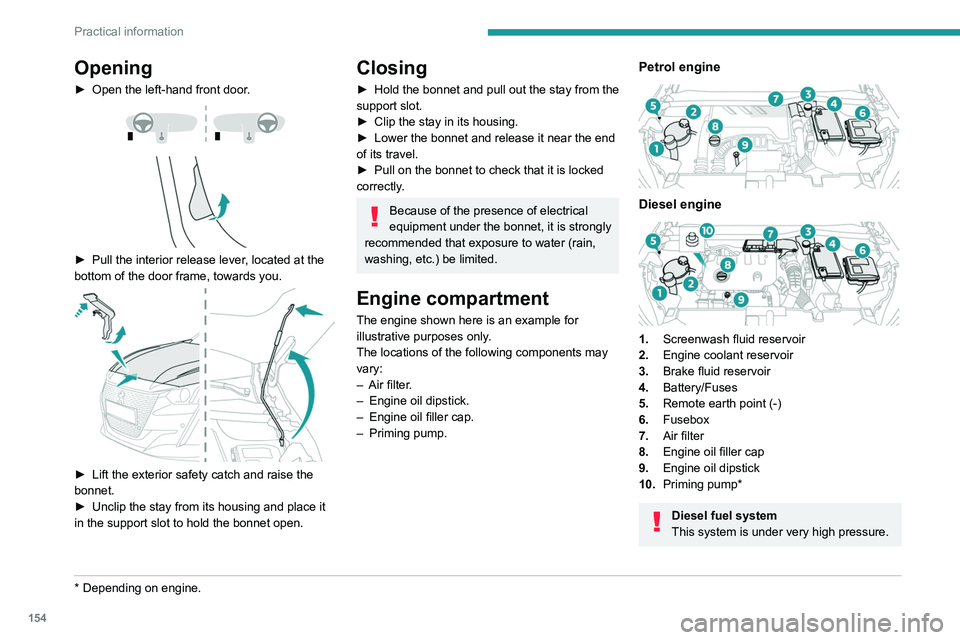
Engine compartment
The engine shown here is an example for
illustrative purposes only.
The locations of the following components may
vary:
–
Air filter
.
–
Engine oil dipstick.
–
Engine oil filler cap.
–
Priming pump.
Petrol engine
Diesel engine
1. Screenwash fluid reservoir
2. Engine coolant reservoir
3. Brake fluid reservoir
4. Battery/Fuses
5. Remote earth point (-)
6. Fusebox
7. Air filter
8. Engine oil filler cap
9. Engine oil dipstick
10. Priming pump*
Diesel fuel system
This system is under very high pressure.
Page 162 of 276
160
Practical information
Free-wheeling
In certain situations, it is necessary to put the
vehicle into free-wheeling mode (e.g. towing, on
a rolling road, automatic car wash (Wash mode),
rail or sea transport).
The procedure varies according to the type of
gearbox and parking brake.
With manual or EAT6
automatic gearbox and
electric parking brake
/
To release them
► With the engine running and while depressing
the brake pedal, move the gear selector to the
neutral position.
► While depressing the brake pedal, switch off
the ignition.
► Release the brake pedal, then switch on the
ignition again.
► While depressing the brake pedal, press the
control to release the parking brake.
► Release the brake pedal, then switch off the
ignition.
Reverting to normal operation
► While depressing the brake pedal, restart the
engine.
Precautions for use
AdBlue® is a urea-based solution. This fluid is
non-flammable, colourless and odourless (when
kept in a cool place).
In the event of contact with the skin, wash the
affected area with soap and running water. In the
event of contact with the eyes, immediately rinse
the eyes with large amounts of water or with an
eye wash solution for at least 15 minutes. Seek
medical attention if you feel a persistent burning
sensation or irritation.
If swallowed, immediately wash out the mouth
with clean water and then drink plenty of water.
In certain conditions (high temperature, for
example), the risk of release of ammonia cannot
be excluded: do not inhale the fluid. Ammonia
vapours have an irritant effect on mucous
membranes (eyes, nose and throat).
Store AdBlue® out of the reach of
children, in its original container.
Procedure
Before starting the top-up procedure, ensure that
the vehicle is parked on a flat and level surface.
In wintry conditions, ensure that the temperature
of the vehicle is above -11°C. Otherwise the
AdBlue
® may be frozen and so cannot be poured
into the tank. Park the vehicle in a warmer area
for a few hours to allow the top-up to be carried
out.
Never pour the AdBlue® into the Diesel
fuel tank.
If any AdBlue® is splashed, or if there are
any spillages on the bodywork, rinse
immediately with cold water or wipe with a
damp cloth.
If the fluid has crystallised, clean it off using a
sponge and hot water.
Important: in the event of a top-up after
a breakdown because of a lack of
AdBlue, it is essential to wait around 5
minutes before switching on the ignition,
without opening the driver’s door,
unlocking the vehicle, inserting the key
into the ignition switch, or bringing the
key for the "Keyless Entry and Starting"
system into the passenger compartment.
Switch on the ignition, then wait for 10
seconds before starting the engine.
►
Switch off the ignition and remove the key
from the switch to switch off the engine.
or
►
With Keyless Entry and Starting, press the
"
START/STOP" button to switch off the engine.
► Turn the blue cap of the AdBlue® tank anti-
clockwise and remove it.
►
With a container of
AdBlue
®: after checking
the expiry date, read the instructions on the
label carefully before pouring the contents of the
container into the vehicle's AdBlue tank.
►
With an
AdBlue® pump: insert the nozzle and
fill the tank until the nozzle automatically cuts
out.
In order not to overfill the AdBlue® tank:
–
Add between 10 and 13 litres using
AdBlue® containers.
–
Stop after the nozzle’ s first automatic cut-
out, if you are refilling at a service station.
The system only registers AdBlue
® top-ups of
5
litres or more.
If the AdBlue® tank is completely empty
– which is confirmed by the message
“Top up
AdBlue: Starting impossible ” – it is
essential to add at least 5 litres.
Page 164 of 276
162
Practical information
Advice on care and maintenance
General recommendations
Observe the following recommendations to avoid
damaging the vehicle.
Exterior
Never use a high-pressure jet wash in
the engine compartment - risk of
damaging the electrical components!
Do not wash the vehicle in bright sunshine or
extremely cold conditions.
When washing the vehicle in an
automatic roller-brush car wash, be sure
to lock the doors and, depending on version,
move the electronic key away.
When using a pressure washer, keep the jet
nozzle at a minimum distance of 30 cm from
the vehicle (particularly when cleaning areas
containing chipped paint, sensors or seals).
Promptly clean up any stains containing
chemicals liable to damage the vehicle's
paintwork (including tree resin, bird
droppings, insect secretions, pollen and tar).
Depending on the environment, clean the
vehicle frequently to remove salty deposits
(in coastal areas), soot (in industrial areas)
and mud/salts (in wet or cold areas). These
substances can be highly corrosive.
Contact a PEUGEOT dealer or a qualified
workshop for advice on removing stubborn
stains requiring special products (such as tar
or insect removers).
Preferably, have paint touch-ups performed
by a PEUGEOT dealer or a qualified
workshop.
Interior
When washing the vehicle, never use a
water hose or high-pressure jet to clean
the interior.
Liquids carried in cups or other open
containers can spill, presenting a risk of
damage to the instruments and controls and
the controls located on the centre console. Be
vigilant!
To clean instrument panels, touch screens
or other displays, wipe gently with a soft,
dry cloth. Do not use products (e.g. alcohol,
disinfectant) or soapy water directly on these
surfaces - risk of damage!
Bodywork
High-gloss paint
Do not use abrasive products, solvents,
petrol or oil to clean the bodywork.
Never use an abrasive sponge to clean
stubborn stains - risk of scratching the
paintwork!
Do not apply polish in strong sunshine, or to
plastic or rubber parts.
Use a soft cloth and soapy water or a pH
neutral product.
Gently wipe the bodywork with a clean
microfibre cloth.
Apply polish with the vehicle clean and dry.
Comply with the instructions for use stated on
the product.
Decals
(Depending on version)
Do not use a high-pressure washer to
clean the vehicle - risk of damaging or
detaching the decals!
Use a high-flow hose (temperature
between 25°C and 40°C).
Place the jet of water perpendicular to the
surface to be cleaned.
Rinse the vehicle with demineralised water.
Leather
Leather is a natural product. Appropriate regular
care is essential for its durability.
It must be protected and nourished using a
specific leather product, to keep it supple and
preserve its original appearance.
Page 240 of 276
238
Alphabetical index
Charging the traction battery
(Electric)
22, 137, 140, 143, 145–146
CHECK
23
Checking the engine oil level
19
Checking the levels
155–156
Checking tyre pressures
(using the kit)
166, 168
Checks
154, 157–159
Checks, routine
157–158
Child lock
82
Children
71, 77–81
Children (safety)
82
Child seats
71, 74–77
Child seats, conventional
76–77
Child seats, i-Size
81
Child seats, ISOFIX
78–80
Cleaning (advice)
138, 162
Closing the boot
33, 37
Closing the doors
33, 37
Collision Risk Alert
123–125
Configuration, vehicle
27
Connected applications
221
Connection, Bluetooth
192–193, 204–205, 221–222, 226–227
Connection, Wi-Fi network
222
Connectivity
220
Consumption figures
28
Container, AdBlue®
159–160
Control, emergency boot release
37
Control, emergency door
34–35
Control, heated seats
43
Controls, steering mounted
94–96
Control stalk, lighting
57–58Control stalk, wipers 61–62, 64
Control unit
139–140
Courtesy lamp, front
54
Courtesy lamps
53–54
Cover, load space
55
Cruise control
107, 109–111
Cruise control, adaptive
111
Cruise control by speed limit recognition
107
Cruise control, dynamic with
Stop function
107
D
DAB (Digital Audio Broadcasting) -
Digital radio
190, 201, 224
Date (setting)
207, 229
Daytime running lamps
58, 172
Deactivating the passenger airbag
72, 75–76
Deadlocking
31, 33
Deferred charging
28
Deferred charging (Electric)
28, 139, 143, 145
Defrosting
44, 50
Defrosting, front
50
Demisting
44, 50
Demisting, front
50
Demisting, rear
50
Demisting, rear screen
50
Dials and gauges
9–10
Digital instrument panel
10–11
Dimensions
186
Dipstick
19, 155
Direction indicators
58, 172–174
Display screen, instrument panel 9–10
Domestic charging
(Electric)
140, 144–146, 185
Doors
37
Drive Assist Plus
111
Driver’s attention warning
126–127
Drive selector (Electric)
97
Driving
84–85
Driving aids camera (warnings)
104
Driving aids (recommendations)
103
Driving economically
7
Driving modes
98–99
Dynamic stability control (DSC)
68–69
E
EBFD 68
Eco-driving (advice)
7
ECO mode
99
Economy mode
152
Electric motor
5, 8, 28, 137, 147,
155, 175, 178, 185
Electric windows
40
Electronic brake force distribution (EBFD)
68
Emergency braking assistance (EBA)
68
Emergency call
66–67
Emergency switching off
88–89
Emergency warning lamps
65, 164
Emissions control system, SCR
21, 159
Energy economy mode
152
Energy flows
28
Energy recovery
22, 98
Page 242 of 276
240
Alphabetical index
Key, electronic 32–33
Keyless Entry and Starting
32–33, 87–88
Key not recognised
88–89
Key with remote control
30, 85–86
Kit, hands-free
192–193, 204, 226
Kit, puncture repair
165
Kit, temporary puncture repair
164–166, 168
L
Labels 6
Labels, identification
186
Lamp, boot
55
Lamps, parking
58
Lamps, rear
173
Lams with Full LED technology
59
Lane assist
111, 115–117
Lane departure warning active
119
Leather (care)
162
LEDs - Light-emitting diodes
58, 172
Level, AdBlue®
157
Level, brake fluid
156
Level, Diesel additive
157
Level, engine coolant
20, 156
Level, engine oil
19, 155
Levels and checks
154–156
Level, screenwash fluid
62, 156
Light-emitting diodes - LEDs
58, 172
Lighting dimmer
23
Lighting, exterior
57, 60
Lighting, guide-me home
31, 60
Lighting, interior
53–54
Lighting, mood 54
Lighting, welcome
60
Loading
150
Load reduction mode
153
Locating your vehicle
31
Locking
31, 33
Locking from the inside
34
Locking the doors
34
Low fuel level
136
Lumbar
42
M
Mains socket (domestic network) 139
Maintenance (advice)
55, 138, 162
Maintenance, routine
104, 157–159
Manoeuvring aids (recommendations)
103
Map reading lamps
53
Markings, identification
186
Massage function
42
Mat
53, 104
Menu
203
Menu, main
27
Menus (audio)
188–189, 198–199, 210–211
Menu short cuts
27
Messages
228
Messages, quick
228
Minimum traction battery charge level
(Electric)
22
Mirror, rear view
44
Mirrors, door
43–44, 50, 122
Mirror, vanity
52
Misfuel prevention 137
Mobile application
28, 51, 145
Motor, electric
88, 155, 185
Mountings, ISOFIX
78
N
Navigation 215–217
Navigation, connected
218–220
O
Obstacle detection 127
Oil change
155
Oil consumption
155
OIl, engine
155
On-board tools
55, 164–166
Opening the bonnet
153–154
Opening the boot
32, 37
Opening the doors
32, 37
Opening the panoramic sunroof blind
54
Opening the windows
30
P
Pads, brake 158
Paint
162, 186
Paint colour code
186
Panoramic glass sunroof
54–55
Parcel shelf, rear
55
Page 244 of 276
242
Alphabetical index
Side parking sensors 128
Silent vehicle warning sound (Electric)
66, 85
Smartphone
29, 52
Snow chains
102, 150–151
Snow screen
151
Socket, 12 V accessory
52
Socket, auxiliary
191, 202, 224
Socket, Jack
224
Speed limiter
107–109
Speed limit recognition
104, 106
Speedometer
9–10, 104
Sport mode
99
Spotlamps, side
60
Stability control (ESC)
68–69
Starting a Diesel engine
136
Starting the engine
86, 88
Starting the vehicle
86–87, 94–96
Starting using another battery
88, 176
Station, radio
189–190, 199–200, 223
Stay, bonnet
154
Steering mounted controls,
audio
187–188, 197, 210
Steering wheel, adjustment
43
Stickers, customising ~ Stickers,
expressive
162
Stopping the vehicle
86–88, 94–97
Stop & Start
25, 47, 50, 100–101, 136, 153, 157, 178
Storage
52
Storage box
55
Storage wells
55
Sunshine sensor
46
Sun visor
52Super-fast charging (Electric) 144–146, 185
Suspension
158
Switching off the engine
86, 88
Synchronising the remote control
36
T
Tables of engines 185
Tank, fuel
136–137
Technical data
182, 184–185
Telephone
192–193, 204–205, 226–228
Temperature, coolant
20
Thermal comfort consumption indicator
(Electric)
22
Thermal comfort equipment
22
Time (setting)
194, 206, 230
TMC (Traffic info)
217
Tool box
55
Tools
164–166
Topping-up AdBlue®
160
Top Tether (fixing)
78
Total distance recorder
23
Touch screen
25–26, 28, 51
Touch-sensitive reading lamps
54
Towball, quickly detachable
147–149
Towbar
69, 146
Towbar with quickly detachable
towball
147–149
Towed loads
181–182, 184
Towing another vehicle
178, 180
Traction battery (Electric)
22, 28,
137–138, 185
Traction control (ASR) 68–69
Traffic information (TMC)
217
Trailer
69, 146
Trailer stability assist (TSA)
69
Trajectory control systems
68
Triangle, warning
164
Trip computer
24–25
Trip distance recorder
23
Tyres
158, 186
Tyre under-inflation detection
102, 166
U
Under-inflation (detection) 102
Unlocking
30, 32
Unlocking from the inside
34
Unlocking the boot
33
Unlocking the doors
34
Unlocking the tailgate
33
Updating the date
207, 229
Updating the time
194, 206, 230
USB
191, 201, 203, 220, 224
V
Vehicle data recording and privacy 234
Ventilation
46
Video
225
Visibility
50
Visiopark 1
129
Voice commands
212–215