tow PEUGEOT 3008 2013 Service Manual
[x] Cancel search | Manufacturer: PEUGEOT, Model Year: 2013, Model line: 3008, Model: PEUGEOT 3008 2013Pages: 352, PDF Size: 15.64 MB
Page 233 of 352
231
04
2ABC3DEF5JKL4GHI6MNO8TUV7PQRS9WXYZ0*#
1RADIO MEDIANAV TRAFFIC
SETUPADDR
BOOK
2ABC3DEF5JKL4GHI6MNO8TUV7PQRS9WXYZ0*#
1RADIO MEDIANAV TRAFFIC
SETUPADDR
BOOK
2ABC3DEF5JKL4GHI6MNO8TUV7PQRS9WXYZ0*#
1RADIO MEDIANAV TRAFFIC
SETUPADDR
BOOK
2ABC3DEF5JKL4GHI6MNO8TUV7PQRS9WXYZ0*#
1RADIO MEDIANAV TRAFFIC
SETUPADDR
BOOK
2ABC3DEF5JKL4GHI6MNO8TUV7PQRS9WXYZ0*#
1RADIO MEDIANAV TRAFFIC
SETUPADDR
BOOK
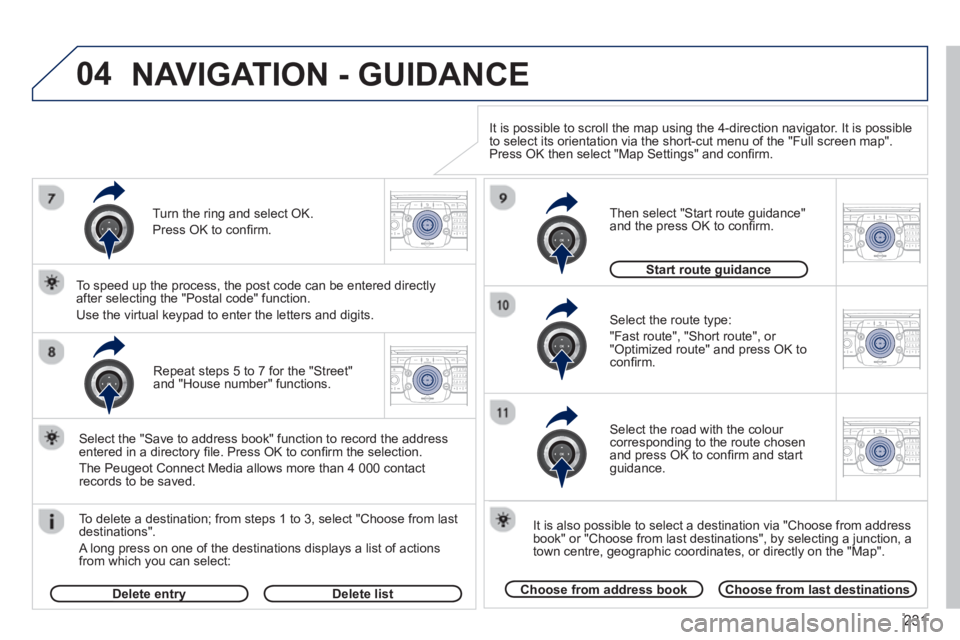
Repeat steps 5 to 7 for the "Street" and "House number" functions.
To delete a destination; from ste
ps 1 to 3, select "Choose from last destinations".
A long press on one of the destinations displays a list of actions
from which you can select:
Select the "Save to address book" function to record the address
entered in a directory fi le. Press OK to confi rm the selection.
The Peu
geot Connect Media allows more than 4 000 contact
records to be saved.
To speed up the process, the post code can be entered directl
y
after selecting the "Postal code" function.
Use the virtual keypad to enter the letters and digits.
Select the route type:
"Fast route"
, "Short route", or "Optimized route" and press OK to confi rm.
Then select "Start route
guidance"
and the press OK to confi rm.
It is also
possible to select a destination via "Choose from address
book" or "Choose from last destinations", by selecting a junction, a
town centre, geographic coordinates, or directly on the "Map".
Choose from address bookChoose from last destinations
Start route guidanceg
It is possible to scroll the map using the 4-direction navigator. It is possible
to select its orientation via the short-cut menu of the "Full screen map".
Press OK then select "Map Settings" and confi rm.
Select the road with the colour corresponding to the route chosen
and press OK to confi rm and start guidance.
Turn the rin
g and select OK.
Press
OK to confi rm.
Delete entryyDelete list
NAVIGATION - GUIDANCE
Page 234 of 352
232
04
NAV2ABC3DEF5JKL4GHI6MNO8TUV7PQRS9WXYZ0*#
1RADIO MEDIANAV TRAFFIC
SETUPADDR
BOOK
2ABC3DEF5JKL4GHI6MNO8TUV7PQRS9WXYZ0*#
1RADIO MEDIANAV TRAFFIC
SETUPADDR
BOOK
2ABC3DEF5JKL4GHI6MNO8TUV7PQRS9WXYZ0*#
1RADIO MEDIANAV TRAFFIC
SETUPADDR
BOOK
2ABC3DEF5JKL4GHI6MNO8TUV7PQRS9WXYZ0*#
1RADIO MEDIANAV TRAFFIC
SETUPADDR
BOOK
NAVIGATION - GUIDANCE
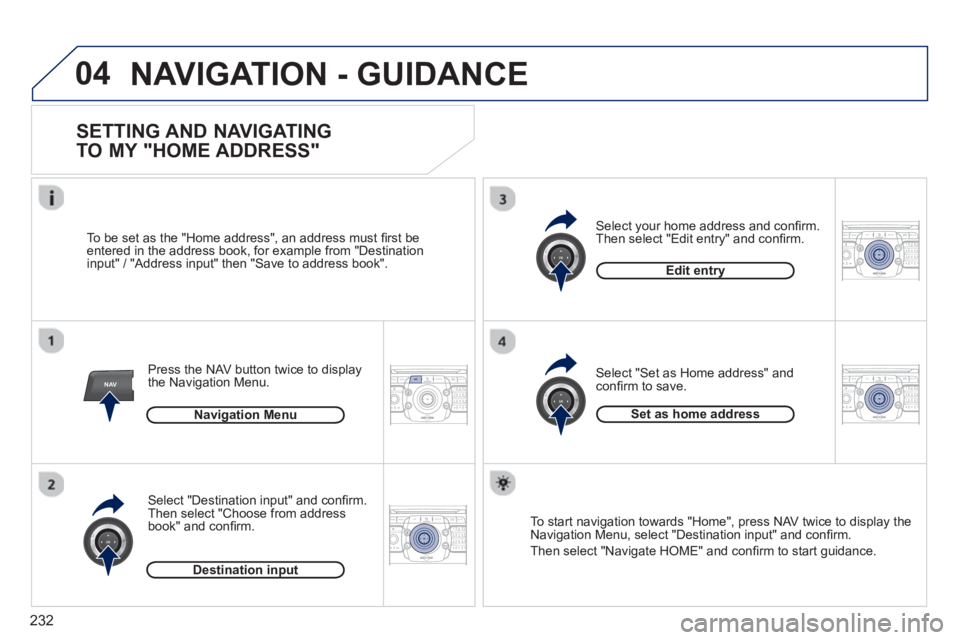
SETTING AND NAVIGATING
TO MY "HOME ADDRESS"
Press the NAV button twice to display
the Navigation Menu.
To be set as the "Home address", an address must
fi rst be entered in the address book, for example from "Destination
input" / "Address input" then "Save to address book".
Select "Destination input" and confi rm.
Then select "
Choose from address book" and confi rm.
Select "Set as Home address" and confi rm to save. Select
your home address and confi rm.
Then select "Edit entry" and confi rm.
To start navi
gation towards "Home", press NAV twice to display the
Navigation Menu, select "Destination input" and confi rm.
Then select "Navi
gate HOME" and confi rm to start guidance. Navi
gation Menu
Destination input
Edit entry
Set as home address
Page 235 of 352
233
04
NAV2ABC3DEF5JKL4GHI6MNO8TUV7PQRS9WXYZ0*#
1RADIO MEDIANAV TRAFFIC
SETUPADDR
BOOK
2ABC3DEF5JKL4GHI6MNO8TUV7PQRS9WXYZ0*#
1RADIO MEDIANAV TRAFFIC
SETUPADDR
BOOK
2ABC3DEF5JKL4GHI6MNO8TUV7PQRS9WXYZ0*#
1RADIO MEDIANAV TRAFFIC
SETUPADDR
BOOK
2ABC3DEF5JKL4GHI6MNO8TUV7PQRS9WXYZ0*#
1RADIO MEDIANAV TRAFFIC
SETUPADDR
BOOK
2ABC3DEF5JKL4GHI6MNO8TUV7PQRS9WXYZ0*#
1RADIO MEDIANAV TRAFFIC
SETUPADDR
BOOK
2ABC3DEF5JKL4GHI6MNO8TUV7PQRS9WXYZ0*#
1RADIO MEDIANAV TRAFFIC
SETUPADDR
BOOK2ABC3DEF5JKL4GHI6MNO8TUV7PQRS9WXYZ0*#
1RADIO MEDIANAV TRAFFIC
SETUPADDR
BOOK
NAVIGATION - GUIDANCE
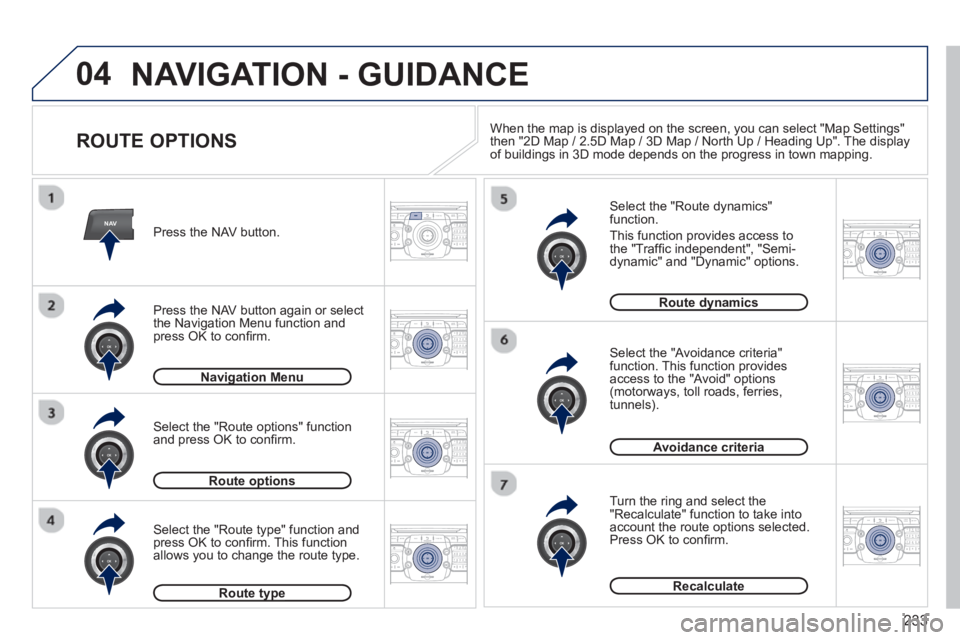
ROUTE OPTIONS
Select the "Route dynamics"function.
This
function provides access to
the "Traffi c independent", "Semi-
dynamic" and "Dynamic" options.
Select the "Avoidance criteria"function. This function provides
access to the "Avoid" options(motorways, toll roads, ferries,
tunnels).
Turn the rin
g and select the"Recalculate" function to take intoaccount the route options selected.
Press OK to confi rm.
Press the NAV button.
Press the NAV button again or select
the Navi
gation Menu function and
press OK to confi rm.
Select the "Route t
ype" function and
press OK to confi rm. This functionallows you to change the route type.
Select the "Route options" functionand press OK to confi rm.
Navigation Menug
Route optionsp
Route typeyp
Route dynamicsy
Avoidance criteria
Recalculate
When the map is displayed on the screen, you can select "Map Settings"
then "2D Map / 2.5D Map / 3D Map / North Up / Heading Up". The display
of buildings in 3D mode depends on the progress in town mapping.
Page 272 of 352
270
04
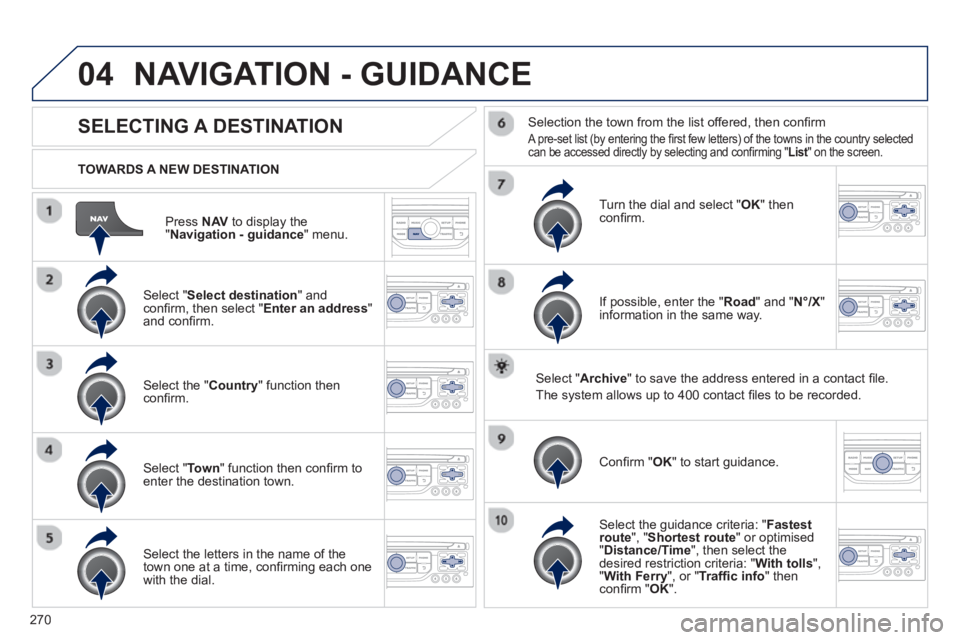
Press NAVto display the"Navigation - guidance " menu.
TOWARDS A NEW DESTINATION
NAVIGATION - GUIDANCE
SELECTING A DESTINATION
Select "Select destination
" and confi rm, then select " Enter an address"and confi rm.
Select the " Country
" function then confi rm.
Select "Town" function then confi rm to enter the destination town.
Select the letters in the name of the
town one at a time, confi rming each one
with the dial.
Selection the town from the list offered, then confi rm
A pre-set list (by entering the fi rst few letters) of the towns in the country selected can be accessed directly by selecting and confi rming " List" on the screen. t
Turn the dial and select "OK" thenconfi rm.
If possible, enter the "
Road
" and "N°/X"
information in the same way.
Select "Archive
" to save the address entered in a contact fi le.
The s
ystem allows up to 400 contact fi les to be recorded.
Confi rm " OK
" to start guidance.
Select the guidance criteria: "Fastest
route", " Shortest route" or optimised "Distance/Time ", then select thedesired restriction criteria: "With tolls","With Ferry", or "Traffi c info" thenconfi rm "OK".
Page 273 of 352
271
04
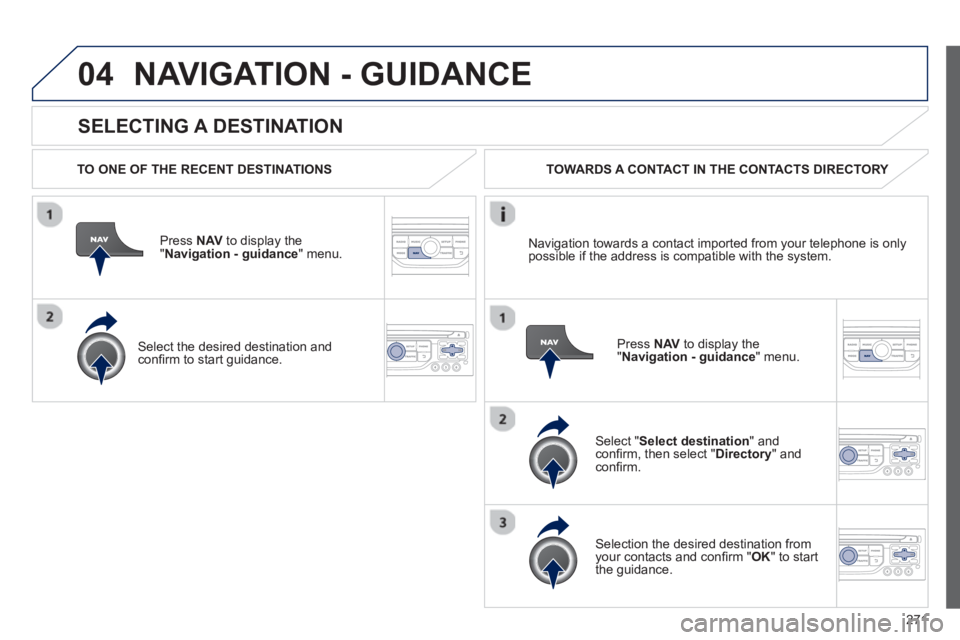
SELECTING A DESTINATION
NAVIGATION - GUIDANCE
TO ONE OF THE RECENT DESTINATIONS
Press NAV
to display the"Navigation - guidance" menu.
Select the desired destination and confi rm to start guidance. TOWARDS A CONTACT IN THE CONTACTS DIRECTORY
Select " Select destination" andconfi rm, then select " Directory " and confi rm.
Selection the desired destination from your contacts and confi rm "OK
" to start
the guidance.
Pr
ess NAVto display the"Navigation - guidance
" menu. Navi
gation towards a contact imported from your telephone is only
possible if the address is compatible with the system.
Page 274 of 352
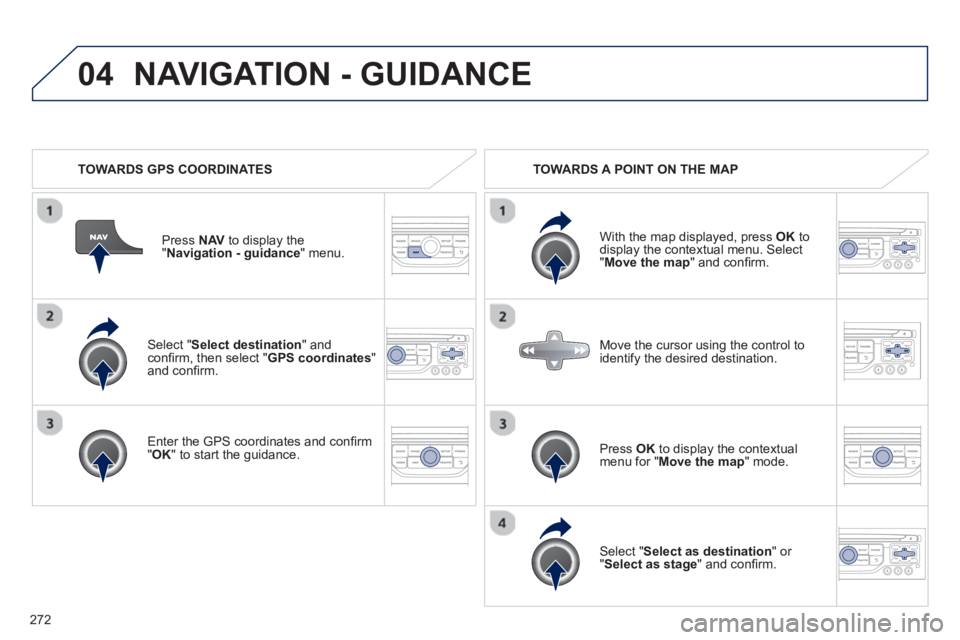
272
04
Select "Select destination" andconfi rm, then select " GPS coordinates
"and confi rm.
Enter the
GPS coordinates and confi rm "OK " to start the guidance. Pr
ess NAV
to display the
"Navigation - guidance" menu.
NAVIGATION - GUIDANCE
TOWARDS GPS COORDINATES TOWARDS A POINT ON THE MAP
With the map displa
yed, press OKto
display the contextual menu. Select"Move the map
" and confi rm.
Pr
ess OK
to display the contextual
menu for " Move the map " mode.
Select " Select as destination
" or "Select as stage" and confi rm. Move the cursor usin
g the control to
identify the desired destination.
Page 275 of 352
273
04
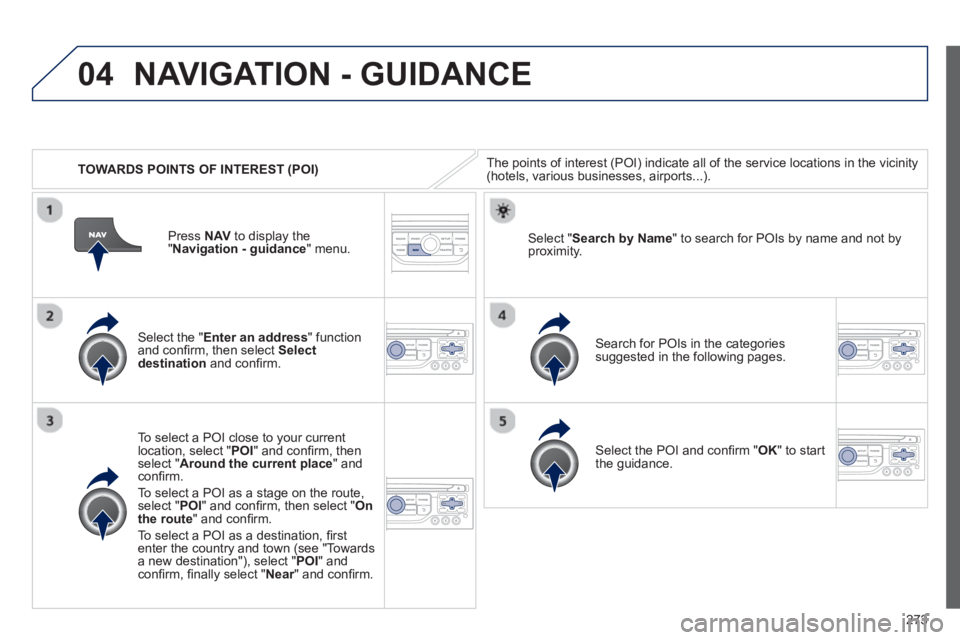
TOWARDS POINTS OF INTEREST (POI)
NAVIGATION - GUIDANCE
The points of interest (POI) indicate all of the service locations in the vicinity(hotels, various businesses, airports...).
Select the " Enter an address
" function
and confi rm, then select Select
destinationand confi rm.
To select a P
OI close to your currentlocation, select "POI" and confi rm, thenselect " Around the current place
" and confi rm.
To select a P
OI as a stage on the route,select " POI" and confi rm, then select " On
the route" and confi rm.
To select a P
OI as a destination, fi rst enter the country and town (see "Towards
a new destination"), select "POI" andconfi rm, fi nally select "Near" and confi rm.r
Search for POIs in the categories
suggested in the following pages.
Select " Search by Name
" to search for POIs by name and not byproximity.
Select the POI and confi rm " OK" to start
the guidance. Pr
ess NAV
to display the
"Navigation - guidance" menu.
Page 342 of 352
340
ALPHABETICAL INDEX
Replacing wiper blades ........95, 202
Resetting the service indicator .....39
Resetting the trip recorder ............41
Rev counter ..................................27
Reversing lamp...........................189
Risk areas (update) ............237, 274
Roof bars ....................................205
Routine checks ...................173, 174
Running out of fuel (Diesel) ........168
Safety for children......... 79, 118, 123
Screen, colour 16/9 ............225, 252
Screen,
colour and mapping .........267, 306
Screen, monochrome .... 320, 330, 332
Screen, monochrome C................53
Screen, multifunction (with audio
equipment) .............. 44, 46, 49, 51
Screen, multifunction
(without audio equipment) .........42
Screen-wash reservoir................172
Screen
menu map ....... 252, 306, 330, 332
Screenwash, front.........................94
Screenwash fl uid level ..........94, 172
Seat adjustment......................63, 64
Seat belts............................ 130-132
Seats, electric ...............................64
Seats, rear ....................................67
Serial number, vehicle ................213
Service indicator ...........................38
Servicing .......................................25
Setting the clock ...............42, 44, 46
Short-cut menus .................226, 268
Sidelamps ............... 87, 89, 186-189
Side repeater ..............................188
SIM card .............................100, 250
Ski fl ap ........................................104
Spare wheel........................181, 183Speed limiter...............................149
Speedometer ................................27
Spotlamps, side ............................97
Start ............................................199
Starting the vehicle ...... 74, 154, 158
Steering mounted controls,
audio ................................224, 319
Stopping the vehicle .... 74, 154, 158
Stop & Start .............. 55, 59, 61, 85,
161, 167, 173, 198
Storage ................ 99, 101, 104, 106
Storage box ................................100
Storage wells ..............................106
Stowing rings ..............................106
Sun visor............................. 100, 111
Synchronising
the remote control ......................75
Synthesiser, voice.......................280
System, ASR ..............................128
System, navigation .............230, 270
Table of weights .......... 208, 210, 211
Tables of engines................207, 209
Tables of fuses............................191
Tank, fuel ......................................86
Technical data......................207-211
Telephone .... 217, 247-249, 286, 290
Telephone, hands-free ........ 247-249
Temperature, coolant ....................37
Temperature control for heated
seats ..........................................65
Temporary tyre repair kit .............175
Third brake lamp.........................190
TMC (Traffi c info) ................239, 283
Tools ...................................181, 183
Torch ..................................... 98, 111
Total distance recorder .................41
Towbar ........................................204
Towed loads................ 208, 210, 211
S
T
V
Towing another vehicle ...............202
Traction control (ASR) ..........35, 128
Traffi c information
(TA) ................. 240, 284, 297, 322
Traffi c information
(TMC) ............. 239, 240, 283, 284
Trailer .........................................204
Trip computer ...................52, 53, 55
Trip distance recorder ...................41
Tyre pressures ............................213
Tyres .............................................25
Tyre under-infl ation detection .....125
Under-infl ation (detection) ..........125
Under fl oor storage .....................109
Unlocking ......................................72
Unlocking from the inside .............82
Update risk areas ...............237, 274
Updating POIs ............................237
USB (Peugeot Connect) .....101, 324
U
Vehicle identifi cation ...................213
Ventilation ............................... 56-58
Voice commands ........................222
Page 344 of 352
342
VISUAL SEARCH
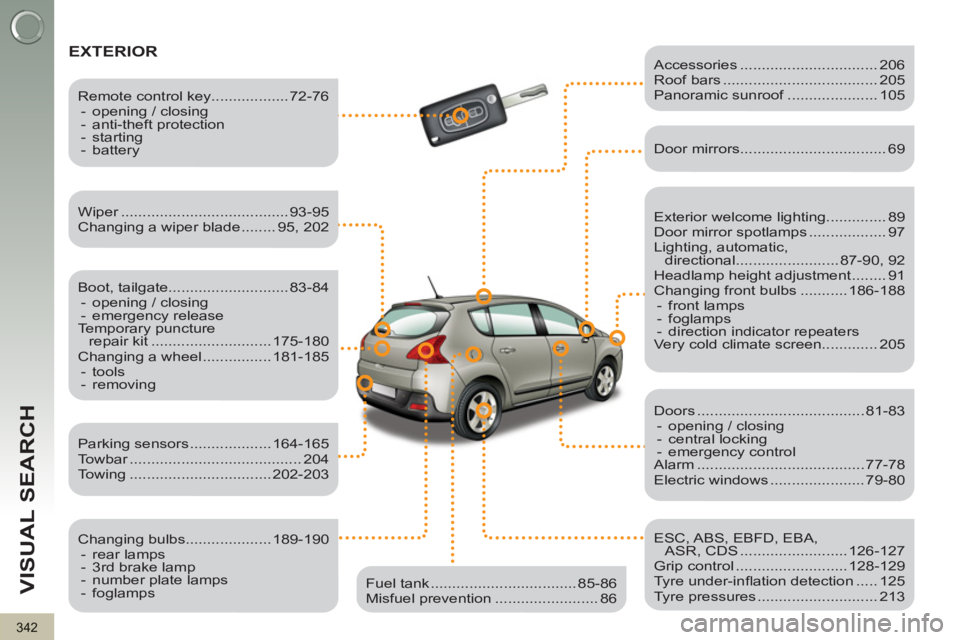
EXTERIOR
Exterior welcome lighting.............. 89
Door mirror spotlamps .................. 97
Lighting, automatic,
directional ........................ 87-90, 92
Headlamp height adjustment ........ 91
Changing front bulbs ........... 186-188
- front lamps
- foglamps
- direction indicator repeaters
Very cold climate screen............. 205
Wiper ....................................... 93-95
Changing a wiper blade ........ 95, 202
Boot, tailgate............................ 83-84
- opening / closing
- emergency release
Temporary puncture
repair kit ............................ 175-180
Changing a wheel ................ 181-185
- tools
- removing
Remote control key.................. 72-76
- opening / closing
- anti-theft protection
- starting
- battery
Parking sensors ................... 164-165
Towbar ........................................ 204
Towing ................................. 202-203
Changing bulbs.................... 189-190
- rear lamps
- 3rd brake lamp
- number plate lamps
- foglamps
Accessories ................................ 206
Roof bars .................................... 205
Panoramic sunroof ..................... 105
Fuel tank .................................. 85-86
Misfuel prevention ........................ 86
Door mirrors .................................. 69
Doors ....................................... 81-83
- opening / closing
- central locking
- emergency control
Alarm ....................................... 77-78
Electric windows ...................... 79-80
ESC, ABS, EBFD, EBA,
ASR, CDS ......................... 126-127
Grip control .......................... 128-129
Tyre under-infl ation detection ..... 125
Tyre pressures ............................ 213