navigation update PEUGEOT 3008 2013 Owners Manual
[x] Cancel search | Manufacturer: PEUGEOT, Model Year: 2013, Model line: 3008, Model: PEUGEOT 3008 2013Pages: 352, PDF Size: 15.64 MB
Page 239 of 352
237
04
NAV2ABC3DEF5JKL4GHI6MNO8TUV7PQRS9WXYZ0*#
1RADIO MEDIANAV TRAFFIC
SETUPADDR
BOOK
2ABC3DEF5JKL4GHI6MNO8TUV7PQRS9WXYZ0*#
1RADIO MEDIANAV TRAFFIC
SETUPADDR
BOOK
NAVIGATION - GUIDANCE
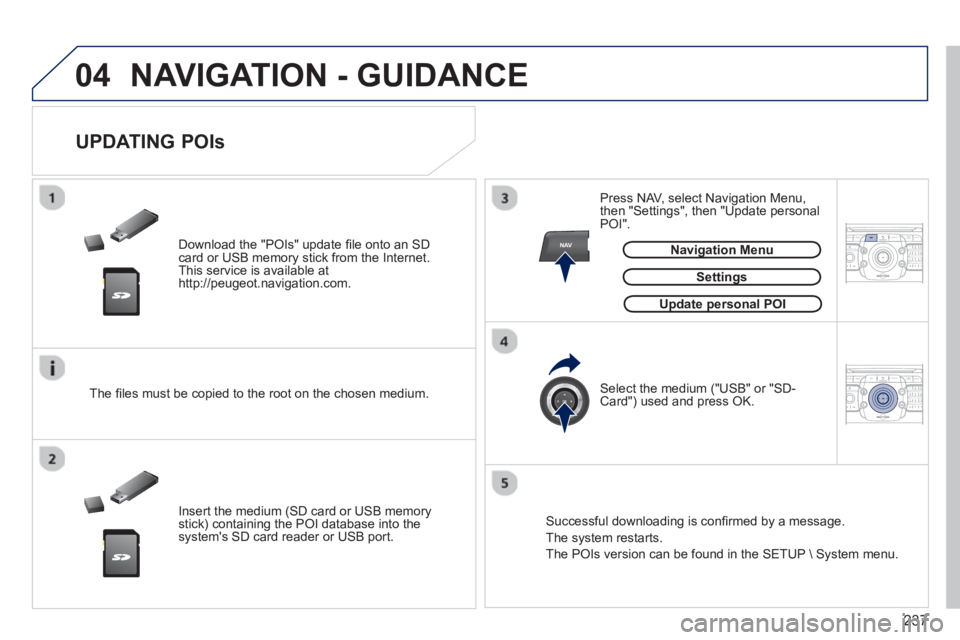
Download the "POIs" update fi le onto an SDcard or USB memory stick from the Internet.
This service is available at
http://peugeot.navigation.com.
UPDATING POIs
Settings
The fi les must be copied to the root on the chosen medium.
Insert the medium
(SD card or USB memory stick) containing the POI database into the system's SD card reader or USB port. Select the medium
("USB" or "SD-Card") used and press OK. Press NAV, select Navi
gation Menu,
then "Settings", then "Update personal
POI".
Successful downloadin
g is confi rmed by a message.
The system restarts.
The P
OIs version can be found in the SETUP \ System menu.
Update personal POIpp
Navigation Menug
Page 263 of 352
261
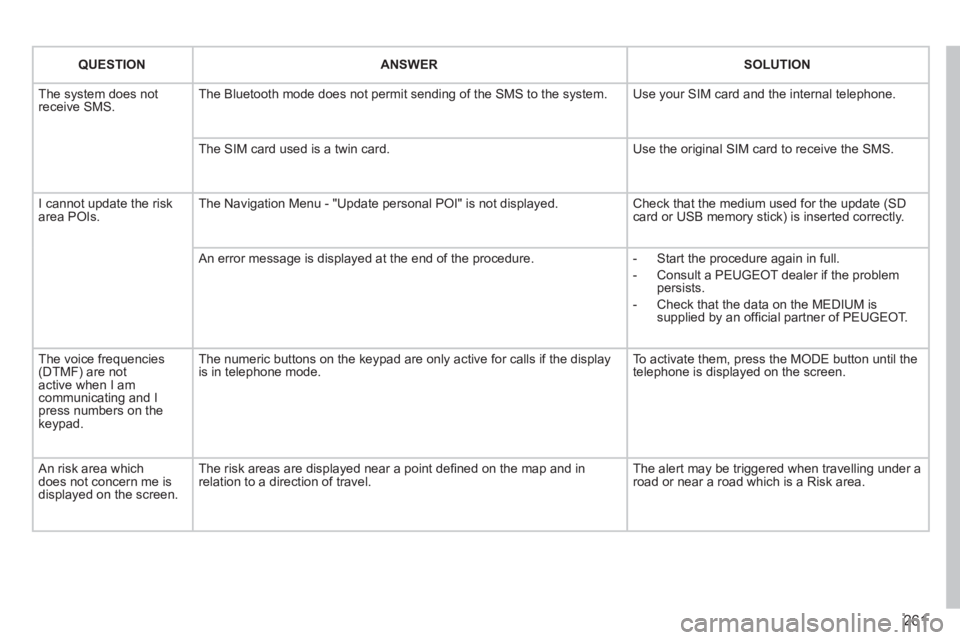
QUESTIONANSWERSOLUTION
The system does notreceive SMS. The Bluetooth mode does not permit sending of the SMS to the system.
Use your SIM card and the internal telephone.
The SIM card used is a twin card.
Use the original SIM card to receive the SMS.
I cannot update the risk area POIs. The Navigation Menu - "Update personal POI" is not displayed. Check that the medium used for the update (SDcard or USB memory stick) is inserted correctly.
An error message is displayed at the end of the procedure.
- Start the procedure again in full.
- Consult a PEUGEOT dealer if the problempersists.
- Check that the data on the MEDIUM issupplied by an offi cial partner of PEUGEOT.
The voice frequencies(DTMF) are not active when I am communicating and I press numbers on thekeypad.
The numeric buttons on the keypad are only active for calls if the display is in telephone mode.
To activate them, press the MODE button until the telephone is displayed on the screen.
An risk area whichdoes not concern me isdisplayed on the screen.
The risk areas are displayed near a point defi ned on the map and in relation to a direction of travel.
The alert may be triggered when travelling under a road or near a road which is a Risk area.
Page 271 of 352
269
04
""""""""""""ggggggggggNavigation guidanceNavigation guidanceNavigation guidanceNavigation guidanceNavigation guidanceNavigation - guidanceNavigation - guidanceNavigation - guidanceNavigation - guidanceNavigation guidanceNavigation guidanceNavigation guidanceNavigation guidanceN i ti idN i ti idN i ti idN i ti idN i ti idN i ti idN i ti idN i ti idN i ti idNi i id""""""""""""
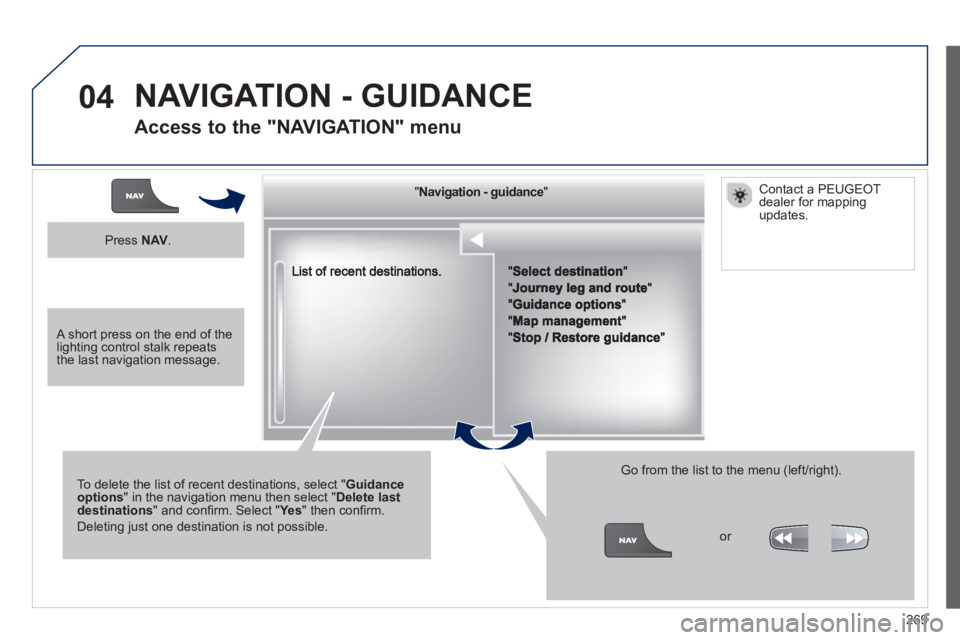
To delete the list of recent destinations, select "Guidance options" in the navigation menu then select "Delete last destinations" and confi rm. Select "Ye s" then confi rm.
Deleting just one destination is not possible.
Go from the list to the menu (left/right).
NAVIGATION - GUIDANCE
Access to the "NAVIGATION" menu
Press NAV.
or
Contact a PEUGEOT
dealer for mappingupdates.
A short press on the end of thelighting control stalk repeats the last navigation message.
Page 342 of 352
340
ALPHABETICAL INDEX
Replacing wiper blades ........95, 202
Resetting the service indicator .....39
Resetting the trip recorder ............41
Rev counter ..................................27
Reversing lamp...........................189
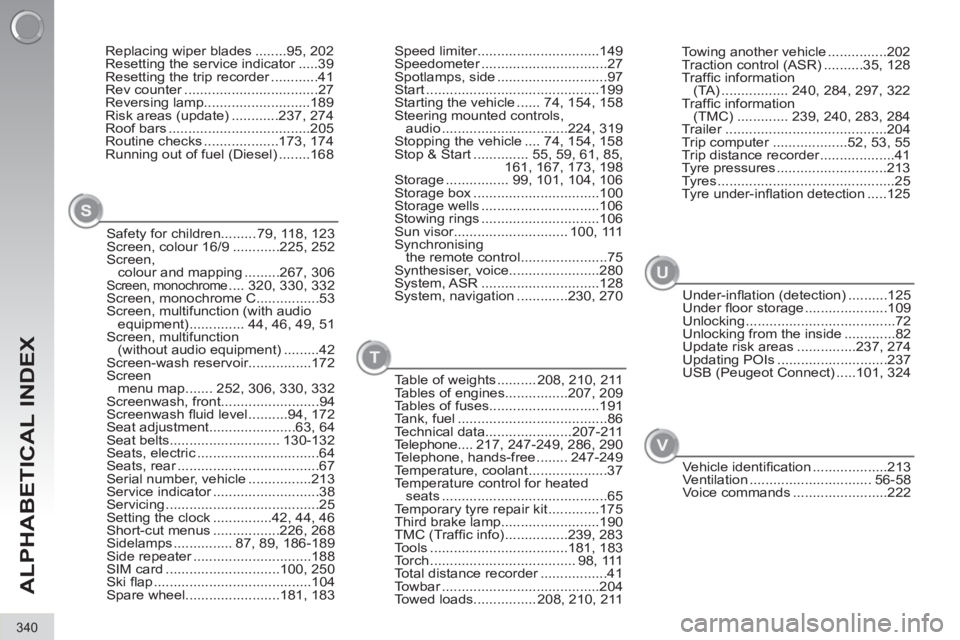
Risk areas (update) ............237, 274
Roof bars ....................................205
Routine checks ...................173, 174
Running out of fuel (Diesel) ........168
Safety for children......... 79, 118, 123
Screen, colour 16/9 ............225, 252
Screen,
colour and mapping .........267, 306
Screen, monochrome .... 320, 330, 332
Screen, monochrome C................53
Screen, multifunction (with audio
equipment) .............. 44, 46, 49, 51
Screen, multifunction
(without audio equipment) .........42
Screen-wash reservoir................172
Screen
menu map ....... 252, 306, 330, 332
Screenwash, front.........................94
Screenwash fl uid level ..........94, 172
Seat adjustment......................63, 64
Seat belts............................ 130-132
Seats, electric ...............................64
Seats, rear ....................................67
Serial number, vehicle ................213
Service indicator ...........................38
Servicing .......................................25
Setting the clock ...............42, 44, 46
Short-cut menus .................226, 268
Sidelamps ............... 87, 89, 186-189
Side repeater ..............................188
SIM card .............................100, 250
Ski fl ap ........................................104
Spare wheel........................181, 183Speed limiter...............................149
Speedometer ................................27
Spotlamps, side ............................97
Start ............................................199
Starting the vehicle ...... 74, 154, 158
Steering mounted controls,
audio ................................224, 319
Stopping the vehicle .... 74, 154, 158
Stop & Start .............. 55, 59, 61, 85,
161, 167, 173, 198
Storage ................ 99, 101, 104, 106
Storage box ................................100
Storage wells ..............................106
Stowing rings ..............................106
Sun visor............................. 100, 111
Synchronising
the remote control ......................75
Synthesiser, voice.......................280
System, ASR ..............................128
System, navigation .............230, 270
Table of weights .......... 208, 210, 211
Tables of engines................207, 209
Tables of fuses............................191
Tank, fuel ......................................86
Technical data......................207-211
Telephone .... 217, 247-249, 286, 290
Telephone, hands-free ........ 247-249
Temperature, coolant ....................37
Temperature control for heated
seats ..........................................65
Temporary tyre repair kit .............175
Third brake lamp.........................190
TMC (Traffi c info) ................239, 283
Tools ...................................181, 183
Torch ..................................... 98, 111
Total distance recorder .................41
Towbar ........................................204
Towed loads................ 208, 210, 211
S
T
V
Towing another vehicle ...............202
Traction control (ASR) ..........35, 128
Traffi c information
(TA) ................. 240, 284, 297, 322
Traffi c information
(TMC) ............. 239, 240, 283, 284
Trailer .........................................204
Trip computer ...................52, 53, 55
Trip distance recorder ...................41
Tyre pressures ............................213
Tyres .............................................25
Tyre under-infl ation detection .....125
Under-infl ation (detection) ..........125
Under fl oor storage .....................109
Unlocking ......................................72
Unlocking from the inside .............82
Update risk areas ...............237, 274
Updating POIs ............................237
USB (Peugeot Connect) .....101, 324
U
Vehicle identifi cation ...................213
Ventilation ............................... 56-58
Voice commands ........................222