radio PEUGEOT 3008 2017 Owner's Manual
[x] Cancel search | Manufacturer: PEUGEOT, Model Year: 2017, Model line: 3008, Model: PEUGEOT 3008 2017Pages: 566, PDF Size: 16.05 MB
Page 452 of 566
92
Audio and Telematics
Transversal-Peugeot_en_Chap01_NAC-2-2-0_ed01-2016
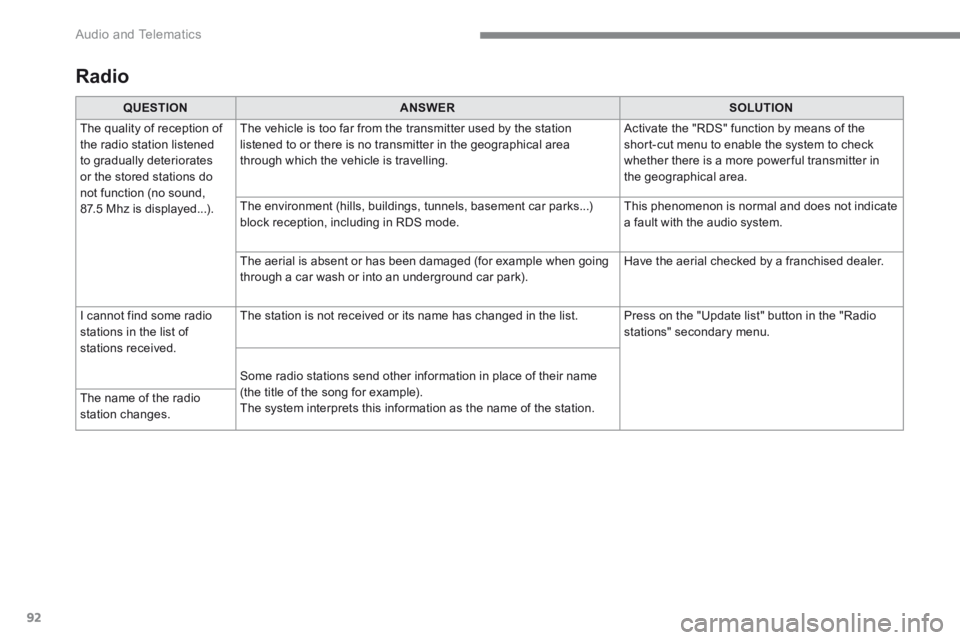
Radio
QUESTIONANSWERSOLUTION
The quality of reception of the radio station listened to gradually deteriorates or the stored stations do not function (no sound, 87.5 Mhz is displayed...).
The vehicle is too far from the transmitter used by the station listened to or there is no transmitter in the geographical area through which the vehicle is travelling.
Activate the "RDS" function by means of the short-cut menu to enable the system to check whether there is a more power ful transmitter in the geographical area.
The environment (hills, buildings, tunnels, basement car parks...) block reception, including in RDS mode. This phenomenon is normal and does not indicate a fault with the audio system.
The aerial is absent or has been damaged (for example when going through a car wash or into an underground car park). Have the aerial checked by a franchised dealer.
I cannot find some radio stations in the list of stations received.
The station is not received or its name has changed in the list. Press on the "Update list" button in the "Radio stations" secondary menu.
Some radio stations send other information in place of their name (the title of the song for example). The system interprets this information as the name of the station. The name of the radio station changes.
Page 456 of 566
96
Audio and Telematics
Transversal-Peugeot_en_Chap01_NAC-2-2-0_ed01-2016
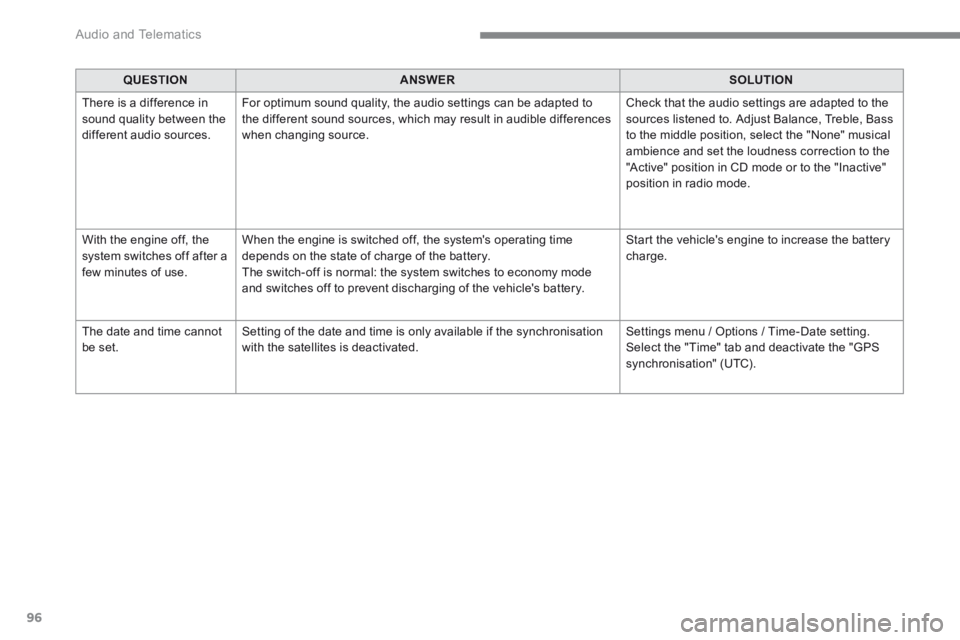
QUESTIONANSWERSOLUTION
There is a difference in sound quality between the different audio sources.
For optimum sound quality, the audio settings can be adapted to the different sound sources, which may result in audible differences when changing source.
Check that the audio settings are adapted to the sources listened to. Adjust Balance, Treble, Bass to the middle position, select the "None" musical ambience and set the loudness correction to the "Active" position in CD mode or to the "Inactive" position in radio mode.
With the engine off, the system switches off after a few minutes of use.
When the engine is switched off, the system's operating time depends on the state of charge of the battery. The switch-off is normal: the system switches to economy mode and switches off to prevent discharging of the vehicle's battery.
Start the vehicle's engine to increase the battery charge.
The date and time cannot be set. Setting of the date and time is only available if the synchronisation with the satellites is deactivated. Settings menu / Options / Time-Date setting. Select the "Time" tab and deactivate the "GPS synchronisation" (UTC).
Page 457 of 566
97
.
Audio and Telematics
Transversal-Peugeot_en_Chap02_RCC-2-2-0_ed01-2016
PEUGEOT Connect Radio
Multimedia audio system - Applications - Bluetooth ® Multimedia audio system - Applications - Bluetooth ® Multimedia audio system - Applications - Bluetooth telephone ® telephone ®
Contents First steps 98
Steering mounted controls - Type 1 100
Steering mounted controls - Type 2 101
Menus 102
Applications 104
Radio Media 112
Telephone 124
Settings 138
Frequently asked questions 149
The system is protected in such a way that it will only operate in your vehicle. The display of the Energy Economy Mode message signals that a change to standby is imminent.
The different functions and settings described vary according to the version and configuration of your vehicle.
The link below gives access to OSS (Open Source Software) codes for the system. http://www.psa-peugeot-citroen.com/oss
As a safety measure and because it requires sustained attention by the driver, the pairing of a Bluetooth mobile telephone with the Bluetooth hands-free system of your audio system must be done with the vehicle stationaryand the ignition on.
Page 459 of 566
99
.
Audio and Telematics
Transversal-Peugeot_en_Chap02_RCC-2-2-0_ed01-2016
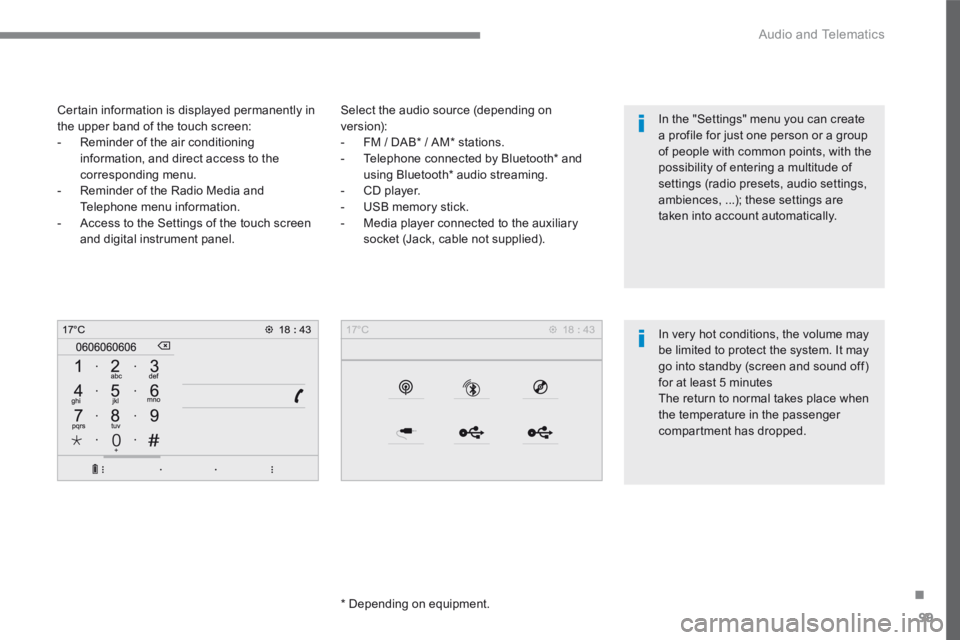
Select the audio source (depending on version): - FM / DAB * / AM * stations. - Telephone connected by Bluetooth * and using Bluetooth * audio streaming. - CD player. - USB memory stick. - Media player connected to the auxiliary
socket (Jack, cable not supplied).
* Depending on equipment.
Certain information is displayed permanently in the upper band of the touch screen: - Reminder of the air conditioning information, and direct access to the corresponding menu. - Reminder of the Radio Media and Telephone menu information. - Access to the Settings of the touch screen
and digital instrument panel.
In very hot conditions, the volume may be limited to protect the system. It may go into standby (screen and sound off) for at least 5 minutes The return to normal takes place when the temperature in the passenger
compartment has dropped.
In the "Settings" menu you can create a profile for just one person or a group of people with common points, with the possibility of entering a multitude of settings (radio presets, audio settings, ambiences, ...); these settings are taken into account automatically.
Page 460 of 566
100
Audio and Telematics
Transversal-Peugeot_en_Chap02_RCC-2-2-0_ed01-2016
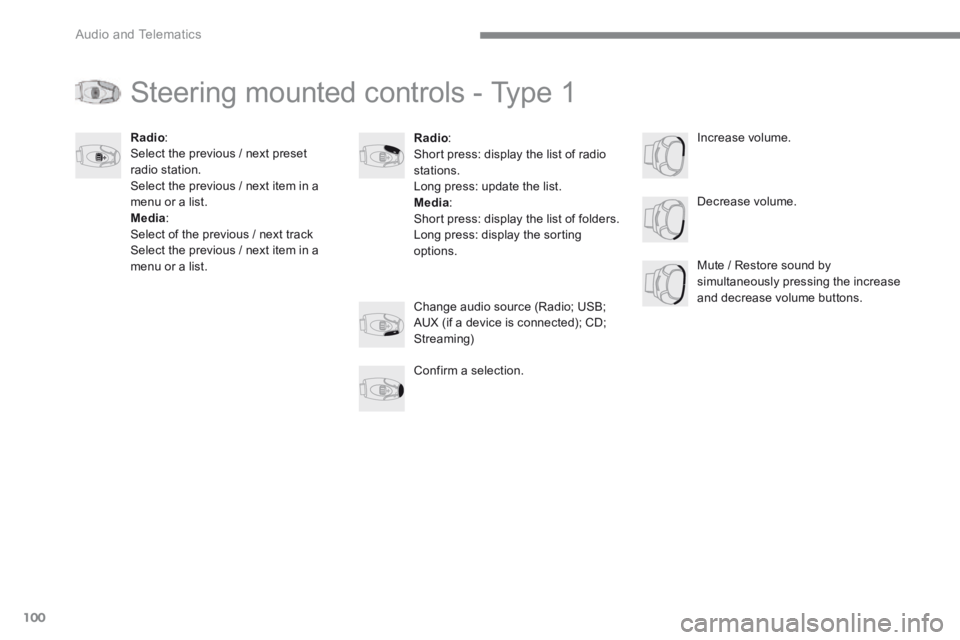
Steering mounted controls - Type 1
Radio : Short press: display the list of radio stations. Long press: update the list. Media : Short press: display the list of folders. Long press: display the sorting options.
Decrease volume.
Radio : Select the previous / next preset radio station. Select the previous / next item in a menu or a list. Media: Select of the previous / next track Select the previous / next item in a menu or a list. Mute / Restore sound by simultaneously pressing the increase and decrease volume buttons. Change audio source (Radio; USB; AUX (if a device is connected); CD; Streaming)
Confirm a selection.
Increase volume.
Page 461 of 566
101
.
Audio and Telematics
Transversal-Peugeot_en_Chap02_RCC-2-2-0_ed01-2016
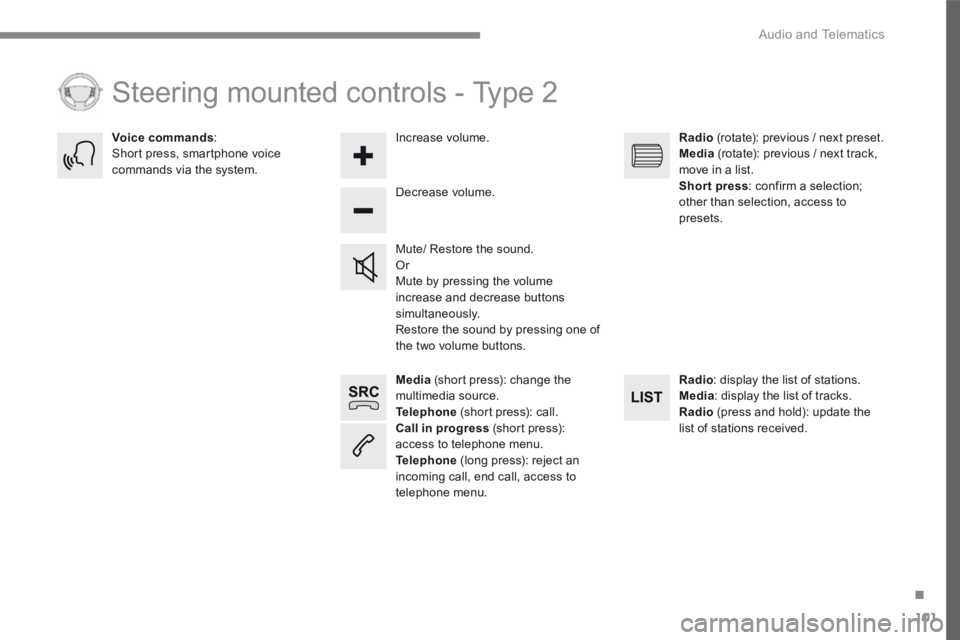
Media (short press): change the multimedia source. Telephone (short press): call. Call in progress (short press): access to telephone menu. Telephone (long press): reject an incoming call, end call, access to telephone menu.
Decrease volume.
Voice commands : Short press, smartphone voice commands via the system.
Mute/ Restore the sound. Or Mute by pressing the volume increase and decrease buttons simultaneously. Restore the sound by pressing one of the two volume buttons.
Radio (rotate): previous / next preset. Media (rotate): previous / next track, move in a list. Short press : confirm a selection; other than selection, access to presets.
Radio : display the list of stations. Media : display the list of tracks. Radio (press and hold): update the list of stations received.
Increase volume.
Steering mounted controls - Type 2
Page 462 of 566
102
21,518,5
Audio and Telematics
Transversal-Peugeot_en_Chap02_RCC-2-2-0_ed01-2016
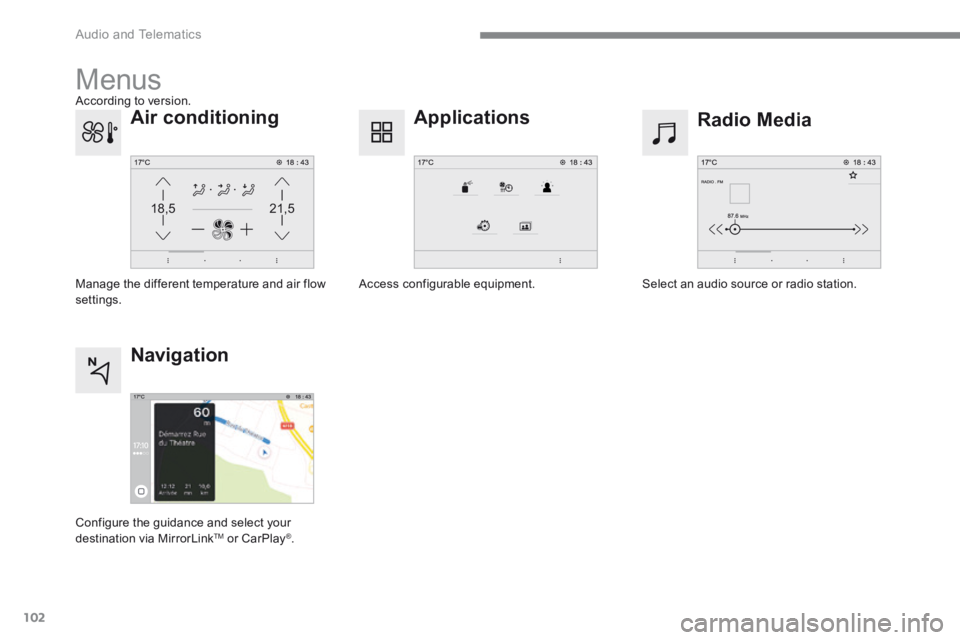
Menus
Radio Media Applications
Select an audio source or radio station. Access configurable equipment.
Air conditioning
Manage the different temperature and air flow settings.
Navigation
Configure the guidance and select your
destination via MirrorLink TM or CarPlay ® .
According to version.
Page 472 of 566
112
21345
Audio and Telematics
Transversal-Peugeot_en_Chap02_RCC-2-2-0_ed01-2016
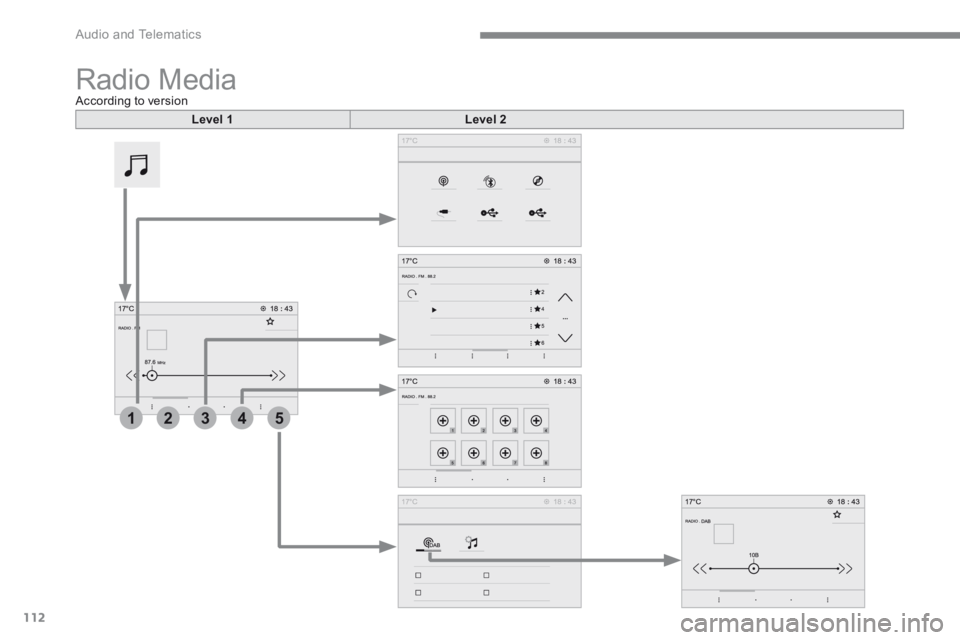
Radio Media According to version
Level 1Level 2
Page 473 of 566
113
.
1
2
3
4
5
Audio and Telematics
Transversal-Peugeot_en_Chap02_RCC-2-2-0_ed01-2016
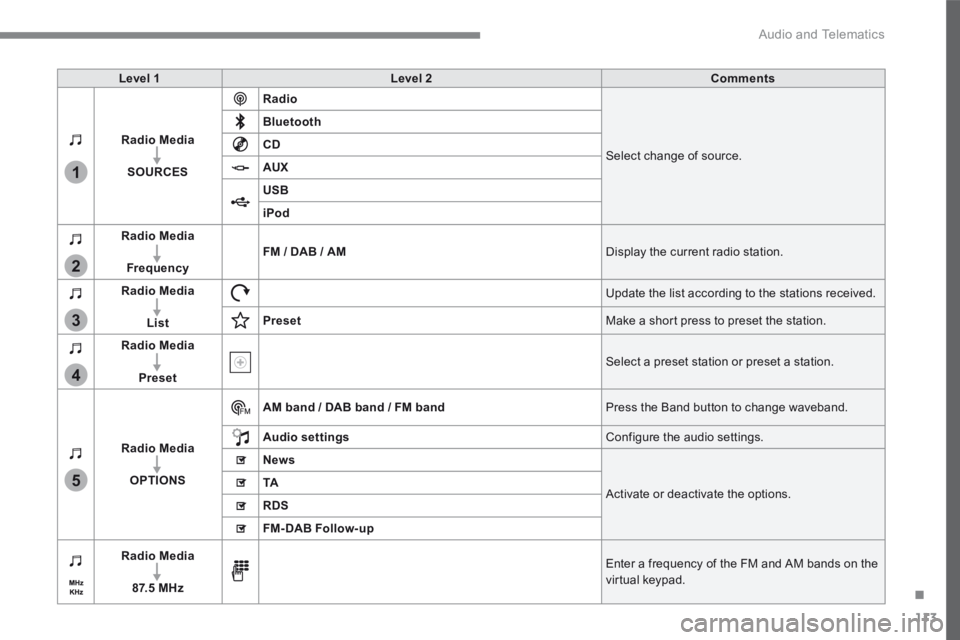
Level 1Level 2Comments
Radio Media
SOURCES
Radio
Select change of source.
Bluetooth
CD
AUX
USB
iPod
Radio Media
FrequencyFM / DAB / AM Display the current radio station.
Radio Media
List
Update the list according to the stations received.
Preset Make a short press to preset the station.
Radio Media
Preset Select a preset station or preset a station.
Radio Media
OPTIONS
AM band / DAB band / FM band Press the Band button to change waveband.
Audio settings Configure the audio settings.
News
Activate or deactivate the options. TA
RDS
FM-DAB Follow-up
Radio Media
8 7. 5 M H z
Enter a frequency of the FM and AM bands on the virtual keypad.
Page 475 of 566
115
.
1
1
1
2
3
4
5
5
5
Audio and Telematics
Transversal-Peugeot_en_Chap02_RCC-2-2-0_ed01-2016
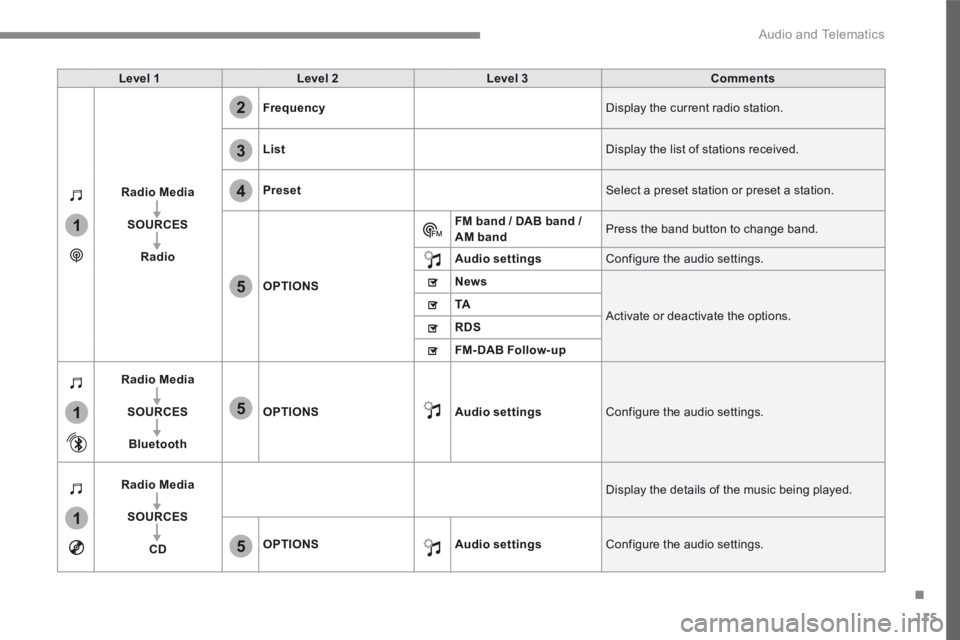
Level 1Level 2Level 3Comments
Radio Media
SOURCES
Radio
Frequency Display the current radio station.
List Display the list of stations received.
Preset Select a preset station or preset a station.
OPTIONS
FM band / DAB band / AM band Press the band button to change band.
Audio settings Configure the audio settings.
News
Activate or deactivate the options. TA
RDS
FM-DAB Follow-up
Radio Media
SOURCES
Bluetooth
OPTIONSAudio settings Configure the audio settings.
Radio Media
SOURCES
CD
Display the details of the music being played.
OPTIONSAudio settings Configure the audio settings.