light PEUGEOT 3008 2017 Workshop Manual
[x] Cancel search | Manufacturer: PEUGEOT, Model Year: 2017, Model line: 3008, Model: PEUGEOT 3008 2017Pages: 566, PDF Size: 16.05 MB
Page 202 of 566
200
3008-2_en_Chap06_conduite_ed01-2016
Starting / Switching off the engine with
Keyless Entry and Starting
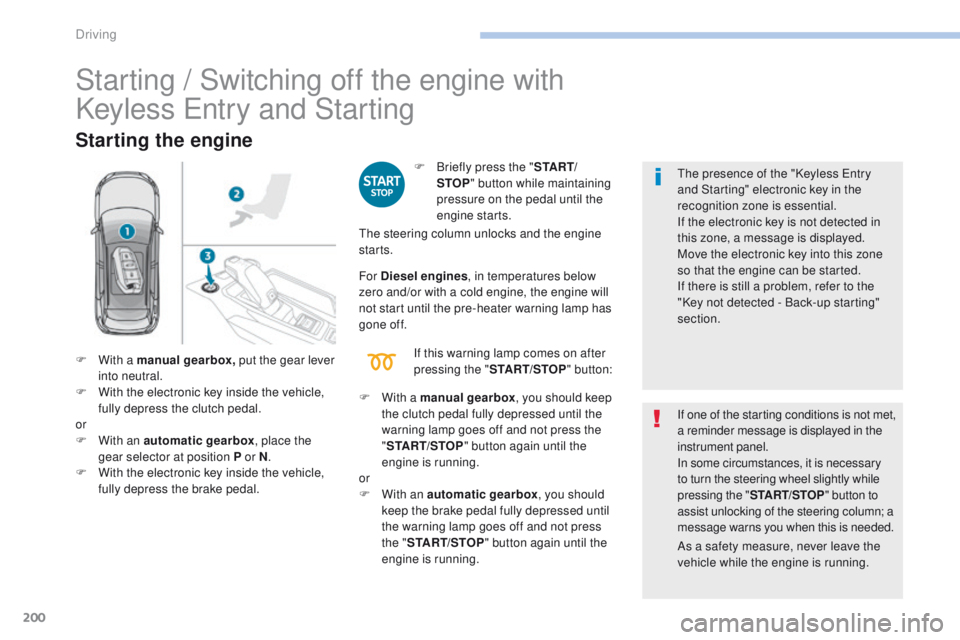
Starting the engine
F Briefly press the "S TA R T/
STOP " button while maintaining
pressure on the pedal until the
engine starts. The presence of the "Keyless Entry
and Starting" electronic key in the
recognition zone is essential.
If the electronic key is not detected in
this zone, a message is displayed.
Move the electronic key into this zone
so that the engine can be started.
If there is still a problem, refer to the
"Key not detected - Back-up starting"
section.
If one of the starting conditions is not met,
a reminder message is displayed in the
instrument panel.
In some circumstances, it is necessary
to turn the steering wheel slightly while
pressing the "
START/STOP " button to
assist unlocking of the steering column; a
message warns you when this is needed.
F
W
ith a manual gearbox , put the gear lever
into neutral.
F
W
ith the electronic key inside the vehicle,
fully depress the clutch pedal.
or
F
W
ith an automatic gearbox , place the
gear selector at position P or N .
F
W
ith the electronic key inside the vehicle,
fully depress the brake pedal. The steering column unlocks and the engine
starts.
F
W
ith a manual gearbox , you should keep
the clutch pedal fully depressed until the
warning lamp goes off and not press the
" START/STOP " button again until the
engine is running.
or
F
W
ith an automatic gearbox , you should
keep the brake pedal fully depressed until
the warning lamp goes off and not press
the " START/STOP " button again until the
engine is running.
For Diesel engines
, in temperatures below
zero and/or with a cold engine, the engine will
not start until the pre-heater warning lamp has
gone of f.
If this warning lamp comes on after
pressing the " START/STOP " button:
As a safety measure, never leave the
vehicle while the engine is running.
Driving
Page 203 of 566
201
3008-2_en_Chap06_conduite_ed01-2016
Switching off the engine
F Immobilise the vehicle, engine at idle.
F W ith a manual gearbox , put the gear lever
into neutral.
or
F
W
ith an automatic gearbox , place the
gear selector at position P or N .
Never leave your vehicle with the
electronic key still inside.
Switching off the engine leads to a loss
of braking assistance. If the vehicle is not immobilised, the
engine will not stop. F
W
ith the electronic key inside
the vehicle, press the " S TA R T/
STOP " button.
The engine stops and the steering
column locks.
Ignition on
(without starting)
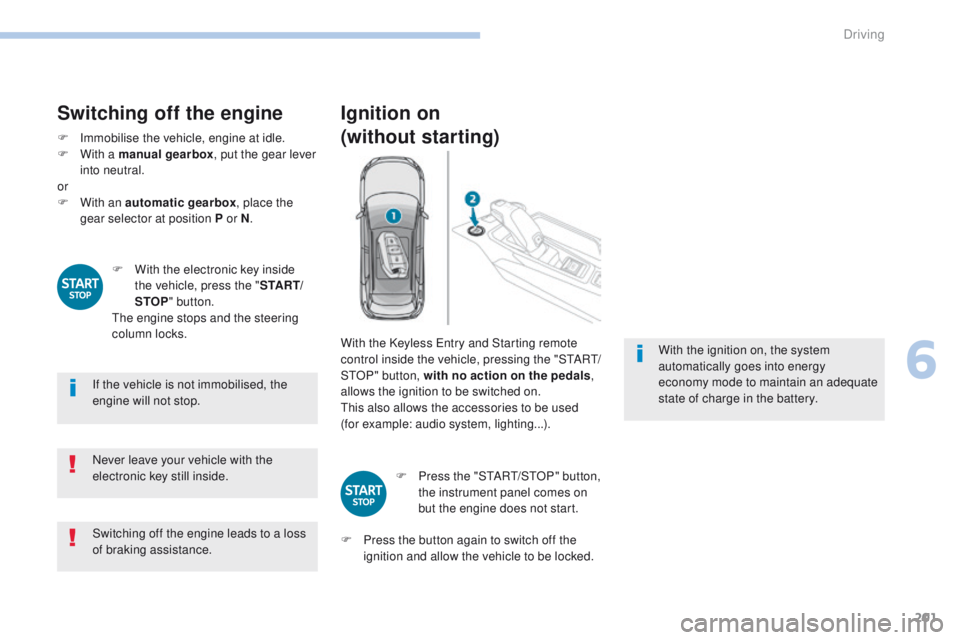
With the Keyless Entry and Starting remote
control inside the vehicle, pressing the "START/
STOP" button, with no action on the pedals ,
allows the ignition to be switched on.
This also allows the accessories to be used
(for example: audio system, lighting...).
F
P
ress the "START/STOP" button,
the instrument panel comes on
but the engine does not start.
F
P
ress the button again to switch off the
ignition and allow the vehicle to be locked. With the ignition on, the system
automatically goes into energy
economy mode to maintain an adequate
state of charge in the battery.
6
Driving
Page 221 of 566
219
3008-2_en_Chap06_conduite_ed01-2016
Stop & Start
Operation
Going into engine STOP mode
This indicator lamp comes on in the
instrument panel and the engine
goes into standby automatically:
-
w
ith a manual gearbox , at speeds below
12 mph (20 km/h) or vehicle stationary with
the PureTech 130 petrol and BlueHDi 115
and 120 Diesel versions, when you place
the gear lever in neutral and you release
the clutch pedal,
A time counter calculates the sum of the
periods in STOP mode during a journey. It
resets itself to zero every time the ignition is
switched on with the key or the START/STOP
button. -
w
ith an automatic gearbox , vehicle
stationary, when you press the brake pedal
or put the gear selector in N mode.
The Stop & Start
system puts the engine
temporarily into standby - STOP mode
-
during stops in the traffic (red lights,
traffic jams,
...). The engine restarts
automatically
-
START
mode - as soon as
you want to move off. The restart takes place
instantly, quickly and silently.
Per fect for urban use, the Stop & Start system
reduces fuel consumption and exhaust
emissions as well as the noise level when
stationary.
Never refuel with the engine in
STOP
mode; you must switch off the
ignition with the key or the S TA R T/
STOP button.
For your comfort, during parking
manoeuvres, STOP mode is not
available for a few seconds after
coming out of reverse gear.
Stop & Start does not affect the
operation of vehicle systems such as
braking, power steering...
6
Driving
Page 229 of 566
227
3008-2_en_Chap06_conduite_ed01-2016
Speed limit recognition
This system allows the speed limit detected by
the camera to be displayed in the instrument
panel.
Specific speed limits, such as those for heavy
goods vehicles, are not displayed.
The display of the speed limit in the instrument
panel is updated as you pass a speed limit sign
intended for cars (light vehicles).The units for the speed limits (mph or
km/h) depend on the country you are
driving in.
It should be taken into account so that
you observe the speed limit.
For the system to operate correctly
when you change country, the units for
speed in the instrument panel must be
those for the country you are driving in. The automatic reading of road signs is a
driving assistance system and does not
always display speed limits correctly.
The speed limit signs present on the
road always take priority over the
display by the system.
The system cannot in any
circumstances replace the need for
vigilance on the part of the driver.
The driver must observe the driving
regulations and must adapt the speed
of the vehicle to suit the weather and
traffic.
It is possible for the system to not
display the speed limit if it does not
detect a speed limit sign within a preset
period.
The system is designed to detect signs
that conform to the Vienna Convention
on road signs.
To maintain correct operation of the
system: regularly clean the area in front
of the camera.Principles
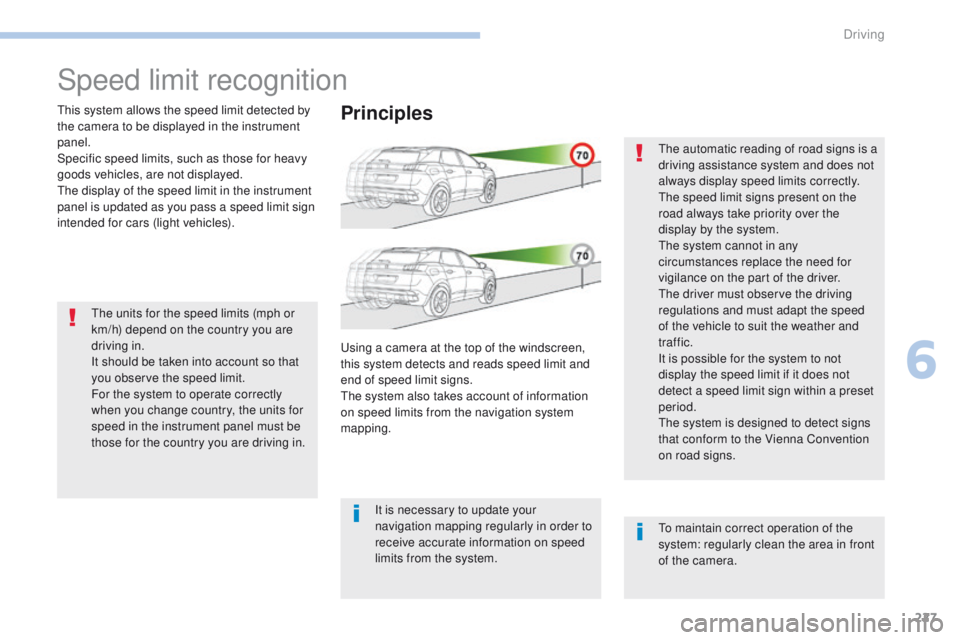
Using a camera at the top of the windscreen,
this system detects and reads speed limit and
end of speed limit signs.
The system also takes account of information
on speed limits from the navigation system
mapping.
It is necessary to update your
navigation mapping regularly in order to
receive accurate information on speed
limits from the system.
6
Driving
Page 231 of 566
229
3008-2_en_Chap06_conduite_ed01-2016
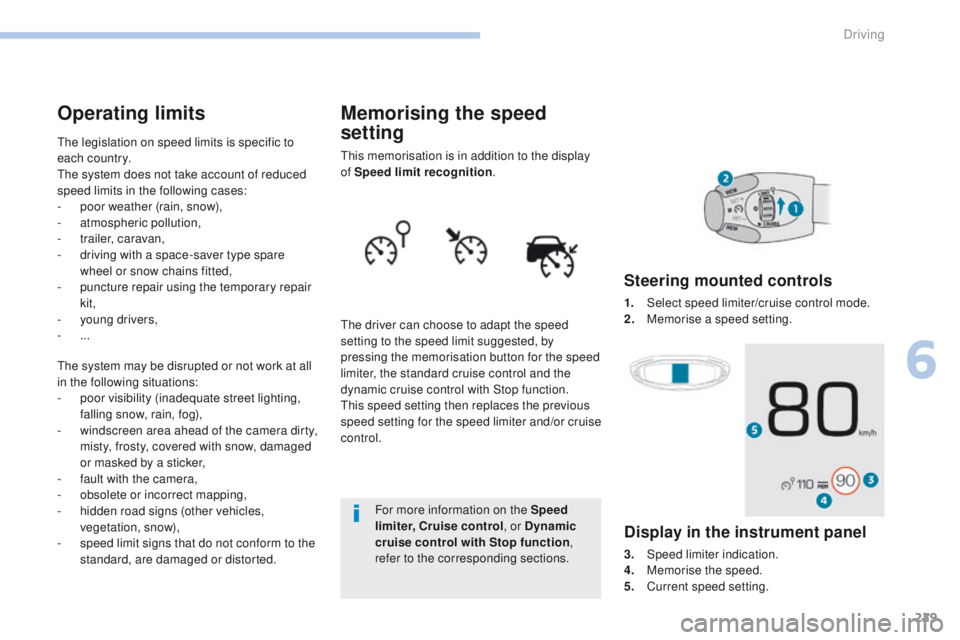
Memorising the speed
setting
This memorisation is in addition to the display
of Speed limit recognition.
The driver can choose to adapt the speed
setting to the speed limit suggested, by
pressing the memorisation button for the speed
limiter, the standard cruise control and the
dynamic cruise control with Stop function.
This speed setting then replaces the previous
speed setting for the speed limiter and/or cruise
control. For more information on the Speed
limiter, Cruise control , or Dynamic
cruise control with Stop function ,
refer to the corresponding sections.
Steering mounted controls
1. Select speed limiter/cruise control mode.
2. M emorise a speed setting.
Operating limits
The legislation on speed limits is specific to
each country.
The system does not take account of reduced
speed limits in the following cases:
-
p
oor weather (rain, snow),
-
a
tmospheric pollution,
-
t
railer, caravan,
-
d
riving with a space-saver type spare
wheel or snow chains fitted,
-
p
uncture repair using the temporary repair
kit,
-
y
oung drivers,
-
...
The system may be disrupted or not work at all
in the following situations:
-
p
oor visibility (inadequate street lighting,
falling snow, rain, fog),
-
w
indscreen area ahead of the camera dirty,
misty, frosty, covered with snow, damaged
or masked by a sticker,
-
f
ault with the camera,
-
o
bsolete or incorrect mapping,
-
h
idden road signs (other vehicles,
vegetation, snow),
-
s
peed limit signs that do not conform to the
standard, are damaged or distorted.
Display in the instrument panel
3. Speed limiter indication.
4. M emorise the speed.
5.
C
urrent speed setting.
6
Driving
Page 247 of 566
245
3008-2_en_Chap06_conduite_ed01-2016
Limits of operation
The system cannot exceed the limits of the
laws of physics.
It is recommended that the system be
deactivated when the "space-saver" spare
wheel is in use.
The system should not be activated when
towing a trailer.
In certain critical situations, the system will
encourage the driver to immediately take back
control:
-
i
f the vehicle in front slows down too much
or too suddenly, and the driver does not
brake,
-
i
f a vehicle comes between your vehicle
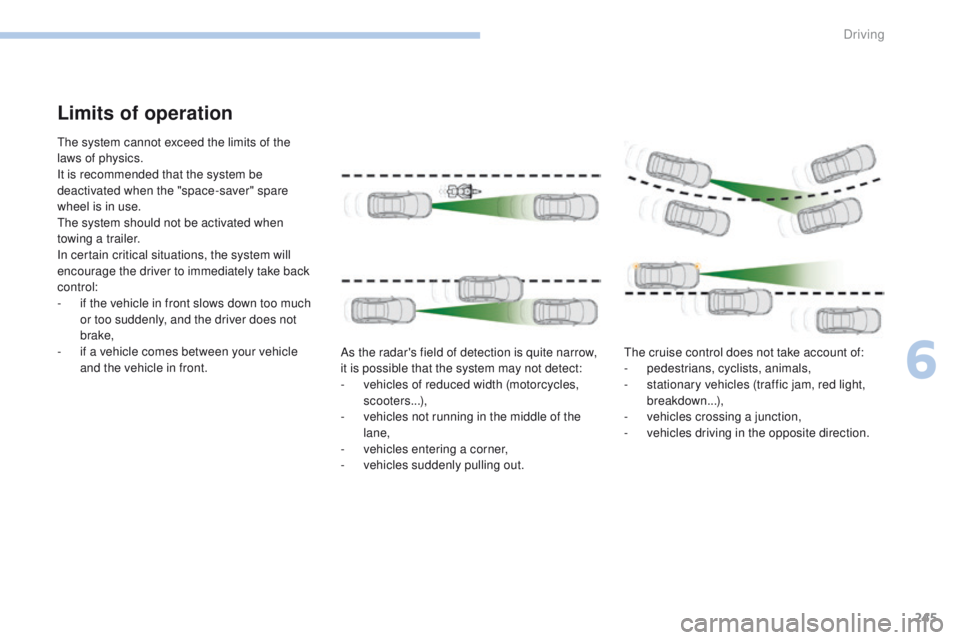
and the vehicle in front. As the radar's field of detection is quite narrow,
it is possible that the system may not detect:
-
v
ehicles of reduced width (motorcycles,
scooters...),
-
v
ehicles not running in the middle of the
lane,
-
v
ehicles entering a corner,
-
v
ehicles suddenly pulling out.The cruise control does not take account of:
-
p
edestrians, cyclists, animals,
-
s
tationary vehicles (traffic jam, red light,
breakdown...),
-
v
ehicles crossing a junction,
-
v
ehicles driving in the opposite direction.
6
Driving
Page 252 of 566
250
3008-2_en_Chap06_conduite_ed01-2016
Active Safety Brake
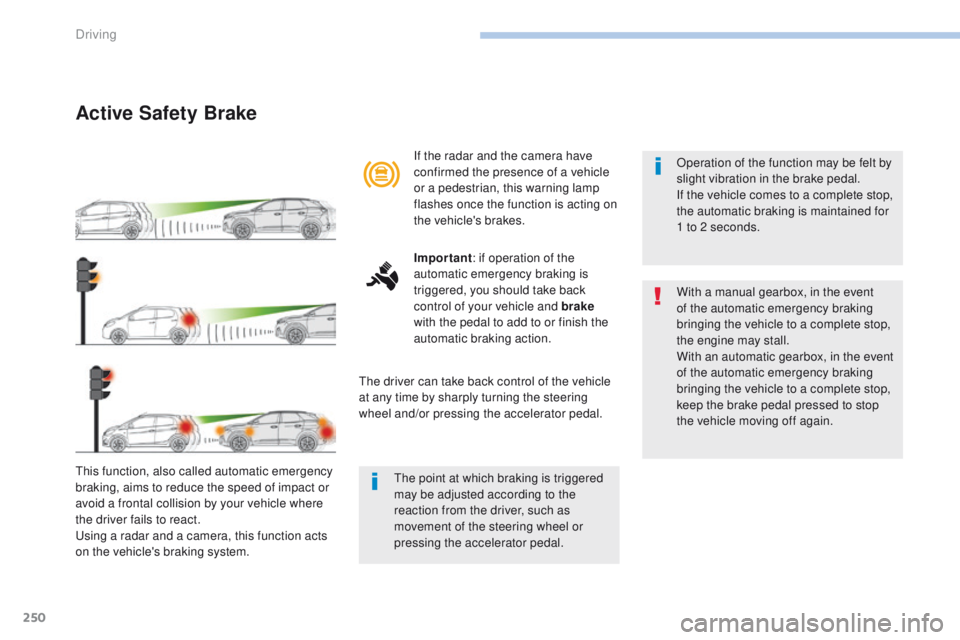
This function, also called automatic emergency
braking, aims to reduce the speed of impact or
avoid a frontal collision by your vehicle where
the driver fails to react.
Using a radar and a camera, this function acts
on the vehicle's braking system.If the radar and the camera have
confirmed the presence of a vehicle
or a pedestrian, this warning lamp
flashes once the function is acting on
the vehicle's brakes.
Important
: if operation of the
automatic emergency braking is
triggered, you should take back
control of your vehicle and brake
with the pedal to add to or finish the
automatic braking action.
The driver can take back control of the vehicle
at any time by sharply turning the steering
wheel and/or pressing the accelerator pedal. Operation of the function may be felt by
slight vibration in the brake pedal.
If the vehicle comes to a complete stop,
the automatic braking is maintained for
1 to 2 seconds.
With a manual gearbox, in the event
of the automatic emergency braking
bringing the vehicle to a complete stop,
the engine may stall.
With an automatic gearbox, in the event
of the automatic emergency braking
bringing the vehicle to a complete stop,
keep the brake pedal pressed to stop
the vehicle moving off again.
The point at which braking is triggered
may be adjusted according to the
reaction from the driver, such as
movement of the steering wheel or
pressing the accelerator pedal.
Driving
Page 253 of 566
251
3008-2_en_Chap06_conduite_ed01-2016
Deactivation / ActivationOperating fault
In the event of a fault, you are alerted
by the illumination of this warning
lamp, accompanied by the display of
a message and an audible signal.
Clean the windscreen regularly,
particularly the area in front of the
camera.
Do not allow snow to accumulate on
the bonnet or roof of the vehicle as this
could mask the camera's view.
Clean the front bumper, removing mud,
snow, ...
If the front bumper is to be repainted,
contact a PEUGEOT dealer or a
qualified workshop. Certain types of
paint could inter fere with the operation
of the radar.
Check that the sensors (camera and radar) are
not covered by dirt, mud, frost, snow...
If the problem persists, contact a PEUGEOT
dealer or a qualified workshop to have the
system checked.
By default, the system is automatically
activated at every engine start.
The system can be deactivated or activated in
the vehicle settings menu in the screen.
Deactivation of the system is
signalled by the illumination of this
indicator lamp, accompanied by the
display of a message. There may be interference in the
operation of the camera or it may not
work at all in the following situations:
-
p
oor visibility (inadequate street
lighting, falling snow, heavy rain,
dense fog, ...),
-
d
azzle (headlamps of an
approaching vehicle on the other
side of the road, low sun, reflection
on a wet road, leaving a tunnel,
alternating between light and
shade, ...),
-
c
amera or radar masked (mud,
frost, snow, ...).
In these situations, detection
performance may be reduced.
6
Driving
Page 255 of 566
253
3008-2_en_Chap06_conduite_ed01-2016
After three first level alerts, the system triggers
a new alert with the message "Take a break!",
accompanied by a more pronounced audible
signal.
In certain driving conditions (poor road
sur face or strong winds), the system
may give alerts independent of the
driver's level of vigilance. The following situations may inter fere
with the operation of the system or
prevent it working:
-
p
oor visibility (inadequate lighting
of the roadway, falling snow, heavy
rain, dense fog, ...),
-
d
azzle (headlamps of an oncoming
vehicle, low sun, reflections on
a damp road, leaving a tunnel,
alternating shade and light, ...),
-
w
indscreen area located in front
of the camera: dirty, misted, frost-
covered, snow-covered, damaged
or covered by a sticker,
-
l
ane markings absent, worn,
masked (snow, mud) or multiple
(roadworks, ...),
-
c
lose to the vehicle ahead (lane
markings not detected),
- r oads that are narrow, winding, ...
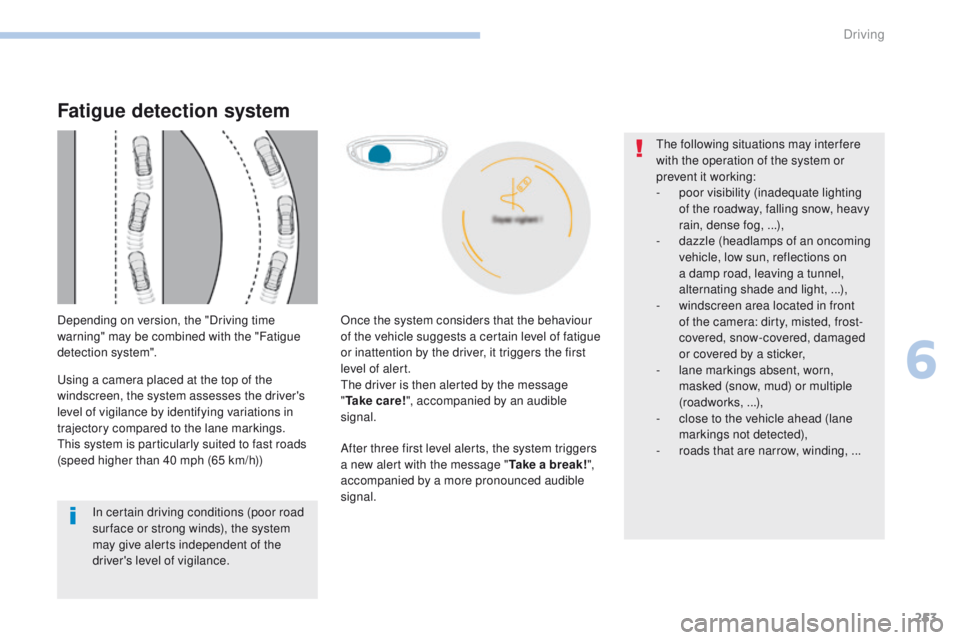
Once the system considers that the behaviour
of the vehicle suggests a certain level of fatigue
or inattention by the driver, it triggers the first
level of alert.
The driver is then alerted by the message
"
Ta k e c a r e ! ", accompanied by an audible
signal.
Fatigue detection system
Depending on version, the "Driving time
warning" may be combined with the "Fatigue
detection system".
Using a camera placed at the top of the
windscreen, the system assesses the driver's
level of vigilance by identifying variations in
trajectory compared to the lane markings.
This system is particularly suited to fast roads
(speed higher than 40 mph (65 km/h))
6
Driving
Page 256 of 566
254
3008-2_en_Chap06_conduite_ed01-2016
Lane Departure Warning System
Activation / Deactivation
Select the "Driving assistance " tab, then
" Lane departure detection assistance. ".
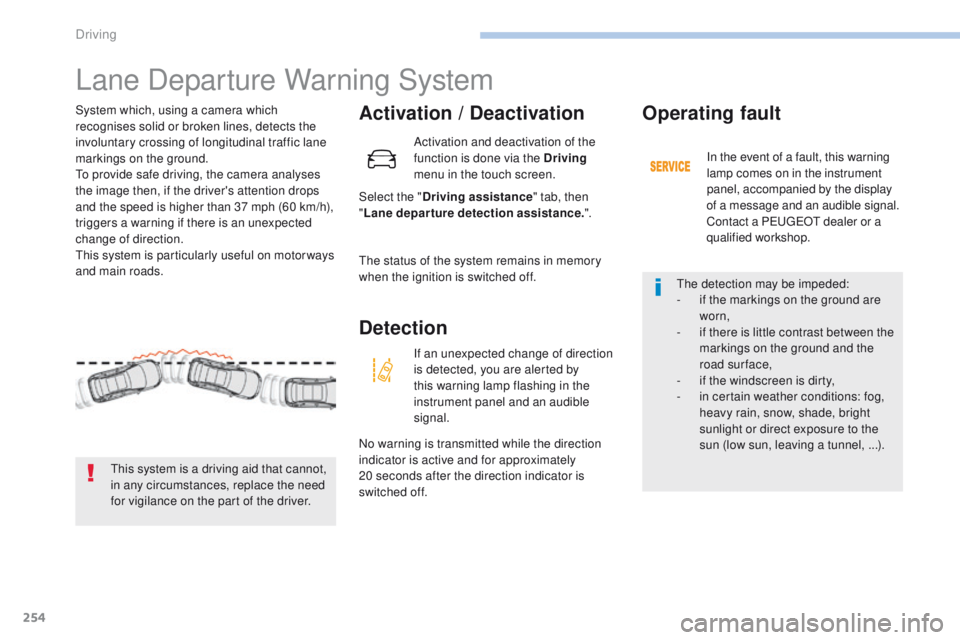
System which, using a camera which
recognises solid or broken lines, detects the
involuntary crossing of longitudinal traffic lane
markings on the ground.
To provide safe driving, the camera analyses
the image then, if the driver's attention drops
and the speed is higher than 37 mph (60 km/h),
triggers a warning if there is an unexpected
change of direction.
This system is particularly useful on motor ways
and main roads.
This system is a driving aid that cannot,
in any circumstances, replace the need
for vigilance on the part of the driver. Activation and deactivation of the
function is done via the Driving
menu in the touch screen.
The status of the system remains in memory
when the ignition is switched off.
Detection
If an unexpected change of direction
is detected, you are alerted by
this warning lamp flashing in the
instrument panel and an audible
signal.
No warning is transmitted while the direction
indicator is active and for approximately
20
seconds after the direction indicator is
switched off.
Operating fault
In the event of a fault, this warning
lamp comes on in the instrument
panel, accompanied by the display
of a message and an audible signal.
Contact a PEUGEOT dealer or a
qualified workshop.
The detection may be impeded:
-
i
f the markings on the ground are
worn,
-
i
f there is little contrast between the
markings on the ground and the
road surface,
-
i
f the windscreen is dirty,
-
i
n certain weather conditions: fog,
heavy rain, snow, shade, bright
sunlight or direct exposure to the
sun (low sun, leaving a tunnel, ...).
Driving