phone PEUGEOT 3008 2017 Manual PDF
[x] Cancel search | Manufacturer: PEUGEOT, Model Year: 2017, Model line: 3008, Model: PEUGEOT 3008 2017Pages: 566, PDF Size: 16.05 MB
Page 529 of 566
167
.
Audio and Telematics
Transversal-Peugeot_en_Chap03_RD6_ed01-2016
Telephone
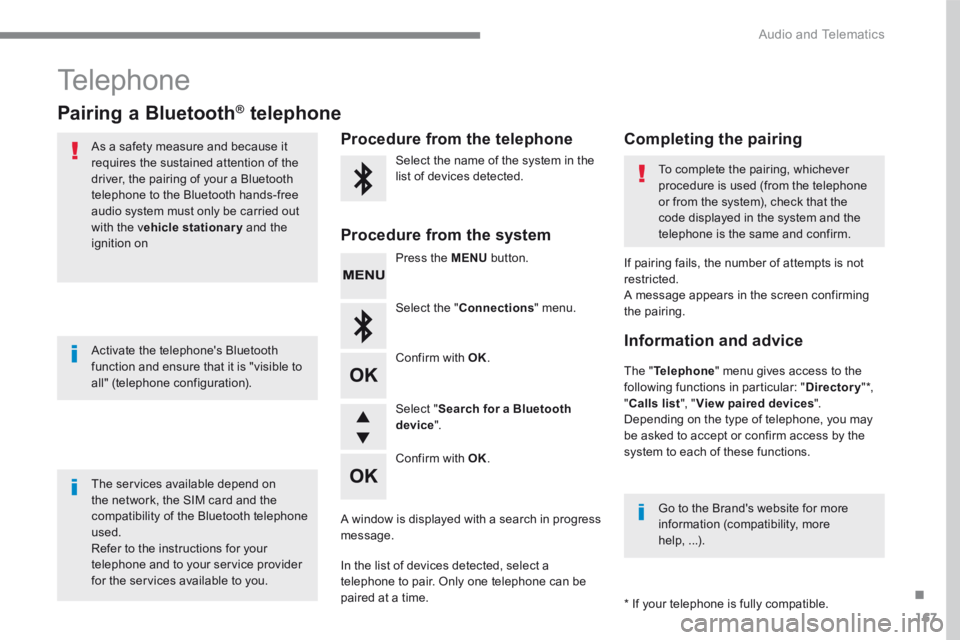
Pairing a Bluetooth ®Pairing a Bluetooth ®Pairing a Bluetooth telephone ® telephone ®
As a safety measure and because it requires the sustained attention of the driver, the pairing of your a Bluetooth telephone to the Bluetooth hands-free audio system must only be carried out
with the vehicle stationary and the ignition on
The services available depend on the network, the SIM card and the compatibility of the Bluetooth telephone used. Refer to the instructions for your telephone and to your service provider for the services available to you.
Activate the telephone's Bluetooth function and ensure that it is "visible to all" (telephone configuration).
Go to the Brand's website for more information (compatibility, more help, ...).
* If your telephone is fully compatible.
The " Telephone " menu gives access to the following functions in particular: " Directory " * , " Calls list ", " View paired devices ". Depending on the type of telephone, you may be asked to accept or confirm access by the system to each of these functions.
If pairing fails, the number of attempts is not restricted. A message appears in the screen confirming the pairing.
Procedure from the telephone Completing the pairing
Procedure from the system
Select the name of the system in the list of devices detected. To complete the pairing, whichever procedure is used (from the telephone or from the system), check that the code displayed in the system and the
telephone is the same and confirm.
Press the MENU button.
Select the " Connections " menu.
Confirm with OK .
A window is displayed with a search in progress message.
In the list of devices detected, select a telephone to pair. Only one telephone can be
paired at a time.
Confirm with OK .
Select " Search for a Bluetooth device ".
Information and advice
Page 530 of 566
168
Audio and Telematics
Confirm with OK .
Confirm with OK .
Confirm with OK .
Confirm with OK.
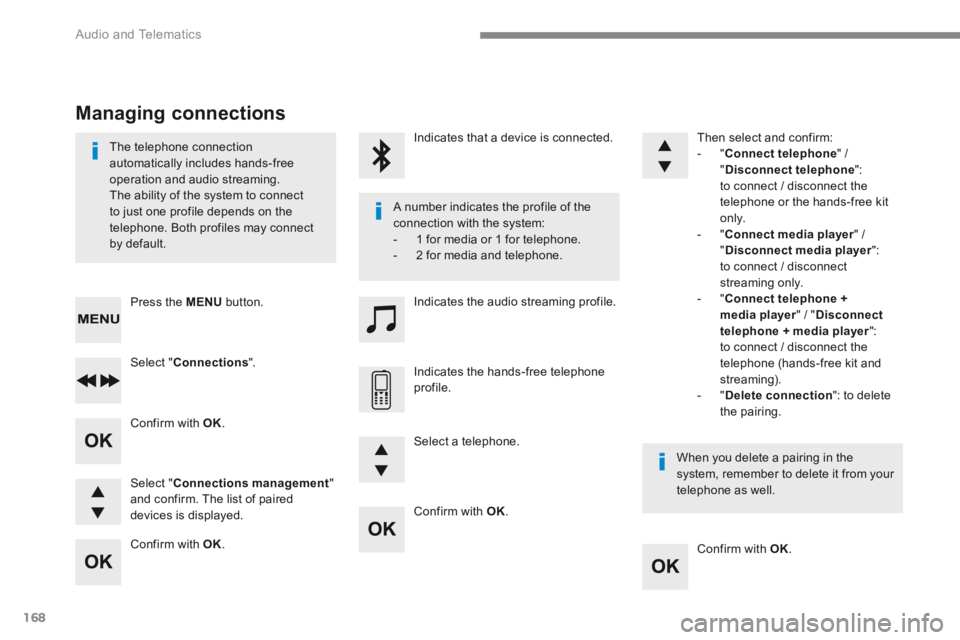
The telephone connection automatically includes hands-free operation and audio streaming. The ability of the system to connect to just one profile depends on the telephone. Both profiles may connect by default.
A number indicates the profile of the connection with the system: - 1 for media or 1 for telephone. - 2 for media and telephone.
When you delete a pairing in the system, remember to delete it from your telephone as well.
Indicates that a device is connected.
Indicates the audio streaming profile.
Indicates the hands-free telephone profile.
Press the MENU button.
Managing connections
Select " Connections ".
Select " Connections management " and confirm. The list of paired devices is displayed.
Select a telephone.
Then select and confirm: - " Connect telephone " / " Disconnect telephone ": to connect / disconnect the telephone or the hands-free kit o n l y. - " Connect media player " / " Disconnect media player ": to connect / disconnect streaming only. - " Connect telephone + media player " / " Disconnect telephone + media player ": to connect / disconnect the telephone (hands-free kit and streaming). - " Delete connection ": to delete the pairing.
Page 531 of 566
169
.
Audio and Telematics
Transversal-Peugeot_en_Chap03_RD6_ed01-2016
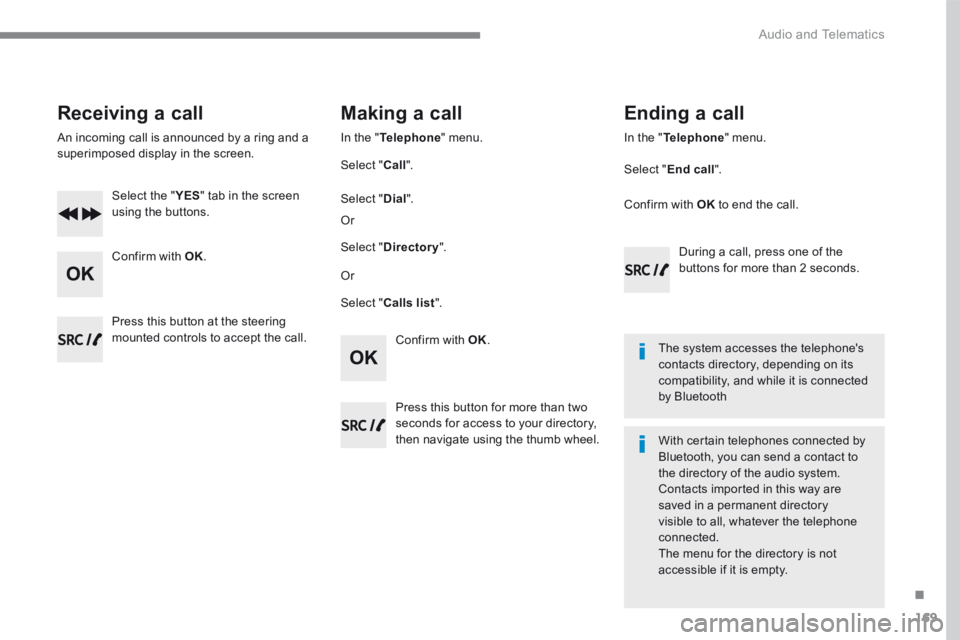
Receiving a call
An incoming call is announced by a ring and a superimposed display in the screen.
Select the " YES Select the " YES Select the " " tab in the screen using the buttons.
Confirm with OK .
Confirm with OK .
Press this button at the steering mounted controls to accept the call.
Making a call
In the " Telephone " menu.
Select " Call ".
Select " Calls list ".
Select " Dial ".
Or
Or
Select " Directory ".
Press this button for more than two seconds for access to your directory, then navigate using the thumb wheel.
In the " Telephone " menu.
Select " End call ".
Ending a call
During a call, press one of the buttons for more than 2 seconds.
Confirm with OK to end the call.
The system accesses the telephone's contacts directory, depending on its compatibility, and while it is connected by Bluetooth
With certain telephones connected by Bluetooth, you can send a contact to the directory of the audio system. Contacts imported in this way are saved in a permanent directory visible to all, whatever the telephone
connected. The menu for the directory is not accessible if it is empty.
Page 532 of 566
170
Audio and Telematics
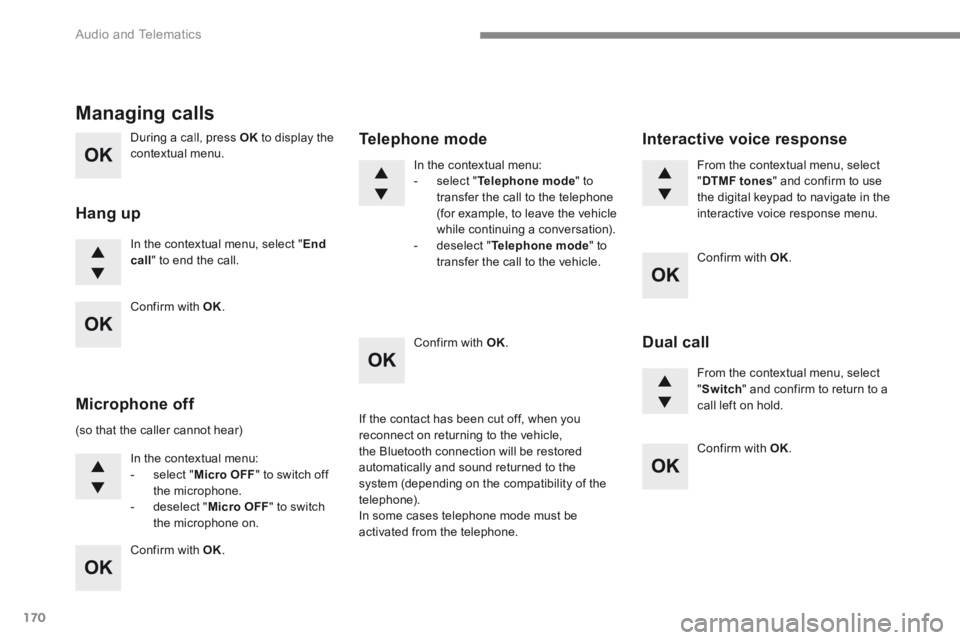
During a call, press OK to display the contextual menu.
In the contextual menu, select " End call " to end the call.
Managing calls
Hang up
(so that the caller cannot hear)
In the contextual menu: - select " Micro OFF " to switch off the microphone. - deselect " Micro OFF " to switch the microphone on.
In the contextual menu: - select " Telephone mode " to transfer the call to the telephone (for example, to leave the vehicle while continuing a conversation). - deselect " Telephone mode " to transfer the call to the vehicle.
Microphone off
Telephone mode
If the contact has been cut off, when you reconnect on returning to the vehicle, the Bluetooth connection will be restored automatically and sound returned to the system (depending on the compatibility of the telephone). In some cases telephone mode must be activated from the telephone.
From the contextual menu, select " DTMF tones " and confirm to use the digital keypad to navigate in the interactive voice response menu.
From the contextual menu, select " Switch " and confirm to return to a call left on hold.
Interactive voice response
Dual call
Confirm with OK .
Confirm with OK .
Confirm with OK .
Confirm with OK .
Confirm with OK .
Page 533 of 566
171
.
Audio and Telematics
Transversal-Peugeot_en_Chap03_RD6_ed01-2016
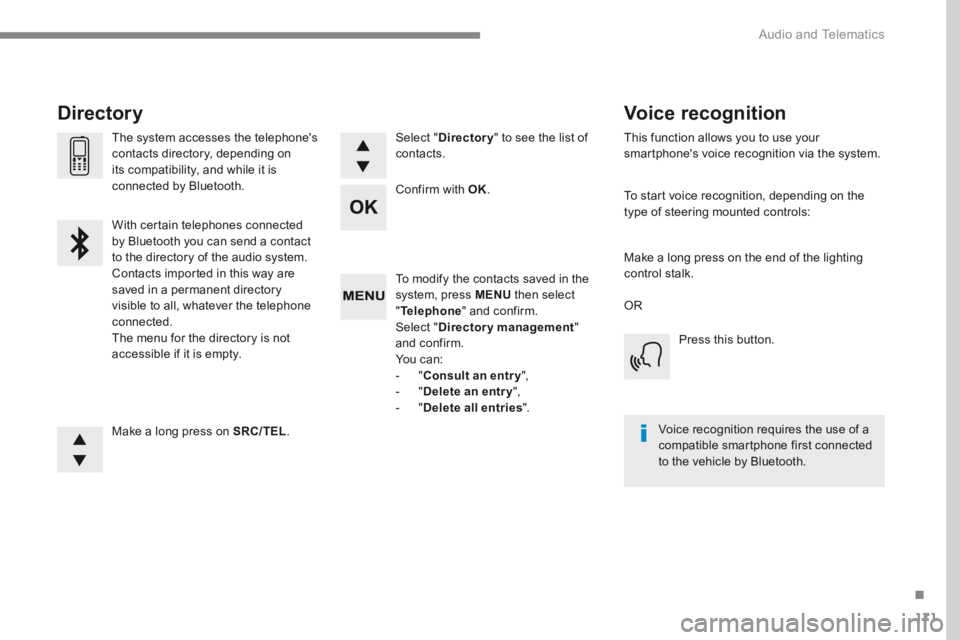
To modify the contacts saved in the system, press MENU then select " Telephone " and confirm. Select " Directory management " and confirm. You can: - " Consult an entr y ", - " Delete an entry ", - " Delete all entries ".
Make a long press on SRC/TEL .
The system accesses the telephone's contacts directory, depending on its compatibility, and while it is connected by Bluetooth.
With certain telephones connected by Bluetooth you can send a contact to the directory of the audio system. Contacts imported in this way are saved in a permanent directory visible to all, whatever the telephone connected. The menu for the directory is not accessible if it is empty.
Select " Directory " to see the list of contacts.
Directory
Confirm with OK .
OR
Voice recognition
This function allows you to use your smartphone's voice recognition via the system.
To start voice recognition, depending on the type of steering mounted controls:
Make a long press on the end of the lighting control stalk.
Press this button.
Voice recognition requires the use of a compatible smartphone first connected to the vehicle by Bluetooth.
Page 536 of 566
174
Audio and Telematics
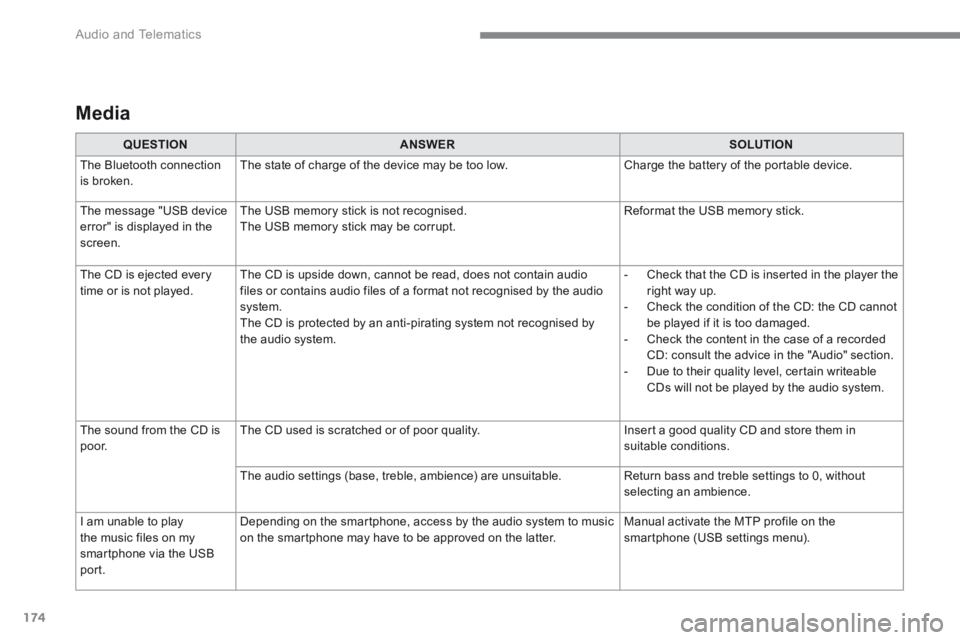
Media
QUESTIONANSWERSOLUTION
The Bluetooth connection is broken. The state of charge of the device may be too low. Charge the battery of the portable device.
The message "USB device
error" is displayed in the screen.
The USB memory stick is not recognised.
The USB memory stick may be corrupt.
Reformat the USB memory stick.
The CD is ejected every time or is not played. The CD is upside down, cannot be read, does not contain audio files or contains audio files of a format not recognised by the audio system. The CD is protected by an anti-pirating system not recognised by the audio system.
- Check that the CD is inserted in the player the right way up. - Check the condition of the CD: the CD cannot be played if it is too damaged. - Check the content in the case of a recorded CD: consult the advice in the "Audio" section. - Due to their quality level, certain writeable CDs will not be played by the audio system.
The sound from the CD is p o o r. The CD used is scratched or of poor quality. Insert a good quality CD and store them in suitable conditions.
The audio settings (base, treble, ambience) are unsuitable. Return bass and treble settings to 0, without selecting an ambience.
I am unable to play
the music files on my smartphone via the USB port.
Depending on the smartphone, access by the audio system to music
on the smartphone may have to be approved on the latter.
Manual activate the MTP profile on the
smartphone (USB settings menu).
Page 537 of 566
175
.
Audio and Telematics
Transversal-Peugeot_en_Chap03_RD6_ed01-2016
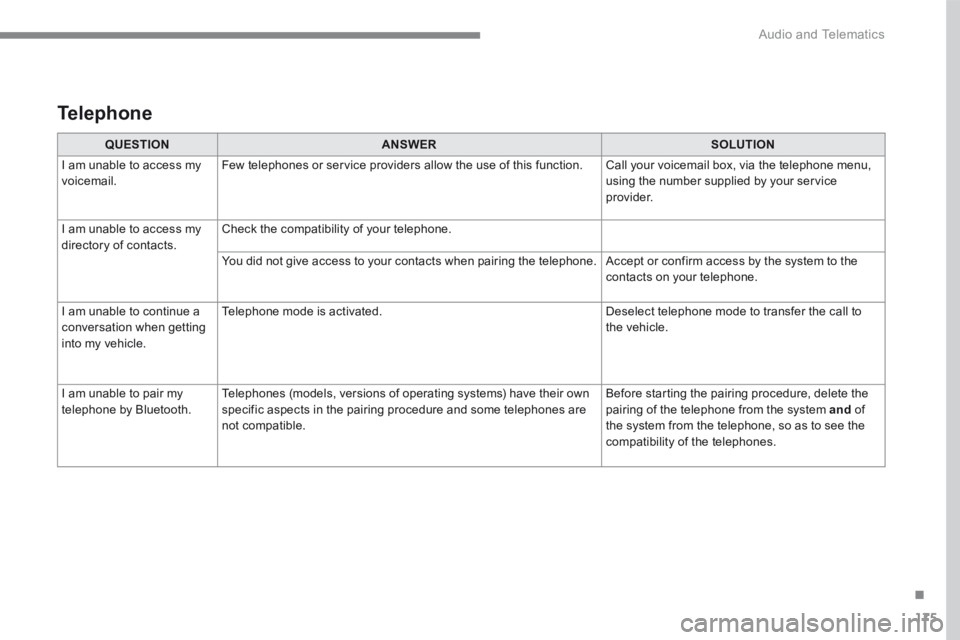
QUESTIONANSWERSOLUTION
I am unable to access my voicemail. Few telephones or service providers allow the use of this function. Call your voicemail box, via the telephone menu, using the number supplied by your service provider.
I am unable to access my directory of contacts. Check the compatibility of your telephone.
You did not give access to your contacts when pairing the telephone. Accept or confirm access by the system to the contacts on your telephone.
I am unable to continue a conversation when getting into my vehicle.
Telephone mode is activated. Deselect telephone mode to transfer the call to the vehicle.
I am unable to pair my telephone by Bluetooth. Telephones (models, versions of operating systems) have their own specific aspects in the pairing procedure and some telephones are not compatible.
Before starting the pairing procedure, delete the pairing of the telephone from the system and of the system from the telephone, so as to see the compatibility of the telephones.
Telephone
Page 545 of 566
5
Precautions in use
In wintry conditions
In the event of an accumulation of snow
on the tailgate, clear the snow before
commanding a motorised opening of the
tailgate.
The formation of ice can block the tailgate
and prevent its opening: wait until the ice
melts with the heating of the passenger
compartment.When washing
When washing the vehicle in an automatic
car wash, don't forget to lock your vehicle
to avoid the risk of unexpected opening.
Recommendations related to the "Hands-Free Tailgate
Access" function
If several kicking movements to operate the
tailgate have no effect, wait a few seconds
before trying again.
The function automatically deactivates in heavy
rain or following a build-up of snow.
If it does not work, check that the electronic key
is not exposed to a source of electromagnetic
pollution (smartphone etc.).
The function may not work correctly with a
prosthetic leg.
The function may not work correctly if your
vehicle is fitted with a towbar. In some circumstances, the tailgate may open
or close by itself, particularly if:
-
you hitch or unhitch a trailer,
- you fit or remove a bicycle carrier,
- you load or unload bicycles from a bicycle
c a r r i e r,
- you place or lift something behind the
vehicle,
- an animal approaches the rear bumper,
- you are washing your vehicle,
- your vehicle is being serviced,
- you are accessing the spare wheel
(depending on version).
To avoid such operating problems, keep the
electronic key away from the sensor zone or
deactivate the "Hands-Free Tailgate Access"
function.
2
Access