battery PEUGEOT 3008 2023 Workshop Manual
[x] Cancel search | Manufacturer: PEUGEOT, Model Year: 2023, Model line: 3008, Model: PEUGEOT 3008 2023Pages: 292, PDF Size: 9.43 MB
Page 215 of 292
213
In the event of a breakdown
8
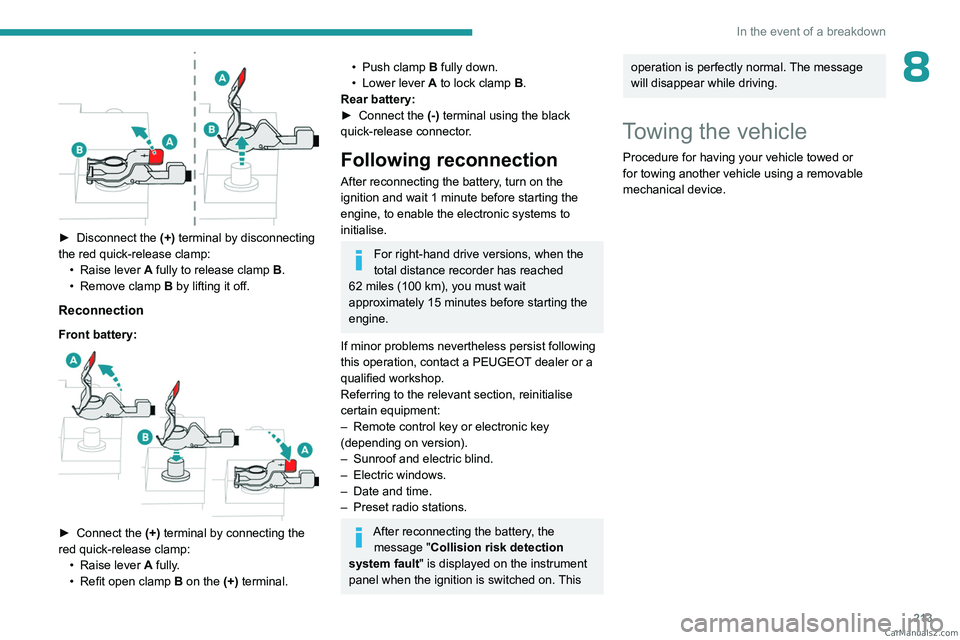
► Disconnect the (+) terminal by disconnecting
the red quick-release clamp: •
Raise lever
A
fully to release clamp
B
.
•
Remove clamp
B
by lifting it off.
Reconnection
Front battery:
► Connect the (+) terminal by connecting the
red quick-release clamp: •
Raise lever
A
fully.
•
Refit open clamp
B
on the (+) terminal.
• Push clamp B fully down.
• Lower lever A to lock clamp B.
Rear battery:
►
Connect the
(-) terminal using the black
quick-release connector.
Following reconnection
After reconnecting the battery, turn on the
ignition and wait 1 minute before starting the
engine, to enable the electronic systems to
initialise.
For right-hand drive versions, when the
total distance recorder has reached
62
miles (100 km), you must wait
approximately 15
minutes before starting the
engine.
If minor problems nevertheless persist following
this operation, contact a PEUGEOT dealer or a
qualified workshop.
Referring to the relevant section, reinitialise
certain equipment:
–
Remote control key or electronic key
(depending on version).
–
Sunroof and electric blind.
–
Electric windows.
–
Date and time.
–
Preset radio stations.
After reconnecting the battery, the message "Collision risk detection
system fault" is displayed on the instrument
panel when the ignition is switched on. This
operation is perfectly normal. The message
will disappear while driving.
Towing the vehicle
Procedure for having your vehicle towed or
for towing another vehicle using a removable
mechanical device. CarM an uals 2 .c o m
Page 217 of 292
215
In the event of a breakdown
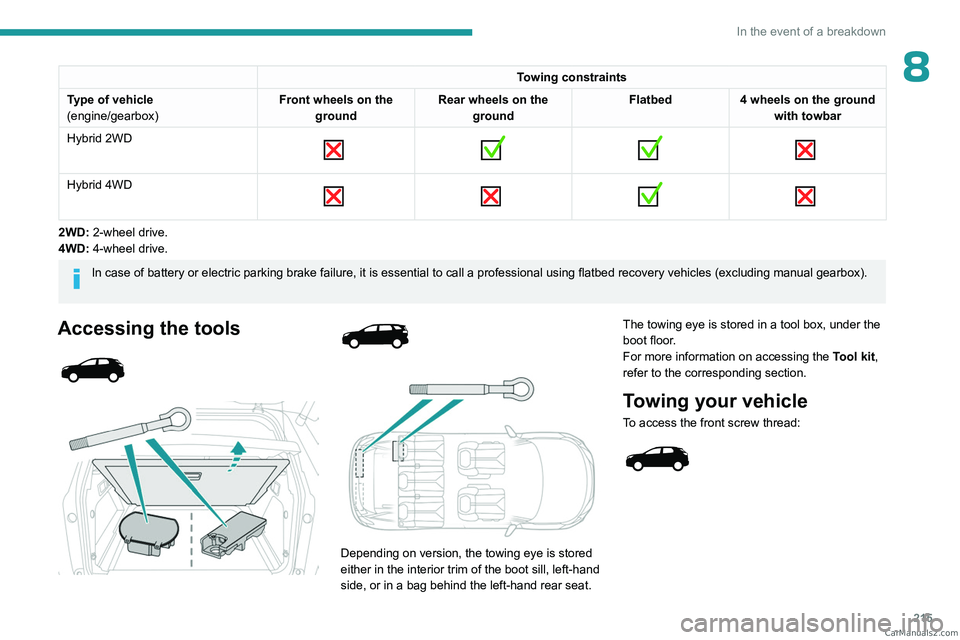
8Towing constraints
Type of vehicle
(engine/gearbox) Front wheels on the
ground Rear wheels on the
ground Flatbed
4 wheels on the ground
with towbar
Hybrid 2WD
Hybrid 4WD
2WD: 2-wheel drive.
4WD: 4-wheel drive.
In case of battery or electric parking brake failure, it is essential to call a p
rofessional using flatbed recovery vehicles (excluding manual gearbox).
Accessing the tools
Depending on version, the towing eye is stored
either in the interior trim of the boot sill, left-hand
side, or in a bag behind the left-hand rear seat. The towing eye is stored in a tool box, under the
boot floor.
For more information on accessing the
Tool kit,
refer to the corresponding section.
Towing your vehicle
To access the front screw thread:
CarM an uals 2 .c o m
Page 223 of 292
221
Technical data
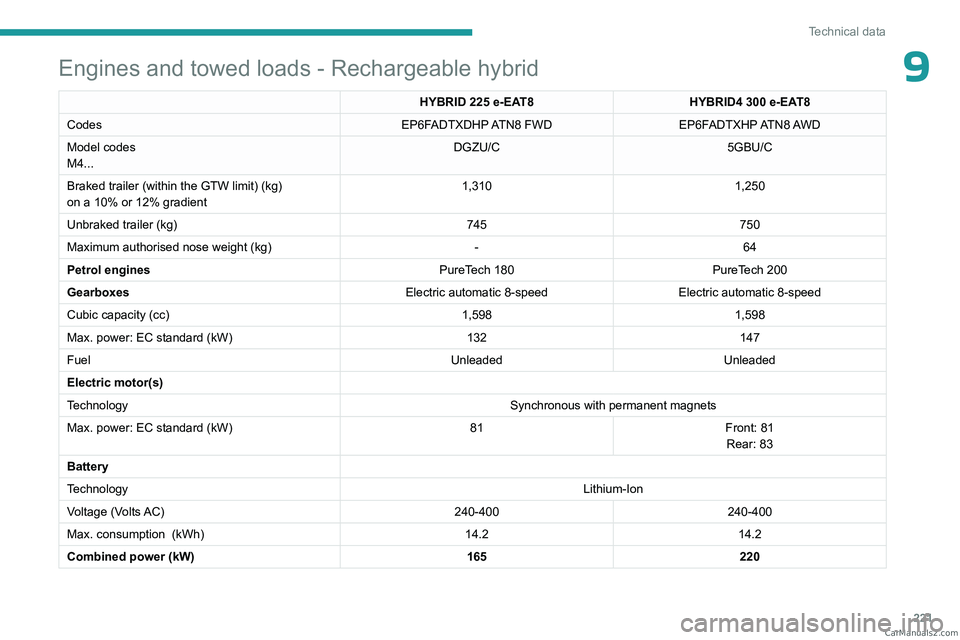
9Engines and towed loads - Rechargeable hybrid
HYBRID 225 e-EAT8HYBRID4 300 e-EAT8
Codes EP6FADTXDHP ATN8 FWDEP6FADTXHP ATN8 AWD
Model codes
M4... DGZU/C
5GBU/C
Braked trailer (within the GTW limit) (kg)
on a 10% or 12% gradient 1,310
1,250
Unbraked trailer (kg) 745750
Maximum authorised nose weight (kg) -64
Petrol engines PureTech 180PureTech 200
Gearboxes Electric automatic 8-speedElectric automatic 8-speed
Cubic capacity (cc) 1,5981,598
Max. power: EC standard (kW) 132147
Fuel UnleadedUnleaded
Electric motor(s)
Technology Synchronous with permanent magnets
Max. power: EC standard (kW) 81Front: 81
Rear: 83
Battery
Technology Lithium-Ion
Voltage (Volts AC) 240-400240-400
Max. consumption
(kWh) 14.214.2
Combined power (kW) 165220 CarM an uals 2 .c o m
Page 238 of 292
236
PEUGEOT Connect Radio
► Delete the files supplied with the memory
stick and limit the number of sub-folders in the
file structure on the memory stick.
Some characters in information about the
currently playing media are not displayed
correctly
.
The audio system is unable to process certain
types of character.
►
Use standard characters to name tracks and
folders.
Playback of streaming files does not start.
The connected device does not automatically
launch playback.
►
Start playback from the device.
T
rack names and playing times are not
displayed on the audio streaming screen.
The Bluetooth profile does not allow the transfer
of this information.
Telephone
I cannot connect my Bluetooth telephone.
The telephone's Bluetooth function may be
switched off or the device may not be visible.
►
Check that the telephone has Bluetooth
switched on.
►
Check in the telephone settings that it is
"visible to all".
The Bluetooth telephone is not compatible with
the system.
►
Check the compatibility of the telephone on
the Brand's website (services).
Android
Auto and/or CarPlay do not work. Android Auto and CarPlay may not activate if the
USB cables are of poor quality.
►
Use genuine USB cables to ensure
compatibility
.
Android Auto and/or CarPlay do not work.
Android Auto and CarPlay are not available in all
countries.
►
Check the Google
Android Auto or Apple
website to see which countries are supported.
The volume of the telephone connected in
Bluetooth mode is inaudible.
The volume depends on both the system and the
telephone.
►
Increase the volume of the audio system, to
maximum if required, and increase the volume of
the telephone if necessary
.
Ambient noise affects the quality of the
telephone call.
►
Reduce ambient noise (close windows, turn
down ventilation, slow down, etc.).
The contacts are not listed in alphabetical
order
.
Some telephones offer display options.
Depending on the settings chosen, contacts can
be transferred in a specific order.
►
Modify the telephone directory display
settings.
Settings
When the treble and bass settings are
changed, the ambience is deselected.
When the ambience is changed, the treble
and bass settings are reset. Selecting an ambience imposes the treble and
bass settings, and vice versa.
►
Modify the treble and bass or ambience
settings to obtain the desired musical ambience.
When the balance settings are changed, the
distribution is deselected.
When the distribution setting is changed, the
balance settings are deselected.
Selecting a distribution setting imposes the
balance settings, and vice versa.
►
Modify the balance setting or the distribution
setting to obtain the desired sound quality
.
There is a difference in sound quality
between audio sources.
To allow for optimal listening quality, the sound
settings can be tailored to different audio
sources, which can generate audible differences
when changing source.
►
Check that the sound settings are appropriate
to the sources listened to.
Adjust the sound
functions to the middle position.
When the engine is off, the system switches
off after several minutes of use.
When the engine is switched off, the system's
operating time depends on the state of charge of
the battery.
The switch-off is normal: the system
automatically goes into energy economy mode
and switches off to maintain an adequate charge
in the battery.
► Start the vehicle’ s engine to increase the
charge of the battery. CarM an uals 2 .c o m
Page 263 of 292
261
PEUGEOT Connect Nav
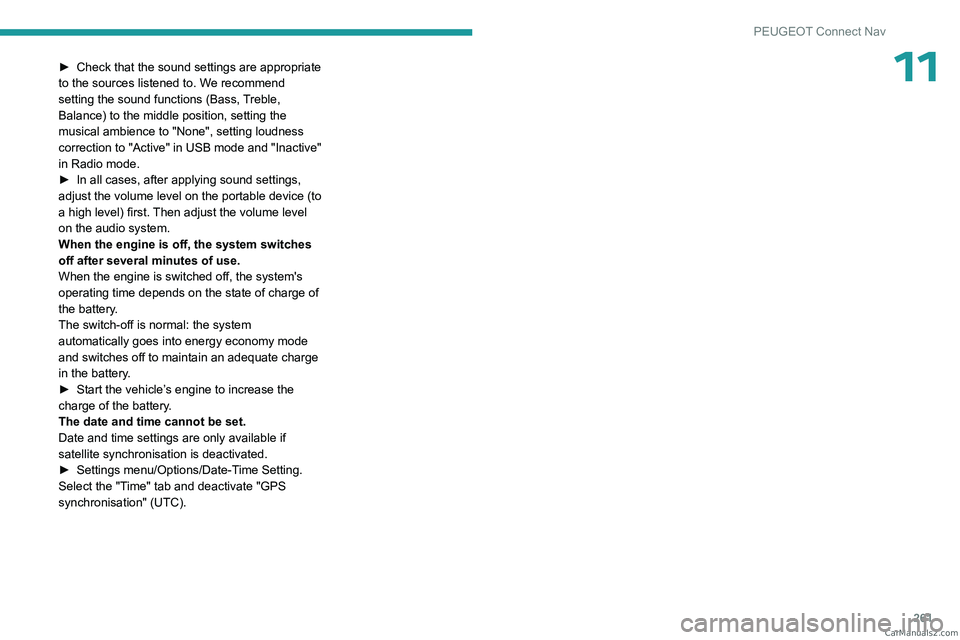
11► Check that the sound settings are appropriate
to the sources listened to. W e recommend
setting the sound functions (Bass, Treble,
Balance) to the middle position, setting the
musical ambience to "None", setting loudness
correction to "Active" in USB mode and "Inactive"
in Radio mode.
►
In all cases, after applying sound settings,
adjust the volume level on the portable device (to
a high level) first.
Then adjust the volume level
on the audio system.
When the engine is off, the system switches
off after several minutes of use.
When the engine is switched off, the system's
operating time depends on the state of charge of
the battery.
The switch-off is normal: the system
automatically goes into energy economy mode
and switches off to maintain an adequate charge
in the battery.
►
Start the vehicle’
s engine to increase the
charge of the battery.
The date and time cannot be set.
Date and time settings are only available if
satellite synchronisation is deactivated.
►
Settings
menu/Options/Date-Time Setting.
Select the "Time" tab and deactivate "GPS
synchronisation" (UTC). CarM an uals 2 .c o m
Page 264 of 292
262
Vehicle data recording and privacy
Vehicle data recording
and privacy
Electronic control units are installed in your
vehicle. These control units process data
received from the vehicle's sensors, for example,
or data they generate themselves or exchange
with each other. Some of these control units are
required for the correct operation of your vehicle,
some others assist you while driving (driving or
manoeuvring aids), while others provide comfort
or infotainment functions.
The following contains general information about
how data is processed within the vehicle.
You will find additional information about the
specific data which is downloaded, stored
and transmitted to third parties and what it is
used for in your vehicle under the keyword
"Data protection". This information is directly
associated with the references for the functions
in question contained in the corresponding
vehicle handbook, or in the general terms and
conditions of sale.
This information is also available online.
Vehicle operating data
The control units process the data used for the
operation of the vehicle.
This data includes, for example:
–
Information about the state of the vehicle
(e.g.
speed, travel time, lateral acceleration,
wheel rotation rate, fastened seat belts display). –
Environmental conditions (e.g.
temperature,
rain sensor, distance sensor).
As a general rule, this data is temporary, is
not stored for longer than one operating cycle
and is only used within the vehicle itself. The
control units often record this data (including the
vehicle's key). This function allows either the
temporary or permanent storage of information
about the state of the vehicle, stresses on
components, servicing requirements, as well as
events and technical errors.
Depending on the vehicle's equipment level, the
data stored is as follows:
–
Operating state of system components
(e.g.
filling level, tyre pressures, battery charge
status).
–
Faults and malfunctions in important system
components (e.g.
lamps, brakes).
–
System reactions in specific driving situations
(e.g.
deployment of an airbag, triggering of
stability control and braking systems).
–
Information about events which have
damaged the vehicle.
–
For electric and rechargeable hybrid vehicles,
the traction battery charge level and the
estimated driving range.
In particular circumstances (e.g.
if the vehicle
has detected a malfunction), it may be necessary
to record data which would otherwise simply not
be stored.
When taking your vehicle in for servicing
(e.g.
repairs, maintenance), the stored operating
data may be read along with the vehicle's identification number and used if necessary.
The personnel working for the servicing network
(e.g.
garages, manufacturers) or third parties
(e.g. roadside assistance agents) may read
the vehicle's data. This also applies to work
carried out under warranty and quality assurance
measures.
This data is generally read via the OBD
(On-Board Diagnostics) port fitted by law to
the vehicle. It is used to report on the technical
state of the vehicle or its components and
facilitates the diagnosis of malfunctions, in
compliance with warranty obligations and for
quality improvement. This data, in particular the
information relating to stress on components,
technical events, operator errors and other
malfunctions, is sent to the Manufacturer, if
necessary, along with the vehicle's identification
number. The Manufacturer's liability may also be
engaged. The Manufacturer may also use the
operating data taken from the vehicle for product
recalls. This data may also be used to check the
customer's warranty and any claims made under
warranty.
Any malfunctions stored in the vehicle may be
reset by an after-sales service company during
servicing or repair work, or at your request. CarM an uals 2 .c o m
Page 267 of 292

265
Alphabetical index
A
ABS 87
Accelerated charging unit (Wallbox)
169–170
Accessories
84
Active Safety Brake
150–152
AdBlue®
18, 189
AdBlue® tank
190
Additive, Diesel
186–187
Adjusting headlamps
76
Adjusting head restraints
44
Adjusting seat
43, 45, 50–52
Adjusting the air distribution
58–60
Adjusting the air flow
58–60
Adjusting the date
235, 257
Adjusting the headlamp beam height
76
Adjusting the height and reach of
the steering wheel
47
Adjusting the lumbar support
43, 45
Adjusting the seat belt height
92
Adjusting the temperature
58
Adjusting the time
234, 258
Advanced Grip Control
89
Advice on care and maintenance
168, 192
Advice on driving
7, 111–112
Airbags
95, 97, 99
Airbags, curtain
96–97
Airbags, front
96–97, 100
Airbags, lateral
96–97
Air conditioning
56, 59
Air conditioning, automatic
60
Air conditioning, dual-zone
57
Air conditioning, dual-zone automatic
57
Air intake 58, 60
Air vents
56
Alarm
37–38
Amplifier, audio
63
Anti-lock braking system (ABS)
87
Antitheft / Immobiliser
27
Applications
249
Armrest, front
65
Armrest, rear
67
Assistance call
85–86
Assistance, emergency braking
87, 152
Audio streaming (Bluetooth)
230, 253
B
Backrest, folding 44
Battery, 12 V
183, 187, 208–212
Battery, ancillaries
208
Battery, charging
208–209, 212
Battery, remote control
31
Blanking screen (snow shield)
182
Blind
39–41
Blind spot monitoring
154
Blinds, side
68
BlueHDi
18, 20, 187, 195
Bluetooth (hands-free)
232, 254
Bluetooth (telephone)
232–233, 254–255
Bodywork
193
Bonnet
184
Boot
32–33, 36, 73
Boot (fittings)
68
Brake discs
188
Brake lamps 207
Brakes
188
Braking
123
Braking assistance system
87
Braking, automatic emergency
150–152
Braking, dynamic emergency
115–117
Brightness
234
Bulbs (changing)
206–207
C
Cable, audio 252
Cable, Jack
252
Capacity, fuel tank
165
Care of the bodywork
193
Central locking
29–30
Changing a bulb
206–207
Changing a fuse
208
Changing a wheel
195–197, 201–203
Changing a wiper blade
82–83
Changing the remote control battery
31
Changing to free-wheeling
191
Charge level indicator (Rechargeable
hybrid)
20
Charger, induction
64
Charger, wireless
64
Charging cable
171
Charging cable (Rechargeable
hybrid)
169–170, 176
Charging connector (Rechargeable
hybrid)
168, 175–177 CarM an uals 2 .c o m
Page 268 of 292
266
Alphabetical index
Charging flap (Rechargeable
hybrid)
168, 175–177
Charging the traction battery
(Rechargeable hybrid)
19, 167, 175–177
CHECK
20
Checking the engine oil level
17
Checking the levels
185–186
Checking tyre pressures
(using the kit)
198, 200
Checks
185–186, 187–189
Checks, routine
187–188
Child lock
109
Children
94, 101–102, 105–106, 108
Children (safety)
109
Child seats
94, 97–101, 107, 108
Child seats, conventional
100–101
Child seats, i-Size
108
Child seats, ISOFIX
102, 104–105
Cleaning (advice)
168, 192–194
Closing the boot
29, 33
Closing the doors
29, 32
Collision Risk Alert
150–151
Configurations, seats
55
Configuration, vehicle
23–24
Connected applications
249
Connection, Android Auto
249
Connection, Apple CarPlay
231, 248
Connection, Bluetooth
232–233,
249–250, 254–255
Connection, MirrorLink
231
Connection, Wi-Fi network
250
Connectivity
248
Consumptions
24Container, AdBlue® 190
Control, emergency boot release
33
Control, emergency door
30–31
Control, heated seats
46
Controls, steering mounted
118, 121–123
Control stalk, lighting
74–75
Control stalk, wipers
80–82
Control unit
169–171, 176
Courtesy lamps
66
Cruise control
131, 134, 137–139
Cruise control, adaptive
139
Cruise control, adaptive with Stop function
134
Cruise control by speed limit recognition
134
Cup holder
62
D
DAB (Digital Audio Broadcasting) -
Digital radio
229, 252
Date (setting)
235, 257
Daytime running lamps
75, 207
Deactivating the passenger airbag
96, 99–100
Deadlocking
27, 29
Deferred charging
24, 176
Deferred charging (Rechargeable
hybrid)
23–24, 168, 175
Defrosting
48, 60
Defrosting, front
60
Defrosting, rear screen
61
Demisting
48, 60
Demisting, front
60
Demisting, rear
61
Dials and gauges 9
Digital instrument panel
9–10
Dimensions
222
Dipstick
17, 185
Direction indicators (turn signals)
75, 207
Domestic charging
171
Domestic charging (Rechargeable
hybrid)
176–177
Door pockets
62
Doors
32
Drive Assist Plus
139
Driver’s attention warning
153
Driving
42–43, 111–112
Driving aids camera (warnings)
130
Driving aids (recommendations)
130
Driving economically
7
Driving modes
89–90, 125
Driving positions (storing)
45–46
Dynamic stability control (DSC)
88, 90
E
EBFD 87
Eco-driving (advice)
7
ECO mode
125
Electric windows
38
Electronic brake force distribution (EBFD)
87
Emergency braking assistance (EBA)
87
Emergency call
85–86
Emergency switching off
11 4
Emergency warning lamps
84, 195
Emissions control system, SCR
19, 189 CarM an uals 2 .c o m
Page 271 of 292
269
Alphabetical index
N
Navigation 243–245
Navigation, connected
246–248
Net
69–70
Net, high load retaining
70–71
Night vision
79
Night Vision
79
O
Obstacle detection 155
Oil change
185
Oil consumption
185
Oil, engine
185
On-board tools
72, 195–198
Opening the bonnet
183–184
Opening the boot
28, 32
Opening the doors
28, 32
P
Pads, brake 188
Paint
193, 223
Paint colour code
223
Paint, matt
193
Paint, textured
193
Parcel shelf, rear
67, 69
Park Assist
161–162
Parking brake, electric
115–117, 188
Parking (sensors)
155
Parking sensors, audible and visual 155
Parking sensors, front
156
Parking sensors, rear
156
Passenger compartment temperature pre-
conditioning (Rechargeable hybrid)
24, 61
Pedestrian horn (Rechargeable hybrid)
85
Personalisation
10
Plates, identification
223
Player, Apple®
230, 253
Player, USB
229, 252
Port, USB
63, 67, 229, 231, 248, 252
Power
19
Power indicator (Rechargeable hybrid)
8, 19
Pressures, tyres
188, 199, 223
Pre-tensioning (seat belts)
94
Priming the fuel system
195
Profiles
234, 257
Protecting children
96–102, 105–106, 108
Puncture
198–199, 201
R
Radar (warnings) 130
Radio
227–228, 251
Radio, digital (Digital Audio Broadcasting -
DAB)
229, 252
Range, AdBlue®
18, 187
RDS
228, 251
Reading lamps
66
READY (warning lamp)
183
Rear air blower
59
Rear bench seat
48–49
Rear screen (demisting) 61
Rechargeable hybrid engine
8, 23, 182–183, 214, 221
Rechargeable hybrid system
5, 8, 23, 113, 126, 167
Recharging the battery
208–209, 212
Recharging the traction battery
171
Recharging the traction battery
(Rechargeable hybrid)
167, 175–177
Recirculation, air
58, 60
Recorder, total distance
20
Recorder, trip distance
21
Reduction of electrical load (mode)
183
Regeneration of the particle filter
187
Regenerative braking (deceleration
by engine braking)
123
Reinitialising the remote control
32
Reinitialising the under-inflation detection
system
129
Reminder, lighting on
74
Remote control
26–30
Remote functions
176
Remotely operable functions (Rechargeable
hybrid)
24, 61
Removing a wheel
203–205
Removing the mat
65
Replacing bulbs
206–207
Replacing fuses
208
Replacing the air filter
187
Replacing the oil filter
187
Replacing the passenger compartment
filter
187
Reservoir, screenwash
186 CarM an uals 2 .c o m
Page 272 of 292
270
Alphabetical index
Resetting the trip 21–22
Resetting the trip recorder
21
Rev counter
9
Reversing camera
130, 157–159
Reversing lamps
207
Roof bars
180–181
Running out of fuel (Diesel)
195
S
Safety, children 96–102, 105–106, 108
Saturation of the particle filter (Diesel)
187
Screen menu map
231
Screens, very cold conditions
182
Screenwash
81
Screenwash, front
81
Screenwash, rear
81
SCR (Selective Catalytic Reduction)
19, 189
Seat belts
91–92, 94, 100
Seat belts, rear
92–93
Seats, additional
53–55
Seats, electric
45–46
Seats, front
43, 45–46
Seats, heated
46
Seats, rear
48–55, 98
Selector, gear
118, 121–124
Sensors (warnings)
130
Serial number, vehicle
223
Servicing
16, 187, 189
Settings, equipment
23–24
Settings, system
234, 257
Sidelamps
75, 207
Silent vehicle warning sound (Rechargeable
hybrid)
85
Smartphone
25, 64
Snow chains
129, 181–182
Snow screen
182
Socket, 12 V accessory
63, 66, 72
Socket, auxiliary
230, 252
Socket, Jack
252
Speakers
63
Speed limiter
131, 134–136
Speed limit recognition
131, 133
Speedometer
9, 131
Sport mode
125–126
Spotlamps, side
77
Stability control (ESC)
87–88, 90
Starting a Diesel engine
165
Starting the engine
11 3
Starting the vehicle
113, 122–123
Starting using another battery
114, 209
State of charge, battery
23
Station, radio
227–228, 251
Stay, engine bonnet
184
Steering mounted controls, audio
225, 238
Steering wheel (adjustment)
47
Stickers, customising
193
Stopping the vehicle
113, 122–123
Stop & Start
22, 57, 60, 127–128, 165, 183, 187, 211
Storage
62, 65, 67–68
Storage box
72
Storage boxes
68
Storage compartments
62
Storage wells
72Storing driving positions 45–46
Sunroof, panoramic
39–41
Sunshine sensor
56
Sun visor
62
Suspension
189
Synchronising the remote control
32
T
Table position 44
Tables, aircraft
67
Tables of engines
221
Tailgate
32
Tank, fuel
165–166
Technical data
218, 220–221
Telephone
232–233, 254–256
Temperature, coolant
18
Ticket holder
62
Time (setting)
234, 258
TMC (Traffic info)
245
Tool box
72
Tools
195–198, 201–203
Topping-up AdBlue®
190
Top Tether (fixing)
102
Total distance recorder
20–21
Touch screen
21–24, 61
Towball, quickly detachable
178–180
Towbar
88, 177
Towbar with quickly detachable
towball
178–180
Towed loads
217–218, 220–221
Towing
213–216 CarM an uals 2 .c o m