Limiter PEUGEOT 3008 2023 Owners Manual
[x] Cancel search | Manufacturer: PEUGEOT, Model Year: 2023, Model line: 3008, Model: PEUGEOT 3008 2023Pages: 292, PDF Size: 9.43 MB
Page 4 of 292
2
Contents
■
Overview
■
Eco-driving
1Dashboard instrumentsDriver information 9
Digital instrument panels 9
Warning and indicator lamps 11
Indicators 16
Manual test 20
Distance recorders 20
Lighting dimmer 21
Trip computer 21
Touch screen 22
Remotely operable additional functions
(Rechargeable hybrid)
24
2AccessElectronic key with remote control function
and built-in key 26
Keyless Entry and Start 28
Central locking 30
Back-up procedures 30
Doors 32
Boot 32
Hands-free tailgate 33
Alarm 37
Electric windows 38
Panoramic sunroof 39
3Ease of use and comfortDriving position 42
Front seats 43
Steering wheel adjustment 47
Mirrors 47
Rear bench seat 49
Rear seats 50
Seat modularity 55
Heating and Ventilation 56
Dual-zone automatic air conditioning 57
Front demisting - defrosting 60
Heated windscreen 60
Rear screen demisting/defrosting 61
Temperature pre-conditioning
(Rechargeable hybrid)
61
Front fittings 62
Courtesy lamps 66
Interior ambient lighting 66
Rear fittings 66
Boot fittings 68
4Lighting and visibilityLighting control stalk 74
Direction indicators 75
Headlamp beam height adjustment 76
Automatic illumination of headlamps 76
Guide-me-home and welcome lighting 77
Automatic lighting systems - General
recommendations
77
Automatic headlamp dipping 77
Static cornering lighting 78
Night Vision 79
Wiper control stalk 80
Automatic wipers 81
Changing a wiper blade 83
5SafetyGeneral safety recommendations 84
Hazard warning lamps 84
Horn 85
Pedestrian horn (Rechargeable hybrid) 85
Emergency or assistance 85
Electronic stability control (ESC) 87
Advanced Grip Control 89
Hill Assist Descent Control 90
Seat belts 91
Airbags 95
Child seats 97
Deactivating the front passenger airbag 99
ISOFIX child seats 102
i-Size child seats 108
Child lock 109
6DrivingDriving recommendations 111
Starting/Switching off the engine 11 2
Starting rechargeable hybrid vehicles 11 3
Electric parking brake 11 5
6-speed manual gearbox 11 7
Automatic gearbox (type 1) 11 7
Automatic gearbox (type 2) 120
Hill start assist 124
Driving modes 125
Gear shift indicator 126
Stop & Start 127
Tyre under-inflation detection 128
Driving and manoeuvring aids - General
recommendations
130
Memorising speeds 131
Road signs recognition 131
Speed limiter 135 CarM an uals 2 .c o m
Page 6 of 292
4
Overview
Presentation
These illustrations and descriptions are intended
as a guide. The presence and location of some
elements vary depending on the version or trim
level.
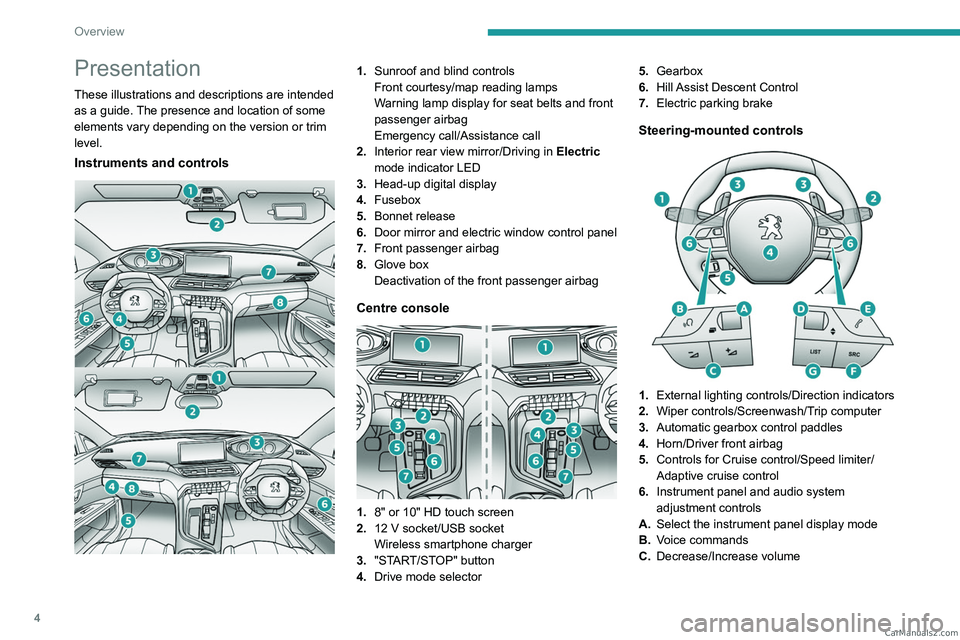
Instruments and controls
1.Sunroof and blind controls
Front courtesy/map reading lamps
Warning lamp display for seat belts and front
passenger airbag
Emergency call/Assistance call
2. Interior rear view mirror/Driving in Electric
mode indicator LED
3. Head-up digital display
4. Fusebox
5. Bonnet release
6. Door mirror and electric window control panel
7. Front passenger airbag
8. Glove box
Deactivation of the front passenger airbag
Centre console
1.8" or 10" HD touch screen
2. 12 V socket/USB socket
Wireless smartphone charger
3. "START/STOP" button
4. Drive mode selector 5.
Gearbox
6. Hill Assist Descent Control
7. Electric parking brake
Steering-mounted controls
1.External lighting controls/Direction indicators
2. Wiper controls/Screenwash/Trip computer
3. Automatic gearbox control paddles
4. Horn/Driver front airbag
5. Controls for Cruise control/Speed limiter/
Adaptive cruise control
6. Instrument panel and audio system
adjustment controls
A. Select the instrument panel display mode
B. Voice commands
C. Decrease/Increase volume CarM an uals 2 .c o m
Page 11 of 292
9
Dashboard instruments
1Driver information
Instrument panel
The instrument panel displays all the information
the driver needs about the status of the vehicle's
various systems.
This information appears in the form of warning
and indicator lamps and messages.
The instrument panel is in the form of a fully
digital screen.
Head-up digital display
This digital instrument panel can be customised.
Depending on the display mode selected, certain
information is hidden or presented differently.
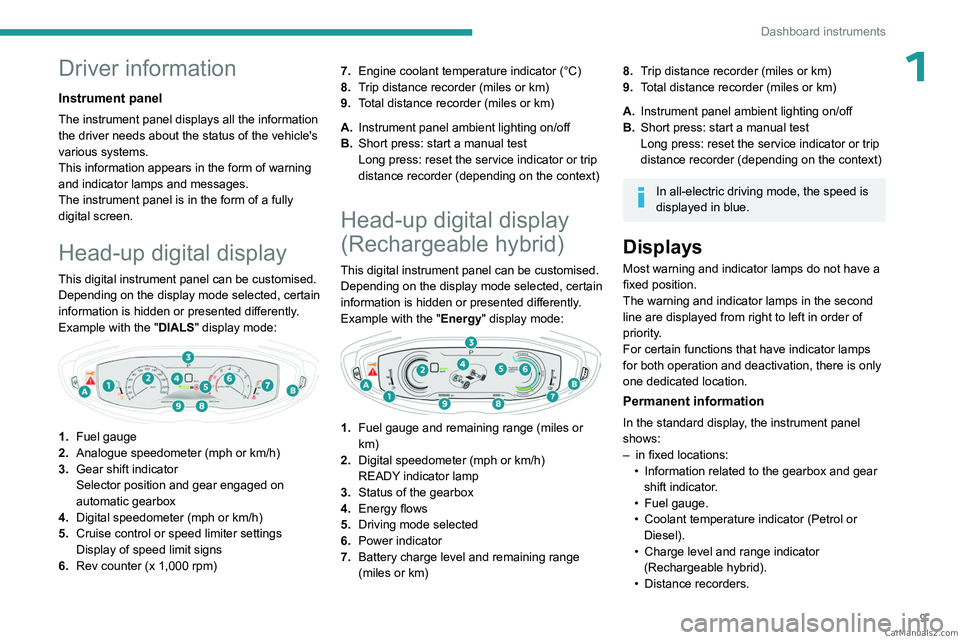
Example with the "DIALS"
display mode:
1.Fuel gauge
2. Analogue speedometer (mph or km/h)
3. Gear shift indicator
Selector position and gear engaged on
automatic gearbox
4. Digital speedometer (mph or km/h)
5. Cruise control or speed limiter settings
Display of speed limit signs
6. Rev counter (x 1,000 rpm) 7.
Engine coolant temperature indicator (°C)
8. Trip distance recorder (miles or km)
9. Total distance recorder (miles or km)
A. Instrument panel ambient lighting on/off
B. Short press: start a manual test
Long press: reset the service indicator or trip
distance recorder (depending on the context)
Head-up digital display
(Rechargeable hybrid)
This digital instrument panel can be customised.
Depending on the display mode selected, certain
information is hidden or presented differently.
Example with the " Energy" display mode:
1.Fuel gauge and remaining range (miles or
km)
2. Digital speedometer (mph or km/h)
READY indicator lamp
3. Status of the gearbox
4. Energy flows
5. Driving mode selected
6. Power indicator
7. Battery charge level and remaining range
(miles or km)
8.Trip distance recorder (miles or km)
9. Total distance recorder (miles or km)
A. Instrument panel ambient lighting on/off
B. Short press: start a manual test
Long press: reset the service indicator or trip
distance recorder (depending on the context)
In all-electric driving mode, the speed is
displayed in blue.
Displays
Most warning and indicator lamps do not have a
fixed position.
The warning and indicator lamps in the second
line are displayed from right to left in order of
priority.
For certain functions that have indicator lamps
for both operation and deactivation, there is only
one dedicated location.
Permanent information
In the standard display, the instrument panel
shows:
–
in fixed locations:
•
Information related to the gearbox and gear
shift indicator
.
•
Fuel gauge.
•
Coolant temperature indicator (Petrol or
Diesel).
•
Charge level and range indicator
(Rechargeable hybrid).
•
Distance recorders. CarM an uals 2 .c o m
Page 12 of 292
10
Dashboard instruments
– in variable locations:
• Digital speedometer .
•
Status or alert messages displayed
temporarily
.
Optional information
Depending on the selected display mode and
active features, additional information may be
displayed:
–
Rev counter (Petrol or Diesel).
–
T
rip computer.
–
Driving aid functions.
–
Speed limiter or cruise control.
–
Media currently playing.
–
Navigation instructions.
–
Engine information from the Dynamic Pack.
–
Power flow (Rechargeable hybrid).
Customising the instrument
panel
Depending on version, the appearance of the
instrument panel may be customisable (colour
and/or display mode).
Display language and units
These depend on the multifunction
screen settings (configuration menu).
When travelling abroad, the speed must be
shown in the official units of the country you
are driving in (mph, miles or km/h, km).
As a safety measure, these adjustments must be carried out with the vehicle
stationary.
Choosing the display colour
Depending on version, the instrument panel
display colour depends on the colour scheme
chosen in this system.
This function is set via the Settings touch screen menu.
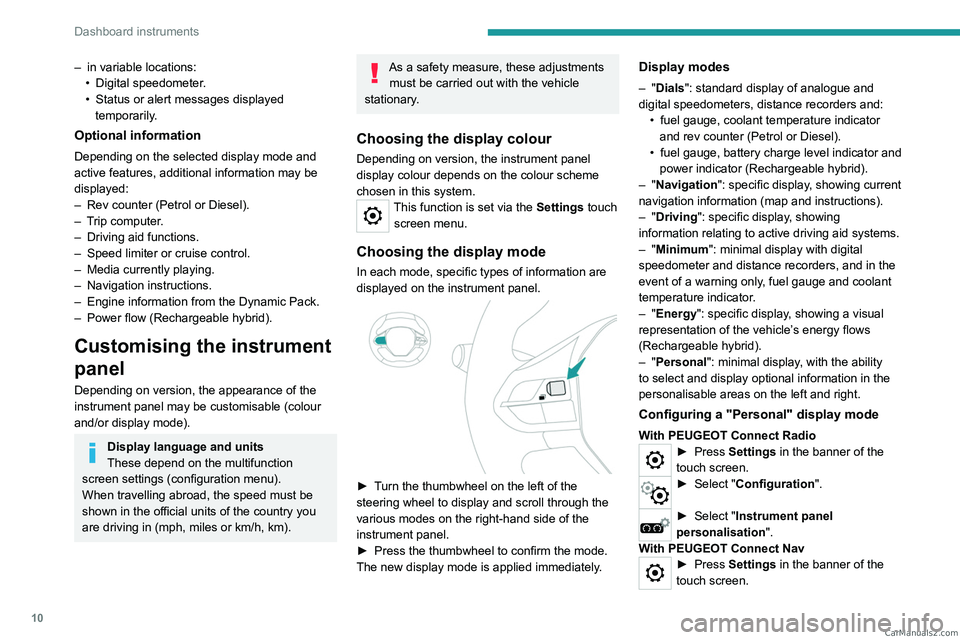
Choosing the display mode
In each mode, specific types of information are
displayed on the instrument panel.
► Turn the thumbwheel on the left of the
steering wheel to display and scroll through the
various modes on the right-hand side of the
instrument panel.
►
Press the thumbwheel to confirm the mode.
The new display mode is applied immediately
.
Display modes
– "Dials": standard display of analogue and
digital speedometers, distance recorders and: •
fuel gauge, coolant temperature indicator
and rev counter (Petrol or Diesel).
•
fuel gauge, battery charge level indicator and
power indicator (Rechargeable hybrid).
–
"Navigation": specific display, showing current
navigation information (map and instructions).
–
"Driving": specific display, showing
information relating to active driving aid systems.
–
"Minimum": minimal display with digital
speedometer and distance recorders, and in the
event of a warning only, fuel gauge and coolant
temperature indicator.
–
"Energy": specific display, showing a visual
representation of the vehicle’s energy flows
(Rechargeable hybrid).
–
"Personal": minimal display, with the ability
to select and display optional information in the
personalisable areas on the left and right.
Configuring a "Personal" display mode
With PEUGEOT Connect Radio► Press Settings in the banner of the
touch screen.
► Select " Configuration ".
► Select "Instrument panel
personalisation".
With PEUGEOT Connect Nav
► Press Settings in the banner of the
touch screen. CarM an uals 2 .c o m
Page 67 of 292

65
Ease of use and comfort
3– remove the device and try again in a quarter
of an hour .
If the problem persists, have the system checked
by a PEUGEOT dealer or a qualified workshop.
Front armrest
It includes a refrigerated storage space.
Opening
► Press the lever beneath the cover.
The cover opens in two parts.
Storage
The small removable tray can be installed in
front of or behind the storage space.
A ventilation nozzle circulates fresh air.
Closing
► Fold back the two parts of the cover .
Mats
Fitting
When fitting it on the driver's side, only use
the mountings present on the carpet (a "click"
indicates proper locking).
The other mats are simply laid over the carpet.
Removing/refitting
► To remove it on the driver's side, move the
seat backwards and unclip the fasteners.
►
T
o refit it, position the mat and secure it by
pressing down.
►
Check that the mat is secured correctly
.
To avoid any risk of jamming the pedals:– Only use mats which are suited to the
fixings already present in the vehicle; these
fixings must be used.
–
Never fit one mat on top of another
.
The use of mats not approved by PEUGEOT
may interfere with access to the pedals and
hinder the operation of the cruise control/
speed limiter.
The approved mats have two fasteners
located underneath the seat. CarM an uals 2 .c o m
Page 133 of 292
131
Driving
6snow or dead leaves on the road or in the
event of damaged bumpers and mirrors.
When reverse gear is engaged, an audible
signal (long beep) indicates that the sensors
may be dirty.
A front or rear impact to the vehicle can
upset the sensors’ settings, which is not
always detected by the system: distance
measurements may be distorted.
The sensors do not systematically detect
obstacles that are too low (pavements, studs)
or too thin (trees, posts, wire fences).
Certain obstacles located in the sensors’ blind
spots may not be detected or may no longer
be detected during the manoeuvre.
Certain materials (fabrics) absorb sound
waves: pedestrians may not be detected.
Maintenance
Clean the bumpers and door mirrors and
the field of vision of the cameras regularly.
When washing your vehicle at high pressure,
direct the spray from at least 30
cm away
from the radar, sensors and cameras.
Mats/Pedal trims
The use of mats or pedal trims not
approved by PEUGEOT may interfere with
the operation of the speed limiter or cruise
control.
To avoid any risk of jamming the pedals:
–
Ensure that the mat is secured correctly
.
– Never fit one mat on top of another.
Units of speed
Ensure that the units of speed displayed
on the instrument panel (mph or km/h) are
those for the country you are driving in.
If this is not the case, when the vehicle is
stationary, set the display to the required
units of speed so that it complies with what is
authorised locally.
In case of doubt, contact a PEUGEOT dealer
or a qualified workshop.
Memorising speeds
This function, used only for the speed limiter
and programmable cruise control, lets you
save speed settings that will subsequently be
proposed for the purpose of configuring these
two systems.
You can memorise multiple speed settings for
each of the two systems.
By default, some speed settings are already
memorised.
As a safety measure, the driver must only change speed settings when stationary.
Changing a speed setting
Speed settings can be activated,
deactivated, selected and changed in the
Driving
/ Vehicle touch screen menu.
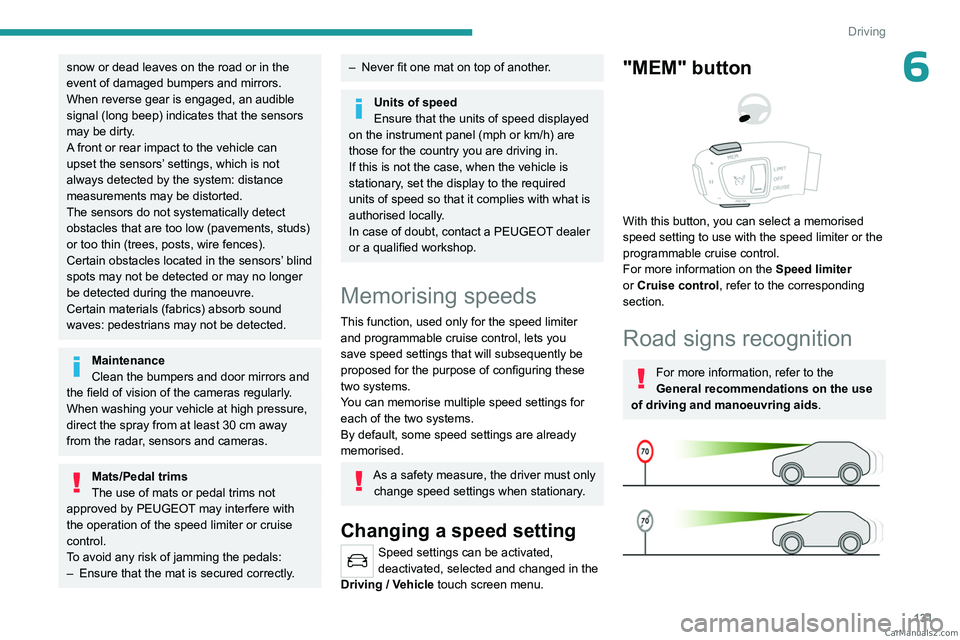
"MEM" button
With this button, you can select a memorised
speed setting to use with the speed limiter or the
programmable cruise control.
For more information on the Speed limiter
or Cruise control, refer to the corresponding
section.
Road signs recognition
For more information, refer to the
General recommendations on the use
of driving and manoeuvring aids .
CarM an uals 2 .c o m
Page 136 of 292
134
Driving
Recommendation
In addition to Road signs recognition, the
driver can select the speed displayed as a speed
setting for the speed limiter or cruise control
using the speed limiter or cruise control 'store'
button.
For more information on the Speed
limiter, Cruise control or Adaptive
cruise control, refer to the corresponding
sections.
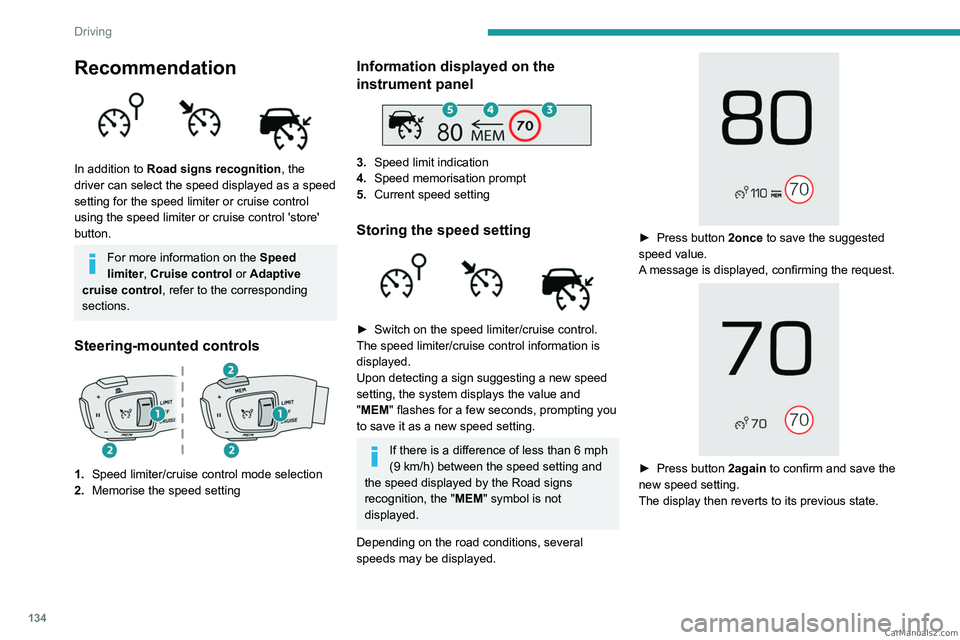
Steering-mounted controls
1. Speed limiter/cruise control mode selection
2. Memorise the speed setting
Information displayed on the
instrument panel
3.Speed limit indication
4. Speed memorisation prompt
5. Current speed setting
Storing the speed setting
► Switch on the speed limiter/cruise control.
The speed limiter/cruise control information is
displayed.
Upon detecting a sign suggesting a new speed
setting, the system displays the value and
"
MEM" flashes for a few seconds, prompting you
to save it as a new speed setting.
If there is a difference of less than 6 mph
(9 km/h) between the speed setting and
the speed displayed by the Road signs
recognition, the " MEM" symbol is not
displayed.
Depending on the road conditions, several
speeds may be displayed.
► Press button 2once to save the suggested
speed value.
A message is displayed, confirming the request.
► Press button 2again to confirm and save the
new speed setting.
The display then reverts to its previous state. CarM an uals 2 .c o m
Page 137 of 292
135
Driving
6Extended Traffic Sign
Recognition
For more information, refer to the
General recommendations on the use
of driving and manoeuvring aids .
This additional system recognises these road
signs and displays them on the instrument panel.
As you approach it, the symbol of the
corresponding sign is displayed on the
instrument panel.
The actual road signs always take priority
over those displayed by the system.
The signs must comply with the Vienna
Convention on road signs.
Activation/Deactivation
The settings are changed via the Driving/Vehicle touch screen menu.
Speed limiter
For more information, refer to the
General recommendations on the use
of driving and manoeuvring aids .
This system prevents the vehicle from
exceeding the speed programmed by the
driver (speed setting).
The speed limiter is switched on manually.
The minimum speed setting is 19 mph (30
km/h).
The speed setting remains in the system
memory when the ignition is switched off.
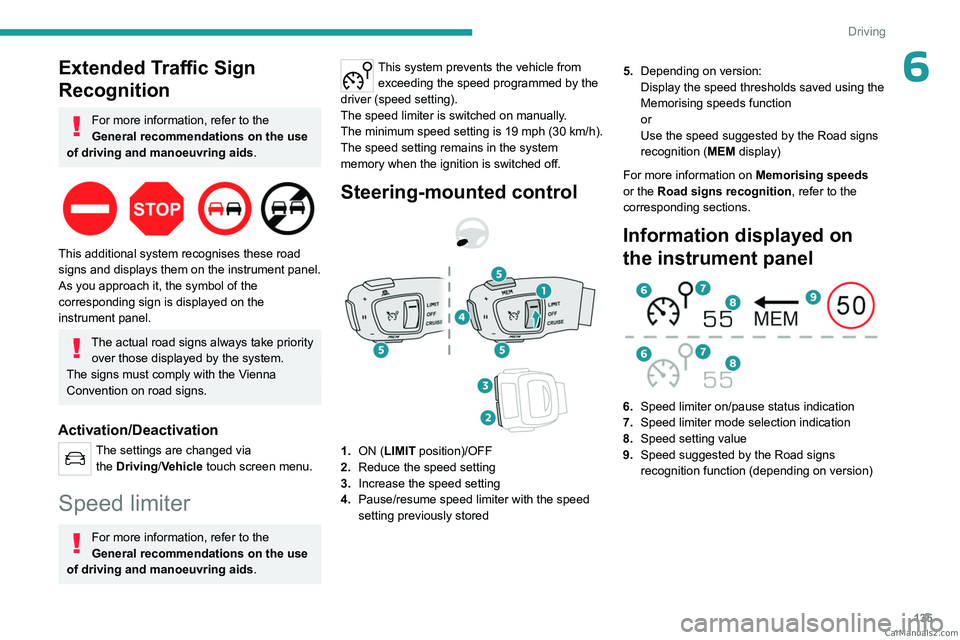
Steering-mounted control
1. ON (LIMIT position)/OFF
2. Reduce the speed setting
3. Increase the speed setting
4. Pause/resume speed limiter with the speed
setting previously stored 5.
Depending on version:
Display the speed thresholds saved using the
Memorising speeds function
or
Use the speed suggested by the Road signs
recognition ( MEM display)
For more information on Memorising speeds
or the Road signs recognition , refer to the
corresponding sections.
Information displayed on
the instrument panel
6. Speed limiter on/pause status indication
7. Speed limiter mode selection indication
8. Speed setting value
9. Speed suggested by the Road signs
recognition function (depending on version) CarM an uals 2 .c o m
Page 138 of 292
136
Driving
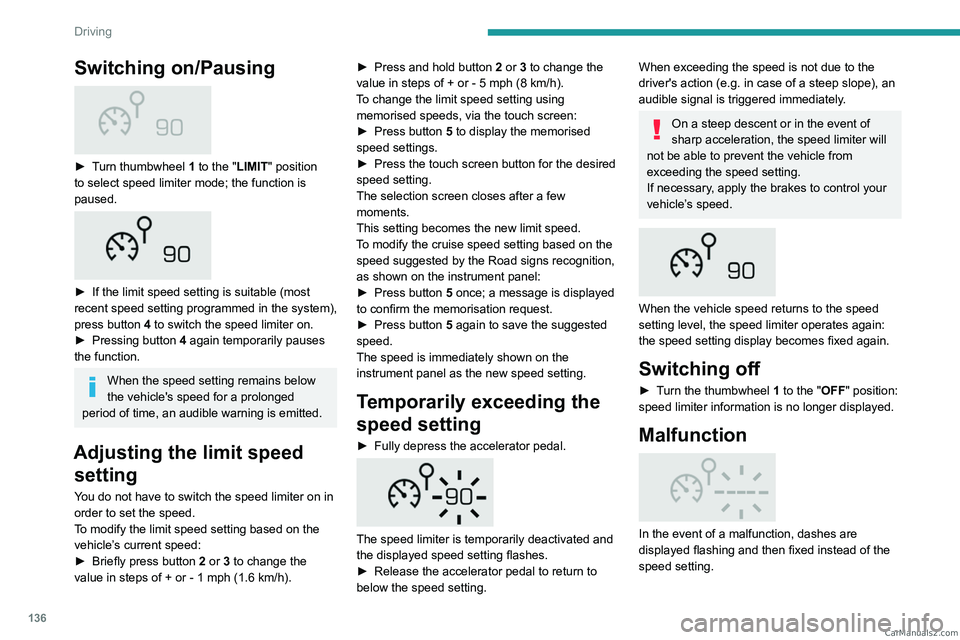
Switching on/Pausing
► Turn thumbwheel 1 to the "LIMIT" position
to select speed limiter mode; the function is
paused.
► If the limit speed setting is suitable (most
recent speed setting programmed in the system),
press button
4 to switch the speed limiter on.
►
Pressing button 4
again temporarily pauses
the function.
When the speed setting remains below
the vehicle's speed for a prolonged
period of time, an audible warning is emitted.
Adjusting the limit speed setting
You do not have to switch the speed limiter on in
order to set the speed.
To modify the limit speed setting based on the
vehicle’s current speed:
►
Briefly press button
2 or 3 to change the
value in steps of +
or - 1 mph (1.6 km/h). ►
Press and hold button
2
or 3 to change the
value in steps of + or - 5 mph (8 km/h).
To change the limit speed setting using memorised speeds, via the touch screen:
►
Press button
5 to display the memorised
speed settings.
►
Press the touch screen button for the desired
speed setting.
The selection screen closes after a few
moments.
This setting becomes the new limit speed.
T
o modify the cruise speed setting based on the
speed suggested by the Road signs recognition,
as shown on the instrument panel:
►
Press button
5 once; a message is displayed
to confirm the memorisation request.
►
Press button
5 again to save the suggested
speed.
The speed is immediately shown on the
instrument panel as the new speed setting.
Temporarily exceeding the
speed setting
► Fully depress the accelerator pedal.
The speed limiter is temporarily deactivated and
the displayed speed setting flashes.
►
Release the accelerator pedal to return to
below the speed setting.
When exceeding the speed is not due to the
driver's action (e.g. in case of a steep slope), an
audible signal is triggered immediately.
On a steep descent or in the event of
sharp acceleration, the speed limiter will
not be able to prevent the vehicle from
exceeding the speed setting.
If necessary, apply the brakes to control your
vehicle’s speed.
When the vehicle speed returns to the speed
setting level, the speed limiter operates again:
the speed setting display becomes fixed again.
Switching off
► Turn the thumbwheel 1 to the "OFF" position:
speed limiter information is no longer displayed.
Malfunction
In the event of a malfunction, dashes are
displayed flashing and then fixed instead of the
speed setting. CarM an uals 2 .c o m
Page 272 of 292
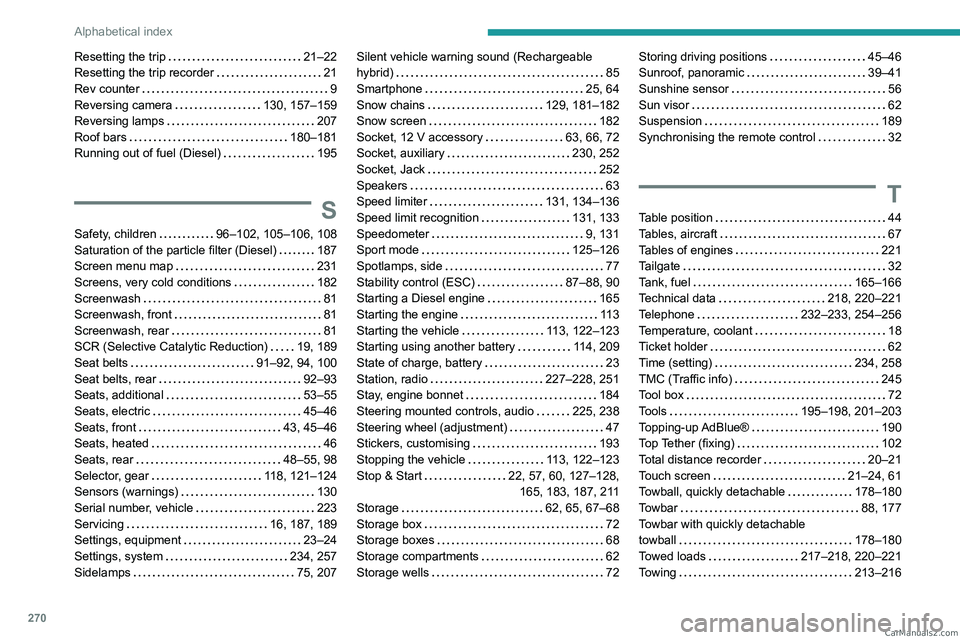
270
Alphabetical index
Resetting the trip 21–22
Resetting the trip recorder
21
Rev counter
9
Reversing camera
130, 157–159
Reversing lamps
207
Roof bars
180–181
Running out of fuel (Diesel)
195
S
Safety, children 96–102, 105–106, 108
Saturation of the particle filter (Diesel)
187
Screen menu map
231
Screens, very cold conditions
182
Screenwash
81
Screenwash, front
81
Screenwash, rear
81
SCR (Selective Catalytic Reduction)
19, 189
Seat belts
91–92, 94, 100
Seat belts, rear
92–93
Seats, additional
53–55
Seats, electric
45–46
Seats, front
43, 45–46
Seats, heated
46
Seats, rear
48–55, 98
Selector, gear
118, 121–124
Sensors (warnings)
130
Serial number, vehicle
223
Servicing
16, 187, 189
Settings, equipment
23–24
Settings, system
234, 257
Sidelamps
75, 207
Silent vehicle warning sound (Rechargeable
hybrid)
85
Smartphone
25, 64
Snow chains
129, 181–182
Snow screen
182
Socket, 12 V accessory
63, 66, 72
Socket, auxiliary
230, 252
Socket, Jack
252
Speakers
63
Speed limiter
131, 134–136
Speed limit recognition
131, 133
Speedometer
9, 131
Sport mode
125–126
Spotlamps, side
77
Stability control (ESC)
87–88, 90
Starting a Diesel engine
165
Starting the engine
11 3
Starting the vehicle
113, 122–123
Starting using another battery
114, 209
State of charge, battery
23
Station, radio
227–228, 251
Stay, engine bonnet
184
Steering mounted controls, audio
225, 238
Steering wheel (adjustment)
47
Stickers, customising
193
Stopping the vehicle
113, 122–123
Stop & Start
22, 57, 60, 127–128, 165, 183, 187, 211
Storage
62, 65, 67–68
Storage box
72
Storage boxes
68
Storage compartments
62
Storage wells
72Storing driving positions 45–46
Sunroof, panoramic
39–41
Sunshine sensor
56
Sun visor
62
Suspension
189
Synchronising the remote control
32
T
Table position 44
Tables, aircraft
67
Tables of engines
221
Tailgate
32
Tank, fuel
165–166
Technical data
218, 220–221
Telephone
232–233, 254–256
Temperature, coolant
18
Ticket holder
62
Time (setting)
234, 258
TMC (Traffic info)
245
Tool box
72
Tools
195–198, 201–203
Topping-up AdBlue®
190
Top Tether (fixing)
102
Total distance recorder
20–21
Touch screen
21–24, 61
Towball, quickly detachable
178–180
Towbar
88, 177
Towbar with quickly detachable
towball
178–180
Towed loads
217–218, 220–221
Towing
213–216 CarM an uals 2 .c o m