wipers Peugeot 3008 Hybrid 4 2013 Owner's Manual
[x] Cancel search | Manufacturer: PEUGEOT, Model Year: 2013, Model line: 3008 Hybrid 4, Model: Peugeot 3008 Hybrid 4 2013Pages: 340, PDF Size: 16.54 MB
Page 4 of 340
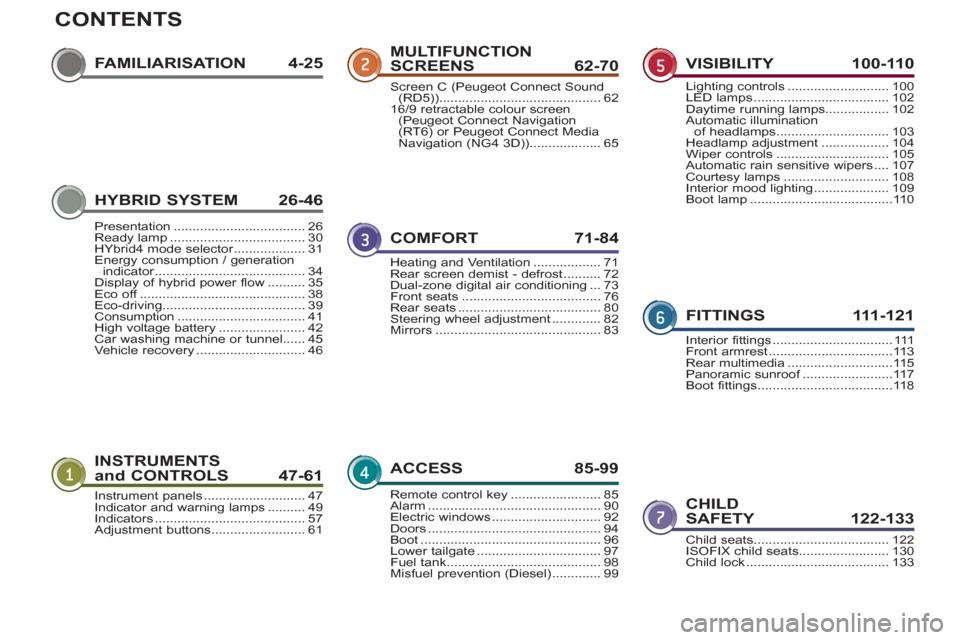
CONTENTS
FAMILIARISATION 4-25
INSTRUMENTS
and CONTROLS 47-61
CHILD
SAFETY 122-133
MULTIFUNCTION
SCREENS 62-70
COMFORT 71-8
4
ACCESS 85-99
VISIBILITY 100-110
FITTINGS 111-12
1
Instrument panels...........................47Indicator and warning lamps ..........49Indicators........................................57Adjustment buttons.........................61Child seats ....................................122ISOFIX child seats........................130Child lock ......................................133
Screen C (Peugeot Connect Sound(RD5)) ...........................................6216/9 retractable colour screen (Peugeot Connect Navigation(RT6) or Peugeot Connect Media
Navigation (NG4 3D))...................65
Heating and Ventilation ..................71Rear screen demist - defrost ..........72Dual-zone digital air conditioning...73Front seats.....................................76Rear seats......................................80Steering wheel adjustment .............82Mirrors............................................83
Remote control key........................85Alarm ..............................................90Electric windows.............................92Doors ..............................................94Boot................................................96Lower tailgate.................................97Fuel tank.........................................98Misfuel prevention (Diesel) .............99
Lighting controls...........................100LED lamps....................................102Daytime running lamps.................102Automatic illuminationof headlamps..............................103Headlamp adjustment ..................104Wiper controls..............................105Automatic rain sensitive wipers....107Courtesy lamps ............................108Interior mood lighting....................109Boot lamp......................................110
Interior fittings................................111Front armrest.................................113Rear multimedia............................115Panoramic sunroof........................f117Boot fittings....................................118
HYBRID SYSTEM 26-46
Presentation...................................26Ready lamp ....................................30HYbrid4 mode selector...................r31Energy consumption / generationindicator........................................r34Display of hybrid power flow..........35Eco off............................................f38Eco-driving......................................39Consumption..................................41High voltage battery .......................42Car washing machine or tunnel......45Vehicle recovery.............................46
Page 16 of 340
14
FA
M
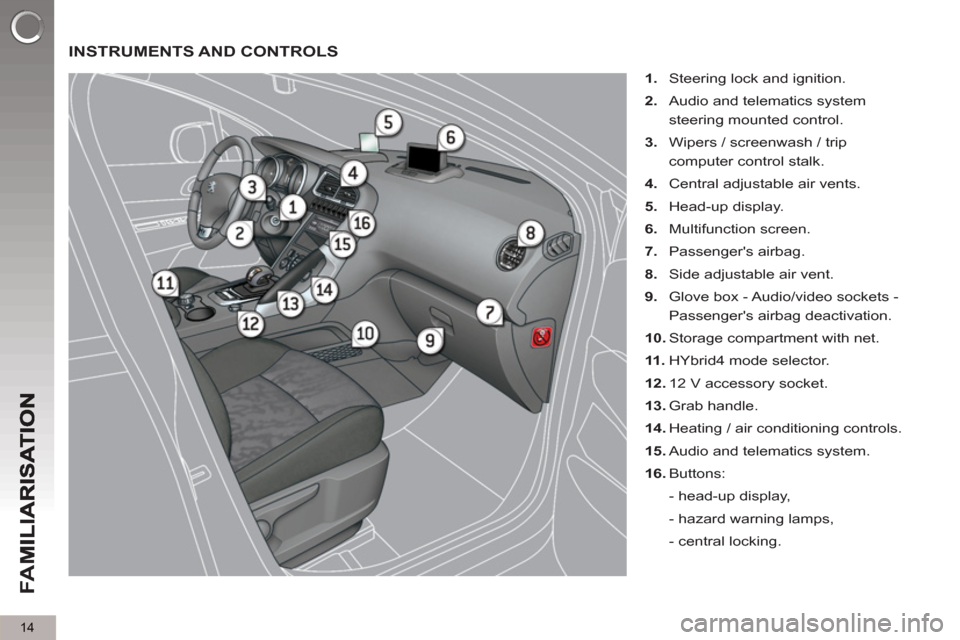
INSTRUMENTS AND CONTROLS
1.
Steering lock and ignition.
2.
Audio and telematics system
steering mounted control.
3.
Wipers / screenwash / trip
computer control stalk.
4.
Central adjustable air vents.
5.
Head-up display.
6.
Multifunction screen.
7.
Passenger's airbag.
8.
Side adjustable air vent.
9.
Glove box - Audio/video sockets -
Passenger's airbag deactivation.
10.
Storage compartment with net.
11 .
HYbrid4 mode selector.
12.
12 V accessory socket.
13.
Grab handle.
14.
Heating / air conditioning controls.
15.
Audio and telematics system.
16.
Buttons:
- head-up display,
- hazard warning lamps,
- central locking.
Page 20 of 340
18
FA
M
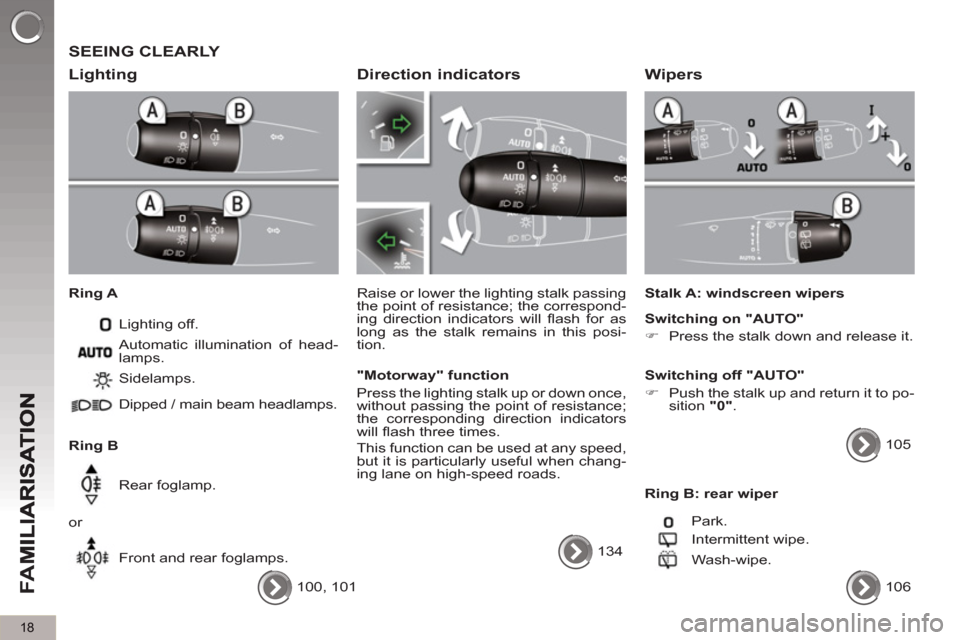
SEEING CLEARLY
Li
ghting
Ring A
Lighting off.
Ring B Sidelamps.
Dipped / main beam headlamps.
Rear foglamp.
or
Front and rear foglamps. Automatic illumination of head-
lamps.
100, 101
Direction indicators
Raise or lower the lighting stalk passing
the point of resistance; the correspond-
ing direction indicators will fl ash for as
long as the stalk remains in this posi-
tion.
"Motorway" function
Press the lighting stalk up or down once,
without passing the point of resistance;
the corresponding direction indicators
will fl ash three times.
This function can be used at any speed,
but it is particularly useful when chang-
ing lane on high-speed roads.
134
Wipers
Stalk A: windscreen wipers
Switching on "AUTO"
)
Press the stalk down and release it.
Switching off "AUTO"
)
Push the stalk up and return it to po-
sition "0"
.
105
Ring B: rear wiper
Park.
Intermittent wipe.
Wash-wipe.
106
Page 105 of 340
VIS
103
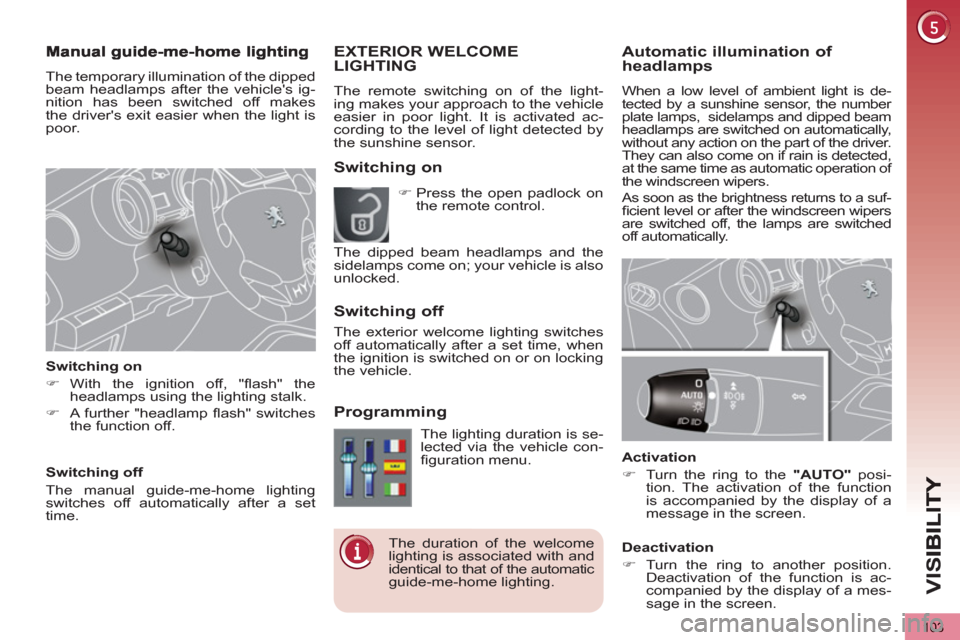
Automatic illumination of headlamps
When a low level of ambient light is de-
tected by a sunshine sensor, the number
plate lamps, sidelamps and dipped beam
headlamps are switched on automatically,
without any action on the part of the driver.
They can also come on if rain is detected,
at the same time as automatic operation of
the windscreen wipers.
As soon as the brightness returns to a suf-fi cient level or after the windscreen wipers
are switched off, the lamps are switched
off automatically.
Activation
)
Turn the ring to the "AUTO"
posi-
tion. The activation of the function
is accompanied by the display of a
message in the screen.
Deactivation
)
Turn the ring to another position.
Deactivation of the function is ac-
companied by the display of a mes-
sage in the screen.
EXTERIOR WELCOME LIGHTING
The remote switching on of the light-
ing makes your approach to the vehicle
easier in poor light. It is activated ac-
cording to the level of light detected by
the sunshine sensor.
Switching on
Switchin
g off
Pro
gramming
The lighting duration is se-
lected via the vehicle con-
fi guration menu.
The duration of the welcome
lighting is associated with and
identical to that of the automatic
guide-me-home lighting.
)
Press the open padlock on
the remote control.
The dipped beam headlamps and the
sidelamps come on; your vehicle is also
unlocked.
The exterior welcome lighting switches
off automatically after a set time, when
the ignition is switched on or on locking
the vehicle.
The temporary illumination of the dipped
beam headlamps after the vehicle's ig-
nition has been switched off makes
the driver's exit easier when the light is
poor.
Switching on
)
With the ignition off, "fl ash" the
headlamps using the lighting stalk.
)
A further "headlamp fl ash" switches
the function off.
Switching off
The manual guide-me-home lighting
switches off automatically after a set
time.
Page 107 of 340
VIS
105
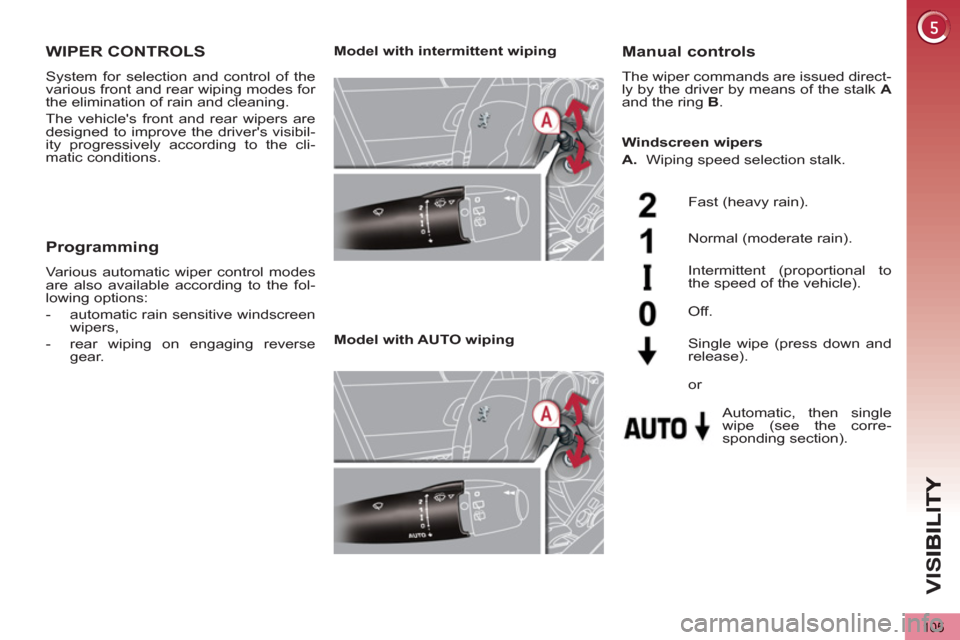
WIPER CONTROLS
System for selection and control of the
various front and rear wiping modes for
the elimination of rain and cleaning.
The vehicle's front and rear wipers are
designed to improve the driver's visibil-
ity progressively according to the cli-
matic conditions.
Manual controls
The wiper commands are issued direct-
ly by the driver by means of the stalk A
and the ring B
.
Model with intermittent wiping
Model with AUTO wiping
Fast (heavy rain).
Normal (moderate rain).
Intermittent (proportional to
the speed of the vehicle).
Automatic, then single
wipe (see the corre-
sponding section).
Off.
Single wipe (press down and
release).
Windscreen wipers
A.
Wiping speed selection stalk.
or
Programming
Various automatic wiper control modes
are also available according to the fol-
lowing options:
- automatic rain sensitive windscreen
wipers,
- rear wiping on engaging reverse
gear.
Page 108 of 340
VIS
106
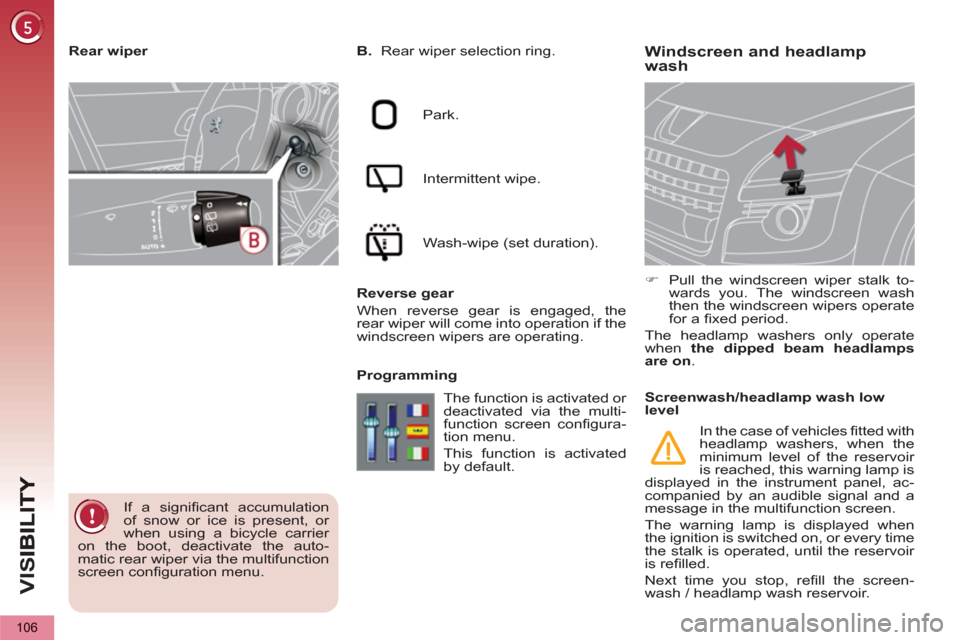
Windscreen and headlamp
wash
B.
Rear wiper selection ring.
Park.
Intermittent wipe.
Wash-wipe (set duration).
Reverse gear
When reverse gear is engaged, the
rear wiper will come into operation if the
windscreen wipers are operating.
Programming
)
Pull the windscreen wiper stalk to-
wards you. The windscreen wash
then the windscreen wipers operate
for a fi xed period.
The headlamp washers only operate
when the dipped beam headlamps
are on
.
Rear wiper
If a signifi cant accumulation
of snow or ice is present, or
when using a bicycle carrier
on the boot, deactivate the auto-
matic rear wiper via the multifunction
screen confi guration menu. The function is activated or
deactivated via the multi-
function screen confi gura-
tion menu.
This function is activated
by default.
Screenwash/headlamp wash low
level
In the case of vehicles fi tted with
headlamp washers, when the
minimum level of the reservoir
is reached, this warning lamp is
displayed in the instrument panel, ac-
companied by an audible signal and a
message in the multifunction screen.
The warning lamp is displayed when
the ignition is switched on, or every time
the stalk is operated, until the reservoir
is refi lled.
Next time you stop, refi ll the screen-
wash / headlamp wash reservoir.
Page 109 of 340
VIS
107
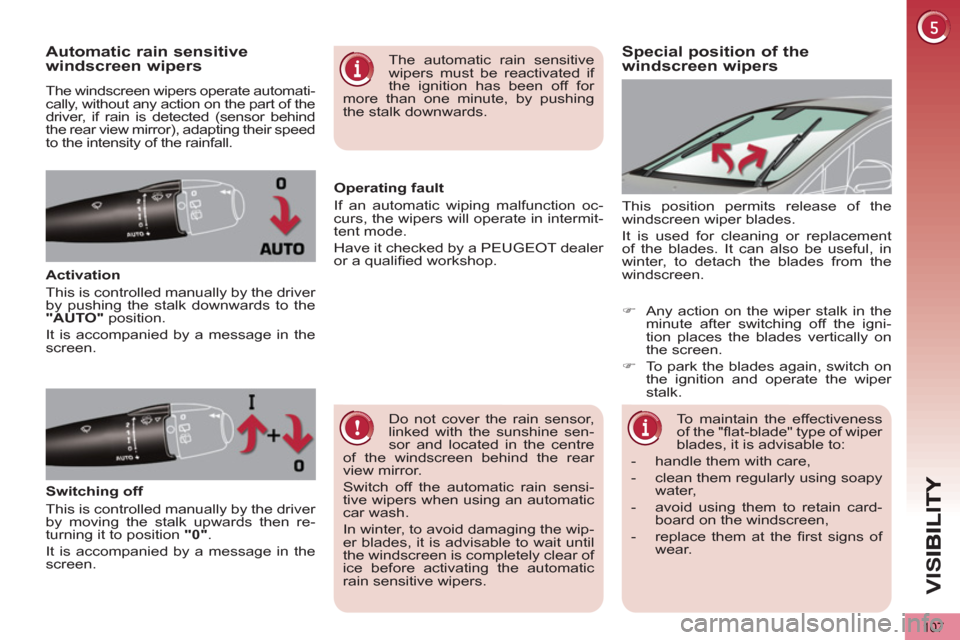
Special position of the
windscreen wipersAutomatic rain sensitive
windscreen wipers
The windscreen wipers operate automati-
cally, without any action on the part of the
driver, if rain is detected (sensor behind
the rear view mirror), adapting their speed
to the intensity of the rainfall.
Activation
This is controlled manually by the driver
by pushing the stalk downwards to the
"AUTO"
position.
It is accompanied by a message in the
screen. This position permits release of the
windscreen wiper blades.
It is used for cleaning or replacement
of the blades. It can also be useful, in
winter, to detach the blades from the
windscreen.
Do not cover the rain sensor,
linked with the sunshine sen-
sor and located in the centre
of the windscreen behind the rear
view mirror.
Switch off the automatic rain sensi-
tive wipers when using an automatic
car wash.
In winter, to avoid damaging the wip-
er blades, it is advisable to wait until
the windscreen is completely clear of
ice before activating the automatic
rain sensitive wipers.
The automatic rain sensitive
wipers must be reactivated if
the ignition has been off for
more than one minute, by pushing
the stalk downwards.
Switching off
This is controlled manually by the driver
by moving the stalk upwards then re-
turning it to position "0"
.
It is accompanied by a message in the
screen.
Operating fault
If an automatic wiping malfunction oc-
curs, the wipers will operate in intermit-
tent mode.
Have it checked by a PEUGEOT dealer
or a qualifi ed workshop.
To maintain the effectiveness
of the "fl at-blade" type of wiper
blades, it is advisable to:
- handle them with care,
- clean them regularly using soapy
water,
- avoid using them to retain card-
board on the windscreen,
- replace them at the fi rst signs of
wear.
)
Any action on the wiper stalk in the
minute after switching off the igni-
tion places the blades vertically on
the screen.
)
To park the blades again, switch on
the ignition and operate the wiper
stalk.
Page 192 of 340
PRACTICAL INFORMATION
190
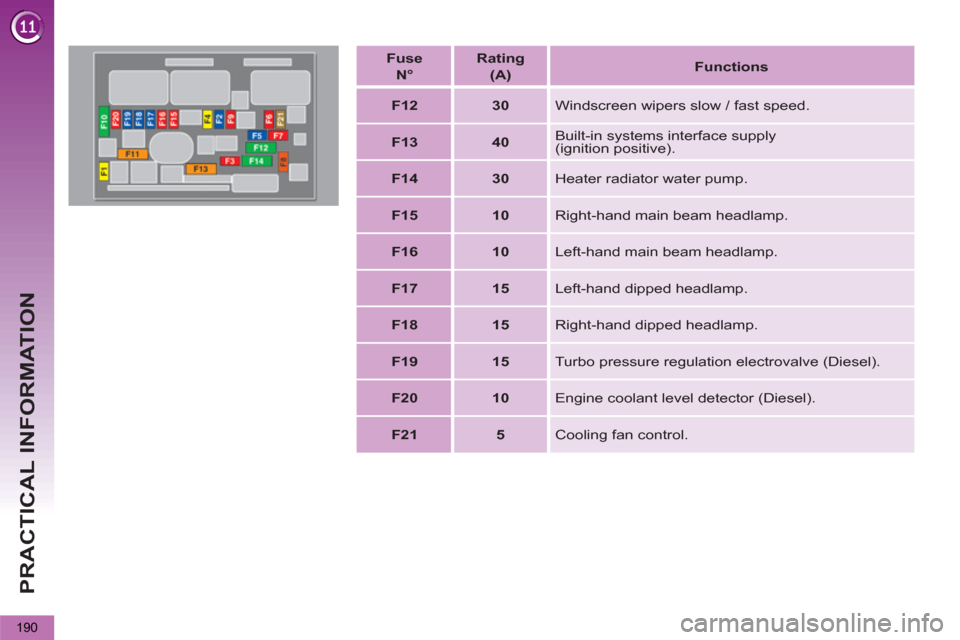
Fuse
N°
Rating
(A)
Functions
F12
30
Windscreen wipers slow / fast speed.
F13
40
Built-in systems interface supply
(ignition positive).
F14
30
Heater radiator water pump.
F15
10
Right-hand main beam headlamp.
F16
10
Left-hand main beam headlamp.
F17
15
Left-hand dipped headlamp.
F18
15
Right-hand dipped headlamp.
F19
15
Turbo pressure regulation electrovalve (Diesel).
F20
10
Engine coolant level detector (Diesel).
F21
5
Cooling fan control.
Page 197 of 340
PRACTICAL INFORMATION
195
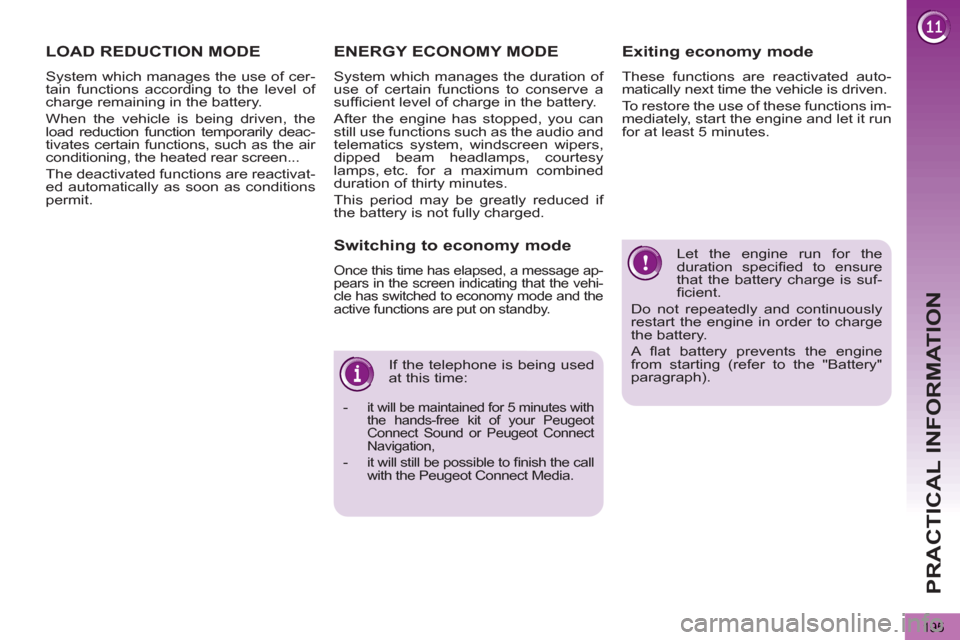
Let the engine run for the
duration specifi ed to ensure
that the battery charge is suf-
fi cient.
Do not repeatedly and continuously
restart the engine in order to charge
the battery.
A fl at battery prevents the engine
from starting (refer to the "Battery"
paragraph). If the telephone is being used
at this time:
-
it will be maintained for 5 minutes with
the hands-free kit of your Peugeot
Connect Sound or Peugeot Connect
Navigation,
- it will still be possible to fi nish the call
with the Peugeot Connect Media.
Exiting economy mode
These functions are reactivated auto-
matically next time the vehicle is driven.
To restore the use of these functions im-
mediately, start the engine and let it run
for at least 5 minutes.
LOAD REDUCTION MODE
System which manages the use of cer-
tain functions according to the level of
charge remaining in the battery.
When the vehicle is being driven, the
load reduction function temporarily deac-
tivates certain functions, such as the air
conditioning, the heated rear screen...
The deactivated functions are reactivat-
ed automatically as soon as conditions
permit.
ENERGY ECONOMY MODE
System which manages the duration of
use of certain functions to conserve a
suffi cient level of charge in the battery.
After the engine has stopped, you can
still use functions such as the audio and
telematics system, windscreen wipers,
dipped beam headlamps, courtesy
lamps, etc. for a maximum combined
duration of thirty minutes.
This period may be greatly reduced if
the battery is not fully charged.
Switching to economy mode
Once this time has elapsed, a message ap-
pears in the screen indicating that the vehi-
cle has switched to economy mode and the
active functions are put on standby.
Page 303 of 340
301
11
2
3
3
1
4
2
2
1
4
4
2
2
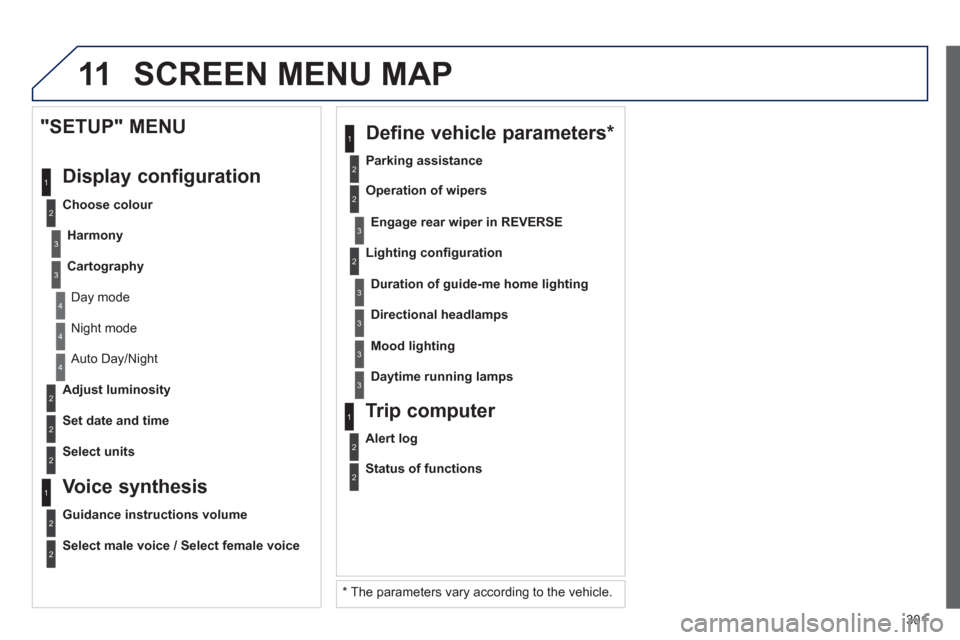
Night mode
Auto Day/Night
Ad
just luminosity
Set date and time
"SETUP" MENU
Displa
y configuration
Choose colour
Harmon
y
Cartography
Day mode
Voice synthesis
Guidance instructions volume
Select male voice / Select female voice
2
Select units
SCREEN MENU MAP
2
3
3
2
Lighting confi guration
Parkin
g assistance
En
gage rear wiper in REVERSE
Duration of guide-me home lighting
1
Define vehicle parameters *
2
Operation of wipers
3Directional headlamps
3Mood lighting
3Daytime running lamps
*
The parameters var
y according to the vehicle.
2
Alert log
1
Trip computer
2
Status of functions