bluetooth Peugeot 301 2015 User Guide
[x] Cancel search | Manufacturer: PEUGEOT, Model Year: 2015, Model line: 301, Model: Peugeot 301 2015Pages: 285, PDF Size: 13.55 MB
Page 160 of 285
158
301_en_Chap09_info-pratiques_ed01-2014
* To avoid any risk of jamming of the pedals:
-
e
nsure that the mat is positioned and
secured correctly,
-
n
ever fit one mat on top of another.
"Protection":
mats*, seat covers, alarm, front and rear mud
flaps, boot liner, boot carpet, side rubbing
strips, bumper protective strips, transparent
boot sill protector, shield under engine...
The fitting of electrical equipment or
accessories which are not recommended
by PEUGEOT may result in a failure of
your vehicle's electronic system and
excessive electrical consumption.
Contact a PEUGEOT dealer
for information on the range of
recommended equipment and
accessories.
Installation of radio
communication transmitters
Before installing any after-market radio
communication transmitter, you can
contact a PEUGEOT dealer for the
specification of transmitters which can
be fitted (frequency, maximum power,
aerial position, specific installation
requirements), in line with the Vehicle
Electromagnetic Compatibility
Directive (2004/104/EC).Depending on the legislation in force in
the country, certain safety equipment
may be compulsory: high visibility
safety vests, warning triangles,
breathalyzers, spare bulbs, spare fuses,
fire extinguisher, first aid kit, mud flaps
at the rear of the vehicle.
By visiting a PEUGEOT dealer, you can also
obtain products for cleaning and maintenance
(exterior and interior) - including ecological
products in the "TECHNATURE" range, topping
up products (screenwash...), touch-up pens
and paint aerosols for the exact colour of your
vehicle, refills (cartridge for the temporary
puncture repair kit...), ...
"Multimedia":
audio systems, portable satellite and semi-
integral navigation systems, fixed and
Bluetooth hands-free kit, universal solar
charger, speakers and wiring, 230 V socket,
rear multimedia bracket, telephone bracket...
Practical information
Page 179 of 285
177
301_en_Chap12a_RD5(RD45)_ed01-2014
Your audio system is coded in such a way that it will
only operate in your vehicle.
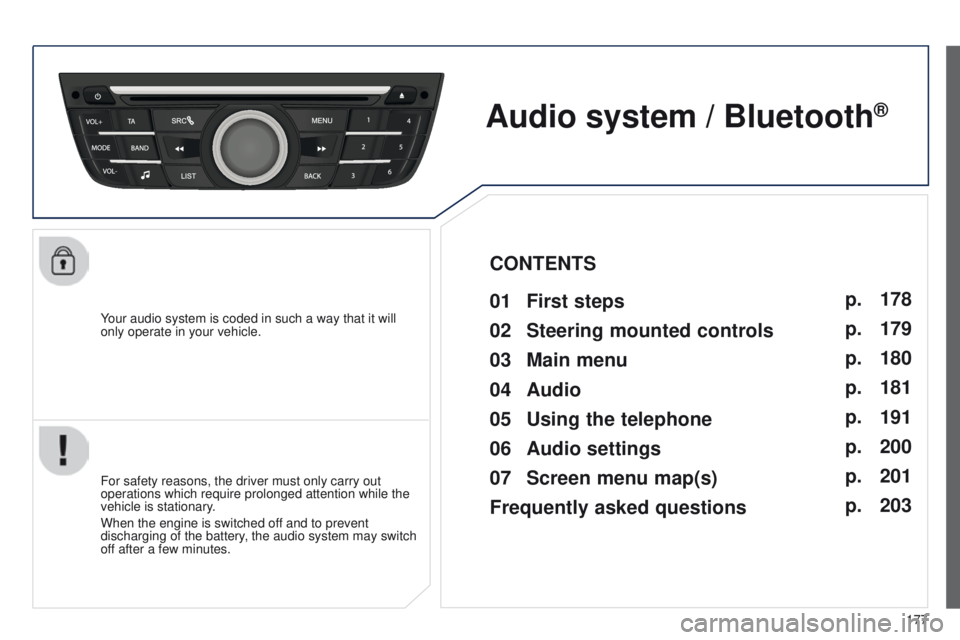
Audio system / Bluetooth®
01 First steps
For safety reasons, the driver must only carry out
operations which require prolonged attention while the
vehicle is stationary.
When the engine is switched off and to prevent
discharging of the battery, the audio system may switch
off after a few minutes.
CONTENTS
02
Steering mounted
controls
03
Main
menu
04
Audio
05
Using
the telephone
06
Audio
settings
07
Screen menu map(s)
Frequently
asked questions p.
p.
p.
p.
p.
p.
p.
p.
178
179
180
181
191
200
201
203
Page 182 of 285
03
180
301_en_Chap12a_RD5(RD45)_ed01-2014
MAIN MENU
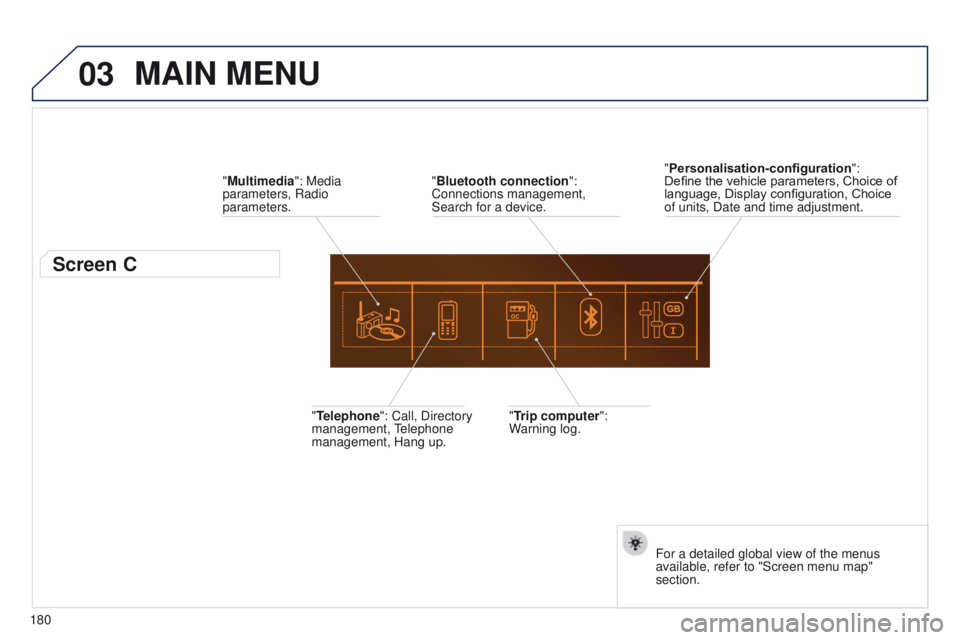
"Multimedia": Media
parameters, Radio
parameters.
Screen C
"Trip computer":
Warning log.
"Telephone": Call, Directory
management, Telephone
management, Hang up. "Personalisation-configuration
":
Define the vehicle parameters, Choice of
language, Display configuration, Choice
of units, Date and time adjustment.
For a detailed global view of the menus
available, refer to "Screen menu map"
section.
"Bluetooth connection
":
Connections management,
Search for a device.
Page 192 of 285
04
190
301_en_Chap12a_RD5(RD45)_ed01-2014
AUDIO
Streaming - Playing audio files via
Bluetooth
Depending on the compatibility of the phonePair/connect the telephone: see the "USING THE
TELEPHONE" section.
Streaming allows music files on a telephone to be heard via the
vehicle's speakers.
The telephone must support the appropriate bluetooth profiles
(Profiles A2DP / AVRCP).
Activate the streaming source by pressing SRC/
TEL. Control of playback is via the audio system. The
contextual information can be displayed in the screen.
In certain cases, playing of the audio files must be initiated from the
telephone.
The audio quality depends on the quality of the transmission from
the telephone.
Play mode
The play modes available are:
-
Normal: the tracks are played in order
, depending on the
classification of the selected files.
-
Random: the tracks in an album or folder are played in a random
order
.
-
Random all: all of the tracks saved in the media are played in
random order
.
-
Repeat: the tracks played are only those from the current album
or folder
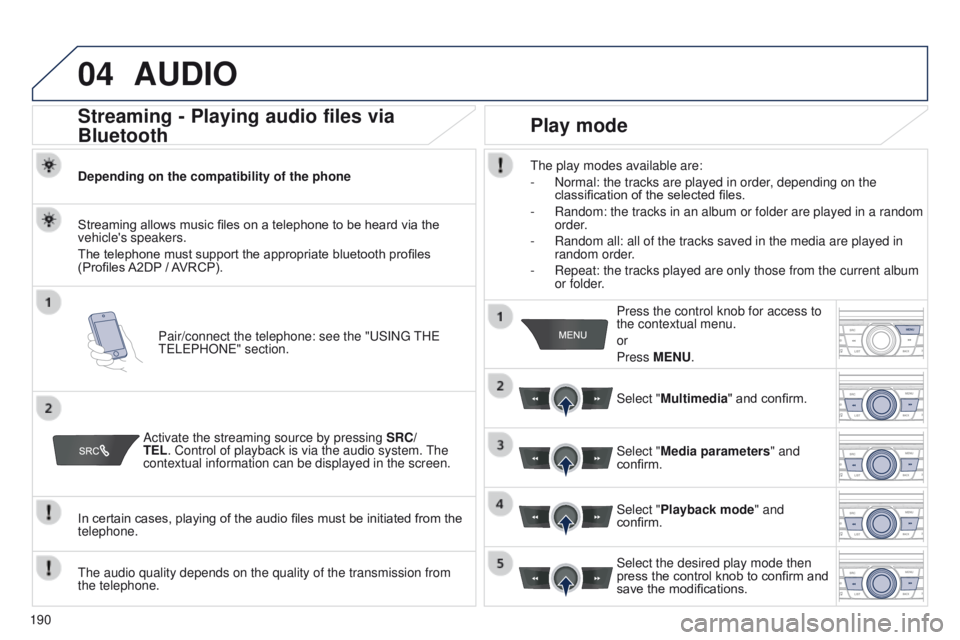
.Press the control knob for access to
the contextual menu.
or
Press MENU.
Select "Multimedia" and confirm.
Select "Media parameters " and
confirm.
Select "Playback mode" and
confirm.
Select the desired play mode then
press the control knob to confirm and
save the modifications.
Page 193 of 285
_ed01-2014
USING THE TELEPHONE
Pairing a telephone
First connection
The services offered depend on the network, the SIM card and the compatibility of the B\
luetooth tel")
05
191
301_en_Chap12a_RD5(RD45)_ed01-2014
USING THE TELEPHONE
Pairing a telephone
First connection
The services offered depend on the network, the SIM card and the compatibility of the B\
luetooth telephone used.
Consult your telephone's manual and your operator to find out which services are available to you.
Activate the telephone's Bluetooth function and
ensure that it is "visible to all" (refer to the telephone
user guide). Press MENU. A window is displayed "
Search in progress…".
Select the telephone to be connected
from the list. Only one telephone can
be connected at a time. Select "Search for a device".
For safety reasons and because they require prolonged attention on the p\
art of the driver, the operations for pairing of the Bluetooth mobile
telephone with the Bluetooth hands-free system of your audio system must\
be carried out with the
vehicle stationary and the ignition on.
Visit www.peugeot.co.uk for more information (compatibility, additional help, ...).
Select "Bluetooth connection " and
confirm.
Page 194 of 285
05
192
301_en_Chap12a_RD5(RD45)_ed01-2014
USING THE TELEPHONE
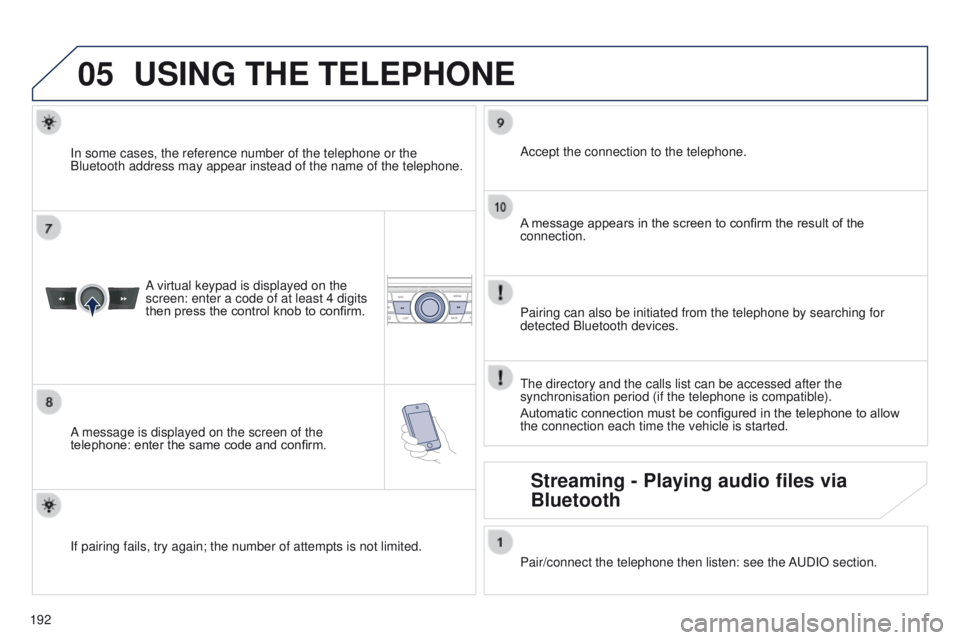
A virtual keypad is displayed on the
screen: enter a code of at least 4 digits
then press the control knob to confirm.
A message is displayed on the screen of the
telephone: enter the same code and confirm. A message appears in the screen to confirm the result of the
connection.
Pairing can also be initiated from the telephone by searching for
detected Bluetooth devices. Accept the connection to the telephone.
If pairing fails, try again; the number of attempts is not limited. The directory and the calls list can be accessed after the
synchronisation period (if the telephone is compatible).
Automatic connection must be configured in the telephone to allow
the connection each time the vehicle is started.
In some cases, the reference number of the telephone or the
Bluetooth address may appear instead of the name of the telephone.
Pair/connect the telephone then listen: see the AUDIO section.
Streaming - Playing audio files via
Bluetooth
Page 195 of 285
05
193
301_en_Chap12a_RD5(RD45)_ed01-2014
USING THE TELEPHONE
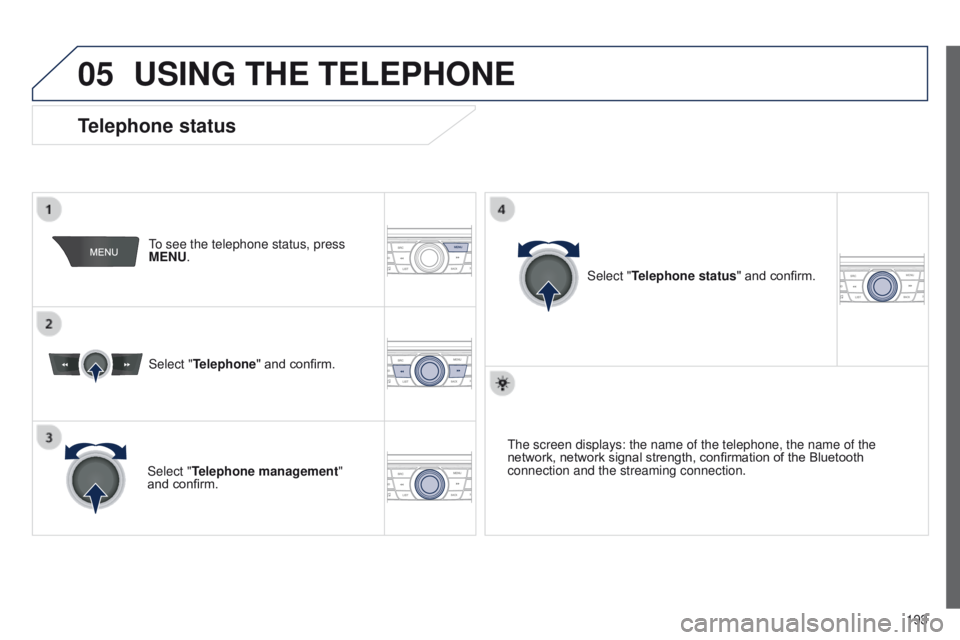
To see the telephone status, press
MENU.
Select "Telephone" and confirm.
Select "Telephone management"
and confirm. Select "Telephone status" and confirm.
Telephone status
The screen displays: the name of the telephone, the name of the
network, network signal strength, confirmation of the Bluetooth
connection and the streaming connection.
Page 196 of 285
05
194
301_en_Chap12a_RD5(RD45)_ed01-2014
USING THE TELEPHONE
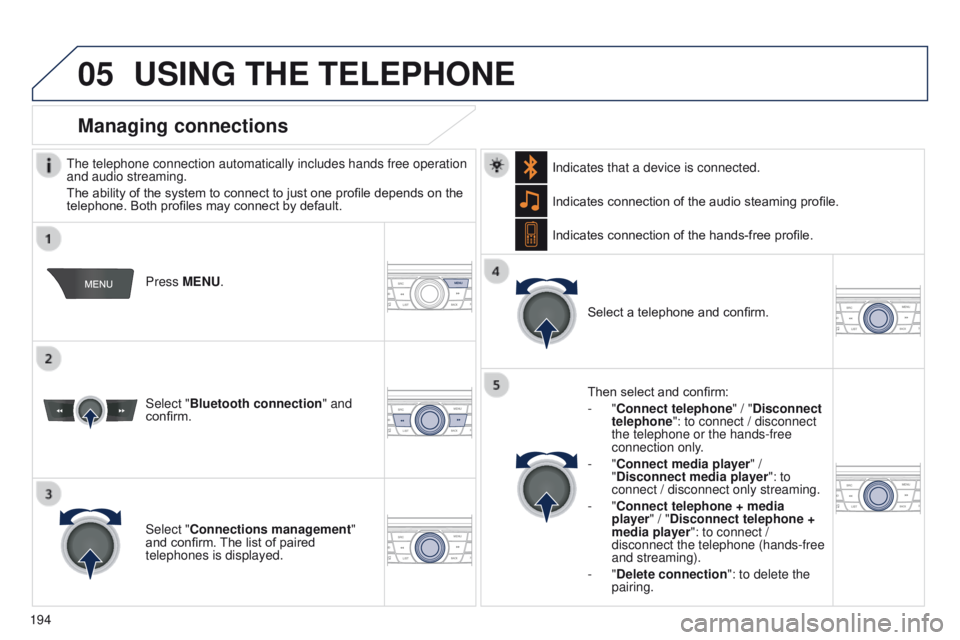
The telephone connection automatically includes hands free operation
and audio streaming.
The ability of the system to connect to just one profile depends on the
telephone. Both profiles may connect by default. Press MENU.
Select "Bluetooth connection " and
confirm. Indicates connection of the audio steaming profile.
Managing connections
Select "Connections management"
and confirm. The list of paired
telephones is displayed. Select a telephone and confirm.
Indicates connection of the hands-free profile.
Then select and confirm:
- "Connect telephone
" / "Disconnect
telephone": to connect / disconnect
the telephone or the hands-free
connection only.
- "Connect media player" /
"Disconnect media player": to
connect / disconnect only streaming.
- "Connect telephone + media
player" / "Disconnect telephone +
media player": to connect /
disconnect the telephone (hands-free
and streaming).
-
"Delete connection": to delete the
pairing.
Indicates that a device is connected.
Page 200 of 285
05
198
301_en_Chap12a_RD5(RD45)_ed01-2014
USING THE TELEPHONE
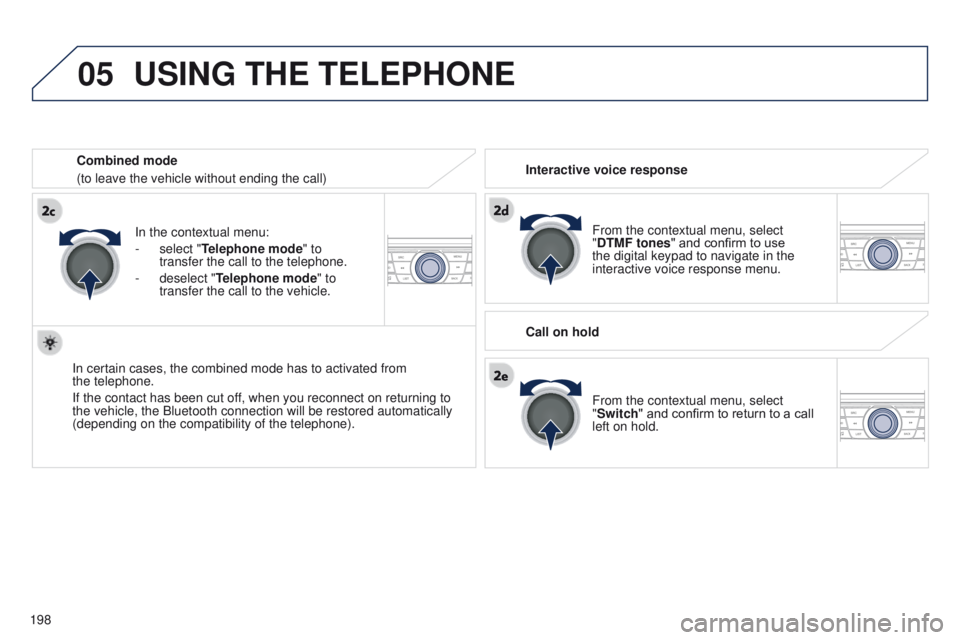
From the contextual menu, select
"DTMF tones" and confirm to use
the digital keypad to navigate in the
interactive voice response menu.
From the contextual menu, select
"Switch" and confirm to return to a call
left on hold.
Interactive voice response
Call on hold
In the contextual menu:
-
select "
Telephone mode " to
transfer the call to the telephone.
-
deselect "
Telephone mode" to
transfer the call to the vehicle.
In certain cases, the combined mode has to activated from
the
telephone.
If the contact has been cut off, when you reconnect on returning to
the vehicle, the Bluetooth connection will be restored automatically
(depending on the compatibility of the telephone). Combined mode
(to leave the vehicle without ending the call)
Page 201 of 285
05
199
301_en_Chap12a_RD5(RD45)_ed01-2014
USING THE TELEPHONE
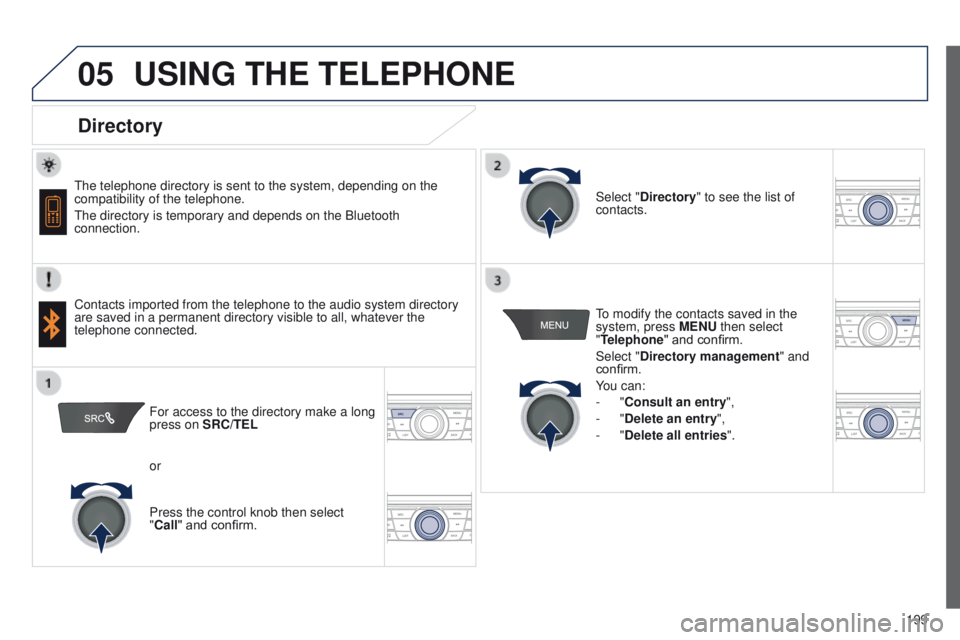
Directory
The telephone directory is sent to the system, depending on the
compatibility of the telephone.
The directory is temporary and depends on the Bluetooth
connection.
Contacts imported from the telephone to the audio system directory
are saved in a permanent directory visible to all, whatever the
telephone connected.To modify the contacts saved in the
system, press MENU then select
"Telephone" and confirm.
Select "Directory management
" and
confirm.
You can:
-
"Consult an entry",
-
"Delete an entry",
-
"Delete all entries".
Select "Directory
" to see the list of
contacts.
For access to the directory make a long
press on SRC/TEL
or
Press the control knob then select
"Call" and confirm.