bluetooth Peugeot 301 2015 Owner's Guide
[x] Cancel search | Manufacturer: PEUGEOT, Model Year: 2015, Model line: 301, Model: Peugeot 301 2015Pages: 285, PDF Size: 13.55 MB
Page 279 of 285
Audio and Telematics
16
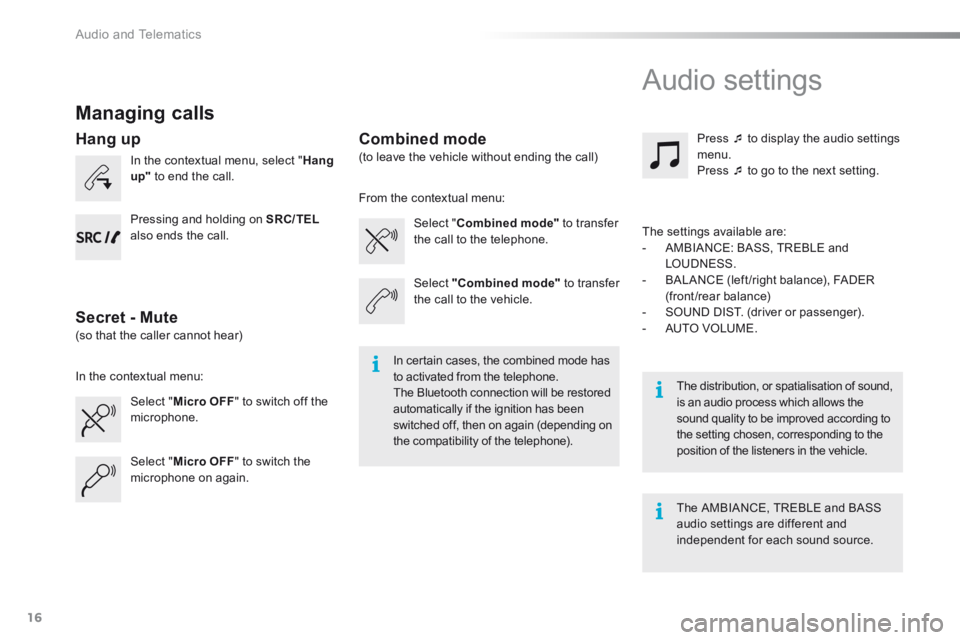
Managing calls
In the contextual menu, select " Hang up" to end the call.
Select " Micro OFF " to switch off the microphone.
Select " Combined mode" to transfer the call to the telephone.
Press to display the audio settings menu. Press to go to the next setting.
Select " Micro OFF " to switch the microphone on again.
Select "Combined mode" to transfer the call to the vehicle.
In the contextual menu:
From the contextual menu:
In certain cases, the combined mode has to activated from the telephone. The Bluetooth connection will be restored automatically if the ignition has been switched off, then on again (depending on the compatibility of the telephone).
The distribution, or spatialisation of sound, is an audio process which allows the sound quality to be improved according to the setting chosen, corresponding to the position of the listeners in the vehicle.
Hang up
Secret - Mute
Combined mode
Pressing and holding on SRC/TEL
also ends the call.
(so that the caller cannot hear)
(to leave the vehicle without ending the call)
The settings available are: - AMBIANCE: BASS, TREBLE and LOUDNESS. - BALANCE (left /right balance), FADER (front/rear balance) - SOUND DIST. (driver or passenger). - AUTO VOLUME.
The AMBIANCE, TREBLE and BASS audio settings are different and independent for each sound source.
Audio settings
Page 281 of 285
Audio and Telematics
18
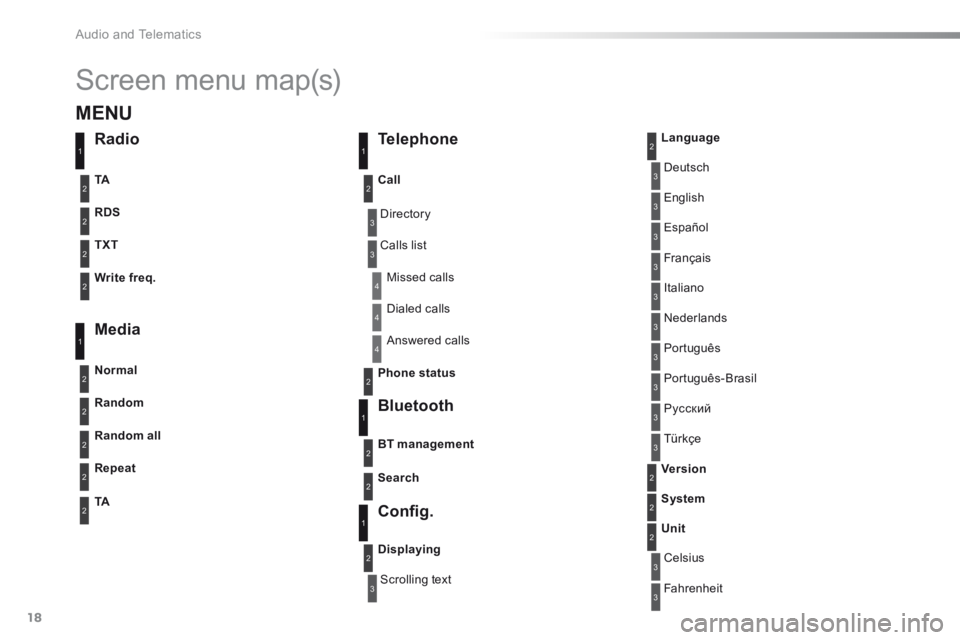
Screen menu map(s)
3
3
3
3
3
3
3
3
3
3
3
3
3
3
3
4
4
4
Directory
Scrolling text
Deutsch
Italiano
Español
Português
Р у с с к и й
Celsius
English
Nederlands
Français
Português-Brasil
Türkçe
Fahrenheit
Calls list
Missed calls
Dialed calls
Answered calls
Radio Telephone
Bluetooth
C o n fi g .
RDS
TXT
Write freq.
Media
Normal
Random all
TACall
BT management
Unit
Search
Displaying
Language
Version
System
Phone status
11
1
1
22
2
2
2
2
2
2
2
2
2
2
2
1
2
2
MENU
Random
Repeat
TA
2
2
2
Page 284 of 285
.
Audio and Telematics 21
301-add-2_en_Chap12_RDE2_ed01-2014
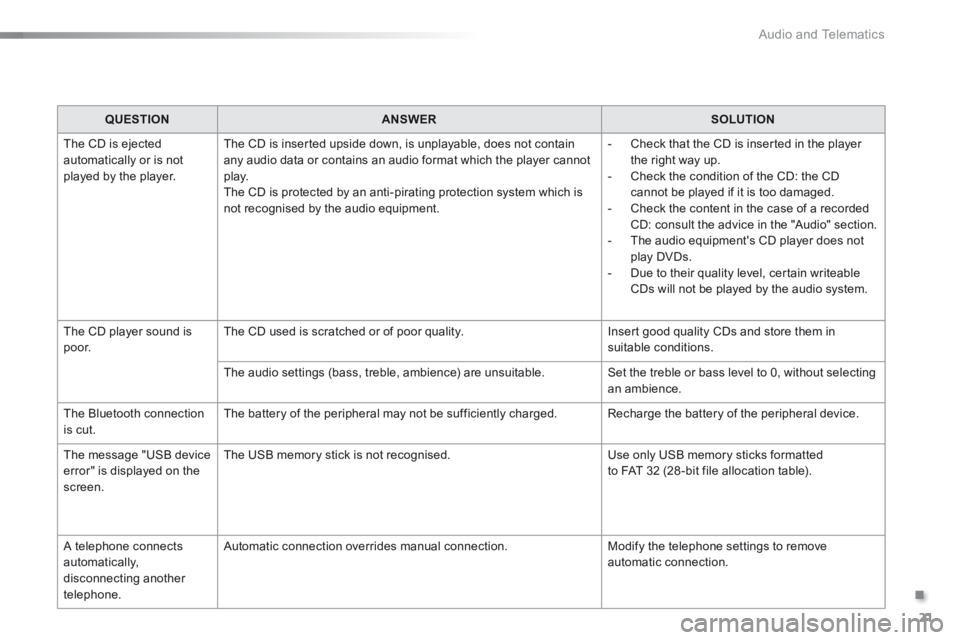
QUESTIONANSWERSOLUTION
The CD is ejected automatically or is not played by the player.
The CD is inserted upside down, is unplayable, does not contain any audio data or contains an audio format which the player cannot p l ay. The CD is protected by an anti-pirating protection system which is not recognised by the audio equipment.
- Check that the CD is inserted in the player the right way up. - Check the condition of the CD: the CD cannot be played if it is too damaged. - Check the content in the case of a recorded CD: consult the advice in the "Audio" section. - The audio equipment's CD player does not play DVDs. - Due to their quality level, certain writeable CDs will not be played by the audio system.
The CD player sound is p o o r. The CD used is scratched or of poor quality. Insert good quality CDs and store them in suitable conditions.
The audio settings (bass, treble, ambience) are unsuitable. Set the treble or bass level to 0, without selecting an ambience.
The Bluetooth connection is cut. The battery of the peripheral may not be sufficiently charged. Recharge the battery of the peripheral device.
The message "USB device error" is displayed on the screen.
The USB memory stick is not recognised. Use only USB memory sticks formatted to FAT 32 (28 -bit file allocation table).
A telephone connects automatically, disconnecting another telephone.
Automatic connection overrides manual connection. Modify the telephone settings to remove automatic connection.