phone Peugeot 301 2015 Owner's Guide
[x] Cancel search | Manufacturer: PEUGEOT, Model Year: 2015, Model line: 301, Model: Peugeot 301 2015Pages: 285, PDF Size: 13.55 MB
Page 203 of 285
07
201
301_en_Chap12a_RD5(RD45)_ed01-2014
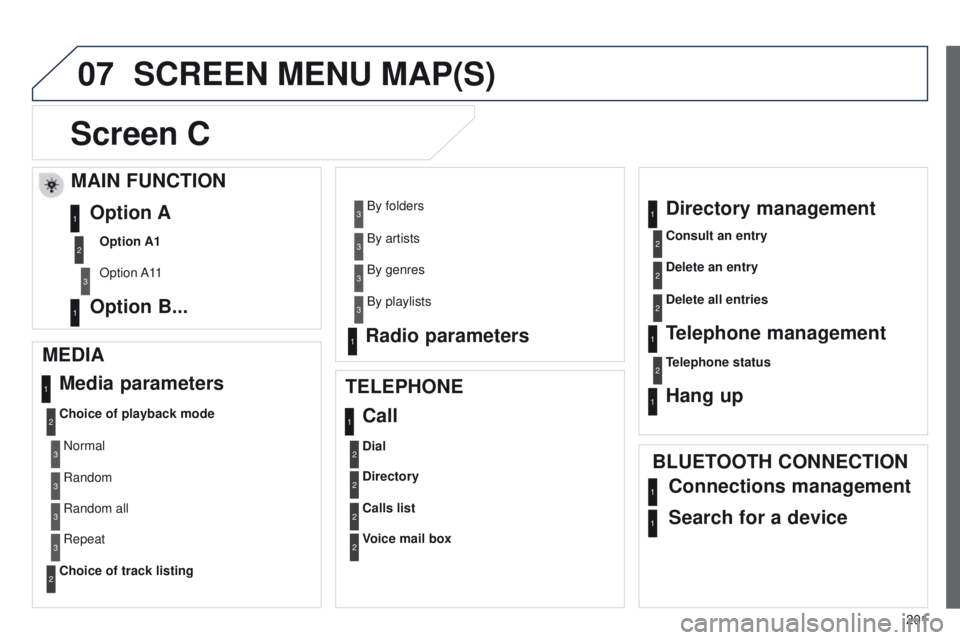
SCREEN MENU MAP(S)
Screen C
MEDIA Media parameters
Choice of playback mode
Choice of track listing
TELEPHONE
Call
Dial
Directory
Calls list
Voice mail box
Directory management
Consult an entry
Delete an entry
Delete all entries
Telephone management
Telephone status
Hang up
BLUETOOTH CONNECTION
Normal
Random
Random all
Repeat By folders
By artists
By genres
By playlists
Radio parameters
1
2
2
1
2
2
2
2
1
2
2
2
1
2
1
1
1
3
3
3
3
3
3
3
3
1
Connections management
Search for a device
MAIN FUNCTION
Option A1
Option A11
Option A
Option B...1
2
3
1
Page 207 of 285
205
301_en_Chap12a_RD5(RD45)_ed01-2014
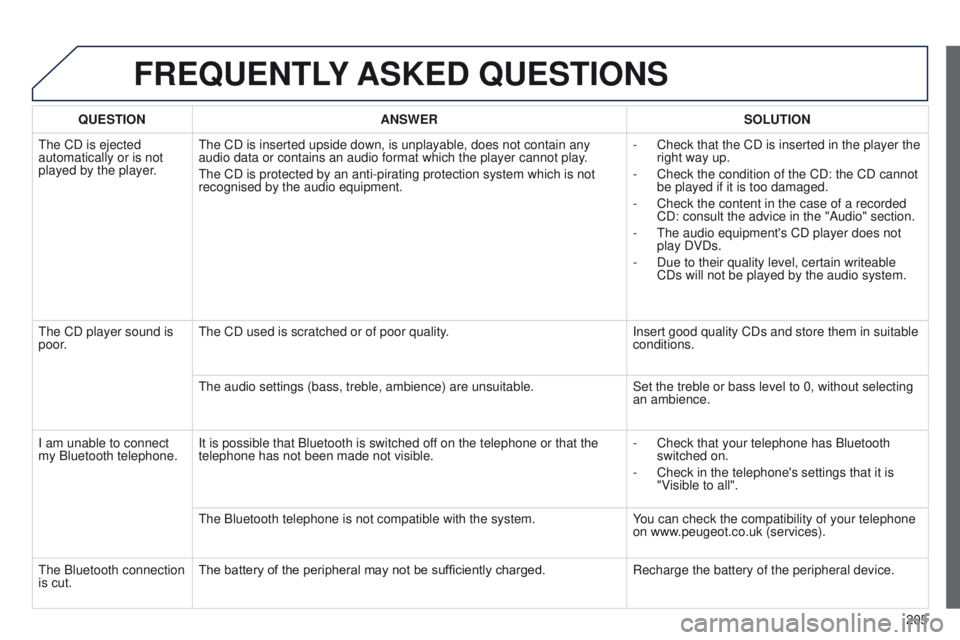
FREqUENTLY ASKED q UESTIONS
qUESTION ANSWER SOLUTION
The CD is ejected
automatically or is not
played by the player
.The CD is inserted upside down, is unplayable, does not contain any
audio data or contains an audio format which the player cannot play.
The CD is protected by an anti-pirating protection system which is not
recognised by the audio equipment. -
Check that the CD is inserted in the player the
right way up.
-
Check the condition of the CD: the CD cannot
be played if it is too damaged.
-
Check the content in the case of a recorded
CD: consult the advice in the "Audio" section.
-
The audio equipment's CD player does not
play DVDs.
-
Due to their quality level, certain writeable
CDs will not be played by the audio system.
The CD player sound is
poor
. The CD used is scratched or of poor quality.
Insert good quality CDs and store them in suitable
conditions.
The audio settings (bass, treble, ambience) are unsuitable. Set the treble or bass level to 0, without selecting
an ambience.
I am unable to connect
my Bluetooth telephone. It is possible that Bluetooth is switched off on the telephone or that the
telephone has not been made not visible. -
Check that your telephone has Bluetooth
switched on.
-
Check in the telephone's settings that it is
"V
isible to all".
The Bluetooth telephone is not compatible with the system. You can check the compatibility of your telephone
on www.peugeot.co.uk (services).
The Bluetooth connection
is cut. The battery of the peripheral may not be sufficiently charged.
Recharge the battery of the peripheral device.
Page 208 of 285
206
301_en_Chap12a_RD5(RD45)_ed01-2014
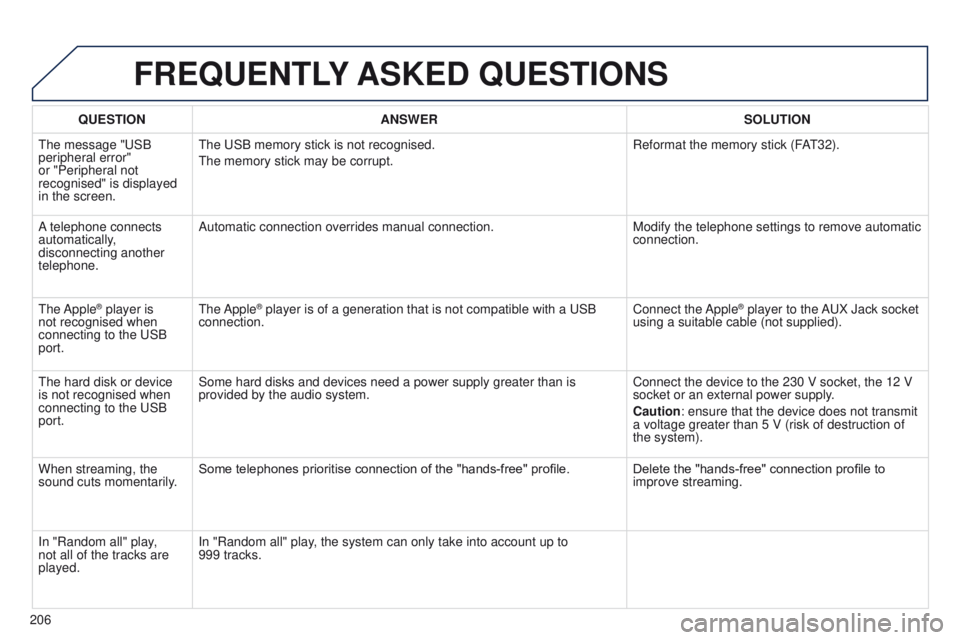
FREqUENTLY ASKED q UESTIONS
qUESTION ANSWER SOLUTION
The message "USB
peripheral error"
or "Peripheral not
recognised" is displayed
in the screen. The USB memory stick is not recognised.
The memory stick may be corrupt.
Reformat the memory stick (F
AT32).
A telephone connects
automatically,
disconnecting another
telephone. Automatic connection overrides manual connection.
Modify the telephone settings to remove automatic
connection.
The Apple
® player is
not recognised when
connecting to the USB
port. The Apple® player is of a generation that is not compatible with a USB
connection. Connect the Apple® player to the AUX Jack socket
using a suitable cable (not supplied).
The hard disk or device
is not recognised when
connecting to the USB
port. Some hard disks and devices need a power supply greater than is
provided by the audio system.
Connect the device to the 230 V socket, the 12 V
socket or an external power supply.
Caution: ensure that the device does not transmit
a voltage greater than 5 V (risk of destruction of
the system).
When streaming, the
sound cuts momentarily. Some telephones prioritise connection of the "hands-free" profile.
Delete the "hands-free" connection profile to
improve streaming.
In "Random all" play,
not all of the tracks are
played. In "Random all" play, the system can only take into account up to
999
tracks.
Page 234 of 285
232
301_en_Chap14_index-alpha_ed01-2014
Replacing the oil filter ...................................16 9
Replacing the passenger compartment filter
...................................... 169
Replacing wiper blades ...........................8 8 , 151
Resetting the service indicator
........................................................ 21
Resetting the trip recorder
..............................22
Rev counter
..................................................... 10
Reversing lamps
........................................... 140
Roof bars
....................................................... 16
0
Routine checks
..................................... 16 9, 170
Running out of fuel (Diesel)
..........................12
1
Safety for children
....................98, 10 0, 103 -117
Screen C, monochrome (Audio system / Bluetooth) ...................................................... 26
Screen menu map
.........................201, 202, 220
Screen, monochrome
...........................201, 220
Screen, multifunction (with audio equipment)
............................................ 26, 180
Screenwash fluid level
..................................168
Screenwash, front
........................................... 87
Screen-wash reservoir
.................................168
Seat adjustment
...............................
...............40
Seat belts
......................................... 9
6, 98, 109
Seats, rear
....................................................... 42
Serial number, vehicle
.................................. 17
6
Service indicator
............................................. 20
Servicing
...............................
............................8
Setting the clock
............................................. 23
S
Towing another vehicle .................................15 3
Three flashes (direction indicators) ................90
Traction control (ASR)
....................................95
Traffic information (TA)
.................................182
Tr a i l e r
............................................................ 15 4
Trip computer
............................................ 24-25
Trip distance recorder
..................................... 22
Tyre pressures
.............................................. 176
Ty r e s
.................................................................. 8
Tyre under-inflation detection
........................................... 16, 91, 93
Table of weights
.................................... 17
2 , 174
Tables of engines
.................................. 171, 173
Tables of fuses
.............................................. 142
Ta n k , f u e l
....................................................... 11 9
Technical data
........................................ 171-174
Telephone
..................................................... 193
Temporary tyre repair kit ...............................12 2
Third brake lamp
........................................... 141
To o l s
...................................................... 128, 129
Total distance recorder
................................... 22
To w b a r
........................................................... 15 4
Towed loads
.......................................... 172 , 174Under floor storage
......................................... 59
Under-inflation (detection)
.................. 16
, 91- 93
Unlocking
..............................
..........................30
Unlocking the boot
.......................................... 30
Vanity mirror
.................................................... 56
V
entilation
..............................
.............46-48, 50
T
U
V
Shields for very cold conditions ................... 15 6
Sidelamps ....................................... 81, 138, 140
Side repeater
..............................
..................13 9
Snow chains
.................................................. 13
5
Spare wheel
...............................
...........128, 129
Speed limiter
................................................... 75
Speedometer
.................................................. 10
Stability control (ESP)
..................................... 95
Start
...............................
................................148
Starting the engine
................................... 61- 63
Steering mounted controls, audio
........................................................... 179
Storage
...................................................... 55-57
Sun visor
......................................................... 56
Switching off the engine
........................... 61
- 63
Synchronising the remote control
...................32
Systems, ASR and ESP
..................................95
Alphabetical index
Page 267 of 285
Audio and Telematics
4
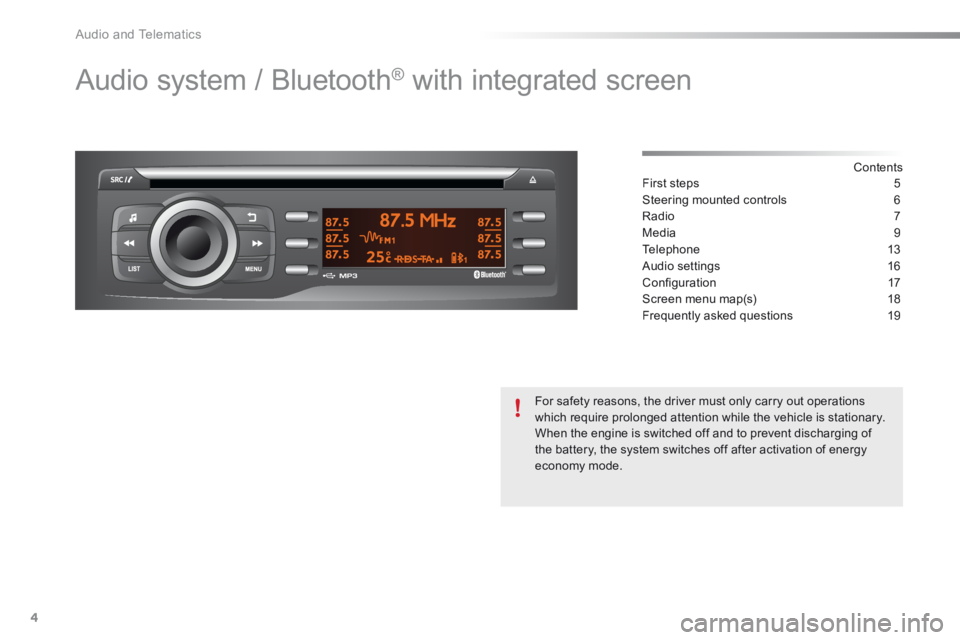
Audio system / Bluetooth® with integrated screen
Contents First steps 5
Steering mounted controls 6
Radio 7
Media 9
Telephone 13
Audio settings 16
Confi guration 17
Screen menu map(s) 18
Frequently asked questions 19
For safety reasons, the driver must only carry out operations which require prolonged attention while the vehicle is stationary. When the engine is switched off and to prevent discharging of the battery, the system switches off after activation of energy economy mode.
Page 268 of 285
.
Audio and Telematics 5
301-add-2_en_Chap12_RDE2_ed01-2014
First steps
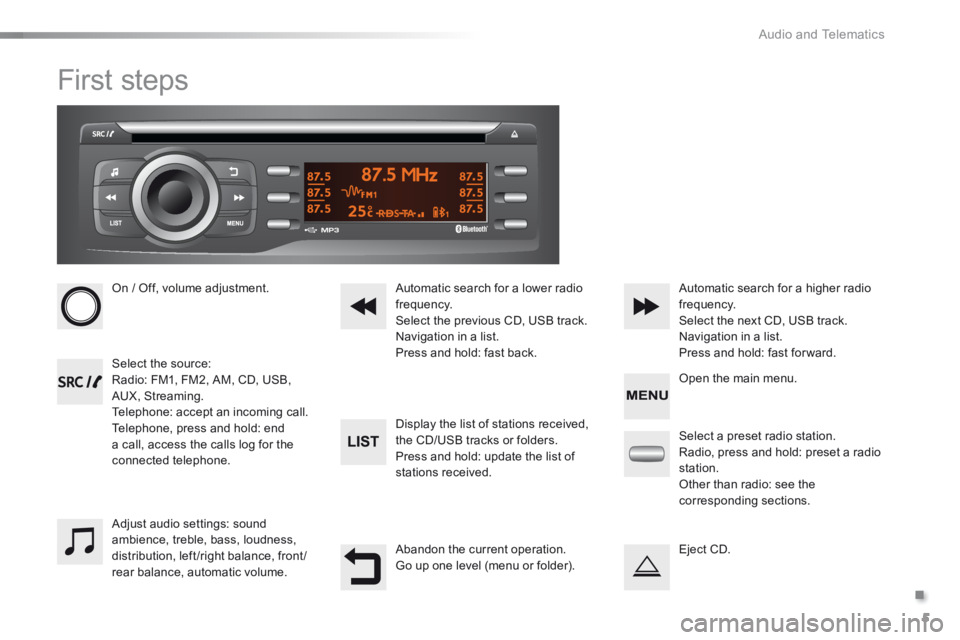
On / Off, volume adjustment.
Select the source: Radio: FM1, FM2, AM, CD, USB, AUX, Streaming. Telephone: accept an incoming call. Telephone, press and hold: end a call, access the calls log for the connected telephone.
Display the list of stations received,
the CD/USB tracks or folders. Press and hold: update the list of stations received.
Automatic search for a lower radio frequency. Select the previous CD, USB track. Navigation in a list. Press and hold: fast back.
Automatic search for a higher radio frequency. Select the next CD, USB track. Navigation in a list. Press and hold: fast for ward.
Adjust audio settings: sound ambience, treble, bass, loudness, distribution, left/right balance, front/rear balance, automatic volume.
Abandon the current operation. Go up one level (menu or folder).
Select a preset radio station. Radio, press and hold: preset a radio station. Other than radio: see the corresponding sections.
Eject CD.
Open the main menu.
Page 269 of 285
Audio and Telematics
6
Steering mounted controls
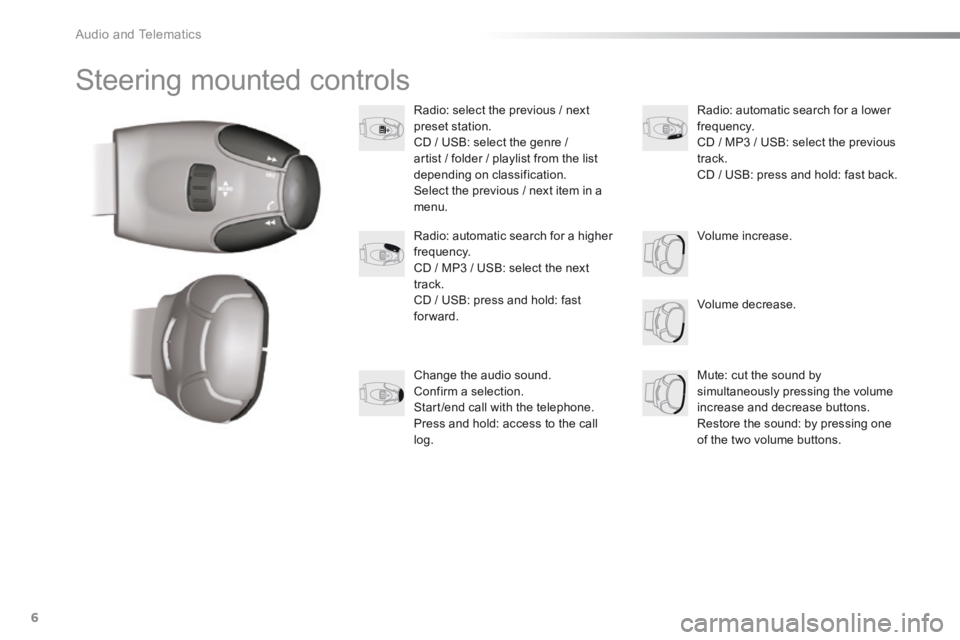
Radio: select the previous / next preset station. CD / USB: select the genre / artist / folder / playlist from the list depending on classification. Select the previous / next item in a menu.
Volume decrease.
Radio: automatic search for a higher frequency. CD / MP3 / USB: select the next track. CD / USB: press and hold: fast forward.
Mute: cut the sound by simultaneously pressing the volume increase and decrease buttons. Restore the sound: by pressing one of the two volume buttons.
Radio: automatic search for a lower frequency. CD / MP3 / USB: select the previous track. CD / USB: press and hold: fast back.
Change the audio sound. Confirm a selection. Start /end call with the telephone. Press and hold: access to the call log.
Volume increase.
Page 275 of 285
Audio and Telematics
12
Bluetooth ® Bluetooth ® Bluetooth audio streaming ® audio streaming ®
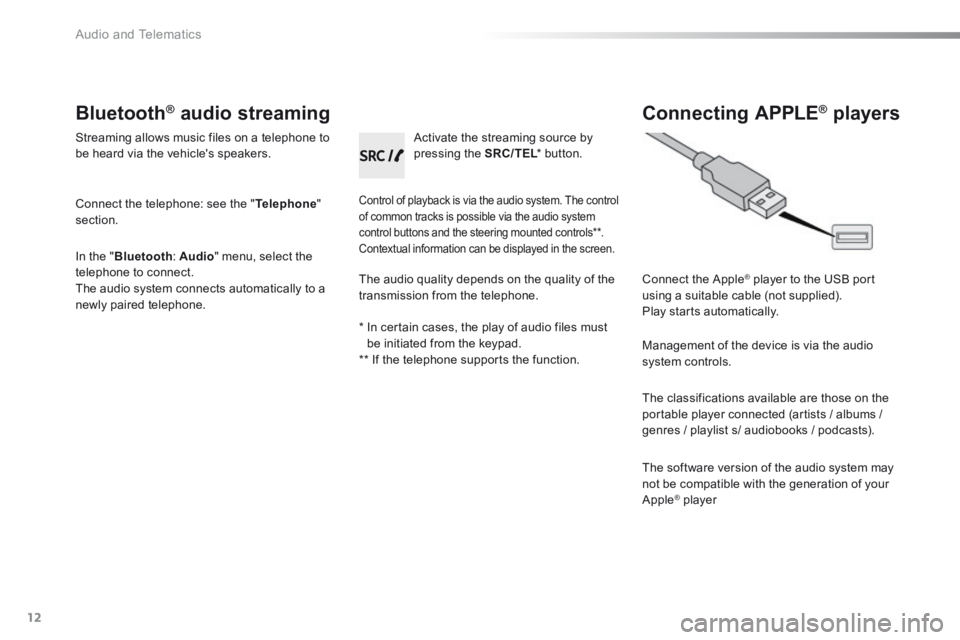
Streaming allows music files on a telephone to be heard via the vehicle's speakers.
Connect the telephone: see the " Telephone " section.
In the " Bluetooth : Audio " menu, select the telephone to connect. The audio system connects automatically to a newly paired telephone.
Control of playback is via the audio system. The control of common tracks is possible via the audio system control buttons and the steering mounted controls ** . Contextual information can be displayed in the screen.
Activate the streaming source by pressing the SRC/TEL * button. SRC/TEL * button. SRC/TEL
Connecting APPLE ® Connecting APPLE ® Connecting APPLE players ® players ®
Connect the Apple ® player to the USB port ® player to the USB port ®
using a suitable cable (not supplied). Play starts automatically.
Management of the device is via the audio system controls.
The classifications available are those on the portable player connected (artists / albums /
genres / playlist s/ audiobooks / podcasts).
The software version of the audio system may not be compatible with the generation of your Apple ® player ® player ®
The audio quality depends on the quality of the transmission from the telephone.
* In certain cases, the play of audio files must be initiated from the keypad. ** If the telephone supports the function.
Page 276 of 285
.
Audio and Telematics 13
301-add-2_en_Chap12_RDE2_ed01-2014
Telephone
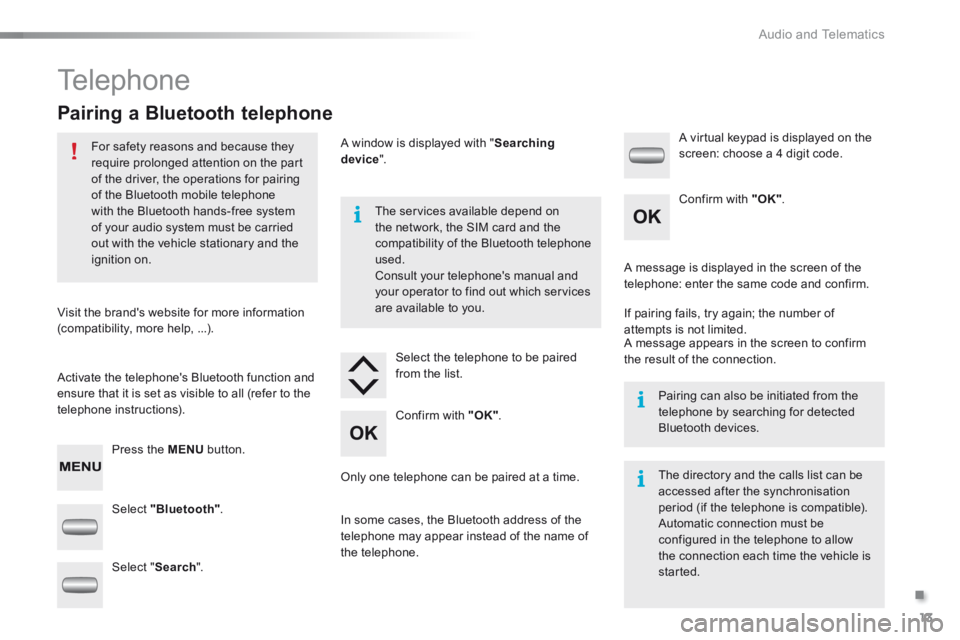
Pairing a Bluetooth telephone
For safety reasons and because they require prolonged attention on the part of the driver, the operations for pairing of the Bluetooth mobile telephone with the Bluetooth hands-free system
of your audio system must be carried out with the vehicle stationary and the ignition on.
Visit the brand's website for more information (compatibility, more help, ...).
Activate the telephone's Bluetooth function and ensure that it is set as visible to all (refer to the telephone instructions).
Press the MENU button.
The services available depend on
the network, the SIM card and the compatibility of the Bluetooth telephone used. Consult your telephone's manual and your operator to find out which services are available to you.
Only one telephone can be paired at a time.
A message is displayed in the screen of the telephone: enter the same code and confirm.
If pairing fails, try again; the number of attempts is not limited. A message appears in the screen to confirm the result of the connection.
Pairing can also be initiated from the telephone by searching for detected Bluetooth devices.
The directory and the calls list can be accessed after the synchronisation period (if the telephone is compatible). Automatic connection must be configured in the telephone to allow the connection each time the vehicle is started.
Select "Bluetooth" .
Select the telephone to be paired from the list.
A virtual keypad is displayed on the screen: choose a 4 digit code.
Select " Search ".
A window is displayed with " Searching device ".
In some cases, the Bluetooth address of the telephone may appear instead of the name of the telephone.
Confirm with "OK" .
Confirm with "OK" .
Page 277 of 285
Audio and Telematics
14
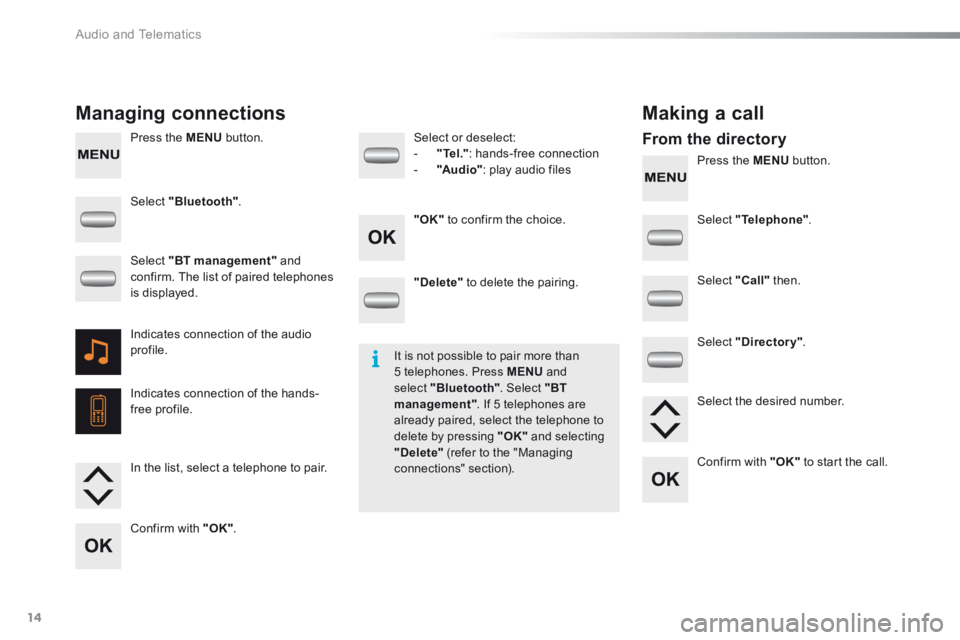
Press the MENU button.
Press the MENU button.
Managing connections Making a call
From the directory
Select "Bluetooth" .
Select "Telephone" .
Select "Call " then .
Select "Directory" .
"Delete" to delete the pairing.
Select or deselect: - "Te l ." : hands-free connection - "Au d i o" : play audio files
Indicates connection of the audio profile.
Indicates connection of the hands-free profile.
Select "BT management" and confirm. The list of paired telephones is displayed.
In the list, select a telephone to pair.
Confirm with "OK" .
"OK" to confirm the choice.
Select the desired number.
Confirm with "OK" to start the call.
It is not possible to pair more than 5 telephones. Press MENU and select "Bluetooth" . Select "BT management" . If 5 telephones are already paired, select the telephone to delete by pressing "OK" and selecting "Delete" (refer to the "Managing connections" section).