reset Peugeot 301 2017 User Guide
[x] Cancel search | Manufacturer: PEUGEOT, Model Year: 2017, Model line: 301, Model: Peugeot 301 2017Pages: 306, PDF Size: 9.87 MB
Page 186 of 306
184
BACK
VOL+
TA
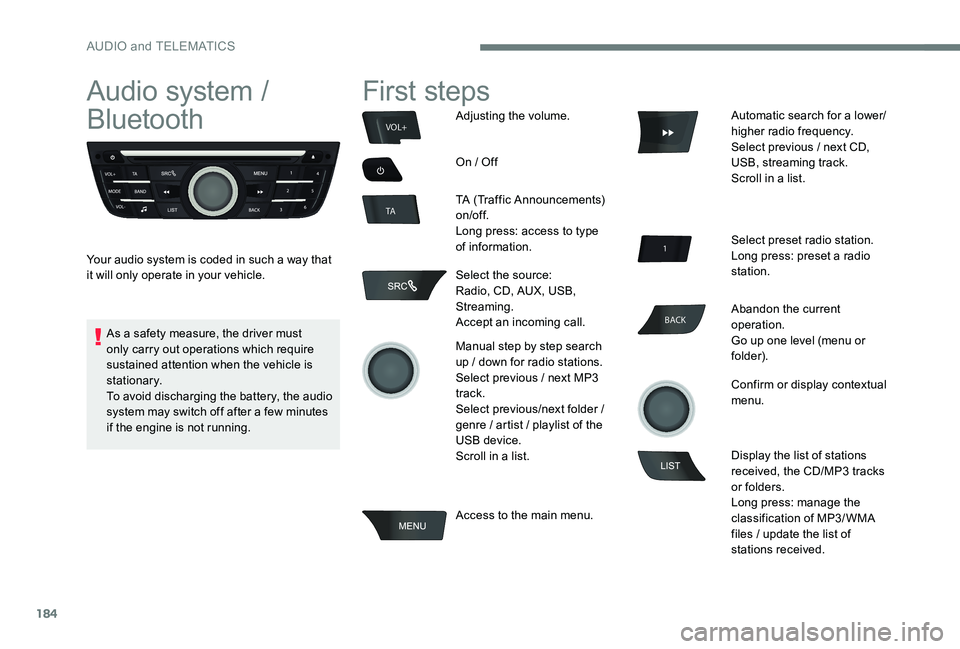
Audio system /
Bluetooth
Your audio system is coded in such a way that
it will only operate in your vehicle.
First steps
Adjusting the volume.
On / Off
TA (Traffic Announcements)
on/of f.
Long press: access to type
of information.
Select the source:
Radio, CD, AUX, USB,
Streaming.
Accept an incoming call.
Manual step by step search
up / down for radio stations.
Select previous / next MP3
track.
Select previous/next folder /
genre / artist / playlist of the
USB device.
Scroll in a list.
Access to the main menu. Automatic search for a lower/
higher radio frequency.
Select previous / next CD,
USB, streaming track.
Scroll in a list.
Select preset radio station.
Long press: preset a radio
station.
Abandon the current
operation.
Go up one level (menu or
folder).
Confirm or display contextual
menu.
Display the list of stations
received, the CD/MP3 tracks
or folders.
Long press: manage the
classification of MP3/ WMA
files / update the list of
stations received.
As a safety measure, the driver must
only carry out operations which require
sustained attention when the vehicle is
stationary.
To avoid discharging the battery, the audio
system may switch off after a few minutes
if the engine is not running.
AUDIO and TELEMATICS
Page 187 of 306
185
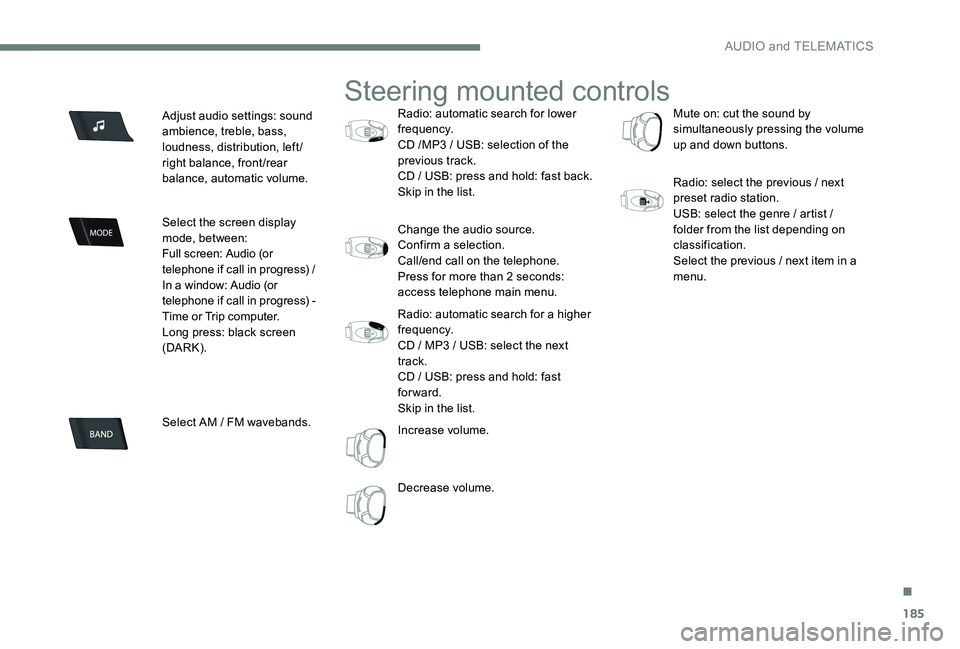
Adjust audio settings: sound
ambience, treble, bass,
loudness, distribution, left/
right balance, front/rear
balance, automatic volume.
Select the screen display
mode, between:
Full screen: Audio (or
telephone if call in progress) /
In a window: Audio (or
telephone if call in progress) -
Time or Trip computer.
Long press: black screen
(DARK).
Select AM / FM wavebands.
Steering mounted controls
Radio: automatic search for lower
frequency.
CD /MP3 / USB: selection of the
previous track.
CD / USB: press and hold: fast back.
Skip in the list.
Change the audio source.
Confirm a selection.
Call/end call on the telephone.
Press for more than 2 seconds:
access telephone main menu.
Radio: automatic search for a higher
frequency.
CD / MP3 / USB: select the next
track.
CD / USB: press and hold: fast
forward.
Skip in the list.
Increase volume.
Decrease volume. Mute on: cut the sound by
simultaneously pressing the volume
up and down buttons.
Radio: select the previous / next
preset radio station.
USB: select the genre / artist /
folder from the list depending on
classification.
Select the previous / next item in a
menu.
.
AUDIO and TELEMATICS
Page 205 of 306
203
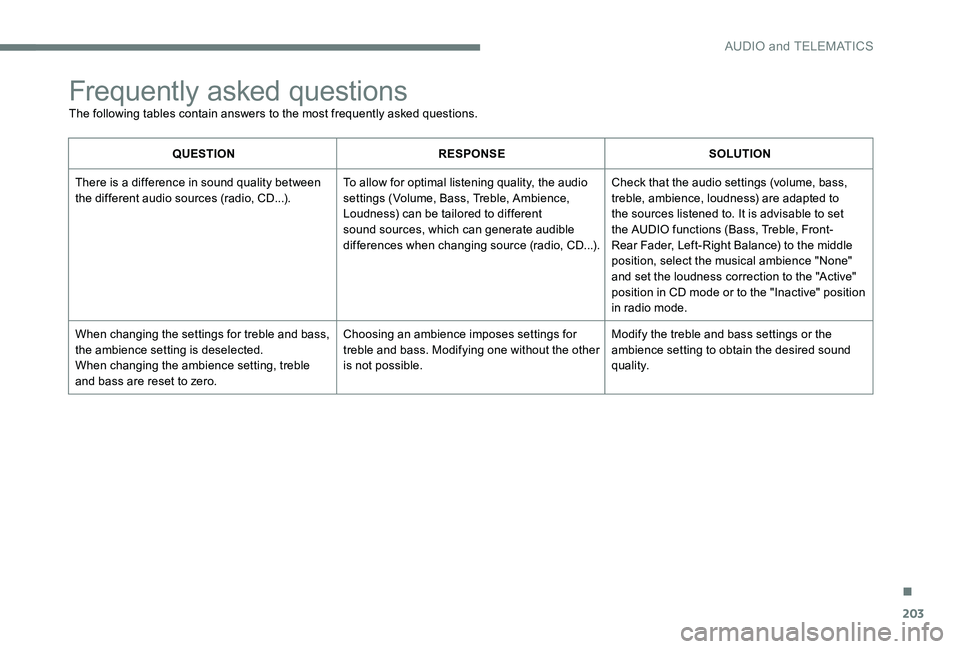
Frequently asked questions
The following tables contain answers to the most frequently asked questions.
QUESTIONRESPONSE SOLUTION
There is a difference in sound quality between
the different audio sources (radio, CD...). To allow for optimal listening quality, the audio
settings (Volume, Bass, Treble, Ambience,
Loudness) can be tailored to different
sound sources, which can generate audible
differences when changing source (radio, CD...).Check that the audio settings (volume, bass,
treble, ambience, loudness) are adapted to
the sources listened to. It is advisable to set
the AUDIO functions (Bass, Treble, Front-
Rear Fader, Left-Right Balance) to the middle
position, select the musical ambience "None"
and set the loudness correction to the "Active"
position in CD mode or to the "Inactive" position
in radio mode.
When changing the settings for treble and bass,
the ambience setting is deselected.
When changing the ambience setting, treble
and bass are reset to zero. Choosing an ambience imposes settings for
treble and bass. Modifying one without the other
is not possible.
Modify the treble and bass settings or the
ambience setting to obtain the desired sound
quality.
.
AUDIO and TELEMATICS
Page 210 of 306
208
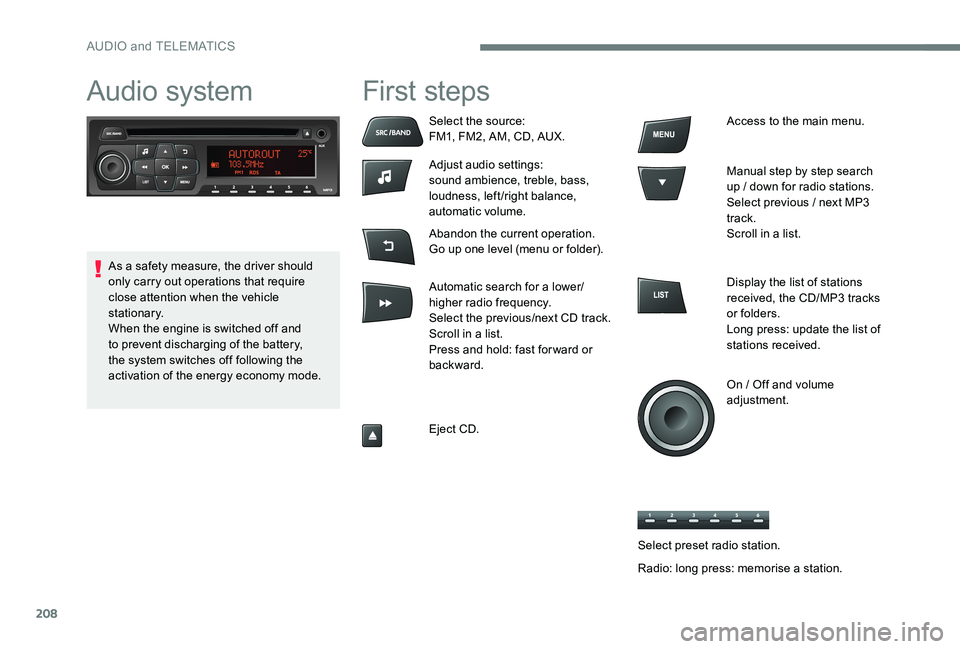
Audio system First steps
Select the source:
FM1, FM2, AM, CD, AUX.
Adjust audio settings:
sound ambience, treble, bass,
loudness, left/right balance,
automatic volume.
Abandon the current operation.
Go up one level (menu or folder).
Automatic search for a lower/
higher radio frequency.
Select the previous/next CD track.
Scroll in a list.
Press and hold: fast for ward or
backward.
Eject CD.Access to the main menu.
Manual step by step search
up / down for radio stations.
Select previous / next MP3
track.
Scroll in a list.
Display the list of stations
received, the CD/MP3 tracks
or folders.
Long press: update the list of
stations received.
On / Off and volume
adjustment.
As a safety measure, the driver should
only carry out operations that require
close attention when the vehicle
stationary.
When the engine is switched off and
to prevent discharging of the battery,
the system switches off following the
activation of the energy economy mode.
Select preset radio station.
Radio: long press: memorise a station.
AUDIO and TELEMATICS
Page 211 of 306
209
Audio
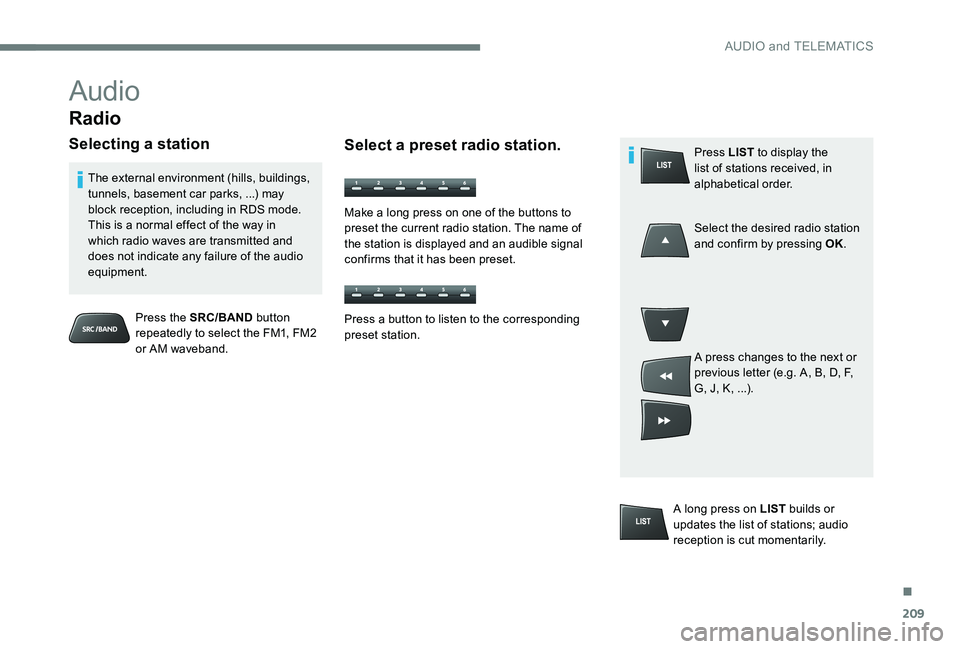
Radio
Selecting a station
Press the SRC/BAND button
repeatedly to select the FM1, FM2
or AM waveband.
The external environment (hills, buildings,
tunnels, basement car parks, ...) may
block reception, including in RDS mode.
This is a normal effect of the way in
which radio waves are transmitted and
does not indicate any failure of the audio
equipment.
Select a preset radio station.
Make a long press on one of the buttons to
preset the current radio station. The name of
the station is displayed and an audible signal
confirms that it has been preset.
A long press on LIST builds or
updates the list of stations; audio
reception is cut momentarily. Press LIST
to display the
list of stations received, in
alphabetical order.
Select the desired radio station
and confirm by pressing OK.
A press changes to the next or
previous letter (e.g. A, B, D, F,
G, J, K, ...).
Press a button to listen to the corresponding
preset station.
.
AUDIO and TELEMATICS
Page 217 of 306
215
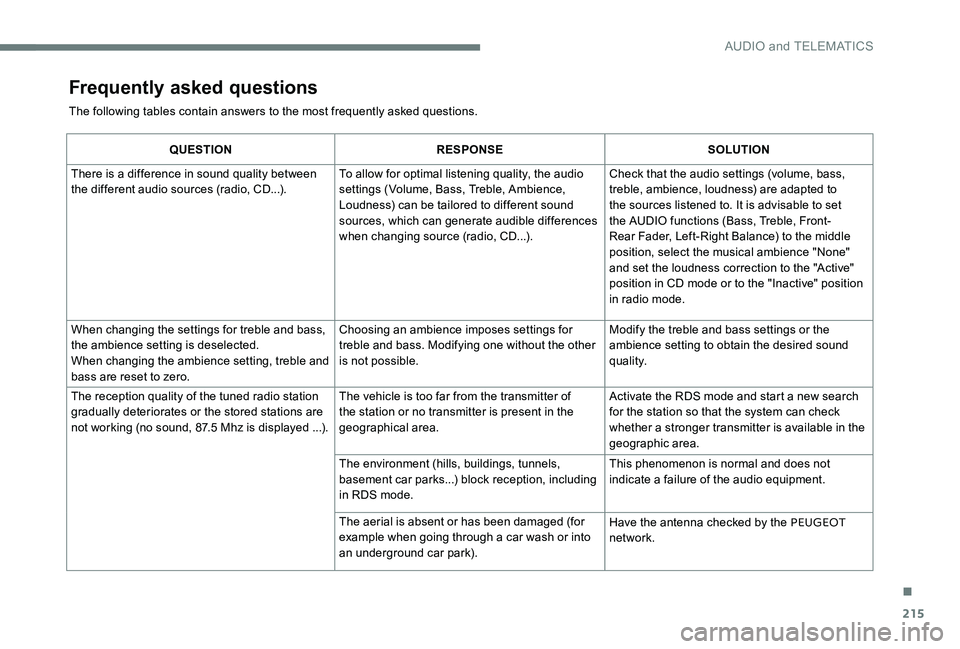
Frequently asked questions
The following tables contain answers to the most frequently asked questions.
QUESTIONRESPONSE SOLUTION
There is a difference in sound quality between
the different audio sources (radio, CD...). To allow for optimal listening quality, the audio
settings (Volume, Bass, Treble, Ambience,
Loudness) can be tailored to different sound
sources, which can generate audible differences
when changing source (radio, CD...). Check that the audio settings (volume, bass,
treble, ambience, loudness) are adapted to
the sources listened to. It is advisable to set
the AUDIO functions (Bass, Treble, Front-
Rear Fader, Left-Right Balance) to the middle
position, select the musical ambience "None"
and set the loudness correction to the "Active"
position in CD mode or to the "Inactive" position
in radio mode.
When changing the settings for treble and bass,
the ambience setting is deselected.
When changing the ambience setting, treble and
bass are reset to zero. Choosing an ambience imposes settings for
treble and bass. Modifying one without the other
is not possible.
Modify the treble and bass settings or the
ambience setting to obtain the desired sound
quality.
The reception quality of the tuned radio station
gradually deteriorates or the stored stations are
not working (no sound, 87.5 Mhz is displayed ...). The vehicle is too far from the transmitter of
the station or no transmitter is present in the
geographical area. Activate the RDS mode and start a new search
for the station so that the system can check
whether a stronger transmitter is available in the
geographic area.
The environment (hills, buildings, tunnels,
basement car parks...) block reception, including
in RDS mode. This phenomenon is normal and does not
indicate a failure of the audio equipment.
The aerial is absent or has been damaged (for
example when going through a car wash or into
an underground car park). Have the antenna checked by the PEUGEOT
network.
.
AUDIO and TELEMATICS
Page 223 of 306
221
Tables of engines ................................... 18 0 -181
Tables of fuses ............................... 167-169, 171
Ta n k , f u e l
................................................ 12 9 -13 0
Technical data
........................................ 18
0 -181
Telephone
..............................
.......................195
Temperature, coolant
................................13, 15
Third brake lamp
........................................... 166
Three flashes (direction indicators)
................ 71
T
ime (setting)
............................................. 31- 32
S
T
Safety, children .......................83-84, 87- 8 9 , 98
Screen, multifunction (with audio system)
..................................... 18
6
Screens, very cold conditions
....................13
9
Screenwash, front
........................................... 68
SCR (Selective Catalytic Reduction)
............132
SCR system
.................................................. 132
Seat belts
............................................ 80-82, 93
Seats, front
...............................
.......................46
Seats, heated
.................................................. 48
Seats, rear
................................................. 48-49
Selector, gear
......................................... 1 0 6 -113
Serial number, vehicle
..................................183
Service
............................................................ 22
Service indicator
....................................... 25 -26
Sidelamps
............................................. 16
3, 165
Replacing fuses
.............................
167-169, 171
Replacing the air filter
................................... 14
6
Replacing the oil filter
................................... 14
6
Replacing the passenger compartment filter
......................................
146
Reservoir, screenwash
.................................
145
Resetting the service indicator
.......................
26
Resetting the trip recorder
..............................
30
Reversing camera
...............................
..........
127
Reversing lamps
..............................
.............
165
Roof bars
.......................................................
140
Running out of fuel (Diesel) ..........................
148Side repeater
................................................
16 4
Snow chains
..................................................
13 6
Socket, 12 V accessory ..................................
62
Socket, auxiliary
............................................ 19
1
Socket, JACK
..........................................
62, 191
Sockets, audio
......................... 62
, 19 0 -191
, 213
Sockets, auxiliary
...............................
...........
213
Speed limiter
.......................................... 11
9 -12 1
Stability control (ESC)..................................... 77
Starting a Diesel engine
............................... 13
1
Starting the vehicle
................. 10
2-104
, 1 0 6 -114
Starting using another battery
......................
173
Stay, bonnet
..................................................
141
Steering mounted controls, audio
................ 18
5
Steering wheel, adjustment
............................ 50
S
topping the vehicle
...............
102-104, 1 0 6 -114
Stop & Start
.....
22-23 , 35, 59, 11 6 -118 , 172, 176
Storage
......................................................
60 - 61
Storage box
.....................................................
63
Sun visor
...............................
..........................
60To o l s
.......................................................
15 4 -15 6
Total distance recorder
...................................
30
To w b a r
...............................
............................
13 9
Towed loads
..................................................
179
Towing another vehicle
..........................
17 7-178
Traction control (ASR)
.........................
19, 7 7-79
Traffic information (TA)
.................................
187
Tr a i l e r
...............
..............................
13 9, 18 0 -181
Trajectory control systems
..............................
77
T
rip computer
............................................
33-35
Trip distance recorder
..................................... 3
0
Ty r e s
..............................................................
183
Tyre under-inflation detection
............
74 -76, 153
Under-inflation (detection) ........................17, 74
Unlocking
........................................................36
Unlocking the boot
...............................
...........36
Updating the date
............................................ 31
U
pdating the time
...............................
........31- 32
UREA
..............................................................27U
.
Alphabetical index
Page 235 of 306
3
In the "Settings" menu you can create
a profile for just one person or a group
of people with common features, with
the possibility of entering a multitude of
settings (radio presets, audio settings,
navigation history, contact favourites, ...);
these settings are taken into account
automatically.
In very hot conditions, the volume may
be limited to protect the system. It may go
into standby (screen and sound off) for at
least 5 minutes.
The return to normal takes place when
the temperature in the passenger
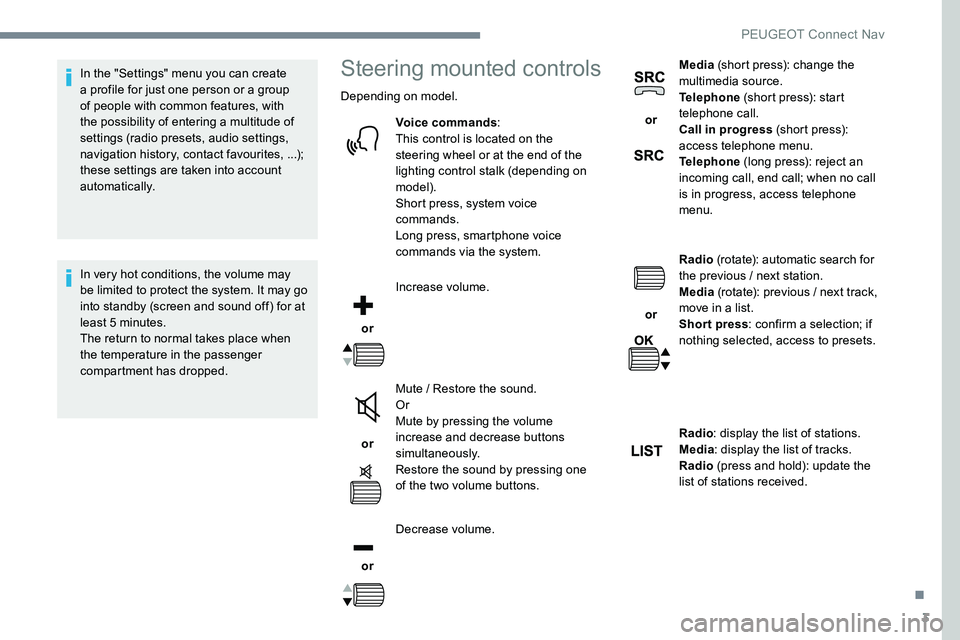
compartment has dropped.Steering mounted controls
Depending on model.Voice commands :
This control is located on the
steering wheel or at the end of the
lighting control stalk (depending on
model).
Short press, system voice
commands.
Long press, smartphone voice
commands via the system.
or Increase volume.
or Mute / Restore the sound.
Or
Mute by pressing the volume
increase and decrease buttons
simultaneously.
Restore the sound by pressing one
of the two volume buttons.
or Decrease volume. or
Media
(short press): change the
multimedia source.
Telephone (short press): start
telephone call.
Call in progress (short press):
access telephone menu.
Telephone (long press): reject an
incoming call, end call; when no call
is in progress, access telephone
menu.
or Radio
(rotate): automatic search for
the previous / next station.
Media (rotate): previous / next track,
move in a list.
Short press : confirm a selection; if
nothing selected, access to presets.
Radio : display the list of stations.
Media : display the list of tracks.
Radio (press and hold): update the
list of stations received.
.
PEUGEOT Connect Nav
Page 241 of 306
9
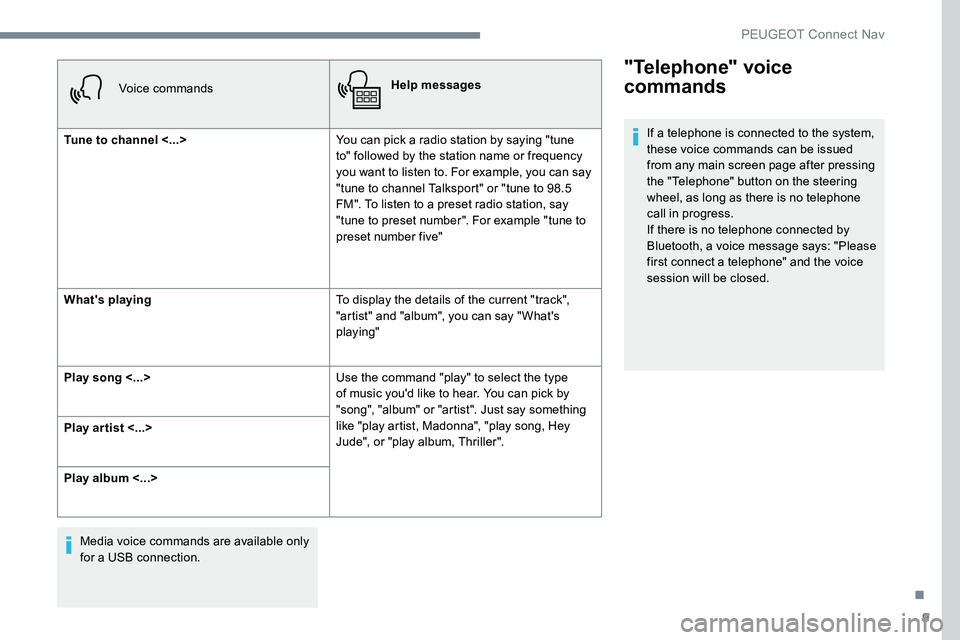
Voice commandsHelp messages
Tune to channel <...> You can pick a radio station by saying "tune
to" followed by the station name or frequency
you want to listen to. For example, you can say
"tune to channel Talksport" or "tune to 98.5
FM". To listen to a preset radio station, say
"tune to preset number". For example "tune to
preset number five"
What's playing To display the details of the current "track",
"artist" and "album", you can say " What's
playing"
Play song <...> Use the command "play" to select the type
of music you'd like to hear. You can pick by
"song", "album" or "artist". Just say something
like "play artist, Madonna", "play song, Hey
Jude", or "play album, Thriller".
Play ar tist <...>
Play album <...>
Media voice commands are available only
for a USB connection.
"Telephone" voice
commands
If a telephone is connected to the system,
these voice commands can be issued
from any main screen page after pressing
the "Telephone" button on the steering
wheel, as long as there is no telephone
call in progress.
If there is no telephone connected by
Bluetooth, a voice message says: "Please
first connect a telephone" and the voice
session will be closed.
.
PEUGEOT Connect Nav
Page 243 of 306
11
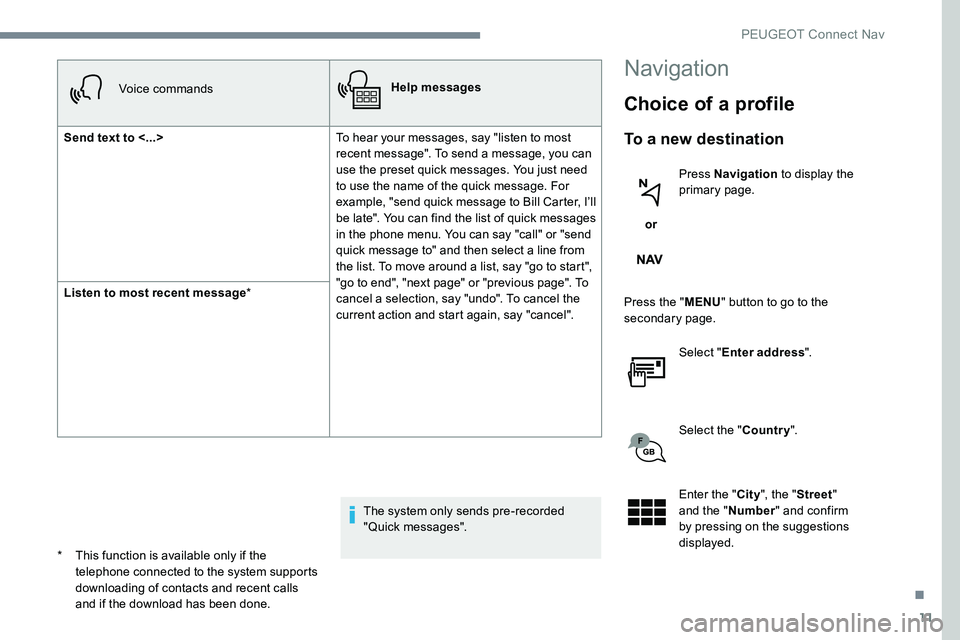
Voice commandsHelp messages
Send text to <...> To hear your messages, say "listen to most
recent message". To send a message, you can
use the preset quick messages. You just need
to use the name of the quick message. For
example, "send quick message to Bill Carter, I’ll
be late". You can find the list of quick messages
in the phone menu. You can say "call" or "send
quick message to" and then select a line from
the list. To move around a list, say "go to start",
"go to end", "next page" or "previous page". To
cancel a selection, say "undo". To cancel the
current action and start again, say "cancel".
Listen to most recent message
*
The system only sends pre-recorded
"Quick messages".
Navigation
Choice of a profile
To a new destination
or Press Navigation
to display the
primary page.
Press the " MENU" button to go to the
secondary page.
Select "Enter address ".
Select the " Country".
Enter the " City", the " Street "
and the " Number" and confirm
by pressing on the suggestions
displayed.
*
T
his function is available only if the
telephone connected to the system supports
downloading of contacts and recent calls
and if the download has been done.
.
PEUGEOT Connect Nav