key PEUGEOT 301 2022 Owner's Manual
[x] Cancel search | Manufacturer: PEUGEOT, Model Year: 2022, Model line: 301, Model: PEUGEOT 301 2022Pages: 148, PDF Size: 4.74 MB
Page 121 of 148
11 9
PEUGEOT Connect Radio
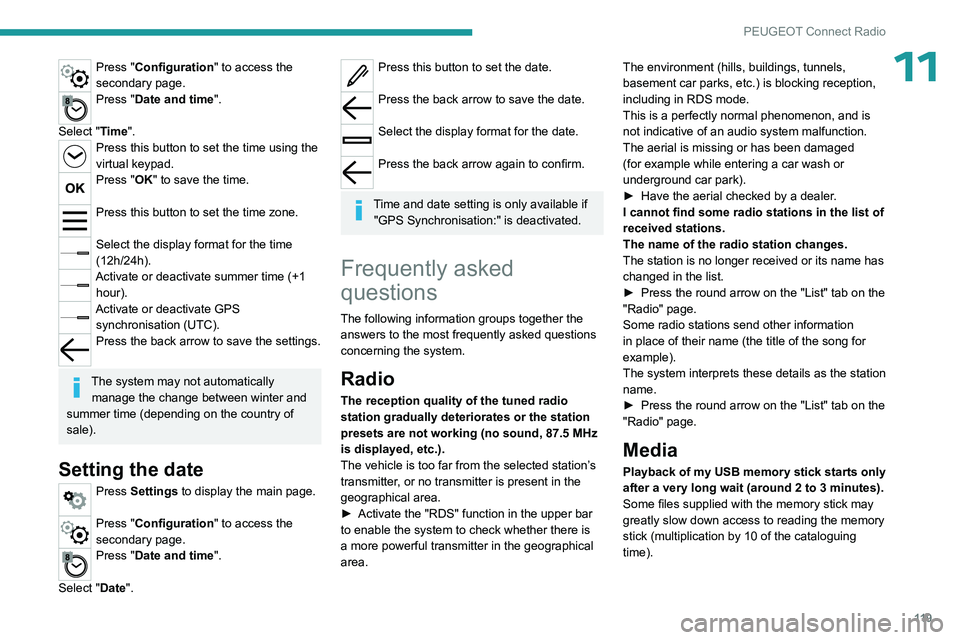
11Press "Configuration" to access the
secondary page.
Press "Date and time".
Select "Time".
Press this button to set the time using the
virtual keypad.
Press "OK" to save the time.
Press this button to set the time zone.
Select the display format for the time
(12h/24h).
Activate or deactivate summer time (+1 hour).
Activate or deactivate GPS synchronisation (UTC).
Press the back arrow to save the settings.
The system may not automatically manage the change between winter and
summer time (depending on the country of
sale).
Setting the date
Press Settings to display the main page.
Press "Configuration" to access the
secondary page.
Press "Date and time".
Select "Date".
Press this button to set the date.
Press the back arrow to save the date.
Select the display format for the date.
Press the back arrow again to confirm.
Time and date setting is only available if
"GPS Synchronisation:" is deactivated.
Frequently asked
questions
The following information groups together the answers to the most frequently asked questions
concerning the system.
Radio
The reception quality of the tuned radio
station gradually deteriorates or the station
presets are not working (no sound, 87.5 MHz
is displayed, etc.).
The vehicle is too far from the selected station’s
transmitter, or no transmitter is present in the
geographical area.
►
Activate the "RDS" function in the upper bar
to enable the system to check whether there is
a more powerful transmitter in the geographical
area. The environment (hills, buildings, tunnels,
basement car parks, etc.) is blocking reception,
including in RDS mode.
This is a perfectly normal phenomenon, and is
not indicative of an audio system malfunction.
The aerial is missing or has been damaged
(for example while entering a car wash or
underground car park).
►
Have the aerial checked by a dealer
.
I cannot find some radio stations in the list of
received stations.
The name of the radio station changes.
The station is no longer received or its name has
changed in the list.
►
Press the round arrow on the "List" tab on the
"Radio" page.
Some radio stations send other information
in place of their name (the title of the song for
example).
The system interprets these details as the station
name.
►
Press the round arrow on the "List" tab on the
"Radio" page.
Media
Playback of my USB memory stick starts only
after a very long wait (around 2 to 3 minutes).
Some files supplied with the memory stick may
greatly slow down access to reading the memory
stick (multiplication by 10 of the cataloguing
time).
Page 123 of 148

121
Vehicle data recording and privacy
Vehicle data recording
and privacy
Electronic control units are installed in your
vehicle. These control units process data
received from the vehicle's sensors, for example,
or data they generate themselves or exchange
with each other. Some of these control units are
required for the correct operation of your vehicle,
some others assist you while driving (driving or
manoeuvring aids), while others provide comfort
or infotainment functions.
The following contains general information about
how data is processed within the vehicle.
You will find additional information about the
specific data which is downloaded, stored
and transmitted to third parties and what it is
used for in your vehicle under the keyword
"Data protection". This information is directly
associated with the references for the functions
in question contained in the corresponding
vehicle handbook, or in the general terms and
conditions of sale.
This information is also available online.
Vehicle operating data
The control units process the data used for the
operation of the vehicle.
This data includes, for example:
–
Information about the state of the vehicle
(e.g.
speed, travel time, lateral acceleration,
wheel rotation rate, fastened seat belts display). –
Environmental conditions (e.g.
temperature,
rain sensor, distance sensor).
As a general rule, this data is temporary, is
not stored for longer than one operating cycle
and is only used within the vehicle itself. The
control units often record this data (including the
vehicle's key). This function allows either the
temporary or permanent storage of information
about the state of the vehicle, stresses on
components, servicing requirements, as well as
events and technical errors.
Depending on the vehicle's equipment level, the
data stored is as follows:
–
Operating state of system components
(e.g.
filling level, tyre pressures, battery charge
status).
–
Faults and malfunctions in important system
components (e.g.
lamps, brakes).
–
System reactions in specific driving situations
(e.g.
deployment of an airbag, triggering of
stability control and braking systems).
–
Information about events which have
damaged the vehicle.
–
For electric and rechargeable hybrid vehicles,
the traction battery charge level and the
estimated driving range.
In particular circumstances (e.g.
if the vehicle
has detected a malfunction), it may be necessary
to record data which would otherwise simply not
be stored.
When taking your vehicle in for servicing
(e.g.
repairs, maintenance), the stored operating
data may be read along with the vehicle's identification number and used if necessary.
The personnel working for the servicing network
(e.g.
garages, manufacturers) or third parties
(e.g. roadside assistance agents) may read
the vehicle's data. This also applies to work
carried out under warranty and quality assurance
measures.
This data is generally read via the OBD
(On-Board Diagnostics) port fitted by law to
the vehicle. It is used to report on the technical
state of the vehicle or its components and
facilitates the diagnosis of malfunctions, in
compliance with warranty obligations and for
quality improvement. This data, in particular the
information relating to stress on components,
technical events, operator errors and other
malfunctions, is sent to the Manufacturer, if
necessary, along with the vehicle's identification
number. The Manufacturer's liability may also be
engaged. The Manufacturer may also use the
operating data taken from the vehicle for product
recalls. This data may also be used to check the
customer's warranty and any claims made under
warranty.
Any malfunctions stored in the vehicle may be
reset by an after-sales service company during
servicing or repair work, or at your request.
Page 128 of 148

126
Alphabetical index
ISOFIX mountings 45, 47
J
Jack 79–80
Jump starting
89
K
Key 15–17
Key, electronic
15
Key with remote control
15, 51
Kit, hands-free
102, 116
Kit, temporary puncture repair
79
Klaxon
36
L
Labels, identification 96
Leather (care)
78
LEDs - Light-emitting diodes
32, 84
Level, brake fluid
74
Level, Diesel additive
74–75
Level, engine coolant
74
Level, engine oil
73
Levels and checks
72–74
Level, screenwash fluid
33, 74
Light-emitting diodes - LEDs
32, 84
Lighting, exterior
31
Lighting, guide-me home 32
Lighting, interior
30
Loading
70–71
Load reduction mode
69
Locating your vehicle
16
Locking
16
Locking from the inside
16
Locking the doors
16–17
M
Maintenance (advice) 76
Maintenance, routine
61, 74
Manoeuvring aids (recommendations)
60
Map reading lamps
30
Markings, identification
96
Mat
61
Menu
11 5
Menu, main
99
Menus (audio)
11 0 – 111
Mirror, rear view
24
Mirrors, door
23–24, 28
Misfuel prevention
68
Mountings, ISOFIX
45, 47
MP3 CD
100
N
Number plate lamps 87
O
Obstacle detection 64
Oil change
73
Oil consumption
73
Oil, engine
73
On-board tools
79
Opening the bonnet
71–72
Opening the boot
15, 18–19
Opening the doors
15, 18
P
Pads, brake 75
Paint
77, 96
Paint colour code
96
Parking brake
52, 75
Parking sensors, audible and visual
64
Plates, identification
96
Player, Apple®
11 4
Player, MP3 CD
100
Player, USB
100, 113
Port, USB
29, 100–101, 113, 115
Pressures, tyres
76, 97
Pre-tensioning (seat belts)
38
Priming pump
79
Priming the fuel system
79
Profiles
11 8
Protecting children
40–47
Puncture
80
Page 129 of 148

127
Alphabetical index
R
Radio 99, 111–112
Radio, digital (Digital Audio
Broadcasting - DAB)
11 3
RDS
11 2
Reading lamps
30
Rear bench seat
22
Rear screen (demisting)
27–28
Recharging the battery
88–89
Recorder, trip distance
11
Reduction of electrical load (mode)
69
Regeneration of the particle filter
75
Reinitialising the remote control
18
Reinitialising the under-inflation detection
system
59
Reminder, key in ignition
52
Reminder, lighting on
32
Remote control
15–17, 50
Removing a wheel
81–82
Replacing bulbs
83–84, 86
Replacing fuses
87
Replacing the air filter
75
Replacing the oil filter
75
Replacing the passenger compartment
filter
75
Reservoir, screenwash
74
Resetting the trip recorder
11
Reversing camera
60, 65
Reversing lamps
86
Roof bars
70–71
Running out of fuel (Diesel)
79
S
Safety, children 40–43, 45–46
Saturation of the particle filter (Diesel)
75
Screen, cold climate
70
Screen menu map
11 5
Screen, multifunction (with audio system)
99
Screens, very cold conditions
70
Screenwash
33
Screenwash, front
33
Seat belts
37–38, 43
Seat belts, rear
38
Seats, front
21
Seats, rear
22, 42
Sensors (warnings)
60
Serial number, vehicle
96
Servicing
10, 74
Settings, system
11 8
Shield, snow
70
Sidelamps
32, 84–86
Side repeater (turn signal)
86
Snow chains
59, 68–69
Snow screen
70
Socket, 12 V accessory
29
Socket, auxiliary
101, 114
Socket, Jack
29, 101
Sockets, audio
29, 101
Speed limiter
61–62
Speedometer
61
Stability control (ESC)
36
Starting a Diesel engine
67
Starting the vehicle
51–52, 55
Starting using another battery 89
Station, radio
99, 111–112
Stay, engine bonnet
72
Steering mounted controls, audio
98, 109
Steering wheel (adjustment)
23
Stickers, customising
77
Stopping the vehicle
51–52, 55
Stop & Start
14, 25, 27, 56–58, 67, 71, 75, 91
Storage
28–29
Sunshine sensor
24
Sun visor
28
Switch, ignition
51–52
Synchronising the remote control
18
T
Tables of engines 94–95
Tank, fuel
67–68
Technical data
94–95
Telephone
103, 116–117
Third brake lamp
87
Time (setting)
12, 118
Tools
79, 80
Top Tether (fixing)
45
Total distance recorder
11
Towbar
69
Towed loads
93
Towing
91–92
Towing another vehicle
92
Towing the vehicle
91–92
Traction control (ASR)
36–37