stop start PEUGEOT 301 2022 Owner's Manual
[x] Cancel search | Manufacturer: PEUGEOT, Model Year: 2022, Model line: 301, Model: PEUGEOT 301 2022Pages: 148, PDF Size: 4.74 MB
Page 73 of 148
71
Practical information
7Maximum load distributed over the
transverse roof bars, for a loading height
not exceeding 40 cm (except bicycle carrier):
75
kg.
As this value may change, please verify the
maximum load quoted in the guide supplied
with the roof bars.
If the height exceeds 40 cm, adapt the speed
of the vehicle to the profile of the road to
avoid damaging the roof bars and the fixings
on the vehicle.
Be sure to refer to national legislation in order
to comply with the regulations for transporting
objects that are longer than the vehicle.
Recommendations
Distribute the load uniformly, taking care
to avoid overloading one of the sides.
Arrange the heaviest part of the load as close
as possible to the roof.
Secure the load firmly.
Drive gently: the vehicle will be more
susceptible to the effects of side winds and its
stability may be affected.
Regularly check the security and tight
fastening of the roof bars, at least before each
trip.
Remove the roof bars once they are no longer
needed.
Direct fitting on roof
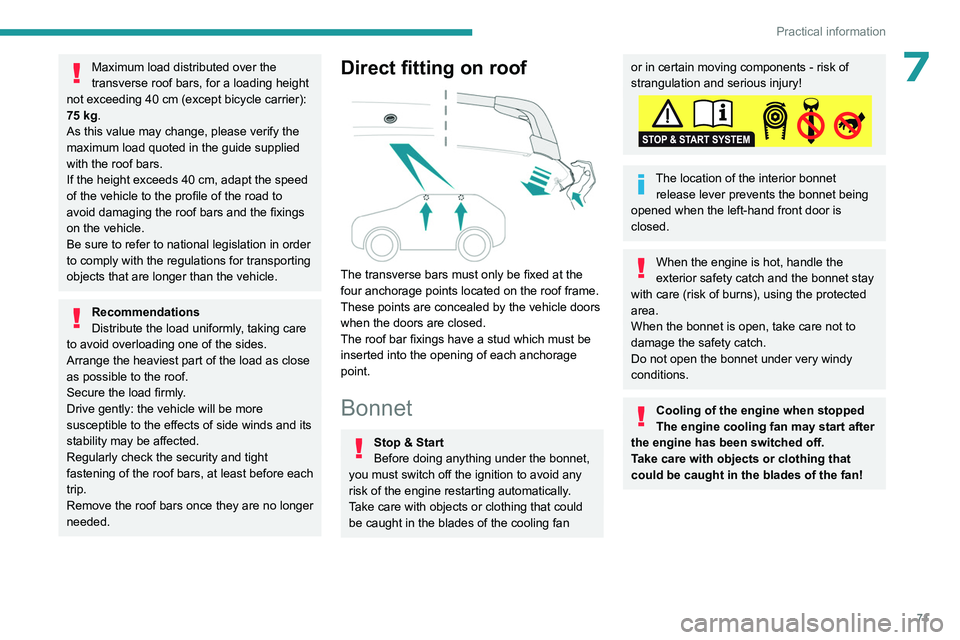
The transverse bars must only be fixed at the
four anchorage points located on the roof frame.
These points are concealed by the vehicle doors
when the doors are closed.
The roof bar fixings have a stud which must be
inserted into the opening of each anchorage
point.
Bonnet
Stop & Start
Before doing anything under the bonnet,
you must switch off the ignition to avoid any
risk of the engine restarting automatically.
Take care with objects or clothing that could
be caught in the blades of the cooling fan
or in certain moving components - risk of
strangulation and serious injury!
The location of the interior bonnet release lever prevents the bonnet being
opened when the left-hand front door is
closed.
When the engine is hot, handle the
exterior safety catch and the bonnet stay
with care (risk of burns), using the protected
area.
When the bonnet is open, take care not to
damage the safety catch.
Do not open the bonnet under very windy
conditions.
Cooling of the engine when stopped
The engine cooling fan may start after
the engine has been switched off.
Take care with objects or clothing that
could be caught in the blades of the fan!
Page 77 of 148
75
Practical information
7For more information on the precautions
to take before any work on the 12 V
battery, refer to the corresponding section.
Versions equipped with Stop & Start are
fitted with a 12 V lead-acid battery with
special technology and specifications.
Its replacement should be carried out only by
a PEUGEOT dealer or a qualified workshop.
Air filter
Depending on the environment and the
use of the vehicle (e.g. dusty atmosphere,
city driving), change it twice as often, if
necessary .
Passenger compartment
filter
Depending on the environment and the
use of the vehicle (e.g. dusty atmosphere,
city driving), change it twice as often, if
necessary .
A clogged passenger compartment filter
can adversely affect air conditioning
system performance and generate
undesirable odours.
Oil filter
Change the oil filter each time the engine
oil is changed.
Particle filter (Diesel)
The start of clogging of the particle filter is
indicated by the temporary lighting of this
warning lamp, accompanied by an alert
message.
As soon as traffic conditions allow, regenerate
the filter by driving at a speed of at least 37
mph
(60
km/h), with an engine speed above 2,500
rpm, for about 15 minutes (until the warning lamp
goes out).
If it is not possible to reach 37
mph (60 km/h),
leave the engine running at idle for about 15
minutes, then drive with an engine speed above
2,500 rpm for 15 minutes.
Do not switch off the engine until the filter
is fully regenerated; repeated intervals
can degrade the engine oil prematurely.
Regenerating the filter while the vehicle is
stationary is not recommended.
Following prolonged operation of the
vehicle at very low speed or at idle, you
may, in exceptional circumstances, notice
water vapour coming from the exhaust while
accelerating. These emissions have no
impact on the vehicle’s behaviour and the
environment.
New vehicle
During the first few particle filter
regeneration operations, you may notice a
"burning" smell. This is perfectly normal.
Manual gearbox
The gearbox does not require any maintenance (no oil change).
Automatic gearbox
The gearbox does not require any maintenance (no oil change).
Brake pads
Brake wear depends on the style of
driving, particularly in the case of vehicles
used in town, over short distances. It may be
necessary to have the condition of the brakes
checked, even between vehicle services.
Unless there is a leak in the circuit, a drop in the
brake fluid level indicates that the brake pads
are worn.
After washing the vehicle, moisture, or in wintry conditions, ice can form on the
brake discs and pads: braking efficiency may
be reduced. Gently dab the brakes to dry and
defrost them.
Brake disc wear
For information on checking brake disc
wear, contact a PEUGEOT dealer or a
qualified workshop.
Manual parking brake
If you notice excessive brake lever travel
or decreased effectiveness, the parking
Page 91 of 148
89
In the event of a breakdown
8
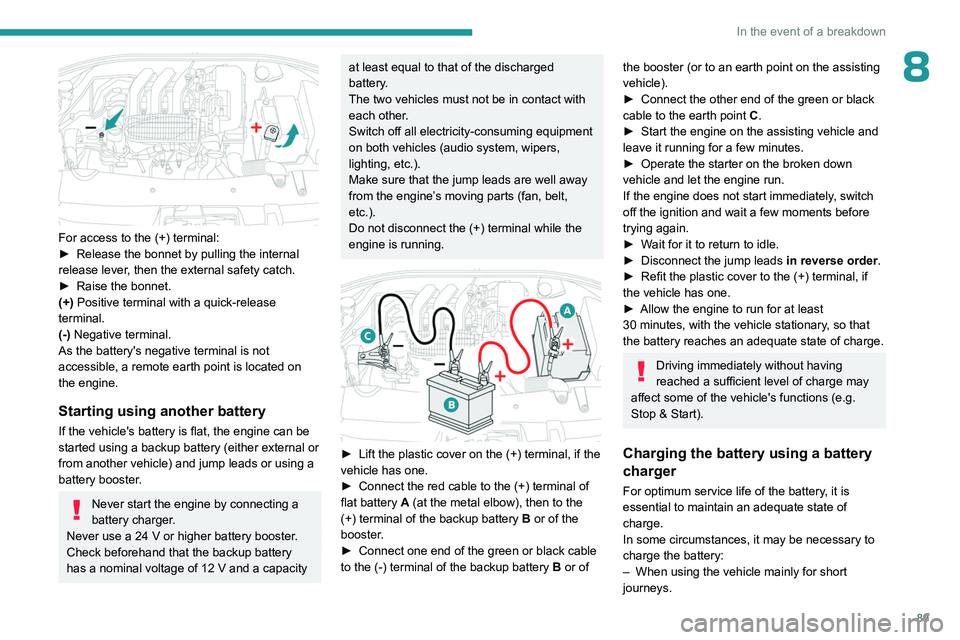
For access to the (+) terminal:
► Release the bonnet by pulling the internal
release lever
, then the external safety catch.
►
Raise the bonnet.
(+)
Positive terminal with a quick-release
terminal.
(-) Negative terminal.
As the battery's negative terminal is not
accessible, a remote earth point is located on
the engine.
Starting using another battery
If the vehicle's battery is flat, the engine can be
started using a backup battery (either external or
from another vehicle) and jump leads or using a
battery booster.
Never start the engine by connecting a
battery charger.
Never use a 24
V or higher battery booster.
Check beforehand that the backup battery
has a nominal voltage of 12
V and a capacity
at least equal to that of the discharged
battery.
The two vehicles must not be in contact with
each other.
Switch off all electricity-consuming equipment
on both vehicles (audio system, wipers,
lighting, etc.).
Make sure that the jump leads are well away
from the engine’s moving parts (fan, belt,
etc.).
Do not disconnect the (+) terminal while the
engine is running.
► Lift the plastic cover on the (+) terminal, if the
vehicle has one.
►
Connect the red cable to the (+) terminal of
flat battery
A (at the metal elbow), then to the
(+) terminal of the backup battery
B or of the
booster.
►
Connect one end of the green or black cable
to the (-) terminal of the backup battery
B or of
the booster (or to an earth point on the assisting
vehicle).
►
Connect the other end of the green or black
cable to the earth point
C
.
►
Start the engine on the assisting vehicle and
leave it running for a few minutes.
►
Operate the starter on the broken down
vehicle and let the engine run.
If the engine does not start immediately
, switch
off the ignition and wait a few moments before
trying again.
►
W
ait for it to return to idle.
►
Disconnect the jump leads in reverse order.
►
Refit the plastic cover to the (+) terminal, if
the vehicle has one.
►
Allow the engine to run for at least
30
minutes, with the vehicle stationary, so that
the battery reaches an adequate state of charge.
Driving immediately without having
reached a sufficient level of charge may
affect some of the vehicle's functions (e.g.
Stop & Start).
Charging the battery using a battery
charger
For optimum service life of the battery, it is
essential to maintain an adequate state of
charge.
In some circumstances, it may be necessary to
charge the battery:
–
When using the vehicle mainly for short
journeys.
Page 93 of 148
91
In the event of a breakdown
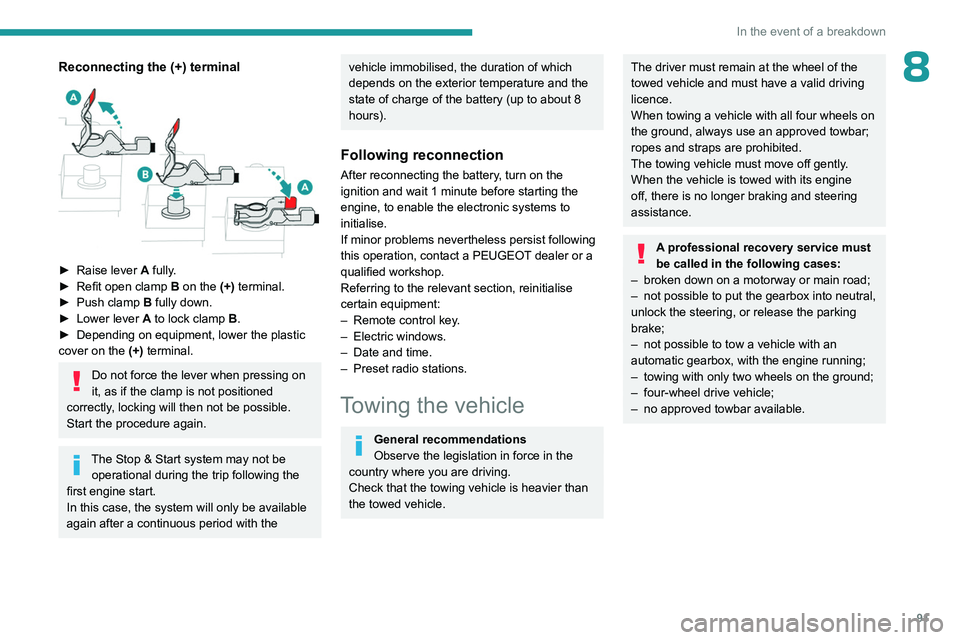
8Reconnecting the (+) terminal
► Raise lever A fully.
► Refit open clamp B on the (+) terminal.
►
Push clamp
B fully down.
►
Lower lever
A
to lock clamp B.
►
Depending on equipment, lower the plastic
cover on the
(+) terminal.
Do not force the lever when pressing on
it, as if the clamp is not positioned
correctly, locking will then not be possible.
Start the procedure again.
The Stop & Start system may not be operational during the trip following the
first engine start.
In this case, the system will only be available
again after a continuous period with the
vehicle immobilised, the duration of which
depends on the exterior temperature and the
state of charge of the battery (up to about 8
hours).
Following reconnection
After reconnecting the battery, turn on the
ignition and wait 1 minute before starting the
engine, to enable the electronic systems to
initialise.
If minor problems nevertheless persist following
this operation, contact a PEUGEOT dealer or a
qualified workshop.
Referring to the relevant section, reinitialise
certain equipment:
–
Remote control key
.
–
Electric windows.
–
Date and time.
–
Preset radio stations.
Towing the vehicle
General recommendations
Observe the legislation in force in the
country where you are driving.
Check that the towing vehicle is heavier than
the towed vehicle.
The driver must remain at the wheel of the
towed vehicle and must have a valid driving
licence.
When towing a vehicle with all four wheels on
the ground, always use an approved towbar;
ropes and straps are prohibited.
The towing vehicle must move off gently.
When the vehicle is towed with its engine
off, there is no longer braking and steering
assistance.
A professional recovery service must
be called in the following cases:
–
broken down on a motorway or main road;
–
not possible to put the gearbox into neutral,
unlock the steering, or release the parking
brake;
–
not possible to tow a vehicle with an
automatic gearbox, with the engine running;
–
towing with only two wheels on the ground;
–
four-wheel drive vehicle;
–
no approved towbar available.
Page 109 of 148
107
Bluetooth® audio system
10– Check that the CD is inserted in the player the
right way up.
–
Check the condition of the CD: the CD cannot
be played if it is too badly damaged.
–
Check the content in the case of a recorded
CD: consult the advice in the "Audio" section.
–
The audio system’
s CD player does not read
DVDs.
–
Because of low quality
, certain burned CDs
will not be read by the audio system.
The CD sound is of poor quality.
1.The CD used is scratched or of poor quality.
Insert good quality CDs and store them in
suitable conditions.
2.The audio settings (bass, treble, ambience) are
unsuitable.
Return bass and treble settings to 0, without
selecting an ambience.
I am unable to connect my Bluetooth
telephone.
1.It is possible that Bluetooth is switched off on
the telephone or that the telephone has been
made not visible.
–
Check that your telephone has Bluetooth
switched on.
–
Check in the telephone settings that it is
"visible to all".
2.
The Bluetooth telephone is not compatible with
the system.
To check the compatibility of your telephone
(services), visit the Manufacturer's website in
your country.
The Bluetooth connection is cut.The battery of the peripheral may not be
sufficiently charged.
Charge the battery of the peripheral device.
The "USB peripheral error" or "Peripheral not
recognised" message appears on the screen.
The USB memory stick is not recognised. The
memory stick could be corrupt.
Reformat the memory stick (FAT 32).
A telephone connects automatically,
disconnecting another telephone.
Automatic connection overrides manual
connection.
Modify the telephone settings to remove
automatic connection.
The Apple
® player is not recognised when
connecting to the USB port.
The Apple
® player is of a generation that is not
compatible with a USB connection.
Connect the Apple
® player to the AUX Jack
socket using a suitable cable (not supplied).
The hard disk or peripheral is not recognised
when connecting to the USB socket.
Some hard disks and devices need a power
supply greater than is provided by the audio
system.
Connect the peripheral to the 230 V socket, the
12V socket or an external power supply.
Ensure that the device does not transmit
a voltage greater than 5 V (risk of
destruction of the system).
When streaming, the sound cuts
momentarily. Some telephones prioritise connection of the
"hands-free" profile.
Delete the "hands-free" connection profile to
improve streaming.
In "Random all" play, not all of the tracks are
played.
In "Random all" play, the system can only take
into account up to 999 tracks.
With the engine off, the audio system
switches off after a few minutes of use.
When the engine is switched off, the audio
system operating time depends on the battery
charge.
The switch-off is normal: the audio system
switches to economy mode and switches off to
prevent discharging the vehicle's battery.
Start the vehicle’s engine to increase the battery
charge.
The message "the audio system is
overheated" appears on the display.
In order to protect the installation if the
surrounding temperature is too high, the audio
system switches to an automatic thermal
protection mode leading to a reduction of the
volume or stopping of the playing of the CD.
Switch the audio system off for a few minutes to
allow the system to cool.
Page 129 of 148

127
Alphabetical index
R
Radio 99, 111–112
Radio, digital (Digital Audio
Broadcasting - DAB)
11 3
RDS
11 2
Reading lamps
30
Rear bench seat
22
Rear screen (demisting)
27–28
Recharging the battery
88–89
Recorder, trip distance
11
Reduction of electrical load (mode)
69
Regeneration of the particle filter
75
Reinitialising the remote control
18
Reinitialising the under-inflation detection
system
59
Reminder, key in ignition
52
Reminder, lighting on
32
Remote control
15–17, 50
Removing a wheel
81–82
Replacing bulbs
83–84, 86
Replacing fuses
87
Replacing the air filter
75
Replacing the oil filter
75
Replacing the passenger compartment
filter
75
Reservoir, screenwash
74
Resetting the trip recorder
11
Reversing camera
60, 65
Reversing lamps
86
Roof bars
70–71
Running out of fuel (Diesel)
79
S
Safety, children 40–43, 45–46
Saturation of the particle filter (Diesel)
75
Screen, cold climate
70
Screen menu map
11 5
Screen, multifunction (with audio system)
99
Screens, very cold conditions
70
Screenwash
33
Screenwash, front
33
Seat belts
37–38, 43
Seat belts, rear
38
Seats, front
21
Seats, rear
22, 42
Sensors (warnings)
60
Serial number, vehicle
96
Servicing
10, 74
Settings, system
11 8
Shield, snow
70
Sidelamps
32, 84–86
Side repeater (turn signal)
86
Snow chains
59, 68–69
Snow screen
70
Socket, 12 V accessory
29
Socket, auxiliary
101, 114
Socket, Jack
29, 101
Sockets, audio
29, 101
Speed limiter
61–62
Speedometer
61
Stability control (ESC)
36
Starting a Diesel engine
67
Starting the vehicle
51–52, 55
Starting using another battery 89
Station, radio
99, 111–112
Stay, engine bonnet
72
Steering mounted controls, audio
98, 109
Steering wheel (adjustment)
23
Stickers, customising
77
Stopping the vehicle
51–52, 55
Stop & Start
14, 25, 27, 56–58, 67, 71, 75, 91
Storage
28–29
Sunshine sensor
24
Sun visor
28
Switch, ignition
51–52
Synchronising the remote control
18
T
Tables of engines 94–95
Tank, fuel
67–68
Technical data
94–95
Telephone
103, 116–117
Third brake lamp
87
Time (setting)
12, 118
Tools
79, 80
Top Tether (fixing)
45
Total distance recorder
11
Towbar
69
Towed loads
93
Towing
91–92
Towing another vehicle
92
Towing the vehicle
91–92
Traction control (ASR)
36–37