tow Peugeot 307 SW Dag 2002.5 Owner's Manual
[x] Cancel search | Manufacturer: PEUGEOT, Model Year: 2002.5, Model line: 307 SW Dag, Model: Peugeot 307 SW Dag 2002.5Pages: 177, PDF Size: 1.99 MB
Page 4 of 177
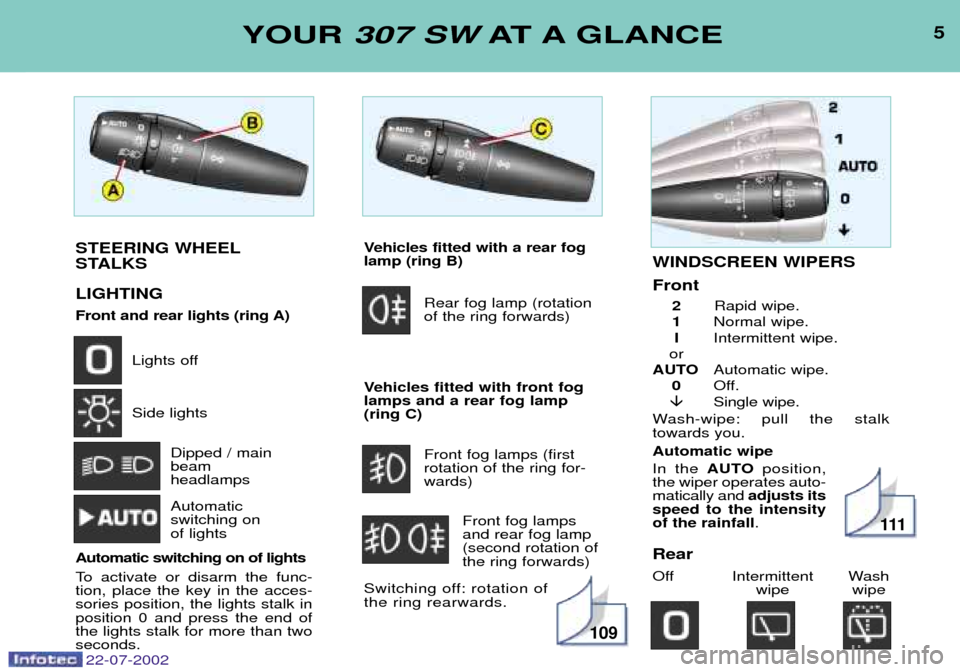
STEERING WHEEL
STALKS LIGHTING
Front and rear lights (ring A)Lights off Side lightsDipped / main beam headlamps Automatic switching on of lights
Automatic switching on of lights
To activate or disarm the func- tion, place the key in the acces-sories position, the lights stalk inposition 0 and press the end ofthe lights stalk for more than twoseconds.
5YOUR 307 SW AT A GLANCE
Vehicles fitted with a rear fog lamp (ring B)
Rear fog lamp (rotationof the ring forwards)
Vehicles fitted with front foglamps and a rear fog lamp(ring C) Front fog lamps (firstrotation of the ring for-wards)Front fog lampsand rear fog lamp(second rotation ofthe ring forwards)
Switching off: rotation ofthe ring rearwards.WINDSCREEN WIPERS Front 2 Rapid wipe.
1 Normal wipe.
I Intermittent wipe.
or
AUTO Automatic wipe.
0 Off.
Single wipe.
Wash-wipe: pull the stalk towards you. Automatic wipe In the AUTO position,
the wiper operates auto- matically and adjusts its
speed to the intensityof the rainfall .
Rear
Off Intermittent Wash wipe wipe
109
111
22-07-2002
Page 11 of 177
12YOUR 307 SW AT A GLANCE
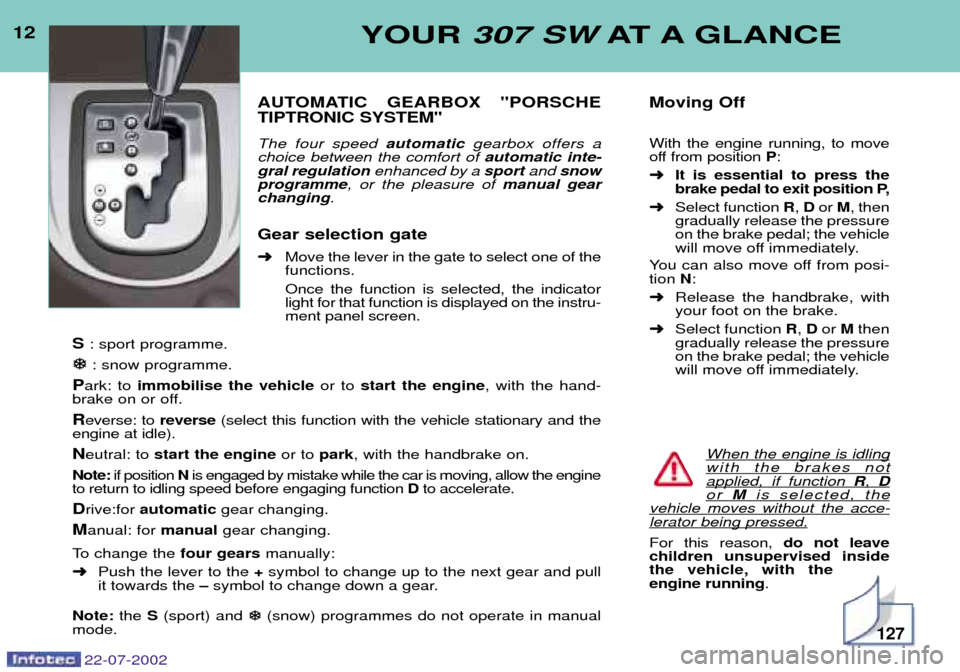
AUTOMATIC GEARBOX "PORSCHE TIPTRONIC SYSTEM" The four speed automatic gearbox offers a
choice between the comfort of automatic inte-
gral regulation enhanced by a sportand snow
programme , or the pleasure of manual gear
changing .
Gear selection gate ➜ Move the lever in the gate to select one of the
functions. Once the function is selected, the indicator light for that function is displayed on the instru-ment panel screen.
S : sport programme.
: snow programme.
P ark: to immobilise the vehicle or to start the engine , with the hand-
brake on or off.
R everse: to reverse(select this function with the vehicle stationary and the
engine at idle).
N eutral: to start the engine or to park, with the handbrake on.
Note: if position Nis engaged by mistake while the car is moving, allow the engine
to return to idling speed before engaging function Dto accelerate.
D rive:for automatic gear changing.
M anual: for manualgear changing.
To change the four gearsmanually:
➜ Push the lever to the +symbol to change up to the next gear and pull
it towards the Ðsymbol to change down a gear.
Note: the S(sport) and
(snow) programmes do not operate in manual
mode. Moving Off With the engine running, to move
off from position
P:
➜ It is essential to press the
brake pedal to exit position P,
➜ Select function R, D or M, then
gradually release the pressureon the brake pedal; the vehicle
will move off immediately.
You can also move off from posi-tion N:
➜ Release the handbrake, withyour foot on the brake.
➜ Select function R, D or Mthen
gradually release the pressureon the brake pedal; the vehicle
will move off immediately.
When the engine is idling
with the brakes notapplied, if function R, Dor M is selected, thevehicle moves without the acce-lerator being pressed.
For this reason, do not leave
children unsupervised inside the vehicle, with theengine running .
127
22-07-2002
Page 20 of 177

22-07-2002
ARDUOUS CONDITIONS OF USE
¥ Continuous door-to-door use.
¥ Town use (e.g. taxi).¥ Repeated short journeys, with the engine cold at low temperatures.
¥ A prolonged stay under the following conditions : Ð countries with temperatures often above +30 ¡C,Ð countries with temperatures often below -15 ¡C,Ð countries with a dusty atmosphere,Ð countries whose lubricants or fuels do not conform to our recommendations.
Recommendations: Ð replace the air filterevery 40 000 km for petrol engines and every 45 000 km for diesel engines,
Ð for replacement of the timing belt: contact a PEUGEOT dealer.
PEUGEOT SERVICING
24
Page 76 of 177
YOUR 307 SW IN DETAIL75
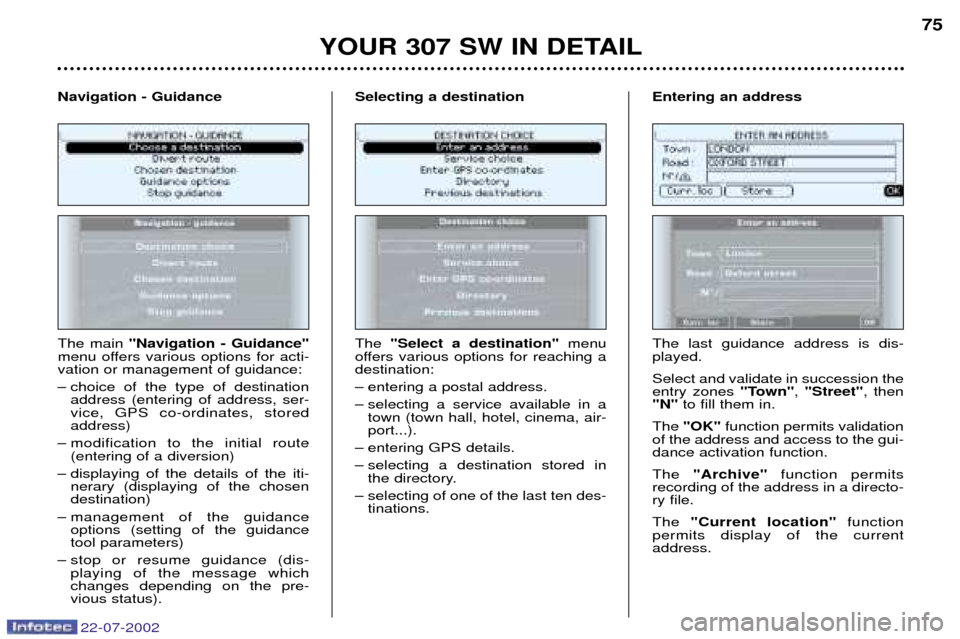
The main "Navigation - Guidance"
menu offers various options for acti- vation or management of guidance:
Ð choice of the type of destination address (entering of address, ser- vice, GPS co-ordinates, storedaddress)
Ð modification to the initial route (entering of a diversion)
Ð displaying of the details of the iti- nerary (displaying of the chosendestination)
Ð management of the guidance options (setting of the guidancetool parameters)
Ð stop or resume guidance (dis- playing of the message whichchanges depending on the pre-vious status).
Navigation - Guidance
The "Select a destination" menu
offers various options for reaching adestination:
Ð entering a postal address.
Ð selecting a service available in a town (town hall, hotel, cinema, air- port...).
Ð entering GPS details.
Ð selecting a destination stored in the directory.
Ð selecting of one of the last ten des- tinations.
Selecting a destination
The last guidance address is dis- played. Select and validate in succession the entry zones "Town", "Street" , then
"N" to fill them in.
The "OK" function permits validation
of the address and access to the gui-dance activation function. The "Archive" function permits
recording of the address in a directo- ry file. The "Current location" function
permits display of the current address.
Entering an address
22-07-2002
Page 77 of 177
YOUR 307 SW IN DETAIL
76
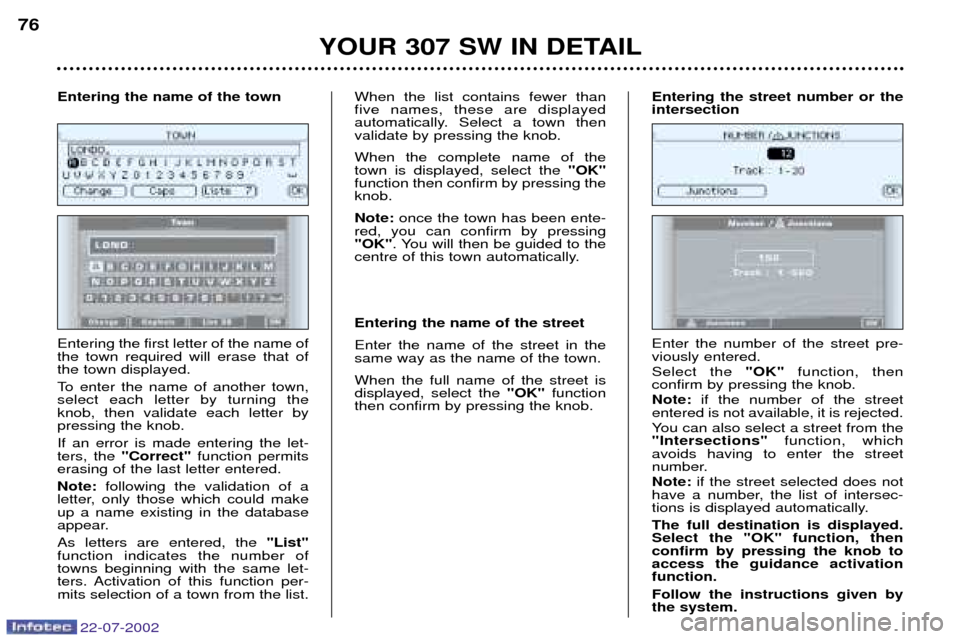
Entering the first letter of the name of the town required will erase that ofthe town displayed.
To enter the name of another town, select each letter by turning theknob, then validate each letter bypressing the knob. If an error is made entering the let- ters, the "Correct" function permits
erasing of the last letter entered. Note: following the validation of a
letter, only those which could make up a name existing in the database
appear. As letters are entered, the "List"
function indicates the number of towns beginning with the same let-
ters. Activation of this function per-mits selection of a town from the list. When the list contains fewer thanfive names, these are displayed
automatically. Select a town thenvalidate by pressing the knob. When the complete name of the town is displayed, select the
"OK"
function then confirm by pressing theknob. Note: once the town has been ente-
red, you can confirm by pressing "OK" . You will then be guided to the
centre of this town automatically. Entering the name of the street Enter the name of the street in the same way as the name of the town. When the full name of the street is displayed, select the "OK"function
then confirm by pressing the knob.
Entering the name of the town
Enter the number of the street pre-viously entered. Select the "OK"function, then
confirm by pressing the knob.Note: if the number of the street
entered is not available, it is rejected.
You can also select a street from the "Intersections" function, which
avoids having to enter the street
number. Note: if the street selected does not
have a number, the list of intersec-
tions is displayed automatically. The full destination is displayed. Select the "OK" function, thenconfirm by pressing the knob toaccess the guidance activationfunction. Follow the instructions given by the system.
Entering the street number or theintersection
22-07-2002
Page 78 of 177
YOUR 307 SW IN DETAIL77
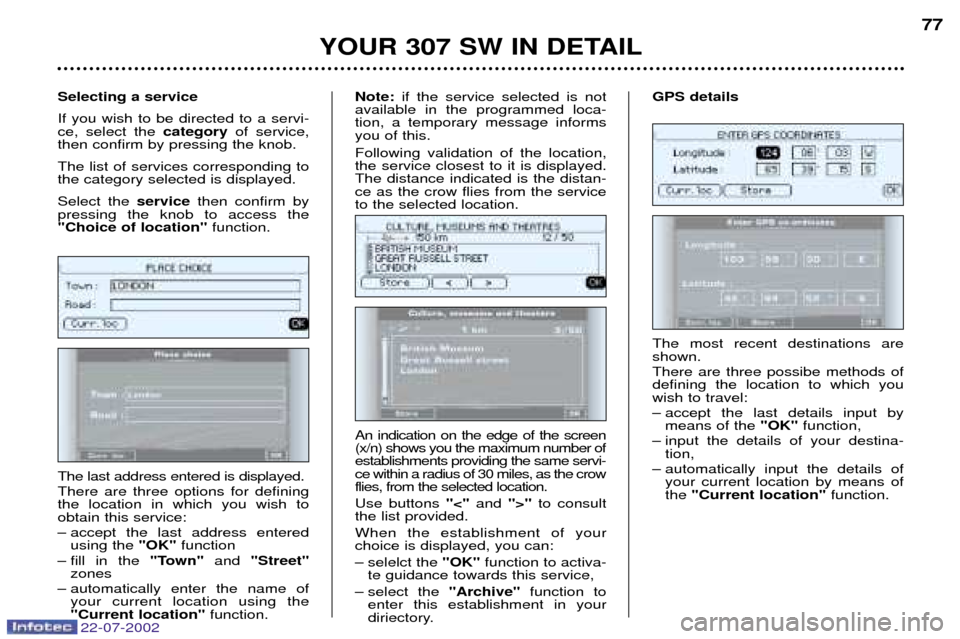
The most recent destinations are shown. There are three possibe methods of defining the location to which youwish to travel:
Ð accept the last details input by means of the "OK"function,
Ð input the details of your destina- tion,
Ð automatically input the details of your current location by means of the "Current location" function.
GPS details
The last address entered is displayed. There are three options for defining the location in which you wish toobtain this service:
Ð accept the last address entered using the "OK"function
Ð fill in the "Town"and "Street"
zones
Ð automatically enter the name of your current location using the "Current location" function.
Selecting a service If you wish to be directed to a servi- ce, select the
categoryof service,
then confirm by pressing the knob. The list of services corresponding to the category selected is displayed. Select the servicethen confirm by
pressing the knob to access the "Choice of location" function.
An indication on the edge of the screen(x/n) shows you the maximum number ofestablishments providing the same servi-ce within a radius of 30 miles, as the crowflies, from the selected location. Use buttons "<"and ">"to consult
the list provided.When the establishment of your choice is displayed, you can:
Ð selelct the "OK"function to activa-
te guidance towards this service,
Ð select the "Archive"function to
enter this establishment in your
diriectory.
Note:
if the service selected is not
available in the programmed loca-tion, a temporary message informsyou of this. Following validation of the location, the service closest to it is displayed.The distance indicated is the distan-ce as the crow flies from the serviceto the selected location.
22-07-2002
Page 81 of 177
22-07-2002
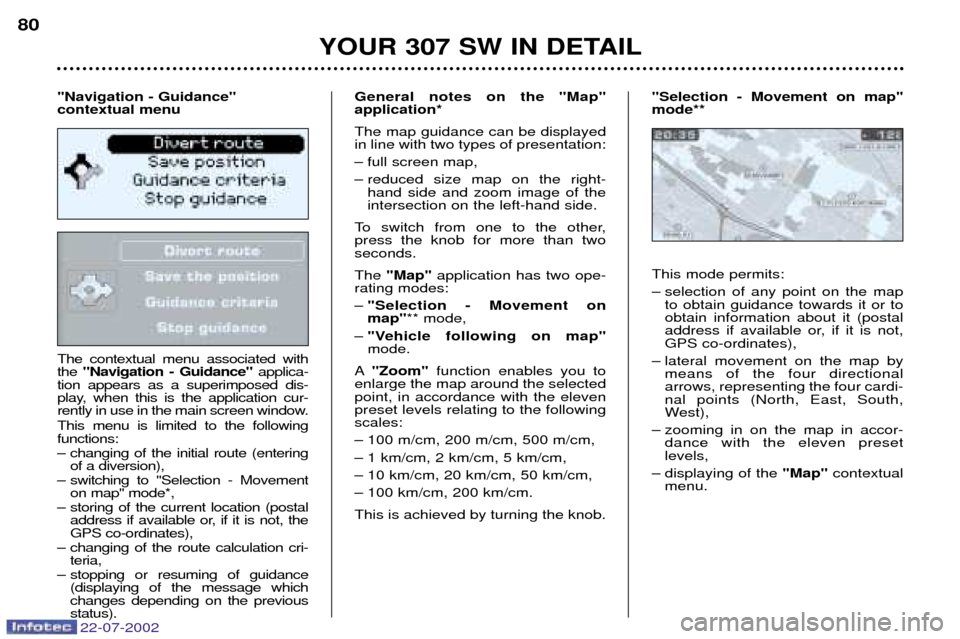
The contextual menu associated with the "Navigation - Guidance" applica-
tion appears as a superimposed dis-
play, when this is the application cur-
rently in use in the main screen window. This menu is limited to the following functions:
Ð changing of the initial route (entering of a diversion),
Ð switching to "Selection - Movement on map" mode*,
Ð storing of the current location (postal address if available or, if it is not, the GPS co-ordinates),
Ð changing of the route calculation cri- teria,
Ð stopping or resuming of guidance (displaying of the message whichchanges depending on the previousstatus). General notes on the "Map"application* The map guidance can be displayed in line with two types of presentation:
Ð full screen map,
Ð reduced size map on the right-
hand side and zoom image of the intersection on the left-hand side.
To switch from one to the other,press the knob for more than twoseconds. The "Map" application has two ope-
rating modes: Ð "Selection - Movement on map" ** mode,
Ð "Vehicle following on map"mode.
A "Zoom" function enables you to
enlarge the map around the selectedpoint, in accordance with the elevenpreset levels relating to the followingscales:
Ð 100 m/cm, 200 m/cm, 500 m/cm,
Ð 1 km/cm, 2 km/cm, 5 km/cm,
Ð 10 km/cm, 20 km/cm, 50 km/cm,
Ð 100 km/cm, 200 km/cm. This is achieved by turning the knob. This mode permits:
Ð selection of any point on the map
to obtain guidance towards it or to obtain information about it (postal
address if available or, if it is not,GPS co-ordinates),
Ð lateral movement on the map by means of the four directionalarrows, representing the four cardi-nal points (North, East, South,
West),
Ð zooming in on the map in accor- dance with the eleven presetlevels,
Ð displaying of the "Map"contextual
menu.
YOUR 307 SW IN DETAIL
80
"Navigation - Guidance" contextual menu "Selection - Movement on map"mode**
Page 82 of 177
22-07-2002
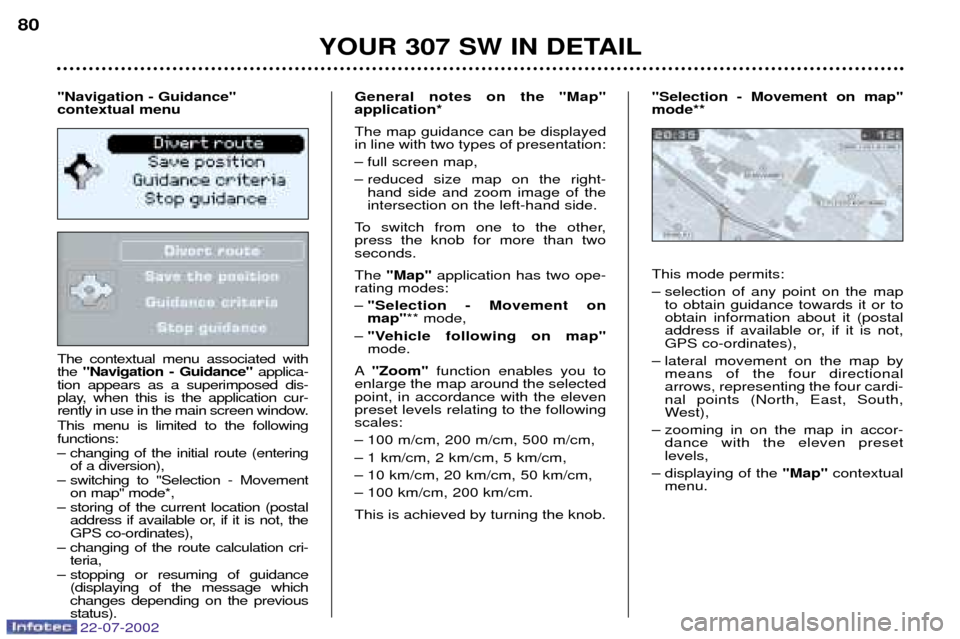
The contextual menu associated with the "Navigation - Guidance" applica-
tion appears as a superimposed dis-
play, when this is the application cur-
rently in use in the main screen window. This menu is limited to the following functions:
Ð changing of the initial route (entering of a diversion),
Ð switching to "Selection - Movement on map" mode*,
Ð storing of the current location (postal address if available or, if it is not, the GPS co-ordinates),
Ð changing of the route calculation cri- teria,
Ð stopping or resuming of guidance (displaying of the message whichchanges depending on the previousstatus). General notes on the "Map"application* The map guidance can be displayed in line with two types of presentation:
Ð full screen map,
Ð reduced size map on the right-
hand side and zoom image of the intersection on the left-hand side.
To switch from one to the other,press the knob for more than twoseconds. The "Map" application has two ope-
rating modes: Ð "Selection - Movement on map" ** mode,
Ð "Vehicle following on map"mode.
A "Zoom" function enables you to
enlarge the map around the selectedpoint, in accordance with the elevenpreset levels relating to the followingscales:
Ð 100 m/cm, 200 m/cm, 500 m/cm,
Ð 1 km/cm, 2 km/cm, 5 km/cm,
Ð 10 km/cm, 20 km/cm, 50 km/cm,
Ð 100 km/cm, 200 km/cm. This is achieved by turning the knob. This mode permits:
Ð selection of any point on the map
to obtain guidance towards it or to obtain information about it (postal
address if available or, if it is not,GPS co-ordinates),
Ð lateral movement on the map by means of the four directionalarrows, representing the four cardi-nal points (North, East, South,
West),
Ð zooming in on the map in accor- dance with the eleven presetlevels,
Ð displaying of the "Map"contextual
menu.
YOUR 307 SW IN DETAIL
80
"Navigation - Guidance" contextual menu "Selection - Movement on map"mode**
Page 83 of 177
22-07-2002
YOUR 307 SW IN DETAIL81
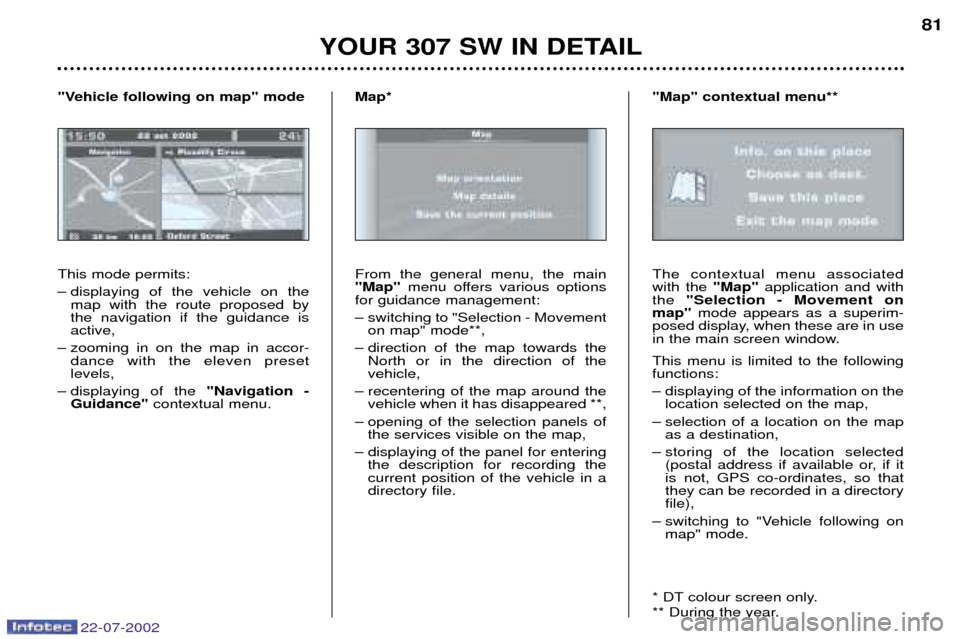
This mode permits:
Ð displaying of the vehicle on the map with the route proposed by the navigation if the guidance isactive,
Ð zooming in on the map in accor- dance with the eleven presetlevels,
Ð displaying of the "Navigation -
Guidance" contextual menu.
"Vehicle following on map" mode
From the general menu, the main"Map"menu offers various options
for guidance management:
Ð switching to "Selection - Movement on map" mode**,
Ð direction of the map towards the North or in the direction of the vehicle,
Ð recentering of the map around the vehicle when it has disappeared **,
Ð opening of the selection panels of the services visible on the map,
Ð displaying of the panel for entering the description for recording thecurrent position of the vehicle in adirectory file.
Map*
The contextual menu associatedwith the "Map"application and with
the "Selection - Movement on
map" mode appears as a superim-
posed display, when these are in use
in the main screen window. This menu is limited to the following functions:
Ð displaying of the information on the location selected on the map,
Ð selection of a location on the map as a destination,
Ð storing of the location selected (postal address if available or, if it is not, GPS co-ordinates, so thatthey can be recorded in a directoryfile),
Ð switching to "Vehicle following on map" mode.
* DT colour screen only.
** During the year.
"Map" contextual menu**
Page 89 of 177
22-07-2002
YOUR 307 SW IN DETAIL87
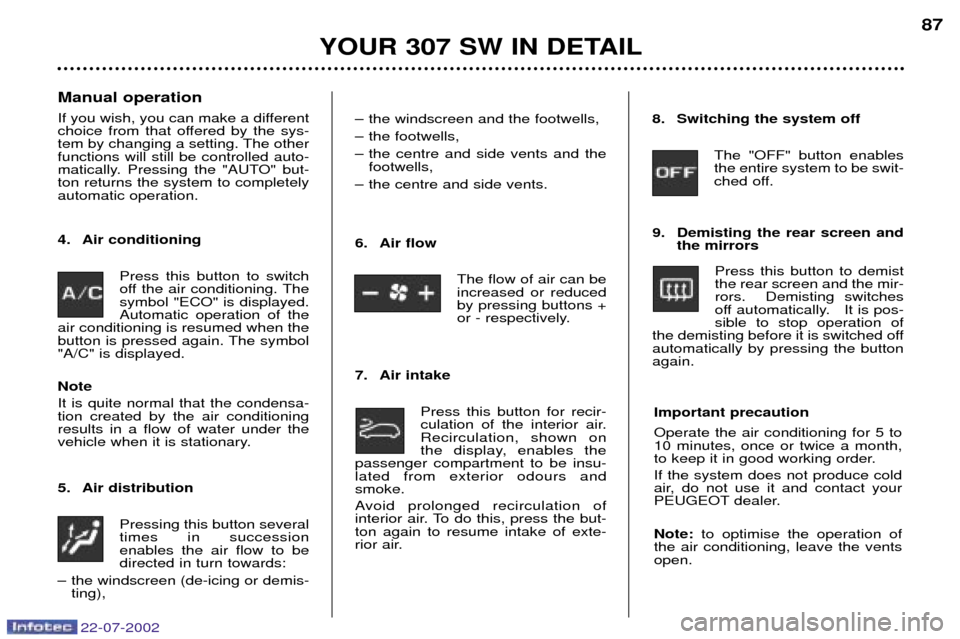
Manual operation
If you wish, you can make a different
choice from that offered by the sys-
tem by changing a setting. The otherfunctions will still be controlled auto-
matically. Pressing the "AUTO" but-ton returns the system to completelyautomatic operation.
4. Air conditioning Press this button to switch
off the air conditioning. Thesymbol "ECO" is displayed.Automatic operation of the
air conditioning is resumed when the
button is pressed again. The symbol"A/C" is displayed. Note It is quite normal that the condensa- tion created by the air conditioningresults in a flow of water under the
vehicle when it is stationary.
5. Air distribution
Pressing this button several times in successionenables the air flow to bedirected in turn towards:
Ð the windscreen (de-icing or demis- ting), Ð the windscreen and the footwells,
Ð the footwells,
Ð the centre and side vents and the
footwells,
Ð the centre and side vents.
6. Air flow
The flow of air can be increased or reducedby pressing buttons +
or - respectively.
7. Air intake Press this button for recir-
culation of the interior air.Recirculation, shown on
the display, enables the
passenger compartment to be insu-lated from exterior odours andsmoke.
Avoid prolonged recirculation of
interior air. To do this, press the but-ton again to resume intake of exte-
rior air. 8. Switching the system off
The "OFF" button enablesthe entire system to be swit-
ched off.
9. Demisting the rear screen and the mirrors
Press this button to demistthe rear screen and the mir-rors. Demisting switches
off automatically. It is pos-sible to stop operation of
the demisting before it is switched offautomatically by pressing the buttonagain.
Important precaution Operate the air conditioning for 5 to 10 minutes, once or twice a month,
to keep it in good working order. If the system does not produce cold
air, do not use it and contact your
PEUGEOT dealer. Note: to optimise the operation of
the air conditioning, leave the vents open.