display PEUGEOT 308 2012 Manual Online
[x] Cancel search | Manufacturer: PEUGEOT, Model Year: 2012, Model line: 308, Model: PEUGEOT 308 2012Pages: 328, PDF Size: 62.62 MB
Page 251 of 328
249
08
1
2
3
1
3
22ABC3DEF5JKL4GHI6MNO8TUV7PQRS9WXYZ0*#
1RADIO MEDIANAV ESC TRAFFIC
SETUPADDR
BOOK
2ABC3DEF5JKL4GHI6MNO8TUV7PQRS9WXYZ0*#
1RADIO MEDIANAV ESC TRAFFIC
SETUPADDR
BOOK
2ABC3DEF5JKL4GHI6MNO8TUV7PQRS9WXYZ0*#
1RADIO MEDIANAV ESC TRAFFIC
SETUPADDR
BOOK
2ABC3DEF5JKL4GHI6MNO8TUV7PQRS9WXYZ0*#
1RADIO MEDIANAV ESC TRAFFIC
SETUPADDR
BOOK
2ABC3DEF5JKL4GHI6MNO8TUV7PQRS9WXYZ0*#
1RADIO MEDIANAV ESC TRAFFIC
SETUPADDR
BOOK
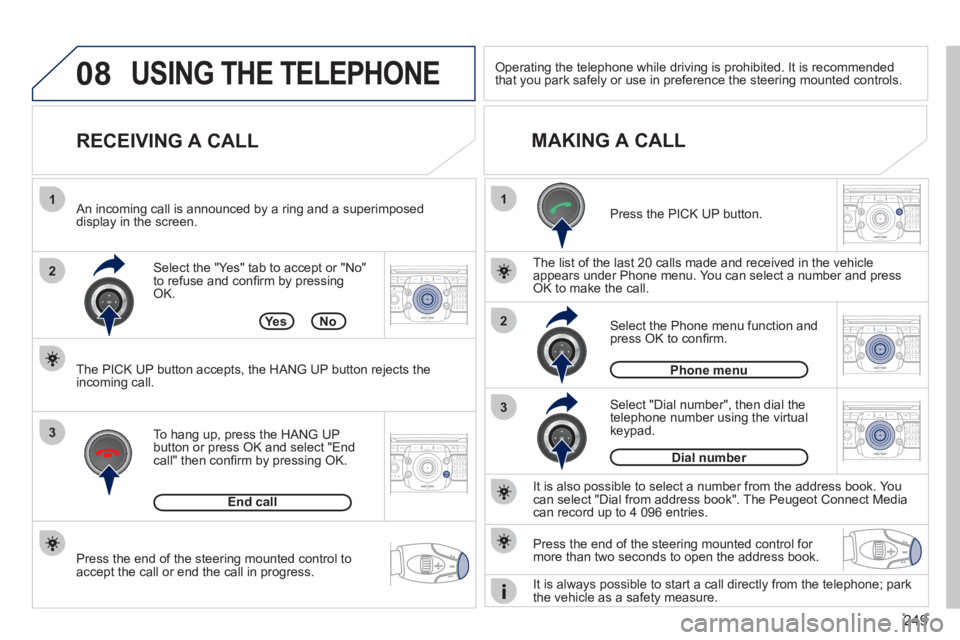
Press the end of the steering mounted control to
accept the call or end the call in progress.
Select the "Yes" tab to accept or "No"
to refuse and confi rm by pressing
OK.
RECEIVING A CALL
MAKING A CALL
An incoming call is announced by a ring and a superimposed
display in the screen.
To hang up, press the HANG UP
button or press OK and select "End
call" then confi rm by pressing OK.
End call
Press the PICK UP button.
It is also possible to select a number from the address book. You
can select "Dial from address book". The Peugeot Connect Media
can record up to 4 096 entries.
Select "Dial number", then dial the
telephone number using the virtual
keypad.
Select the Phone menu function and
press OK to confi rm.
Dial number
Phone menu
The list of the last 20 calls made and received in the vehicle
appears under Phone menu. You can select a number and press
OK to make the call.
Yes No
The PICK UP button accepts, the HANG UP button rejects the
incoming call.
USING THE TELEPHONE
Press the end of the steering mounted control for
more than two seconds to open the address book.
Operating the telephone while driving is prohibited. It is recommended
that you park safely or use in preference the steering mounted controls.
It is always possible to start a call directly from the telephone; park
the vehicle as a safety measure.
Page 253 of 328
251
10
MEDIA
TRAFFIC
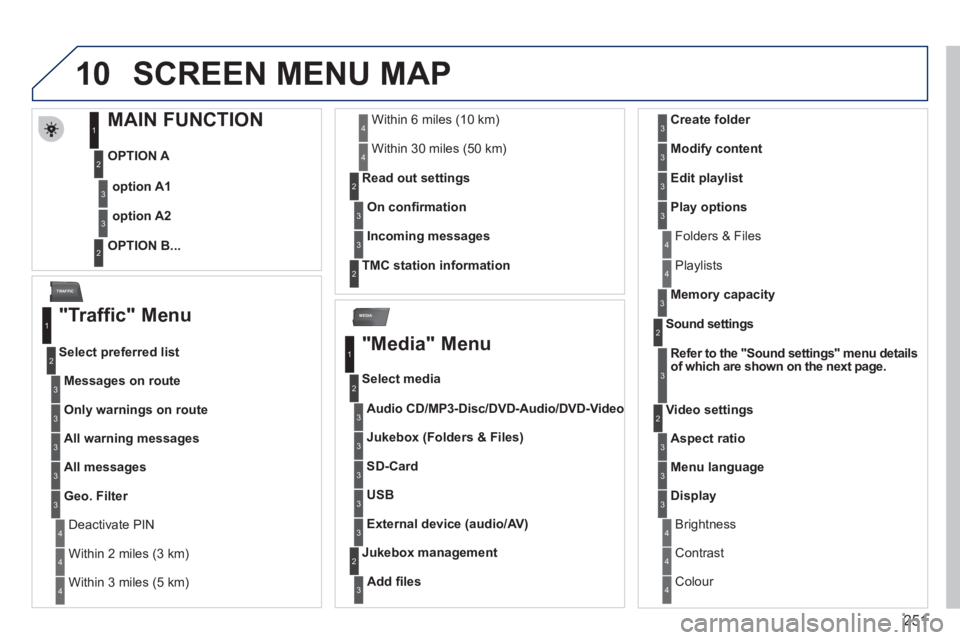
SCREEN MENU MAP
MAIN FUNCTION
OPTION A
OPTION B...
option A1
option A2
1
2
3
2
3
"Traffic" Menu
Messages on route
Select preferred list
1
2
3
Deactivate PIN 4
Only warnings on route
3
All warning messages
3
All messages
3
Geo. Filter
3
Within 2 miles (3 km) 4
Within 3 miles (5 km) 4
Within 6 miles (10 km) 4
Within 30 miles (50 km) 4
On confi rmation
Read out settings
2
3
Incoming messages
3
TMC station information
2
"Media" Menu
Audio CD/MP3-Disc / DVD-Audio / DVD-Video
Select media
1
2
3
Jukebox (Folders & Files)
3
SD-Card
3
USB
3
External device (audio/AV)
3
Add fi les
Jukebox management
2
3
Folders & Files 4
Create folder
3
Modify content
3
Edit playlist
3
Play options
3
Playlists 4
Memory capacity
3
Refer to the "
Sound settings
"
menu details
of which are shown on the next page.
Sound settings
2
3
Aspect ratio
Video settings
2
3
Menu language
3
Display
3
Brightness 4
Contrast 4
Colour 4
Page 257 of 328
255
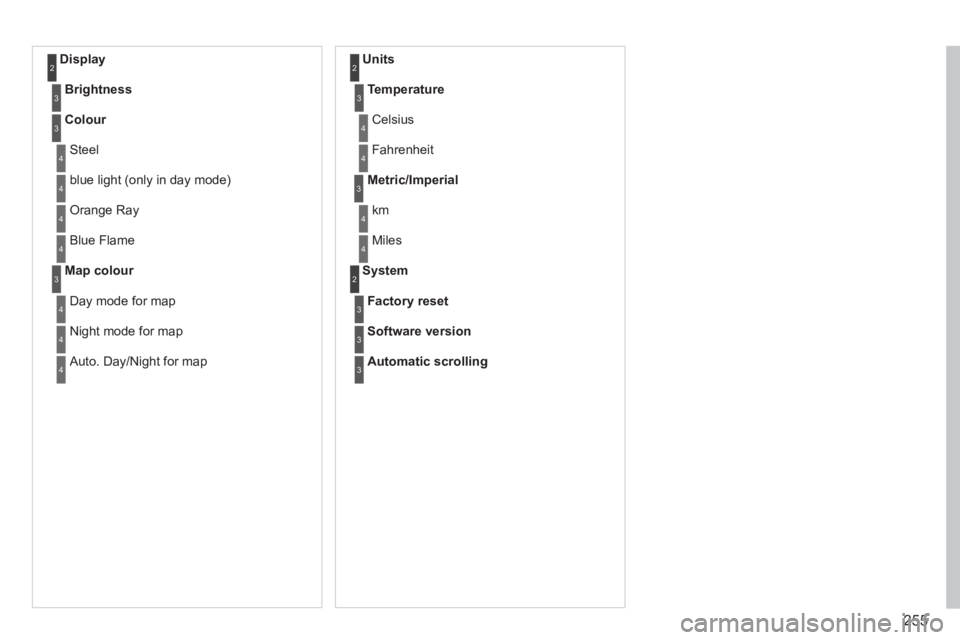
Display 2
Brightness
3
Colour
3
Steel 4
blue light (only in day mode) 4
Orange Ray 4
Blue Flame 4
Map colour
3
Day mode for map 4
Night mode for map 4
Auto. Day/Night for map 4
Units 2
Temperature
3
Celsius 4
Fahrenheit 4
Metric/Imperial
3
km 4
Miles 4
System 2
Factory reset
3
Software version
3
Automatic scrolling
3
Page 259 of 328
257
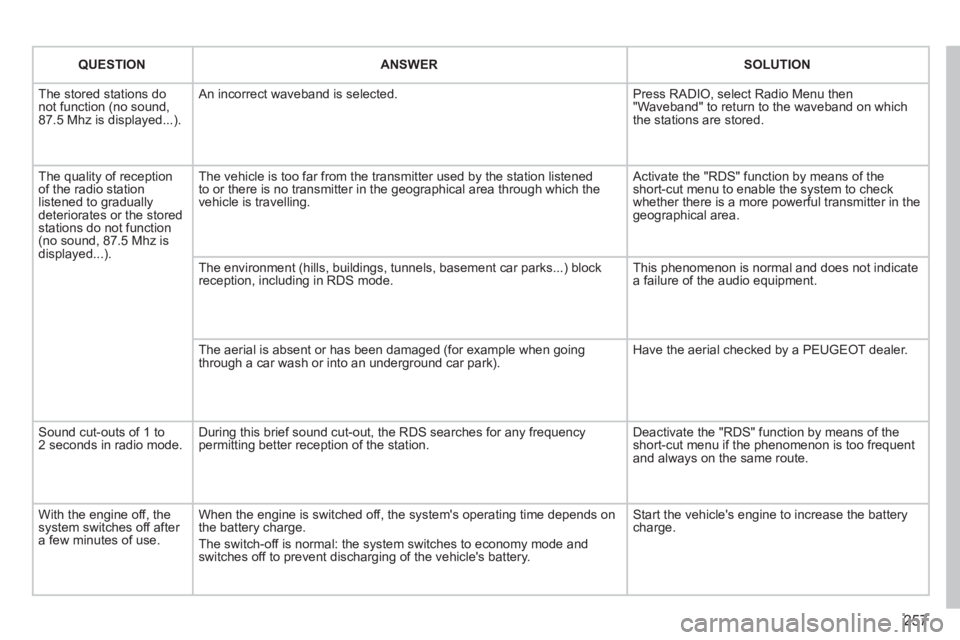
QUESTION
ANSWER
SOLUTION
The stored stations do
not function (no sound,
87.5 Mhz is displayed...). An incorrect waveband is selected. Press RADIO, select Radio Menu then
"Waveband" to return to the waveband on which
the stations are stored.
The quality of reception
of the radio station
listened to gradually
deteriorates or the stored
stations do not function
(no sound, 87.5 Mhz is
displayed...). The vehicle is too far from the transmitter used by the station listened
to or there is no transmitter in the geographical area through which the
vehicle is travelling. Activate the "RDS" function by means of the
short-cut menu to enable the system to check
whether there is a more powerful transmitter in the
geographical area.
The environment (hills, buildings, tunnels, basement car parks...) block
reception, including in RDS mode. This phenomenon is normal and does not indicate
a failure of the audio equipment.
The aerial is absent or has been damaged (for example when going
through a car wash or into an underground car park). Have the aerial checked by a PEUGEOT dealer.
Sound cut-outs of 1 to
2 seconds in radio mode. During this brief sound cut-out, the RDS searches for any frequency
permitting better reception of the station. Deactivate the "RDS" function by means of the
short-cut menu if the phenomenon is too frequent
and always on the same route.
With the engine off, the
system switches off after
a few minutes of use. When the engine is switched off, the system's operating time depends on
the battery charge.
The switch-off is normal: the system switches to economy mode and
switches off to prevent discharging of the vehicle's battery. Start the vehicle's engine to increase the battery
charge.
Page 260 of 328
258
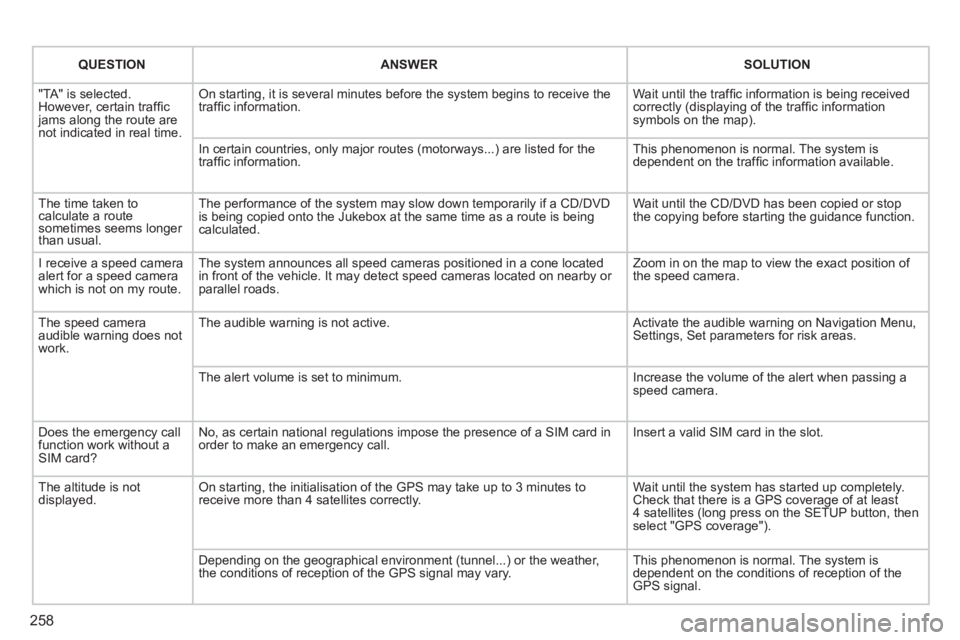
QUESTION
ANSWER
SOLUTION
"TA" is selected.
However, certain traffi c
jams along the route are
not indicated in real time. On starting, it is several minutes before the system begins to receive the
traffi c information. Wait until the traffi c information is being received
correctly (displaying of the traffi c information
symbols on the map).
In certain countries, only major routes (motorways...) are listed for the
traffi c information. This phenomenon is normal. The system is
dependent on the traffi c information available.
The time taken to
calculate a route
sometimes seems longer
than usual. The performance of the system may slow down temporarily if a CD/DVD
is being copied onto the Jukebox at the same time as a route is being
calculated. Wait until the CD/DVD has been copied or stop
the copying before starting the guidance function.
I receive a speed camera
alert for a speed camera
which is not on my route. The system announces all speed cameras positioned in a cone located
in front of the vehicle. It may detect speed cameras located on nearby or
parallel roads. Zoom in on the map to view the exact position of
the speed camera.
The speed camera
audible warning does not
work. The audible warning is not active. Activate the audible warning on Navigation Menu,
Settings, Set parameters for risk areas.
The alert volume is set to minimum. Increase the volume of the alert when passing a
speed camera.
Does the emergency call
function work without a
SIM card? No, as certain national regulations impose the presence of a SIM card in
order to make an emergency call. Insert a valid SIM card in the slot.
The altitude is not
displayed. On starting, the initialisation of the GPS may take up to 3 minutes to
receive more than 4 satellites correctly. Wait until the system has started up completely.
Check that there is a GPS coverage of at least
4 satellites (long press on the SETUP button, then
select "GPS coverage").
Depending on the geographical environment (tunnel...) or the weather,
the conditions of reception of the GPS signal may vary. This phenomenon is normal. The system is
dependent on the conditions of reception of the
GPS signal.
Page 262 of 328
260
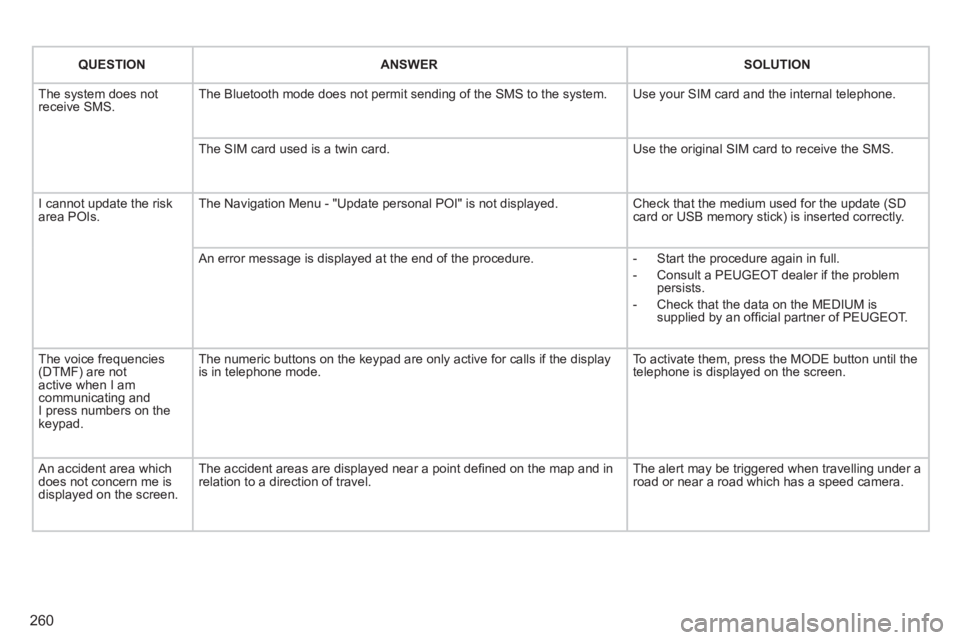
QUESTION
ANSWER
SOLUTION
The system does not
receive SMS. The Bluetooth mode does not permit sending of the SMS to the system. Use your SIM card and the internal telephone.
The SIM card used is a twin card. Use the original SIM card to receive the SMS.
I cannot update the risk
area POIs. The Navigation Menu - "Update personal POI" is not displayed. Check that the medium used for the update (SD
card or USB memory stick) is inserted correctly.
An error message is displayed at the end of the procedure.
- Start the procedure again in full.
- Consult a PEUGEOT dealer if the problem
persists.
- Check that the data on the MEDIUM is
supplied by an offi cial partner of PEUGEOT.
The voice frequencies
(DTMF) are not
active when I am
communicating and
I press numbers on the
keypad. The numeric buttons on the keypad are only active for calls if the display
is in telephone mode. To activate them, press the MODE button until the
telephone is displayed on the screen.
An accident area which
does not concern me is
displayed on the screen. The accident areas are displayed near a point defi ned on the map and in
relation to a direction of travel. The alert may be triggered when travelling under a
road or near a road which has a speed camera.
Page 264 of 328
262
01 FIRST STEPS
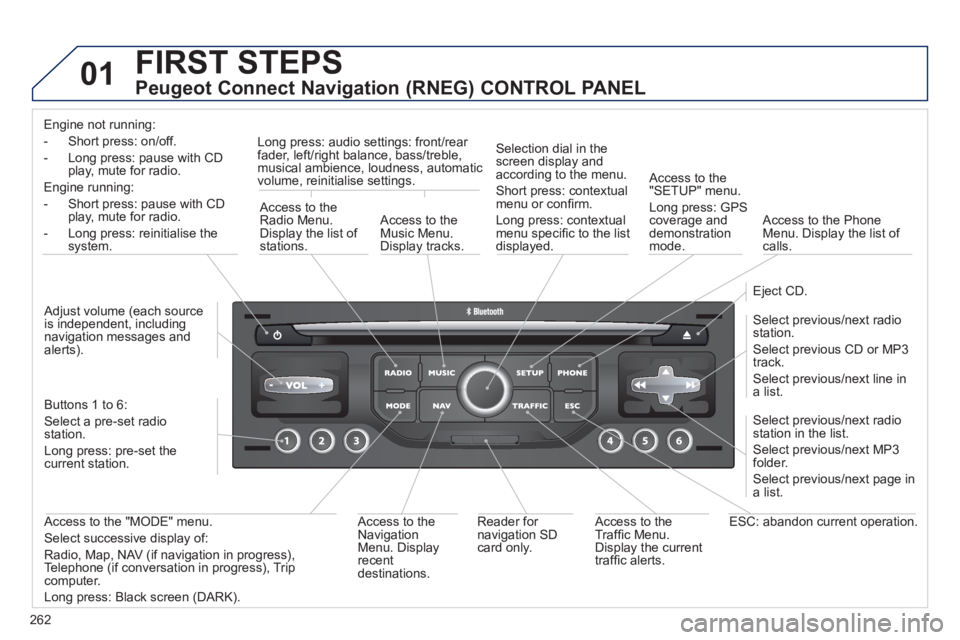
Peugeot Connect Navigation (RNEG) CONTROL PANEL
Engine not running:
- Short press: on/off.
- Long press: pause with CD
play, mute for radio.
Engine running:
- Short press: pause with CD
play, mute for radio.
- Long press: reinitialise the
system.
Access to the
Radio Menu.
Display the list of
stations.
Access to the
Music Menu.
Display tracks.
Long press: audio settings: front/rear
fader, left/right balance, bass/treble,
musical ambience, loudness, automatic
volume, reinitialise settings.
Selection dial in the
screen display and
according to the menu.
Short press: contextual
menu or confi rm.
Long press: contextual
menu specifi c to the list
displayed.
Access to the
"SETUP" menu.
Long press: GPS
coverage and
demonstration
mode.
Access to the Phone
Menu. Display the list of
calls.
Eject CD.
Select previous/next radio
station.
Select previous CD or MP3
track.
Select previous/next line in
a list.
Select previous/next radio
station in the list.
Select previous/next MP3
folder.
Select previous/next page in
a list.
ESC: abandon current operation.
Access to the
Traffi c Menu.
Display the current
traffi c alerts.
Reader for
navigation SD
card only.
Access to the
Navigation
Menu. Display
recent
destinations.
Access to the "MODE" menu.
Select successive display of:
Radio, Map, NAV (if navigation in progress),
Telephone (if conversation in progress), Trip
computer.
Long press: Black screen (DARK).
Buttons 1 to 6:
Select a pre-set radio
station.
Long press: pre-set the
current station.
Adjust volume (each source
is independent, including
navigation messages and
alerts).
Page 266 of 328
264
03 GENERAL OPERATION
For a detailed global view of the menus available, refer to the
"Screen menu map" section.
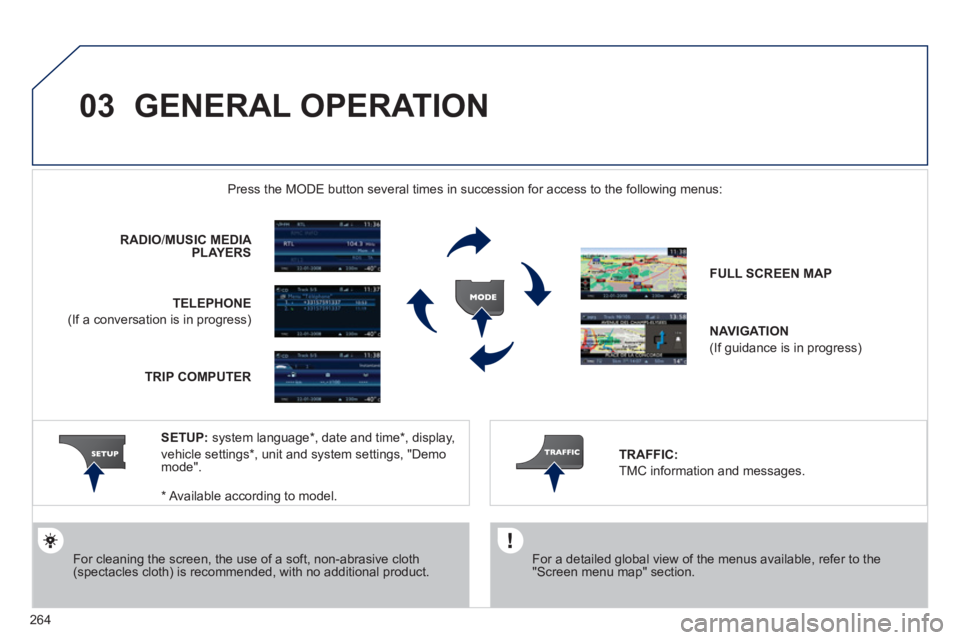
Press the MODE button several times in succession for access to the following menus:
For cleaning the screen, the use of a soft, non-abrasive cloth
(spectacles cloth) is recommended, with no additional product.
RADIO
/ MUSIC MEDIA
PLAYERS
TELEPHONE
(If a conversation is in progress)
FULL SCREEN MAP
NAVIGATION
(If guidance is in progress)
SETUP:
system language * , date and time * , display,
vehicle settings * , unit and system settings, "Demo
mode".
TRAFFIC:
TMC information and messages.
*
Available according to model.
TRIP COMPUTER
Page 267 of 328
265
03 GENERAL OPERATION
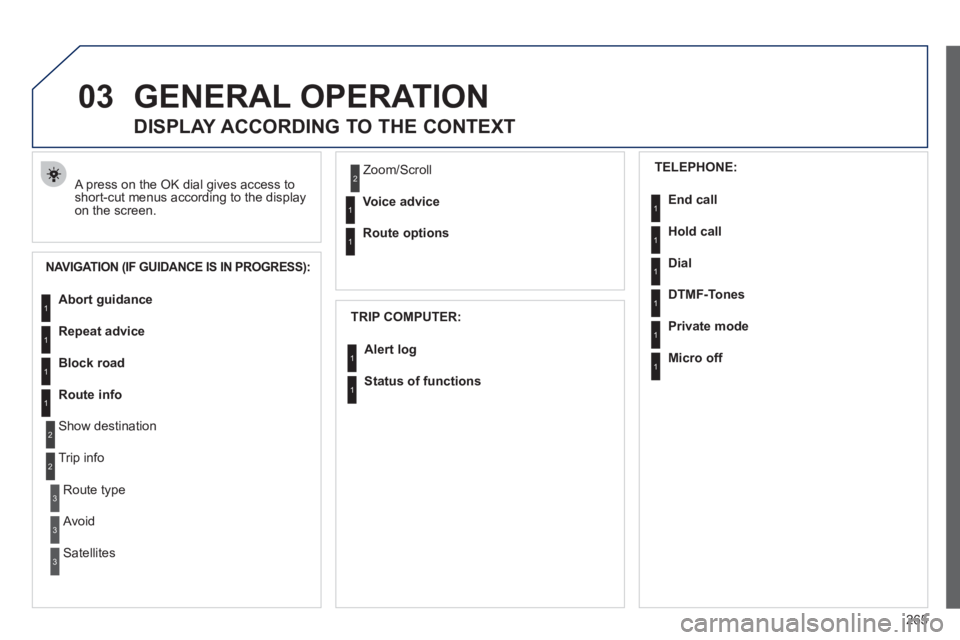
A press on the OK dial gives access to
short-cut menus according to the display
on the screen.
DISPLAY ACCORDING TO THE CONTEXT
NAVIGATION (IF GUIDANCE IS IN PROGRESS):
TRIP COMPUTER:
Abort guidance
Repeat advice
Block road
Route info
Show destination
Trip info
Route type
Avoid
Satellites Zoom/Scroll
Voice advice
Route options
Alert log
Status of functions
1
2
3
3
2
1
1
1
3
1
1
1
1
2
TELEPHONE:
End call
Hold call
Dial
DTMF-Tones
Private mode
Micro off
1
1
1
1
1
1
Page 268 of 328
266
03 GENERAL OPERATION
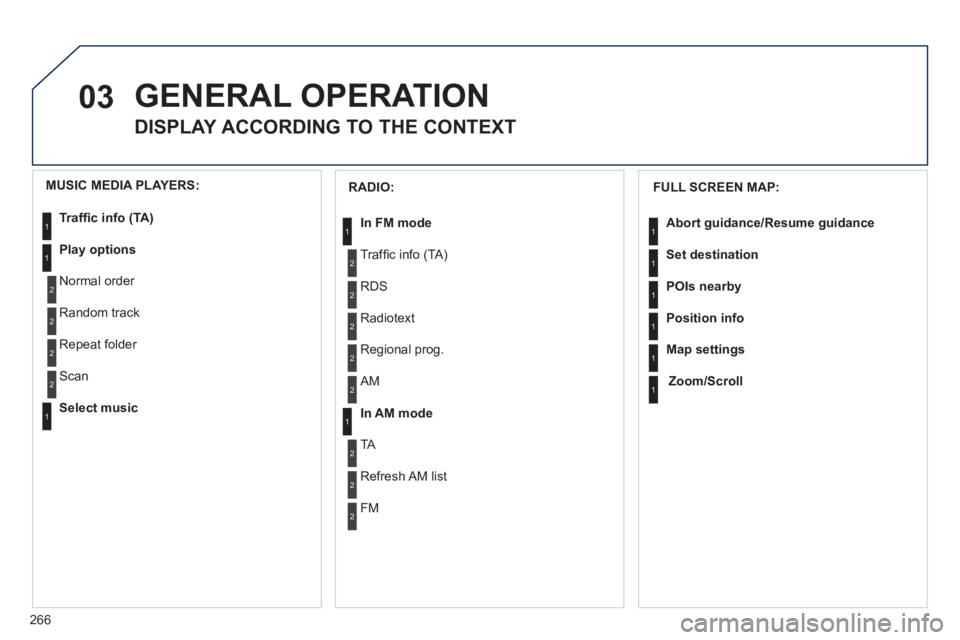
DISPLAY ACCORDING TO THE CONTEXT
FULL SCREEN MAP:
Abort guidance
/Resume guidance
Set destination
POIs nearby
Position info
Map settings
Zoom/Scroll
1
1
1
1
1
1
RADIO:
In FM mode
Traffi c info (TA)
RDS
Radiotext
Regional prog.
In AM mode
AM
TA
Refresh AM list
FM
1
2
1
2
2
2
2
2
2
2
MUSIC MEDIA PLAYERS:
Traffi c info (TA)
Play options
Normal order
Random track
Repeat folder
Select music
Scan
1
1
2
2
2
2
1