audio Peugeot 308 2014 User Guide
[x] Cancel search | Manufacturer: PEUGEOT, Model Year: 2014, Model line: 308, Model: Peugeot 308 2014Pages: 400, PDF Size: 10.05 MB
Page 249 of 400
247
7
Practical information
308_EN_CHAP07_INFO PR ATIQUES_ED02-2013
Dashboard fuses
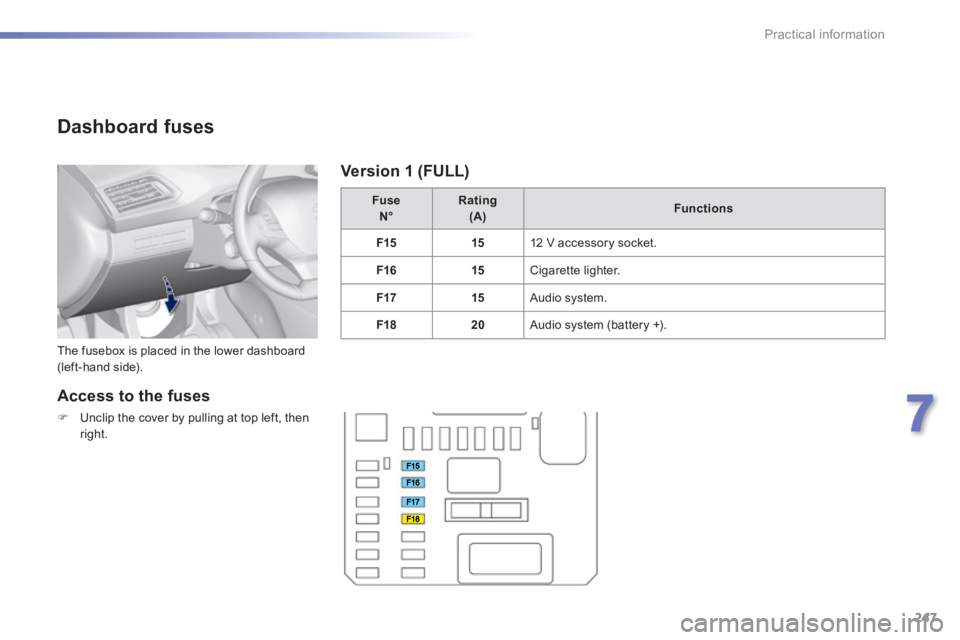
The fusebox is placed in the lower dashboard (left-hand side).
Fuse N° Rating (A)Functions
F1515 12 V accessory socket.
F1615 Cigarette lighter.
F1715 Audio system.
F1820 Audio system (battery +).
Access to the fuses
Unclip the cover by pulling at top left, then
right.
Version 1 (FULL)
Page 250 of 400
248
Practical information
308_EN_CHAP07_INFO PR ATIQUES_ED02-2013
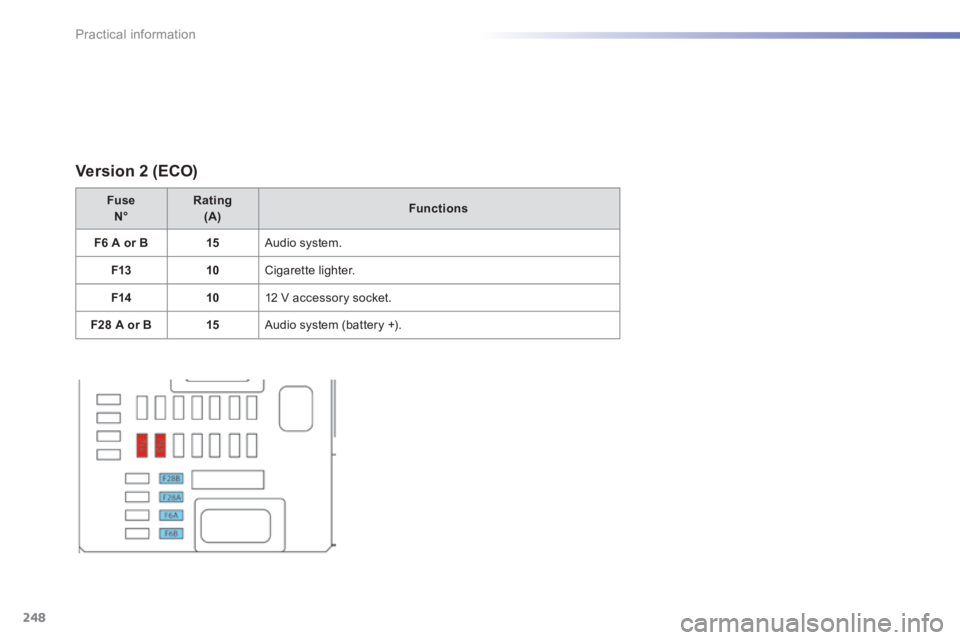
Version 2 (ECO)
Fuse N°Rating (A)Functions
F6 A or B15 Audio system.
F1310 Cigarette lighter.
F1410 12 V accessory socket.
F28 A or B15 Audio system (battery +).
Page 257 of 400
255
7
Practical information
308_EN_CHAP07_INFO PR ATIQUES_ED02-2013
System which manages the duration of use of certain functions to conserve a sufficient level of charge in the battery. After the engine has stopped, you can still use functions such as the audio and telematics system, windscreen wipers, dipped beam headlamps, courtesy lamps, etc. for a maximum combined duration of about forty minutes.
Energy economy mode
Switching to economy
mode
A message then appears in the instrument panel screen indicating that the vehicle has switched to economy mode and the active functions are put on standby.
If a telephone call is being made at this time, it will be maintained for around 10 minutes with the Bluetooth hands-free system of your audio system.
Exiting economy mode
These functions are reactivated automatically next time the vehicle is driven. In order to restore the use of these functions immediately, start the engine and let it run: - for less than ten minutes, to use the equipment for approximately five minutes, - for more than ten minutes, to use the equipment for up to approximately thirty minutes. Let the engine run for the duration specified to ensure that the battery charge is sufficient. Do not repeatedly and continuously restart the engine in order to charge the battery. A flat battery prevents the engine from starting (refer to the "Battery" section).
Load reduction mode
System which manages the use of certain functions according to the level of charge remaining in the battery. When the vehicle is being driven, the load reduction function temporarily deactivates certain functions, such as the air conditioning, the heated rear screen... The deactivated functions are reactivated automatically as soon as conditions permit.
Page 293 of 400
291
308_EN_CHAP10B_DENON_ED02-2013
DENON EQUIPMENT
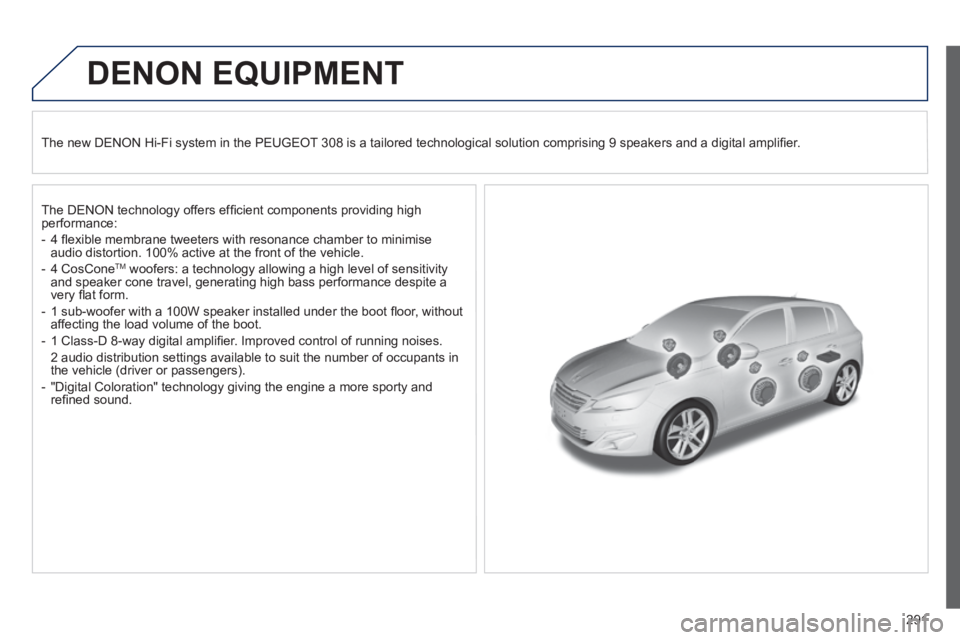
The new DENON Hi-Fi system in the PEUGEOT 308 is a tailored technological solution comprising 9 speakers and a digital amplifi er.
The DENON technology offers effi cient components providing high performance:
- 4 fl exible membrane tweeters with resonance chamber to minimise audio distortion. 100% active at the front of the vehicle.
- 4 CosCone TM woofers: a technology allowing a high level of sensitivity and speaker cone travel, generating high bass performance despite a very fl at form.
- 1 sub-woofer with a 100W speaker installed under the boot fl oor, without affecting the load volume of the boot.
- 1 Class-D 8-way digital amplifi er. Improved control of running noises.
2 audio distribution settings available to suit the number of occupants in the vehicle (driver or passengers).
- "Digital Coloration" technology giving the engine a more sporty and refi ned sound.
Page 295 of 400
293
308_EN_CHAP10C_SMEGPLUS_ED02-2013
The system is protected in such a way that it will only operate in your vehicle.
Touch screen
01 General operation
For safety reasons, the driver must carry out operations which require prolonged attention while the vehicle is stationary.
When the engine is switched off and to prevent discharging of the battery, the system switches off following the activation of the energy economy mode.
CONTENTS
02 First steps - Control panel
04 Media
05 Navigation
06 Configuration
07 Connected services
08 Telephone p.
p.
p.
p.
p.
p.
p.
Frequently asked questions p.
SATELLITE NAVIGATION SYSTEM
MULTIMEDIA AUDIO SYSTEM
BLUETOOTH TELEPHONE
294
296
316
298
336
346
348
358
03 Steering mounted controls
p. 297
Page 298 of 400
02
296
308_EN_CHAP10C_SMEGPLUS_ED02-2013
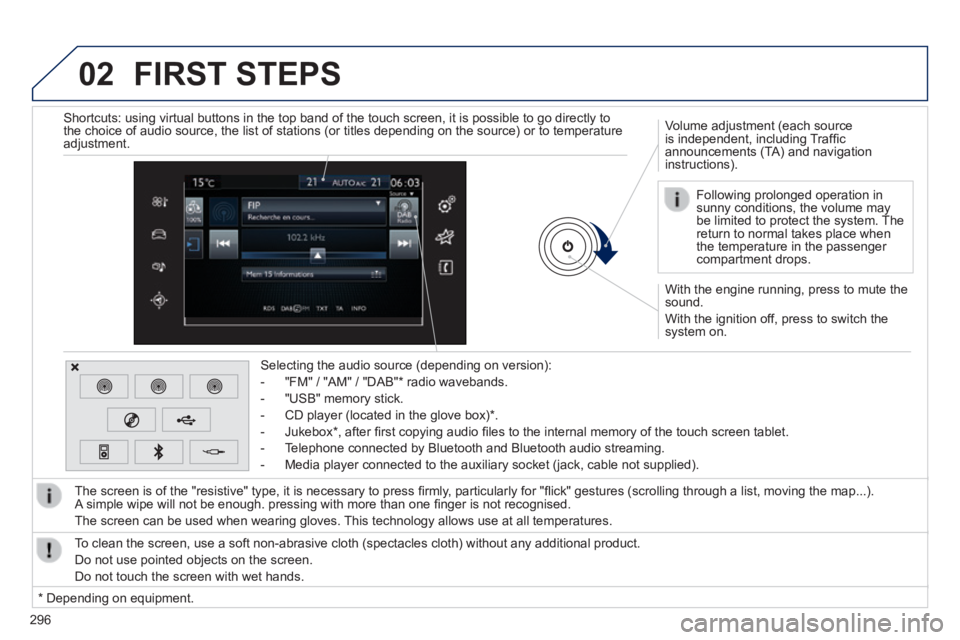
With the engine running, press to mute the sound.
With the ignition off, press to switch the system on.
Volume adjustment (each source is independent, including Traffi c announcements (TA) and navigation instructions).
Selecting the audio source (depending on version):
- "FM" / "AM" / "DAB" * radio wavebands.
- "USB" memory stick.
- CD player (located in the glove box) * .
- Jukebox * , after fi rst copying audio fi les to the internal memory of the touch screen tablet.
- Telephone connected by Bluetooth and Bluetooth audio streaming.
- Media player connected to the auxiliary socket (jack, cable not supplie\
d).
The screen is of the "resistive" type, it is necessary to press fi rmly, particularly for "fl ick" gestures (scrolling through a list, moving the map...). A simple wipe will not be enough. pressing with more than one fi nger is not recognised.
The screen can be used when wearing gloves. This technology allows use at all temperatures.
FIRST STEPS
* Depending on equipment.
To clean the screen, use a soft non-abrasive cloth (spectacles cloth) w\
ithout any additional product.
Do not use pointed objects on the screen.
Do not touch the screen with wet hands.
Following prolonged operation in sunny conditions, the volume may be limited to protect the system. The return to normal takes place when the temperature in the passenger compartment drops.
Shortcuts: using virtual buttons in the top band of the touch screen, it\
is possible to go directly to the choice of audio source, the list of stations (or titles depending o\
n the source) or to temperature adjustment.
Page 299 of 400
03
297
308_EN_CHAP10C_SMEGPLUS_ED02-2013
STEERING MOUNTED CONTROLS
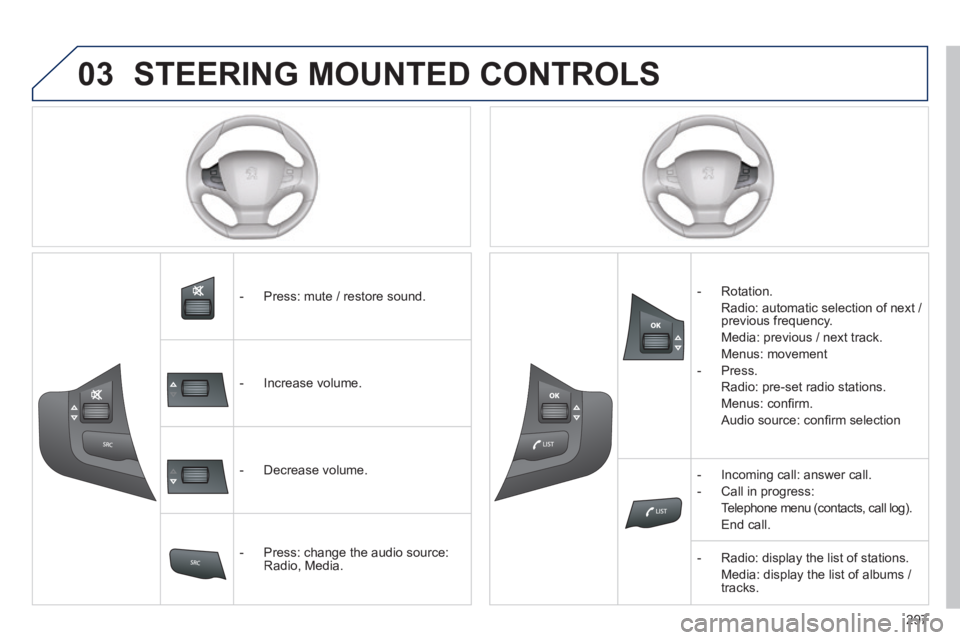
- Press: mute / restore sound.
- Increase volume.
- Decrease volume.
- Press: change the audio source: Radio, Media.
- Rotation.
Radio: automatic selection of next / previous frequency.
Media: previous / next track.
Menus: movement
- Press.
Radio: pre-set radio stations.
Menus: confi rm.
Audio source: confi rm selection
- Incoming call: answer call.
- Call in progress:
Telephone menu (contacts, call log).
End call.
- Radio: display the list of stations.
Media: display the list of albums / tracks.
Page 306 of 400
 may prevent reception, even in RDS station tracki")
04
308_EN_CHAP10C_SMEGPLUS_ED02-2013
Selecting a station
The exterior environment (hills, buildings, tunnel, car park, below gro\
und...) may prevent reception, even in RDS station tracking mode. This phenomenon is normal in the propagation of radio waves and is in no\
way indicative of a fault with the audio system.
Select " List " in the primary page.
or
Select " Radio list " in the secondary page.
Press on Media to display the primary page.
or
Press on Media to display the primary page then go to the secondary page.
Select a radio station from the list offered. If necessary, select change of source.
Press Media to display the primary page then select " Memo ".
Select " FM Radio " or " AM Radio ".
OR
Select " Update list " to refresh the list.
RADIO
Select a preset radio station in the list.
304
Page 310 of 400
04
308
308_EN_CHAP10C_SMEGPLUS_ED02-2013
RADIO
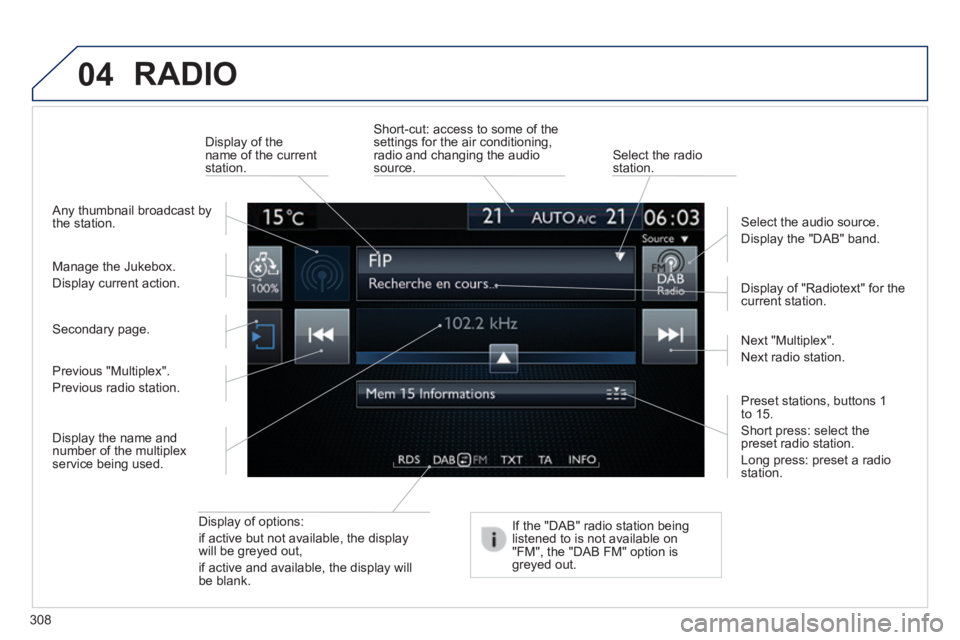
Display of options:
if active but not available, the display will be greyed out,
if active and available, the display will be blank.
Display of "Radiotext" for the current station.
Manage the Jukebox.
Display current action.
Select the audio source.
Display the "DAB" band.
Display of the name of the current station.
Short-cut: access to some of the settings for the air conditioning, radio and changing the audio source. Select the radio station.
If the "DAB" radio station being listened to is not available on "FM", the "DAB FM" option is greyed out.
Any thumbnail broadcast by the station.
Preset stations, buttons 1 to 15 .
Short press: select the preset radio station.
Long press: preset a radio station.
Next "Multiplex".
Next radio station.
Secondary page.
Display the name and number of the multiplex service being used.
Previous "Multiplex".
Previous radio station.
Page 311 of 400
04
309
308_EN_CHAP10C_SMEGPLUS_ED02-2013
RADIO
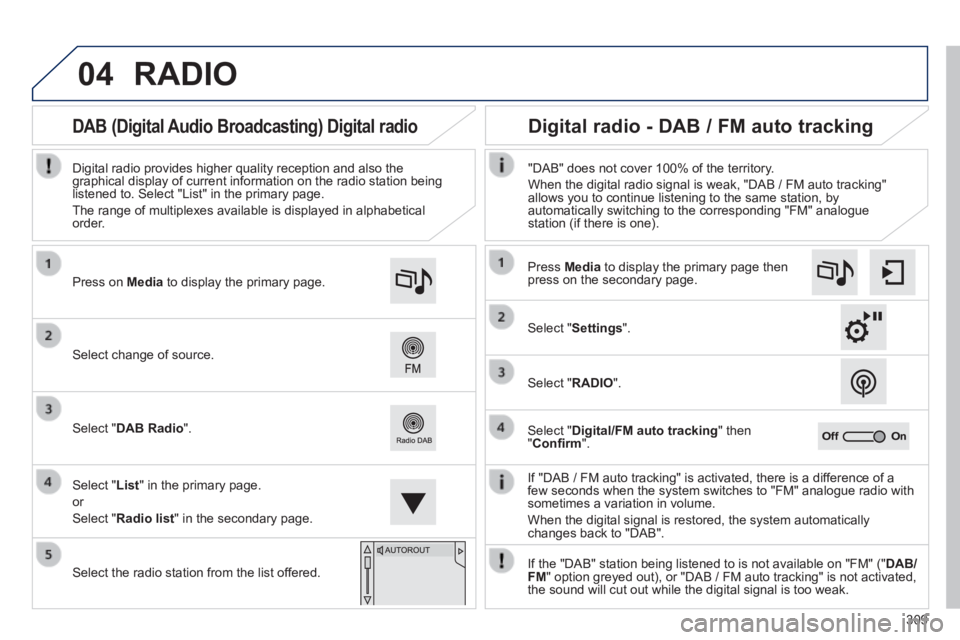
If "DAB / FM auto tracking" is activated, there is a difference of a few seconds when the system switches to "FM" analogue radio with sometimes a variation in volume.
When the digital signal is restored, the system automatically changes back to "DAB".
Select change of source.
Press on Media to display the primary page.
Select " DAB Radio ".
Select " List " in the primary page.
or
Select " Radio list " in the secondary page.
Select the radio station from the list offered.
Digital radio provides higher quality reception and also the graphical display of current information on the radio station being listened to. Select "List" in the primary page.
The range of multiplexes available is displayed in alphabetical order.
Press Media to display the primary page then press on the secondary page.
Select " Settings ".
Select " RADIO ".
Select " Digital/FM auto tracking " then " Confi rm ".
"DAB" does not cover 100% of the territory.
When the digital radio signal is weak, "DAB / FM auto tracking" allows you to continue listening to the same station, by automatically switching to the corresponding "FM" analogue station (if there is one).
If the "DAB" station being listened to is not available on "FM" (" DAB/FM " option greyed out), or "DAB / FM auto tracking" is not activated, the sound will cut out while the digital signal is too weak.
Digital radio - DAB / FM auto tracking DAB (Digital Audio Broadcasting) Digital radio