ignition PEUGEOT 308 2014 User Guide
[x] Cancel search | Manufacturer: PEUGEOT, Model Year: 2014, Model line: 308, Model: Peugeot 308 2014Pages: 389, PDF Size: 22.92 MB
Page 41 of 389
1
Monitoring39
Service indicator
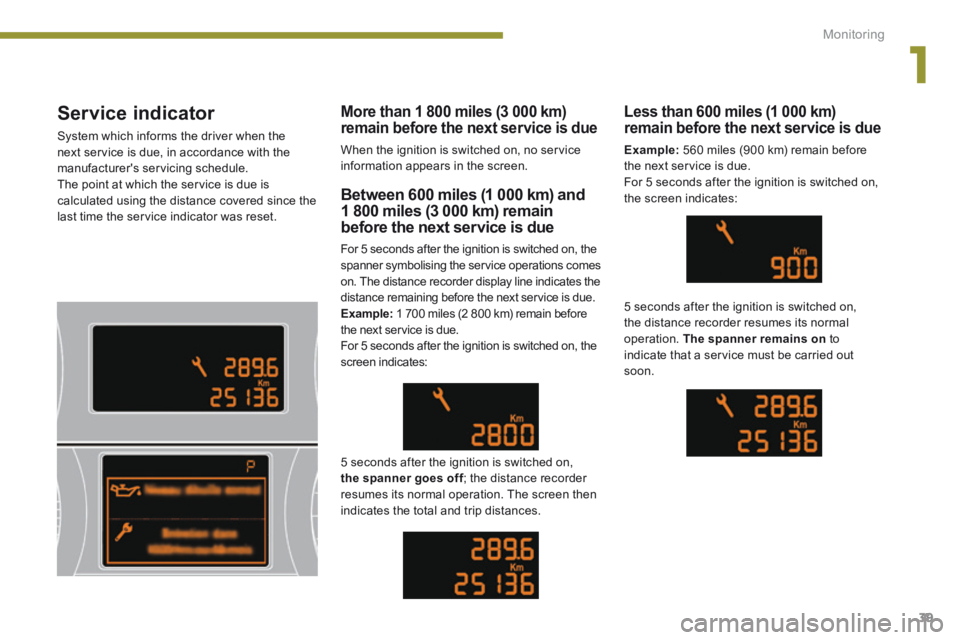
System which informs the driver when the next service is due, in accordance with the manufacturer's servicing schedule. The point at which the service is due is calculated using the distance covered since the last time the service indicator was reset.
Between 600 miles (1 000 km) and 1 800 miles (3 000 km) remain
before the next service is due
For 5 seconds after the ignition is switched on, the spanner symbolising the service operations comes on. The distance recorder display line indicates the distance remaining before the next service is due. Example: 1 700 miles (2 800 km) remain before the next service is due. For 5 seconds after the ignition is switched on, the screen indicates:
5 seconds after the ignition is switched on, the spanner goes off ; the distance recorder the spanner goes off ; the distance recorder the spanner goes offresumes its normal operation. The screen then indicates the total and trip distances.
Less than 600 miles (1 000 km) remain before the next service is due
Example: 560 miles (900 km) remain before the next service is due. For 5 seconds after the ignition is switched on, the screen indicates:
5 seconds after the ignition is switched on, the distance recorder resumes its normal operation. The spanner remains on to indicate that a service must be carried out soon.
More than 1 800 miles (3 000 km) remain before the next service is due
When the ignition is switched on, no service information appears in the screen.
Page 42 of 389
Monitoring
40
Service indicator zero reset
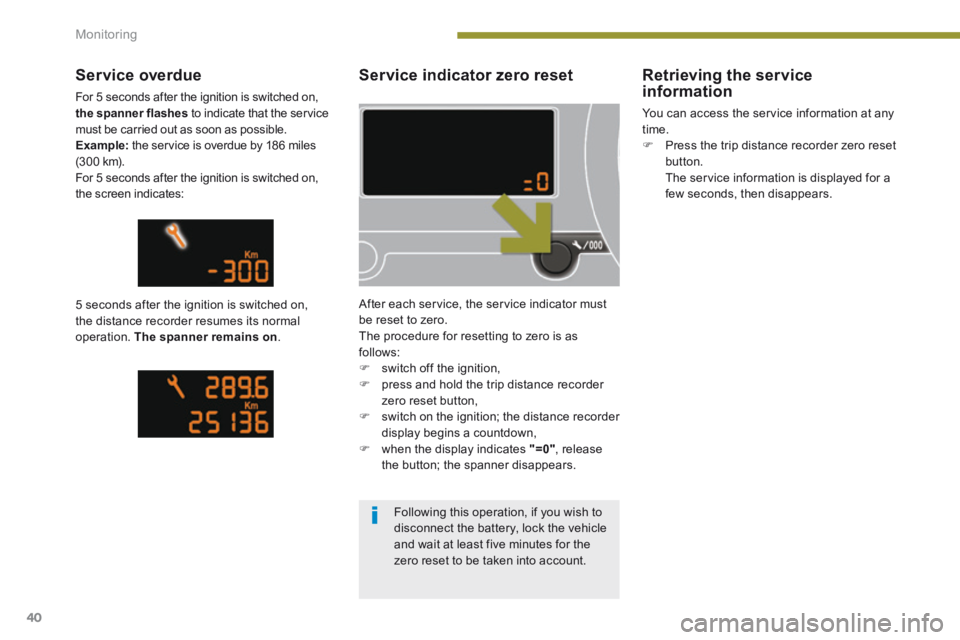
After each service, the service indicator must be reset to zero. The procedure for resetting to zero is as follows: switch off the ignition, press and hold the trip distance recorder zero reset button, switch on the ignition; the distance recorder display begins a countdown, when the display indicates "=0" , release the button; the spanner disappears.
Service overdue
For 5 seconds after the ignition is switched on, the spanner flashes to indicate that the service must be carried out as soon as possible. Example: the service is overdue by 186 miles (3 0 0 k m). For 5 seconds after the ignition is switched on, the screen indicates:
5 seconds after the ignition is switched on, the distance recorder resumes its normal operation. The spanner remains on .
Retrieving the service information
You can access the service information at any time. Press the trip distance recorder zero reset button. The service information is displayed for a few seconds, then disappears.
Following this operation, if you wish to disconnect the battery, lock the vehicle
and wait at least five minutes for the zero reset to be taken into account.
Page 43 of 389
1
Monitoring41
Engine oil level indicator *
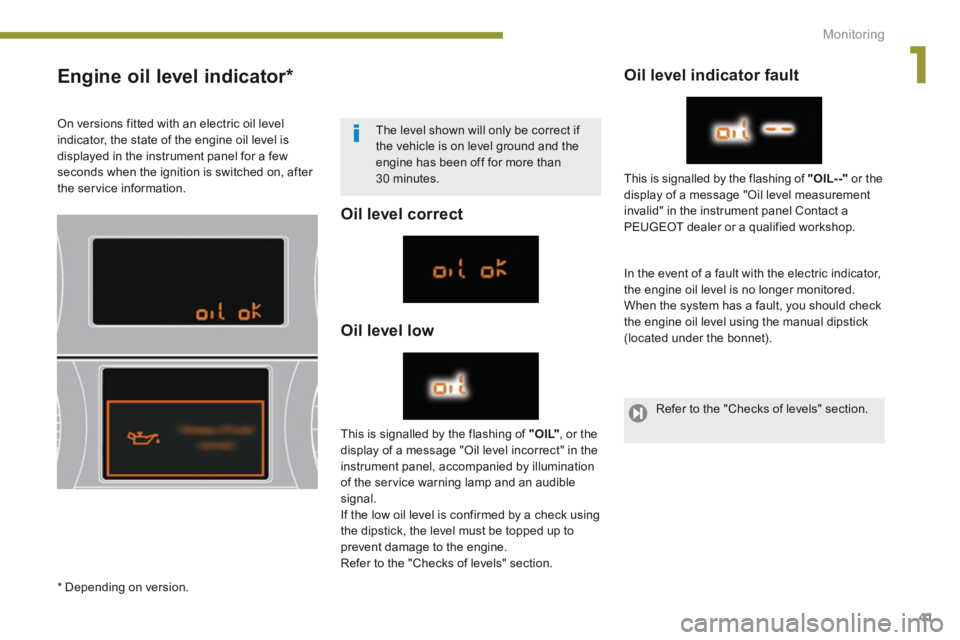
Oil level correct
Oil level low
Oil level indicator fault
In the event of a fault with the electric indicator, the engine oil level is no longer monitored. When the system has a fault, you should check the engine oil level using the manual dipstick (located under the bonnet).
This is signalled by the flashing of " O I L" , or the display of a message "Oil level incorrect" in the instrument panel, accompanied by illumination of the service warning lamp and an audible signal. If the low oil level is confirmed by a check using the dipstick, the level must be topped up to
prevent damage to the engine. Refer to the "Checks of levels" section.
This is signalled by the flashing of "OIL- -" or the display of a message "Oil level measurement invalid" in the instrument panel Contact a
PEUGEOT dealer or a qualified workshop.
On versions fitted with an electric oil level indicator, the state of the engine oil level is displayed in the instrument panel for a few seconds when the ignition is switched on, after the service information.
The level shown will only be correct if the vehicle is on level ground and the engine has been off for more than 30 minutes.
* Depending on version.
Refer to the "Checks of levels" section.
Page 44 of 389
Monitoring
42
Total distance recorder
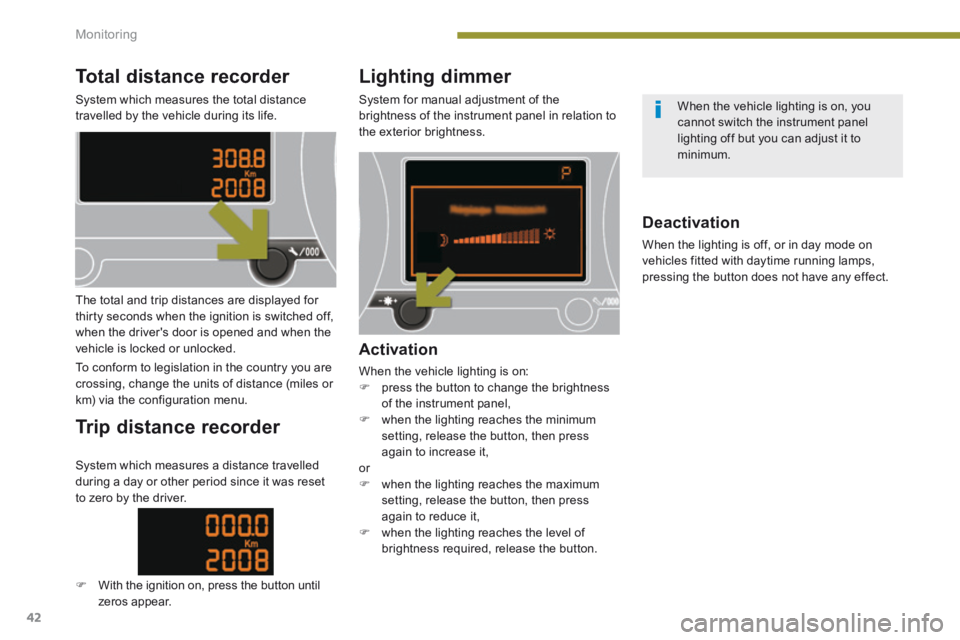
System which measures the total distance travelled by the vehicle during its life.
Lighting dimmer
System for manual adjustment of the brightness of the instrument panel in relation to the exterior brightness.
The total and trip distances are displayed for thirty seconds when the ignition is switched off, when the driver's door is opened and when the vehicle is locked or unlocked.
To conform to legislation in the country you are crossing, change the units of distance (miles or km) via the configuration menu.
Trip distance recorder
Activation
When the vehicle lighting is on: press the button to change the brightness of the instrument panel, when the lighting reaches the minimum setting, release the button, then press again to increase it, or when the lighting reaches the maximum setting, release the button, then press again to reduce it, when the lighting reaches the level of
brightness required, release the button.
Deactivation
When the lighting is off, or in day mode on vehicles fitted with daytime running lamps, pressing the button does not have any effect.
System which measures a distance travelled during a day or other period since it was reset to zero by the driver.
With the ignition on, press the button until zeros appear.
When the vehicle lighting is on, you cannot switch the instrument panel lighting off but you can adjust it to minimum.
Page 54 of 389
Multifunction screens
52
Adjusting the angle of the screen
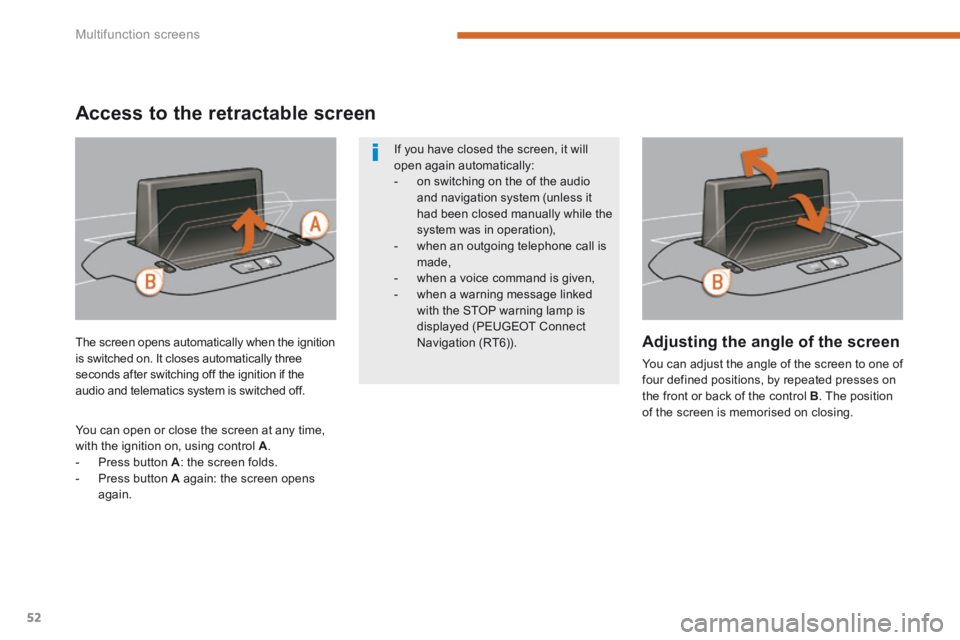
You can adjust the angle of the screen to one of four defined positions, by repeated presses on the front or back of the control B . The position of the screen is memorised on closing.
The screen opens automatically when the ignition is switched on. It closes automatically three seconds after switching off the ignition if the audio and telematics system is switched off.
You can open or close the screen at any time, with the ignition on, using control A . - Press button A : the screen folds. - Press button A again: the screen opens again.
If you have closed the screen, it will open again automatically: - on switching on the of the audio and navigation system (unless it had been closed manually while the
system was in operation), - when an outgoing telephone call is made, - when a voice command is given, - when a warning message linked with the STOP warning lamp is displayed (PEUGEOT Connect Navigation (RT6)).
Access to the retractable screen
Page 58 of 389
Multifunction screens
56
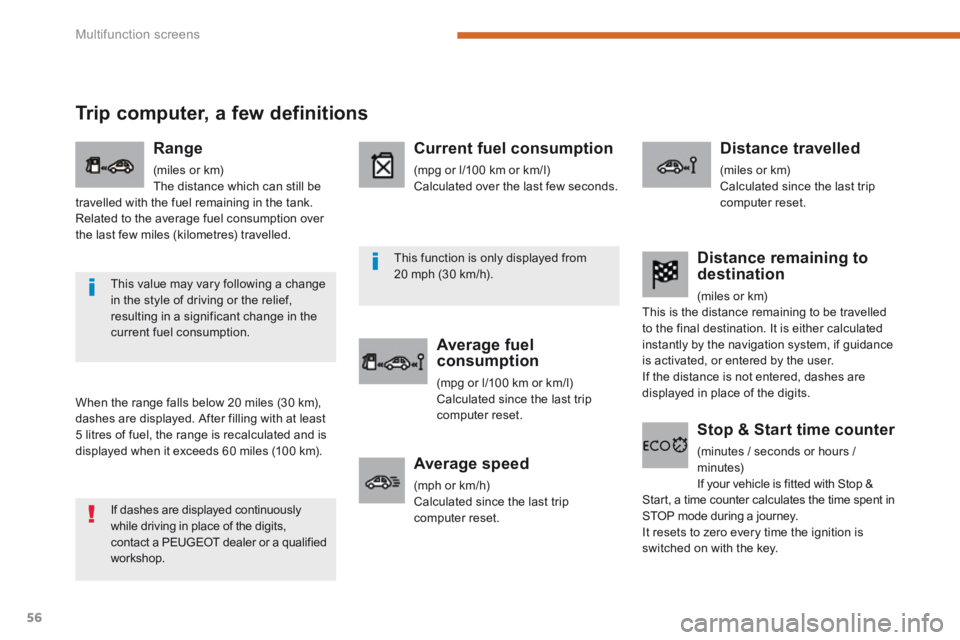
Trip computer, a few definitions
When the range falls below 20 miles (30 km), dashes are displayed. After filling with at least
5 litres of fuel, the range is recalculated and is displayed when it exceeds 60 miles (100 km).
Range
(miles or km) The distance which can still be travelled with the fuel remaining in the tank. Related to the average fuel consumption over the last few miles (kilometres) travelled.
Current fuel consumption
(mpg or l/100 km or km/l) Calculated over the last few seconds.
Average fuel consumption
(mpg or l/100 km or km/l) Calculated since the last trip computer reset.
Distance travelled
(miles or km) Calculated since the last trip computer reset.
Average speed
(mph or km/h) Calculated since the last trip computer reset.
Distance remaining to destination
(miles or km) This is the distance remaining to be travelled to the final destination. It is either calculated instantly by the navigation system, if guidance is activated, or entered by the user. If the distance is not entered, dashes are displayed in place of the digits.
Stop & Start time counter
(minutes / seconds or hours / minutes) If your vehicle is fitted with Stop & Start, a time counter calculates the time spent in STOP mode during a journey. It resets to zero every time the ignition is switched on with the key.
If dashes are displayed continuously while driving in place of the digits, contact a PEUGEOT dealer or a qualified workshop.
This value may vary following a change in the style of driving or the relief, resulting in a significant change in the current fuel consumption.
This function is only displayed from 20 mph (30 km/h).
Page 69 of 389
3
Comfort67
The electrical functions of the driver's seat are active approximately one minute after opening the front door. They are deactivated approximately one minute after the ignition is switched off and in economy mode. To reactivate them, switch on the ignition.
Before moving the seat backwards, ensure that there is nothing that might prevent the full travel of the seat, so as to avoid the risk of of jamming the seat caused by the presence of objects
on the floor behind the seat or rear passengers. If the seat jams, stop the movement immediately.
Head restraint height and
angle adjustment
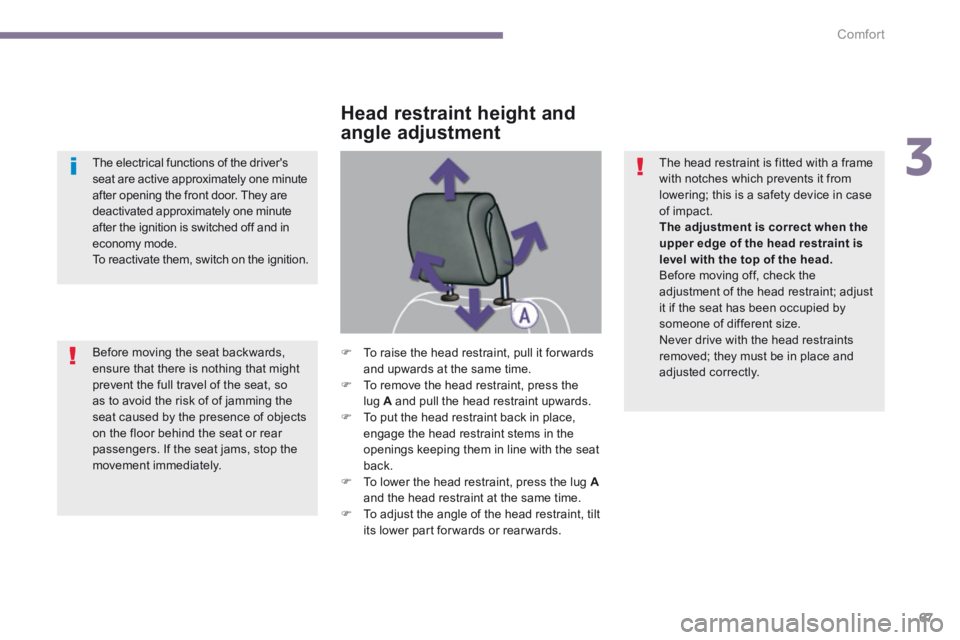
To raise the head restraint, pull it for wards and upwards at the same time. To remove the head restraint, press the lug A and pull the head restraint upwards. To put the head restraint back in place, engage the head restraint stems in the openings keeping them in line with the seat
back. To lower the head restraint, press the lug Aand the head restraint at the same time. To adjust the angle of the head restraint, tilt its lower part forwards or rearwards.
The head restraint is fitted with a frame with notches which prevents it from lowering; this is a safety device in case of impact. The adjustment is correct when the upper edge of the head restraint is level with the top of the head. Before moving off, check the adjustment of the head restraint; adjust it if the seat has been occupied by someone of different size. Never drive with the head restraints removed; they must be in place and adjusted correctly.
Page 74 of 389
Comfort
72
Mirrors
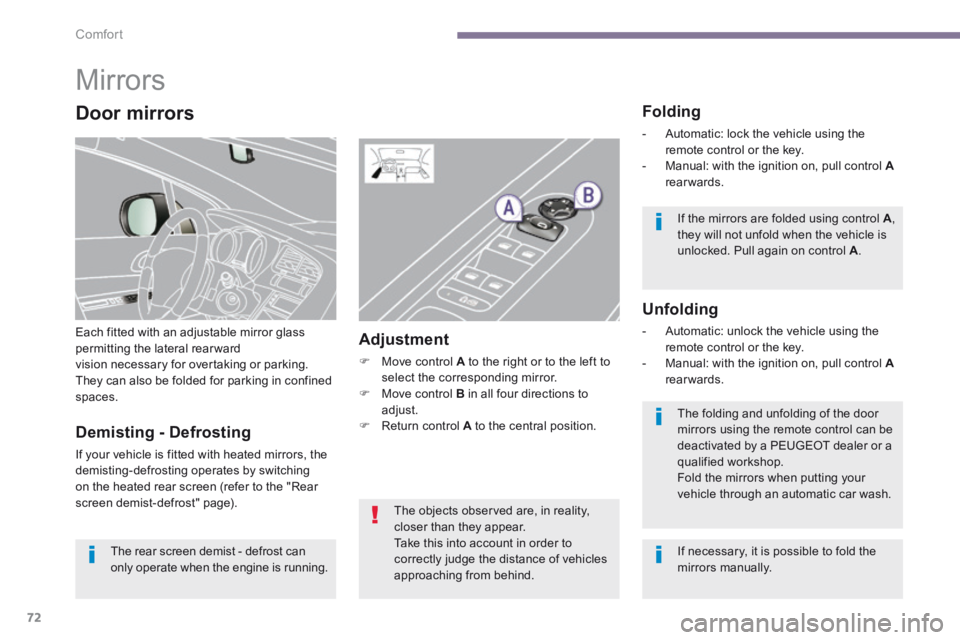
Each fitted with an adjustable mirror glass permitting the lateral rearwardvision necessary for overtaking or parking. They can also be folded for parking in confined spaces.
Folding
- Automatic: lock the vehicle using the remote control or the key. - Manual: with the ignition on, pull control A - Manual: with the ignition on, pull control A - Manual: with the ignition on, pull control rearwards.
Unfolding
- Automatic: unlock the vehicle using the remote control or the key. - Manual: with the ignition on, pull control A - Manual: with the ignition on, pull control A - Manual: with the ignition on, pull control rearwards.
Adjustment
Move control A to the right or to the left to select the corresponding mirror. Move control B in all four directions to adjust. Return control A to the central position. Demisting - Defrosting
If your vehicle is fitted with heated mirrors, the demisting-defrosting operates by switching on the heated rear screen (refer to the "Rear screen demist-defrost" page).
If the mirrors are folded using control A , they will not unfold when the vehicle is unlocked. Pull again on control A .
The folding and unfolding of the door mirrors using the remote control can be deactivated by a PEUGEOT dealer or a qualified workshop. Fold the mirrors when putting your vehicle through an automatic car wash.
The rear screen demist - defrost can only operate when the engine is running.
The objects observed are, in reality, closer than they appear.
Take this into account in order to correctly judge the distance of vehicles approaching from behind.
Door mirrors
If necessary, it is possible to fold the mirrors manually.
Page 80 of 389
Access
78
Electronic engine immobiliser
The key contains an electronic chip which has a special code. When the ignition is switched on, this code must be recognised in order for starting to be possible. This electronic engine immobiliser locks the engine management system a few minutes after the ignition is switched off and prevents starting of the engine by anyone who does not have the key.
Anti-theft protection
In the event of a fault, you are informed by illumination of this warning lamp, an audible signal and a message in the screen. In this case, your vehicle will not start; contact a PEUGEOT dealer as soon as possible. Keep safely the label attached to the keys given to you on acquisition of the vehicle.
Starting the vehicle
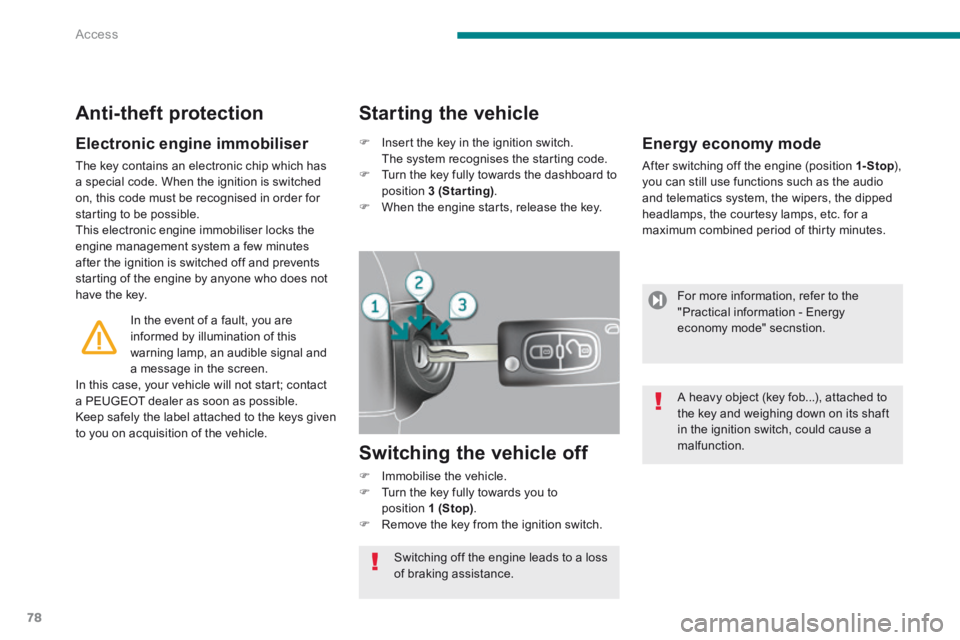
Insert the key in the ignition switch. The system recognises the starting code. Turn the key fully towards the dashboard to position 3 (Starting) . When the engine starts, release the key.
Switching the vehicle off
Immobilise the vehicle. Turn the key fully towards you to position 1 (Stop) . Remove the key from the ignition switch.
Switching off the engine leads to a loss of braking assistance.
Energy economy mode
After switching off the engine (position 1- Stop ), 1- Stop ), 1- Stopyou can still use functions such as the audio and telematics system, the wipers, the dipped headlamps, the courtesy lamps, etc. for a maximum combined period of thirty minutes.
For more information, refer to the "Practical information - Energy economy mode" secnstion.
A heavy object (key fob...), attached to the key and weighing down on its shaft in the ignition switch, could cause a malfunction.
Page 81 of 389
4
Access79
Remote control problem
Following disconnection of the vehicle battery, replacement of the remote control battery or in the event of a remote control malfunction, you can no longer unlock, lock or locate your vehicle. First of all, use the key in the lock to unlock or lock your vehicle. Then, reinitialise the remote control.
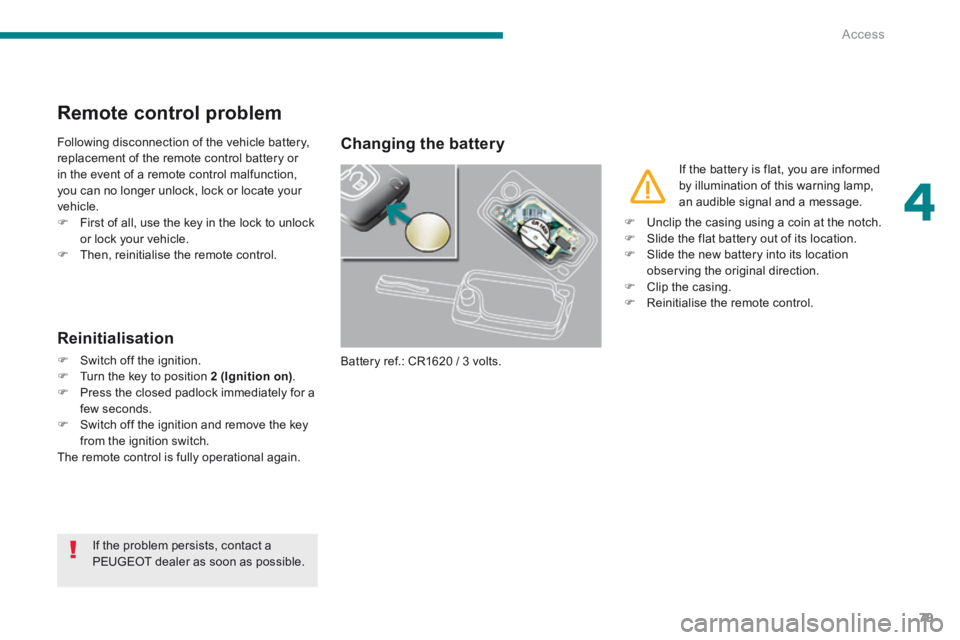
Changing the battery
Battery ref.: CR1620 / 3 volts.
Reinitialisation
Switch off the ignition. Turn the key to position 2 (Ignition on) . Press the closed padlock immediately for a few seconds. Switch off the ignition and remove the key from the ignition switch. The remote control is fully operational again.
If the battery is flat, you are informed by illumination of this warning lamp, an audible signal and a message.
If the problem persists, contact a PEUGEOT dealer as soon as possible.
Unclip the casing using a coin at the notch. Slide the flat battery out of its location. Slide the new battery into its location observing the original direction. Clip the casing. Reinitialise the remote control.