navigation system PEUGEOT 308 2014 User Guide
[x] Cancel search | Manufacturer: PEUGEOT, Model Year: 2014, Model line: 308, Model: Peugeot 308 2014Pages: 389, PDF Size: 22.92 MB
Page 256 of 389
254
01 FIRST STEPS
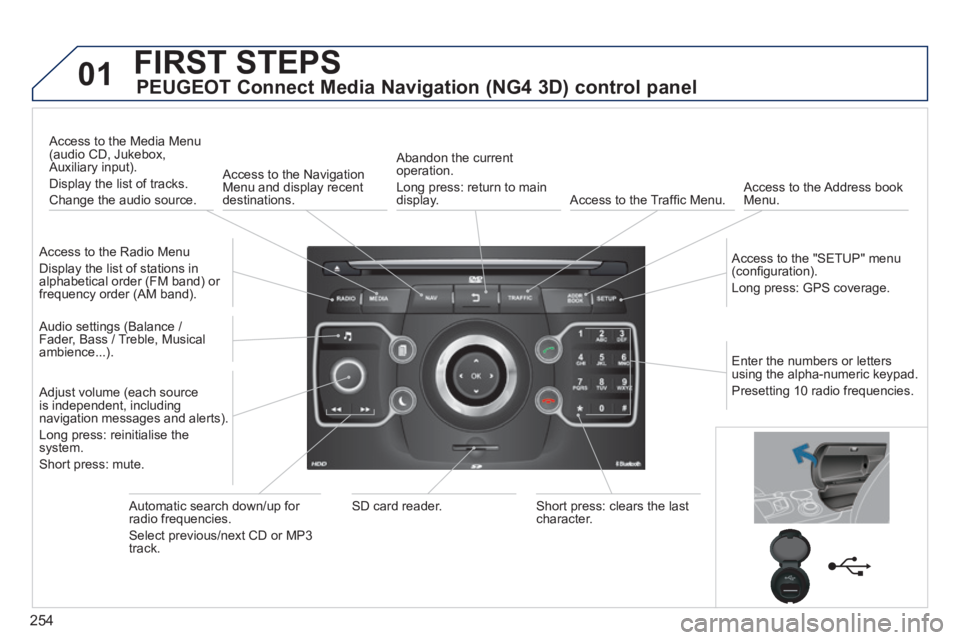
PEUGEOT Connect Media Navigation (NG4 3D) control panel
Access to the Radio Menu
Display the list of stations in alphabetical order (FM band) or frequency order (AM band).
Access to the Media Menu (audio CD, Jukebox, Auxiliary input).
Display the list of tracks.
Change the audio source.
Access to the Navigation Menu and display recent destinations.
Abandon the current operation.
Long press: return to main display. Access to the Traffi c Menu. Access to the Address book Menu.
Access to the "SETUP" menu (confi guration).
Long press: GPS coverage.
Audio settings (Balance / Fader, Bass / Treble, Musical ambience...).
Adjust volume (each source is independent, including navigation messages and alerts).
Long press: reinitialise the system.
Short press: mute.
Automatic search down/up for radio frequencies.
Select previous/next CD or MP3 track.
SD card reader. Short press: clears the last character.
Enter the numbers or letters using the alpha-numeric keypad.
Presetting 10 radio frequencies.
Page 258 of 389
256
02
SETUP2ABC3DEF5JKL4GHI6MNO8TUV7PQR S9WXYZ0*#
1NAV TRAFFICADDR
BOOKSETUP
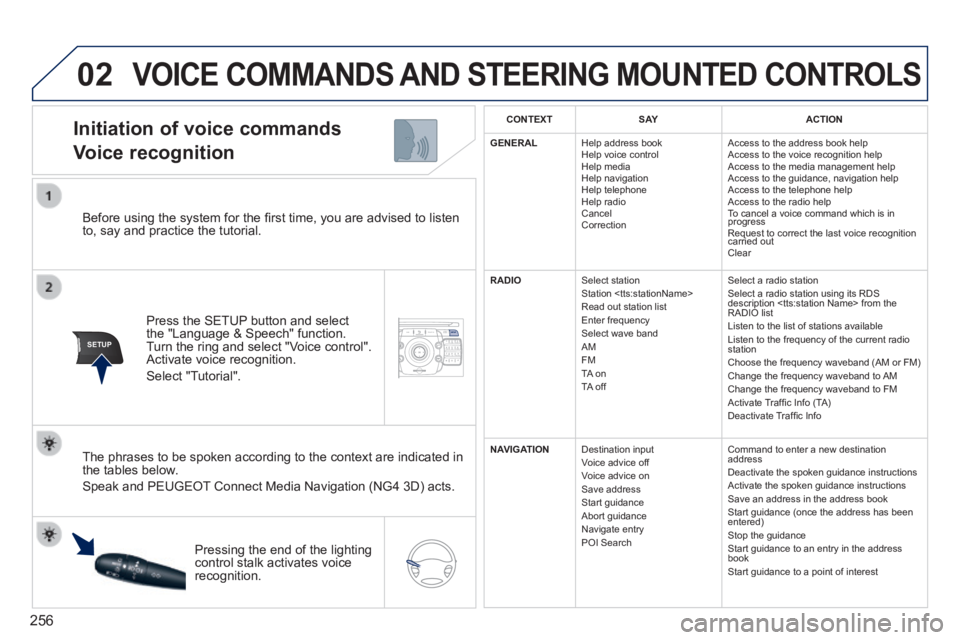
Before using the system for the fi rst time, you are advised to listen to, say and practice the tutorial.
Press the SETUP button and select the "Language & Speech" function. Turn the ring and select "Voice control". Activate voice recognition.
Select "Tutorial".
Initiation of voice commands
Voice recognition
The phrases to be spoken according to the context are indicated in the tables below.
Speak and PEUGEOT Connect Media Navigation (NG4 3D) acts.
Pressing the end of the lighting control stalk activates voice recognition.
CONTEXTS AYACTION
GENERAL Help address book Help voice control Help media Help navigation Help telephone Help radio Cancel Correction
Access to the address book help Access to the voice recognition help Access to the media management help Access to the guidance, navigation help Access to the telephone help Access to the radio help To cancel a voice command which is in progress Request to correct the last voice recognition carried out Request to correct the last voice recognition carried out Request to correct the last voice recognition
Clear
RADIO Select station Station
Select a radio station Select a radio station using its RDS description
NAVIGATION Destination input Voice advice off Voice advice on Save address Start guidance Abort guidance Navigate entry POI Search
Command to enter a new destination address Deactivate the spoken guidance instructions Activate the spoken guidance instructions Save an address in the address book Start guidance (once the address has been entered) Stop the guidance Start guidance to an entry in the address book Start guidance to a point of interest
VOICE COMMANDS AND STEERING MOUNTED CONTROLS
Page 261 of 389
259
03
SETUP
TRAFFIC
MEDIA
GENERAL OPERATION
For a detailed global view of the menus available, refer to the "Screen menu map" section of this handbook.
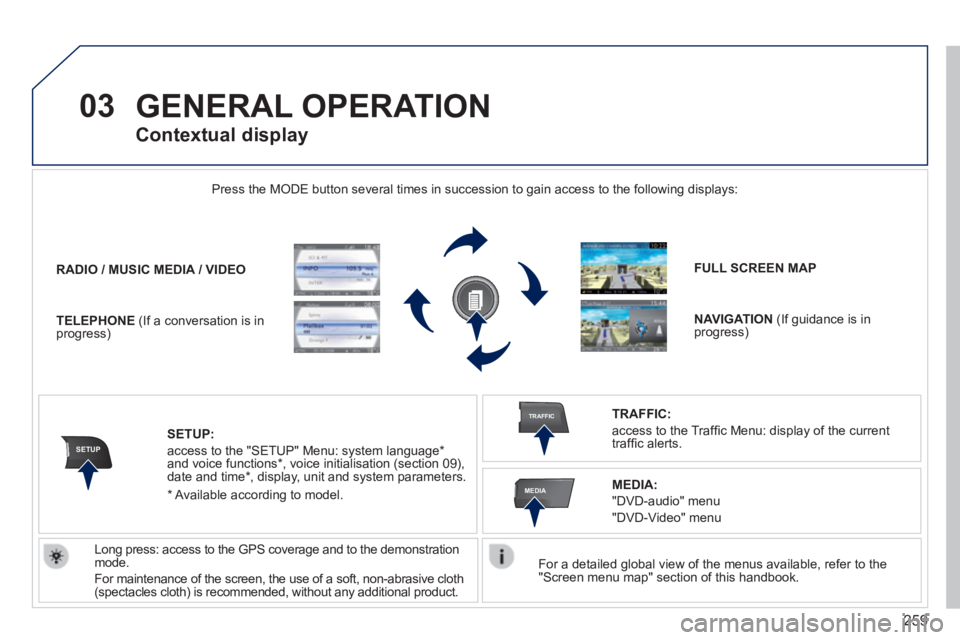
Press the MODE button several times in succession to gain access to the \
following displays:
Long press: access to the GPS coverage and to the demonstration mode.
For maintenance of the screen, the use of a soft, non-abrasive cloth (spectacles cloth) is recommended, without any additional product.
RADIO / / / /MUSIC MEDIA / VIDEO
TELEPHONE (If a conversation is in progress)
FULL SCREEN MAP
NAVIGATION (If guidance is in progress)
SETUP:
access to the "SETUP" Menu: system language * and voice functions * , voice initialisation (section 09), date and time * , display, unit and system parameters.
TRAFFIC:
access to the Traffi c Menu: display of the current traffi c alerts.
Contextual display
MEDIA:
"DVD-audio" menu
"DVD-Video" menu
* Available according to model.
Page 273 of 389
271
04
NAV2AB C3DEF5JKL4GHI6MNO8TUV7PQR S9WXYZ0*#
1RADIO MEDIA NA
V TRAFFIC
SETUPADDR
BOOK
2ABC3DEF5JKL4GHI6MNO8TUV7PQR S9WXYZ0*#
1RADIO MEDIA NA
V TRAFFIC
SETUPADDR
BOOK
NAVIGATION - GUIDANCE
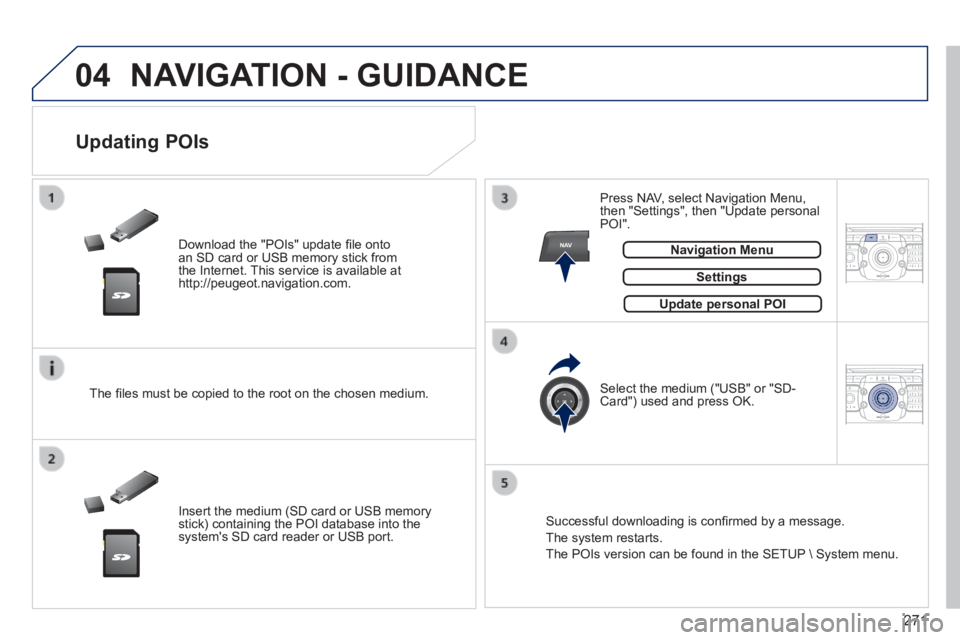
Download the "POIs" update fi le onto an SD card or USB memory stick from the Internet. This service is available at http://peugeot.navigation.com.
Updating POIs
Settings
The fi les must be copied to the root on the chosen medium.
Insert the medium (SD card or USB memory stick) containing the POI database into the system's SD card reader or USB port.
Select the medium ("USB" or "SD-Card") used and press OK.
Press NAV, select Navigation Menu, then "Settings", then "Update personal POI".
Successful downloading is confi rmed by a message.
The system restarts.
The POIs version can be found in the SETUP System menu.
Update personal POIUpdate personal POI
Navigation MenuNavigation Menu
Page 275 of 389
273
05
TRAFFIC
2ABC3DEF5JKL4GHI6MNO8TUV7PQR S9WXYZ0*#
1RADIO MEDIA NA
V TRAFFIC
SETUPADDR
BOOK
2ABC3DEF5JKL4GHI6MNO8TUV7PQR S9WXYZ0*#
1RADIO MEDIA NA
V TRAFFIC
SETUPADDR
BOOK
2ABC3DEF5JKL4GHI6MNO8TUV7PQR S9WXYZ0*#
1RADIO MEDIA NA
V TRAFFIC
SETUPADDR
BOOK
2ABC3DEF5JKL4GHI6MNO8TUV7PQR S9WXYZ0*#
1RADIO MEDIA NA
V TRAFFIC
SETUPADDR
BOOK
2ABC3DEF5JKL4GHI6MNO8TUV7PQR S9WXYZ0*#
1RADIO MEDIA NA
V TRAFFIC
SETUPADDR
BOOK
TRAFFIC INFORMATION
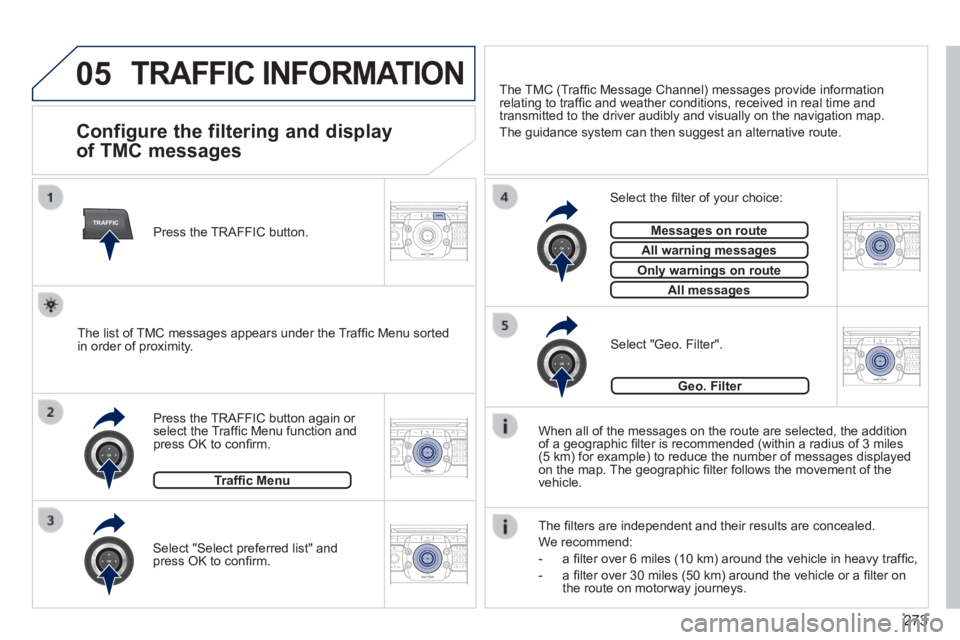
Configure the filtering and display
of TMC messages
When all of the messages on the route are selected, the addition of a geographic fi lter is recommended (within a radius of 3 miles (5 km) for example) to reduce the number of messages displayed on the map. The geographic fi lter follows the movement of the vehicle.
The fi lters are independent and their results are concealed.
We recommend:
- a fi lter over 6 miles (10 km) around the vehicle in heavy traffi c,
- a fi lter over 30 miles (50 km) around the vehicle or a fi lter on the route on motorway journeys.
Press the TRAFFIC button again or select the Traffi c Menu function and press OK to confi rm.
Select "Geo. Filter". The list of TMC messages appears under the Traffi c Menu sorted in order of proximity.
Select the fi lter of your choice:
Messages on routeMessages on route
All warning messagesAll warning messages
Only warnings on routeOnly warnings on route
All messagesAll messages
Traffi c Menu
Select "Select preferred list" and press OK to confi rm.
The TMC (Traffi c Message Channel) messages provide information relating to traffi c and weather conditions, received in real time and transmitted to the driver audibly and visually on the navigation map.
The guidance system can then suggest an alternative route.
Press the TRAFFIC button.
Geo. Filter
Page 284 of 389
282
08
2ABC3DEF5JKL4GHI6MNO8TUV7PQR S9WXYZ0*#
1RADIO MEDIA NA
V TRAFFIC
SETUPADDR
BOOK
2ABC3DEF5JKL4GHI6MNO8TUV7PQR S9WXYZ0*#
1RADIO MEDIA NA
V TRAFFIC
SETUPADDR
BOOK
2ABC3DEF5JKL4GHI6MNO8TUV7PQR S9WXYZ0*#
1RADIO MEDIA NA
V TRAFFIC
SETUPADDR
BOOK
2ABC3DEF5JKL4GHI6MNO8TUV7PQR S9WXYZ0*#
1RADIO MEDIA NA
V TRAFFIC
SETUPADDR
BOOK
2ABC3DEF5JKL4GHI6MNO8TUV7PQR S9WXYZ0*#
1RADIO MEDIA NA
V TRAFFIC
SETUPADDR
BOOK2ABC3DEF5JKL4GHI6MNO8TUV7PQR S9WXYZ0*#
1RADIO MEDIA NA
V TRAFFIC
SETUPADDR
BOOK
* The services available via the telephone depend on the network, the SIM \
card and the compatibility of the Bluetooth equipment used. Refer to you\
r telephone's manual and your operator to check which services you have access to.
USING THE TELEPHONE
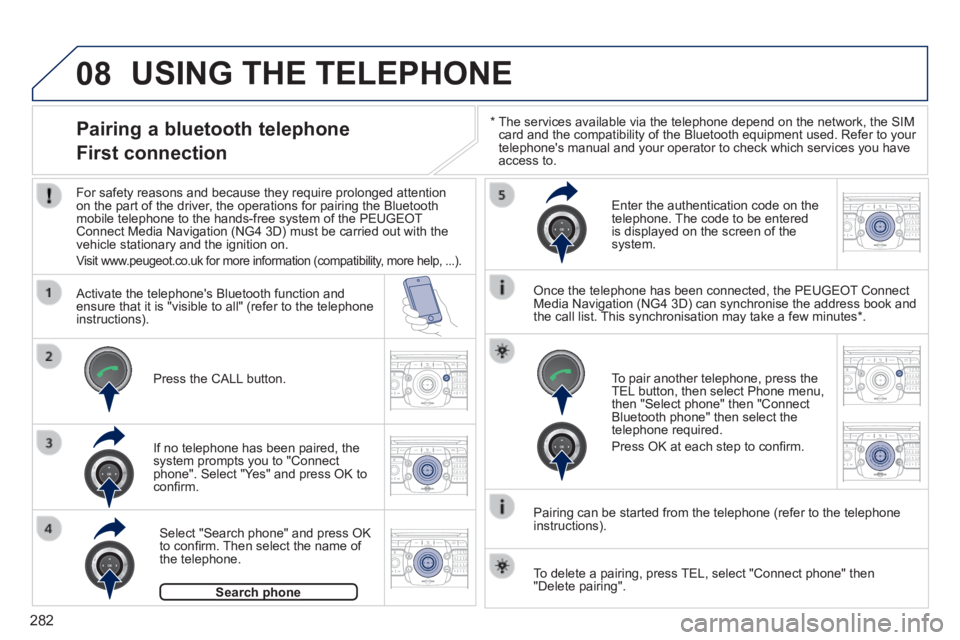
Pairing a bluetooth telephone
First connection
For safety reasons and because they require prolonged attention on the part of the driver, the operations for pairing the Bluetooth mobile telephone to the hands-free system of the PEUGEOT Connect Media Navigation (NG4 3D) must be carried out with the vehicle stationary and the ignition on.
Visit www.peugeot.co.uk for more information (compatibility, more help, ...).
Activate the telephone's Bluetooth function and ensure that it is "visible to all" (refer to the telephone instructions).
If no telephone has been paired, the system prompts you to "Connect phone". Select "Yes" and press OK to confi rm.
Enter the authentication code on the telephone. The code to be entered is displayed on the screen of the system.
To pair another telephone, press the TEL button, then select Phone menu, then "Select phone" then "Connect Bluetooth phone" then select the telephone required.
Press OK at each step to confi rm.
Once the telephone has been connected, the PEUGEOT Connect Media Navigation (NG4 3D) can synchronise the address book and the call list. This synchronisation may take a few minutes * .
Pairing can be started from the telephone (refer to the telephone instructions).
Press the CALL button.
Select "Search phone" and press OK to confi rm. Then select the name of the telephone.
Search phoneSearch phone
To delete a pairing, press TEL, select "Connect phone" then "Delete pairing".
Page 285 of 389

283
08
2ABC3DEF5JKL4GHI6MNO8TUV7PQR S9WXYZ0*#
1RADIO MEDIA NA
V TRAFFIC
SETUPADDR
BOOK
* The services available via the telephone depend on the network, the SIM \
card and the compatibility of the Bluetooth equipment used. Refer to your tel\
ephone's manual and your operator to check which services you have access to. A list of mobile telephones which offer the best range of services is available from dealers.
USING THE TELEPHONE
Connecting a bluetooth telephone
For safety reasons and because they require prolonged attention on the part of the driver, the operations for pairing the Bluetooth mobile telephone to the hands-free system of the PEUGEOT Connect Media Navigation (NG4 3D) must be carried out with the vehicle stationary and the ignition on.
Activate the telephone's Bluetooth function and ensure that it is visible to all.
Once the telephone has been connected, the PEUGEOT Connect Media Navigation (NG4 3D) can synchronise the address book and the call list. This synchronisation may take a few minutes * .
Press the PICK UP button.
The list of telephones connected previously (4 maximum) appears in the multifunction screen. Select the telephone required then select "Connect phone" for a new connection. Select "Delete pairing" to cancel the connection to the telephone.
Page 293 of 389
.
FREQUENTLY ASKED QUESTIONS
QUESTIONANSWERSOLUT")
291
The table below groups together the answers to the most frequently asked\
questions concerning the PEUGEOT Connect Media Navigation (NG4 3D).
FREQUENTLY ASKED QUESTIONS
QUESTIONANSWERSOLUTION
There is a difference in sound quality between the different audio sources (radio, CD...).
For optimum sound quality, the audio settings (Volume, Bass, Treble, Ambience, Loudness) can be adapted to the different sound sources, which may result in audible differences when changing source (radio, CD...).
Check that the audio settings (Volume, Bass, Treble, Ambience, Loudness) are adapted to the sources listened to. It is advisable to set the AUDIO functions (Bass, Treble, Front-Rear Balance, Left-Right Balance) to the middle position, select the musical ambience "Linear" and set the loudness correction to the "Active" position in CD mode or to the "Inactive" position in radio mode.
The CD is ejected automatically or is not played by the player.
The CD is inserted upside down, is unplayable, does not contain any audio data or contains an audio format which the player cannot play.
The CD is protected by an anti-pirating protection system which is not recognised by the audio equipment.
- Check that the CD is inserted in the player the right way up.
- Check the condition of the CD: the CD cannot be played if it is too damaged.
- Check the content in the case of a recorded CD: consult the advice in the "Audio" section.
- The audio equipment's CD player does not play DVDs.
- Due to inadequate quality, certain recorded CDs will not be played by the audio system.
The CD player sound is poor. The CD used is scratched or of poor quality. Insert good quality CDs and store them in suitable conditions.
The audio equipment settings (bass, treble, ambiences) are unsuitable.\
Set the treble or bass level to 0, without selecting an ambience.
Page 295 of 389
293
QUESTIONANSWERSOLUTION
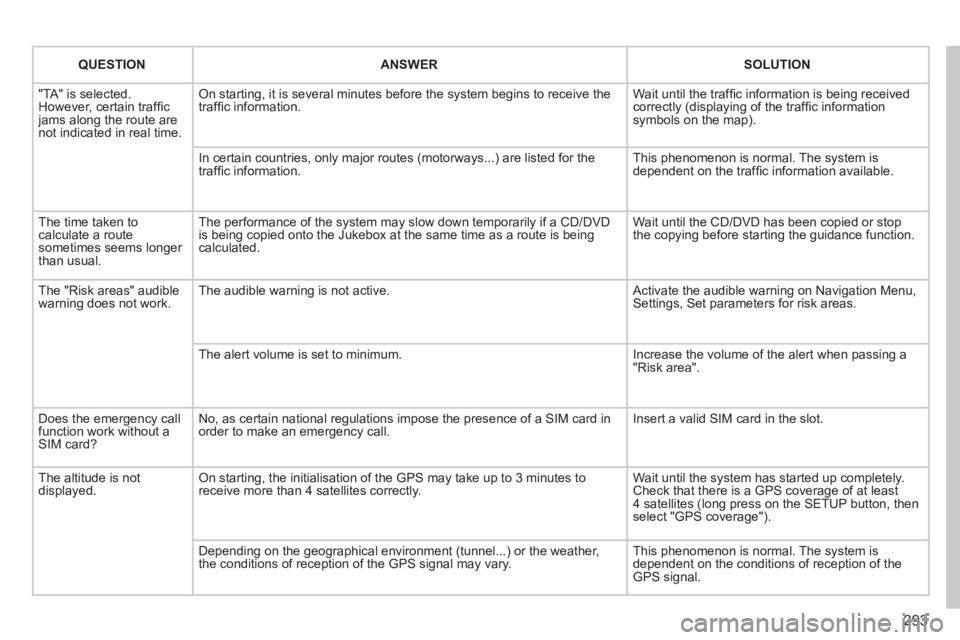
"TA" is selected. However, certain traffi c jams along the route are not indicated in real time.
On starting, it is several minutes before the system begins to receive t\
he traffi c information. Wait until the traffi c information is being received correctly (displaying of the traffi c information symbols on the map).
In certain countries, only major routes (motorways...) are listed for \
the traffi c information. This phenomenon is normal. The system is dependent on the traffi c information available.
The time taken to calculate a route sometimes seems longer than usual.
The performance of the system may slow down temporarily if a CD/DVD is being copied onto the Jukebox at the same time as a route is being calculated.
Wait until the CD/DVD has been copied or stop the copying before starting the guidance function.
The "Risk areas" audible warning does not work. The audible warning is not active. Activate the audible warning on Navigation Menu, Settings, Set parameters for risk areas.
The alert volume is set to minimum. Increase the volume of the alert when passing a "Risk area".
Does the emergency call function work without a SIM card?
No, as certain national regulations impose the presence of a SIM card in\
order to make an emergency call. Insert a valid SIM card in the slot.
The altitude is not displayed. On starting, the initialisation of the GPS may take up to 3 minutes to receive more than 4 satellites correctly. Wait until the system has started up completely. Check that there is a GPS coverage of at least 4 satellites (long press on the SETUP button, then select "GPS coverage").
Depending on the geographical environment (tunnel...) or the weather, the conditions of reception of the GPS signal may vary. This phenomenon is normal. The system is dependent on the conditions of reception of the GPS signal.
Page 296 of 389
294
QUESTIONANSWERSOLUTION
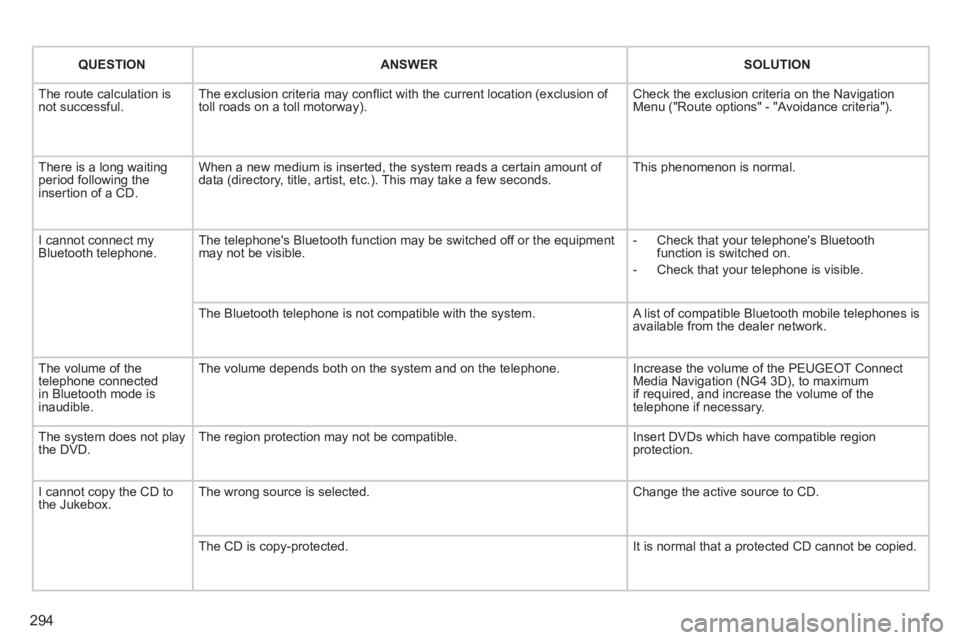
The route calculation is not successful. The exclusion criteria may confl ict with the current location (exclusion of toll roads on a toll motorway). Check the exclusion criteria on the Navigation Menu ("Route options" - "Avoidance criteria").
There is a long waiting period following the insertion of a CD.
When a new medium is inserted, the system reads a certain amount of data (directory, title, artist, etc.). This may take a few seconds. This phenomenon is normal.
I cannot connect my Bluetooth telephone. The telephone's Bluetooth function may be switched off or the equipment may not be visible. - Check that your telephone's Bluetooth function is switched on.
- Check that your telephone is visible.
The Bluetooth telephone is not compatible with the system. A list of compatible Bluetooth mobile telephones is available from the dealer network.
The volume of the telephone connected in Bluetooth mode is inaudible.
The volume depends both on the system and on the telephone. Increase the volume of the PEUGEOT Connect Media Navigation (NG4 3D), to maximum if required, and increase the volume of the telephone if necessary.
The system does not play the DVD. The region protection may not be compatible. Insert DVDs which have compatible region protection.
I cannot copy the CD to the Jukebox. The wrong source is selected. Change the active source to CD.
The CD is copy-protected. It is normal that a protected CD cannot be copied.