ESP Peugeot 308 2015 User Guide
[x] Cancel search | Manufacturer: PEUGEOT, Model Year: 2015, Model line: 308, Model: Peugeot 308 2015Pages: 416, PDF Size: 11.81 MB
Page 45 of 416
43
308_en_Chap01_controle-de-marche_ed01-2015
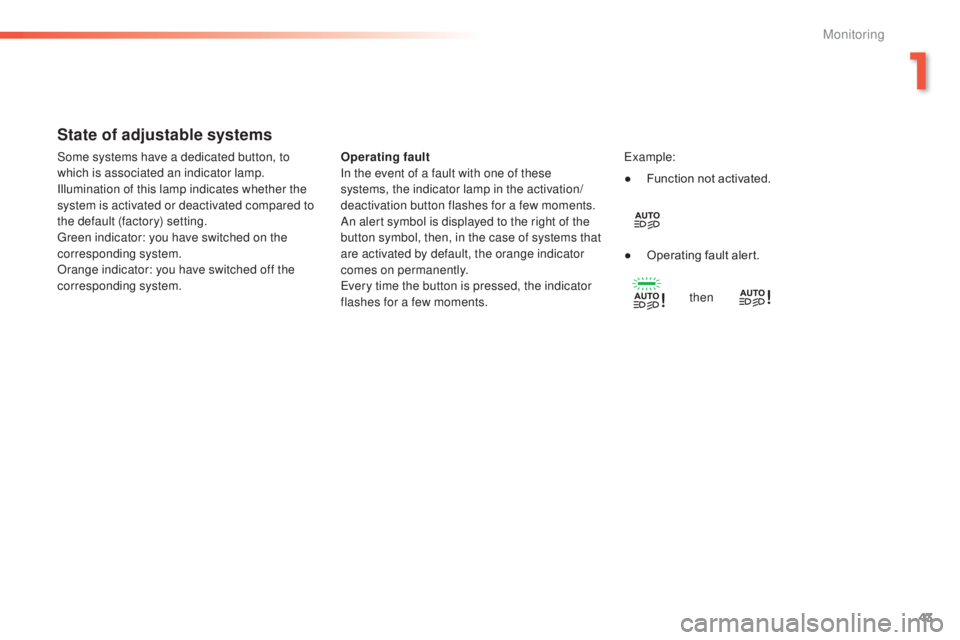
State of adjustable systems
Operating fault
In the event of a fault with one of these
systems, the indicator lamp in the activation/
deactivation button flashes for a few moments.
An alert symbol is displayed to the right of the
button symbol, then, in the case of systems that
are activated by default, the orange indicator
comes on permanently.
ev
ery time the button is pressed, the indicator
flashes for a few moments.ex ample:
Some systems have a dedicated button, to
which is associated an indicator lamp.
Illumination of this lamp indicates whether the
system is activated or deactivated compared to
the default (factory) setting.
gr
een indicator: you have switched on the
corresponding system.
Orange indicator: you have switched off the
corresponding system. ●
F
unction not activated.
●
O
perating fault alert.then
1
Monitoring
Page 46 of 416
44
308_en_Chap01_controle-de-marche_ed01-2015
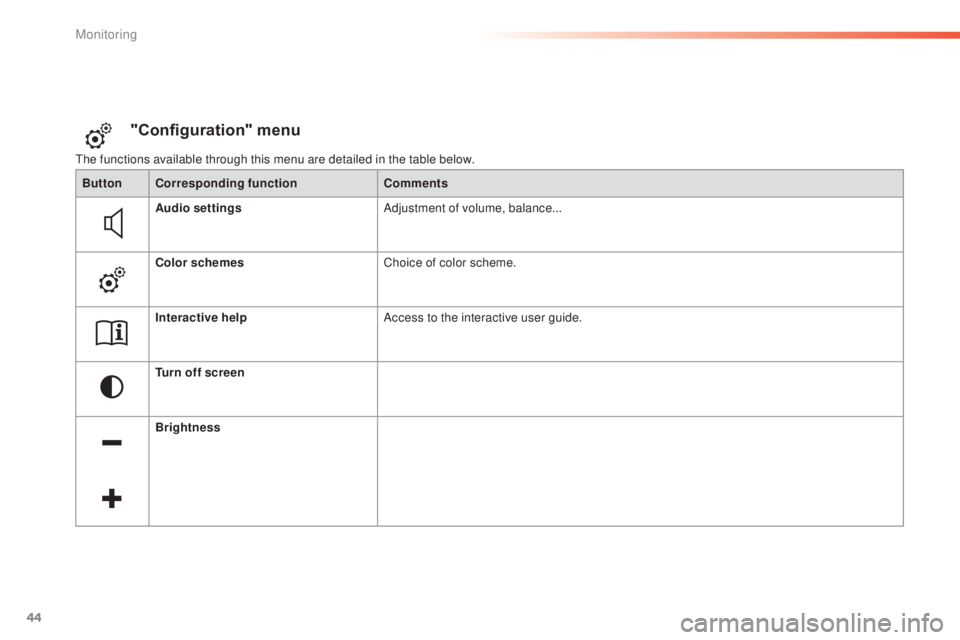
the functions available through this menu are detailed in the table below.
"Configuration" menu
ButtonCorresponding function Comments
Audio settings Adjustment of volume, balance...
Color schemes Choice of color scheme.
Interactive help Access to the interactive user guide.
Turn off screen
Brightness
Monitoring
Page 47 of 416
45
308_en_Chap01_controle-de-marche_ed01-2015
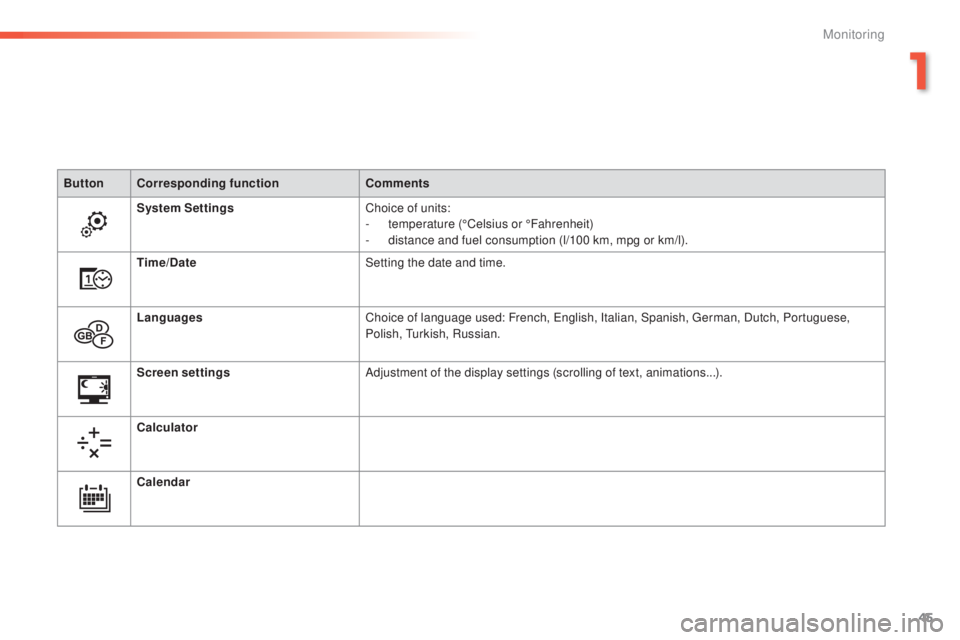
ButtonCorresponding function Comments
System Settings Choice of units:
-
t
emperature (°Celsius or °Fahrenheit)
-
d
istance and fuel consumption (l/100 km, mpg or km/l).
Time/Date Setting the date and time.
Languages Choice of language used: French,
e
n
glish, Italian, Spanish, g
e
rman, Dutch, Portuguese,
Polish,
t
u
rkish, Russian.
Screen settings Adjustment of the display settings (scrolling of text, animations...).
Calculator
Calendar
1
Monitoring
Page 50 of 416
48
308_en_Chap01_controle-de-marche_ed01-2015
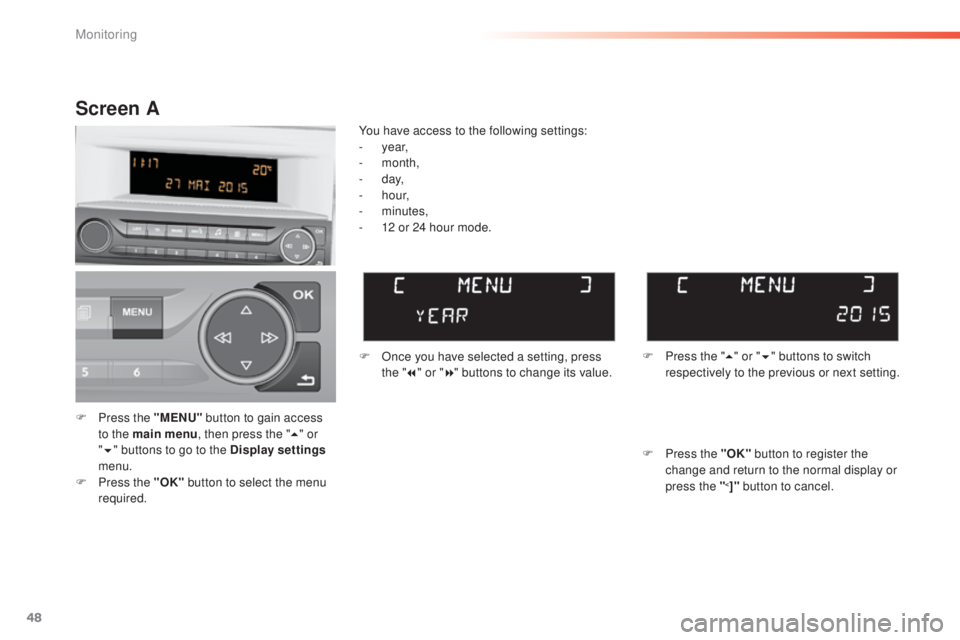
F Press the "MENU" button to gain access
to the main menu , then press the "5" or
" 6 " buttons to go to the Display settings
menu.
F
P
ress the "OK" button to select the menu
required. F
O
nce you have selected a setting, press
the " 7" or " 8" buttons to change its value.
You have access to the following settings:
-
year,
-
month,
-
d ay,
-
h o u r,
-
minutes,
-
1
2 or 24 hour mode.
Screen A
F Press the " 5" or " 6" buttons to switch
respectively to the previous or next setting.
F
P
ress the "OK" button to register the
change and return to the normal display or
press the "
<]" button to cancel.
Monitoring
Page 76 of 416
74
308_en_Chap02_ouvertures_ed01-2015
Reinitialising the electric
windows
Always remove the key when leaving
the vehicle, even for a short time.
In the event of contact during operation
of the windows, you must reverse the
movement of the window. t
o d
o this,
press the switch concerned.
When operating the passenger electric
window switches, the driver must
ensure that no one is preventing correct
closing of the windows.
th
e driver must ensure that the
passengers use the electric windows
c o r r e c t l y.
Be aware of children when operating
the windows.
Following reconnection of the battery, the
safety anti-pinch function must be reinitialised.
th
e safety anti-pinch is not active during these
operations:
-
l
ower the window completely, then raise
it, it will rise in steps of a few centimetres
each time the switch is pressed. Repeat
the operation until the window closes
completely,
-
p
ress and hold the switch upwards for
at least one second after reaching this
position, window closed.
For the safety of your children,
press switch 5 to prevent operation
of the windows of the rear doors,
irrespective of their position.
Deactivating the rear
window controls
With the warning lamp on, the rear switches
are deactivated. With the warning lamp off,
the switches are active.
Access
Page 84 of 416
82
308_en_Chap03_confort_ed01-2015
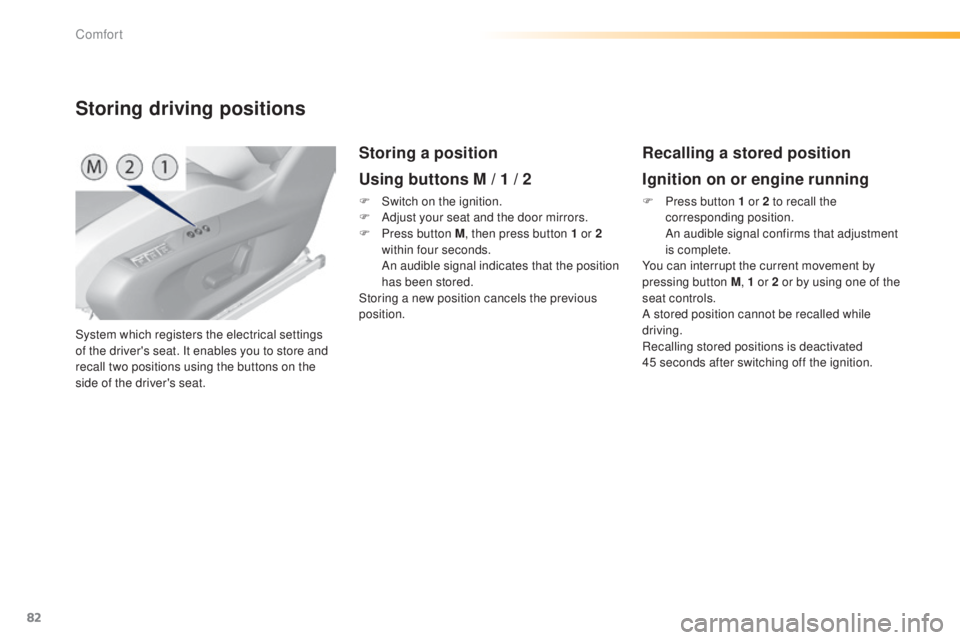
System which registers the electrical settings
of the driver's seat. It enables you to store and
recall two positions using the buttons on the
side of the driver's seat.
Storing driving positions
Storing a position
Using buttons M / 1 / 2
F Switch on the ignition.
F A djust your seat and the door mirrors.
F
P
ress button M , then press button 1 or 2
within four seconds.
A
n audible signal indicates that the position
has been stored.
Storing a new position cancels the previous
position.
Recalling a stored position
Ignition on or engine running
F Press button 1 or 2 to recall the corresponding position.
A
n audible signal confirms that adjustment
is complete.
You can interrupt the current movement by
pressing button M , 1 or 2 or by using one of the
seat controls.
A stored position cannot be recalled while
driving.
Recalling stored positions is deactivated
45
seconds after switching off the ignition.
Comfort
Page 87 of 416
85
308_en_Chap03_confort_ed01-2015
Rear seats (hatchback)
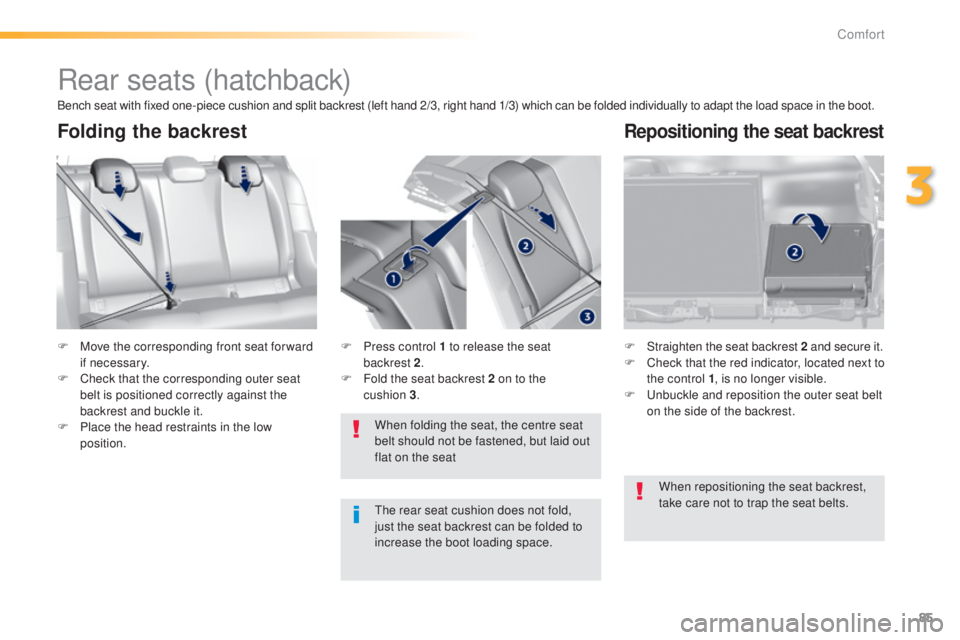
F Move the corresponding front seat for ward if necessary.
F
C
heck that the corresponding outer seat
belt is positioned correctly against the
backrest and buckle it.
F
P
lace the head restraints in the low
position. F
S traighten the seat backrest 2
and secure it.
F C heck that the red indicator, located next to
the control 1 , is no longer visible.
F
u
n
buckle and reposition the outer seat belt
on the side of the backrest.
When folding the seat, the centre seat
belt should not be fastened, but laid out
flat on the seat
F
P ress control 1 to release the seat
backrest 2.
F
F
old the seat backrest 2 on to the
cushion
3.
Folding the backrestRepositioning the seat backrest
Bench seat with fixed one-piece cushion and split backrest (left hand 2/3, right hand 1/3) which can be folded individually to adapt the load space in the boot.
th
e rear seat cushion does not fold,
just the seat backrest can be folded to
increase the boot loading space. When repositioning the seat backrest,
take care not to trap the seat belts.
3
Comfort
Page 88 of 416
86
308_en_Chap03_confort_ed01-2015
Rear seats (SW)
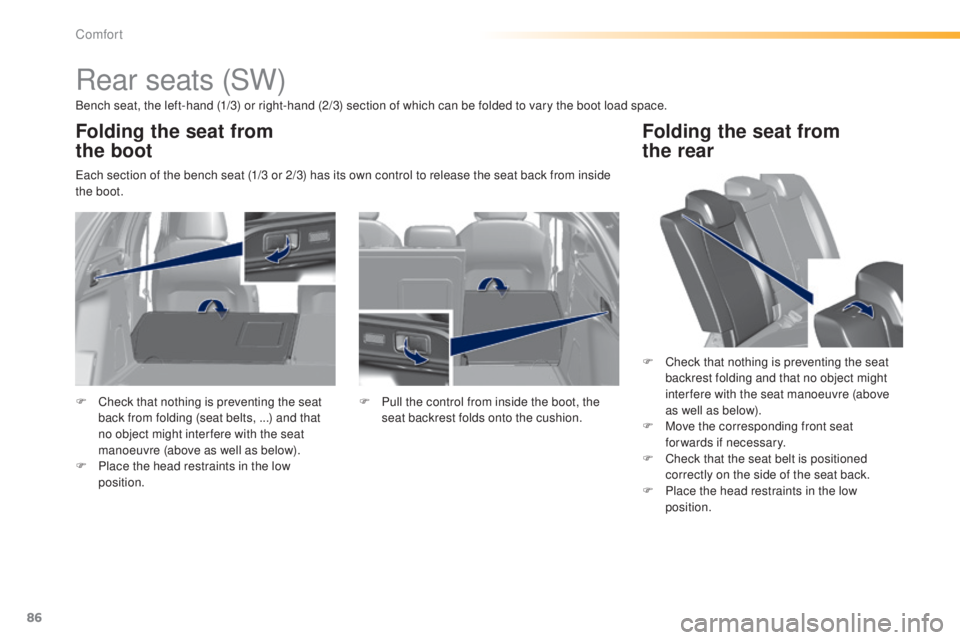
Bench seat, the left-hand (1/3) or right-hand (2/3) section of which can be folded to vary the boot load space.
ea
ch section of the bench seat (1/3 or 2/3) has its own control to release the seat back from inside
the boot.
Folding the seat from
the boot
F Check that nothing is preventing the seat
back from folding (seat belts, ...) and that
no object might inter fere with the seat
manoeuvre (above as well as below).
F
P
lace the head restraints in the low
position. F
P ull the control from inside the boot, the
seat backrest folds onto the cushion.
Folding the seat from
the rear
F Check that nothing is preventing the seat
backrest folding and that no object might
inter fere with the seat manoeuvre (above
as well as below).
F
M
ove the corresponding front seat
forwards if necessary.
F
C
heck that the seat belt is positioned
correctly on the side of the seat back.
F
P
lace the head restraints in the low
position.
Comfort
Page 97 of 416
95
308_en_Chap03_confort_ed01-2015
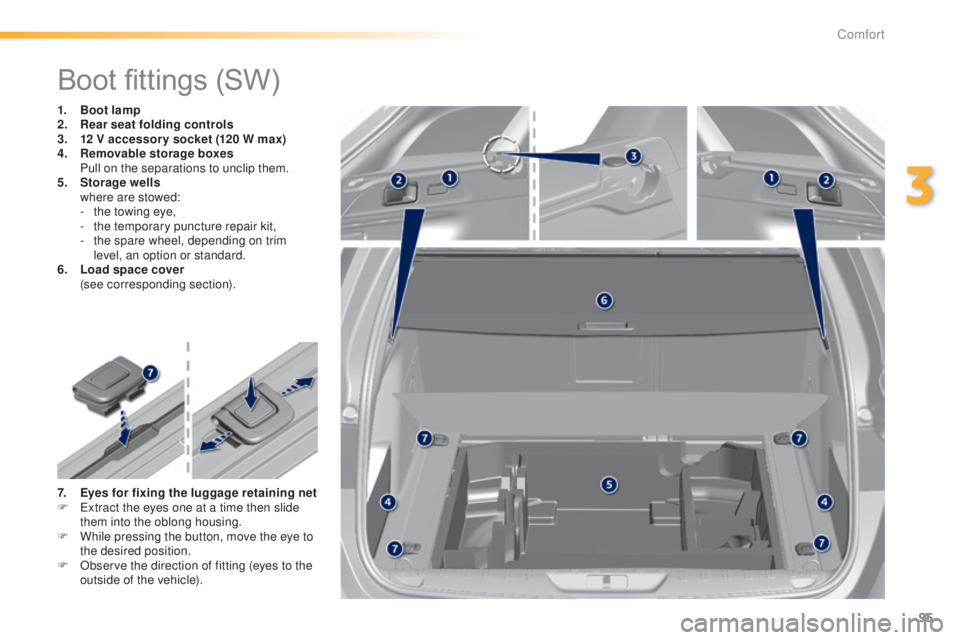
Boot fittings (SW)
1. Boot lamp
2. Rear seat folding controls
3.
1
2 V accessor y socket (120 W max)
4.
R
emovable storage boxes
P
ull on the separations to unclip them.
5.
S
torage wells
w
here are stowed:
-
t
he towing eye,
-
t
he temporary puncture repair kit,
-
t
he spare wheel, depending on trim
level, an option or standard.
6.
L
oad space cover
(
see corresponding section).
7.
E
yes for fixing the luggage retaining net
F
e
x
tract the eyes one at a time then slide
them into the oblong housing.
F
W
hile pressing the button, move the eye to
the desired position.
F
O
bserve the direction of fitting (eyes to the
outside of the vehicle).
3
Comfort
Page 99 of 416
97
308_en_Chap03_confort_ed01-2015
To install
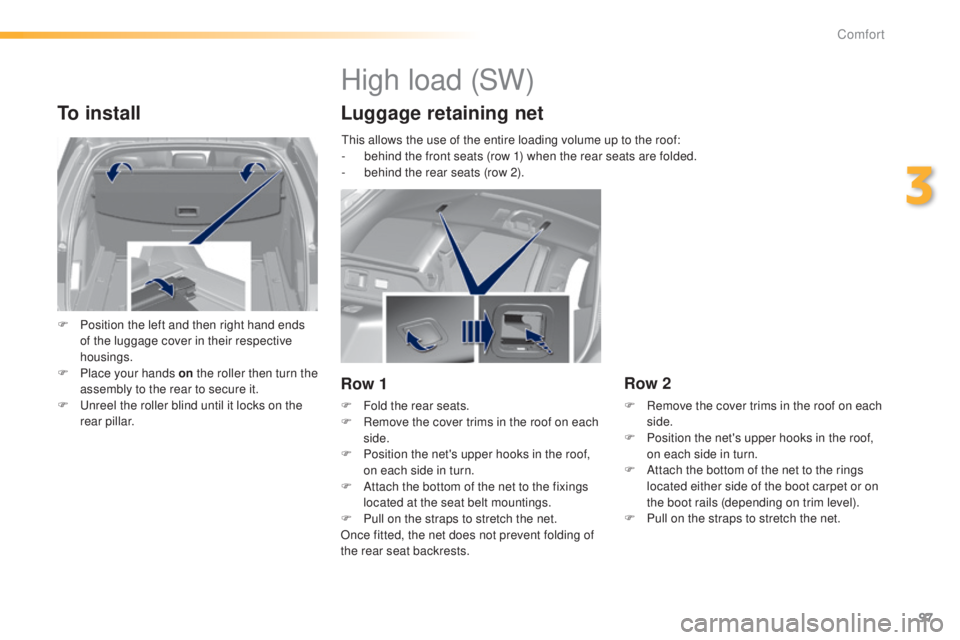
F Position the left and then right hand ends of the luggage cover in their respective
housings.
F
P
lace your hands on the roller then turn the
assembly to the rear to secure it.
F
u
n
reel the roller blind until it locks on the
rear pillar.
High load (SW)
Luggage retaining net
Row 1
F Fold the rear seats.
F R emove the cover trims in the roof on each
side.
F
P
osition the net's upper hooks in the roof,
on each side in turn.
F
A
ttach the bottom of the net to the fixings
located at the seat belt mountings.
F
P
ull on the straps to stretch the net.
Once fitted, the net does not prevent folding of
the rear seat backrests.
Row 2
F Remove the cover trims in the roof on each side.
F
P
osition the net's upper hooks in the roof,
on each side in turn.
F
A
ttach the bottom of the net to the rings
located either side of the boot carpet or on
the boot rails (depending on trim level).
F
P
ull on the straps to stretch the net.
th
is allows the use of the entire loading volume up to the roof:
-
b
ehind the front seats (row 1) when the rear seats are folded.
-
b
ehind the rear seats (row 2).
3
Comfort