automatic brake Peugeot 308 2015 Owner's Guide
[x] Cancel search | Manufacturer: PEUGEOT, Model Year: 2015, Model line: 308, Model: Peugeot 308 2015Pages: 416, PDF Size: 11.81 MB
Page 140 of 416
138
308_en_Chap04_conduite_ed01-2015
the system is reactivated automatically
at every new engine start by the driver.
Reactivation
Press the "ECO OFF" switch again.the system is active again; this is confirmed
by the switch warning lamp going off,
accompanied by a message.
Operating fault
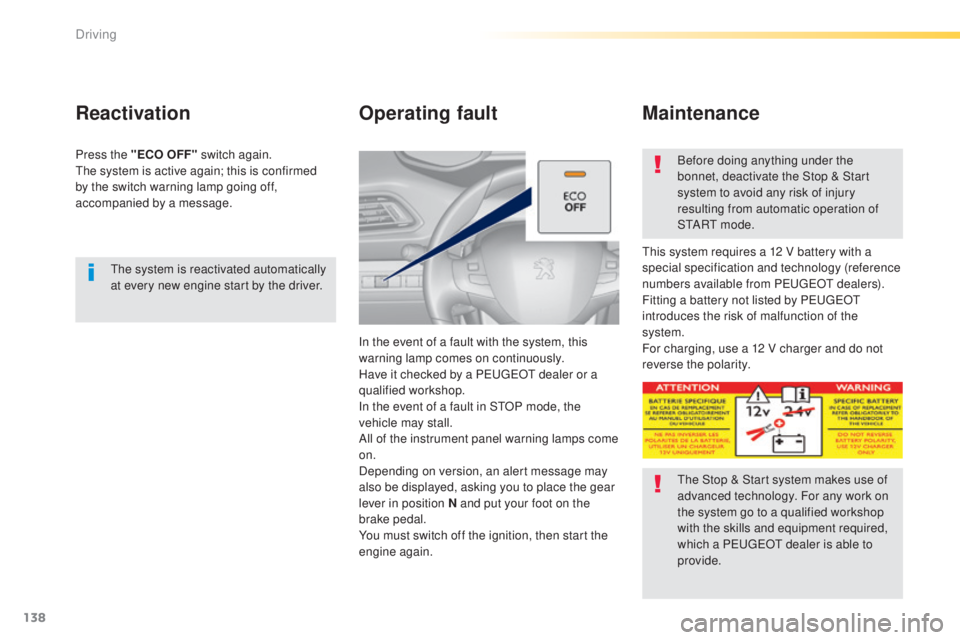
In the event of a fault with the system, this
warning lamp comes on continuously.
Have it checked by a P
e
uge
Ot
dealer or a
qualified workshop.
In the event of a fault in S
tO
P mode, the
vehicle may stall.
All of the instrument panel warning lamps come
on.
Depending on version, an alert message may
also be displayed, asking you to place the gear
lever in position N and put your foot on the
brake pedal.
You must switch off the ignition, then start the
engine again. Before doing anything under the
bonnet, deactivate the Stop & Start
system to avoid any risk of injury
resulting from automatic operation of
S
t
A R
t m
o d e .
th
is system requires a 12 V battery with a
special specification and technology (reference
numbers available from P
e
uge
Ot d
ealers).
Fitting a battery not listed by P
e
uge
Ot
introduces the risk of malfunction of the
system.
For charging, use a 12 V charger and do not
reverse the polarity.
Maintenance
the Stop & Start system makes use of
advanced technology. For any work on
the system go to a qualified workshop
with the skills and equipment required,
which a P
e
uge
Ot
dealer is able to
provide.
Driving
Page 145 of 416
143
308_en_Chap04_conduite_ed01-2015
Steering mounted controls
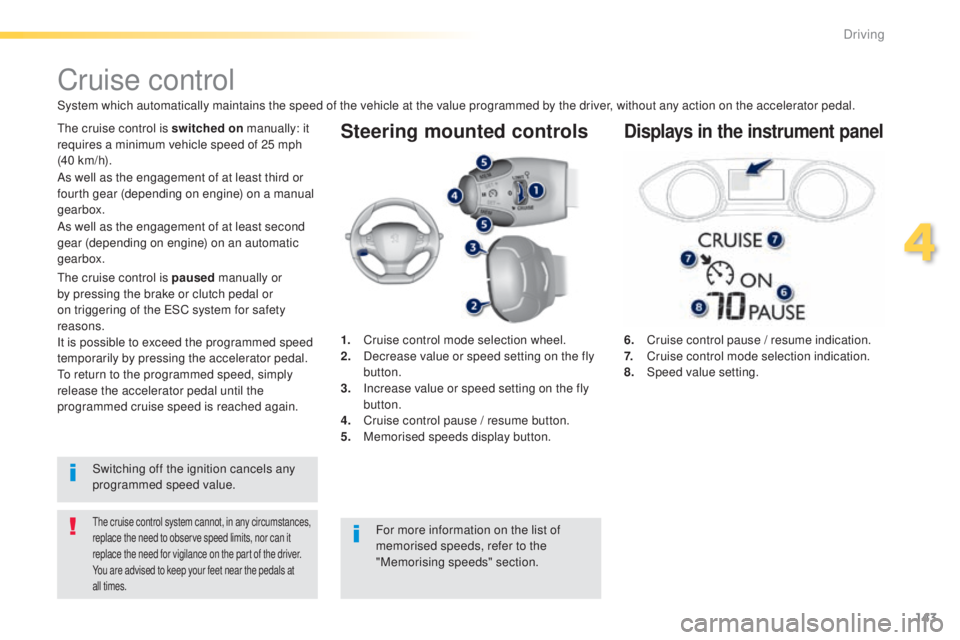
6. Cruise control pause / resume indication.
7. Cruise control mode selection indication.
8.
Spe
ed value setting.
Cruise control
System which automatically maintains the speed of the vehicle at the value programmed by the driver, without any action on the accelerator pedal.
the cruise control system cannot, in any circumstances,
replace the need to observe speed limits, nor can it
replace the need for vigilance on the part of the driver.
You are advised to keep your feet near the pedals at
all times.
the cruise control is switched on manually: it
requires a minimum vehicle speed of 25 mph
(40 km/h).
1.
C
ruise control mode selection wheel.
2.
D
ecrease value or speed setting on the fly
button.
3.
I
ncrease value or speed setting on the fly
button.
4.
C
ruise control pause / resume button.
5.
M
emorised speeds display button.Displays in the instrument panel
Switching off the ignition cancels any
programmed speed value.
th
e cruise control is paused
manually or
by pressing the brake or clutch pedal or
on triggering of the e SC system for safety
reasons.
It is possible to exceed the programmed speed
temporarily by pressing the accelerator pedal.
to r
eturn to the programmed speed, simply
release the accelerator pedal until the
programmed cruise speed is reached again. As well as the engagement of at least third or
fourth gear (depending on engine) on a manual
gearbox.
For more information on the list of
memorised speeds, refer to the
"Memorising speeds" section.
As well as the engagement of at least second
gear (depending on engine) on an automatic
gearbox.
4
Driving
Page 149 of 416
147
308_en_Chap04_conduite_ed01-2015
the active cruise control operates by
day and at night, in fog or moderate
rainfall.
the system does not act on the braking
system, but works only with engine braking.
the regulation range is limited: there
will no longer be any adjustment of
speed if the difference between the
programmed speed setting and the
speed of the vehicle in front becomes
too high.
th
e selection of this system deactivates
the display of inter-vehicle time.
If the difference between the
programmed speed setting and the
speed of the vehicle in front is too
great, the speed cannot be adjusted:
the cruise control is automatically
deactivated.
th
e active cruise control is switched on
manually,
it requires that the speed of the vehicle be between
25 mph (40 km/h) and 90 mph (150 km/h).
General points
the active cruise control can be paused
manually with the control, or automatically:
-
b
y pressing the brake or clutch pedal,
-
i
n the event of operation of the e SP, for
safety reasons,
-
i
n the event of an action of the electric
parking brake control,
-
w
hen an inter-vehicle time threshold is
reached (calculated according to the
relative speeds of your vehicle and the
vehicle in front and the inter-vehicle time
setting chosen),
-
w
hen the distance between your vehicle
and the one in front becomes to small,
-
w
hen the speed of the vehicle in front is to
low,
-
w
hen the speed of your vehicle becomes
too low.
th
e active cruise control cannot in any
circumstances replace the observation
of speed limits, nor the need for the
vigilance on the part of the driver.
It is recommended that you always keep
your feet close to the pedals.
the
inter-vehicle time setting is
memorised when switching off the
ignition.
As well as the engagement of at least third or
fourth gear (depending on engine) on a manual
gearbox.
As well as the engagement of at least second
gear (depending on engine) on an automatic
gearbox.
If the cruise speed setting is above 90 mph
(150 km/h), the active cruise control switches to
normal cruise control mode (without automatic
adjustment of the safety inter-vehicle distance).
4
Driving
Page 154 of 416
152
308_en_Chap04_conduite_ed01-2015
the speed regulation range is limited to a
maximum difference of 20 mph (30 km/h)
between the speed setting and the speed of the
vehicle in front.
Above this, the system goes into pause if the
safe distance becomes too low.
th
e active cruise control uses only engine
braking to slow the vehicle. Consequently the
vehicle looses speed slowly, as when releasing
the accelerator pedal.
th
e system is paused automatically:
-
i
f the vehicle in front slows down to much
or too suddenly, and the driver does not
brake,
-
i
f a vehicle comes between your vehicle
and the vehicle in front,
-
i
f the system does not slow the vehicle
enough to continue to maintain a safe
distance, for example when descending a
steep hill.
Limits of operation
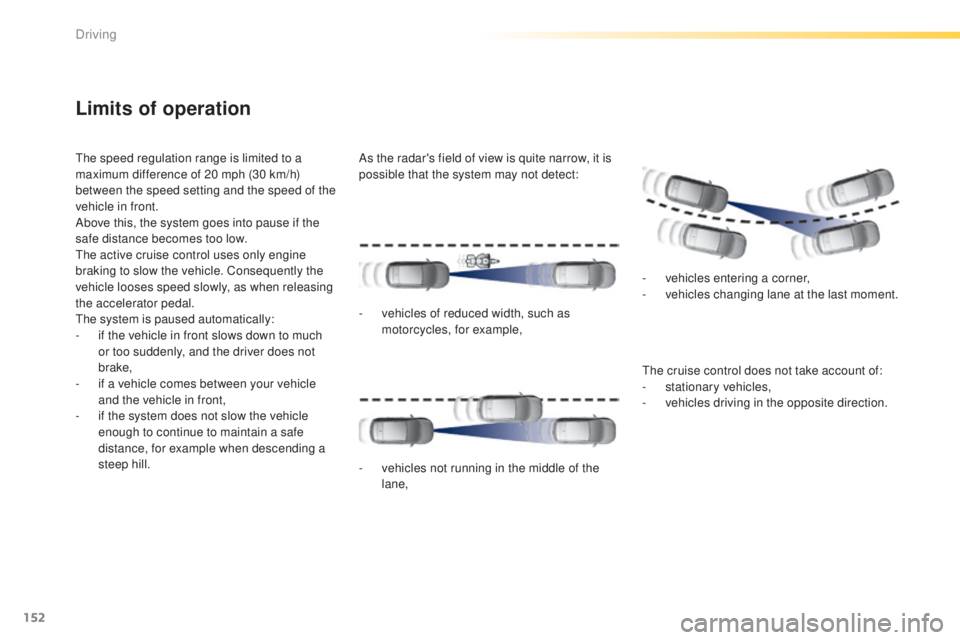
As the radar's field of view is quite narrow, it is
possible that the system may not detect:
th
e cruise control does not take account of:
-
s
tationary vehicles,
-
v
ehicles driving in the opposite direction.
-
v
ehicles of reduced width, such as
motorcycles, for example,
-
v
ehicles not running in the middle of the
lane, -
v
ehicles entering a corner,
-
v
ehicles changing lane at the last moment.
Driving
Page 163 of 416
161
308_en_Chap04_conduite_ed01-2015
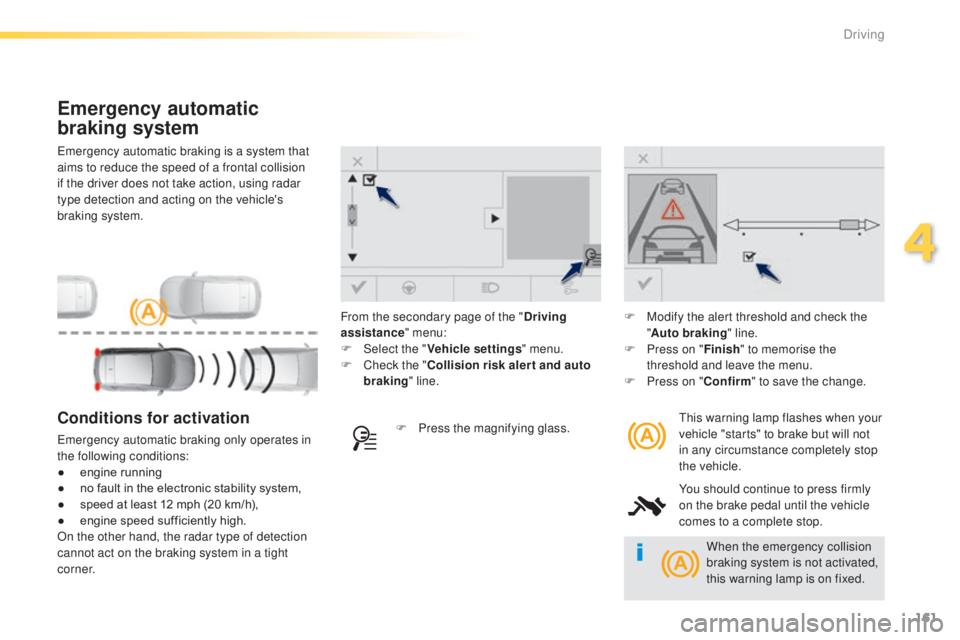
emergency automatic braking is a system that
aims to reduce the speed of a frontal collision
if the driver does not take action, using radar
type detection and acting on the vehicle's
braking system.
Emergency automatic
braking system
this warning lamp flashes when your
vehicle "starts" to brake but will not
in any circumstance completely stop
the vehicle.
You should continue to press firmly
on the brake pedal until the vehicle
comes to a complete stop.Conditions for activation
emergency automatic braking only operates in
the following conditions:
●
e
ngine running
●
n
o fault in the electronic stability system,
●
s
peed at least 12 mph (20 km/h),
●
e
ngine speed sufficiently high.
On the other hand, the radar type of detection
cannot act on the braking system in a tight
c o r n e r. F
P ress the magnifying glass.F
M
odify the alert threshold and check the
" Auto braking " line.
F
P
ress on "
Finish" to memorise the
threshold and leave the menu.
F
P
ress on "
Confirm" to save the change.
From the secondary page of the "
Driving
assistance " menu:
F
Sel
ect the "
Vehicle settings " menu.
F
C
heck the "
Collision risk alert and auto
braking " line.
When the emergency collision
braking system is not activated,
this warning lamp is on fixed.
4
Driving
Page 203 of 416
201
308_en_Chap06_securite_ed01-2015
electronic Stability Control (eSC) incorporating
the following systems:
-
a
nti-lock braking system (ABS) and the
electronic brake force distribution (
eB
FD),
-
em
ergency braking assistance (
eBA
),
-
w
heel anti-slip regulation (ASR) or traction
control,
-
d
ynamic stability control (DSC).
electronic stability control (eS C)
Definitions
Anti-lock braking system (ABS)
and electronic brake force
distribution (EBFD)
this system improves the stability and
manoeuvrability of your vehicle when braking
and contributes towards improved control in
corners, in particular on poor or slippery road
surfaces.
th
e ABS prevents wheel lock in the event of
emergency braking.
th
e electronic brake force distribution system
manages the braking pressure wheel by wheel.
Emergency braking assistance
(EBA)
In an emergency, this system enables you to
reach the optimum braking pressure more
quickly and therefore reduce the stopping
distance.
It is triggered according to the speed at which
the brake pedal is pressed.
t
h
is is felt by a
reduction in the resistance of the pedal and an
increase in the effectiveness of the braking.
Anti-slip regulation (ASR)
the ASR system (also known as tr action
Control) optimises traction in order to limit
wheel slip by acting on the brakes of the driving
wheels and on the engine. It also improves
the directional stability of the vehicle on
acceleration.
Dynamic stability control (DSC)
If there is a difference between the path
followed by the vehicle and that required by
the driver, the DSC monitors each wheel and
automatically acts on the brake of one or more
wheels and on the engine to return the vehicle
to the required path, within the limits of the laws
of physics.
6
Safety
Page 205 of 416
203
308_en_Chap06_securite_ed01-2015
Dynamic stability control (DSC)
and anti-slip regulation (ASR)
Activation
these systems are activated automatically
each time the vehicle is started.
As soon as they detect a problem of grip or
trajectory, these systems act on the operation if
the engine and brakes.
th
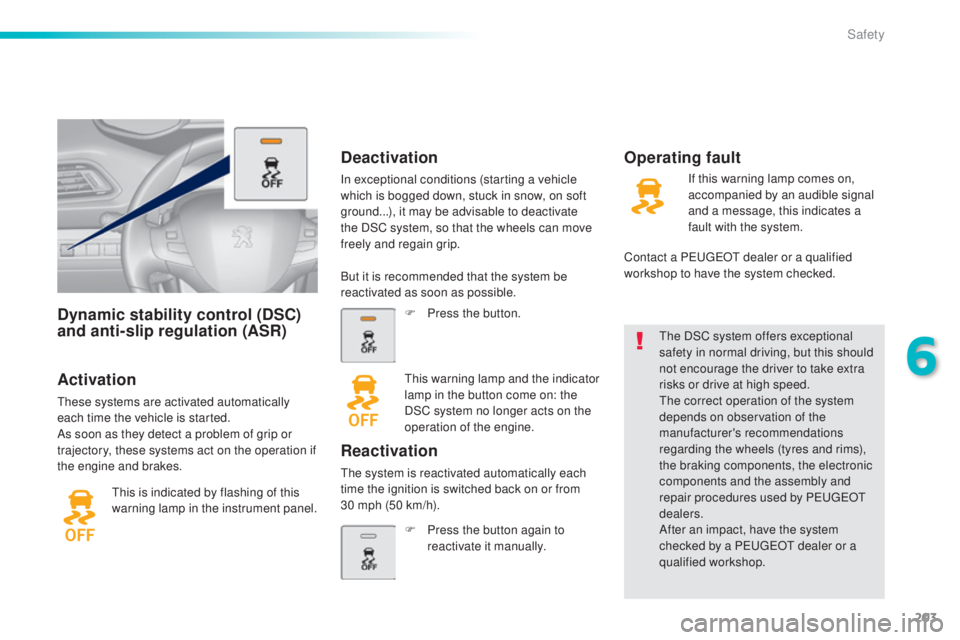
is is indicated by flashing of this
warning lamp in the instrument panel.
th
e DSC system offers exceptional
safety in normal driving, but this should
not encourage the driver to take extra
risks or drive at high speed.th e correct operation of the system
depends on observation of the
manufacturer's recommendations
regarding the wheels (tyres and rims),
the braking components, the electronic
components and the assembly and
repair procedures used by P
e
uge
Ot
dealers.
After an impact, have the system
checked by a P
e
uge
Ot
dealer or a
qualified workshop.
Deactivation
In exceptional conditions (starting a vehicle
which is bogged down, stuck in snow, on soft
ground...), it may be advisable to deactivate
the DSC system, so that the wheels can move
freely and regain grip.
Operating fault
But it is recommended that the system be
reactivated as soon as possible.
F
P
ress the button.
th
is warning lamp and the indicator
lamp in the button come on: the
DSC system no longer acts on the
operation of the engine.
Reactivation
the system is reactivated automatically each
time the ignition is switched back on or from
30
mph (50 km/h). F
P
ress the button again to
reactivate it manually. If this warning lamp comes on,
accompanied by an audible signal
and a message, this indicates a
fault with the system.
Contact a P
e
uge
Ot
dealer or a qualified
workshop to have the system checked.
6
Safety
Page 240 of 416
238
308_en_Chap07_info-pratiques_ed01-2015
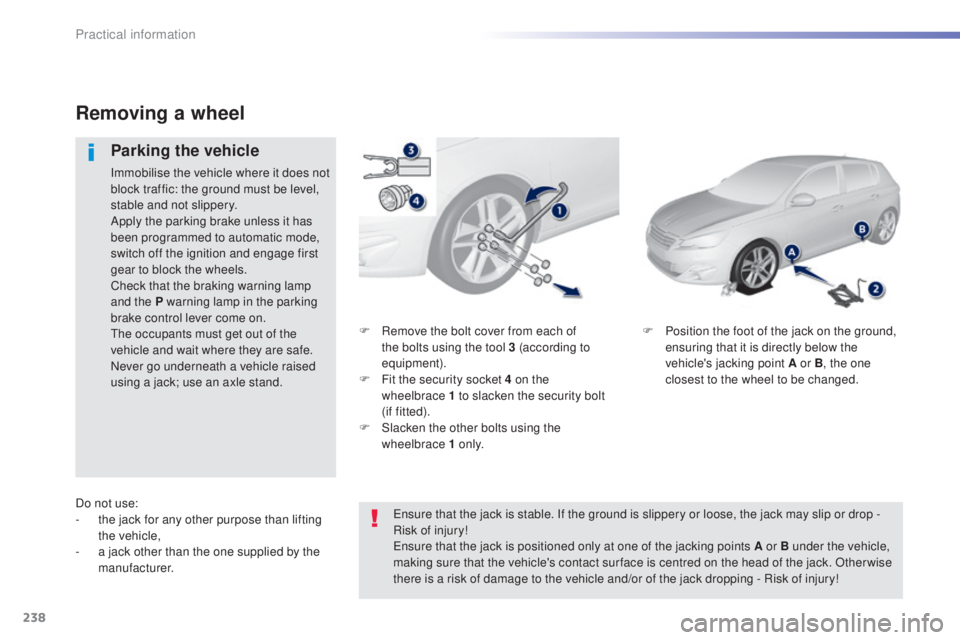
F Remove the bolt cover from each of the bolts using the tool 3 (according to
equipment).
F
F
it the security socket 4 on the
wheelbrace
1 to slacken the security bolt
(if
fitted).
F
S
lacken the other bolts using the
wheelbrace 1 o n l y. F
P osition the foot of the jack on the ground,
ensuring that it is directly below the
vehicle's jacking point A or B , the one
closest to the wheel to be changed.
Removing a wheel
Parking the vehicle
Immobilise the vehicle where it does not
block traffic: the ground must be level,
stable and not slippery.
Apply the parking brake unless it has
been programmed to automatic mode,
switch off the ignition and engage first
gear to block the wheels.
Check that the braking warning lamp
and the P warning lamp in the parking
brake control lever come on.
th
e occupants must get out of the
vehicle and wait where they are safe.
Never go underneath a vehicle raised
using a jack; use an axle stand.
Do not use:
-
t
he jack for any other purpose than lifting
the vehicle,
-
a j
ack other than the one supplied by the
manufacturer.
en
sure that the jack is stable. If the ground is slippery or loose, the jack may slip or drop -
Risk of injury!
en
sure that the jack is positioned only at one of the jacking points A or B under the vehicle,
making sure that the vehicle's contact sur face is centred on the head of the jack. Other wise
there is a risk of damage to the vehicle and/or of the jack dropping - Risk of injury!
Practical information
Page 271 of 416
269
308_en_Chap07_info-pratiques_ed01-2015
Driving advice
Distribution of loads
F Distribute the load in the trailer so that the heaviest items are as close as possible to
the axle and the nose weight approaches
the maximum permitted without
exceeding
it.
Air density decreases with altitude, thus
reducing engine performance. Above
1
000 metres, the maximum towed load must
be reduced by 10
% for every 1 000 metres of
altitude.
Side wind
F take into account the increased sensitivity to side wind.
Cooling
towing a trailer on a slope increases the
temperature of the coolant.
As the fan is electrically controlled, its cooling
capacity is not dependent on the engine speed.
F
t
o l
ower the engine speed, reduce your
speed.
th
e maximum towed load on a long incline
depends on the gradient and the ambient
temperature.
In all cases, keep a check on the coolant
temperature.
F
I
f the warning lamp and the
STOP warning lamp come on,
stop the vehicle and switch off
the engine as soon as possible.
Braking
towing a trailer increases the braking distance.to a void overheating of the brakes on a long
mountain type of descent, the use of engine
braking is recommended.
Ty r e s
F Check the tyre pressures of the towing vehicle and of the trailer, observing the
recommended pressures.
Lighting
F Check the electrical lighting and signalling on the trailer.
Refer to the "
te
chnical data" section for
details of the weights and towed loads
which apply to your vehicle.
th
e rear parking sensors will be
deactivated automatically if a genuine
P
e
uge
Ot
towbar is used.
7
Practical information
Page 294 of 416
292
308_en_Chap08_verifications_ed01-2015
Manual gearbox
the gearbox does not require any
maintenance (no oil change).
Refer to the manufacturer's service
schedule for the checking interval for
this component.Brake wear depends on the style
of driving, particularly in the case
of vehicles used in town, over short
distances. It may be necessary to
Brake pads
For information on checking brake
disc wear, contact a Pe
ugeOt
dealer or a qualified workshop.
Brake disc wear Electric parking brake
this system does not require any
routine servicing. However, in the
event of a problem, have the system
checked by a P
e
uge
Ot
dealer or a
qualified workshop.
Only use products recommended by
P
e
uge
Ot
or products of equivalent
quality and specification.
In order to optimise the operation of
units as important as those in the
braking system, P
e
uge
Ot
selects and
offers very specific products.
After washing the vehicle, dampness,
or in wintry conditions, ice can form
on the brake discs and pads: braking
efficiency may be reduced. Make light
brake applications to dry and defrost
the brakes.
Parking brake
If excessive travel or a loss of
effectiveness of this system is
noticed, the parking brake must be
checked, even between two services.
Checking this system must be done by a
P
e
uge
Ot
dealer or a qualified workshop. have the condition of the brakes checked, even
between vehicle services.
un
less there is a leak in the circuit, a drop in
the brake fluid level indicates that the brake
pads are worn. For more information, refer to the "
el
ectric
parking brake - Operating faults" section.
Automatic gearbox
the gearbox does not require any
maintenance (no oil change).
Refer to the manufacturer's service
schedule for details of the level
checking interval for this component.
Checks