phone Peugeot 308 2015 Owner's Guide
[x] Cancel search | Manufacturer: PEUGEOT, Model Year: 2015, Model line: 308, Model: Peugeot 308 2015Pages: 416, PDF Size: 11.81 MB
Page 364 of 416
08
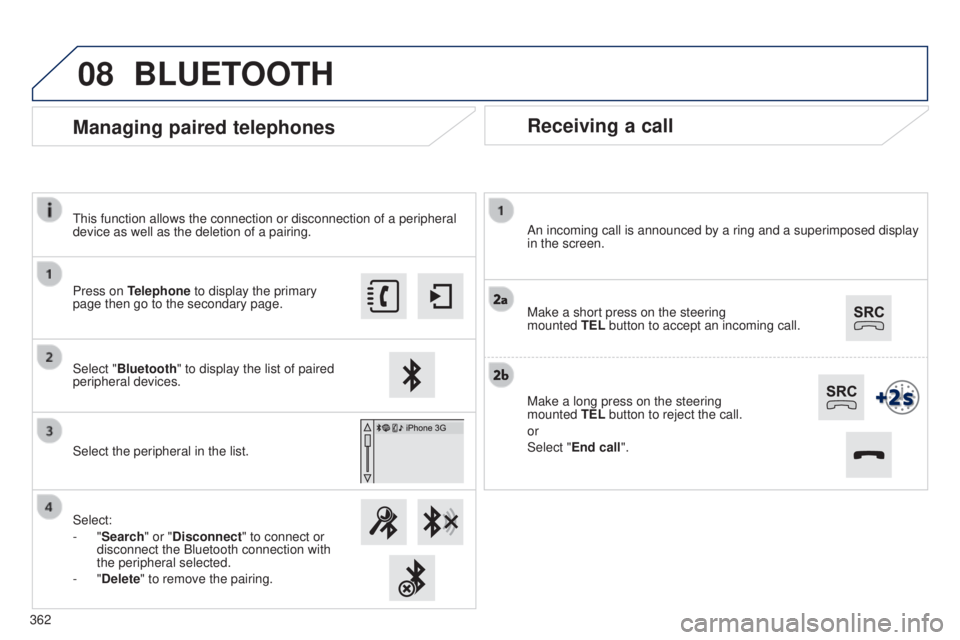
Receiving a call
An incoming call is announced by a ring and a superimposed display
in the screen.
Make a short press on the steering
mounted TEL button to accept an incoming call.
Make a long press on the steering
mounted
TEL button to reject the call.
or
Select "End call".
Managing paired telephones
Press on Telephone to display the primary
page then go to the secondary page.
Select "Bluetooth" to display the list of paired
peripheral devices.
Select the peripheral in the list.
Select:
-
"Search" or "Disconnect" to connect or
disconnect the Bluetooth connection with
the peripheral selected.
-
"Delete" to remove the pairing.
BLUETOOTH
this function allows the connection or disconnection of a peripheral
device as well as the deletion of a pairing.
362
Page 365 of 416
08
363
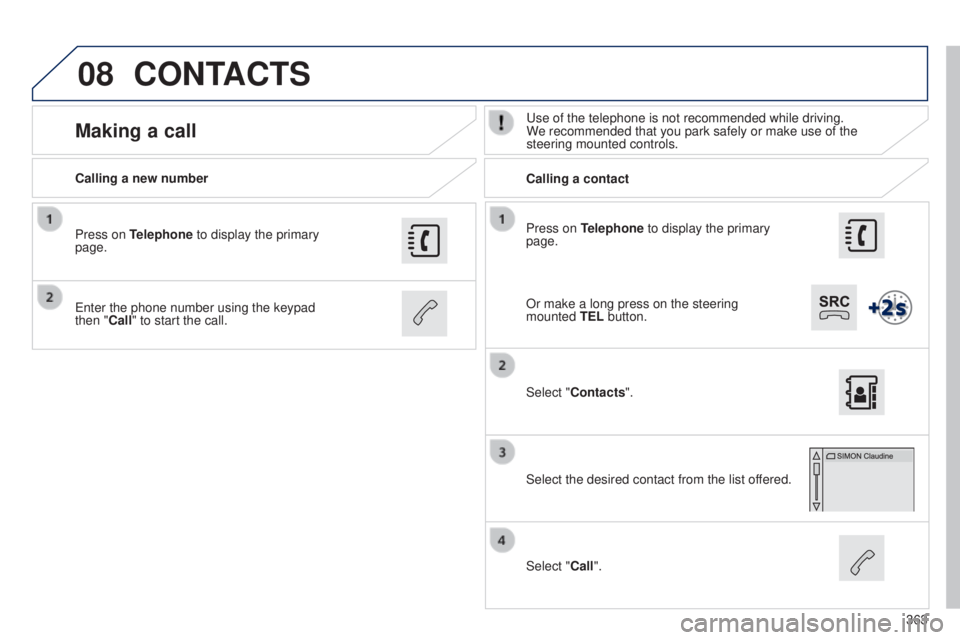
Press on Telephone to display the primary
page.
Calling a new number
Calling a contact
Making a calluse of the telephone is not recommended while driving.
W e recommended that you park safely or make use of the
steering mounted controls.
e
nter the phone number using the keypad
then
"Call" to start the call.
Press on Telephone to display the primary
page.
Select "Contacts".
Select the desired contact from the list offered.
Select "Call".
CONTACTS
Or make a long press on the steering
mounted TEL button.
Page 366 of 416
08
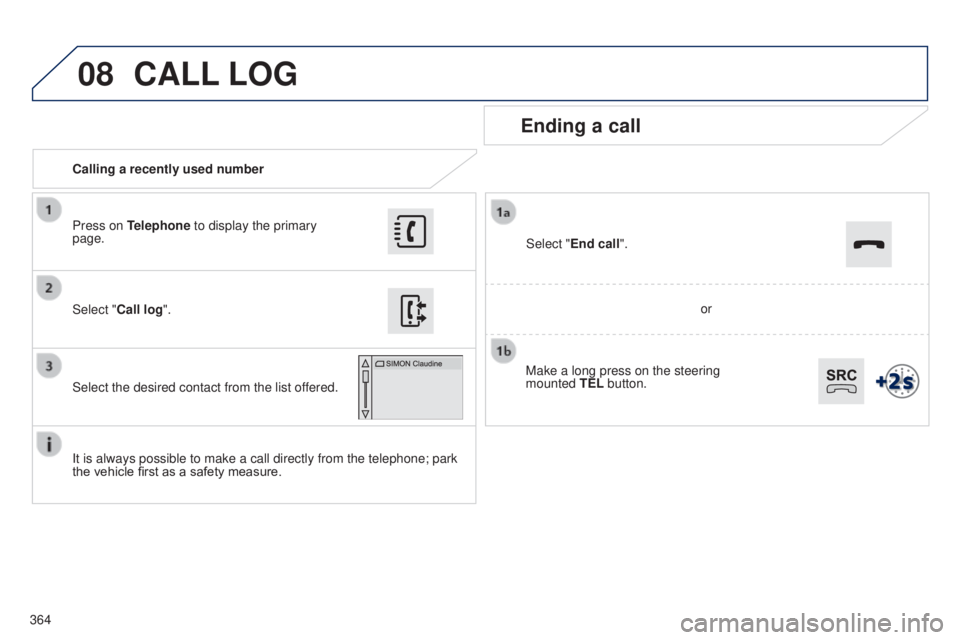
364Calling a recently used number
Ending a call
It is always possible to make a call directly from the telephone; park
the vehicle first as a safety measure. Select "Call log
".
Press on Telephone to display the primary
page.
Select the desired contact from the list offered. Select "End call".
CALL
LOG
or
Make a long press on the steering
mounted
TEL button.
Page 367 of 416
08
365
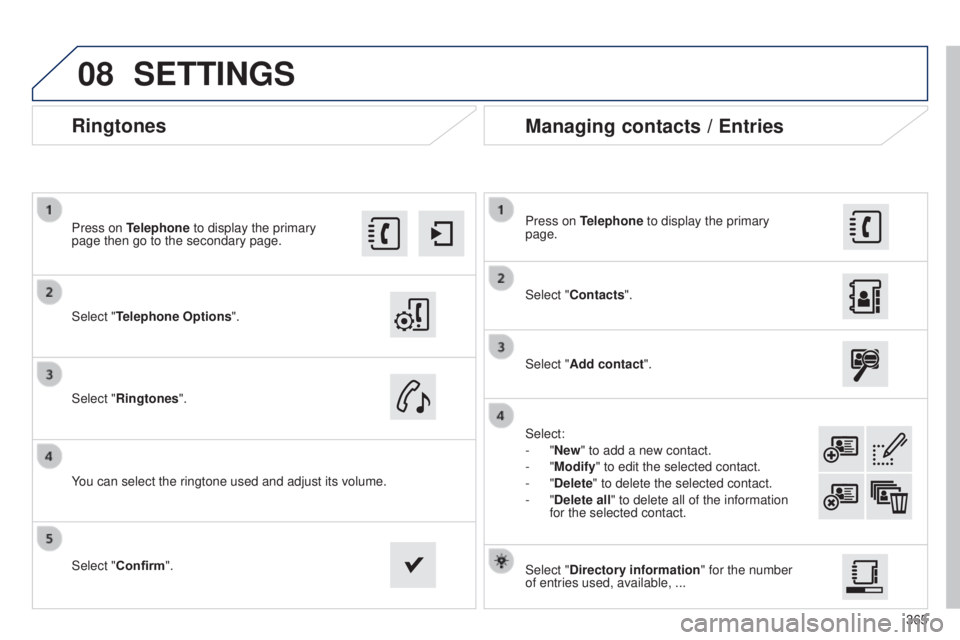
Ringtones
Select "Telephone Options".
Press on Telephone to display the primary
page then go to the secondary page.
Select "Ringtones".
You can select the ringtone used and adjust its volume. Select "Contacts". Press on Telephone to display the primary
page.
Select "Add contact".
Select:
-
"New" to add a new contact.
-
"Modify" to edit the selected contact.
-
"Delete" to delete the selected contact.
-
"Delete all" to delete all of the information
for the selected contact.
Select "Confirm". Select "Directory information" for the number
of entries used, available, ...
Managing contacts / Entries
SETTINGS
Page 369 of 416

FREqUENTLY ASKED q UESTIONS
qUESTION ANSWER SOLUTION
Certain traffic jams
along the route are not
indicated in real time. On starting, it is several minutes before the system begins to receive t\
he
traffic information.
W
ait until the traffic information is being received
correctly (display of the traffic information icons on
the map).
The filters are too restrictive. Modify the "Geographic filter" settings.
In certain countries, only major routes (motorways...) are listed for \
the
traffic information.
t
his phenomenon is normal.
t
he system is
dependent on the traffic information available.
t
he altitude is not
displayed. On starting, the initialisation of the
g PS may take up to 3 minutes to
receive more than 4 satellites correctly. Wait until the system has started up completely.
Check that there is a
g PS coverage of at least
4
satellites (long press on the S etu P button, then
select "
g PS coverage").
Depending on the geographical environment (tunnel...) or the weather,
the conditions of reception of the
g PS signal may vary.
t
his phenomenon is normal.
t
he system
is dependent on the
g PS signal reception
conditions.
Telephone, Bluetooth
I cannot connect my
Bluetooth telephone.
t
he telephone's Bluetooth function may be switched off or the telephone
may not be visible. -
Check that your telephone's Bluetooth
function is switched on.
-
Check in the telephone settings that it is
"visible to all".
t
he Bluetooth telephone is not compatible with the system. You can check the compatibility of your telephone
at www.peugeot.co.uk (services).
t
he volume of the
telephone connected
in Bluetooth mode is
inaudible.
t
he volume depends both on the system and on the telephone. Increase the volume of the audio system, to
maximum if required, and increase the volume of
the telephone if necessary.
The ambient noise level has an influence on the quality of telephone
communication. Reduce the ambient noise level (close the windows,
reduce the booster fan speed, slow down, ...).
367
Page 370 of 416
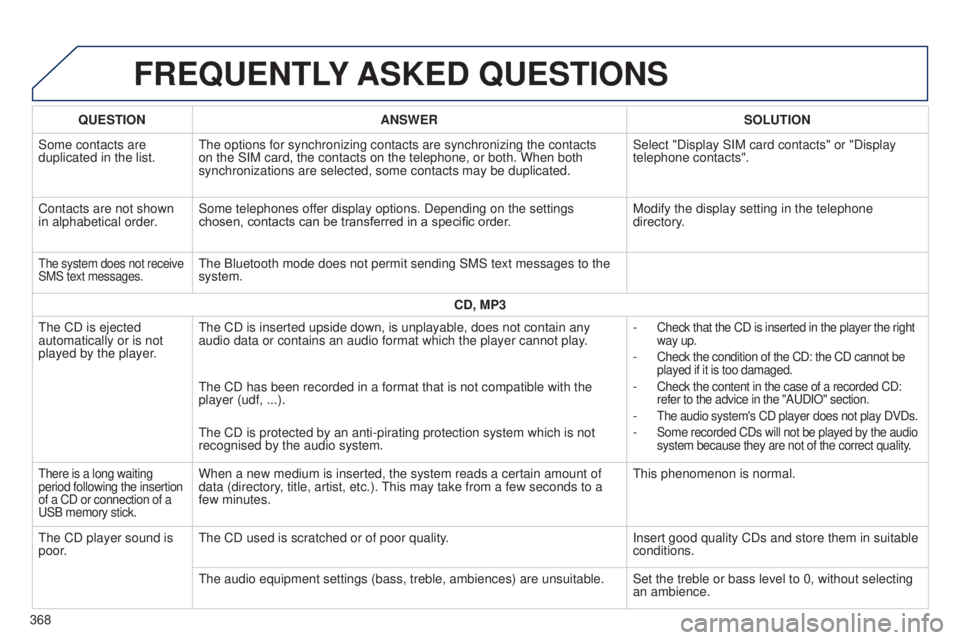
FREqUENTLY ASKED q UESTIONS
qUESTION ANSWER SOLUTION
Some contacts are
duplicated in the list.
t
he options for synchronizing contacts are synchronizing the contacts
on the SIM card, the contacts on the telephone, or both. When both
synchronizations are selected, some contacts may be duplicated. Select "Display SIM card contacts" or "Display
telephone contacts".
Contacts are not shown
in alphabetical order. Some telephones offer display options. Depending on the settings
chosen, contacts can be transferred in a specific order. Modify the display setting in the telephone
directory.
the system does not receive
SMS text messages.the Bluetooth mode does not permit sending SMS text messages to the
system.
CD, MP3
t
he CD is ejected
automatically or is not
played by the player.
t
he CD is inserted upside down, is unplayable, does not contain any
audio data or contains an audio format which the player cannot play. -
Check that the CD is inserted in the player the right
way up.
- Check the condition of the CD: the CD cannot be
played if it is too damaged.
- Check the content in the case of a recorded CD:
refer to the advice in the "A u DIO" section.
- the audio system's CD player does not play DVDs.
- Some recorded CDs will not be played by the audio
system because they are not of the correct quality.
the CD has been recorded in a format that is not compatible with the
player (udf, ...).
t
he CD is protected by an anti-pirating protection system which is not
recognised by the audio system.
there is a long waiting
period following the insertion
of a CD or connection of a
u
SB memory stick.When a new medium is inserted, the system reads a certain amount of
data (directory, title, artist, etc.). t his may take from a few seconds to a
few minutes.t his phenomenon is normal.
t
he CD player sound is
poor.
t
he CD used is scratched or of poor quality. Insert good quality CDs and store them in suitable
conditions.
t
he audio equipment settings (bass, treble, ambiences) are unsuitable. Set the treble or bass level to 0, without selecting an ambience.
368
Page 373 of 416
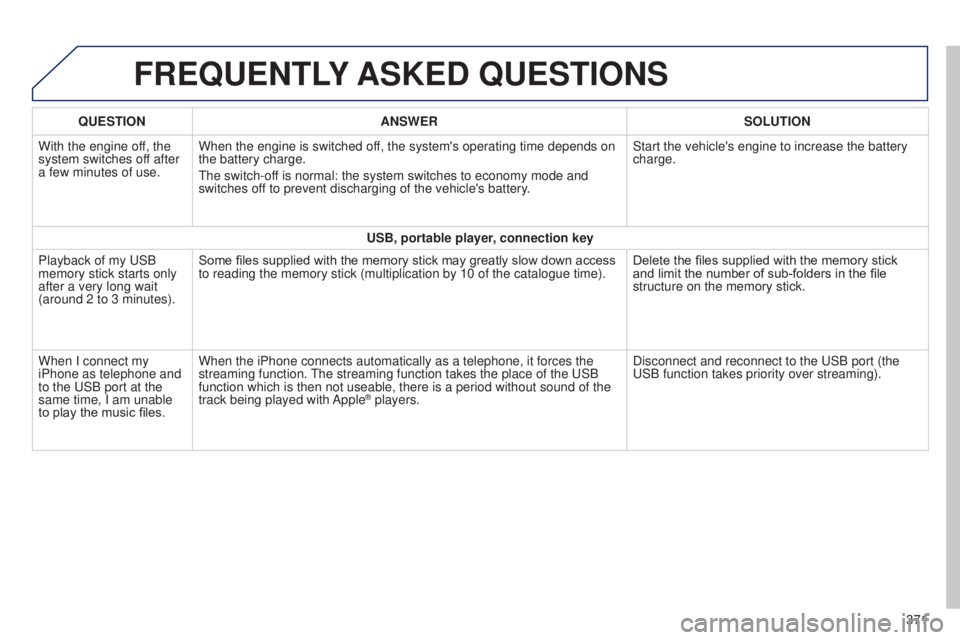
FREqUENTLY ASKED q UESTIONS
qUESTION ANSWER SOLUTION
With the engine of f, the
system switches off after
a few minutes of use. When the engine is switched off, the system's operating time depends on
the battery charge.
t
he switch-off is normal: the system switches to economy mode and
switches off to prevent discharging of the vehicle's battery. Start the vehicle's engine to increase the battery
charge.
USB, portable player, connection key
Playback of my
u SB
memory stick starts only
after a very long wait
(around 2 to 3 minutes). Some files supplied with the memory stick may greatly slow down access
to reading the memory stick (multiplication by 10 of the catalogue time\
).
Delete the files supplied with the memory stick
and limit the number of sub-folders in the file
structure on the memory stick.
When I connect my
iPhone as telephone and
to the
u SB port at the
same time, I am unable
to play the music files. When the iPhone connects automatically as a telephone, it forces the
streaming function.
t
he streaming function takes the place of the u SB
function which is then not useable, there is a period without sound of t\
he
track being played with Apple
® players. Disconnect and reconnect to the u SB port (the
u
SB function takes priority over streaming).
371
Page 376 of 416
01
374
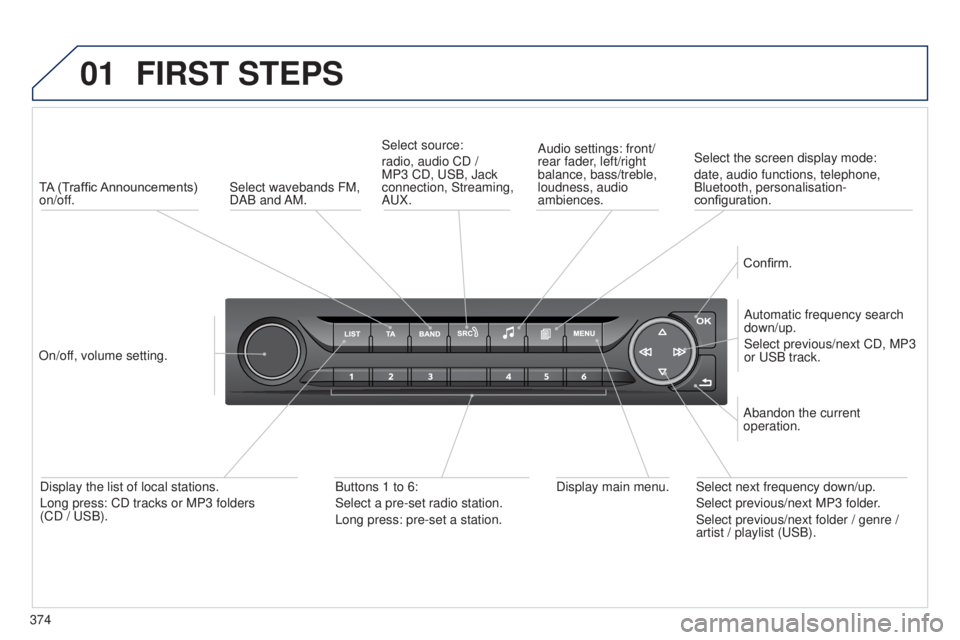
FIRST STEPS
TA (Traffic Announcements)
on/off.
On/off, volume setting. Automatic frequency search
down/up.
Select previous/next CD, MP3
or
u SB track.
Select source:
radio, audio CD /
MP3 CD,
u SB, Jack
connection, Streaming,
A u X.Audio settings: front/
rear fader, left/right
balance, bass/treble,
loudness, audio
ambiences.
Confirm.
Display main menu.
Display the list of local stations.
Long press: CD tracks or MP3 folders
(CD /
u SB). Buttons 1 to 6:
Select a pre-set radio station.
Long press: pre-set a station. Select next frequency down/up.
Select previous/next MP3 folder.
Select previous/next folder / genre /
artist / playlist (
u SB).
Abandon the current
operation.
Select wavebands FM,
DAB and AM.
Select the screen display mode:
date, audio functions, telephone,
Bluetooth, personalisation-
configuration.
Page 377 of 416
02
375
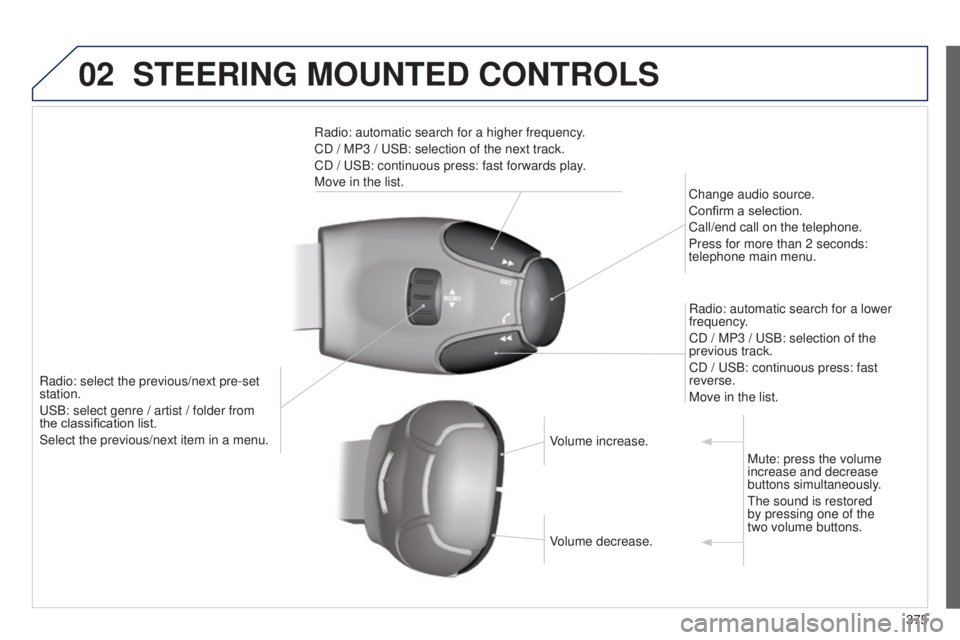
STEERING MOUNTED CONTROLS
Radio: select the previous/next pre-set
station.
u
SB: select genre / artist / folder from
the
classification list.
Select the previous/next item in a menu. Change audio source.
Confirm a selection.
Call/end call on the telephone.
Press for more than 2 seconds:
telephone main menu.
Radio: automatic search for a lower
frequency.
CD / MP3 / u SB: selection of the
previous track.
CD / u SB: continuous press: fast
reverse.
Move in the list.
Radio: automatic search for a higher frequency.
CD
/ MP3 / u SB: selection of the next track.
CD / u SB: continuous press: fast forwards play.
Move in the list.
Volume increase.
Volume decrease.Mute: press the volume
increase and decrease
buttons simultaneously.
t
he sound is restored
by pressing one of the
two
volume buttons.
Page 378 of 416
03
376
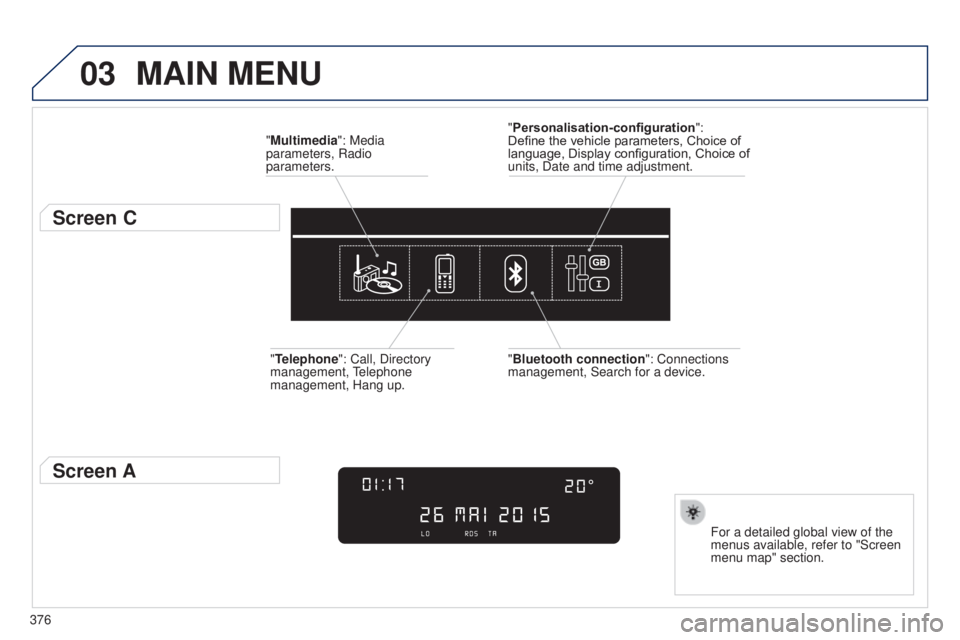
MAIN MENU
"Multimedia": Media
parameters, Radio
parameters.
Screen C
For a detailed global view of the
menus available, refer to "Screen
menu map" section.
"Personalisation-configuration
":
Define the vehicle parameters, Choice of
language, Display configuration, Choice of
units, Date and time adjustment.
"Bluetooth connection ": Connections
management, Search for a device.
"Telephone": Call, Directory
management,
t
elephone
management, Hang up.
Screen A