key battery Peugeot 308 2016 Owner's Manual - RHD (UK, Australia)
[x] Cancel search | Manufacturer: PEUGEOT, Model Year: 2016, Model line: 308, Model: Peugeot 308 2016Pages: 398, PDF Size: 10.3 MB
Page 54 of 398
52
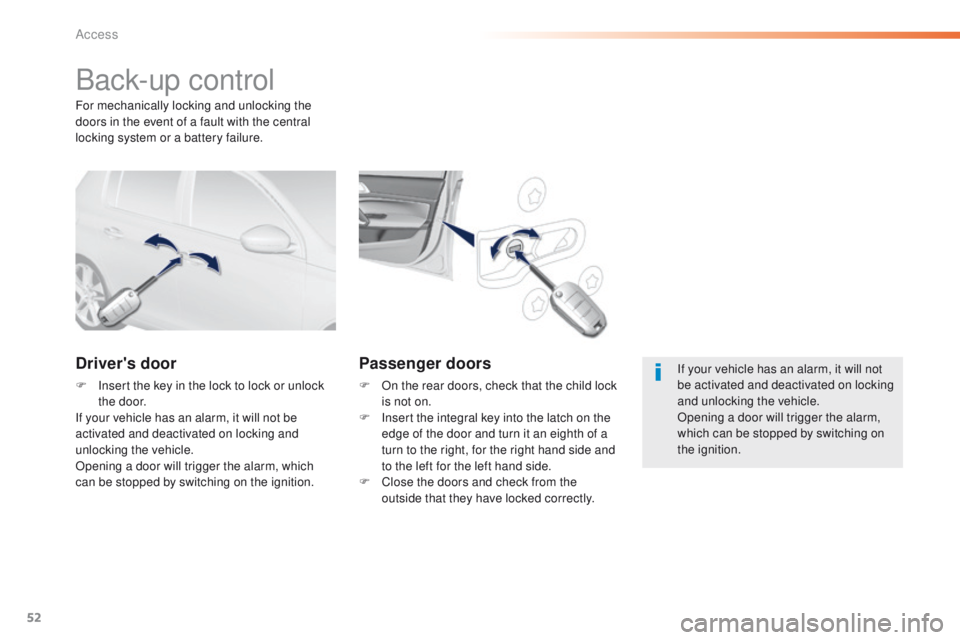
Back-up control
Driver's door
F Insert the key in the lock to lock or unlock the door.
If your vehicle has an alarm, it will not be
activated and deactivated on locking and
unlocking the vehicle.
Opening a door will trigger the alarm, which
can be stopped by switching on the ignition.
Passenger doors
F On the rear doors, check that the child lock is not on.
F
I
nsert the integral key into the latch on the
edge of the door and turn it an eighth of a
turn to the right, for the right hand side and
to the left for the left hand side.
F
C
lose the doors and check from the
outside that they have locked correctly.
For mechanically locking and unlocking the
doors in the event of a fault with the central
locking system or a battery failure.
If your vehicle has an alarm, it will not
be activated and deactivated on locking
and unlocking the vehicle.
Opening a door will trigger the alarm,
which can be stopped by switching on
the ignition.
Access
Page 55 of 398
53
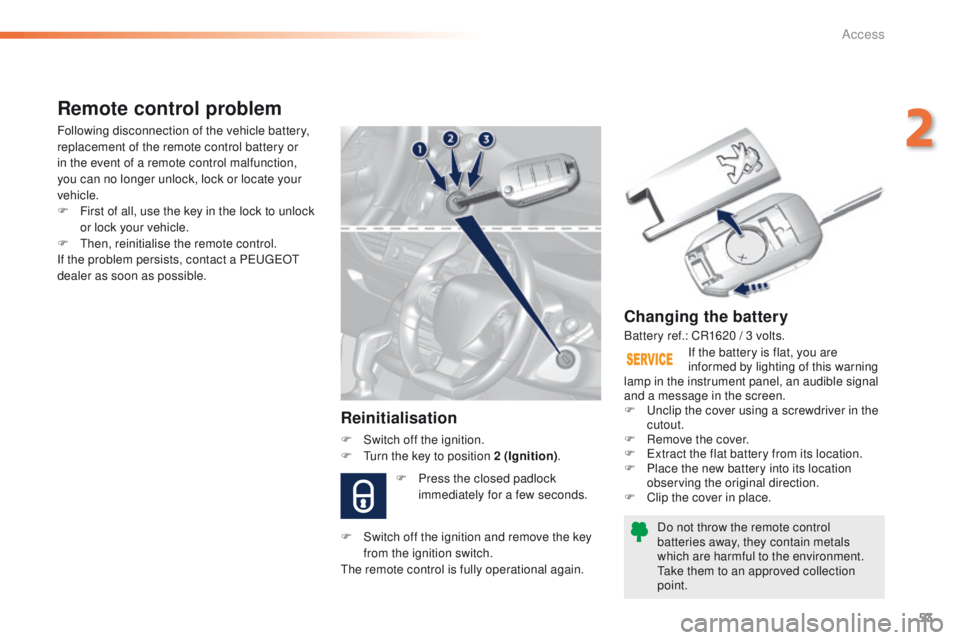
Changing the battery
Do not throw the remote control
batteries away, they contain metals
which are harmful to the environment.
ta
ke them to an approved collection
point. If the battery is flat, you are
informed by lighting of this warning
lamp in the instrument panel, an audible signal
and a message in the screen.
F
u
n
clip the cover using a screwdriver in the
cutout.
F
R
emove the cover.
F
e
x
tract the flat battery from its location.
F
P
lace the new battery into its location
observing the original direction.
F
C
lip the cover in place.
Remote control problem
Reinitialisation
F Switch off the ignition.
F
tu rn the key to position 2 (Ignition) .
Following disconnection of the vehicle battery,
replacement of the remote control battery or
in the event of a remote control malfunction,
you can no longer unlock, lock or locate your
vehicle.
F
F
irst of all, use the key in the lock to unlock
or lock your vehicle.
F
t
hen
, reinitialise the remote control.
If the problem persists, contact a P
e
uge
Ot
dealer as soon as possible.
Battery ref.: CR1620 / 3 volts.
F
P
ress the closed padlock
immediately for a few seconds.
F
S
witch off the ignition and remove the key
from the ignition switch.
th
e remote control is fully operational again.
2
Access
Page 57 of 398
55
this function allows you to identify
your vehicle from a distance,
particularly in poor light. Your vehicle
must be locked.
Locating your vehicle
F Press the closed padlock on the remote control.
th
is will switch on the courtesy lamps and
the direction indicators will flash for around
ten
seconds.As a safety measure (children on
board), never leave the vehicle without
taking the key for the Keyless
e
n
try
and Starting system, even for a short
period.
gu
ard against theft when the key for
the Keyless
e
n
try and Starting system
is in the recognition zone with the
vehicle unlocked.
In order to preserve the charge of the
cell battery in the remote control, the
"hands-free" functions go into extended
stand-by after 21 days of non-use.
t
o
r
estore these functions, press one of
the remote control buttons or start the
engine with the electronic key in the
reader.
2
Access
Page 62 of 398
60
When unlocking of the boot only is activated:
F W ith the electronic key in the recognition
zone A , press the boot unlocking control
to unlock just the tailgate, then raise the
tailgate.
un
locking is signalled by rapid flashing of the
direction indicators for a few seconds.
us
e this button for access to
additional information.
Closing
F Lower the tailgate using one of the interior grab handles.
If the boot is not closed correctly (the lock has
two positions): with the engine running or
when moving (speed above 6 mph (10 km/h)),
a message appears for a few seconds.
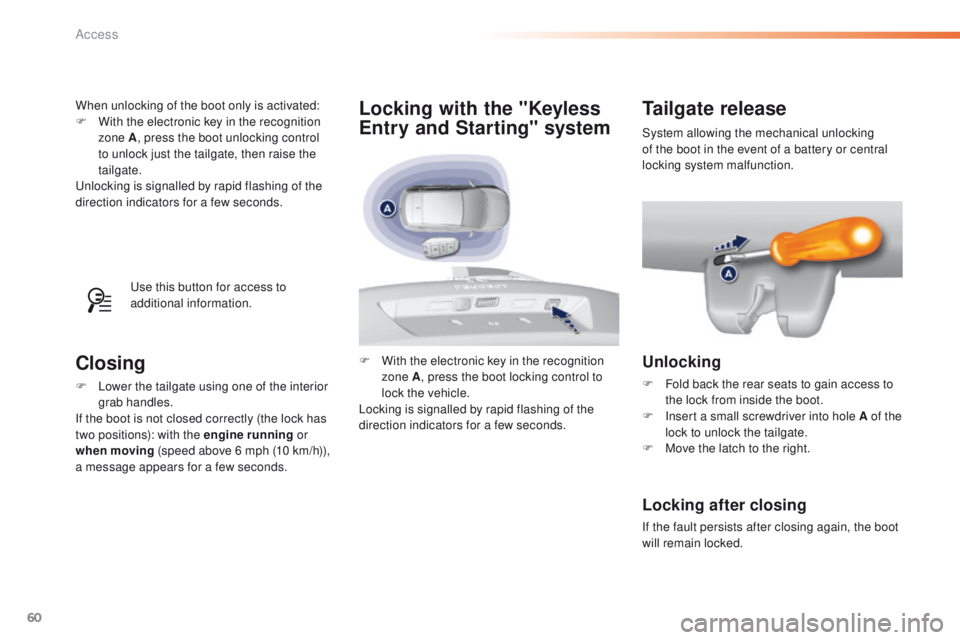
Tailgate release
Unlocking
F Fold back the rear seats to gain access to the lock from inside the boot.
F
I
nsert a small screwdriver into hole A of the
lock to unlock the tailgate.
F
M
ove the latch to the right.
Locking after closing
If the fault persists after closing again, the boot
will remain locked.System allowing the mechanical unlocking
of the boot in the event of a battery or central
locking system malfunction.
F
W
ith the electronic key in the recognition
zone A , press the boot locking control to
lock the vehicle.
Locking is signalled by rapid flashing of the
direction indicators for a few seconds.
Locking with the "Keyless
Entry and Starting" system
Access
Page 63 of 398
61
Back-up key
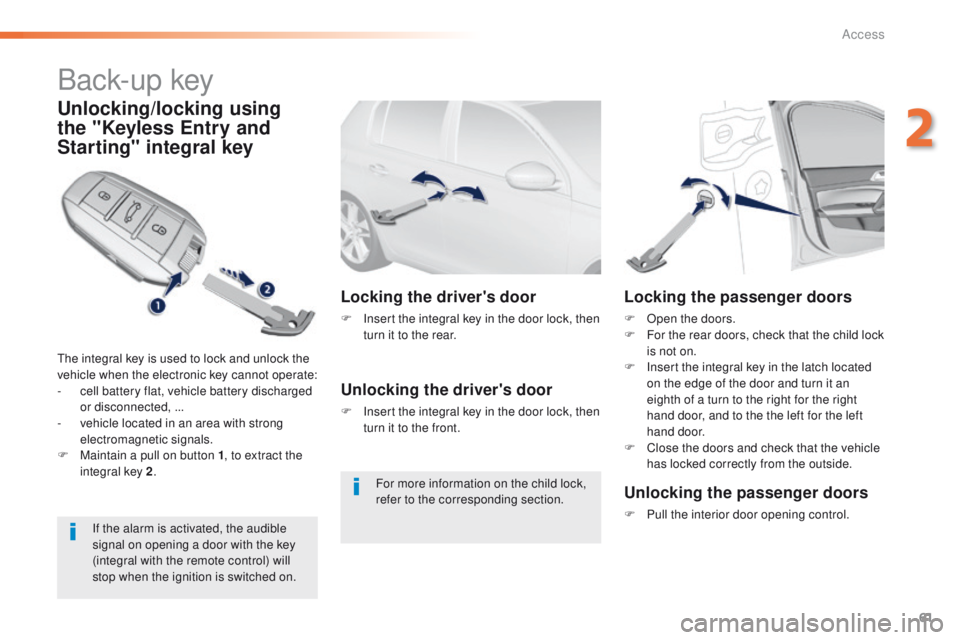
Unlocking/locking using
the "Keyless Entry and
Starting" integral key
the integral key is used to lock and unlock the
vehicle when the electronic key cannot operate:
-
c
ell battery flat, vehicle battery discharged
or disconnected, ...
-
v
ehicle located in an area with strong
electromagnetic signals.
F
M
aintain a pull on button 1 , to extract the
integral key 2 .
Locking the driver's door
F Insert the integral key in the door lock, then
turn it to the rear.
Unlocking the driver's door
F Insert the integral key in the door lock, then turn it to the front.
Locking the passenger doors
F Open the doors.
F F or the rear doors, check that the child lock
is not on.
F
I
nsert the integral key in the latch located
on the edge of the door and turn it an
eighth of a turn to the right for the right
hand door, and to the the left for the left
hand door.
F
C
lose the doors and check that the vehicle
has locked correctly from the outside.
If the alarm is activated, the audible
signal on opening a door with the key
(integral with the remote control) will
stop when the ignition is switched on.
Unlocking the passenger doors
F Pull the interior door opening control.
For more information on the child lock,
refer to the corresponding section.
2
Access
Page 64 of 398
62
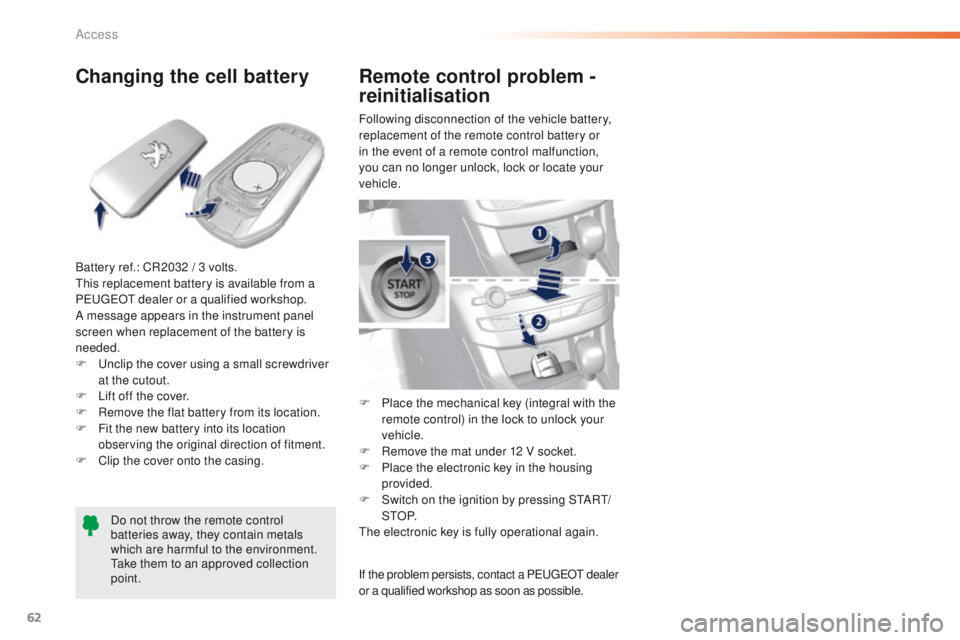
Changing the cell battery
Battery ref.: CR2032 / 3 volts.this replacement battery is available from a
P
e
uge
Ot
dealer or a qualified workshop.
A message appears in the instrument panel
screen when replacement of the battery is
needed.
F
u
n
clip the cover using a small screwdriver
at the cutout.
F
L
ift off the cover.
F
R
emove the flat battery from its location.
F
F
it the new battery into its location
observing the original direction of fitment.
F
C
lip the cover onto the casing.Do not throw the remote control
batteries away, they contain metals
which are harmful to the environment.
ta
ke them to an approved collection
point. Following disconnection of the vehicle battery,
replacement of the remote control battery or
in the event of a remote control malfunction,
you can no longer unlock, lock or locate your
vehicle.
F
P
lace the mechanical key (integral with the
remote control) in the lock to unlock your
vehicle.
F
R
emove the mat under 12 V socket.
F
P
lace the electronic key in the housing
provided.
F
S
witch on the ignition by pressing S
tA
R
t/
StO
P.
th
e electronic key is fully operational again.
Remote control problem -
reinitialisation
If the problem persists, contact a PeugeOt dealer
or a qualified workshop as soon as possible.
Access
Page 72 of 398
70
Reinitialising the electric
windows
Always remove the key when leaving
the vehicle, even for a short time.
In the event of contact during operation
of the windows, you must reverse the
movement of the window. t
o d
o this,
press the switch concerned.
When operating the passenger electric
window switches, the driver must
ensure that no one is preventing correct
closing of the windows.
th
e driver must ensure that the
passengers use the electric windows
c o r r e c t l y.
Be aware of children when operating
the windows.
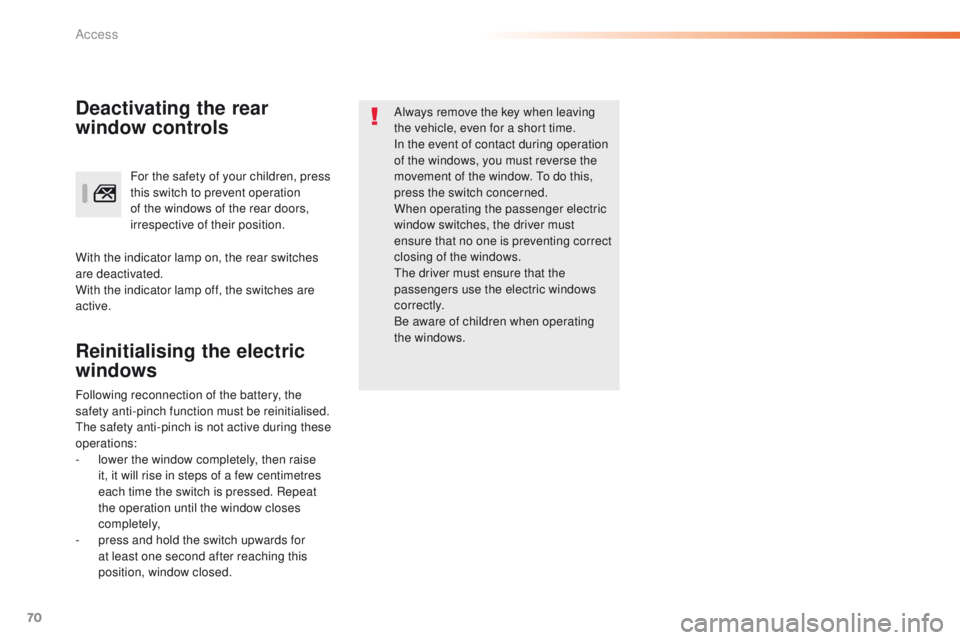
For the safety of your children, press
this switch to prevent operation
of the windows of the rear doors,
irrespective of their position.Deactivating the rear
window controls
With the indicator lamp on, the rear switches
are deactivated.
With the indicator lamp off, the switches are
active.
Following reconnection of the battery, the
safety anti-pinch function must be reinitialised.
th
e safety anti-pinch is not active during these
operations:
-
l
ower the window completely, then raise
it, it will rise in steps of a few centimetres
each time the switch is pressed. Repeat
the operation until the window closes
completely,
-
p
ress and hold the switch upwards for
at least one second after reaching this
position, window closed.
Access
Page 154 of 398
152
If the vehicle is not immobilised,
the engine will not stop.
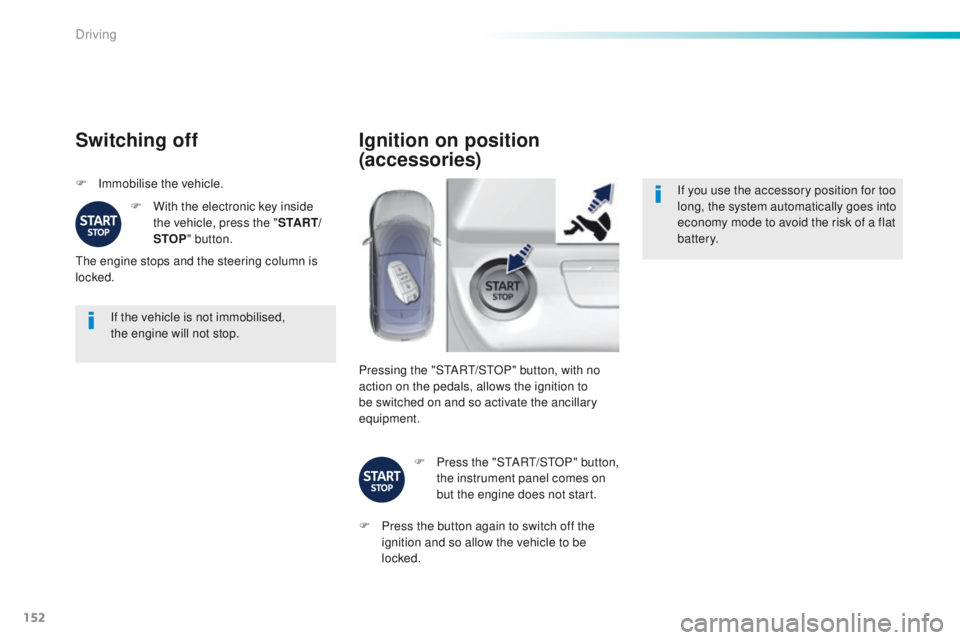
Switching off
F Immobilise the vehicle.F
W
ith the electronic key inside
the vehicle, press the " S TA R T/
STOP " button.
th
e engine stops and the steering column is
locked.
Ignition on position
(accessories)
If you use the accessory position for too
long, the system automatically goes into
economy mode to avoid the risk of a flat
battery.
Pressing the "S
tA
R
t/
S
tO
P" button, with no
action on the pedals, allows the ignition to
be switched on and so activate the ancillary
equipment.
F
P
ress the "S
tA
R
t/
S
tO
P" button,
the instrument panel comes on
but the engine does not start.
F
P
ress the button again to switch off the
ignition and so allow the vehicle to be
locked.
Driving
Page 270 of 398
268
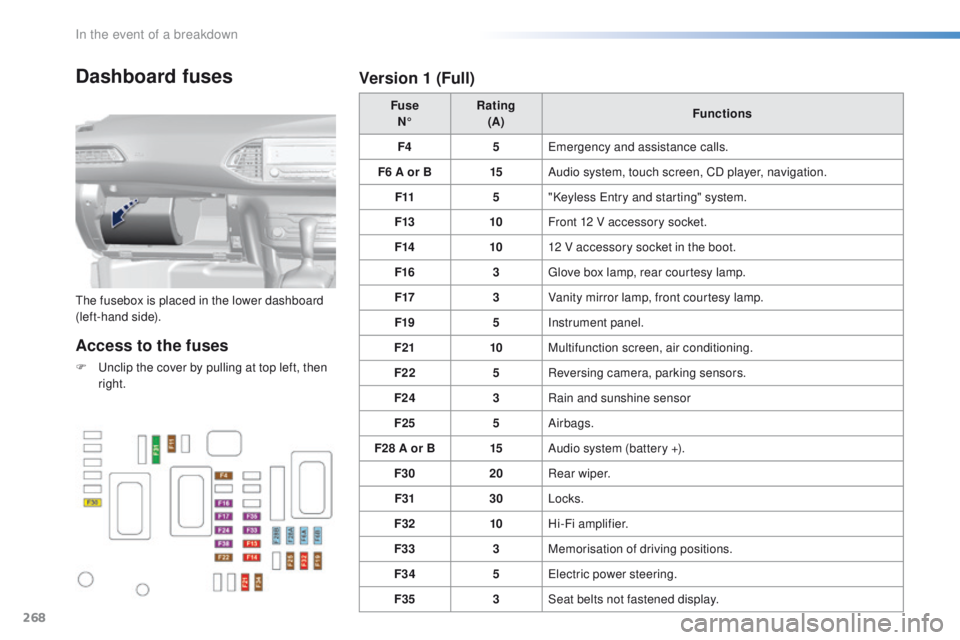
Dashboard fuses
the fusebox is placed in the lower dashboard
(left-hand side).Fuse
N° Rating
(A) Functions
F4 5
em
ergency and assistance calls.
F6 A or B 15Audio system, touch screen, CD player, navigation.
F11 5"Keyless e
n
try and starting" system.
F13 10Front 12 V accessory socket.
F14 1012 V accessory socket in the boot.
F16 3
gl
ove box lamp, rear courtesy lamp.
F17 3Vanity mirror lamp, front courtesy lamp.
F19 5Instrument panel.
F21 10Multifunction screen, air conditioning.
F22 5Reversing camera, parking sensors.
F24 3Rain and sunshine sensor
F25 5Airbags.
F28 A or B 15Audio system (battery +).
F30 20Rear wiper.
F31 30Locks.
F32 10Hi-Fi amplifier.
F33 3Memorisation of driving positions.
F34 5
el
ectric power steering.
F35 3Seat belts not fastened display.
Access to the fuses
F unclip the cover by pulling at top left, then
right.
Version 1 (Full)
In the event of a breakdown
Page 275 of 398
273
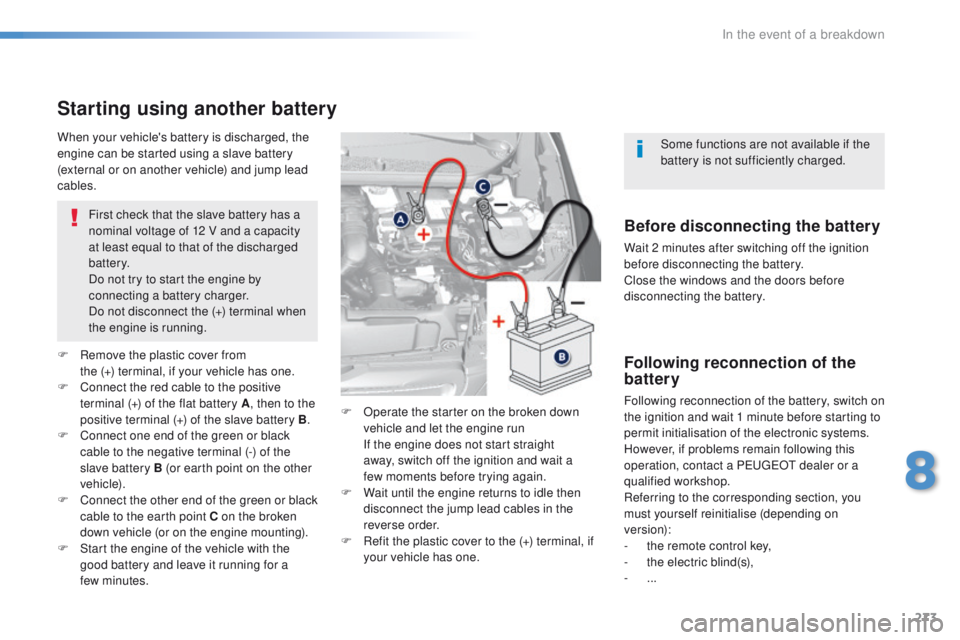
Starting using another battery
First check that the slave battery has a
nominal voltage of 12 V and a capacity
at least equal to that of the discharged
battery.
Do not try to start the engine by
connecting a battery charger.
Do not disconnect the (+) terminal when
the engine is running.
F
R
emove the plastic cover from
the
(+) terminal, if your vehicle has one.
F
C
onnect the red cable to the positive
terminal (+) of the flat battery A , then to the
positive terminal (+) of the slave battery B.
F
C
onnect one end of the green or black
cable to the negative terminal (-) of the
slave battery B (or earth point on the other
vehicle).
F
C
onnect the other end of the green or black
cable to the earth point C on the broken
down vehicle (or on the engine mounting).
F
S
tart the engine of the vehicle with the
good battery and leave it running for a
few
minutes. F
O
perate the starter on the broken down
vehicle and let the engine run
I
f the engine does not start straight
away, switch off the ignition and wait a
few
moments before trying again.
F
W
ait until the engine returns to idle then
disconnect the jump lead cables in the
reverse order.
F
R
efit the plastic cover to the (+) terminal, if
your vehicle has one.
When your vehicle's battery is discharged, the
engine can be started using a slave battery
(external or on another vehicle) and jump lead
cables.Before disconnecting the battery
Wait 2 minutes after switching off the ignition
before disconnecting the battery.
Close the windows and the doors before
disconnecting the battery.
Following reconnection of the
battery
Following reconnection of the battery, switch on
the ignition and wait 1 minute before starting to
permit initialisation of the electronic systems.
However, if problems remain following this
operation, contact a P
e
uge
Ot
dealer or a
qualified workshop.
Referring to the corresponding section, you
must yourself reinitialise (depending on
version):
-
t
he remote control key,
-
t
he electric blind(s),
-
...Some functions are not available if the
battery is not sufficiently charged.
8
In the event of a breakdown