reset Peugeot 308 2016 User Guide
[x] Cancel search | Manufacturer: PEUGEOT, Model Year: 2016, Model line: 308, Model: Peugeot 308 2016Pages: 398, PDF Size: 9.38 MB
Page 311 of 398
309
308_en_Chap10c_SMegplus_ed02-2015
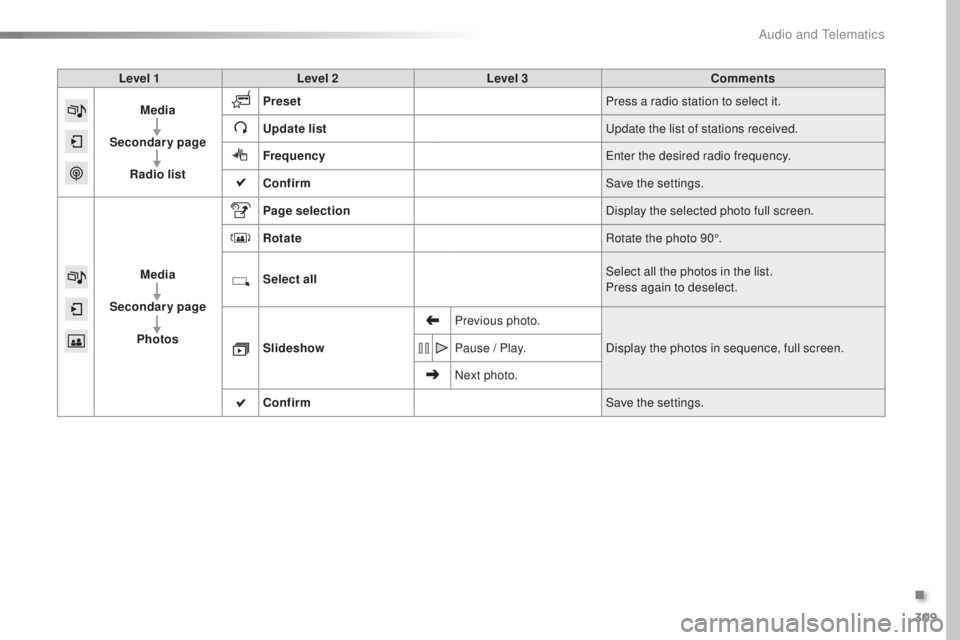
Level 1Level 2 Level 3 Comments
Media
Secondary page Radio list Preset
Press a radio station to select it.
Update list
upd
ate the list of stations received.
Frequency
ent
er the desired radio frequency.
Confirm Save the settings.
Media
Secondary page Photos Page selection
Display the selected photo full screen.
Rotate Rotate the photo 90°.
Select all Select all the photos in the list.
Press again to deselect.
Slideshow Previous photo.
Display the photos in sequence, full screen.
Pause / Play.
Next photo.
Confirm Save the settings.
.
Audio and telematics
Page 314 of 398
312
308_en_Chap10c_SMegplus_ed02-2015
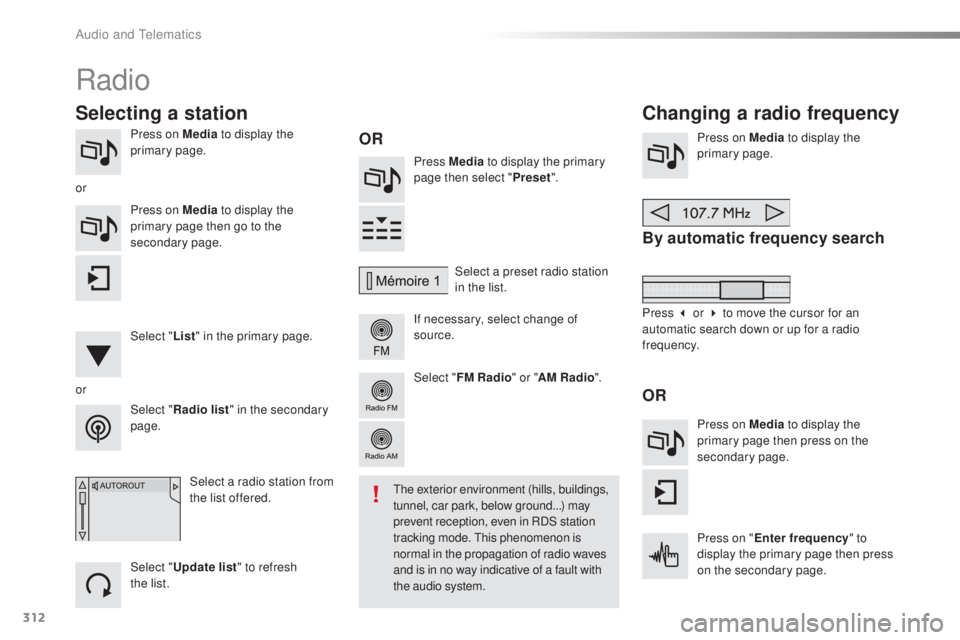
Press on Media to display the
primary page. Press Media to display the primary
page then select " Preset".
If necessary, select change of
source. Press on Media
to display the
primary page.
By automatic frequency search
Select " Radio list " in the secondary
page. Select a preset radio station
in the list.
Select " FM Radio " or "AM Radio ".
Select a radio station from
the list offered.
Select " Update list " to refresh
the
l
ist.
Press on Media
to display the
primary page then go to the
secondary page.
Select " List" in the primary page.
Radio
Changing a radio frequency
Selecting a station
OR
orOR
the exterior environment (hills, buildings,
t unnel, car park, below ground...) may
prevent reception, even in RDS station
tracking mode.
thi
s phenomenon is
normal in the propagation of radio waves
and is in no way indicative of a fault with
the audio system.
or
Press 3 or 4 to move the cursor for an
automatic search down or up for a radio
frequency.Press on Media to display the
primary page then press on the
secondary page.
Press on " Enter frequency " to
display the primary page then press
on the secondary page.
Audio and telematics
Page 315 of 398
313
308_en_Chap10c_SMegplus_ed02-2015
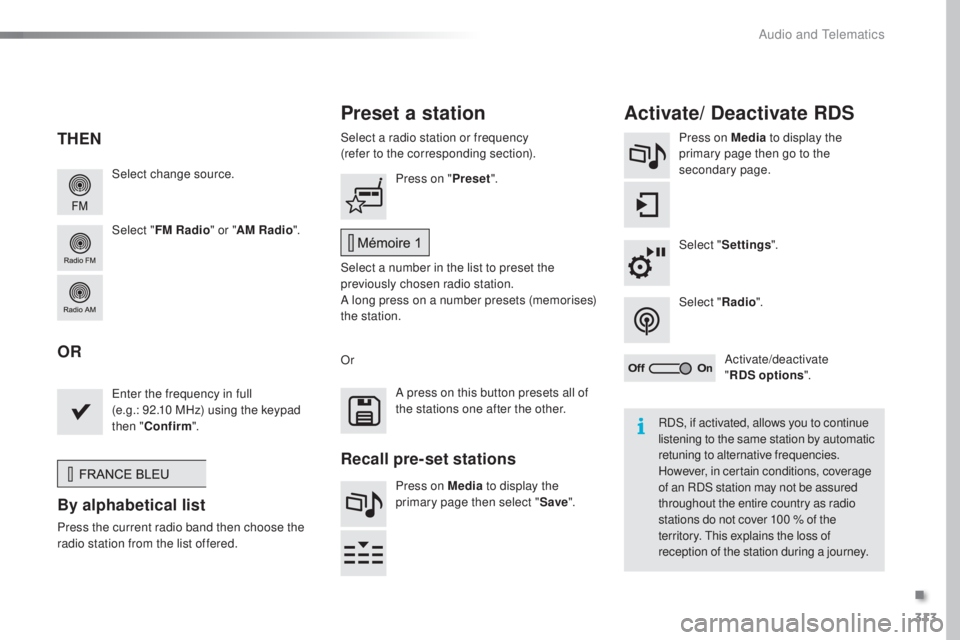
Select change source.
Select "FM Radio " or "AM Radio ".Select a radio station or frequency
(refer to the corresponding section).
Press on Media
to display the
primary page then go to the
secondary page.
Select " Settings ".
Select " Radio".
Activate/deactivate
" RDS options ".
Press on "
Preset".
Select a number in the list to preset the
previously chosen radio station.
A long press on a number presets (memorises)
the station.
ent
er the frequency in full
(e.g.: 92.10 MHz) using the keypad
then " Confirm ".
By alphabetical list
Press the current radio band then choose the
ra dio station from the l ist offered. Or
Press on Media to display the
primary page then select " Save".
Preset a station Activate/ Deactivate RDS
THEN
OR
A press on this button presets all of
the stations one after the other.
Recall pre-set stations
RDS, if activated, allows you to continue
listening to the same station by automatic
retuning to alternative frequencies.
However, in certain conditions, coverage
of an RDS station may not be assured
throughout the entire country as radio
stations do not cover 100
% o
f the
territory.
thi
s explains the loss of
reception of the station during a journey.
.
Audio and telematics
Page 316 of 398
314
308_en_Chap10c_SMegplus_ed02-2015
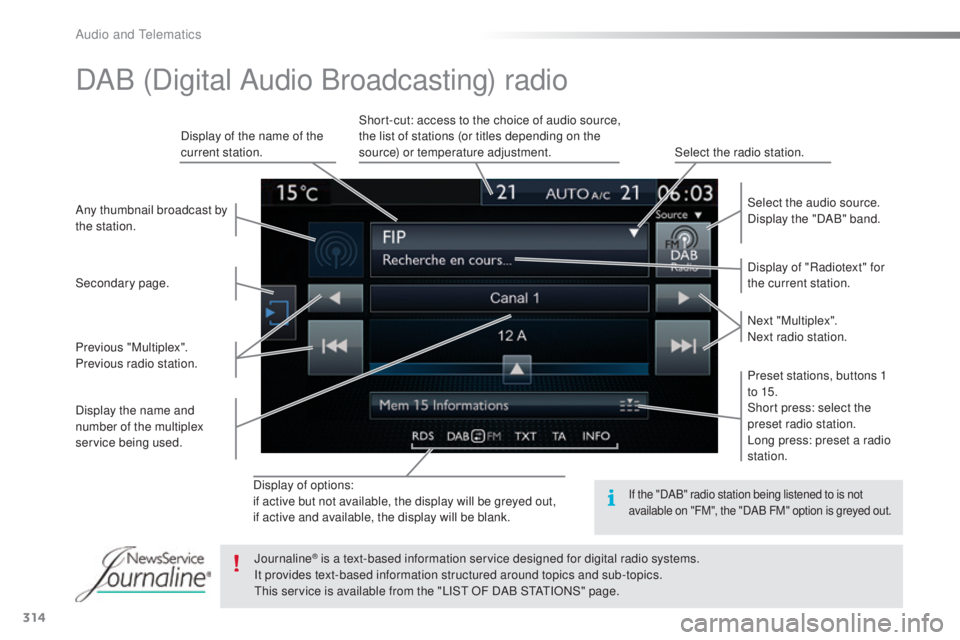
Display of options:
if active but not available, the display will be greyed out,
if active and available, the display will be blank.Display of "Radiotext" for
the current station. Select the audio source.
Display the "DAB" band.
Display of the name of the
current station.
Short-cut: access to the choice of audio source,
the list of stations (or titles depending on the
source) or temperature adjustment.
Select the radio station.
Any thumbnail broadcast by
the station.
Preset stations, buttons 1
to 15.
Short press: select the
preset radio station.
Long press: preset a radio
station. Next "Multiplex".
Next radio station.
Secondary page.
Display the name and
number of the multiplex
service being used. Previous "Multiplex".
Previous radio station.
DAB (Digital Audio Broadcasting) radio
If the "DAB" radio station being listened to is not
available on "FM", the "DAB FM" option is greyed out.
Journaline® is a text-based information service designed for digital radio systems.
It p
rovides text-based information structured around topics and sub-topics.
thi
s service is available from the "LIS
t O
F DAB S
tAtIO
NS" page.
Audio and telematics
Page 370 of 398
368
308_en_Chap10d_RD45_ed02-2015
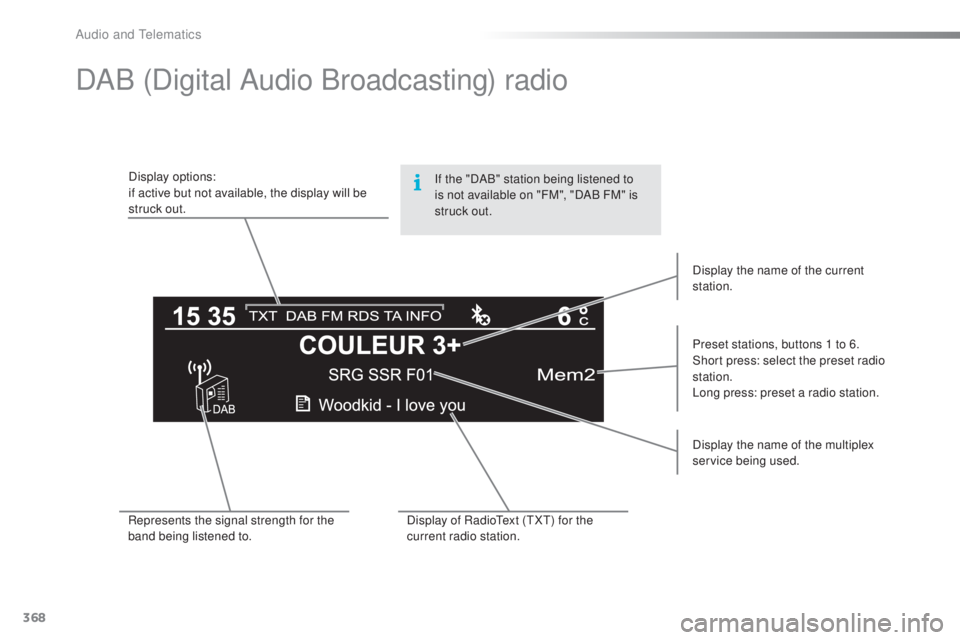
DAB (Digital Audio Broadcasting) radio
Display options:
if active but not available, the display will be
struck out.Preset stations, buttons 1 to 6.
Short press: select the preset radio
station.
Long press: preset a radio station.
Display the name of the multiplex
service being used.
Represents the signal strength for the
band being listened to. Display of Radio
tex
t (
tXt) fo
r the
current radio station. Display the name of the current
station.
If the "DAB" station being listened to
is not available on "FM", "DAB
F
M" is
struck out.
Audio and telematics
Page 389 of 398
387
308_en_Chap11_index-alpha_ed02-2015
Safety, children ......................125 , 127, 13 0 -14 5
Screen, cold climate ..................................... 2
17
Screen, colour
...................................... 3
04, 305
Screen, instrument panel
.......................... 12
, 3 4
tab
le of weights
....................................
281
, 288
tabl
es of engines
.................
2
78, 280, 284, 287
tab
les of fuses
..............................................
26
6
tan
k, AdBlue
® additive .........................
23 5 -242ta
n k , f u e l ............................... ........................ 213
tec
hnical data
....................................... 2
78-295
tele
phone
............................................. 3
5 0 , 374
temp
erature, coolant
...................................... 28thre
e flashes (direction indicators)
.............. 111time
(setting)
............................................ 4
4 - 47
tMC (tra
ffic info)
.......................................... 332to o
l s
................
...................................... 244, 250
top
ping-up the AdBlue
® additive .......... 23 9 -242top
tether ............................... ....................... 13 9
tot
al distance recorder
................................... 32tou
ch screen ........................35, 37- 44, 173, 211
touc
h screen (Menus)
................. 2
99, 304, 305
to w
b a r
................
................................... 1 4 7, 2 1 8
tow
ed loads
.......................................... 28
1, 288
tow
ing another vehicle
................................. 275tow
ing eye
...................................................... 86
S
T
Storage ..........................................80, 82, 85 - 87
Storage wells ............................................ 8
6, 87
Storing driving positions
................................. 74
S
towing rings
..............................
..............86, 87
Switching off the engine
............................... 148
S
ynchronising the remote control
............. 5
3, 62
Reinitialisation of the under-inflation
detection system ......................................... 2
10
Reinitialising the remote control
............... 53
, 62
Reminder, key in ignition
............................... 15
0
Reminder, lighting on
.................................... 111
R
emote control
.......................................... 48-
63
Removing a wheel
..............................
.......... 252
Removing the mat
...............................
............ 81
Replacing bulbs
..............................
...... 256-265
Replacing fuses
.................................... 2
6 6 -271
Replacing the air filter
................................... 23
3
Replacing the oil filter
................................... 233
R
eplacing the passenger compartment
filter
........
..................................................... 233
Reservoir, headlamp wash
........................... 2
31
Reservoir, screenwash
................................. 23
1
Resetting the service indicator
....................... 3
0
Resetting the trip recorder
.............................. 32
R
eversing camera
...............................
.......... 200
Reversing lamp
..................................... 261
, 263
Risk areas (update)
....................................... 3
31
Roof bars
....................................................... 223
R
unning out of fuel (Diesel)
.......................... 27
7 Screen menu ........................
3
06, 308, 310, 320,
322, 326, 334, 346, 348
Screen, multifunction (with audio system)
........................ 4
5, 46, 366
Screen, multifunction (without audio system)
.................................. 47
S
creenwash
..............................
.................... 11 6
Screenwash, rear
...............................
........... 11 6
SCR (Selective Catalytic Reduction)
............ 23
5
Seat belts
....................................... 123
-125, 13 6
Seats, electric
................................................. 73
Se
ats, front
................................................. 7
2 -74
Seats, heated
...............................
................... 75
Seats, rear
................................................. 7
7, 7 8
Serial number, vehicle
.................................. 295
S
ervice indicator
............................................. 28
S
ervice (warning lamp)
................................... 19
Ser
vicing
......................................................... 10
S
ettings, equipment
........................................ 41
S
ettings (Menus)
...............................
............ 334
Settings, system
...............................
............. 342
Sidelamps
............. 1
08, 256, 257, 259 -261, 263
Side repeater
................................................ 26
0
Ski flap
............................................................ 85
S
now chains
.......................................... 20
9, 216
Socket, 12 V accessory
...................... 80
, 83, 87
Socket, 230 V
............................................ 8
0, 84
Sockets, audio
.......................... 8
0, 83, 316, 371
Speed limiter
...............................
.......... 173 , 174
Spotlamps, side
.................................... 11
4 , 2 6 0
Stability control (
eS
C)............................. 17, 1 2 0
Starting the engine
....................................... 14
8
Station, radio
......................................... 312
, 3 6 6
Stay, bonnet
...............................
................... 226
Steering mounted controls, audio
....... 3
03, 365
Steering wheel, adjustment
............................ 71
St
op & Start
........................ 1
6, 24, 36, 101, 170,
171, 213, 226, 233, 272
Stop (warning lamp)
........................................ 18
.
Alphabetical index