lock Peugeot 308 2016 Workshop Manual
[x] Cancel search | Manufacturer: PEUGEOT, Model Year: 2016, Model line: 308, Model: Peugeot 308 2016Pages: 398, PDF Size: 9.38 MB
Page 242 of 398
240
308_en_Chap07_info-pratiques_ed02-2015
Recommendations on storage
Never store bottles of AdBlue® in your
vehicle.
AdBlue
® freezes at about -11°C and
deteriorates above 25°C. It is recommended
that bottles be stored in a cool area and
protected from direct sunlight.
under
these conditions, the additive can be
kept for at least a year.
If the additive has frozen, it can be used once it
has completely thawed out.
Procedure
Before topping-up, ensure that the vehicle is
parked on a flat and level sur face.
In wintry conditions, ensure that the
temperature of the vehicle is above -11°C.
Otherwise the AdBlue
® may be frozen and
so cannot be poured into its tank. Park your
vehicle in a warmer area for a few hours to
allow the top-up to be carried out.
F
Sw
itch off the ignition and remove the
key, or if your vehicle has one, press
the S
tARt/StOP b
utton to switch off
the
eng
ine. F
Fo
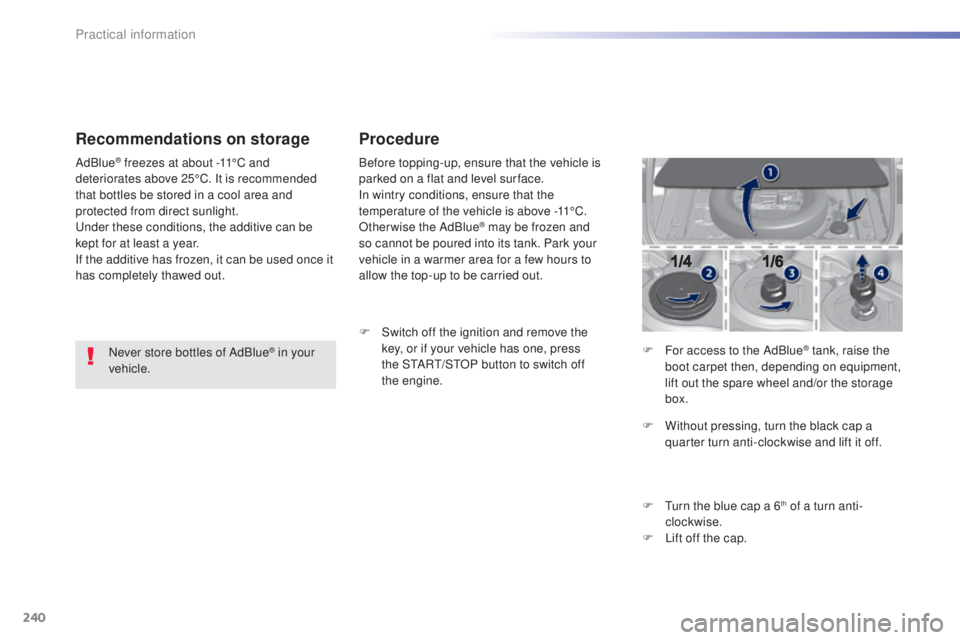
r access to the AdBlue
® tank, raise the
boot carpet then, depending on equipment,
lift out the spare wheel and/or the storage
box.
F
Wi
thout pressing, turn the black cap a
quarter turn anti-clockwise and lift it off.
F
t
ur
n the blue cap a 6
th of a turn anti-
clockwise.
F
Li
ft off the cap.
Practical information
Page 243 of 398
241
308_en_Chap07_info-pratiques_ed02-2015
Never dispose of AdBlue® additive
bottles in the household waste. Place
them in a special container provided
this purpose or take them to your dealer.
F
Af
ter emptying the bottle, wipe away any
spillage around the tank filler using a damp
cloth. If any additive is split or splashed, wash
immediately with cold water or wipe with
a damp cloth.
If the additive has crystallised, clean it
off using a sponge and hot water.
F
Re
fit the blue cap to the tank and turn it a
6
th of a turn clockwise, to its stop.
F Re fit the black cap and turn it a quarter of
a turn clockwise without pressing.
ens
ure
that the indicator on the cap lines up with
the indicator on the support.
F
De
pending on equipment, return the spare
wheel and/or the storage box to the bottom
of the boot.
F
Re
fit the boot carpet and close the tailgate. Important: when topping
-up after
running out of additive , signalled
by the message "
top u
p emissions
additive: Starting prevented", you
must wait for about 5 minutes before
switching on the ignition, without
opening the driver's door, unlocking
the vehicle, introducing the key
into the ignition switch, or placing
the key of the "Keyless Entr y and
Star ting" system inside the vehicle .
Switch on the ignition, then wait for
10
se
conds before starting the engine.
F
Ob
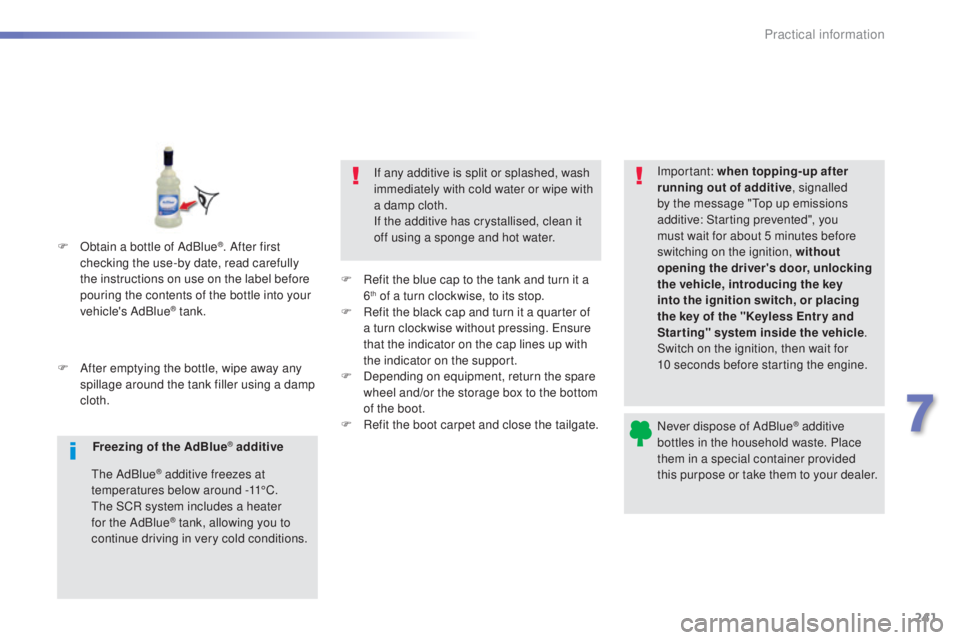
tain a bottle of AdBlue
®. After first
checking the use-by date, read carefully
the instructions on use on the label before
pouring the contents of the bottle into your
vehicle's AdBlue
® tank.
Freezing of the AdBlue
® additive
the
AdBlue
® additive freezes at
temperatures below around -11°C.
the S
CR system includes a heater
for the AdBlue
® tank, allowing you to
continue driving in very cold conditions.
7
Practical information
Page 254 of 398
252
308_en_Chap08_en-cas-de-panne_ed02-2015
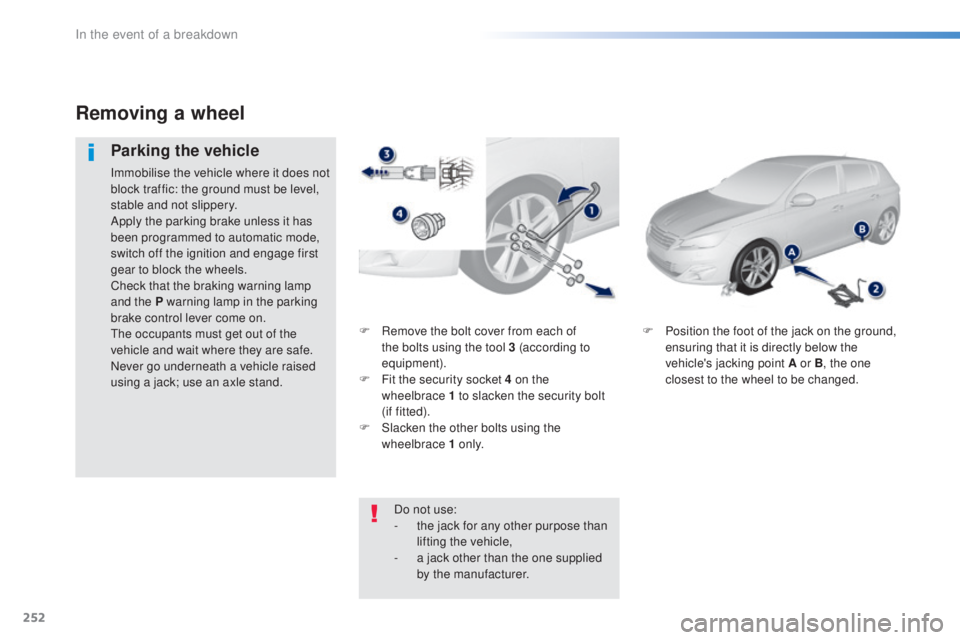
F Remove the bolt cover from each of
t
he bolts using the tool 3 (according to
equipment).
F
Fi
t the security socket 4 on the
wheelbrace
1
to slacken the security bolt
(if
f
itted).
F
Sl
acken the other bolts using the
wheelbrace 1 o n l y. F Po
sition the foot of the jack on the ground,
ensuring that it is directly below the
vehicle's jacking point A or B , the one
closest to the wheel to be changed.
Removing a wheel
Parking the vehicle
Immobilise the vehicle where it does not
block traffic: the ground must be level,
stable and not slippery.
Apply the parking brake unless it has
been programmed to automatic mode,
switch off the ignition and engage first
gear to block the wheels.
Check that the braking warning lamp
and the P warning lamp in the parking
brake control lever come on.
the o
ccupants must get out of the
vehicle and wait where they are safe.
Never go underneath a vehicle raised
using a jack; use an axle stand.
Do not use:
-
th
e jack for any other purpose than
lifting the vehicle,
-
a ja
ck other than the one supplied
by the manufacturer.
In the event of a breakdown
Page 270 of 398
268
308_en_Chap08_en-cas-de-panne_ed02-2015
Dashboard fuses
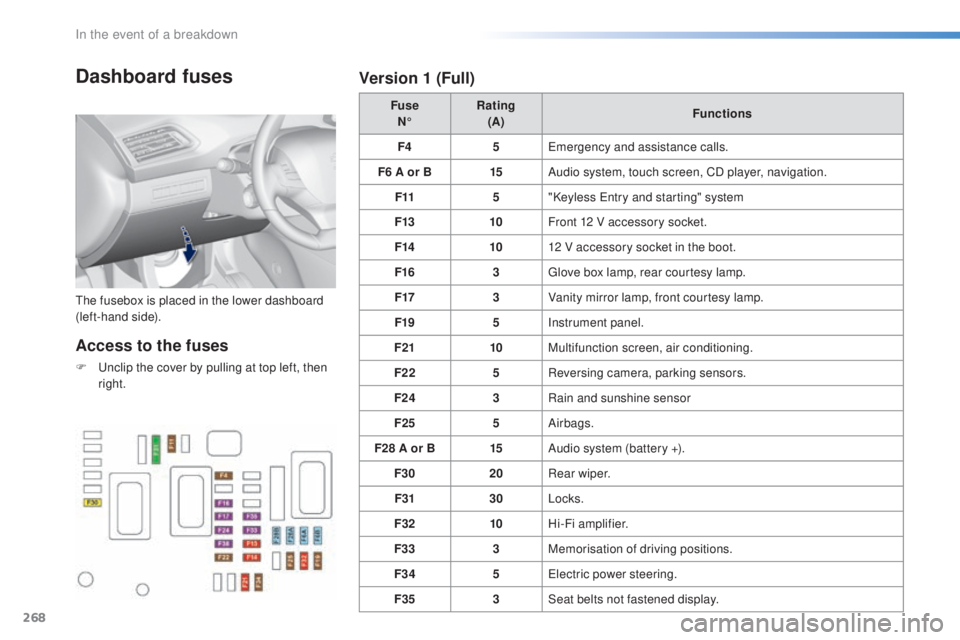
the fusebox is placed in the lower dashboard
( left-hand side). Fuse
N° Rating
(A) Functions
F4 5
eme
rgency and assistance calls.
F6 A or B 15Audio system, touch screen, CD player, navigation.
F11 5"Keyless
ent
ry and starting" system
F13 10Front 12 V accessory socket.
F14 1012 V accessory socket in the boot.
F16 3
glov
e box lamp, rear courtesy lamp.
F17 3Vanity mirror lamp, front courtesy lamp.
F19 5Instrument panel.
F21 10Multifunction screen, air conditioning.
F22 5Reversing camera, parking sensors.
F24 3Rain and sunshine sensor
F25 5Airbags.
F28 A or B 15Audio system (battery +).
F30 20Rear wiper.
F31 30Locks.
F32 10Hi-Fi amplifier.
F33 3Memorisation of driving positions.
F34 5
ele
ctric power steering.
F35 3Seat belts not fastened display.
Access to the fuses
F unclip the cover by pulling at top left, then
r ight.
Version 1 (Full)
In the event of a breakdown
Page 271 of 398
269
308_en_Chap08_en-cas-de-panne_ed02-2015
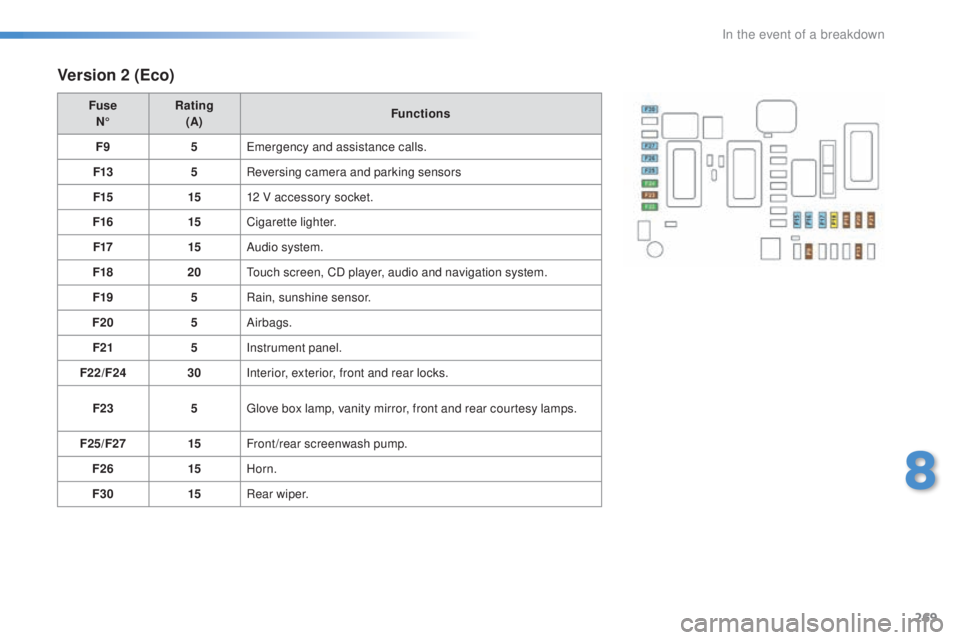
Version 2 (Eco)
Fuse
N° Rating
(A) Functions
F9 5
eme
rgency and assistance calls.
F13 5Reversing camera and parking sensors
F15 1512 V accessory socket.
F16 15Cigarette lighter.
F17 15Audio system.
F18 20
tou
ch screen, CD player, audio and navigation system.
F19 5Rain, sunshine sensor.
F20 5Airbags.
F21 5Instrument panel.
F22/F24 30Interior, exterior, front and rear locks.
F23 5
glov
e box lamp, vanity mirror, front and rear courtesy lamps.
F25/F27 15Front/rear screenwash pump.
F26 15Horn.
F30 15Rear wiper.
8
In the event of a breakdown
Page 274 of 398
272
308_en_Chap08_en-cas-de-panne_ed02-2015
12 V battery
the battery is located under the bonnet.to ga
in access to it:
F
op
en the bonnet using the interior release
lever, then the exterior safety catch,
F
se
cure the bonnet stay,
F
re
move the plastic cover on the (+)
t
erminal.
Access to the battery
Procedure for starting the engine using another battery or charging a discharged battery.
the
presence of this label, in particular
with the Stop & Start system, indicates
the use of a 12 V lead-acid battery with
special technology and specification;
the involvement of a P
eu
ge
Ot d
ealer
or a qualified workshop is essential
when replacing or disconnecting
the
b
attery.
After refitting the battery, the Stop & Start
sy stem will only be active after a continuous
period of immobilisation of the vehicle,
a period which depends on the climatic
conditions and the state of charge of the
battery (up to about 8 hours).
Before doing any work
Immobilise the vehicle: apply the
parking brake, put the gearbox in
neutral, then switch off the ignition.
Check that all electrical equipment is
switched off.
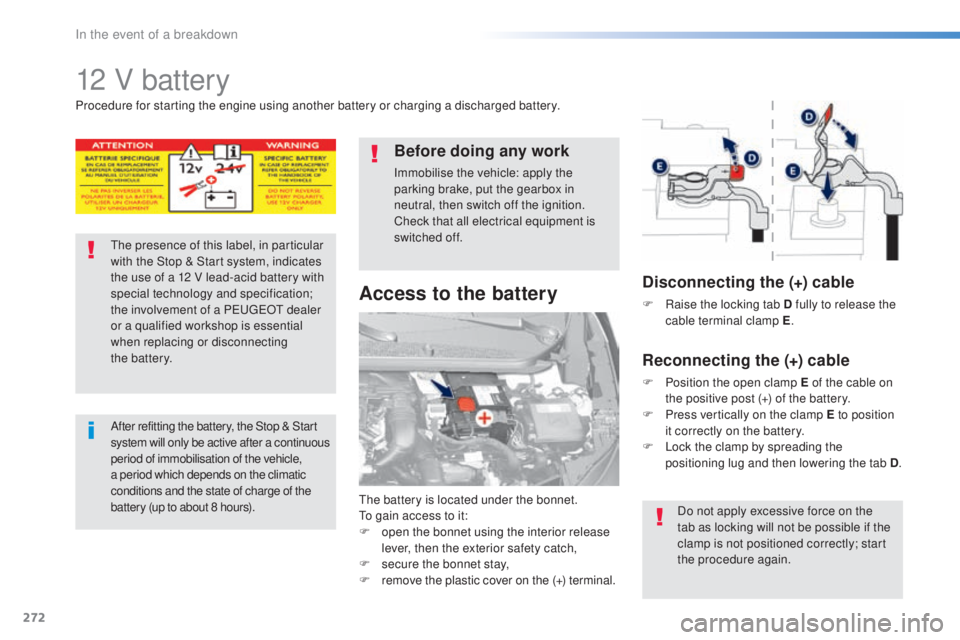
Disconnecting the (+) cable
F Raise the locking tab D fully to release the
c able terminal clamp E .
Reconnecting the (+) cable
F Position the open clamp E of the cable on
t
he positive post (+) of the battery.
F
Pr
ess vertically on the clamp E to position
it correctly on the battery.
F
Lo
ck the clamp by spreading the
positioning lug and then lowering the tab D .
Do not apply excessive force on the
tab as locking will not be possible if the
clamp is not positioned correctly; start
the procedure again.
In the event of a breakdown
Page 278 of 398
276
308_en_Chap08_en-cas-de-panne_ed02-2015
General recommendations
Observe the legislation in force in your country.ens
ure that the weight of the towing vehicle is higher than that of the towed vehicle.
the d
river must remain at the wheel of the towed vehicle and must have a valid driving licence.
When towing a vehicle with all four wheels on the ground, always use an approved towing
arm; rope and straps are prohibited.
the t
owing vehicle must move off gently.
When towing a vehicle with the engine off, there is no longer any power assistance for
braking or steering.
In the following cases, you must always call on a professional recovery service:
-
ve
hicle broken down on a motor way or fast road,
-
fou
r-wheel drive vehicle,
-
wh
en it is not possible to put the gearbox into neutral, unlock the steering, or release
the parking brake,
-
to
wing with only two wheels on the ground,
-
wh
ere there is no approved towing arm available...
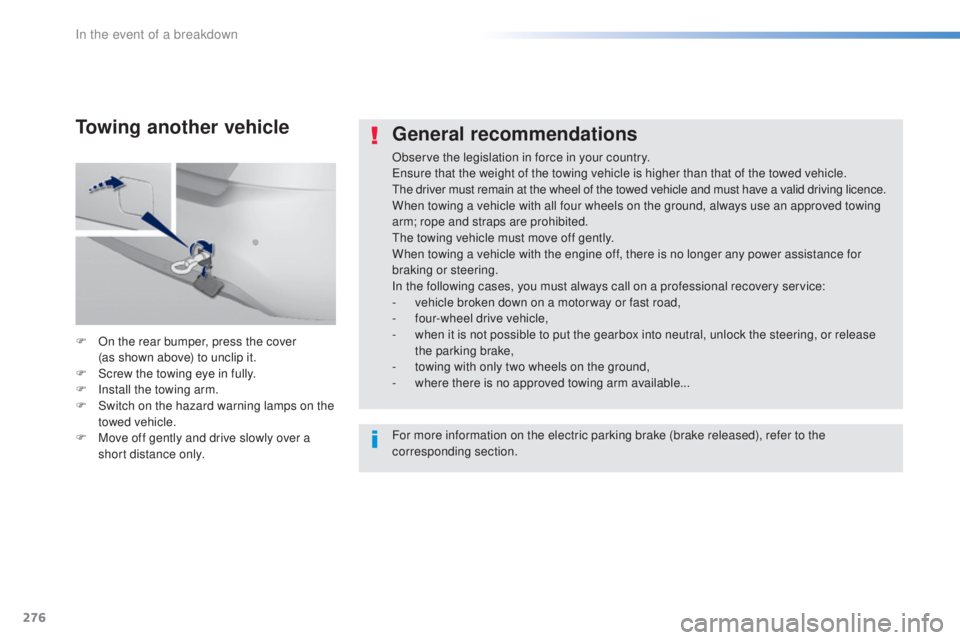
F
On t
he rear bumper, press the cover
(as
s
hown above) to unclip it.
F
Sc
rew the towing eye in fully.
F
In
stall the towing arm.
F
Sw
itch on the hazard warning lamps on the
towed vehicle.
F
Mov
e off gently and drive slowly over a
short distance only.
Towing another vehicle
For more information on the electric parking brake (brake released), refer to the
corresponding section.
In the event of a breakdown
Page 358 of 398
356
308_en_Chap10c_SMegplus_ed02-2015
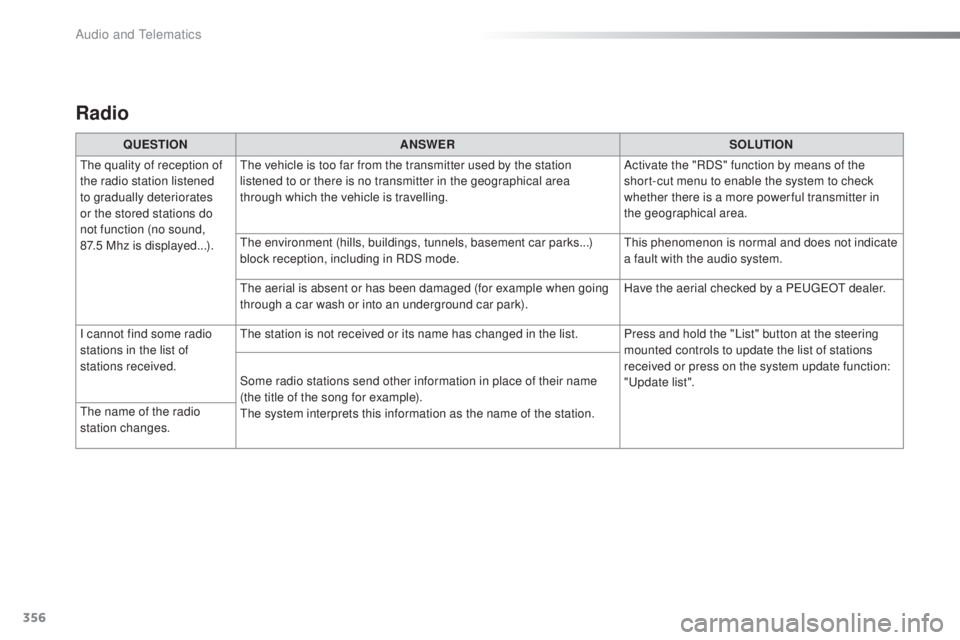
Radio
QUESTIONANSWER SOLUTION
the q
uality of reception of
the radio station listened
to gradually deteriorates
or the stored stations do
not function (no sound,
87.5
M
hz is displayed...).
the v
ehicle is too far from the transmitter used by the station
listened to or there is no transmitter in the geographical area
through which the vehicle is travelling. Activate the "RDS" function by means of the
short-cut menu to enable the system to check
whether there is a more power ful transmitter in
the geographical area.
the e
nvironment (hills, buildings, tunnels, basement car parks...)
block reception, including in RDS mode.
thi
s phenomenon is normal and does not indicate
a fault with the audio system.
the a
erial is absent or has been damaged (for example when going
through a car wash or into an underground car park). Have the aerial checked by a P
eu
ge
Ot d
ealer.
I cannot find some radio
stations in the list of
stations received.
the s
tation is not received or its name has changed in the list. Press and hold the "List" button at the steering mounted controls to update the list of stations
received or press on the system update function:
"
upd
ate list".
Some radio stations send other information in place of their name
(the title of the song for example).
the s
ystem interprets this information as the name of the station.
the n
ame of the radio
station changes.
Audio and telematics
Page 369 of 398
367
308_en_Chap10d_RD45_ed02-2015
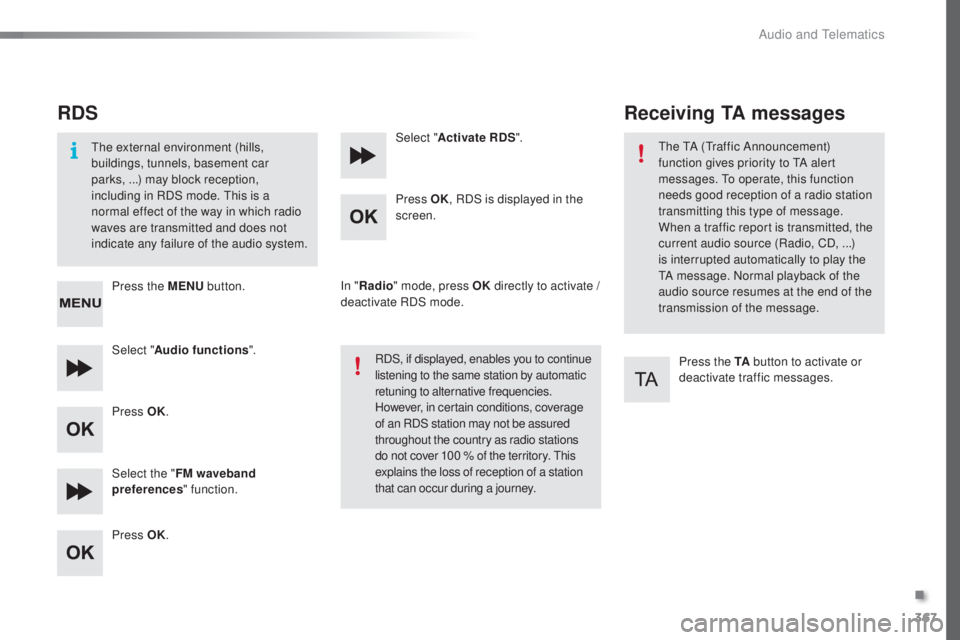
RDS
the external environment (hills,
b uildings, tunnels, basement car
parks,
.
..) may block reception,
including in RDS mode.
thi
s is a
normal effect of the way in which radio
waves are transmitted and does not
indicate any failure of the audio system.
Press the MENU button.
Select " Audio functions ".
Press OK.
Select the " FM waveband
preferences " function.
Press OK. Select "
Activate RDS ".
Press OK , RDS is displayed in the
screen.
In " Radio " mode, press OK directly to activate /
deactivate RDS mode.
RDS, if displayed, enables you to continue
listening to the same station by automatic
retuning to alternative frequencies.
However, in certain conditions, coverage
of an RDS station may not be assured
throughout the country as radio stations
do not cover 100 % of the territory.
thi
s
explains the loss of reception of a station
that can occur during a journey.
Receiving TA messages
Press the TA button to activate or
deactivate traffic messages.
the tA (tra
ffic Announcement)
function gives priority to
tA al
ert
messages.
to op
erate, this function
needs good reception of a radio station
transmitting this type of message.
When a traffic report is transmitted, the
current audio source (Radio, CD, ...)
is interrupted automatically to play the
tA me
ssage. Normal playback of the
audio source resumes at the end of the
transmission of the message.
.
Audio and telematics
Page 382 of 398
380
308_en_Chap10d_RD45_ed02-2015
QUESTIONANSWER SOLUTION
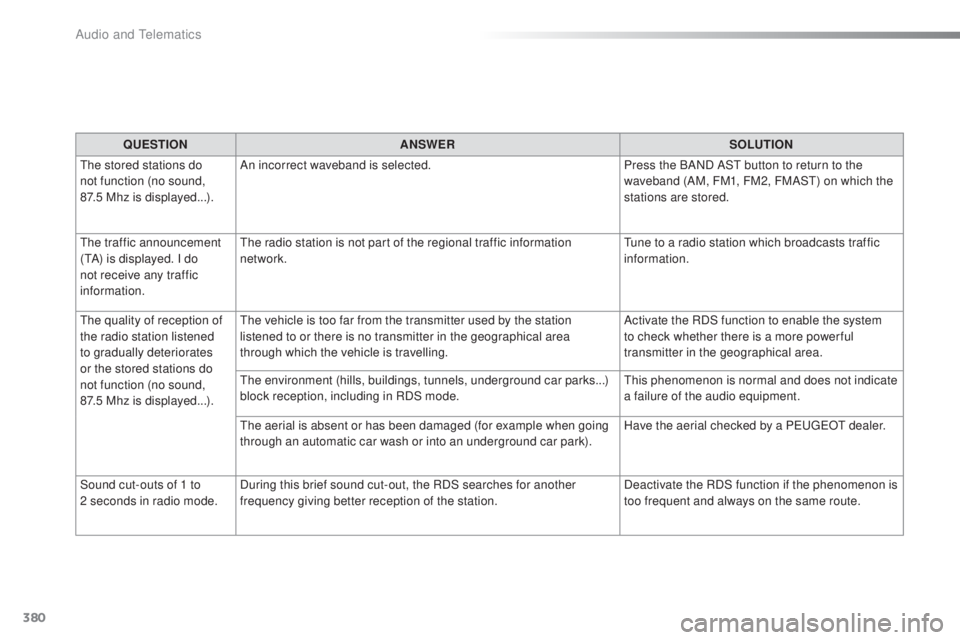
the s
tored stations do
not function (no sound,
87.5
M
hz is displayed...). An incorrect waveband is selected.
Press the BAND AS
t b
utton to return to the
waveband (AM, FM1, FM2, FMAS
t) on w
hich the
stations are stored.
the t
raffic announcement
(
tA) i
s displayed. I do
not receive any traffic
information.
the r
adio station is not part of the regional traffic information
network.
tun
e to a radio station which broadcasts traffic
information.
the q
uality of reception of
the radio station listened
to gradually deteriorates
or the stored stations do
not function (no sound,
87.5
M
hz is displayed...).
the v
ehicle is too far from the transmitter used by the station
listened to or there is no transmitter in the geographical area
through which the vehicle is travelling. Activate the RDS function to enable the system
to check whether there is a more power ful
transmitter in the geographical area.
the en
vironment (hills, buildings, tunnels, underground car parks...)
block reception, including in RDS mode.
thi
s phenomenon is normal and does not indicate
a failure of the audio equipment.
the a
erial is absent or has been damaged (for example when going
through an automatic car wash or into an underground car park). Have the aerial checked by a P
eu
ge
Ot d
ealer.
Sound cut-outs of 1 to
2
s
econds in radio mode. During this brief sound cut-out, the RDS searches for another
frequency giving better reception of the station. Deactivate the RDS function if the phenomenon is
too frequent and always on the same route.
Audio and telematics