configuration Peugeot 308 2017 Owner's Guide
[x] Cancel search | Manufacturer: PEUGEOT, Model Year: 2017, Model line: 308, Model: Peugeot 308 2017Pages: 392, PDF Size: 10.16 MB
Page 348 of 392
346
308_en_Chap10b_SMegplus_ed01-2016
Pairing a Bluetooth®
telephone
For reasons of safety and because they
require prolonged attention on the part
of the driver, the operations for pairing
the Bluetooth mobile telephone to the
hands-free system of the audio system
must be carried out with the vehicle
stationary .
Procedure (short) from the
telephone
In the Bluetooth menu of your device, select the
system name in the list of devices detected.
en
ter a code of at least 4 figures in the device
and confirm.
en
ter this same code in the system,
select " OK" and confirm.
Procedure from the system
Activate the telephone's Bluetooth function
and ensure that it is "visible to all" (telephone
configuration).
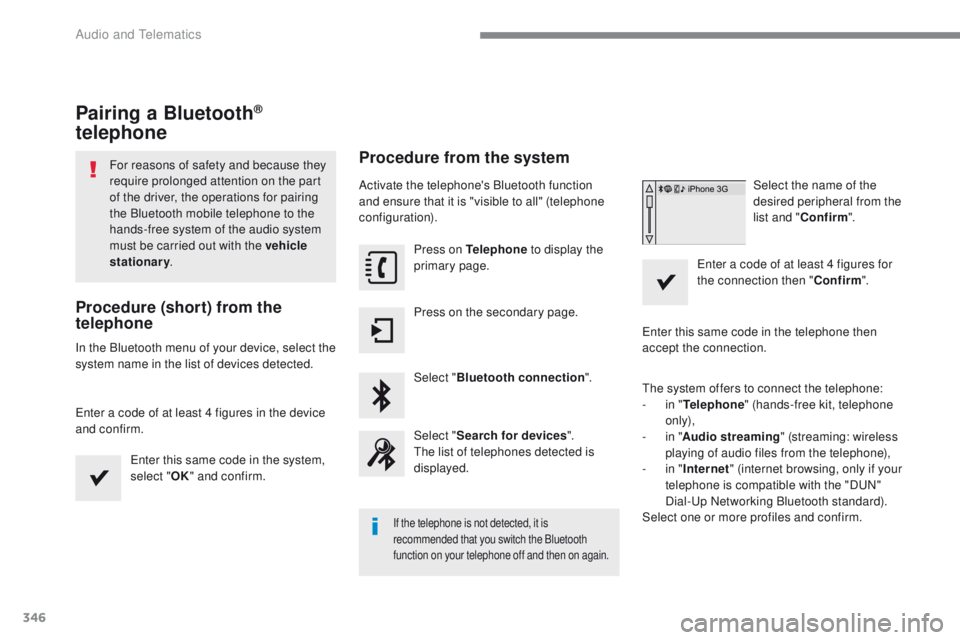
Press on Telephone to display the
primary page.
Press on the secondary page.
Select " Bluetooth connection ".
Select " Search for devices ".
th
e list of telephones detected is
displayed.
If the telephone is not detected, it is
recommended that you switch the Bluetooth
function on your telephone off and then on again.
Select the name of the
desired peripheral from the
list and " Confirm ".
en
ter a code of at least 4 figures for
the connection then " Confirm".
en
ter this same code in the telephone then
accept the connection.
th
e system offers to connect the telephone:
-
i
n " Telephone " (hands-free kit, telephone
only),
-
i
n " Audio streaming " (streaming: wireless
playing of audio files from the telephone),
-
i
n " Internet " (internet browsing, only if your
telephone is compatible with the "D
uN
"
Dial-
up
Networking Bluetooth standard).
Select one or more profiles and confirm.
Audio and telematics
Page 362 of 392
360
308_en_Chap10c_RD45_ed01-2016
First steps
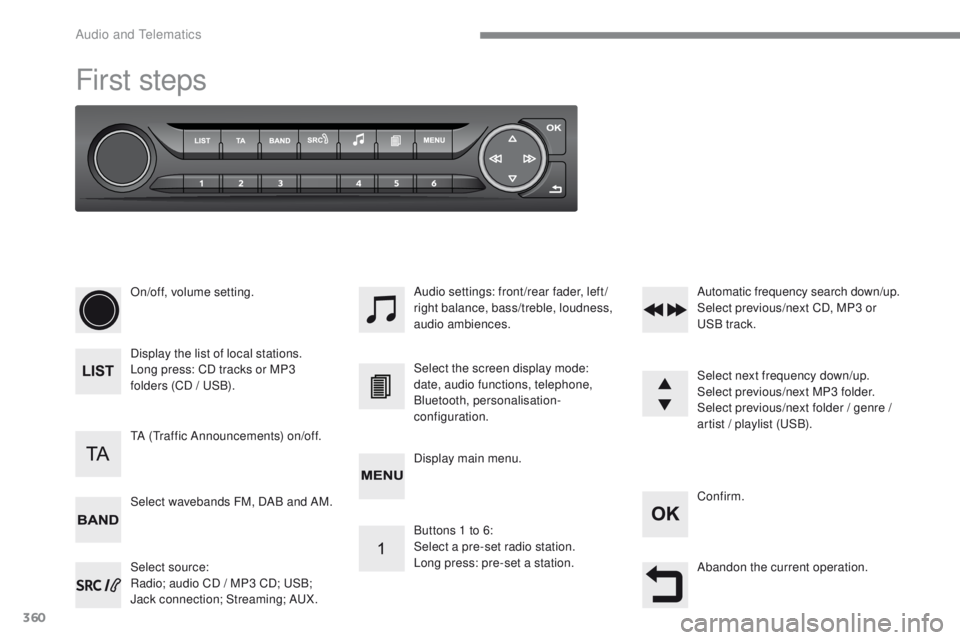
On/off, volume setting.
Display the list of local stations.
Long press: CD tracks or MP3
folders (CD / u
S
B).
Select source:
Radio; audio CD / MP3 CD;
u
S
B;
Jack connection; Streaming; A
uX
.
Select wavebands FM, DAB and AM. Audio settings: front/rear fader, left/
right balance, bass/treble, loudness,
audio ambiences.
tA (tr
affic Announcements) on/off. Select the screen display mode:
date, audio functions, telephone,
Bluetooth, personalisation-
configuration.
Select next frequency down/up.
Select previous/next MP3 folder.
Select previous/next folder / genre /
artist / playlist (
uS
B).
Abandon the current operation. Confirm.
Buttons 1 to 6:
Select a pre-set radio station.
Long press: pre-set a station. Automatic frequency search down/up.
Select previous/next CD, MP3 or
uS
B track.
Display main menu.
Audio and telematics
Page 364 of 392
362
308_en_Chap10c_RD45_ed01-2016
Menus
Screen C
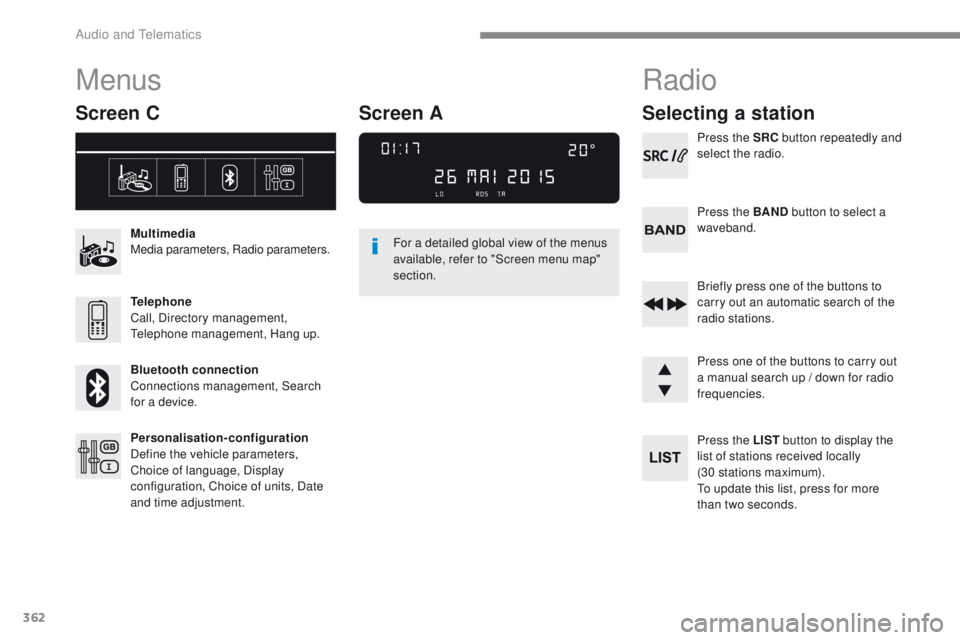
Multimedia
Media parameters, Radio parameters.
Telephone
Call, Directory management,
te
lephone management, Hang up.
Bluetooth connection
Connections management, Search
for a device.
Personalisation-configuration
Define the vehicle parameters,
Choice of language, Display
configuration, Choice of units, Date
and time adjustment. For a detailed global view of the menus
available, refer to "Screen menu map"
section.
Radio
Selecting a station
Press the SRC
button repeatedly and
select the radio.
Press the BAND button to select a
waveband.
Briefly press one of the buttons to
carry out an automatic search of the
radio stations.
Press one of the buttons to carry out
a manual search up / down for radio
frequencies.
Press the LIST button to display the
list of stations received locally
(30 stations maximum).
to u
pdate this list, press for more
than two seconds.
Screen A
Audio and telematics
Page 372 of 392
370
308_en_Chap10c_RD45_ed01-2016
telephone
Pairing a Bluetooth® telephone
Screen C
(Available according to model and version)
As a safety measure and because they
require prolonged attention on the part
of the driver, the operations for pairing
of the Bluetooth mobile telephone with
the Bluetooth hands-free system of
your audio equipment must be carried
out with the vehicle stationary and the
ignition on.
go
to www.peugeot.co.uk for more information
(compatibility, more help, ...).
Activate the telephone's Bluetooth function
and ensure that it is "visible to all" (telephone
configuration).
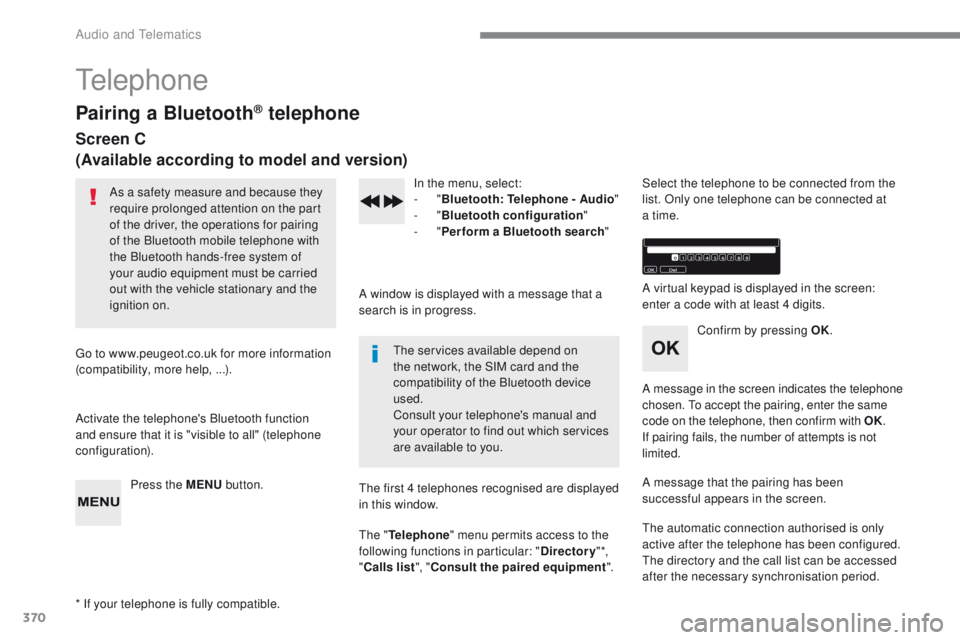
Press the MENU button. In the menu, select:
-
"Bluetooth : Telephone - Audio "
-
"Bluetooth configuration "
-
"Perform a Bluetooth search "
A window is displayed with a message that a
search is in progress.
the
services available depend on
the network, the SIM card and the
compatibility of the Bluetooth device
used.
Consult your telephone's manual and
your operator to find out which services
are available to you.
* If your telephone is fully compatible.
th
e first 4 telephones recognised are displayed
in this window.
th
e "Telephone " menu permits access to the
following functions in particular: " Directory" *,
" Calls list ", "Consult the paired equipment ".Select the telephone to be connected from the
list. Only one telephone can be connected at
a time.
A virtual keypad is displayed in the screen:
enter a code with at least 4 digits.
Confirm by pressing OK.
A message in the screen indicates the telephone
chosen.
t
o
accept the pairing, enter the same
code on the telephone, then confirm with OK.
If pairing fails, the number of attempts is not
limited.
A message that the pairing has been
successful appears in the screen.
th
e automatic connection authorised is only
active after the telephone has been configured.
th
e directory and the call list can be accessed
after the necessary synchronisation period.
Audio and telematics
Page 376 of 392
374
308_en_Chap10c_RD45_ed01-2016
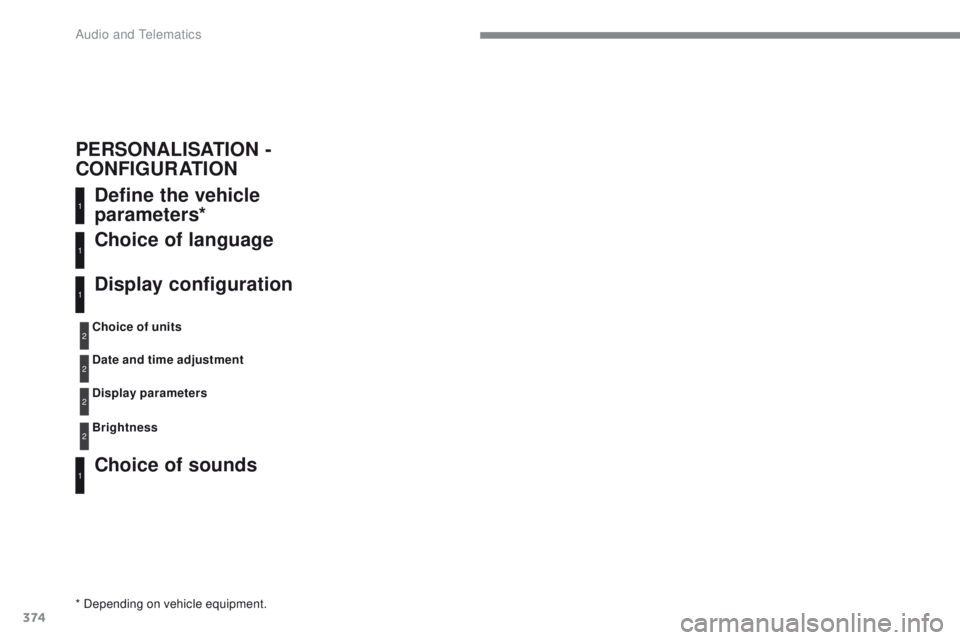
Define the vehicle
parameters*
Choice of sounds Choice of language
Display configuration
* Depending on vehicle equipment.Choice of units
Date and time adjustment
Display parameters
Brightness
1
1
1
1
2
2
2
2
PERSONALISATION -
CONFIGURATION
Audio and telematics
Page 381 of 392
379
308_en_Chap11_index-alpha_ed01-2016
ABS ...............................................................121
Accessories ................................. 152, 220, 222
AdBlue
® additive ....................... 26, 32, 233-237
Additive, Diesel ............................................. 230
Adjusting headlamps
.................................... 113
Adjusting head restraints
................................ 77
Adjusting the seat
..................................... 7 3 , 74
Adjusting the air distribution
...........................95
Adjusting the air flow
....................................... 95
Adjusting the date
...................................... 47- 4 9
Adjusting the height and reach of the steering wheel
.................................... 72
Adjusting the lumbar support
..........................73
Adjusting the temperature
.............................. 95
A
djusting the time
...................................... 47- 4 9
Advice on driving
.................................. 146, 147
Affaire version
............................................... 291
Airbags
............................................ 23, 127, 134
Airbags, curtain
..................................... 1
2 9, 13 0
Airbags, front ......................................... 1 2 7, 1 3 0
Airbags, lateral
...................................... 12 9, 13 0
Air conditioning
............................ 10, 93, 95, 98
Air conditioning, automatic
.......................92, 95
Air conditioning, digital
................................. 10 0
Air conditioning, manual
...................92-94, 100
Air intake
......................................................... 99
Air vents
.......................................................... 91
Alarm
............................................................... 67
Anti-lock braking system (ABS)
....................121
Anti-pinch
................................................ 70, 102
Anti-slip regulation (ASR)
............................. 121
Anti-theft
................................................. 53, 15 4
Armrest
............................................................ 82
Armrest, front
.................................................. 84
Armrest, rear
................................................... 86
A
ssistance call
.............................................. 11 9
Audible warning
............................................ 121
Audio streaming (Bluetooth)
......... 3
12, 314, 3 69
Auxiliary
........................................................ 312
AB
C
Back-up key..................................................... 63
Battery .................................... 219, 231, 268 -271
Battery, charging
........................................... 270
Battery, remote control
................ 5
4, 55, 64, 65
Bicycle carrier
............................................... 222
Blanking screen (snow shield)
.............. 21
7, 218
Blind, panoramic roof
.................................... 102
Blind spot sensors
.................................. 16, 195
BlueHDi
..................................... 28, 32, 233, 274
Bluetooth (hands-free)
.................. 3
46, 347, 370
Bluetooth (telephone)
...........................346, 347
Bonnet
........................................................... 225
Boot
................................................................. 61
Boot lamp
........................................................ 88
Brake discs
.................................................... 2
32
Brake lamps
...............................
...........257, 259
Brakes
............................................... 21, 25, 232
Bulbs (changing)
........................... 25
2, 257, 259
Cable, audio
.................................................. 312
Cable, jack
.................................................... 312
Capacity, fuel tank
..............................
..........213
Cap, fuel filler
................................................ 213
CD, MP3
........................................ 3
12, 367, 368
Central locking
.............................. 51, 56, 58, 59
Changing a bulb
............................ 252, 257, 259
Changing a fuse
........................... 262, 264, 266
Changing a wheel
................................. 246, 247
Changing a wiper blade
........................117, 222
Changing the remote control battery
........54, 64
Checking the engine oil level
..........................31
Checking the levels
...............................228-230Checking tyre pressures
(using the kit) ..............................
................239
Checks
...............
...................226, 227, 231, 232
Child lock
...............................
..................63, 14 4
Children
...............................
..........13 8, 142, 143
Children (safety)
...............................
.............14 4
Child seats
............1
26, 131-13 3, 137, 13 8, 14 5
Child seats, conventional
..............................137
Child seats, ISOFIX
......................14
0, 142, 143
Closing the boot
..............................................61
Closing the doors
..........................51, 56, 58, 59
Collision risk alert
..............................
...........19 0
Compressor, tyre inflation
............................239
Configuration, vehicle
.....................................44
Connection, Bluetooth
.........................346, 347
Control, electric windows
................................70
Control, emergency boot release
...................62
Control, emergency door
................................63
Control, heated seats
......................................76
Control stalk, lighting
.............................. 14
, 107
Control stalk, wipers
..............................114 -11 6
Courtesy lamps
.............................................103
Cruise control
........................ 1
73, 177, 180, 181
Cruise control, dynamic
................................180
Cup holder
...............................
........................82
DAB (Digital Audio Broadcasting) - Digital radio
.........................310, 311, 364, 365
Date (setting)
...............................
...............47- 4 9
Daytime running lamps
................. 1
08, 110, 252, 253, 255, 256
Deactivating the passenger airbag
.................................................. 1
2 7, 1 3 4
D
.
Alphabetical index