audio Peugeot 308 2017 Owner's Manual
[x] Cancel search | Manufacturer: PEUGEOT, Model Year: 2017, Model line: 308, Model: Peugeot 308 2017Pages: 392, PDF Size: 10.16 MB
Page 5 of 392
.
308_en_Chap00a_sommaire_ed01-2016
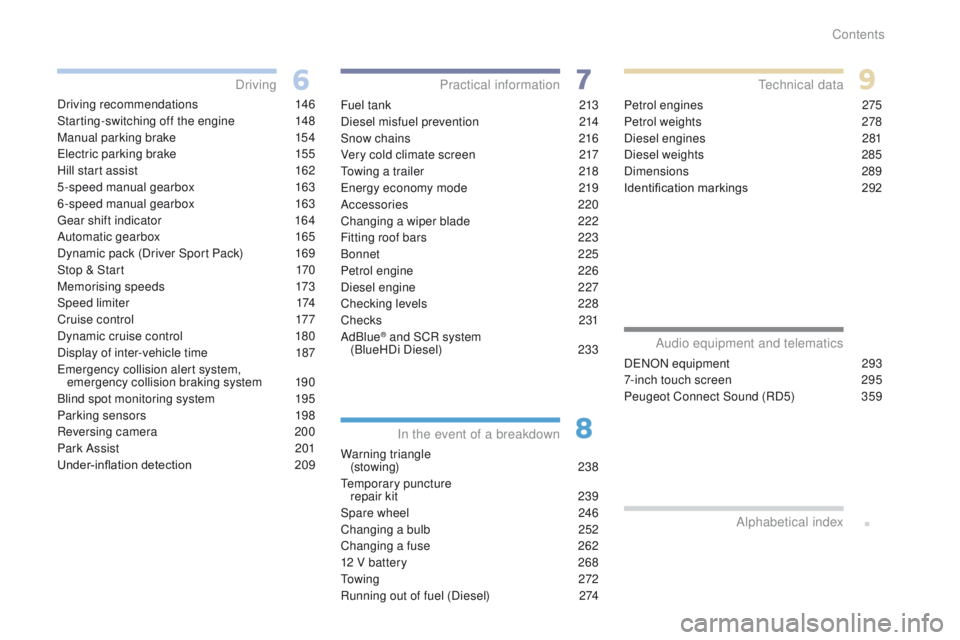
Driving recommendations 146
Starting-switching off the engine
1
48
Manual parking brake
1
54
el
ectric parking brake
1
55
Hill start assist
1
62
5-speed manual gearbox
1
63
6-speed manual gearbox
1
63
ge
ar shift indicator
1
64
Automatic gearbox
1
65
Dynamic pack (Driver Sport Pack)
1
69
Stop & Start
1
70
Memorising speeds
1
73
Speed limiter
1
74
Cruise control
1
77
Dynamic cruise control
1
80
Display of inter-vehicle time
1
87
em
ergency collision alert system,
emergency collision braking system
1
90
Blind spot monitoring system
1
95
Parking sensors
1
98
Reversing camera
2
00
Park Assist
2
01
Under-inflation detection
20
9Fuel tank
2 13
Diesel misfuel prevention
2
14
Snow chains
2
16
Very cold climate screen
2
17
to
wing a trailer
2
18
en
ergy economy mode
2
19
Accessories
2
20
Changing a wiper blade
2
22
Fitting roof bars
2
23
Bonnet
2
25
Petrol engine
2
26
Diesel engine
2
27
Checking levels
2
28
Checks
231
AdBlue
® and SCR system
(BlueHDi Diesel) 23 3
Warning triangle (stowing)
238
te
mporary puncture
repair kit
2
39
Spare wheel
2
46
Changing a bulb
2
52
Changing a fuse
2
62
12 V battery
2
68
to
w i n g
2 7 2
Running out of fuel (Diesel)
2
74Petrol engines
2
75
Petrol weights
2
78
Diesel engines
2
81
Diesel weights
2
85
Dimensions
2
89
Identification markings
2
92
Driving
Practical information
In the event of a breakdownte chnical data
DeNON equipment 2 93
7-inch touch screen
2
95
Peugeot Connect Sound (RD5)
3
59
Audio equipment and telematics
Alphabetical index
Contents
Page 10 of 392

8
308_en_Chap00b_vue-densemble_ed01-2016
Hazard warning lamps 118
Locking/unlocking from inside 6 6
Lighting
1
07-113
Direction indicators
1
12
Instrument panel
1
2-13
Warning lamps
1
3-27
Indicators
28-35
ge
ar shift indicator
1
64
P
e
uge
Ot
i- Cockpit
7
2
Steering wheel adjustment
7
2
H or n
12
1
Headlamp beam adjustment
1
13
Memorising speeds
1
73
Speed limiter
1
74-176
C r u i s e c o nt r o l
17
7-179
Dynamic cruise control
1
80 -186 W i p e r s
11
4 -117
tr
ip computer
3
7-39
Instruments and controls (cont.)
trip computer
3 7, 39tr
ip computer (to uch screen) 3 8, 39
Setting the date/time (
to
uch screen)
4
7
Setting the date/time (screens C, A, A
without audio system)
4
8 - 49
Reversing camera
2
00
Display of inter-vehicle time
1
87-189
Collision risk alert
1
90 -194
em
ergency collision braking
1
93-194
Stop & Start
1
70 -172
Alarm
6
7-69
Heated windscreen and washer jets
1
17
Over view
Page 43 of 392
41
308_en_Chap01_instruments-de-bord_ed01-2016
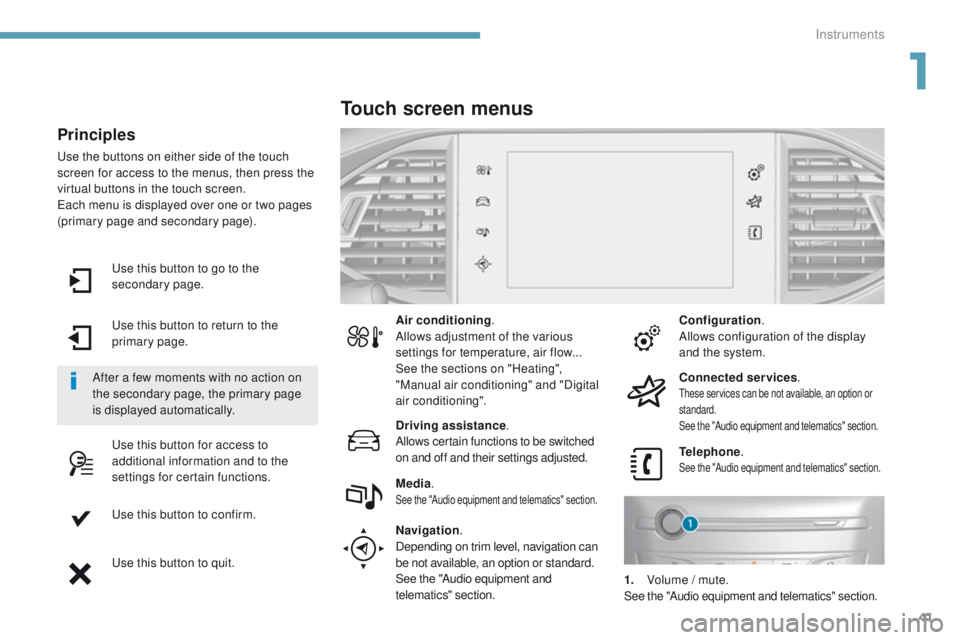
use this button to go to the
secondary page.
us
e this button to return to the
primary page.
us
e this button for access to
additional information and to the
settings for certain functions.
us
e this button to confirm.
us
e this button to quit.
Principles
use the buttons on either side of the touch
screen for access to the menus, then press the
virtual buttons in the touch screen.
ea
ch menu is displayed over one or two pages
(primary page and secondary page).
After a few moments with no action on
the secondary page, the primary page
is displayed automatically. Air conditioning
.
Allows adjustment of the various
settings for temperature, air flow...
See the sections on "Heating",
"Manual air conditioning" and "Digital
air conditioning".
Touch screen menus
Driving assistance .
Allows certain functions to be switched
on and off and their settings adjusted. Telephone
.
See the "Audio equipment and telematics" section.Media.See the "Audio equipment and telematics" section.
Navigation .
Depending on trim level, navigation can
be not available, an option or standard.
See the "Audio equipment and
telematics" section. Configuration
.
Allows configuration of the display
and the system.
Connected services .
these services can be not available, an option or
standard.
See the "Audio equipment and telematics" section.
1. Volume / mute.See the "Audio equipment and telematics" section.
1
Instruments
Page 47 of 392
45
308_en_Chap01_instruments-de-bord_ed01-2016
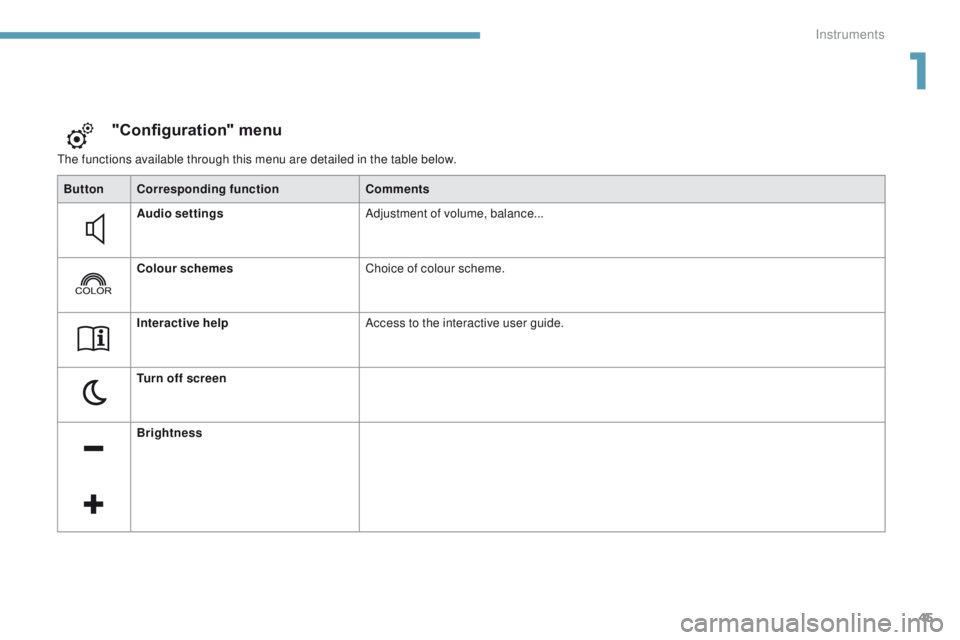
the functions available through this menu are detailed in the table below.
"Configuration" menu
ButtonCorresponding function Comments
Audio settings Adjustment of volume, balance...
Colour schemes Choice of colour scheme.
Interactive help Access to the interactive user guide.
Turn off screen
Brightness
1
Instruments
Page 50 of 392
48
For more information on the
Multimedia menu, refer to the "Audio
and telematics" section.
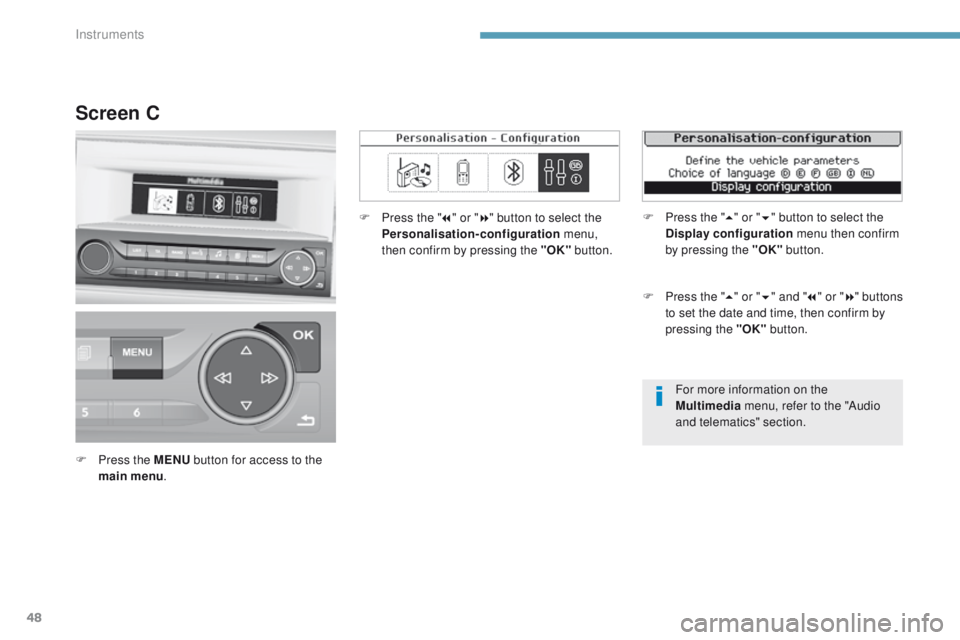
Screen C
F Press the MENU button for access to the
main menu . F
P
ress the "
7" or " 8" button to select the
Personalisation-configuration menu,
then confirm by pressing the "OK" button.
F
P
ress the "
5" or " 6" and " 7" or " 8" buttons
to set the date and time, then confirm by
pressing the "OK" button.
F
P
ress the "
5" or " 6" button to select the
Display configuration menu then confirm
by pressing the "OK" button.
Instruments
Page 51 of 392
49
308_en_Chap01_instruments-de-bord_ed01-2016
Screen A (without audio system)
F Once you have selected a setting using the "5 " or " 6" buttons, press the "OK"
button to change its value.
F
W
ait for approximately ten seconds without
any action to allow the change to be
registered or press the "ESC" button to
cancel.
th
e screen then returns to the normal display.
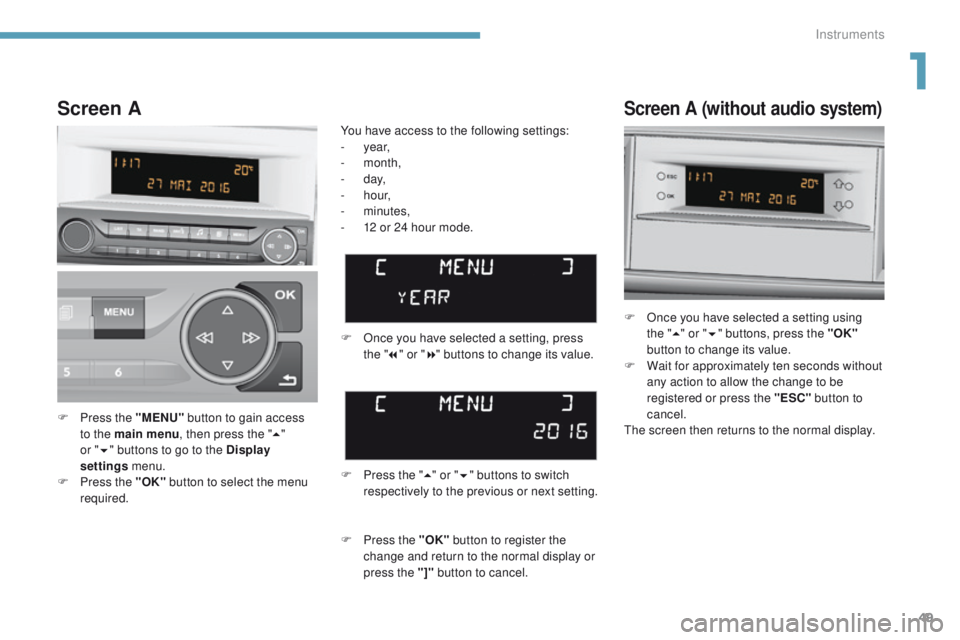
F
P
ress the "MENU" button to gain access
to the main menu , then press the "5"
or
" 6 "
buttons to go to the Display
settings menu.
F
P
ress the "OK" button to select the menu
required. F
O
nce you have selected a setting, press
the " 7" or " 8" buttons to change its value.
You have access to the following settings:
-
year,
-
month,
-
d ay,
-
h o u r,
-
minutes,
-
1
2 or 24 hour mode.
Screen A
F Press the " 5" or " 6" buttons to switch
respectively to the previous or next setting.
F
P
ress the "OK" button to register the
change and return to the normal display or
press the "]" button to cancel.
1
Instruments
Page 87 of 392
85
308_en_Chap03_ergonomie-et-confort_ed01-2016
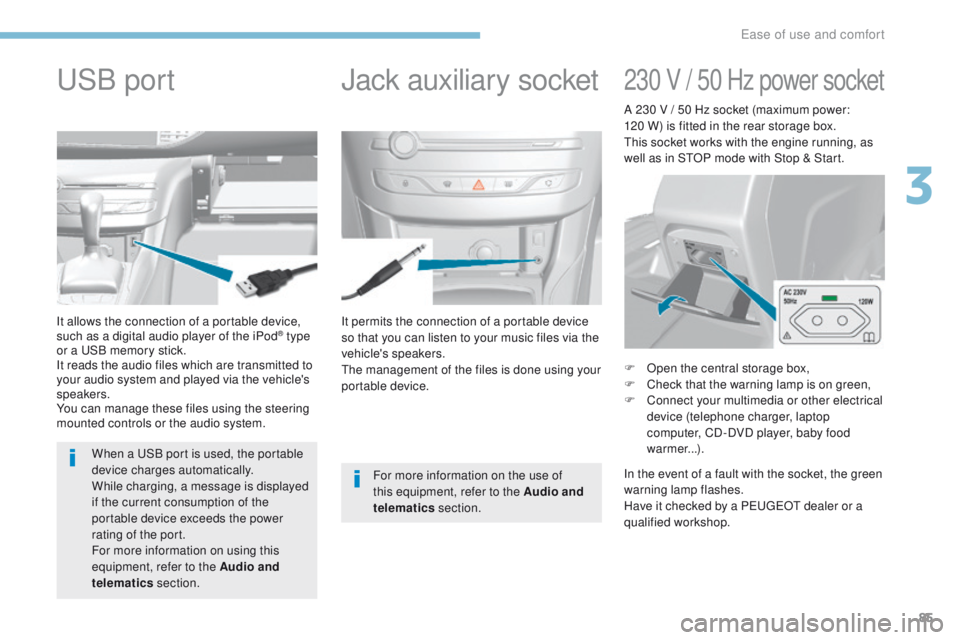
It permits the connection of a portable device
so that you can listen to your music files via the
vehicle's speakers.
th
e management of the files is done using your
portable device.
It allows the connection of a portable device,
such as a digital audio player of the iPod® type
or a
uS
B memory stick.
It reads the audio files which are transmitted to
your audio system and played via the vehicle's
speakers.
You can manage these files using the steering
mounted controls or the audio system.
Jack auxiliary socketuSB p
ort
For more information on the use of
this equipment, refer to the Audio and
telematics section.
When a
u
S
B port is used, the portable
device charges automatically.
While charging, a message is displayed
if the current consumption of the
portable device exceeds the power
rating of the port.
For more information on using this
equipment, refer to the Audio and
telematics section.
230 V / 50 Hz power socket
F Open the central storage box,
F
C heck that the warning lamp is on green,
F
C
onnect your multimedia or other electrical
device (telephone charger, laptop
computer, CD-DVD player, baby food
warmer...).
In the event of a fault with the socket, the green
warning lamp flashes.
Have it checked by a P
e
uge
Ot
dealer or a
qualified workshop. A 230 V / 50 Hz socket (maximum power:
120 W) is fitted in the rear storage box.
th
is socket works with the engine running, as
well as in S
tO
P mode with Stop & Start.
3
ease of use and comfort
Page 154 of 392
152
308_en_Chap06_conduite_ed01-2016
If the vehicle is not immobilised, the
engine will not stop.
Switching off
F Immobilise the vehicle.F
W
ith the electronic key inside
the vehicle, press the " S TA R T/
STOP " button.
th
e engine stops and the steering column is
locked.
Ignition on
(without starting)
With the ignition on, the system
automatically goes into energy
economy mode to maintain an adequate
state of charge in the battery.
With the Keyless
e
n
try and Starting remote
control inside the vehicle, pressing the "S
tA
R
t/
StO
P" button, with no action on the pedals
,
allows the ignition to be switched on.
th
is also allows the accessories to be used (for
example: audio system, lighting...).
F
P
ress the "S
tA
R
t/
S
tO
P" button,
the instrument panel comes on
but the engine does not start.
F
P
ress the button again to switch off the
ignition and allow the vehicle to be locked.
Key not detected
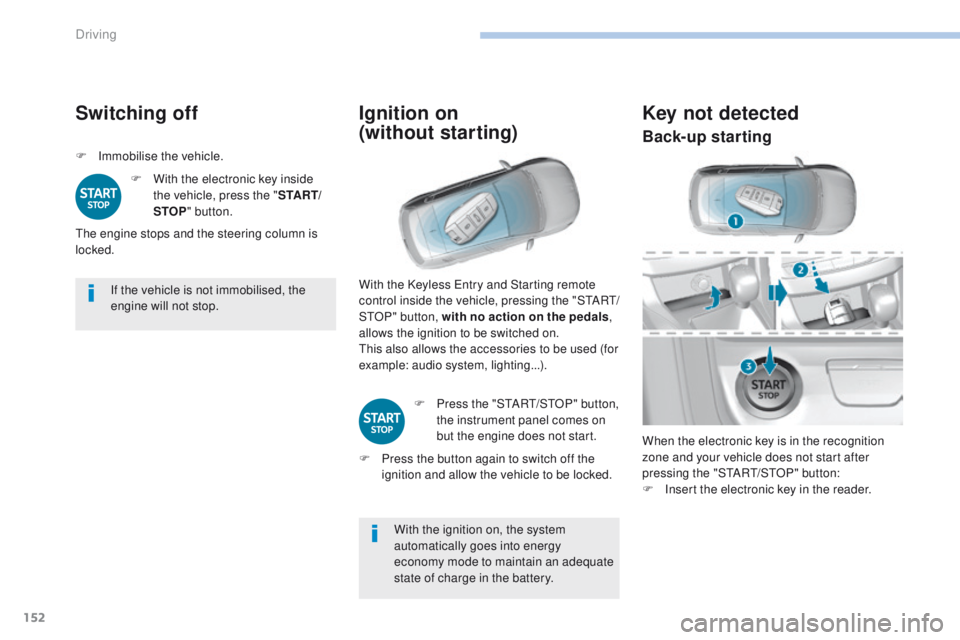
When the electronic key is in the recognition
zone and your vehicle does not start after
pressing the "S
tA
R
t/
S
tO
P" button:
F
I
nsert the electronic key in the reader.
Back-up starting
Driving
Page 214 of 392
212
308_en_Chap06_conduite_ed01-2016
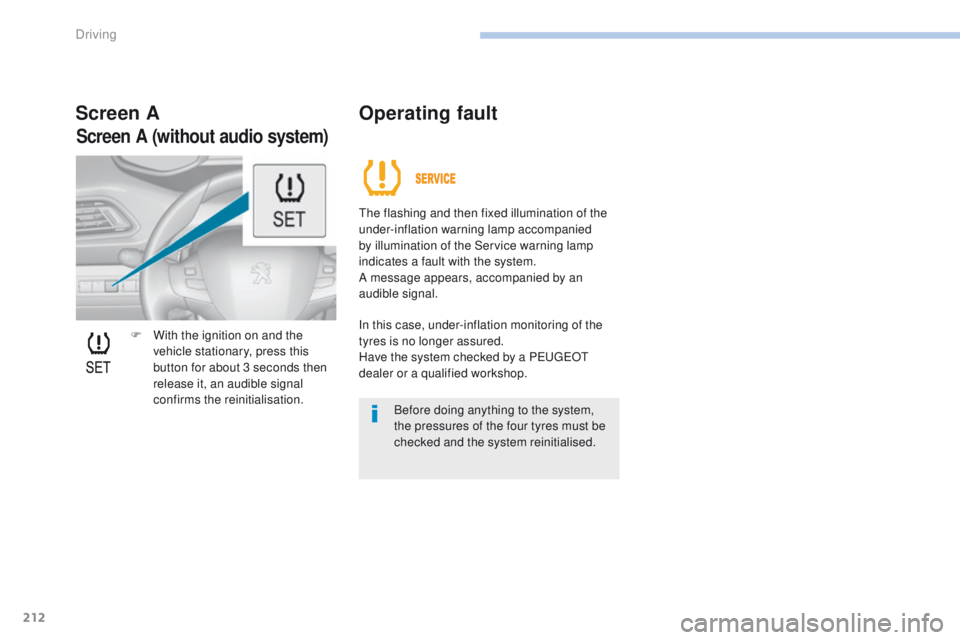
F With the ignition on and the vehicle stationary, press this
button for about 3 seconds then
release it, an audible signal
confirms the reinitialisation.
Screen A Operating fault
the flashing and then fixed illumination of the
under-inflation warning lamp accompanied
by illumination of the Service warning lamp
indicates a fault with the system.
A message appears, accompanied by an
audible signal.
In this case, under-inflation monitoring of the
tyres is no longer assured.
Have the system checked by a P
e
uge
Ot
dealer or a qualified workshop.
Before doing anything to the system,
the pressures of the four tyres must be
checked and the system reinitialised.
Screen A (without audio system)
Driving
Page 221 of 392
219
308_en_Chap07_info-pratiques_ed01-2016
System which manages the duration of use of certain functions to conserve a sufficient level of
charge in the battery.
After the engine has stopped, you can still use functions such as the audio and telematics
system, windscreen wipers, dipped beam headlamps, courtesy lamps, etc. for a maximum
combined duration of about forty minutes.
energy economy mode
Switching to economy
mode
A message appears in the instrument panel
screen indicating that the vehicle has switched
to economy mode and the active functions are
put on standby.
If a telephone call is being made at this time, it
will be maintained for around 10 minutes with
the Bluetooth hands-free system of your audio
system.
Exiting economy mode
these functions are reactivated automatically
next time the vehicle is driven.
In order to restore the use of these functions
immediately, start the engine and let it run:
-
f
or less than ten minutes, to use the
equipment for approximately five minutes,
-
f
or more than ten minutes, to use the
equipment for up to approximately thirty
minutes.
Let the engine run for the duration specified to
ensure that the battery charge is sufficient.
Do not repeatedly and continuously restart the
engine in order to charge the battery.
A flat battery prevents the engine from starting.
Load reduction mode
System which manages the use of certain
functions according to the level of charge
remaining in the battery.
When the vehicle is being driven, the load
reduction function temporarily deactivates
certain functions, such as the air conditioning,
the heated rear screen...
th
e deactivated functions are reactivated
automatically as soon as conditions permit.
For more information on the 12 V
battery , refer to the corresponding
section.
7
Practical information