display Peugeot 308 2017 Owner's Guide
[x] Cancel search | Manufacturer: PEUGEOT, Model Year: 2017, Model line: 308, Model: Peugeot 308 2017Pages: 392, PDF Size: 10.16 MB
Page 48 of 392
46
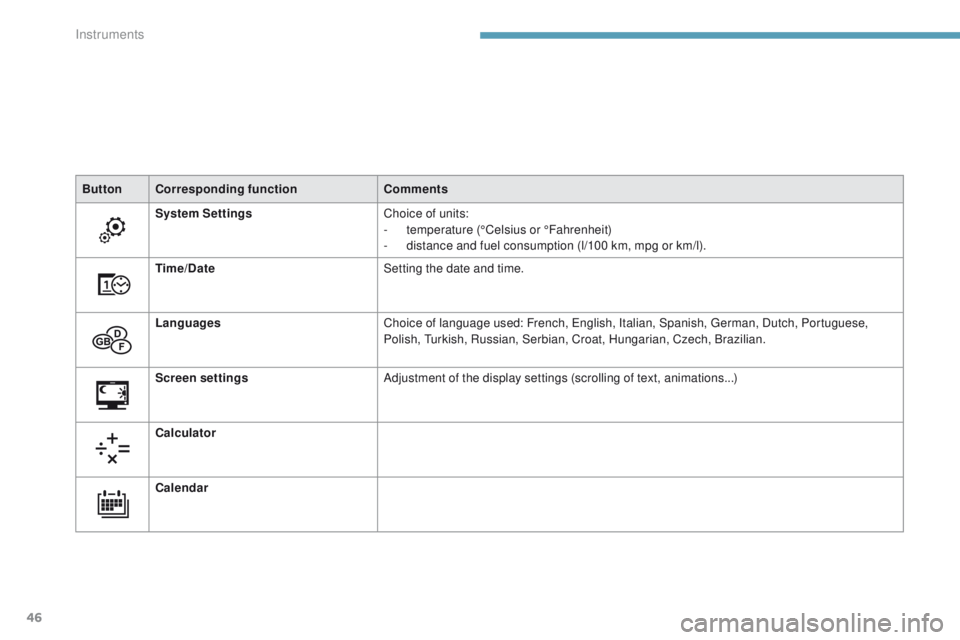
ButtonCorresponding function Comments
System Settings Choice of units:
-
t
emperature (°Celsius or °Fahrenheit)
-
d
istance and fuel consumption (l/100 km, mpg or km/l).
Time/Date Setting the date and time.
Languages Choice of language used: French,
e
n
glish, Italian, Spanish, g
e
rman, Dutch, Portuguese,
Polish,
t
u
rkish, Russian, Serbian, Croat, Hungarian, Czech, Brazilian.
Screen settings Adjustment of the display settings (scrolling of text, animations...)
Calculator
Calendar
Instruments
Page 50 of 392
48
For more information on the
Multimedia menu, refer to the "Audio
and telematics" section.
Screen C
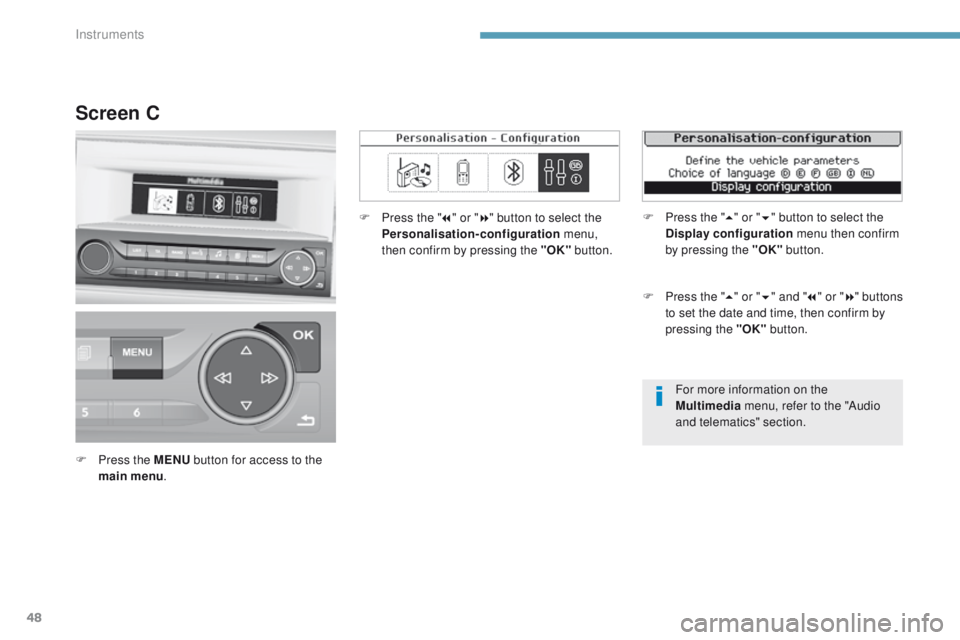
F Press the MENU button for access to the
main menu . F
P
ress the "
7" or " 8" button to select the
Personalisation-configuration menu,
then confirm by pressing the "OK" button.
F
P
ress the "
5" or " 6" and " 7" or " 8" buttons
to set the date and time, then confirm by
pressing the "OK" button.
F
P
ress the "
5" or " 6" button to select the
Display configuration menu then confirm
by pressing the "OK" button.
Instruments
Page 51 of 392
49
308_en_Chap01_instruments-de-bord_ed01-2016
Screen A (without audio system)
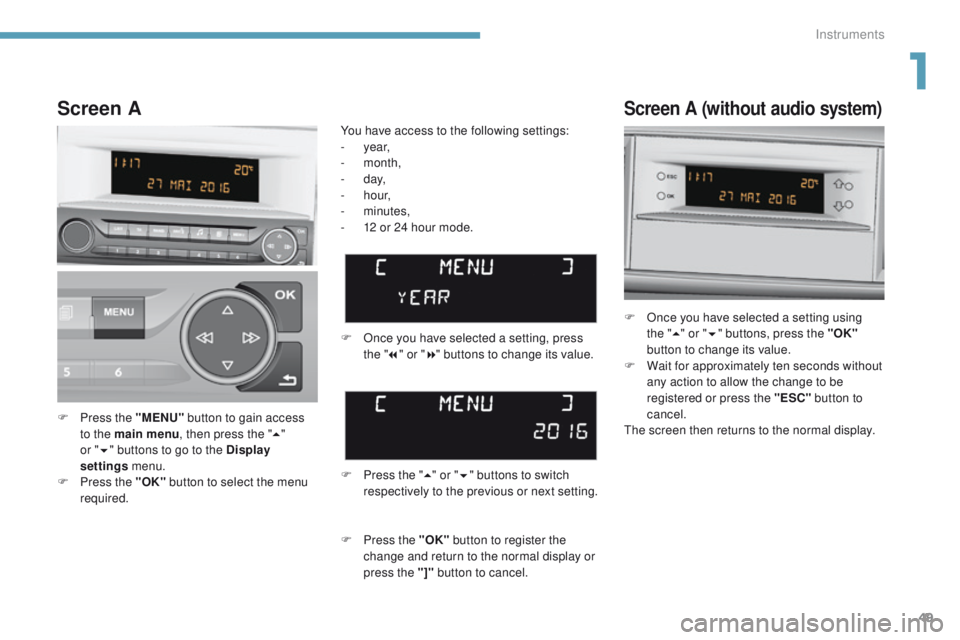
F Once you have selected a setting using the "5 " or " 6" buttons, press the "OK"
button to change its value.
F
W
ait for approximately ten seconds without
any action to allow the change to be
registered or press the "ESC" button to
cancel.
th
e screen then returns to the normal display.
F
P
ress the "MENU" button to gain access
to the main menu , then press the "5"
or
" 6 "
buttons to go to the Display
settings menu.
F
P
ress the "OK" button to select the menu
required. F
O
nce you have selected a setting, press
the " 7" or " 8" buttons to change its value.
You have access to the following settings:
-
year,
-
month,
-
d ay,
-
h o u r,
-
minutes,
-
1
2 or 24 hour mode.
Screen A
F Press the " 5" or " 6" buttons to switch
respectively to the previous or next setting.
F
P
ress the "OK" button to register the
change and return to the normal display or
press the "]" button to cancel.
1
Instruments
Page 86 of 392
84
308_en_Chap03_ergonomie-et-confort_ed01-2016
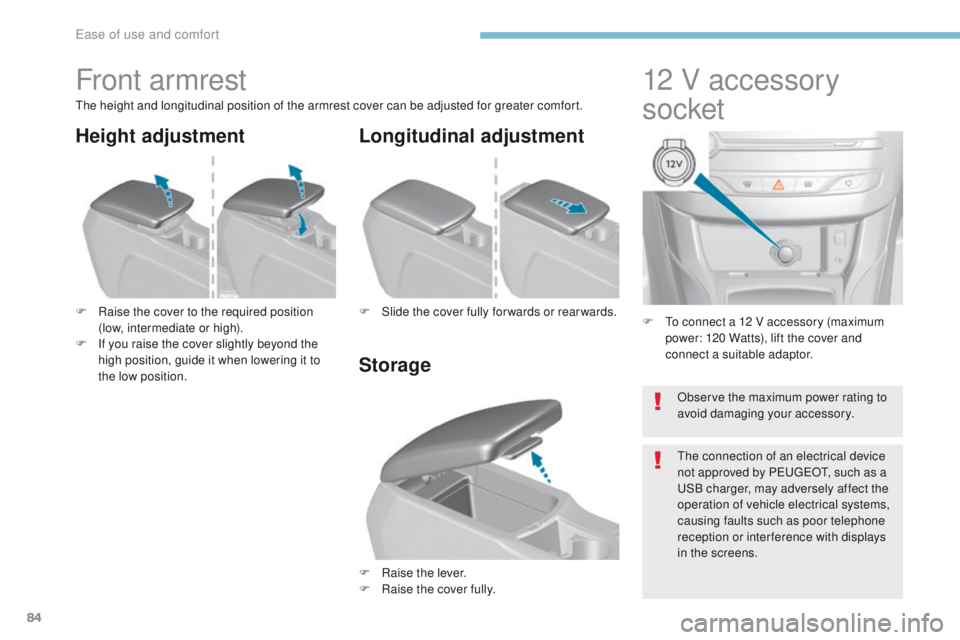
F to connect a 12 V accessory (maximum power: 120 Watts), lift the cover and
connect a suitable adaptor.
12 V accessory
socket
Front armrest
the height and longitudinal position of the armrest cover can be adjusted for greater comfort.
F
R
aise the cover to the required position
(low, intermediate or high).
F
I
f you raise the cover slightly beyond the
high position, guide it when lowering it to
the low position.
F
Ra
ise the lever.
F
Ra
ise the cover fully.
F
S
lide the cover fully for wards or rear wards.
Storage Longitudinal adjustment
Height adjustment
Observe the maximum power rating to
avoid damaging your accessory.
th
e connection of an electrical device
not approved by P
e
uge
Ot, s
uch as a
uS
B charger, may adversely affect the
operation of vehicle electrical systems,
causing faults such as poor telephone
reception or inter ference with displays
in the screens.
ease of use and comfort
Page 87 of 392
85
308_en_Chap03_ergonomie-et-confort_ed01-2016
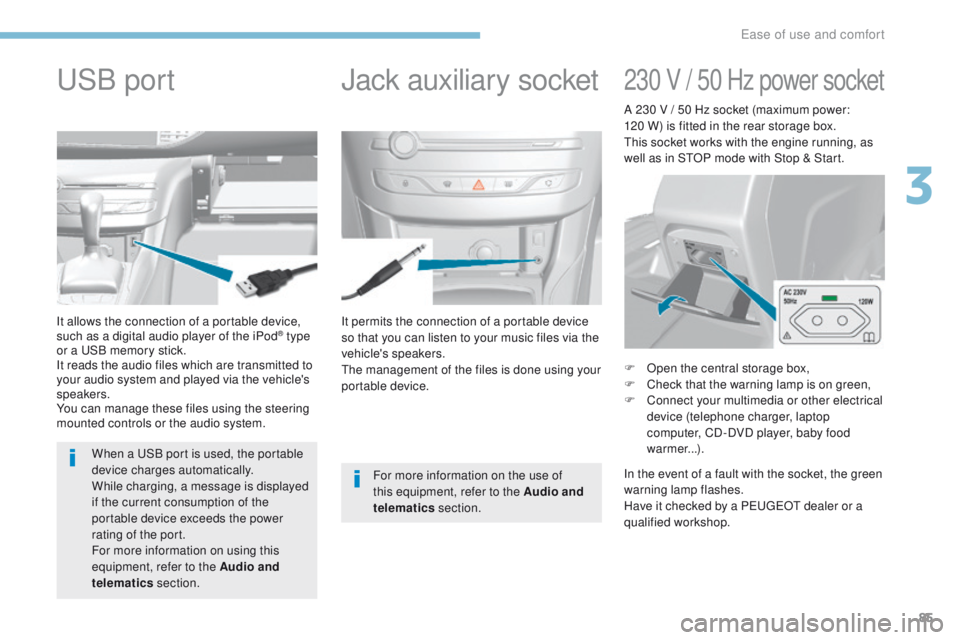
It permits the connection of a portable device
so that you can listen to your music files via the
vehicle's speakers.
th
e management of the files is done using your
portable device.
It allows the connection of a portable device,
such as a digital audio player of the iPod® type
or a
uS
B memory stick.
It reads the audio files which are transmitted to
your audio system and played via the vehicle's
speakers.
You can manage these files using the steering
mounted controls or the audio system.
Jack auxiliary socketuSB p
ort
For more information on the use of
this equipment, refer to the Audio and
telematics section.
When a
u
S
B port is used, the portable
device charges automatically.
While charging, a message is displayed
if the current consumption of the
portable device exceeds the power
rating of the port.
For more information on using this
equipment, refer to the Audio and
telematics section.
230 V / 50 Hz power socket
F Open the central storage box,
F
C heck that the warning lamp is on green,
F
C
onnect your multimedia or other electrical
device (telephone charger, laptop
computer, CD-DVD player, baby food
warmer...).
In the event of a fault with the socket, the green
warning lamp flashes.
Have it checked by a P
e
uge
Ot
dealer or a
qualified workshop. A 230 V / 50 Hz socket (maximum power:
120 W) is fitted in the rear storage box.
th
is socket works with the engine running, as
well as in S
tO
P mode with Stop & Start.
3
ease of use and comfort
Page 96 of 392
94
308_en_Chap03_ergonomie-et-confort_ed01-2016
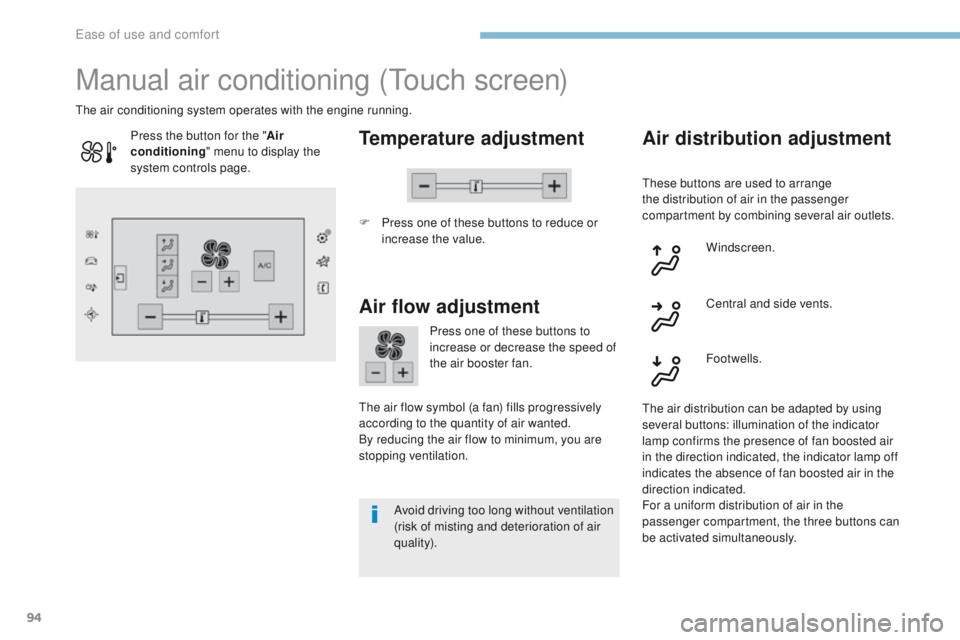
Manual air conditioning (touch screen)
Temperature adjustment
F Press one of these buttons to reduce or
increase the value.
th
e air conditioning system operates with the engine running.
Air flow adjustment
Press one of these buttons to
increase or decrease the speed of
the air booster fan.
th
e air flow symbol (a fan) fills progressively
according to the quantity of air wanted.
By reducing the air flow to minimum, you are
stopping ventilation.
Avoid driving too long without ventilation
(risk of misting and deterioration of air
quality).
Press the button for the "
Air
conditioning " menu to display the
system controls page.
Air distribution adjustment
these buttons are used to arrange
the distribution of air in the passenger
compartment by combining several air outlets.
Windscreen.
th
e air distribution can be adapted by using
several buttons: illumination of the indicator
lamp confirms the presence of fan boosted air
in the direction indicated, the indicator lamp off
indicates the absence of fan boosted air in the
direction indicated.
For a uniform distribution of air in the
passenger compartment, the three buttons can
be activated simultaneously. Footwells. Central and side vents.
ease of use and comfort
Page 97 of 392
95
308_en_Chap03_ergonomie-et-confort_ed01-2016
the air conditioning is designed to
operate effectively in all seasons,
with the windows closed.
Air conditioning On / Off
Switching on
Switching off
the air conditioning does not operate
when the air flow adjustment is set to
of f.F
P
ress this button, its indicator
lamp comes on.
It enables you to:
-
l
ower the temperature, in summer,
-
i
ncrease the effectiveness of the demisting
in winter, above 3°C.
F
P
ress this button again, its
indicator lamp goes off.
Switching off the air conditioning may result in
some discomfort (humidity, misting).
to o
btain cool air more quickly, you can use
interior air recirculation for a few moments.
th
en return to the intake of exterior air.
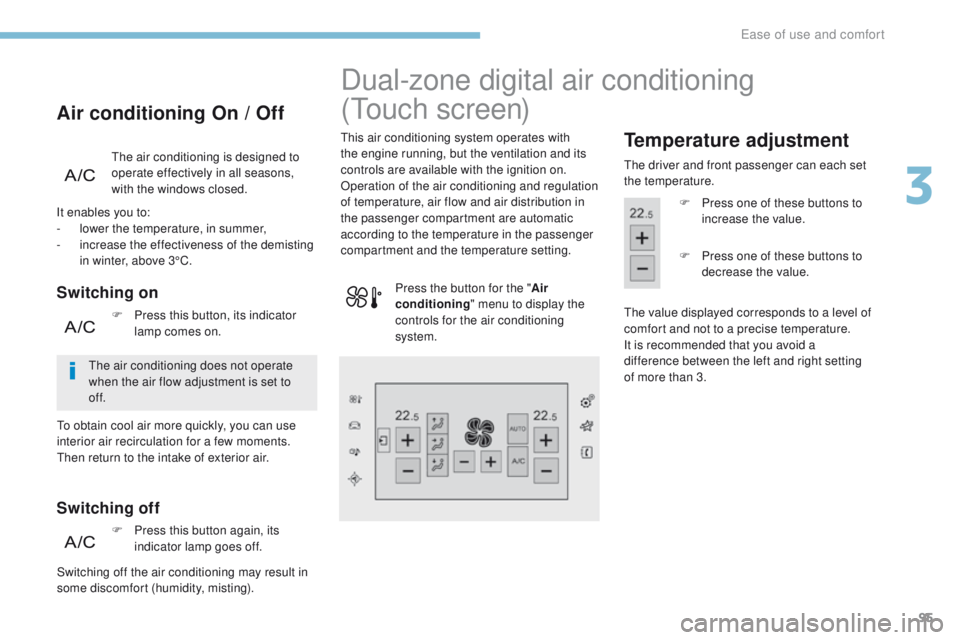
Dual-zone digital air conditioning
(
to
uch
screen)
this air conditioning system operates with
the engine running, but the ventilation and its
controls are available with the ignition on.
Operation of the air conditioning and regulation
of temperature, air flow and air distribution in
the passenger compartment are automatic
according to the temperature in the passenger
compartment and the temperature setting.Temperature adjustment
the driver and front passenger can each set
the temperature.
F
P
ress one of these buttons to
increase the value.
th
e value displayed corresponds to a level of
comfort and not to a precise temperature.
It is recommended that you avoid a
difference
between the left and right setting
of
more than 3.
Press the button for the "
Air
conditioning " menu to display the
controls for the air conditioning
system. F
P
ress one of these buttons to
decrease the value.
3
ease of use and comfort
Page 98 of 392
96
308_en_Chap03_ergonomie-et-confort_ed01-2016
In cold conditions and when the engine
is cold, to limit distribution of cold air
in the passenger compartment, the
air flow will change gradually until the
comfort setting is reached.
On entering the vehicle, if the interior
temperature is much colder or warmer
than the comfort value setting, there
is no need to alter the value displayed
in order to reach the required level
of comfort more quickly. t
h
e system
automatically corrects the temperature
difference.
th
is setting is associated with A
u
t
O m
ode
only. However, on deactivation of A
u
t
O m
ode,
the indicator for the last setting remains on.
Changing the setting does not reactivate A
u
t
O
mode if deactivated.
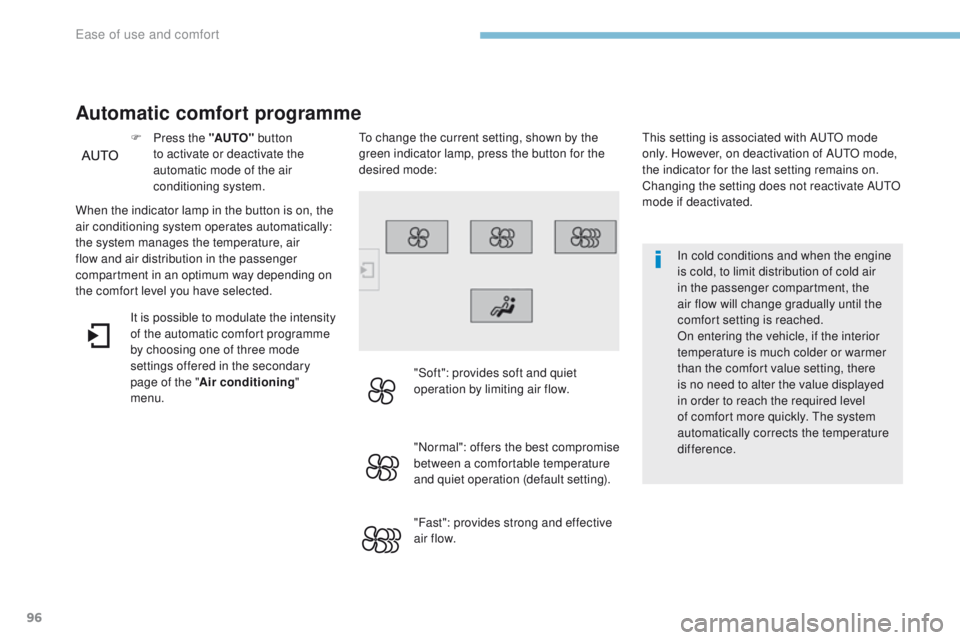
When the indicator lamp in the button is on, the
air conditioning system operates automatically:
the system manages the temperature, air
flow and air distribution in the passenger
compartment in an optimum way depending on
the comfort level you have selected. F
P
ress the "AUTO"
button
to activate or deactivate the
automatic mode of the air
conditioning system.
Automatic comfort programme
to change the current setting, shown by the
green indicator lamp, press the button for the
desired mode:
"Soft": provides soft and quiet
operation by limiting air flow.
"Normal": offers the best compromise
between a comfortable temperature
and quiet operation (default setting).
"Fast": provides strong and effective
air f low.
It is possible to modulate the intensity
of the automatic comfort programme
by choosing one of three mode
settings offered in the secondary
page of the "
Air conditioning "
menu.
ease of use and comfort
Page 99 of 392
97
308_en_Chap03_ergonomie-et-confort_ed01-2016
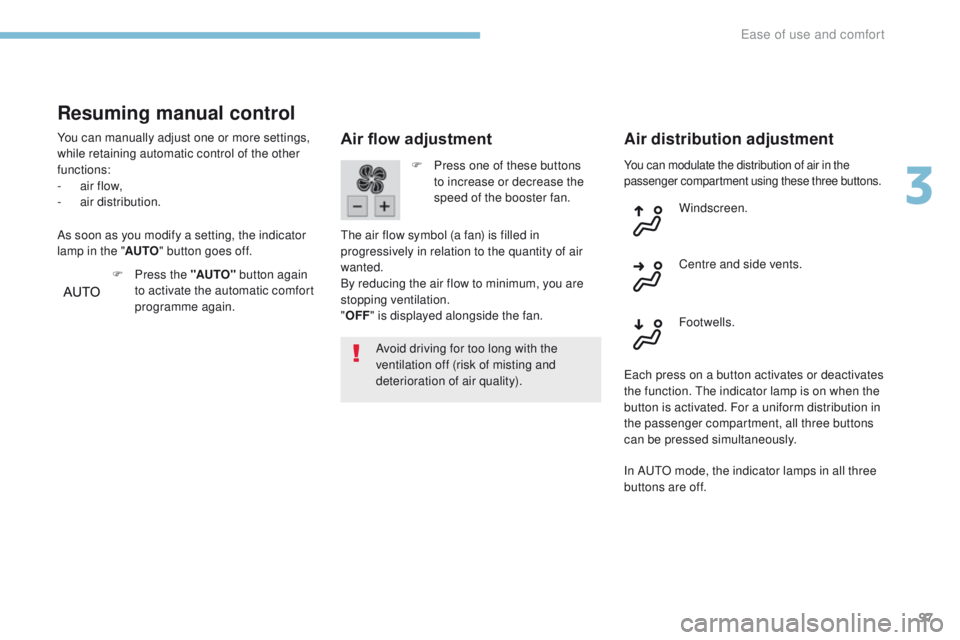
You can modulate the distribution of air in the
passenger compartment using these three buttons.
Air flow adjustment
Avoid driving for too long with the
ventilation off (risk of misting and
deterioration of air quality).
Air distribution adjustment
F Press one of these buttons to increase or decrease the
speed of the booster fan.
th
e air flow symbol (a fan) is filled in
progressively in relation to the quantity of air
wanted.
By reducing the air flow to minimum, you are
stopping ventilation.
" OFF " is displayed alongside the fan. Windscreen.
Footwells. Centre and side vents.
ea
ch press on a button activates or deactivates
the function.
t
h
e indicator lamp is on when the
button is activated. For a uniform distribution in
the passenger compartment, all three buttons
can be pressed simultaneously.
Resuming manual control
You can manually adjust one or more settings,
while retaining automatic control of the other
functions:
-
a
ir flow,
-
a
ir distribution.
F
P
ress the "AUTO" button again
to activate the automatic comfort
programme again.
As soon as you modify a setting, the indicator
lamp in the "
AUTO" button goes off.
In A
u
t
O m
ode, the indicator lamps in all three
buttons are off.
3
ease of use and comfort
Page 110 of 392
108
308_en_Chap04_eclairage-et-visibilite_ed01-2016
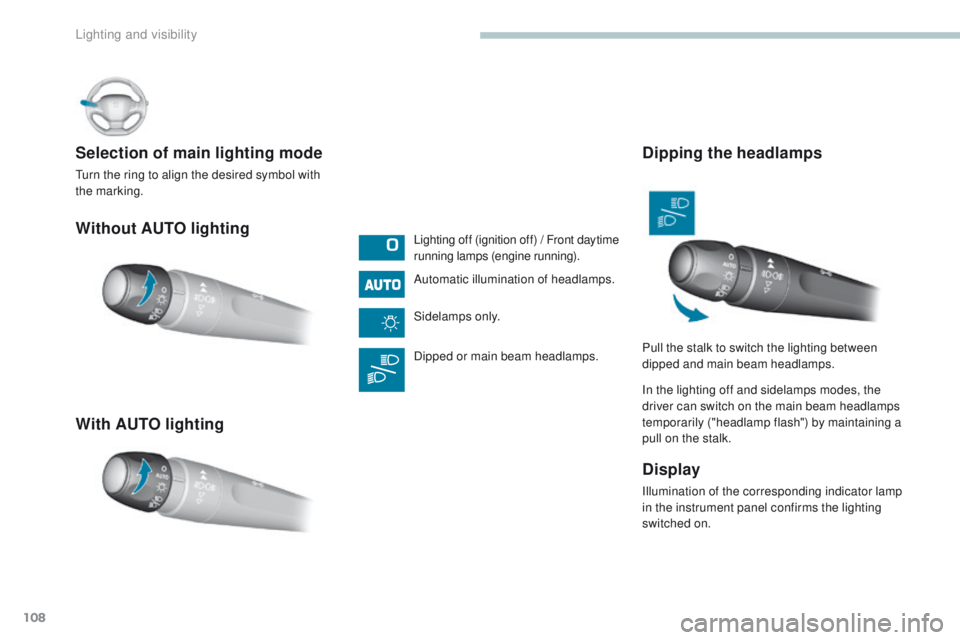
Without AUTO lighting
With AUTO lighting Selection of main lighting mode
turn the ring to align the desired symbol with
the marking.Lighting off (ignition off) / Front daytime
running lamps (engine running).
Automatic illumination of headlamps.
Sidelamps only.
Dipped or main beam headlamps.
Dipping the headlamps
In the lighting off and sidelamps modes, the
driver can switch on the main beam headlamps
temporarily ("headlamp flash") by maintaining a
pull on the stalk.
Display
Illumination of the corresponding indicator lamp
in the instrument panel confirms the lighting
switched on. Pull the stalk to switch the lighting between
dipped and main beam headlamps.
Lighting and visibility