stop start Peugeot 308 2017 Service Manual
[x] Cancel search | Manufacturer: PEUGEOT, Model Year: 2017, Model line: 308, Model: Peugeot 308 2017Pages: 392, PDF Size: 10.16 MB
Page 326 of 392
324
308_en_Chap10b_SMegplus_ed01-2016
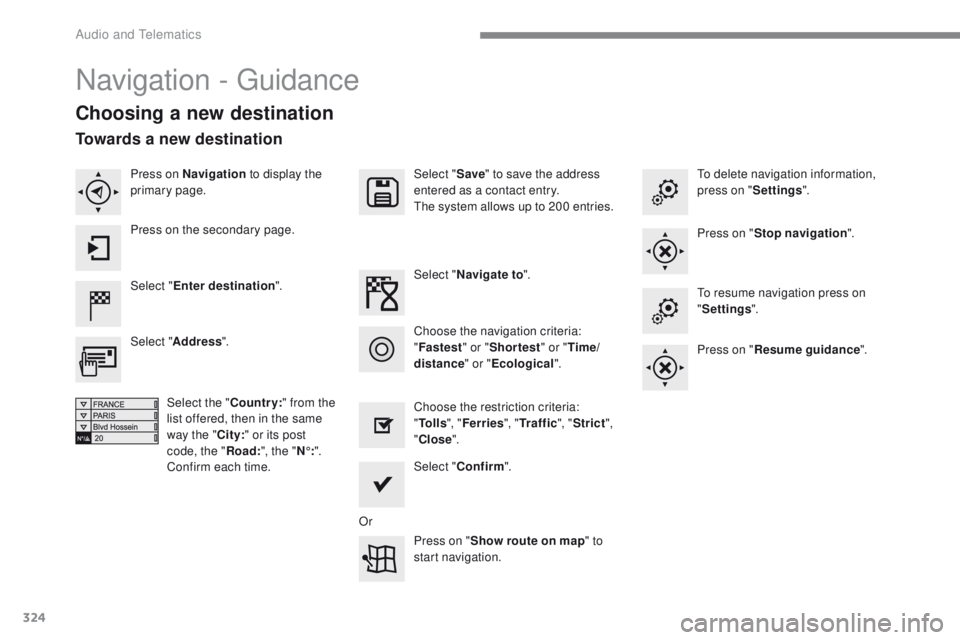
Navigation - guidance
Choosing a new destination
Select "Enter destination ". Select "
Save" to save the address
entered as a contact entry.
th
e system allows up to 200 entries.
Select " Confirm ".
Press on " Show route on map " to
start navigation.
Select "
Address ".
Select the " Country:" from the
list offered, then in the same
way the " City:" or its post
code, the " Road:", the " N°:".
Confirm each time. Select "
Navigate to ".
Choose the restriction criteria:
" To l l s ", "Ferries ", "Tr a f f i c ", "Strict ",
" Close ".
Choose the navigation criteria:
"
Fastest " or "Shortest " or "Time/
distance " or "Ecological".
to
delete navigation information,
press on " Settings".
Press on " Stop navigation ".to r
esume navigation press on
" Settings ".
Press on " Resume guidance ".
Press on Navigation
to display the
primary page.
Press on the secondary page.
Towards a new destination
Or
Audio and telematics
Page 347 of 392
345
308_en_Chap10b_SMegplus_ed01-2016
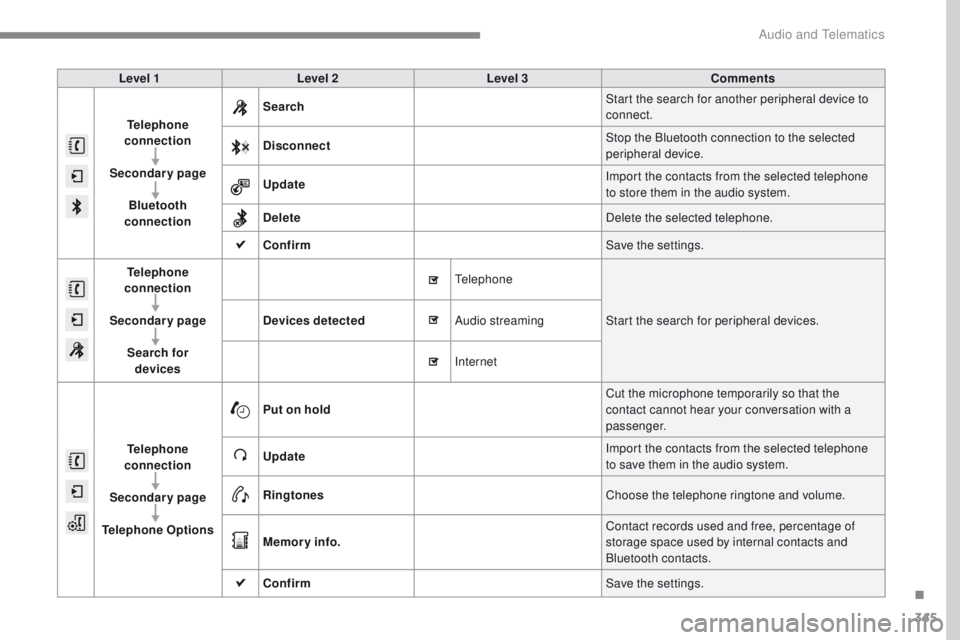
Level 1Level 2 Level 3 Comments
Telephone
connection
Secondary page Bluetooth
connection Search
Start the search for another peripheral device to
connect.
Disconnect Stop the Bluetooth connection to the selected
peripheral device.
Update Import the contacts from the selected telephone
to store them in the audio system.
Delete Delete the selected telephone.
Confirm Save the settings.
Telephone
conn ection
Secondary page Search for devices Devices detected
te
lephoneStart the search for peripheral devices.
Audio streaming
Internet
Telephone
connection
Secondary page
Telephone Options Put on hold
Cut the microphone temporarily so that the
contact cannot hear your conversation with a
passenger.
Update Import the contacts from the selected telephone
to save them in the audio system.
Ringtones Choose the telephone ringtone and volume.
Memory info. Contact records used and free, percentage of
storage space used by internal contacts and
Bluetooth contacts.
Confirm Save the settings.
.
Audio and telematics
Page 377 of 392
375
308_en_Chap10c_RD45_ed01-2016
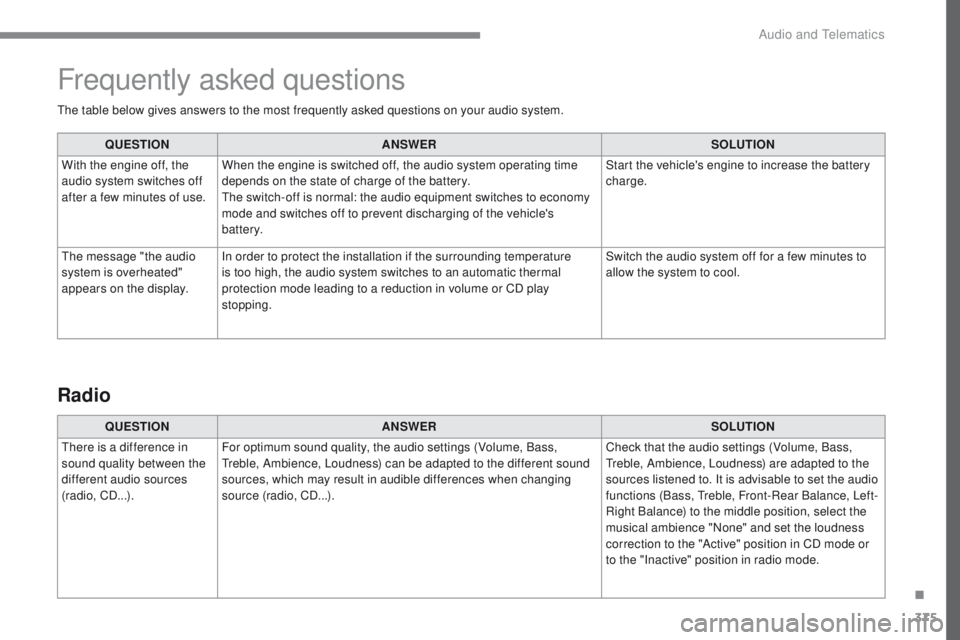
the table below gives answers to the most frequently asked questions on your audio system.QUESTION ANSWER SOLUTION
With the engine off, the
audio system switches off
after a few minutes of use. When the engine is switched off, the audio system operating time
depends on the state of charge of the battery.
th
e switch-off is normal: the audio equipment switches to economy
mode and switches off to prevent discharging of the vehicle's
battery. Start the vehicle's engine to increase the battery
charge.
th
e message "the audio
system is overheated"
appears on the display. In order to protect the installation if the surrounding temperature
is too high, the audio system switches to an automatic thermal
protection mode leading to a reduction in volume or CD play
stopping. Switch the audio system off for a few minutes to
allow the system to cool.
Frequently asked questions
QUESTION
ANSWER SOLUTION
th
ere is a difference in
sound quality between the
different audio sources
(radio, CD...). For optimum sound quality, the audio settings (Volume, Bass,
tr
eble, Ambience, Loudness) can be adapted to the different sound
sources, which may result in audible differences when changing
source (radio, CD...). Check that the audio settings (Volume, Bass,
tr
eble, Ambience, Loudness) are adapted to the
sources listened to. It is advisable to set the audio
functions (Bass,
t
r
eble, Front-Rear Balance, Left-
Right Balance) to the middle position, select the
musical ambience "None" and set the loudness
correction to the "Active" position in CD mode or
to the "Inactive" position in radio mode.
Radio
.
Audio and telematics
Page 385 of 392
383
308_en_Chap11_index-alpha_ed01-2016
Stay, bonnet .................................................. 225
Steering mounted controls, audio ........299, 361
Steering wheel, adjustment
............................72
Stop
................................................................. 18
Stopping the vehicle
.....................151, 152, 165
Stop & Start
..................16, 25, 39, 92, 100, 170,
172, 213, 225, 231, 268, 271
Stop (warning lamp)
........................................ 18
St
orage
.......................................... 82, 84, 86 - 88
Storage wells
............................................ 87, 88
Storing driving positions
.................................75
Stowing rings
............................................ 87, 88
Switching off the engine
............................... 14
8
Synchronising the remote control
..................................................... 5
4, 64
T
tables of weights .................................. 278, 285tab
les of engines ..........................275, 281, 285
ta
bles of fuses ............................. 262, 264, 266
t
a n k , f u e l
....................................................... 213
te
chnical data
.......................275, 278, 281, 285
te
lephone
..................................... 346-348, 370
te
mperature, coolant
...................................... 28
thr
ee flashes (direction indicators)
..............112
tim
e (setting)
..............................
...............47- 4 9
tM
C (
tr
affic info)
.......................................... 32
8
to
o l s
...................................................... 239, 246
to
pping-up the AdBlue
® additive ................. 23 5to
p
te
ther
..................................................... 140
to
tal distance recorder
................................... 35
to
uch screen ..... 38, 40, 42, 44, 45, 47, 173, 211
Screen, cold climate
.....................................
217
Screen, colour
......................................
300, 301
Screen, instrument panel
................................
37
Screen menu map
........
302, 304, 306, 316, 318,
322, 330, 342, 344, 372-374
Screen, monochrome
...................................
372
Screen, monochrome A
................................
372
Screen, multifunction (with audio system)
...............................
49, 362
Screen, multifunction (without audio system)
..................................
49
Screenwash
..................................................
115
SCR (Selective Catalytic Reduction)
............
233
Seat belts
....................................... 12
4 -126, 137
Seat, rear bench
.......................................
79, 80
Seats, electric
.................................................
74
Seats, front
...............................
.................
73 -75
Seats, heated
..................................................
76
Serial number, vehicle
.................................. 2
92
Service indicator
.............................................
28
Service (warning lamp)
................................... 19
S
ettings, equipment
........................................
44
Settings (Menus)
...........................................
330
Settings, system
............................................
338
Sidelamps
..............
107, 252, 253, 255-257, 259
Side repeater
..............................
..................
256
Ski flap
..............................
..............................
86
Snow chains
.......................................... 2
09, 216
Socket, 12 V accessory
.....................
8
2, 84, 88
Socket, 230 V
...............................
.............
82, 85
Socket, auxiliary
....................................
312, 3 67
Socket, JACK
............................
82, 85, 312, 367
Sockets, audio
................................................
85
Speed limiter
.........................................
173 , 174
Spotlamps, side
....................................
113 , 2 5 6
Stability control (e
SC)............................. 17, 1 2 1
Starting the vehicle
....................... 148, 151, 152
Starting using another battery
...................... 15
2
Station, radio
................................ 3
08, 309, 362
tou
ch screen (Menus)
.................
295, 300, 301
to
w b a r
...................................................
1 4 7, 2 1 8
to
wed loads
..........................................
278, 285
to
wing another vehicle
.................................
2
72
to
wing eye ......................................................
87
tra
ction control (ASR)
.......................17, 21, 121
tr
affic information (
tA
)
.........................
329, 363
tr
affic information (
tM
C)
..............................
32
8
t
r a i l e r
....................................................
1 4 7, 2 1 8
tr
iangle, warning
........................................... 238
tr
ip computer
.............................................37- 3 9
tr
ip distance recorder
.....................................
35
ty
r e s
................................................................
10
ty
re under-inflation
detection
...............................
24, 209, 211, 245
U
V
under-inflation (detection) ............................20 9unl
ocking .............................. .............50, 56, 58
up
dating risk areas
....................................... 3
27
up
dating the date
............................................ 47
upd
ating the time
............................................ 47
u
SB
................................................. 85, 312, 368
Ventilation
..............................
.......10, 91-94, 99
.
Alphabetical index