reset PEUGEOT 308 2017 User Guide
[x] Cancel search | Manufacturer: PEUGEOT, Model Year: 2017, Model line: 308, Model: Peugeot 308 2017Pages: 566, PDF Size: 16.05 MB
Page 337 of 566
335
3008-2_en_Chap08_en cas-de-panne_ed01-2016
Disconnecting the battery
The Stop & Start system may not be
operational during the trip following the
first engine start.
In this case, the system will only be
available again after a continuous
period of immobilisation of the vehicle,
a period which depends on the ambient
temperature and the state of charge of
the battery (up to about 8 hours).
In order to maintain an adequate state of charge
for starting the engine, it is recommended that
the battery be disconnected if the vehicle is
taken out of service for a long period.
Before disconnecting the battery:
F
c
lose all openings (doors, tailgate, windows,
sunroof),
F
s
witch off all electrical consumers (audio
system, wipers, lighting, ...),
F
s
witch off the ignition and wait for
four
minutes.
At the battery, it is only necessary to disconnect
the (+) terminal.
Following reconnection of the
battery
After reconnecting the battery, switch on the
ignition and wait 1 minute before starting to
allow initialisation of the electronic systems.
However, if minor problems persist following
this operation, contact a PEUGEOT dealer or a
qualified workshop.
Referring to the corresponding section, you
must yourself initialise or reset certain systems,
such as:
-
t
he remote control or electronic key
(depending on version),
-
t
he sunroof and its electric blind,
-
t
he electric windows,
-
t
he date and time,
-
t
he radio preset stations.
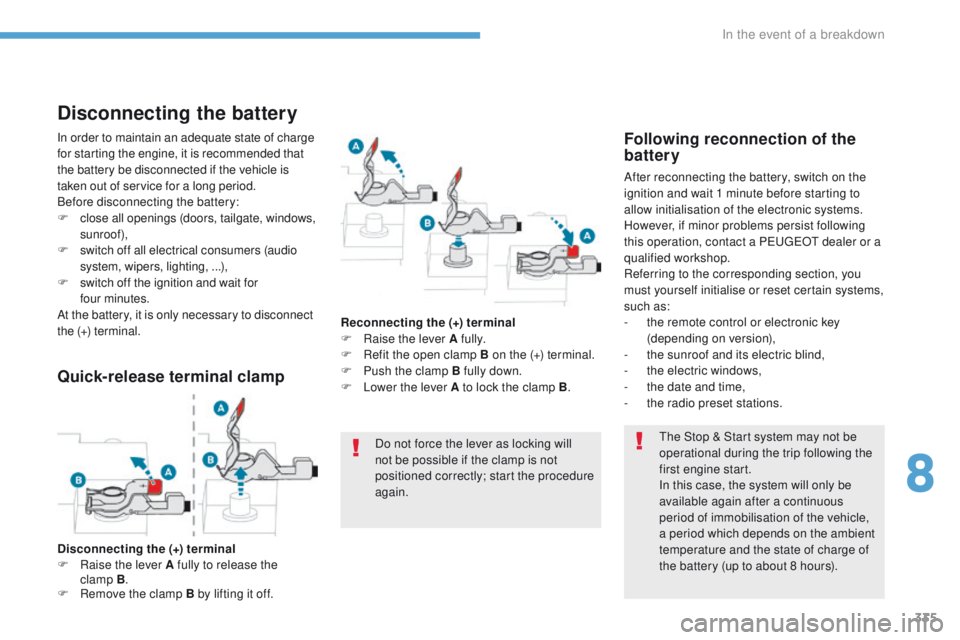
Quick-release terminal clamp
Disconnecting the (+) terminal
F Ra ise the lever A fully to release the
clamp
B.
F
R
emove the clamp B by lifting it off. Reconnecting the (+) terminal
F
Ra
ise the lever A fully.
F
R
efit the open clamp B on the (+) terminal.
F
P
ush the clamp B fully down.
F
L
ower the lever A to lock the clamp B
.
Do not force the lever as locking will
not be possible if the clamp is not
positioned correctly; start the procedure
again.
8
In the event of a breakdown
Page 352 of 566
350
3008-2_en_Chap11_index-alpha_ed01-2016
Range, AdBlue .................................... 30, 37 , 38
Rear screen, demisting .................................118
Recharging the battery
................................. 33
4
Reduction of electrical load
..........................290
Regeneration of the particle filter
.......................................... 301
Reinitialisation of the under-inflation detection system
.................................224 , 225
Reinitialising the remote control
........................................................... 67
R
eminder, key in ignition ...............................19 9
Remote control
........................ 5
4-56, 60, 62, 63
Removing a wheel
........................................ 319
Removing the mat
......................................... 127
Replacing bulbs
........................... 323, 328 , 330
Replacing fuses
..............................
..............331
Replacing the air filter
...................................301
Replacing the oil filter
................................... 3
01
Replacing the passenger compartment filter
...................................... 301
Reservoir, screenwash
................................. 29
9
Resetting the service indicator
.......................35
Resetting the trip recorder
..............................41
Reset trip
......................................................... 43
R
ev counter
..................................................... 12
Reversing lamps
........................................... 328
Roof bars
....................................................... 2
93
Running out of fuel (Diesel)
..........................3
08 Table of weights
....................................339,
342
Table position
..................................................92
Tables of engines
.................................338, 340
Tailgate
................
............................................75
Ta n k , f u e l
...............................................281, 282
Technical data
...............................338-340, 342
Telephone
.....................................................12 2
Temperature, coolant
......................................32
Third brake lamp
...........................................330
Three flashes (direction indicators)
...................................14 4
T
Starting using another
battery ................................................ 2
02, 333
Stay, bonnet
.................................................. 294
Steering wheel, adjustment
.................................................... 99
S
topping the vehicle
.....................197, 200 , 2 11
Stop & Start
........................ 18, 21 , 44 , 105 , 11 6,
219 , 281 , 294 , 301, 335
Storage
.......................... 11 9, 120 , 124, 13 4 , 13 5
Storage box
................................................... 13
9
Storage compartments
................................. 11
9
Storage wells
........................................ 13 5, 13 9
Storing driving positions
.................................96
Stowing rings
................................................ 13 5
Sunroof, panoramic
........................................ 84
Sun visor
....................................................... 120
Switching off the engine
............................... 19
7
Synchronising the remote control
........................................................... 67
S
aturation of the particle
filter (Diesel)
............................................... 301
Scented air freshener
........................... 12
5 , 126
Screen, monochrome
..................................... 45
Screens, very cold conditions
.................................................. 291
Screenwash, front
......................................... 153
Screenwash, rear
.......................................... 153
SCR (Selective Catalytic Reduction)
............................................ 31,
303
SCR system
............................................ 31, 303
Seat belts
....................................... 1
6 8 -171 , 183
Seat belts, rear
...................................... 169, 170
Seats, electric
................................................. 96
Seats, front
...............................
................. 90, 96
Seats, heated
.................................................. 97
Seats, rear
..................................................... 13 0
Selector, gear
................................................ 2 11
Serial number, vehicle
.................................. 3
45
Service indicator
....................................... 33, 40
Servicing
...............................
.................... 10, 33
Settings, equipment
........................... 45, 48 , 50
Sidelamps
.................... 143, 14 4 , 323 , 324, 328
Side repeater
..............................
.................. 327
Ski flap
..............................
............................ 13 4
Snow chains
......................................... 2
23 , 292
Snow screen
................................................. 291
Socket, 12V
................................................... 314
Socket, 12 V accessory
........ 12
0 , 13 3 , 13 6 , 314
Socket, 230 V
...............................
................. 13 3
Speakers
....................................................... 12 2
Speed limiter
................................ 226, 229 , 231
Speed limit recognition
................................. 227
Speedometer
.................................................. 12
Spotlamps, side
.................................... 148, 327
Stability control (ESC)................... 160, 163 , 16 4
Starting the vehicle
....................... 197, 200 , 2 11
R
Safety, children ..................... 17 3, 17 7 , 178 , 182 ,
18 4 , 18 6 -188 , 19 0
S
Alphabetical index
Page 363 of 566
3
.
12:13
18,5 21,5
23 °C
Audio and Telematics
Transversal-Peugeot_en_Chap01_NAC-2-2-0_ed01-2016
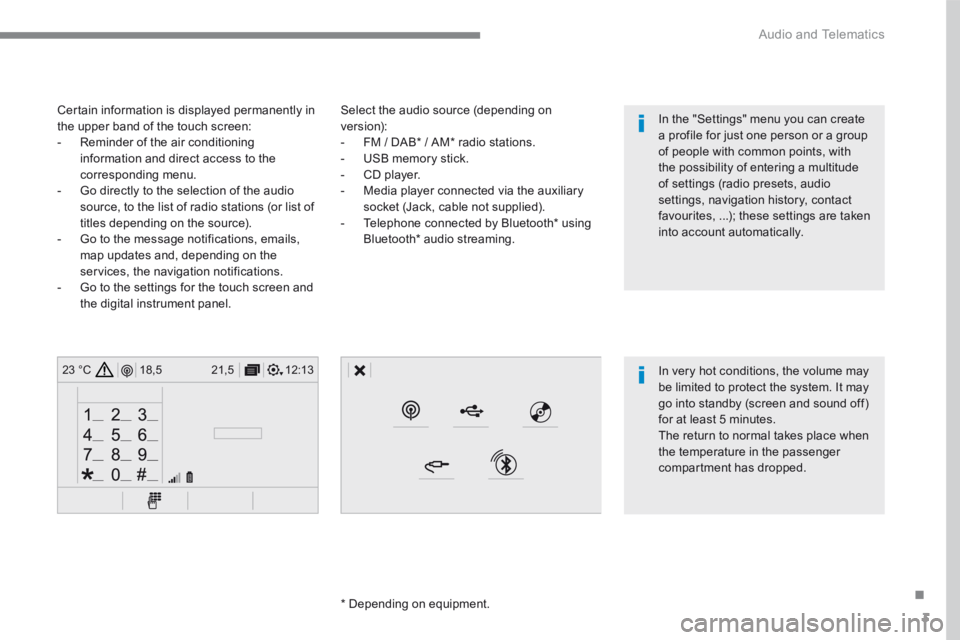
Select the audio source (depending on version): - FM / DAB * / AM * radio stations. - USB memory stick. - CD player. - Media player connected via the auxiliary socket (Jack, cable not supplied). - Telephone connected by Bluetooth * using
Bluetooth * audio streaming.
* Depending on equipment.
Certain information is displayed permanently in the upper band of the touch screen: - Reminder of the air conditioning information and direct access to the corresponding menu. - Go directly to the selection of the audio source, to the list of radio stations (or list of titles depending on the source).
- Go to the message notifications, emails, map updates and, depending on the services, the navigation notifications. - Go to the settings for the touch screen and the digital instrument panel.
In very hot conditions, the volume may be limited to protect the system. It may go into standby (screen and sound off) for at least 5 minutes.
The return to normal takes place when the temperature in the passenger compartment has dropped.
In the "Settings" menu you can create a profile for just one person or a group of people with common points, with the possibility of entering a multitude of settings (radio presets, audio settings, navigation history, contact favourites, ...); these settings are taken into account automatically.
Page 365 of 566
5
.
Audio and Telematics
Transversal-Peugeot_en_Chap01_NAC-2-2-0_ed01-2016
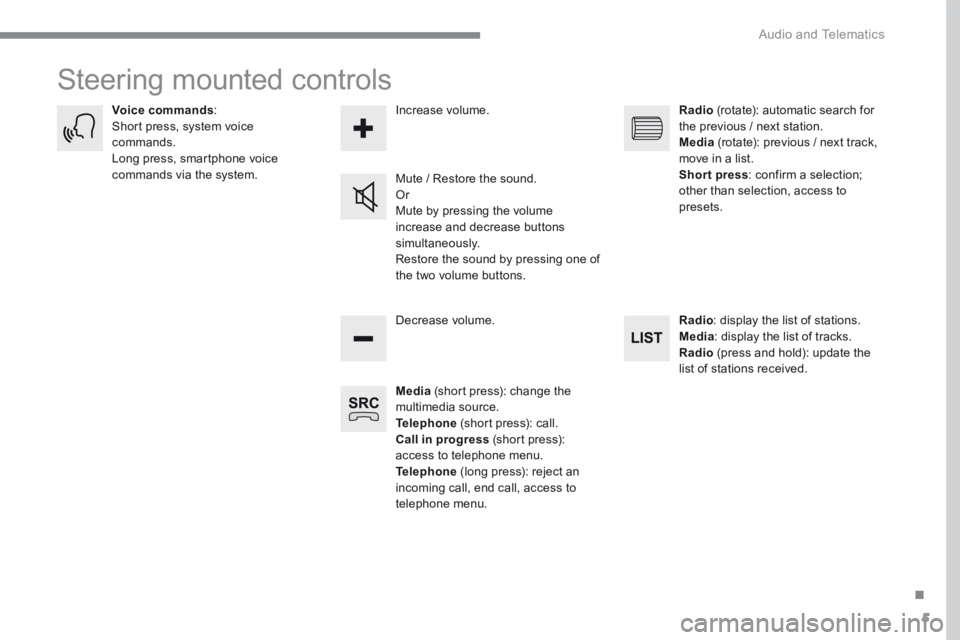
Steering mounted controls
Media (short press): change the multimedia source. Telephone (short press): call. Call in progress (short press): access to telephone menu. Telephone (long press): reject an incoming call, end call, access to telephone menu.
Decrease volume.
Voice commands : Short press, system voice commands. Long press, smartphone voice commands via the system. Mute / Restore the sound. Or Mute by pressing the volume
increase and decrease buttons simultaneously. Restore the sound by pressing one of the two volume buttons.
Radio (rotate): automatic search for the previous / next station. Media (rotate): previous / next track, move in a list. Short press : confirm a selection; other than selection, access to presets.
Radio : display the list of stations. Media : display the list of tracks. Radio (press and hold): update the list of stations received.
Increase volume.
Page 371 of 566
11
.
Audio and Telematics
Transversal-Peugeot_en_Chap01_NAC-2-2-0_ed01-2016
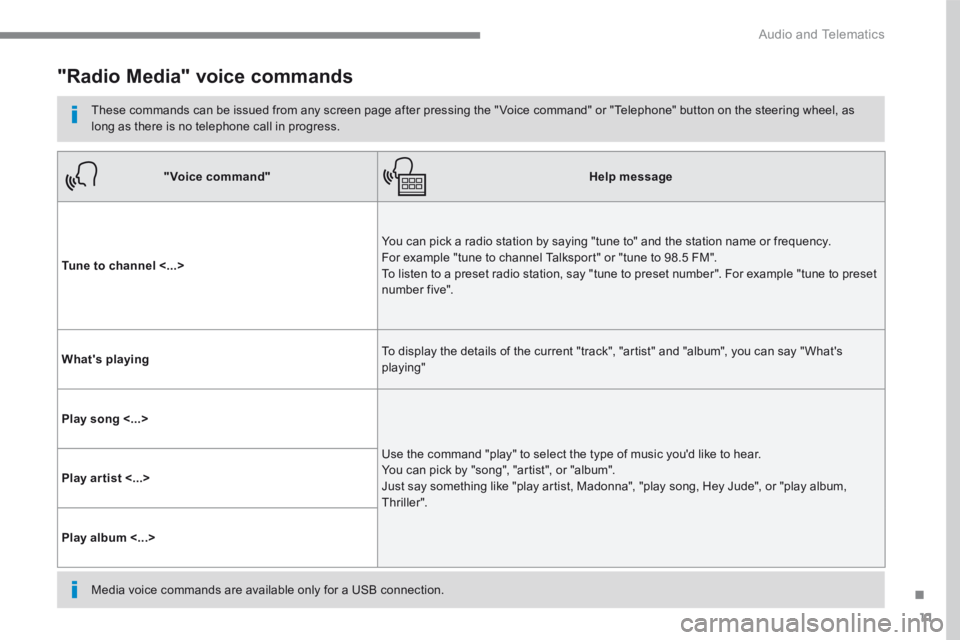
"Radio Media" voice commands
These commands can be issued from any screen page after pressing the " Voice command" or "Telephone" button on the steering wheel, as long as there is no telephone call in progress.
"Voice command"Help message
Tune to channel <...>
You can pick a radio station by saying "tune to" and the station name or frequency. For example "tune to channel Talksport" or "tune to 98.5 FM". To listen to a preset radio station, say "tune to preset number". For example "tune to preset number five".
What's playing To display the details of the current "track", "artist" and "album", you can say " What's playing"
Play song <...>
Use the command "play" to select the type of music you'd like to hear. You can pick by "song", "artist", or "album". Just say something like "play artist, Madonna", "play song, Hey Jude", or "play album, T hr iller ".
Play ar tist <...>
Play album <...>
Media voice commands are available only for a USB connection.
Page 409 of 566
49
.
4
5
6
7
7
8
8
Audio and Telematics
Transversal-Peugeot_en_Chap01_NAC-2-2-0_ed01-2016
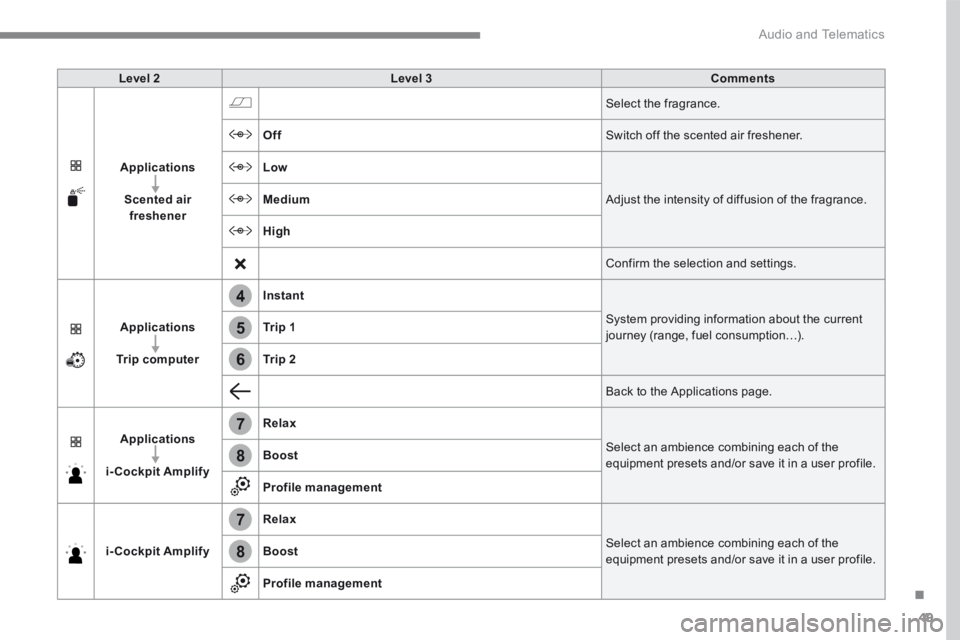
Level 2Level 3Comments
Applications
Scented air freshener
Select the fragrance.
Off Switch off the scented air freshener.
Low
Adjust the intensity of diffusion of the fragrance. Medium
High
Confirm the selection and settings.
Applications
Trip computer
Instant
System providing information about the current journey (range, fuel consumption…). Tr i p 1
Tr i p 2
Back to the Applications page.
Applications
i-Cockpit Amplify
Relax
Select an ambience combining each of the equipment presets and/or save it in a user profile. Boost
Profile management
i-Cockpit Amplify
Relax
Select an ambience combining each of the equipment presets and/or save it in a user profile. Boost
Profile management
Page 411 of 566
51
.
13
12
10
11
9
14
7
7
8
8
Audio and Telematics
Transversal-Peugeot_en_Chap01_NAC-2-2-0_ed01-2016
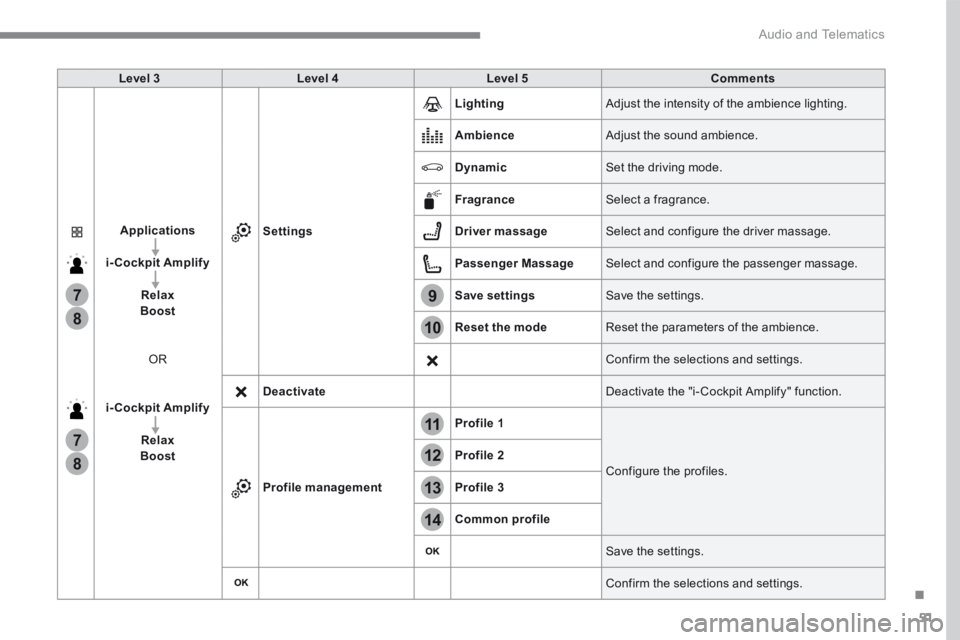
Level 3Level 4Level 5Comments
Applications
i-Cockpit Amplify
RelaxBoost
OR
i-Cockpit Amplify
RelaxBoost
Settings
Lighting Adjust the intensity of the ambience lighting.
Ambience Adjust the sound ambience.
Dynamic Set the driving mode.
Fragrance Select a fragrance.
Driver massage Select and configure the driver massage.
Passenger Massage Select and configure the passenger massage.
Save settings Save the settings.
Reset the mode Reset the parameters of the ambience.
Confirm the selections and settings.
Deactivate Deactivate the "i- Cockpit Amplify" function.
Profile management
Profile 1
Configure the profiles. Profile 2
Profile 3
Common profile
Save the settings.
Confirm the selections and settings.
Page 417 of 566
57
.
3
2
4
Audio and Telematics
Transversal-Peugeot_en_Chap01_NAC-2-2-0_ed01-2016
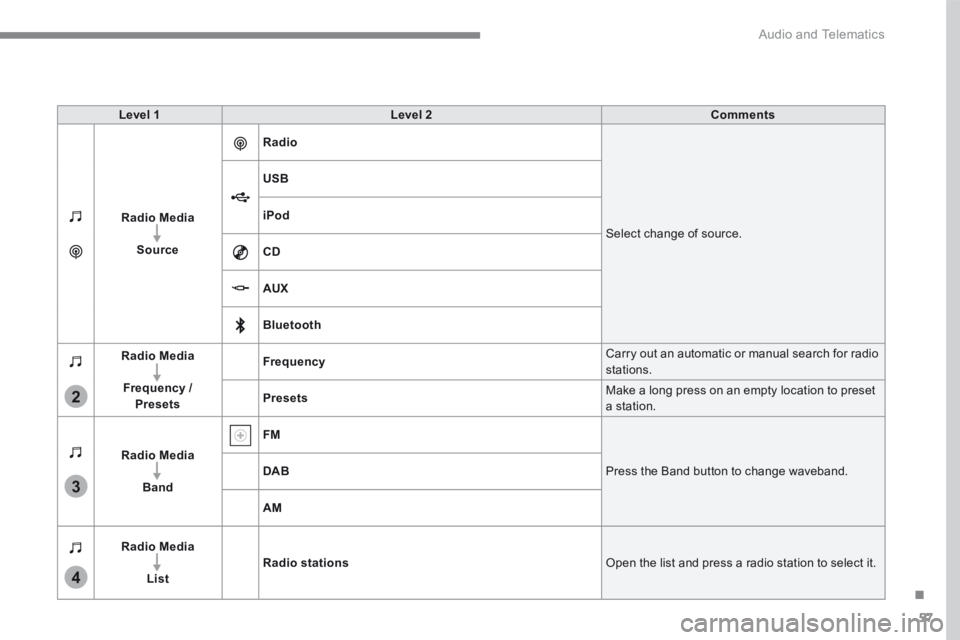
Level 1Level 2Comments
Radio Media
Source
Radio
Select change of source.
USB
iPod
CD
AUX
Bluetooth
Radio Media
Frequency / Presets
Frequency Carry out an automatic or manual search for radio stations.
Presets Make a long press on an empty location to preset a station.
Radio Media
Band
FM
Press the Band button to change waveband. DAB
AM
Radio Media
ListRadio stations Open the list and press a radio station to select it.
Page 419 of 566
59
.
5
12
8
6
13
14
15
9
7
10
11
1
1
1
Audio and Telematics
Transversal-Peugeot_en_Chap01_NAC-2-2-0_ed01-2016
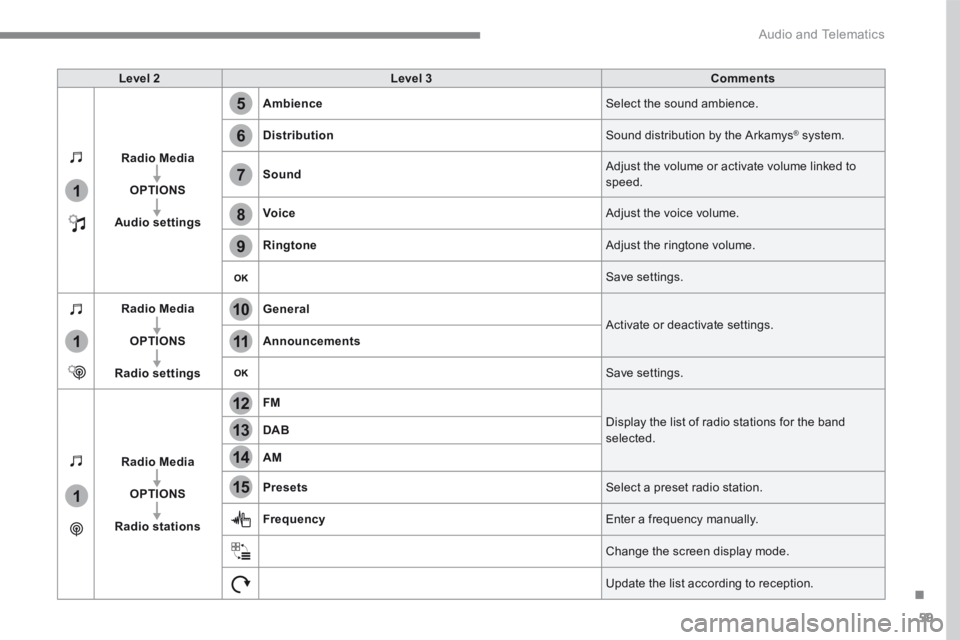
Level 2Level 3Comments
Radio Media
OPTIONS
Audio settings
Ambience Select the sound ambience.
Distribution Sound distribution by the Arkamys ® system. ® system. ®
Sound Adjust the volume or activate volume linked to speed.
Voice Adjust the voice volume.
Ringtone Adjust the ringtone volume.
Save settings.
Radio Media
OPTIONS
Radio settings
General Activate or deactivate settings. Announcements
Save settings.
Radio Media
OPTIONS
Radio stations
FM
Display the list of radio stations for the band selected. DAB
AM
Presets Select a preset radio station.
Frequency Enter a frequency manually.
Change the screen display mode.
Update the list according to reception.
Page 423 of 566
63
.
1
2
2
2
Audio and Telematics
Transversal-Peugeot_en_Chap01_NAC-2-2-0_ed01-2016
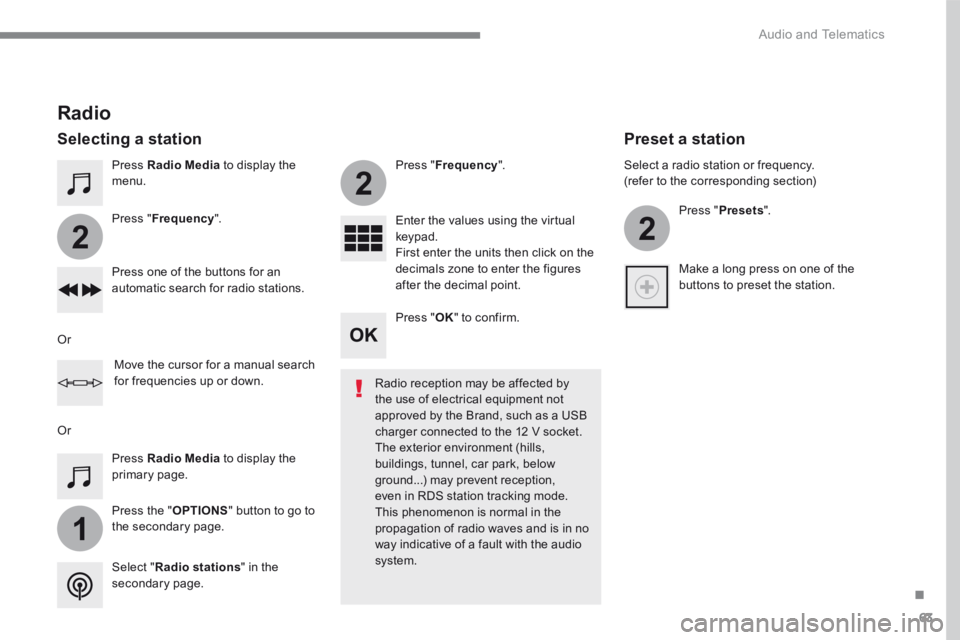
Press Radio Media to display the menu.
Press the " OPTIONS " button to go to the secondary page.
Press " Frequency ".
Press " Frequency ".
Enter the values using the virtual keypad. First enter the units then click on the decimals zone to enter the figures after the decimal point. Press one of the buttons for an automatic search for radio stations.
Press Radio Media to display the primary page.
Radio
Selecting a station
Radio reception may be affected by the use of electrical equipment not approved by the Brand, such as a USB
charger connected to the 12 V socket. The exterior environment (hills, buildings, tunnel, car park, below ground...) may prevent reception, even in RDS station tracking mode. This phenomenon is normal in the propagation of radio waves and is in no way indicative of a fault with the audio system. Select " Radio stations " in the secondary page.
Or
Or
Move the cursor for a manual search for frequencies up or down.
Select a radio station or frequency. (refer to the corresponding section)
Press " Presets ".
Make a long press on one of the buttons to preset the station.
Preset a station
Press " OK " to confirm.