reset PEUGEOT 308 2017 Owner's Manual
[x] Cancel search | Manufacturer: PEUGEOT, Model Year: 2017, Model line: 308, Model: Peugeot 308 2017Pages: 566, PDF Size: 16.05 MB
Page 459 of 566
99
.
Audio and Telematics
Transversal-Peugeot_en_Chap02_RCC-2-2-0_ed01-2016
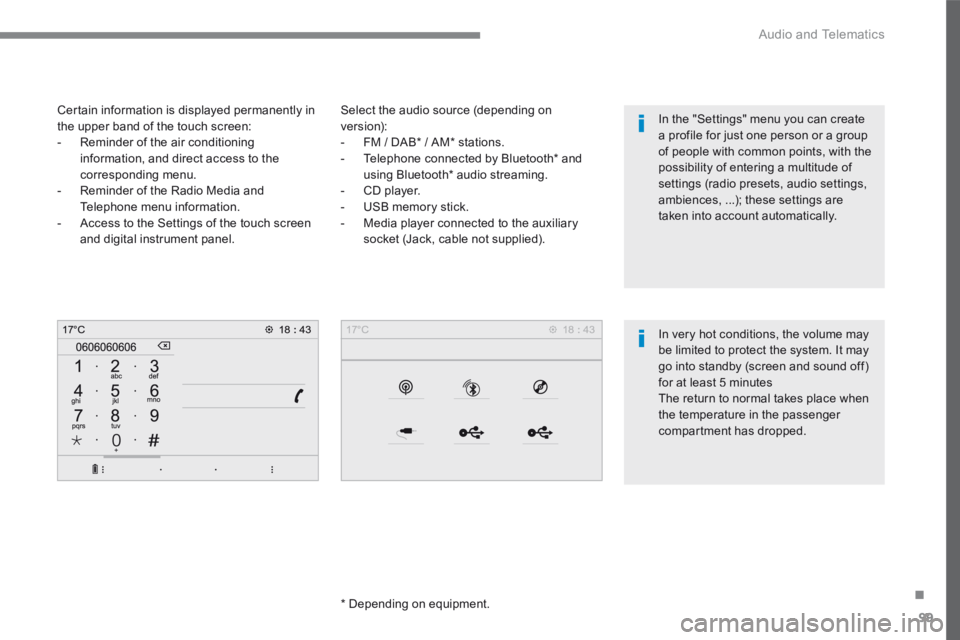
Select the audio source (depending on version): - FM / DAB * / AM * stations. - Telephone connected by Bluetooth * and using Bluetooth * audio streaming. - CD player. - USB memory stick. - Media player connected to the auxiliary
socket (Jack, cable not supplied).
* Depending on equipment.
Certain information is displayed permanently in the upper band of the touch screen: - Reminder of the air conditioning information, and direct access to the corresponding menu. - Reminder of the Radio Media and Telephone menu information. - Access to the Settings of the touch screen
and digital instrument panel.
In very hot conditions, the volume may be limited to protect the system. It may go into standby (screen and sound off) for at least 5 minutes The return to normal takes place when the temperature in the passenger
compartment has dropped.
In the "Settings" menu you can create a profile for just one person or a group of people with common points, with the possibility of entering a multitude of settings (radio presets, audio settings, ambiences, ...); these settings are taken into account automatically.
Page 460 of 566
100
Audio and Telematics
Transversal-Peugeot_en_Chap02_RCC-2-2-0_ed01-2016
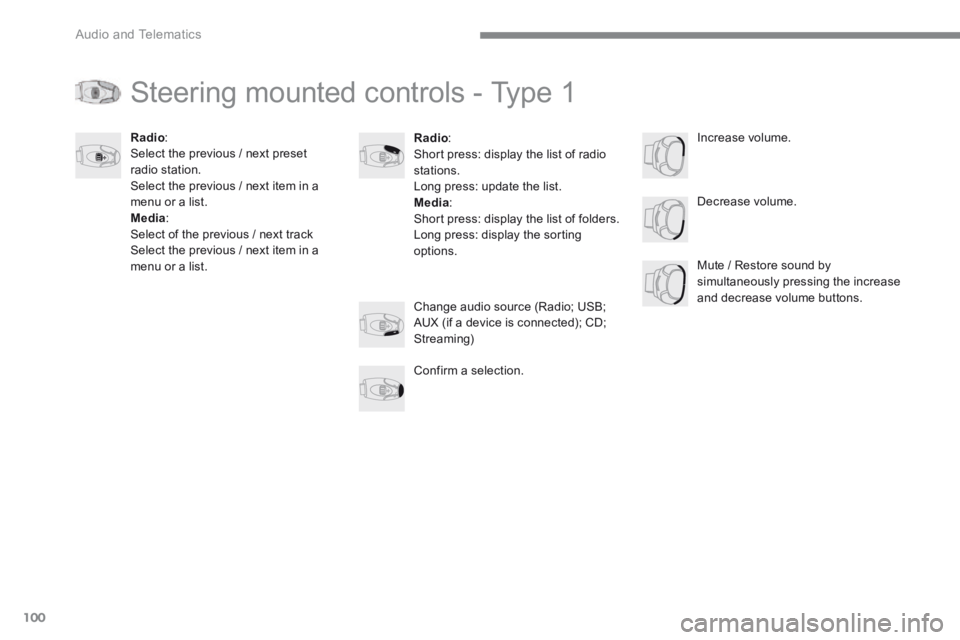
Steering mounted controls - Type 1
Radio : Short press: display the list of radio stations. Long press: update the list. Media : Short press: display the list of folders. Long press: display the sorting options.
Decrease volume.
Radio : Select the previous / next preset radio station. Select the previous / next item in a menu or a list. Media: Select of the previous / next track Select the previous / next item in a menu or a list. Mute / Restore sound by simultaneously pressing the increase and decrease volume buttons. Change audio source (Radio; USB; AUX (if a device is connected); CD; Streaming)
Confirm a selection.
Increase volume.
Page 461 of 566
101
.
Audio and Telematics
Transversal-Peugeot_en_Chap02_RCC-2-2-0_ed01-2016
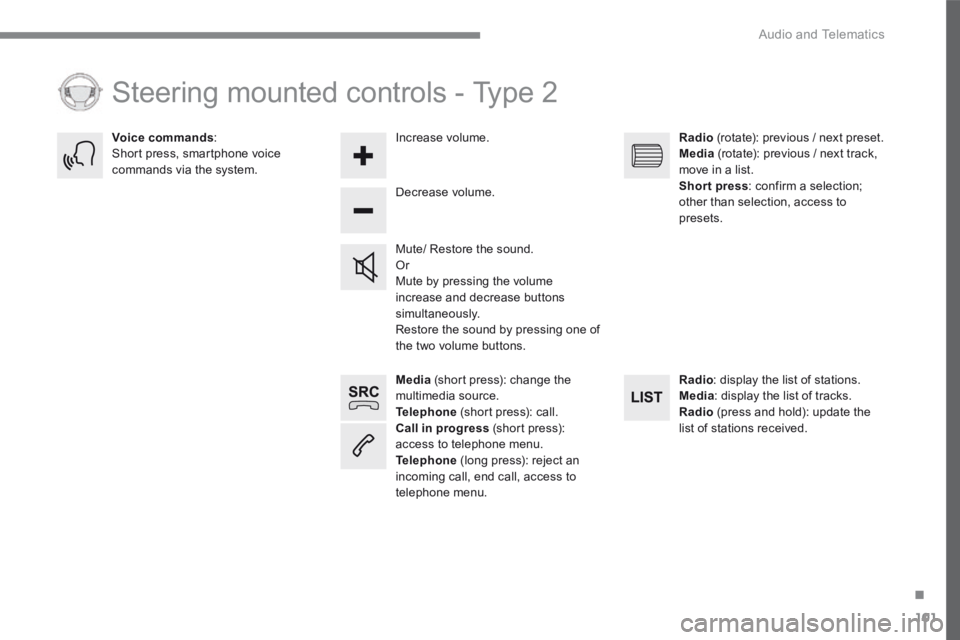
Media (short press): change the multimedia source. Telephone (short press): call. Call in progress (short press): access to telephone menu. Telephone (long press): reject an incoming call, end call, access to telephone menu.
Decrease volume.
Voice commands : Short press, smartphone voice commands via the system.
Mute/ Restore the sound. Or Mute by pressing the volume increase and decrease buttons simultaneously. Restore the sound by pressing one of the two volume buttons.
Radio (rotate): previous / next preset. Media (rotate): previous / next track, move in a list. Short press : confirm a selection; other than selection, access to presets.
Radio : display the list of stations. Media : display the list of tracks. Radio (press and hold): update the list of stations received.
Increase volume.
Steering mounted controls - Type 2
Page 469 of 566

109
.
13
12
10
11
9
14
4
4
5
5
Audio and Telematics
Transversal-Peugeot_en_Chap02_RCC-2-2-0_ed01-2016
Level 1Level 2Level 3Comments
Applications
i-Cockpit Amplify
RelaxBoost
OR
i-Cockpit Amplify
RelaxBoost
Settings
Fragrance Select a fragrance.
Lighting Adjust the intensity of the ambience lighting.
Ambience Adjust the sound ambience.
Driver massage Select and configure the driver massage.
Passenger Massage Select and configure the passenger massage.
Dynamic Set the driving mode.
Save settings Save the settings.
Reset the mode Reset the ambience parameters.
Confirm the selections and settings.
Deactivate Deactivate the "i- Cockpit Amplify function.
Profile management
Profile 1 Configure the profiles.
Profile 2
Profile 3
Common profile
Save the settings.
Confirm the selections and settings.
Page 473 of 566
113
.
1
2
3
4
5
Audio and Telematics
Transversal-Peugeot_en_Chap02_RCC-2-2-0_ed01-2016
Level 1Level 2Comments
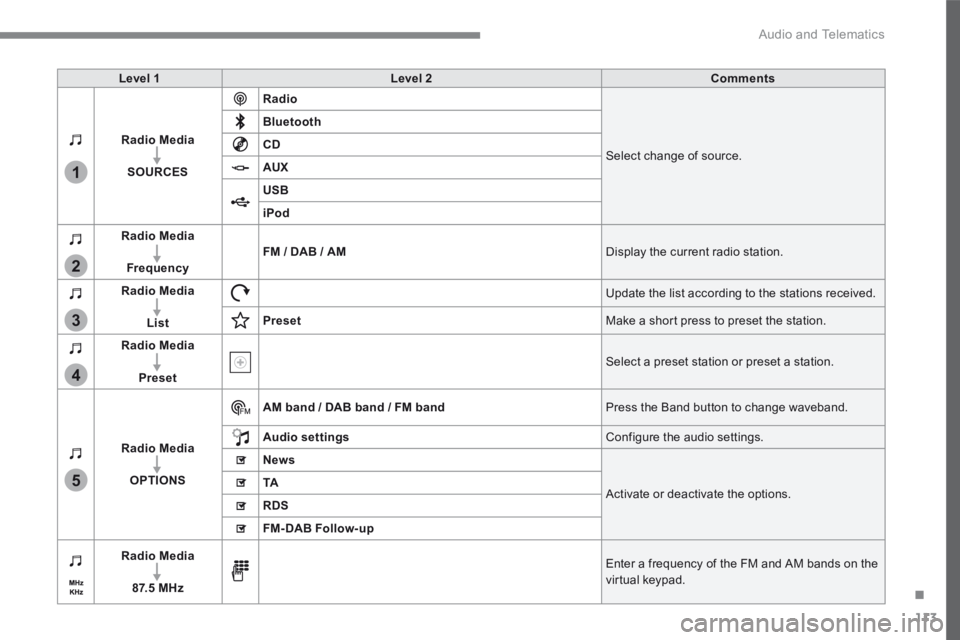
Radio Media
SOURCES
Radio
Select change of source.
Bluetooth
CD
AUX
USB
iPod
Radio Media
FrequencyFM / DAB / AM Display the current radio station.
Radio Media
List
Update the list according to the stations received.
Preset Make a short press to preset the station.
Radio Media
Preset Select a preset station or preset a station.
Radio Media
OPTIONS
AM band / DAB band / FM band Press the Band button to change waveband.
Audio settings Configure the audio settings.
News
Activate or deactivate the options. TA
RDS
FM-DAB Follow-up
Radio Media
8 7. 5 M H z
Enter a frequency of the FM and AM bands on the virtual keypad.
Page 475 of 566
115
.
1
1
1
2
3
4
5
5
5
Audio and Telematics
Transversal-Peugeot_en_Chap02_RCC-2-2-0_ed01-2016
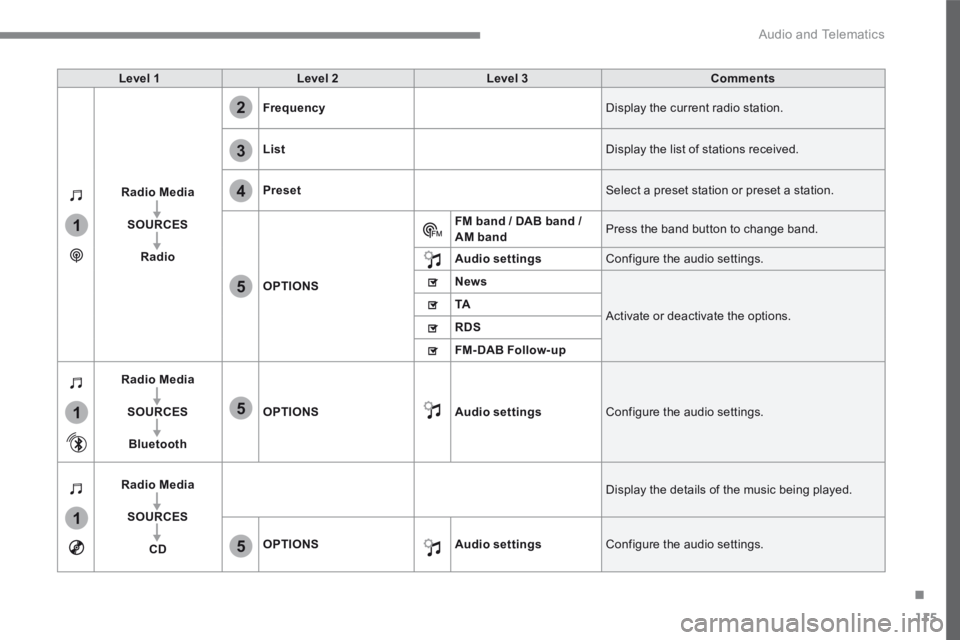
Level 1Level 2Level 3Comments
Radio Media
SOURCES
Radio
Frequency Display the current radio station.
List Display the list of stations received.
Preset Select a preset station or preset a station.
OPTIONS
FM band / DAB band / AM band Press the band button to change band.
Audio settings Configure the audio settings.
News
Activate or deactivate the options. TA
RDS
FM-DAB Follow-up
Radio Media
SOURCES
Bluetooth
OPTIONSAudio settings Configure the audio settings.
Radio Media
SOURCES
CD
Display the details of the music being played.
OPTIONSAudio settings Configure the audio settings.
Page 478 of 566
118
4
5
Audio and Telematics
Transversal-Peugeot_en_Chap02_RCC-2-2-0_ed01-2016
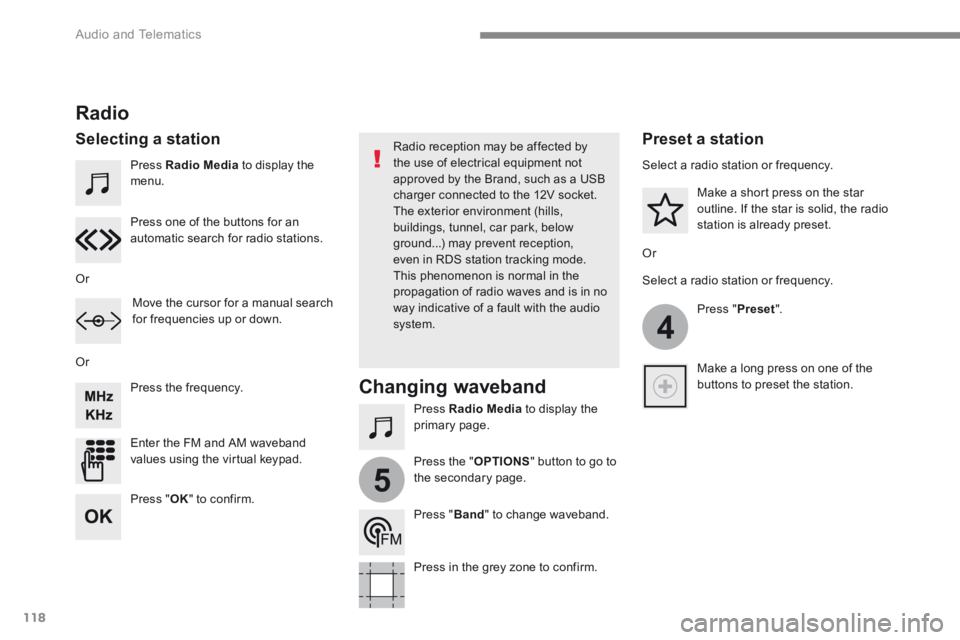
Press Radio Media to display the menu.
Press Radio Media to display the primary page.
Press the frequency.
Enter the FM and AM waveband values using the virtual keypad.
Press one of the buttons for an automatic search for radio stations.
Radio
Selecting a station Radio reception may be affected by the use of electrical equipment not approved by the Brand, such as a USB charger connected to the 12V socket. The exterior environment (hills,
buildings, tunnel, car park, below ground...) may prevent reception, even in RDS station tracking mode. This phenomenon is normal in the propagation of radio waves and is in no way indicative of a fault with the audio system.
Or
Or
Or
Move the cursor for a manual search for frequencies up or down.
Select a radio station or frequency.
Select a radio station or frequency.
Press " Preset ".
Press the " OPTIONS " button to go to the secondary page.
Make a short press on the star outline. If the star is solid, the radio station is already preset.
Make a long press on one of the buttons to preset the station.
Press " Band " to change waveband.
Press in the grey zone to confirm.
Preset a station
Changing waveband
Press " OK " to confirm.
Page 499 of 566
139
.
1
2
3
4
Audio and Telematics
Transversal-Peugeot_en_Chap02_RCC-2-2-0_ed01-2016
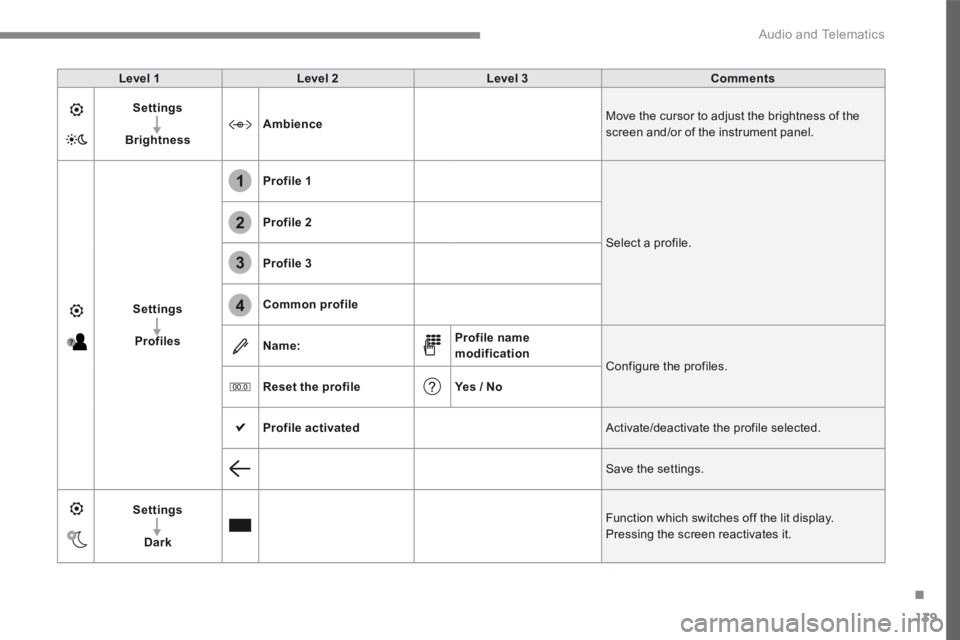
Level 1Level 2Level 3Comments
Settings
BrightnessAmbience Move the cursor to adjust the brightness of the screen and/or of the instrument panel.
Settings
Profiles
Profile 1
Select a profile.
Profile 2
Profile 3
Common profile
Name:Profile name modification Configure the profiles.
Reset the profileYes / No
Profile activated Activate/deactivate the profile selected.
Save the settings.
Settings
Dark
Function which switches off the lit display. Pressing the screen reactivates it.
Page 503 of 566
143
.
6
5
7
8
9
10
11
Audio and Telematics
Transversal-Peugeot_en_Chap02_RCC-2-2-0_ed01-2016
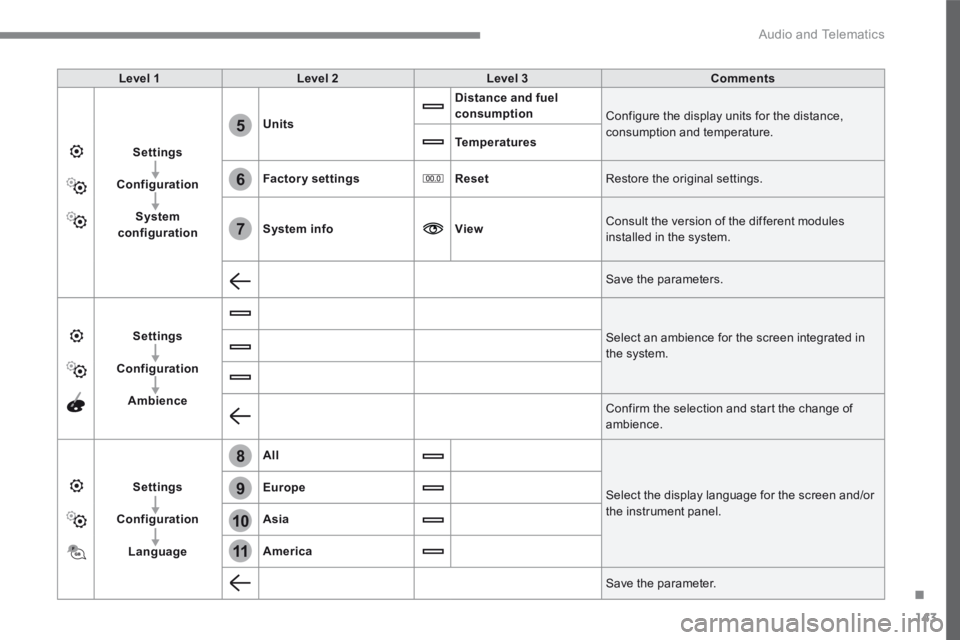
Level 1Level 2Level 3Comments
Settings
Configuration
System configuration
Units
Distance and fuel consumption Configure the display units for the distance, consumption and temperature. Temperatures
Factory settingsReset Restore the original settings.
System infoView Consult the version of the different modules installed in the system.
Save the parameters.
Settings
Configuration
Ambience
Select an ambience for the screen integrated in the system.
Confirm the selection and start the change of ambience.
Settings
Configuration
Language
All
Select the display language for the screen and/or the instrument panel.
Europe
Asia
America
Save the parameter.
Page 516 of 566
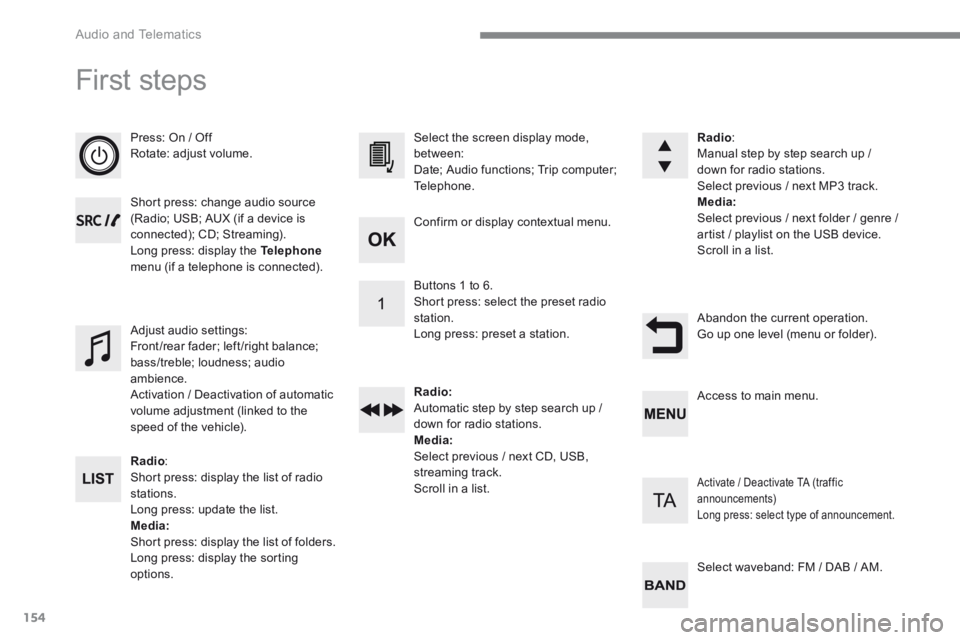
154
Audio and Telematics
First steps
Press: On / Off Rotate: adjust volume.
Short press: change audio source (Radio; USB; AUX (if a device is connected); CD; Streaming). Long press: display the Telephonemenu (if a telephone is connected).
Radio : Short press: display the list of radio stations. Long press: update the list. Media: Short press: display the list of folders. Long press: display the sorting options.
Select the screen display mode, between: Date; Audio functions; Trip computer; Telephone.
Adjust audio settings: Front/rear fader; left/right balance; bass/treble; loudness; audio ambience. Activation / Deactivation of automatic volume adjustment (linked to the speed of the vehicle).
Radio : Manual step by step search up / down for radio stations. Select previous / next MP3 track. Media: Select previous / next folder / genre / artist / playlist on the USB device. Scroll in a list.
Abandon the current operation. Go up one level (menu or folder).
Confirm or display contextual menu.
Buttons 1 to 6. Short press: select the preset radio station. Long press: preset a station.
Radio: Automatic step by step search up / down for radio stations. Media: Select previous / next CD, USB, streaming track. Scroll in a list.
Access to main menu.
Activate / Deactivate TA (traffic announcements) Long press: select type of announcement.
Select waveband: FM / DAB / AM.