ESP Peugeot 308 2018 Manual PDF
[x] Cancel search | Manufacturer: PEUGEOT, Model Year: 2018, Model line: 308, Model: Peugeot 308 2018Pages: 324, PDF Size: 10.72 MB
Page 214 of 324
212
Changing a fuse
Before changing a fuse:
F t he cause of the failure must be identified
and rectified,
F
a
ll electrical consumers must be switched
of f,
F
t
he vehicle must be immobilised with the
ignition off,
F
i
dentify the faulty fuse using the existing
allocation tables and diagrams.
To remove or fit a fuse, it is essential to:
F
u
se the special tweezers to extract the fuse
from its housing and check the condition of
its filament.
F
a
lways replace the failed fuse with a fuse
of the same rating (same colour); using a
different rating could cause faults (risk of
f i r e).
If the fault recurs after replacing a fuse, have
the electrical system checked by a PEUGEOT
dealer or a qualified workshop. Replacement with a fuse not shown in the
allocation tables that follow may cause
a serious malfunction of your vehicle.
Contact a PEUGEOT dealer or a qualified
workshop.
Installing electrical accessories
Your vehicle's electrical system is
designed to operate with standard or
optional equipment.
Before installing other electrical
equipment or accessories on your vehicle,
contact a PEUGEOT dealer or a qualified
workshop to check their comparability.
PEUGEOT accepts no responsibility for
the cost incurred in repairing your vehicle
or for rectifying malfunctions resulting
from the installation of accessories
not supplied and not recommended by
PEUGEOT and not installed in accordance
with specifications, in particular when the
combined power consumption of all of the
additional equipment connected exceeds
10
milliamperes.
Good
Failed Tw e e z e r s
Dashboard fuses
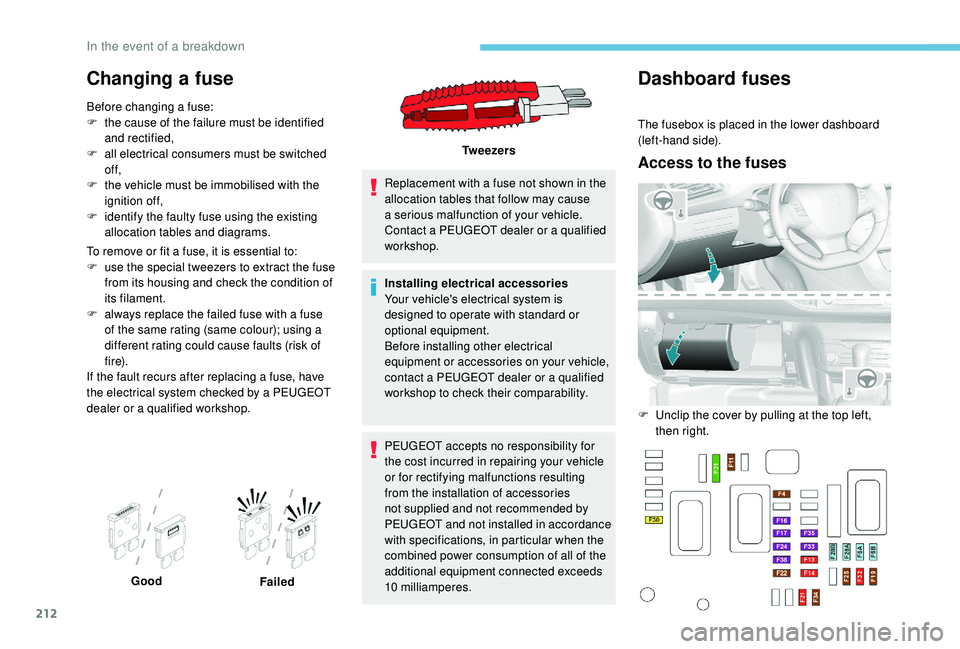
The fusebox is placed in the lower dashboard
(left-hand side).
Access to the fuses
F Unclip the cover by pulling at the top left,
then right.
In the event of a breakdown
Page 220 of 324
218
Following reconnection of the battery
Following reconnection of the battery, switch on
the ignition and wait 1 minute before starting to
permit initialisation of the electronic systems. If
minor problems nevertheless persist following
this operation, contact a PEUGEOT dealer or a
qualified workshop.
Referring to the corresponding section, you
must yourself reinitialise (depending on
version):
-
t
he remote control key,
-
t
he electric blind(s),
-
etc.The Stop & Start system may not be
operational during the trip following the
first engine start.
In this case, the system will only be
available again after a continuous
period of immobilisation of the vehicle,
a period which depends on the exterior
temperature and the state of charge of the
battery (up to about 8
hours).
To w i n g
Procedure for having your vehicle towed or
for towing another vehicle using a removable
towing eye.
Access to the tools
The towing eye is installed in the boot under
t h e f l o o r.
To access it:
F
o
pen the boot,
F
r
aise the floor,
F
r
emove the towing eye from the box.
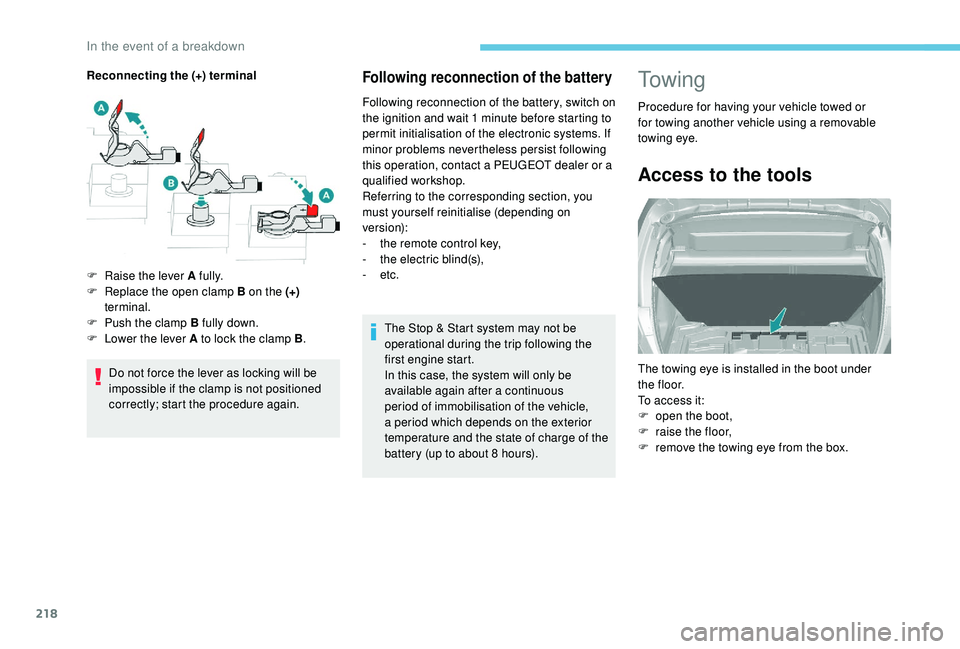
Reconnecting the (+) terminal
Do not force the lever as locking will be
impossible if the clamp is not positioned
correctly; start the procedure again.
F
Ra
ise the lever A fully.
F
R
eplace the open clamp B on the (+)
terminal.
F
P
ush the clamp B fully down.
F
L
ower the lever A to lock the clamp B
.
In the event of a breakdown
Page 222 of 324
220
For more information on the Electric
parking brake and, in particular, parking
the vehicle with the brake released, refer
to the corresponding section.
Running out of fuel
(Diesel)
On vehicles fitted with Diesel engines, the fuel
system must be primed if you run out of fuel.
For all versions other than BlueHDi, refer to the
corresponding engine compartment view.
For more information on Diesel misfuel
prevention , refer to the corresponding
section.
If the engine does not start first time, do
not keep trying, but start the procedure
again from the beginning.
With BlueHDi 100 S&S BVM5
(5-speed manual), BlueHDi
115 S&S and BlueHDi 120
S&S engines
With BlueHDi 100 S&S
BVM6 (6-speed manual),
BlueHDi 130 S&S and
BlueHDi 180 S&S engines
F Fill the fuel tank with at least 5 litres of
Diesel.
F
S
witch on the ignition (without starting the
engine).
F
W
ait around 1 minute and switch off the
ignition.
F
O
perate the starter to run the engine.
If the engine does not start, repeat the
procedure.
Other engines
F Fill the fuel tank with at least five litres of Diesel.
F
O
pen the bonnet.
F
I
f necessary, unclip the cover to access the
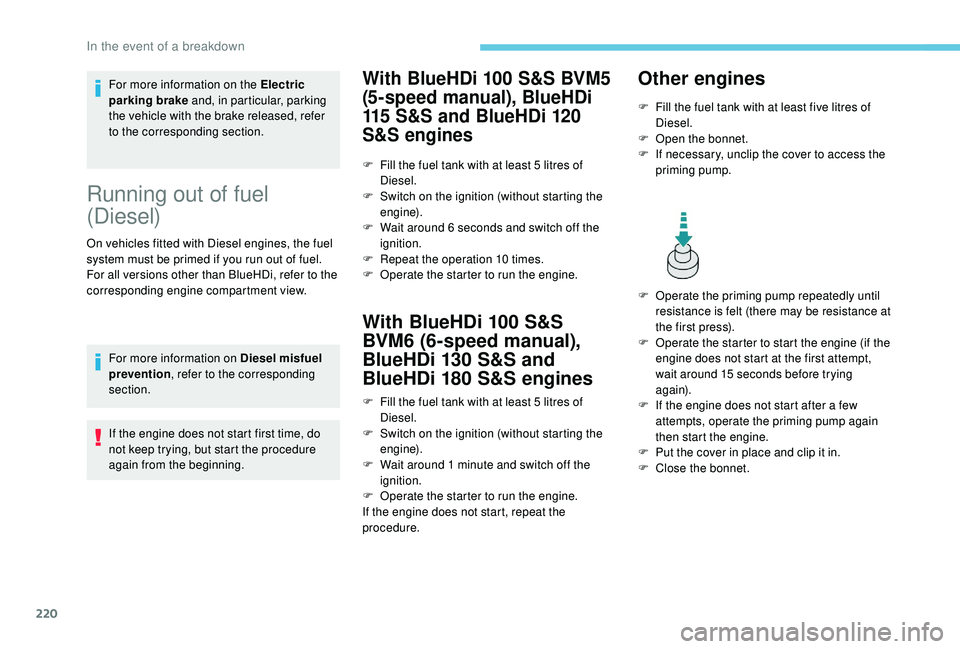
priming pump.
F
O
perate the priming pump repeatedly until
resistance is felt (there may be resistance at
the first press).
F
O
perate the starter to start the engine (if the
engine does not start at the first attempt,
wait around 15
seconds before trying
again).
F
I
f the engine does not start after a few
attempts, operate the priming pump again
then start the engine.
F
P
ut the cover in place and clip it in.
F
C
lose the bonnet.
F
F
ill the fuel tank with at least 5
litres of
Diesel.
F
S
witch on the ignition (without starting the
engine).
F
W
ait around 6
seconds and switch off the
ignition.
F
R
epeat the operation 10 times.
F
O
perate the starter to run the engine.
In the event of a breakdown
Page 223 of 324
221
Engine technical data and
towed loads
Engines
The engine characteristics are given in the
vehicle's registration document, as well as in
sales brochures.The maximum power corresponds to the
value type-approved on a test bed, under
conditions defined in European legislation
(Directive 1999/99/EC).
For more information, contact a PEUGEOT
dealer or a qualified workshop.
Weights and towed loads
The weights and towed loads relating to your
vehicle are given in the registration document,
as well as in sales brochures.
These values are also given on the
manufacturer's plate or label.
For more information, contact a PEUGEOT
dealer or a qualified workshop. The GTW (Gross Train Weight) and towed load
values indicated are valid up to a maximum
altitude of 1,000
metres. The towed load value
must be reduced by 10% for each additional
1,000 metres of altitude.
The maximum authorised nose weight
corresponds to the weight permitted on the
towball.
High exterior temperatures may result
in a reduction in the per formance of the
vehicle to protect the engine. When the
exterior temperature is higher than 37°C,
limit the towed weight.
Towing by a lightly loaded vehicle can
adversely affect road holding.
Braking distances are increased when
towing a trailer.
When using a vehicle to tow, never
exceed a speed of approximately 62 mph
(100
km/h) (obser ve the local legislation
in force).
If the exterior temperature is high, it is
recommended that the engine is allowed
to idle for 1 to 2
minutes after the vehicle
comes to a stop, to facilitate its cooling.
9
Technical data
Page 224 of 324
222
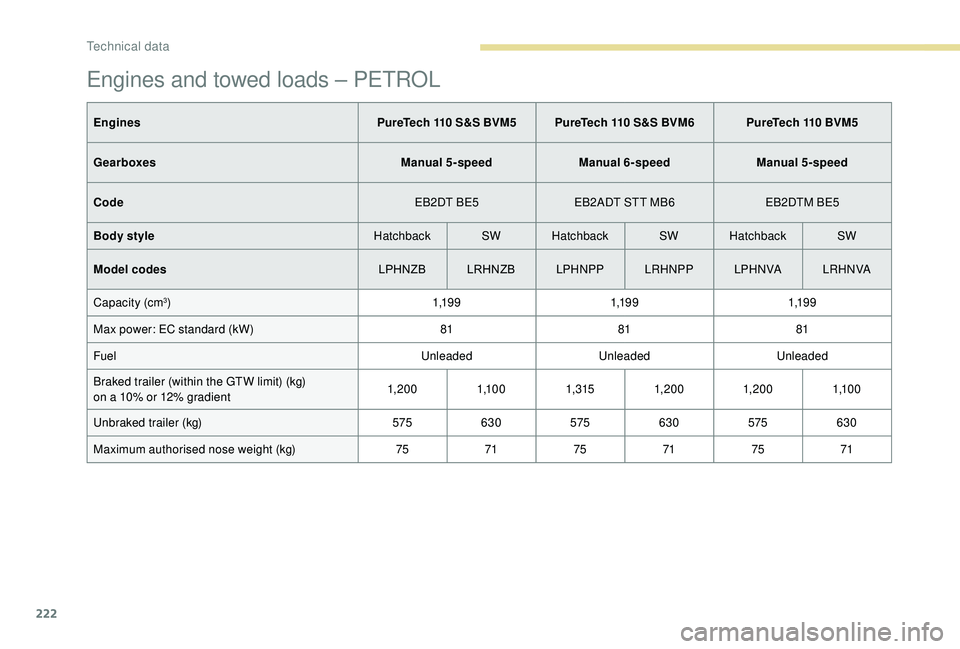
Engines and towed loads – PETROL
EnginesPureTech 110 S&S BVM5 PureTech 110 S&S BVM6 PureTech 110 BVM5
Gearboxes Manual 5-speedManual 6-speedManual 5-speed
Code EB2DT BE5EB2ADT STT MB6 EB2DTM BE5
Body style HatchbackSWHatchback SWHatchback SW
Model codes LPHNZBLRHNZB LPHNPPLRHNPP LPH N VA LR H N VA
Capacity (cm
3) 1,1 9 91,1 9 91,1 9 9
Max power: EC standard (kW) 818181
Fuel UnleadedUnleadedUnleaded
Braked trailer (within the GTW limit) (kg)
on a 10% or 12% gradient 1, 20 0
1,1 0 01,3151, 20 0 1, 20 0 1,1 0 0
Unbraked trailer (kg) 575630 575630 575630
Maximum authorised nose weight (kg) 757175 7175 71
Technical data
Page 225 of 324
223
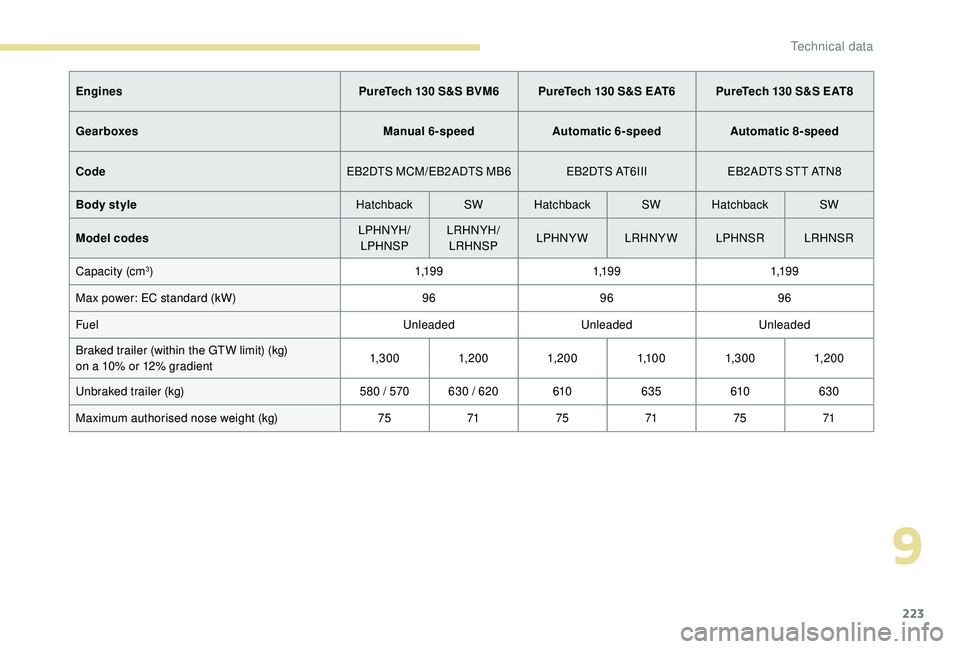
EnginesPureTech 130 S&S BVM6 PureTech 130 S&S EAT6 PureTech 130 S&S EAT8
Gearboxes Manual 6-speedAutomatic 6-speed Automatic 8-speed
Code EB2DTS MCM/EB2ADTS MB6 EB2DTS AT6III EB2ADTS STT ATN8
Body style HatchbackSWHatchback SWHatchback SW
Model codes LPHNYH/
LPHNSP LRHNYH/
LRHNSP LPHNYW LRHNYW
LPHNSRLRHNSR
Capacity (cm
3) 1,1 9 91,1 9 91,1 9 9
Max power: EC standard (kW) 969696
Fuel UnleadedUnleadedUnleaded
Braked trailer (within the GTW limit) (kg)
on a 10% or 12% gradient 1,3 0 0
1, 20 01, 20 0 1,1 0 01,3 0 0 1, 20 0
Unbraked trailer (kg) 580 / 570 630 / 620 610635 610630
Maximum authorised nose weight (kg) 757175 7175 71
9
Technical data
Page 226 of 324
224
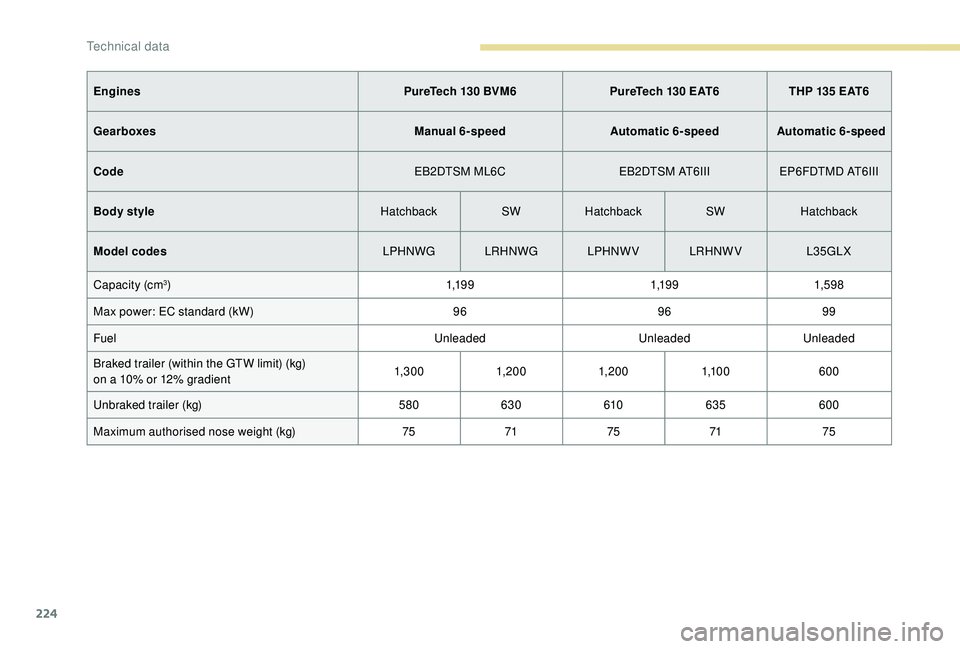
EnginesPureTech 130 BVM6PureTech 130 EAT6THP 135 EAT6
Gearboxes Manual 6-speedAutomatic 6-speed Automatic 6-speed
Code EB2DTSM ML6CEB2DTSM AT6IIIEP6FDTMD AT6III
Body style HatchbackSWHatchback SWHatchback
Model codes LPHNWG LRHNWGLPHNWVLRHNWV L35GLX
Capacity (cm
3) 1,1 9 91,1 9 91,59 8
Max power: EC standard (kW) 969699
Fuel UnleadedUnleadedUnleaded
Braked trailer (within the GTW limit) (kg)
on a 10% or 12% gradient 1,3 0 0
1, 20 0 1, 20 0 1,1 0 0 600
Unbraked trailer (kg) 580630 610635 600
Maximum authorised nose weight (kg) 757175 71 75
Technical data
Page 241 of 324
5
The RDS, if activated, enables you to
continue listening to the same station
by automatic retuning to alternative
frequencies. However, in certain conditions,
coverage of an RDS station may not be
assured throughout the entire country as
radio stations do not cover 100% of the
territory. This explains the loss of reception
of the station during a journey.
Short procedure
In "Radio " mode, press the OK button to
activate or deactivate RDS directly.
Long procedure
Press the MENU button.
Select " Audio functions ".
Press OK.
Select the " FM waveband
preferences " function.
Press OK. Select "
Frequency tracking
(RDS) ".
Press OK , RDS is displayed on the
screen.
Playing TA messages
The TA (Traffic Announcement) function
gives priority to TA alert messages.
To be active, this function requires
good reception of a radio station that
broadcasts this type of message. As
soon as traffic information is broadcast,
the media playing (radio, USB, etc.) is
interrupted automatically to issue the
TA message. Normal play of the media
is restored after the message has been
issued.
Take care when increasing the volume
while listening to TA messages. The
volume may prove too high on return to
the original audio source.
Press the TA button to activate or
deactivate traffic messages.
Playing INFO messages
The INFO function gives priority to alert
messages. To operate, this function
needs good reception of a radio station
transmitting this type of message. When a
message is transmitted, the current audio
source (radio, CD, etc.) is interrupted
automatically to play the INFO message.
Normal playback resumes at the end of
the transmission of the message.
Make a long press on this button to
display the list of categories.
Select or deselect categories.
Activate or deactivate the reception
of the corresponding messages.
Displaying TEXT INFOS
Radio text is information transmitted by
the radio station related to the station's
current programme or song.
.
Bluetooth® audio system
Page 243 of 324
7
DAB/FM station tracking
"DAB" does not have 100% coverage of
the country.
When the digital signal is weak,
"DAB / FM auto tracking" allows you to
continue listening to the same station,
by automatically switching to the
corresponding analogue FM station (if it
ex i st s).
When the "DAB
/ FM auto tracking" is
active, the DAB station will be selected
automatically.
Press the MENU button.
Select " Multimedia " and confirm.
Select " DAB
/ FM auto tracking"
and confirm.
If "DAB
/ FM auto tracking" tracking is
enabled, there is a lag of a few seconds
when the system switches to the analogue
FM station sometimes with a change in
volume. If the "DAB" station you are listening to
is not available on FM ("
DAB/FM" option
struck out), or if "DAB / FM auto tracking"
is not enabled, the sound will be cut when
the digital signal is too weak.
Media
USB port
To protect the system, do not use a USB
hub.
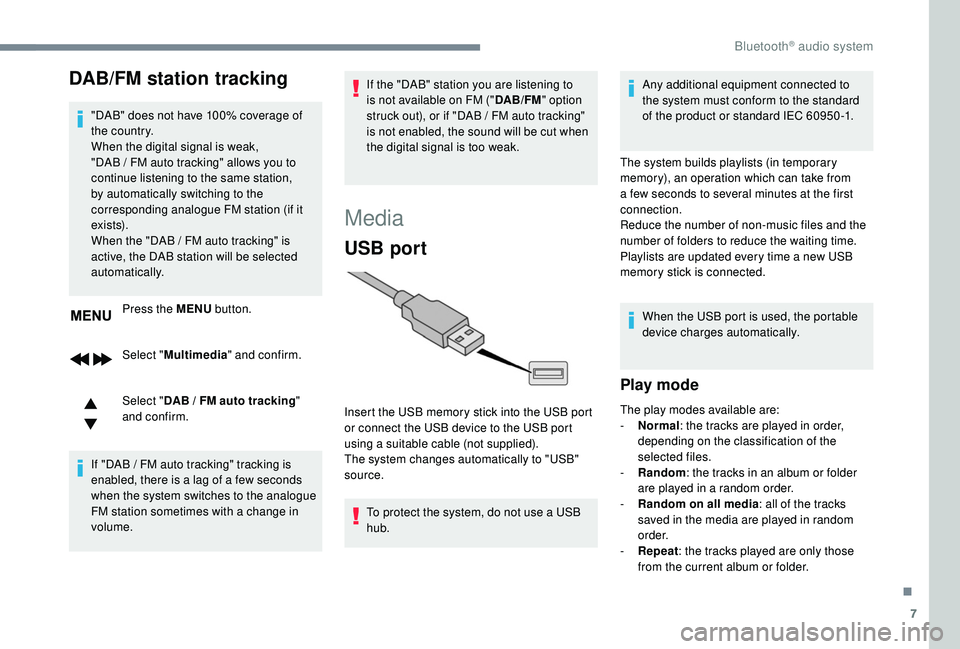
Insert the USB memory stick into the USB port
or connect the USB device to the USB port
using a suitable cable (not supplied).
The system changes automatically to "USB"
source. Any additional equipment connected to
the system must conform to the standard
of the product or standard IEC 60950 -1.
The system builds playlists (in temporary
memory), an operation which can take from
a few seconds to several minutes at the first
connection.
Reduce the number of non-music files and the
number of folders to reduce the waiting time.
Playlists are updated every time a new USB
memory stick is connected. When the USB port is used, the portable
device charges automatically.
Play mode
The play modes available are:
- No rmal: the tracks are played in order,
depending on the classification of the
selected files.
-
Ra
ndom: the tracks in an album or folder
are played in a random order.
-
R
andom on all media: all of the tracks
saved in the media are played in random
o r d e r.
-
R
epeat : the tracks played are only those
from the current album or folder.
.
Bluetooth® audio system
Page 248 of 324
12
Managing calls
During a call, press OK to display
the contextual menu.
End call
In the contextual menu, select
" Hang up " to end the call.
Confirm with OK.
Microphone off
(so that the caller cannot hear) In the contextual menu:
-
s
elect "Micro OFF " to switch off
the microphone.
-
d
eselect "Micro OFF " to switch
the microphone on.
Confirm with OK.
Telephone mode
In the contextual menu:
- s elect " Telephone mode " to
transfer the call to the telephone
(for example, to leave the vehicle
while continuing a conversation).
-
d
eselect " Telephone mode " to
transfer the call to the vehicle.
Confirm with OK.
If the contact has been cut off, when you
reconnect on returning to the vehicle,
the Bluetooth connection will be restored
automatically and sound returned to the
system (depending on the compatibility of the
telephone).
In some cases, the Telephone mode must be
activated from the telephone.
Interactive voice response
From the contextual menu, select
" DTMF tones " and confirm to use
the digital keypad to navigate in the
interactive voice response menu.
Confirm with OK.
Consultation call
From the contextual menu, select
" Switch " and validate to return to a
call left on hold.
Confirm with OK.
Directory
To access the directory, press and
hold SRC/TEL .
Select " Directory " to see the list of
contacts.
Confirm with OK.
To modify the contacts saved in the
system, press MENU then select
" Telephone " and confirm.
Select " Directory management "
and confirm.
Yo u c a n :
-
"Consult an entr y ",
-
"Delete an entry ",
-
"Delete all entries ".
Bluetooth® audio system