instrument panel PEUGEOT 308 2018 Workshop Manual
[x] Cancel search | Manufacturer: PEUGEOT, Model Year: 2018, Model line: 308, Model: Peugeot 308 2018Pages: 360, PDF Size: 12.38 MB
Page 178 of 360
176
Speed limiter
System which prevents the
vehicle from exceeding the speed
programmed by the driver.
The speed limiter is switched on manually.
The minimum programmed speed is 19
mph
(30
km/h).
The programmed speed remains in the system
memory when the ignition is switched off.
The speed limiter is a driving aid that
cannot, in any circumstances, replace the
need to obser ve speed limits or the need
for vigilance on the part of the driver.
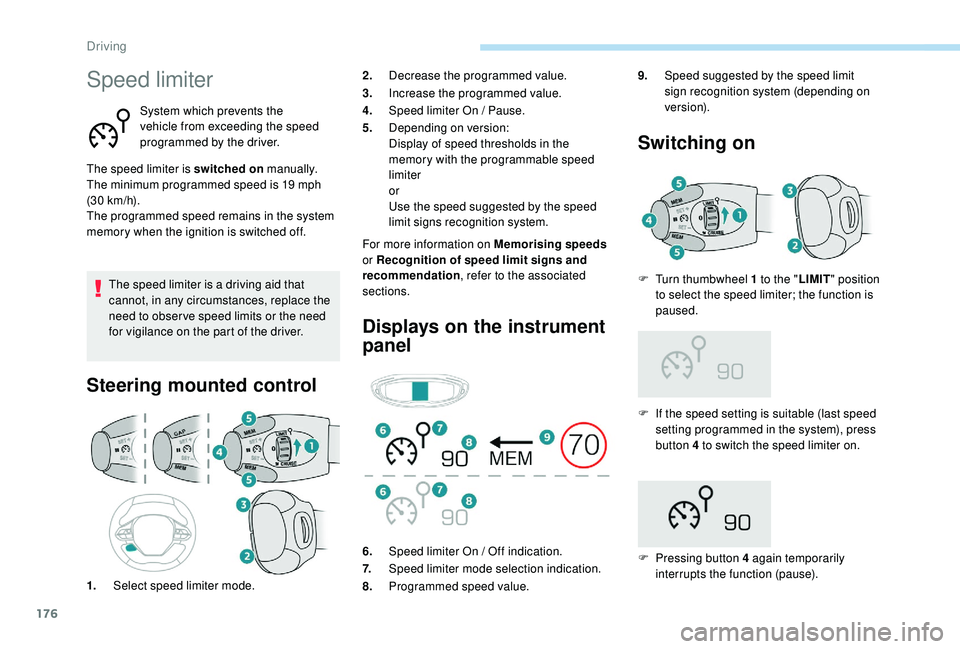
Steering mounted control
For more information on Memorising speeds
or Recognition of speed limit signs and
recommendation , refer to the associated
sections.
Displays on the instrument
panel Switching on
F If the speed setting is suitable (last speed
setting programmed in the system), press
button 4 to switch the speed limiter on.
F
P
ressing button 4 again temporarily
interrupts the function (pause).
2.
Decrease the programmed value.
3. Increase the programmed value.
4. Speed limiter On / Pause.
5. Depending on version:
Display of speed thresholds in the
memory with the programmable speed
limiter
or
Use the speed suggested by the speed
limit signs recognition system.
1. Select speed limiter mode. 6.
Speed limiter On / Off indication.
7. Speed limiter mode selection indication.
8. Programmed speed value. 9.
Speed suggested by the speed limit
sign recognition system (depending on
ve r s i o n).
F
T
urn thumbwheel 1 to the "
LIMIT" position
to select the speed limiter; the function is
paused.
Driving
Page 179 of 360
177
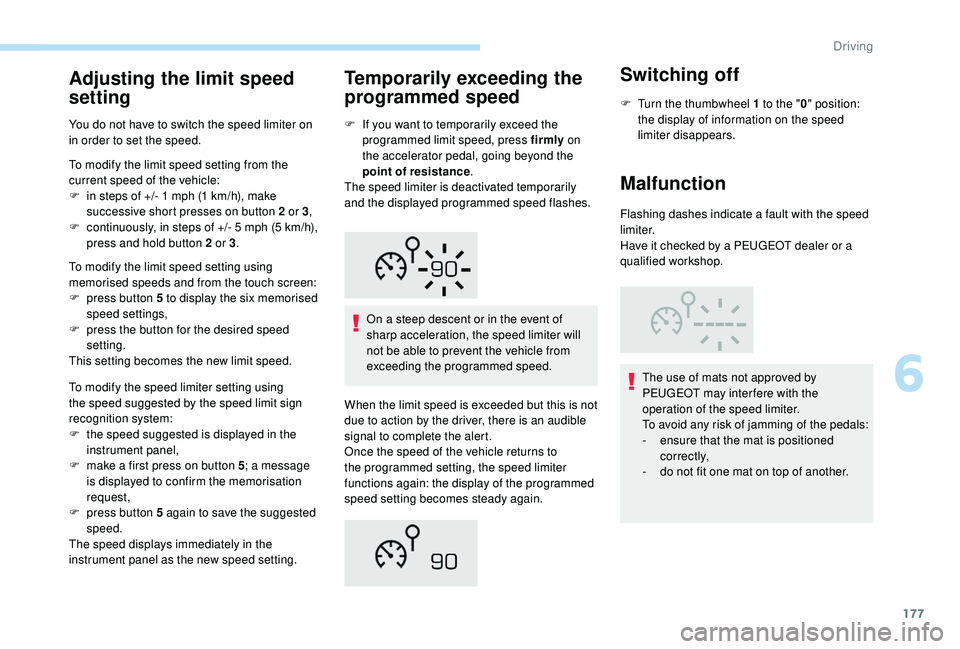
Adjusting the limit speed
setting
You do not have to switch the speed limiter on
in order to set the speed.
To modify the limit speed setting from the
current speed of the vehicle:
F
i
n steps of +/- 1 mph (1 km/h), make
successive short presses on button 2 or 3 ,
F
c
ontinuously, in steps of +/- 5 mph (5 km/h),
press and hold button 2 or 3 .
To modify the limit speed setting using
memorised speeds and from the touch screen:
F
p
ress button 5 to display the six memorised
speed settings,
F
p
ress the button for the desired speed
setting.
This setting becomes the new limit speed.
To modify the speed limiter setting using
the speed suggested by the speed limit sign
recognition system:
F
t
he speed suggested is displayed in the
instrument panel,
F
m
ake a first press on button 5 ; a message
is displayed to confirm the memorisation
request,
F
p
ress button 5 again to save the suggested
speed.
The speed displays immediately in the
instrument panel as the new speed setting.
Temporarily exceeding the
programmed speed
F If you want to temporarily exceed the programmed limit speed, press firmly on
the accelerator pedal, going beyond the
point of resistance .
The speed limiter is deactivated temporarily
and the displayed programmed speed flashes.
On a steep descent or in the event of
sharp acceleration, the speed limiter will
not be able to prevent the vehicle from
exceeding the programmed speed.
When the limit speed is exceeded but this is not
due to action by the driver, there is an audible
signal to complete the alert.
Once the speed of the vehicle returns to
the programmed setting, the speed limiter
functions again: the display of the programmed
speed setting becomes steady again.
Switching off
F Turn the thumbwheel 1 to the " 0" position:
the display of information on the speed
limiter disappears.
Malfunction
Flashing dashes indicate a fault with the speed
limiter.
Have it checked by a PEUGEOT dealer or a
qualified workshop.
The use of mats not approved by
PEUGEOT may inter fere with the
operation of the speed limiter.
To avoid any risk of jamming of the pedals:
-
e
nsure that the mat is positioned
c o r r e c t l y,
-
d
o not fit one mat on top of another.
6
Driving
Page 180 of 360
178
Cruise control
System which automatically
maintains the cruising speed of the
vehicle at a setting programmed by
the driver, without any action on the
accelerator pedal.
The cruise control is switched on manually.
It requires a minimum vehicle speed of 25
mph
(40
km/h).
With a manual gearbox, it requires the
engagement of third gear or higher.
With an automatic gearbox, it requires the
engagement of the selector in mode D or of
second gear or higher in mode M .
Speed regulation remains active after
changing gear on vehicles fitted with a
manual gearbox and Stop & Start.
The operation of the cruise control can be
interrupted (pause):
-
b
y pressing control 4 or by pressing the
brake pedal,
-
a
utomatically, if operation of the dynamic
stability control system is triggered. Switching off the ignition cancels any
programmed speed setting.
The cruise control system is a driving aid
that cannot, in any circumstances, replace
the need to obser ve speed limits, nor the
need for vigilance on the part of the driver.
As a safety measure, you are advised to
keep your feet near the pedals at all times.
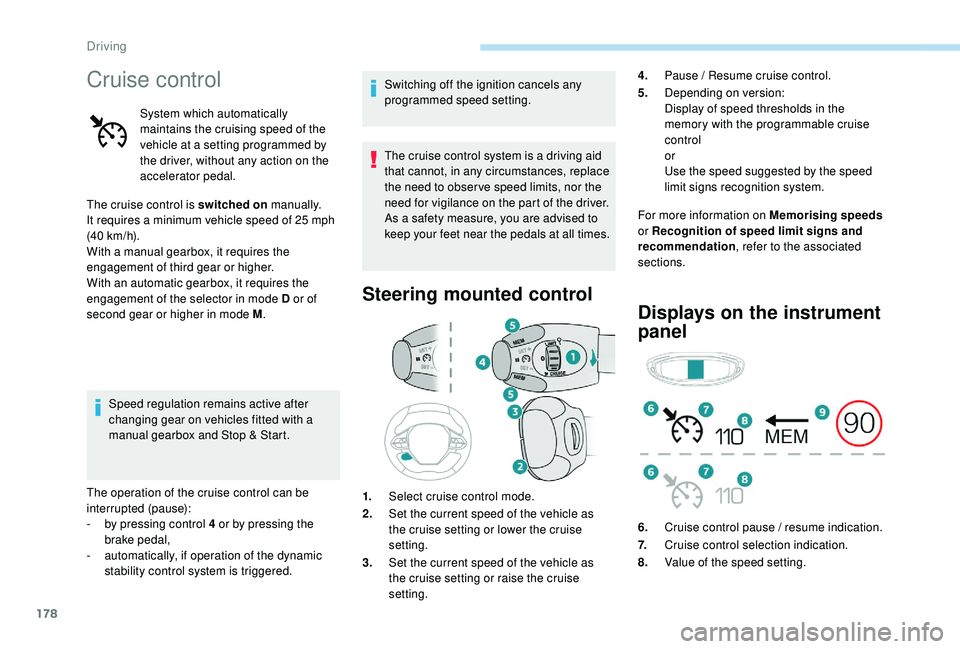
Steering mounted control
For more information on Memorising speeds
or Recognition of speed limit signs and
recommendation , refer to the associated
sections.
Displays on the instrument
panel
1. Select cruise control mode.
2. Set the current speed of the vehicle as
the cruise setting or lower the cruise
setting.
3. Set the current speed of the vehicle as
the cruise setting or raise the cruise
setting. 4.
Pause / Resume cruise control.
5. Depending on version:
Display of speed thresholds in the
memory with the programmable cruise
control
or
Use the speed suggested by the speed
limit signs recognition system.
6. Cruise control pause / resume indication.
7. Cruise control selection indication.
8. Value of the speed setting.
Driving
Page 181 of 360
179
Switching on
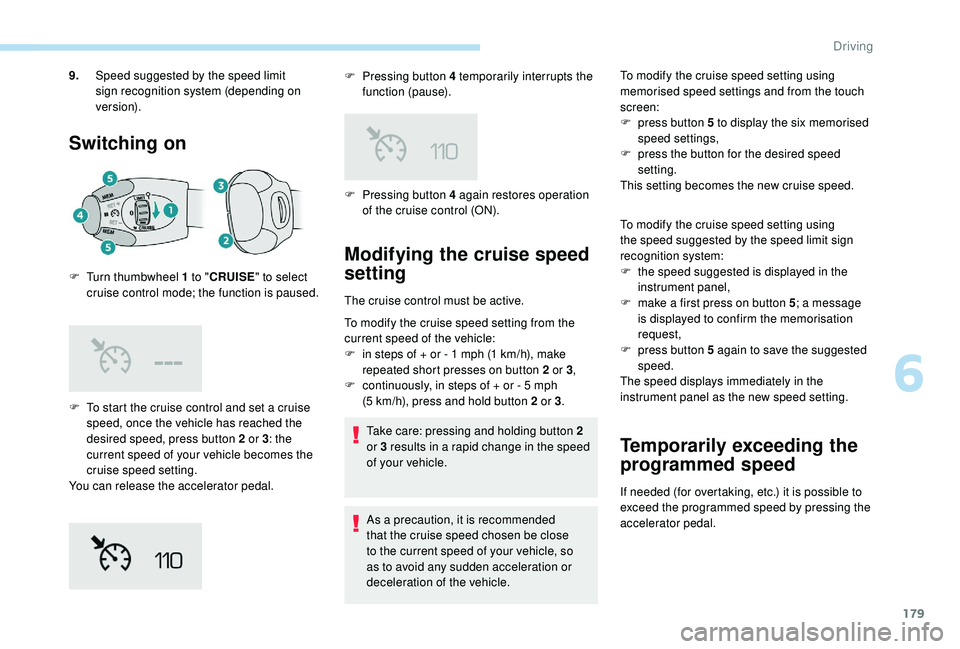
F To start the cruise control and set a cruise speed, once the vehicle has reached the
desired speed, press button 2 or 3 : the
current speed of your vehicle becomes the
cruise speed setting.
You can release the accelerator pedal. F
P
ressing button 4 temporarily interrupts the
function (pause).
9.
Speed suggested by the speed limit
sign recognition system (depending on
ve r s i o n).
F
T
urn thumbwheel 1 to "
CRUISE" to select
cruise control mode; the function is paused. F
P
ressing button 4 again restores operation
of the cruise control (ON).
Modifying the cruise speed
setting
The cruise control must be active.
To modify the cruise speed setting from the
current speed of the vehicle:
F
i
n steps of + or - 1 mph (1 km/h), make
repeated short presses on button 2 or 3 ,
F
c
ontinuously, in steps of + or - 5 mph
(5
km/h), press and hold button 2 or 3 .
Take care: pressing and holding button 2
or 3
results in a rapid change in the speed
of your vehicle.
As a precaution, it is recommended
that the cruise speed chosen be close
to the current speed of your vehicle, so
as to avoid any sudden acceleration or
deceleration of the vehicle. To modify the cruise speed setting using
memorised speed settings and from the touch
screen:
F
p
ress button 5 to display the six memorised
speed settings,
F
p
ress the button for the desired speed
setting.
This setting becomes the new cruise speed.
To modify the cruise speed setting using
the speed suggested by the speed limit sign
recognition system:
F
t
he speed suggested is displayed in the
instrument panel,
F m ake a first press on button 5; a message
is displayed to confirm the memorisation
request,
F
p
ress button 5 again to save the suggested
speed.
The speed displays immediately in the
instrument panel as the new speed setting.
Temporarily exceeding the
programmed speed
If needed (for overtaking, etc.) it is possible to
exceed the programmed speed by pressing the
accelerator pedal.
6
Driving
Page 184 of 360
182
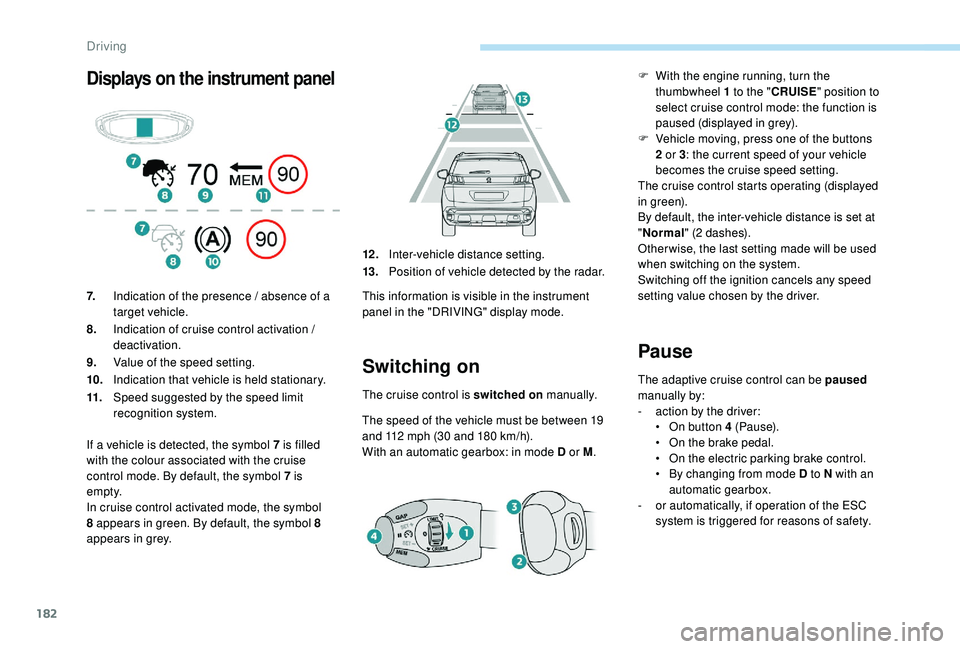
Displays on the instrument panel
Switching on
The cruise control is switched on manually.
The speed of the vehicle must be between 19
and 112
mph (30 and 180 km/h).
With an automatic gearbox: in mode D or M .
Pause
The adaptive cruise control can be paused
manually by:
-
a
ction by the driver:
•
O
n button 4 (Pause).
•
O
n the brake pedal.
•
O
n the electric parking brake control.
•
B
y changing from mode D to N with an
automatic gearbox.
-
o
r automatically, if operation of the ESC
system is triggered for reasons of safety.
7.
Indication of the presence / absence of a
target vehicle.
8. Indication of cruise control activation /
deactivation.
9. Value of the speed setting.
10. Indication that vehicle is held stationary.
11. Speed suggested by the speed limit
recognition system. 12 .
Inter-vehicle distance setting.
13. Position of vehicle detected by the radar.
This information is visible in the instrument
panel in the "DRIVING" display mode.
If a vehicle is detected, the symbol 7
is filled
with the colour associated with the cruise
control mode. By default, the symbol 7 is
e m pt y.
In cruise control activated mode, the symbol
8 appears in green. By default, the symbol 8
appears in grey. F
W
ith the engine running, turn the
thumbwheel 1 to the " CRUISE" position to
select cruise control mode: the function is
paused (displayed in grey).
F
V
ehicle moving, press one of the buttons
2 or 3 : the current speed of your vehicle
becomes the cruise speed setting.
The cruise control starts operating (displayed
in green).
By default, the inter-vehicle distance is set at
" Normal " (2 dashes).
Other wise, the last setting made will be used
when switching on the system.
Switching off the ignition cancels any speed
setting value chosen by the driver.
Driving
Page 185 of 360
183
When the cruise control is paused, it
can only be reactivated when all of the
safety conditions are met. The message
"Activation not possible, conditions
unsuitable" is displayed while reactivation
is not possible.
To reactivate the function, the driver
must accelerate to reach at least 19 mph
(30
km/h), then press one of the buttons
2 , 3 or 4 .
As a safety measure, wait until the
current speed reaches the speed setting
to reactivate the function by pressing
button
4.
Versions fitted with an automatic
gearbox
Following braking of the vehicle bringing it
to a complete stop, the system holds the
vehicle stationary; the cruise control is
paused.
The driver should press the accelerator
pedal to move off, then reactivate the
system above 19
mph (30 km/h) by
pressing button 2 , 3 or 4.
If the driver takes no action following
this immobilisation, the electric parking
brake is applied automatically after a few
minutes.Modification of the speed
setting
Modification from the current
speed
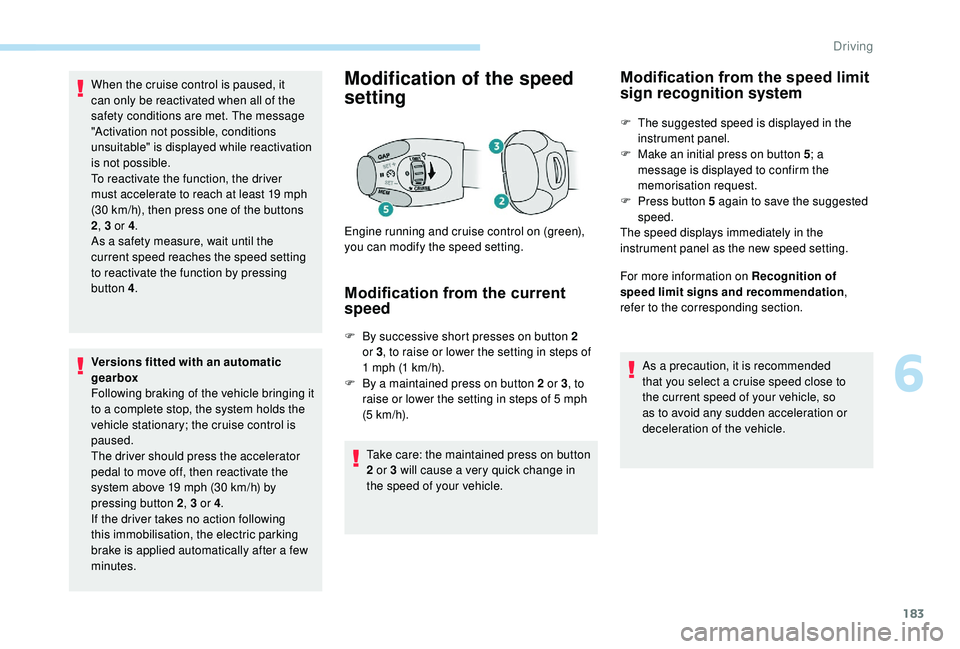
F By successive short presses on button 2 or 3 , to raise or lower the setting in steps of
1
mph (1 km/h).
F
B
y a maintained press on button 2 or 3 , to
raise or lower the setting in steps of 5
mph
(5
km/h).
Take care: the maintained press on button
2 or 3 will cause a very quick change in
the speed of your vehicle.
Engine running and cruise control on (green),
you can modify the speed setting.
Modification from the speed limit
sign recognition system
F The suggested speed is displayed in the
instrument panel.
F
M
ake an initial press on button 5 ; a
message is displayed to confirm the
memorisation request.
F
P
ress button 5 again to save the suggested
speed.
The speed displays immediately in the
instrument panel as the new speed setting.
For more information on Recognition of
speed limit signs and recommendation ,
refer to the corresponding section.
As a precaution, it is recommended
that you select a cruise speed close to
the current speed of your vehicle, so
as to avoid any sudden acceleration or
deceleration of the vehicle.
6
Driving
Page 186 of 360
184
This setting remains in memory, whatever the
state of the system and when the ignition is
switched off.
Exceeding the programmed
setting
It is possible to exceed the speed setting
temporarily by depressing the accelerator
pedal.
The cruise control no longer manages the
braking system during this period.
Simply release the accelerator pedal to return
to the programmed speed.
If the programmed speed setting is exceeded,
the display of the speed setting disappears
and a message "Cruise control suspended"
is displayed until the accelerator pedal is
released.
Driving situations and
associated alerts
To benefit from all necessary information on
the instrument panel, you must previously
select the "DRIVING" display mode.
The table below describes the alerts and
messages displayed depending on the driving
situation.
The display of these alerts is not sequential.
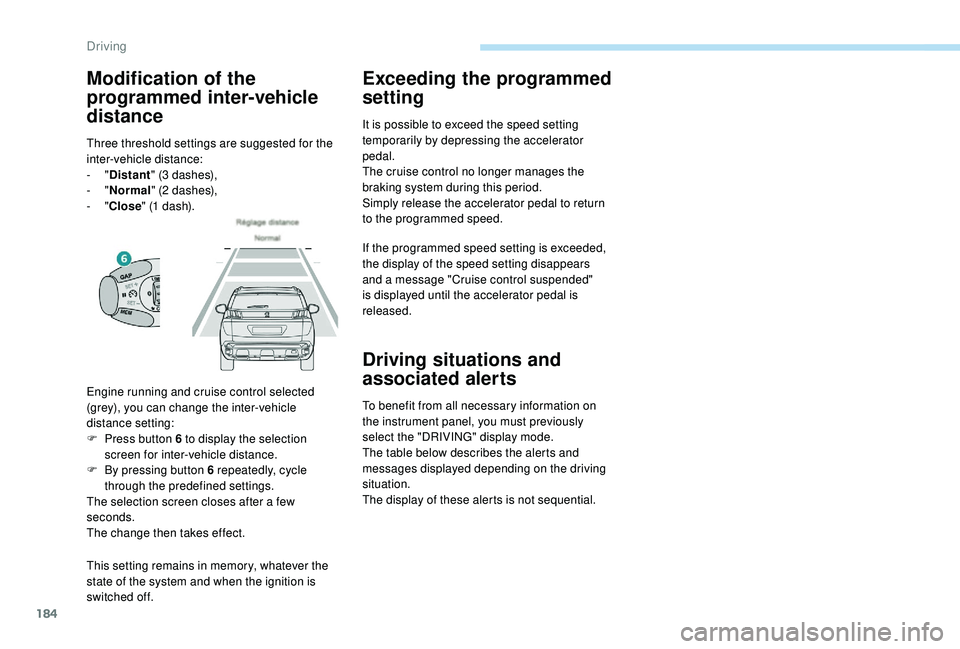
Engine running and cruise control selected
(grey), you can change the inter-vehicle
distance setting:
F
P
ress button 6 to display the selection
screen for inter-vehicle distance.
F
B
y pressing button 6 repeatedly, cycle
through the predefined settings.
The selection screen closes after a few
seconds.
The change then takes effect.
Modification of the
programmed inter-vehicle
distance
Three threshold settings are suggested for the
inter-vehicle distance:
-
"Distant " (3
dashes),
-
"Normal " (2
dashes),
-
"Close " (1
dash).
Driving
Page 191 of 360
189
Operating fault
In the event of a fault with the cruise
control, you are alerted by the
illumination of this warning lamp
and the display of a message in the
instrument panel, accompanied by
an audible signal.
Have the system checked by a PEUGEOT
dealer or a qualified workshop.
Distance alert and Active
Safety Brake
This system is a driving aid that includes three
functions:
-
D
istance alert (alert if there is a risk of
collision),
-
I
ntelligent emergency braking assistance,
Activation and operating
conditions
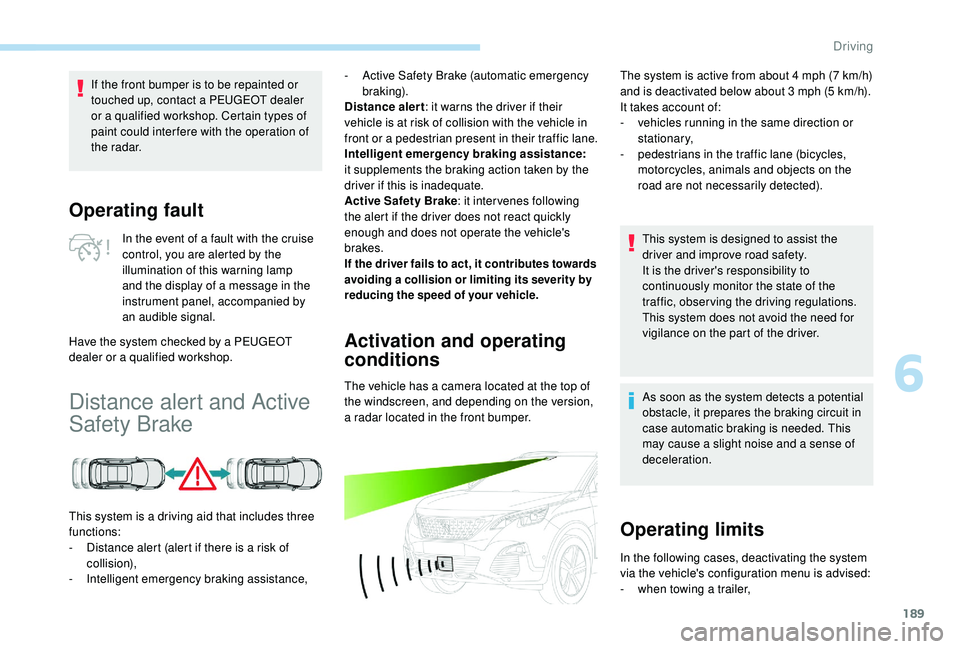
The vehicle has a camera located at the top of
the windscreen, and depending on the version,
a radar located in the front bumper.
If the front bumper is to be repainted or
touched up, contact a PEUGEOT dealer
or a qualified workshop. Certain types of
paint could inter fere with the operation of
the radar.
-
A
ctive Safety Brake (automatic emergency
b r ak ing).
Distance alert : it warns the driver if their
vehicle is at risk of collision with the vehicle in
front or a pedestrian present in their traffic lane.
Intelligent emergency braking assistance:
it supplements the braking action taken by the
driver if this is inadequate.
Active Safety Brake : it intervenes following
the alert if the driver does not react quickly
enough and does not operate the vehicle's
brakes.
If the driver fails to act, it contributes towards
avoiding a collision or limiting its severity by
reducing the speed of your vehicle.
The system is active from about 4 mph (7 km/h)
a nd is deactivated below about 3 mph (5 km/h).
It takes account of:
-
v
ehicles running in the same direction or
stationary,
-
p
edestrians in the traffic lane (bicycles,
motorcycles, animals and objects on the
road are not necessarily detected).
This system is designed to assist the
driver and improve road safety.
It is the driver's responsibility to
continuously monitor the state of the
traffic, observing the driving regulations.
This system does not avoid the need for
vigilance on the part of the driver.
As soon as the system detects a potential
obstacle, it prepares the braking circuit in
case automatic braking is needed. This
may cause a slight noise and a sense of
deceleration.
Operating limits
In the following cases, deactivating the system
via the vehicle's configuration menu is advised:
-
w
hen towing a trailer,
6
Driving
Page 192 of 360
190
It is possible that warnings are not given,
are given too late or seem unjustified.
Consequently, always stay alert and be
prepared to react at any time to avoid an
accident.
Distance alert
Depending on the degree of risk of collision
detected by the system and the alert threshold
chosen by the driver, different levels of
alert can be triggered and displayed in the
instrument panel.Level 1 (orange)
: visual alert only,
signalling to you that the vehicle in
front is very close.
The message " Vehicle close" is
displayed.
This level of alert is based on the inter-vehicle
time between your vehicle and the vehicle in
front.
Level 2 (red) : visual and audible
alert, warning you that a collision is
imminent.
The message " Brake!" is displayed.
This level of alert is based on the time before
collision. It takes account of the vehicle
dynamics, the speed of your vehicle and the
one in front, the environmental conditions, the
operation of the vehicle (cornering, pedals
pressed, etc.) to trigger the alert at the best
moment.
Where the speed of your vehicle is too
high approaching another vehicle, the
first level of alert may not be displayed:
the level 2 alert may be displayed
di r e c t l y.
Important: alert level 1 is never
displayed when the " Close" trigger
threshold has been selected.
-
w
hen carrying long objects on roof bars or a
roof rack,
-
b
efore using an automatic car wash, with
the engine running,
-
b
efore placing the vehicle on a rolling road
in a workshop,
-
w
hen the vehicle is being towed, with the
engine running,
-
w
hen a "space-saver" type spare wheel is
fitted (depending on version),
-
fo
llowing impact damage to the windscreen
close to the detection camera,
-
i
f the front bumper has been damaged
(version with radar),
-
i
f the brake lamps are not working.
Modifying the alert trigger
threshold
This threshold determines how you wish to be
warned of the presence of a vehicle moving
or stationary in front of you, or a pedestrian
present in your traffic lane.
The current threshold can be modified via the
vehicle configuration menu.
You can select one of three predefined
thresholds:
-
"Distant ",
-
"Normal ",
-
"Close ".
The last threshold selected is kept in memory
when the ignition is switched off.
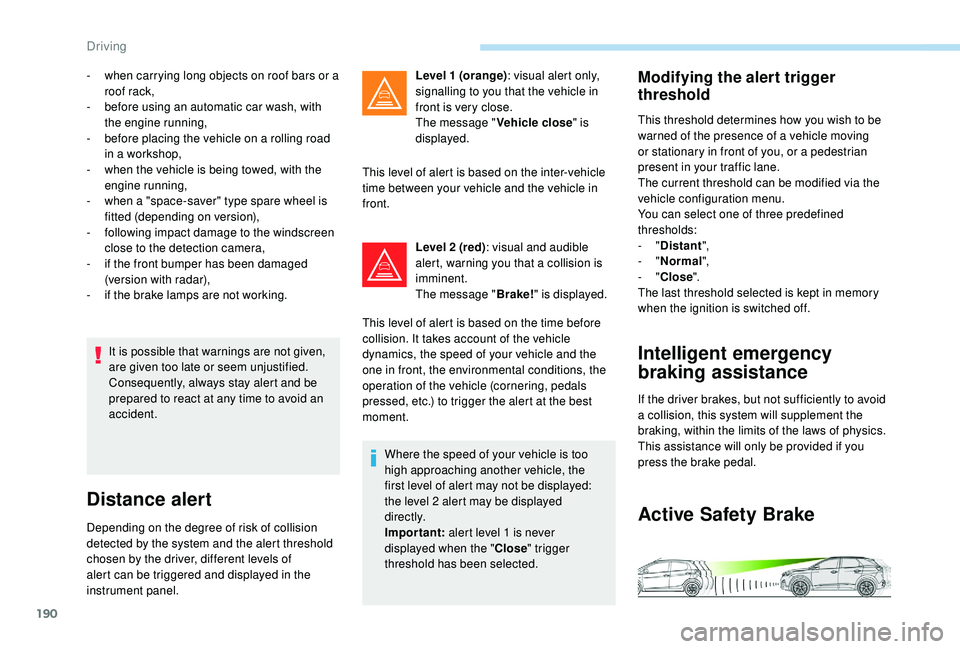
Intelligent emergency
braking assistance
If the driver brakes, but not sufficiently to avoid
a collision, this system will supplement the
braking, within the limits of the laws of physics.
This assistance will only be provided if you
press the brake pedal.
Active Safety Brake
Driving
Page 196 of 360
194
In certain driving conditions (poor road
sur face or strong winds), the system may
give alerts independent of the driver's
level of vigilance.The following situations may interfere
with the operation of the system or
prevent it working:
-
p
oor visibility (inadequate lighting of
the roadway, falling snow, heavy rain,
dense fog, etc.),
-
d
azzle (headlamps of an oncoming
vehicle, low sun, reflections on
a damp road, leaving a tunnel,
alternating shade and light, etc.),
-
w
indscreen area located in front of
the camera: dirty, misted up, frost-
covered, snow-covered, damaged or
covered by a sticker,
-
l
ane markings absent, worn,
hidden (snow, mud) or multiple
(roadworks,
etc.),
-
c
lose to the vehicle ahead (lane
markings not detected),
-
r
oads that are narrow, winding, etc.Lane Departure Warning
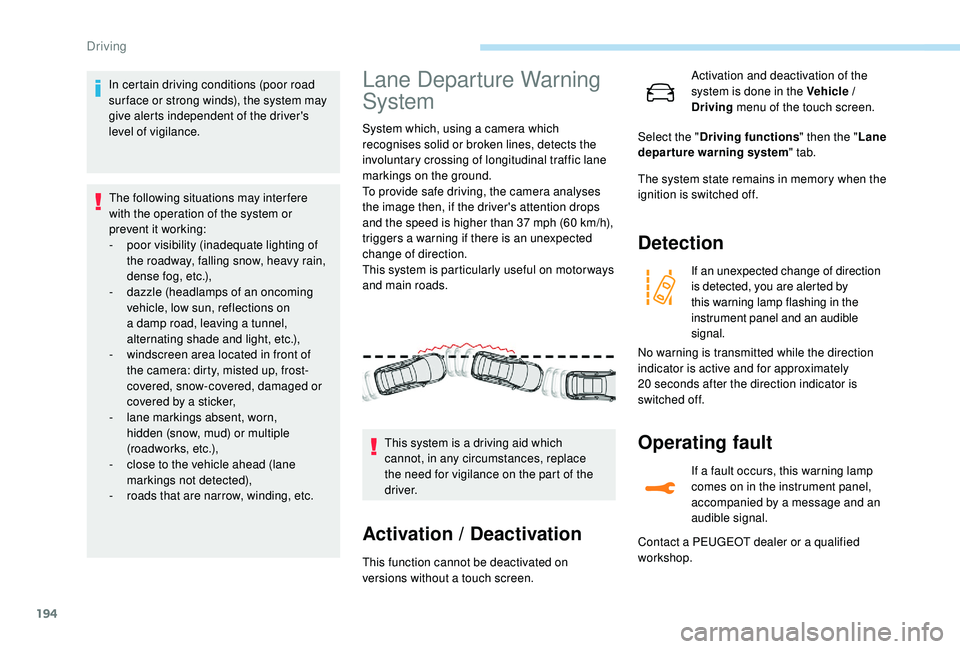
System
System which, using a camera which
recognises solid or broken lines, detects the
involuntary crossing of longitudinal traffic lane
markings on the ground.
To provide safe driving, the camera analyses
the image then, if the driver's attention drops
and the speed is higher than 37 mph (60 km/h),
triggers a warning if there is an unexpected
change of direction.
This system is particularly useful on motor ways
and main roads.
Activation / Deactivation
This function cannot be deactivated on
versions without a touch screen. This system is a driving aid which
cannot, in any circumstances, replace
the need for vigilance on the part of the
driver. Activation and deactivation of the
system is done in the Vehicle /
Driving
menu of the touch screen.
The system state remains in memory when the
ignition is switched off.
Detection
If an unexpected change of direction
is detected, you are alerted by
this warning lamp flashing in the
instrument panel and an audible
signal.
Operating fault
If a fault occurs, this warning lamp
comes on in the instrument panel,
accompanied by a message and an
audible signal.
Select the "
Driving functions " then the "Lane
departure warning system " tab.
No warning is transmitted while the direction
indicator is active and for approximately
20
seconds after the direction indicator is
switched off.
Contact a PEUGEOT dealer or a qualified
workshop.
Driving