ECO mode Peugeot 308 CC 2009 User Guide
[x] Cancel search | Manufacturer: PEUGEOT, Model Year: 2009, Model line: 308 CC, Model: Peugeot 308 CC 2009Pages: 294, PDF Size: 23.29 MB
Page 73 of 294
4
i
i
70
ACCESS
The rear windows do not have an
automatic mode or safety auto-
reverse function for raising.
Approximately 45 seconds after
removing the ignition key or opening
a door none of the windows can
be opened or closed. The ignition
must be switched back on in order
to open or close the windows.
WINDOW MECHANISMS
System which opens or closes a window
manually or automatically. It is fi tted with
a system which protects against pinching
on the front windows and a system which
controls all four windows on all models.
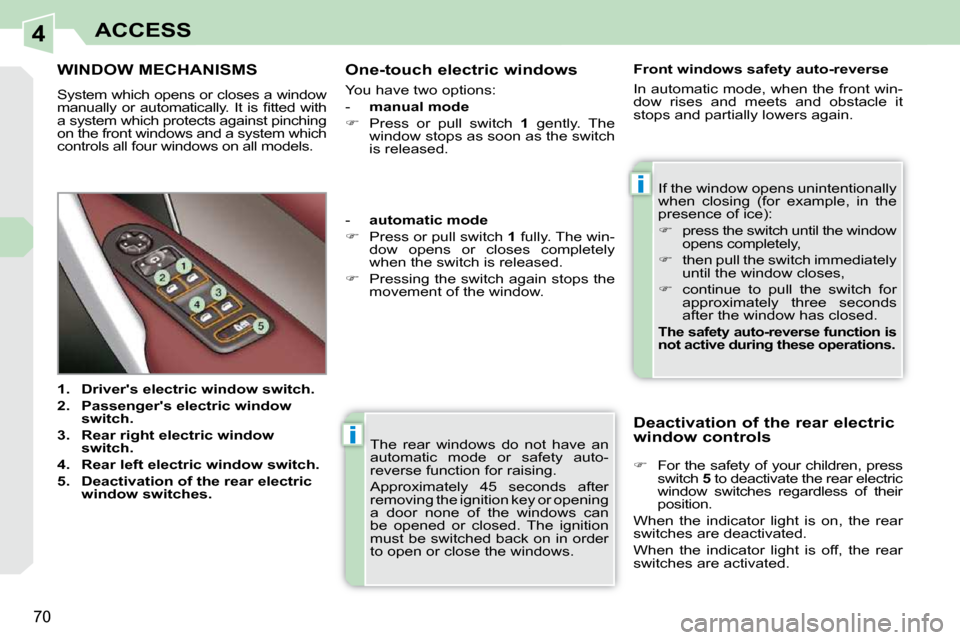
1. Driver's electric window switch.
2. Passenger's electric window
switch.
3. Rear right electric window
switch.
4. Rear left electric window switch.
5. Deactivation of the rear electric
window switches. If the window opens unintentionally
when closing (for example, in the
presence of ice):
press the switch until the window
opens completely,
then pull the switch immediately
until the window closes,
continue to pull the switch for
approximately three seconds
after the window has closed.
The safety auto-reverse function is
not active during these operations.
Front windows safety auto-reverse
In automatic mode, when the front win-
dow rises and meets and obstacle it
stops and partially lowers again.
- automatic mode
Press or pull switch 1 fully. The win-
dow opens or closes completely
when the switch is released.
Pressing the switch again stops the
movement of the window.
One-touch electric windows
You have two options:
-
manual mode
Press or pull switch 1 gently. The
window stops as soon as the switch
is released.
Deactivation of the rear electric
window controls
For the safety of your children, press
switch 5 to deactivate the rear electric
window switches regardless of their
position.
When the indicator light is on, the rear
switches are deactivated.
When the indicator light is off, the rear
switches are activated.
Page 91 of 294
5
i
i
84
VISIBILITY
Special position of
the windscreen wipers
In the minute following switching off
of the ignition, any action on the stalk
positions the wipers in the centre of the
windscreen.
This action enables you to position the
wiper blades for winter parking, cleaning
or replacement.
To park the wipers after this has been
done, switch on the ignition and operate
the stalk. For optimum and lasting wiping of
the "fl at-blade" wiper blades, it is
advisable to:
- handle them with care,
- clean them regularly using soapy water,
- change them approximately every 6 months,
- avoid using them to retain card- board on the windscreen. COURTESY LIGHTS
Selection and control of the various
passenger compartment lights.
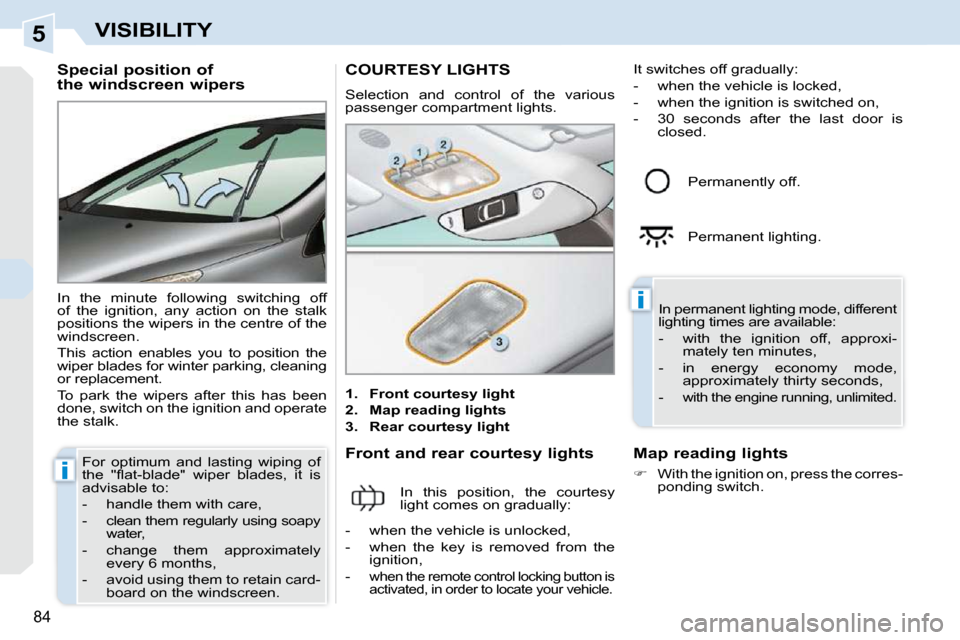
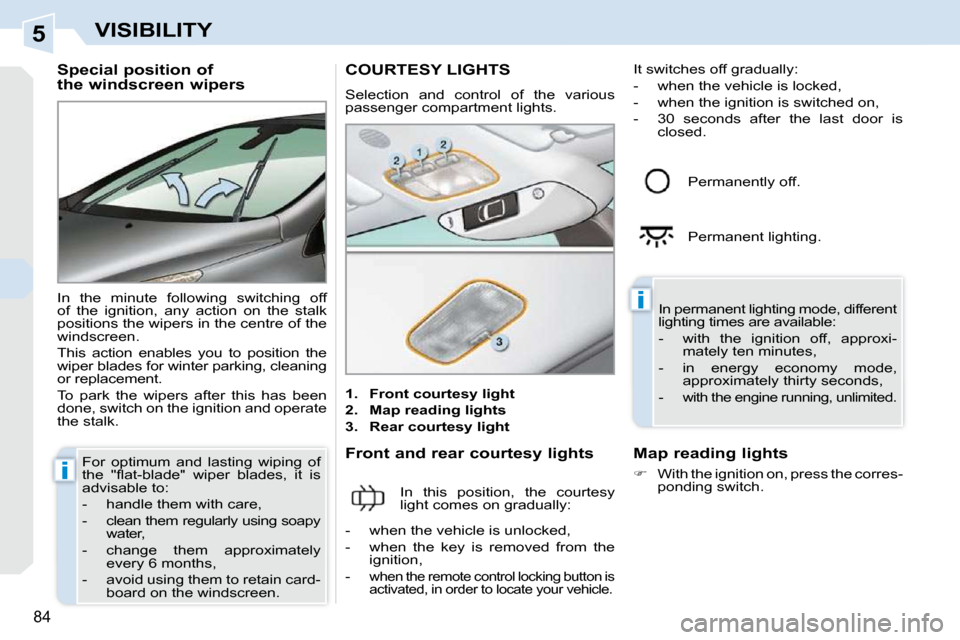
1. Front courtesy light
2. Map reading lights
3. Rear courtesy light
Front and rear courtesy lights
In this position, the courtesy
light comes on gradually: In permanent lighting mode, different
lighting times are available:
- with the ignition off, approxi-
mately ten minutes,
- in energy economy mode, approximately thirty seconds,
-
with the engine running, unlimited.
- when the vehicle is unlocked,
- when the key is removed from the ignition,
-
when the remote control locking button is
activated, in order to locate your vehicle.
Permanently off.
Permanent lighting.
Map reading lights
With the ignition on, press the corres-
ponding switch.
It switches off gradually:
- when the vehicle is locked,
- when the ignition is switched on,
- 30 seconds after the last door is closed.
Page 93 of 294
5
i
i
84
VISIBILITY
Special position of
the windscreen wipers
In the minute following switching off
of the ignition, any action on the stalk
positions the wipers in the centre of the
windscreen.
This action enables you to position the
wiper blades for winter parking, cleaning
or replacement.
To park the wipers after this has been
done, switch on the ignition and operate
the stalk. For optimum and lasting wiping of
the "fl at-blade" wiper blades, it is
advisable to:
- handle them with care,
- clean them regularly using soapy water,
- change them approximately every 6 months,
- avoid using them to retain card- board on the windscreen. COURTESY LIGHTS
Selection and control of the various
passenger compartment lights.
1. Front courtesy light
2. Map reading lights
3. Rear courtesy light
Front and rear courtesy lights
In this position, the courtesy
light comes on gradually: In permanent lighting mode, different
lighting times are available:
- with the ignition off, approxi-
mately ten minutes,
- in energy economy mode, approximately thirty seconds,
-
with the engine running, unlimited.
- when the vehicle is unlocked,
- when the key is removed from the ignition,
-
when the remote control locking button is
activated, in order to locate your vehicle.
Permanently off.
Permanent lighting.
Map reading lights
With the ignition on, press the corres-
ponding switch.
It switches off gradually:
- when the vehicle is locked,
- when the ignition is switched on,
- 30 seconds after the last door is closed.
Page 94 of 294
5
i
i
85
VISIBILITY
AMBIENT LIGHTING
Different lighting times are available:
- when the ignition is off, approxi-mately ten minutes,
- in energy economy mode, approximately thirty seconds,
- when the engine is running, no limit.
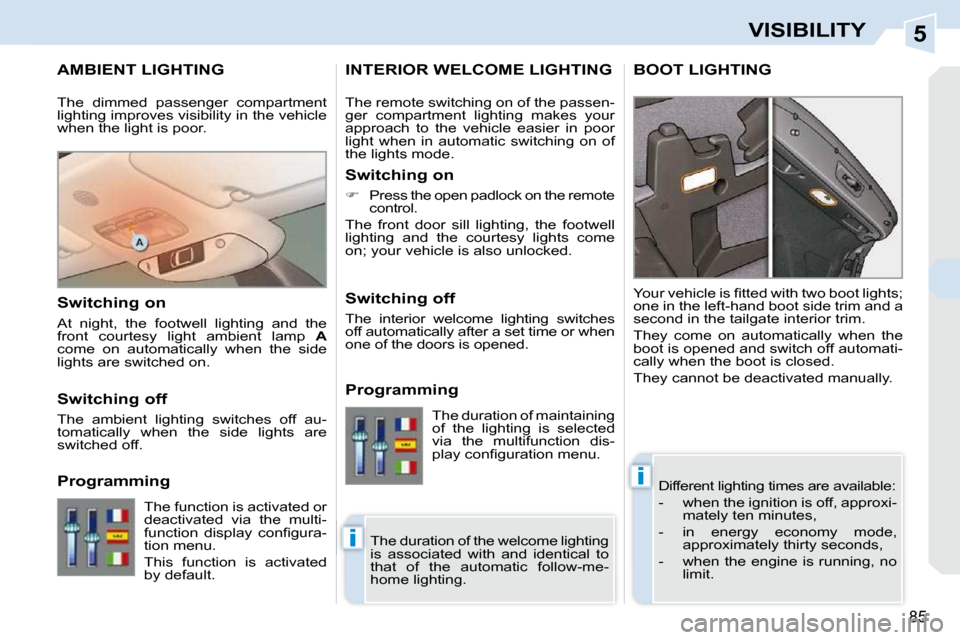
Your vehicle is fi tted with two boot lights;
one in the left-hand boot side trim and a
second in the tailgate interior trim.
They come on automatically when the
boot is opened and switch off automati-
cally when the boot is closed.
They cannot be deactivated manually.
INTERIOR WELCOME LIGHTING BOOT LIGHTING
The remote switching on of the passen-
ger compartment lighting makes your
approach to the vehicle easier in poor
light when in automatic switching on of
the lights mode.
Switching on
Press the open padlock on the remote
control.
The front door sill lighting, the footwell
lighting and the courtesy lights come
on; your vehicle is also unlocked.
Switching off
The interior welcome lighting switches
off automatically after a set time or when
one of the doors is opened.
Programming
The dimmed passenger compartment
lighting improves visibility in the vehicle
when the light is poor.
Switching on
At night, the footwell lighting and the
front courtesy light ambient lamp
A
come on automatically when the side
lights are switched on.
Switching off
The ambient lighting switches off au-
tomatically when the side lights are
switched off.
Programming
The duration of the welcome lighting
is associated with and identical to
that of the automatic follow-me-
home lighting.
The function is activated or
deactivated via the multi-
function display confi gura-
tion menu.
This function is activated
by default. The duration of maintaining
of the lighting is selected
via the multifunction dis-
play confi guration menu.
Page 104 of 294
7
i
i
i
92
SAFETY
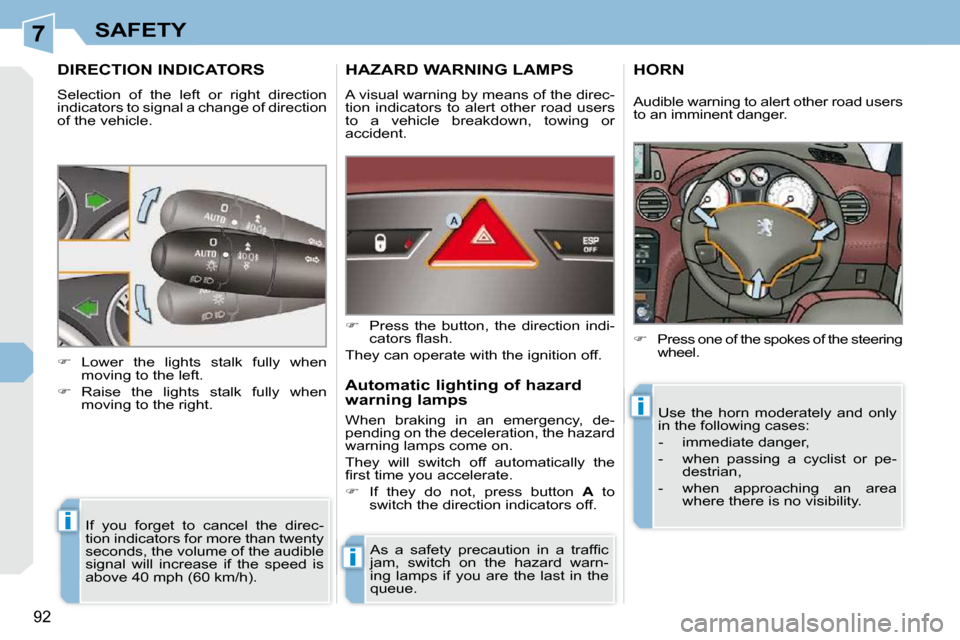
DIRECTION INDICATORS
Selection of the left or right direction
indicators to signal a change of direction
of the vehicle. If you forget to cancel the direc-
tion indicators for more than twenty
seconds, the volume of the audible
signal will increase if the speed is
above 40 mph (60 km/h).
Lower the lights stalk fully when
moving to the left.
Raise the lights stalk fully when moving to the right.
HAZARD WARNING LAMPS
A visual warning by means of the direc-
tion indicators to alert other road users
to a vehicle breakdown, towing or
accident.
As a safety precaution in a traffi c
jam, switch on the hazard warn-
ing lamps if you are the last in the
queue.
Press the button, the direction indi-
cators fl ash.
They can operate with the ignition off.
Automatic lighting of hazard
warning lamps
When braking in an emergency, de-
pending on the deceleration, the hazard
warning lamps come on.
They will switch off automatically the
fi rst time you accelerate.
If they do not, press button A to
switch the direction indicators off.
HORN
Press one of the spokes of the steering
wheel.
Use the horn moderately and only
in the following cases:
- immediate danger,
- when passing a cyclist or pe- destrian,
- when approaching an area where there is no visibility.
Audible warning to alert other road users
to an imminent danger.
Page 128 of 294
8
PRND
!
i
114
DRIVING
Stopping the vehicle
Before switching off the engine, you
can engage position P or N to place the
gearbox in neutral.
In both cases, apply the handbrake to
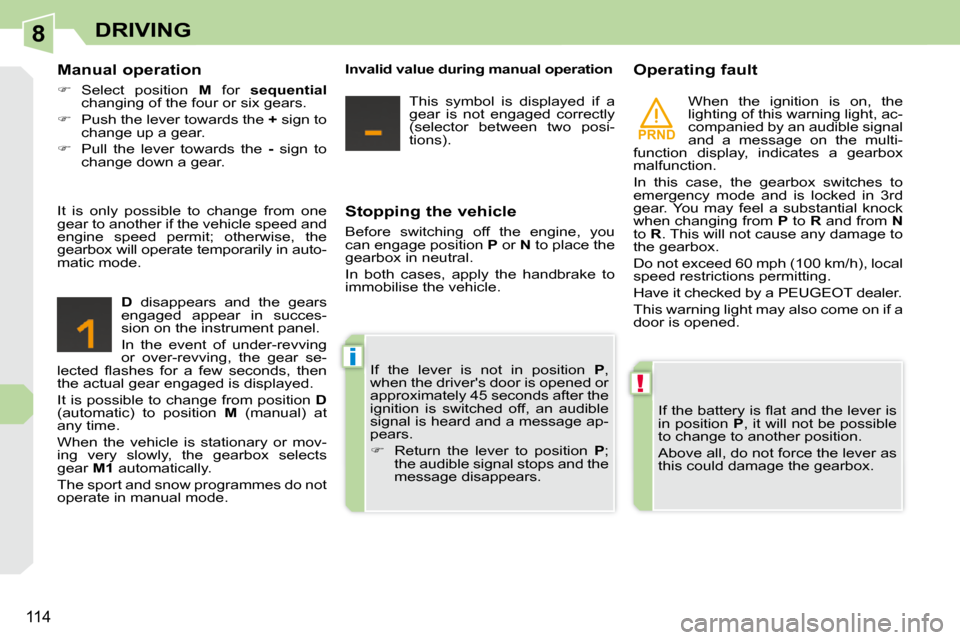
immobilise the vehicle. Operating fault
When the ignition is on, the
lighting of this warning light, ac-
companied by an audible signal
and a message on the multi-
function display, indicates a gearbox
malfunction.
In this case, the gearbox switches to
emergency mode and is locked in 3rd
gear. You may feel a substantial knock
when changing from P to R and from N
to R . This will not cause any damage to
the gearbox.
Do not exceed 60 mph (100 km/h), local
speed restrictions permitting.
Have it checked by a PEUGEOT dealer.
This warning light may also come on if a
door is opened.
If the battery is fl at and the lever is
in position P , it will not be possible
to change to another position.
Above all, do not force the lever as
this could damage the gearbox.
Manual operation
Select position M for sequential
changing of the four or six gears.
Push the lever towards the + sign to
change up a gear.
Pull the lever towards the - sign to
change down a gear.
D disappears and the gears
engaged appear in succes-
sion on the instrument panel.
In the event of under-revving
or over-revving, the gear se-
lected fl ashes for a few seconds, then
the actual gear engaged is displayed.
It is possible to change from position D
(automatic) to position M (manual) at
any time.
When the vehicle is stationary or mov-
ing very slowly, the gearbox selects
gear M1 automatically.
The sport and snow programmes do not
operate in manual mode. If the lever is not in position
P ,
when the driver's door is opened or
approximately 45 seconds after the
ignition is switched off, an audible
signal is heard and a message ap-
pears.
Return the lever to position P ;
the audible signal stops and the
message disappears.
It is only possible to change from one
gear to another if the vehicle speed and
engine speed permit; otherwise, the
gearbox will operate temporarily in auto-
matic mode.
Invalid value during manual operation
This symbol is displayed if a
gear is not engaged correctly
(selector between two posi-
tions).
Page 131 of 294
8
i
117
DRIVING
CRUISE CONTROL
System which automatically maintains
the speed of the vehicle at the value
programmed by the driver, without any
action on the accelerator pedal.
The cruise control is switched on
manually: it requires a minimum vehicle
speed of 25 mph (40 km/h) and the en-
gaging:
- of fourth gear on the manual gearbox,
- of second gear on the automatic gearbox, in sequential driving mode,
-
of position D on the automatic gearbox.
The cruise control is switched off
manually or by pressing the brake or
clutch pedal or on triggering of the ESP
system for safety reasons.
It is possible to exceed the programmed
speed temporarily by pressing the acce-
lerator pedal.
To return to the programmed speed,
simply release the accelerator pedal.
Switching off the ignition cancels any
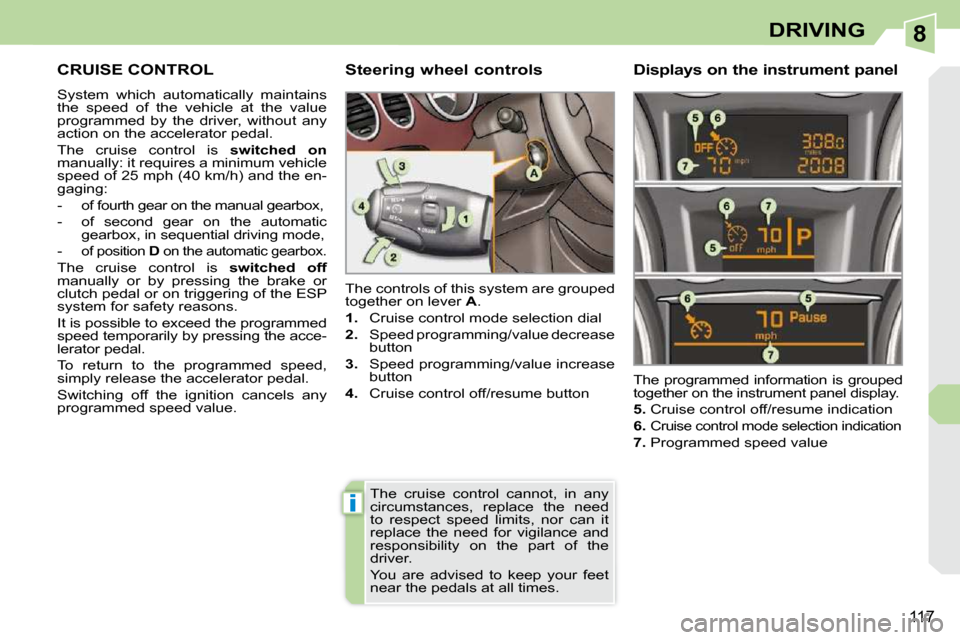
programmed speed value. The controls of this system are grouped
together on lever
A .
1. Cruise control mode selection dial
2. Speed programming/value decrease
button
3. Speed programming/value increase
button
4. Cruise control off/resume button The programmed information is grouped
together on the instrument panel display.
5. Cruise control off/resume indication
6.
Cruise control mode selection indication
7. Programmed speed value
Steering wheel controls Displays on the instrument
panel
The cruise control cannot, in any
circumstances, replace the need
to respect speed limits, nor can it
replace the need for vigilance and
responsibility on the part of the
driver.
You are advised to keep your feet
near the pedals at all times.
Page 162 of 294
10
!
!
i
148
PRACTICAL INFORMATION
Do not disconnect the terminals
while the engine is running.
Do not charge the batteries without
disconnecting the terminals fi rst.
The batteries contain harmful sub-
stances such as sulphuric acid and
lead. They must be disposed of in
accordance with regulations and
must not, in any circumstances, be
discarded with household waste.
Take used remote control batteries
and vehicle batteries to a special
collection point.
Charging the battery using a
battery charger
Disconnect the battery from the
vehicle.
Follow the instructions for use pro-
vided by the manufacturer of the
charger.
Reconnect starting with the negative
terminal (-).
Check that the terminals and connec-
tors are clean. If they are covered with
sulphate (whitish or greenish deposit),
remove them and clean them.
At the risk of discharging the bat-
tery, the deactivated functions can
be reactivated manually.
LOAD REDUCTION MODE
System which manages the use of
certain functions in relation to the level
of charge remaining in the battery.
When the vehicle is being driven, the
load reduction function temporarily
deactivates certain functions, such as
the air conditioning, the "AIRWAVE"
systems, the rear screen de-icing...
The deactivated functions are reactivat-
ed automatically as soon as conditions
permit.
To avoid discharging the battery,
do not leave the lights on repeate-
dly with the ignition off (refer to the
"Energy economy mode" para-
graph).
It is advisable to disconnect the
battery if the vehicle is to be left
unu sed for more than one month. Before disconnecting the
battery
Wait 2 minutes after switching off
the ignition before disconnecting
the battery.
Close the roof, the windows and
the doors before disconnecting the
battery.
Following reconnection of the
battery
Following reconnection of the bat-
tery, switch on the ignition and wait
1 minute before starting to permit ini-
tialisation of the electronic systems.
However, if slight diffi culties are en-
countered following this operation,
contact a PEUGEOT dealer.
Referring to the corresponding sec-
tion, you must yourself reinitialise:
- the remote control key,
- the electric windows and the
automatic partial opening of the
door windows,
- the GPS satellite navigation system.
Page 163 of 294
10
!
!
i
148
PRACTICAL INFORMATION
Do not disconnect the terminals
while the engine is running.
Do not charge the batteries without
disconnecting the terminals fi rst.
The batteries contain harmful sub-
stances such as sulphuric acid and
lead. They must be disposed of in
accordance with regulations and
must not, in any circumstances, be
discarded with household waste.
Take used remote control batteries
and vehicle batteries to a special
collection point.
Charging the battery using a
battery charger
Disconnect the battery from the
vehicle.
Follow the instructions for use pro-
vided by the manufacturer of the
charger.
Reconnect starting with the negative
terminal (-).
Check that the terminals and connec-
tors are clean. If they are covered with
sulphate (whitish or greenish deposit),
remove them and clean them.
At the risk of discharging the bat-
tery, the deactivated functions can
be reactivated manually.
LOAD REDUCTION MODE
System which manages the use of
certain functions in relation to the level
of charge remaining in the battery.
When the vehicle is being driven, the
load reduction function temporarily
deactivates certain functions, such as
the air conditioning, the "AIRWAVE"
systems, the rear screen de-icing...
The deactivated functions are reactivat-
ed automatically as soon as conditions
permit.
To avoid discharging the battery,
do not leave the lights on repeate-
dly with the ignition off (refer to the
"Energy economy mode" para-
graph).
It is advisable to disconnect the
battery if the vehicle is to be left
unu sed for more than one month. Before disconnecting the
battery
Wait 2 minutes after switching off
the ignition before disconnecting
the battery.
Close the roof, the windows and
the doors before disconnecting the
battery.
Following reconnection of the
battery
Following reconnection of the bat-
tery, switch on the ignition and wait
1 minute before starting to permit ini-
tialisation of the electronic systems.
However, if slight diffi culties are en-
countered following this operation,
contact a PEUGEOT dealer.
Referring to the corresponding sec-
tion, you must yourself reinitialise:
- the remote control key,
- the electric windows and the
automatic partial opening of the
door windows,
- the GPS satellite navigation system.
Page 164 of 294
10
!
i
149
PRACTICAL INFORMATION
Let the engine run for the duration
specifi ed to ensure that the battery
charge is suffi cient.
Do not repeatedly and continu-
ously restart the engine in order to
charge the battery.
A fl at battery prevents the engine
from starting (refer to the "Battery"
paragraph).
If the telephone is being used at
this time:
- it will be maintained for 5 minutes
with the hands-free kit of your PC
Sound or PC Nav,
- it will still be possible to fi nish the call with the PC Com 3D.
System which manages the duration of
use of certain functions to conserve a
suffi cient level of charge in the battery.
After the engine has stopped, you can
still use functions such as the audio and
telematics system, windscreen wipers,
dipped headlamps, courtesy lights, etc.
for a maximum combined duration of
thirty minutes. Exiting economy mode These functions are reactivated auto-
matically next time the vehicle is driven.
In order to resume the use of these
functions immediately, start the en-
gine and let it run:
- for less than ten minutes, to use the equipment for approximately
fi ve minutes,
- for more than ten minutes, to use the equipment for up to approxi-
mately thirty minutes.
Switching to economy mode
Once the thirty minutes are over,
a message appears on the multi-func-
tion display indicating that the vehicle
has switched to economy mode and the
active functions are put on standby.
CHANGING A WIPER BLADE
Procedure for replacing a worn wiper
blade with a new one without the use
of tools.
Removing a front wiper blade
Raise the corresponding wiper arm.
Unclip the wiper blade and remove it.
Fitting a front wiper blade
Check the size of the wiper blade
as the shorter blade is fi tted on the
right-hand side of the vehicle.
Put the corresponding new wiper
blade in place and clip it.
Fold down the wiper arm carefully.
Before removing a front wiper
blade
Within one minute after switching off
the ignition, operate the wipers stalk
to position the wiper blades in the
centre of the windscreen.
After fitting a front wiper blade
Switch on the ignition.
Operate the wipers stalk again to
park the wiper blades.