battery PEUGEOT 308 CC 2013 Owner's Manual
[x] Cancel search | Manufacturer: PEUGEOT, Model Year: 2013, Model line: 308 CC, Model: PEUGEOT 308 CC 2013Pages: 268, PDF Size: 15.28 MB
Page 162 of 268
10
!
160
PRACTICAL INFORMATION
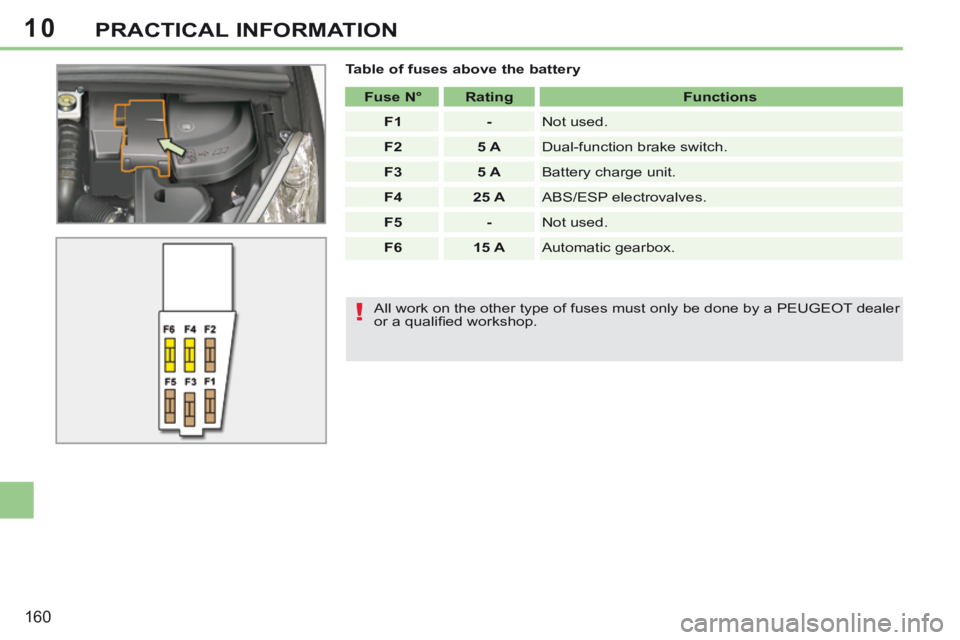
Table of fuses above the battery Fuse N° Rating Functions
F1 - Not used.
F2 5 A Dual-function brake switch.
F3 5 A Battery charge unit.
F4 25 A ABS/ESP electrovalves.
F5 - Not used.
F6 15 A Automatic gearbox.
All work on the other type of fuses must only be done by a PEUGEOT dealer
or a qualifi ed workshop.
Page 163 of 268
10
!
i
i
!
161
PRACTICAL INFORMATION
12 V BATTERY
Access to the battery
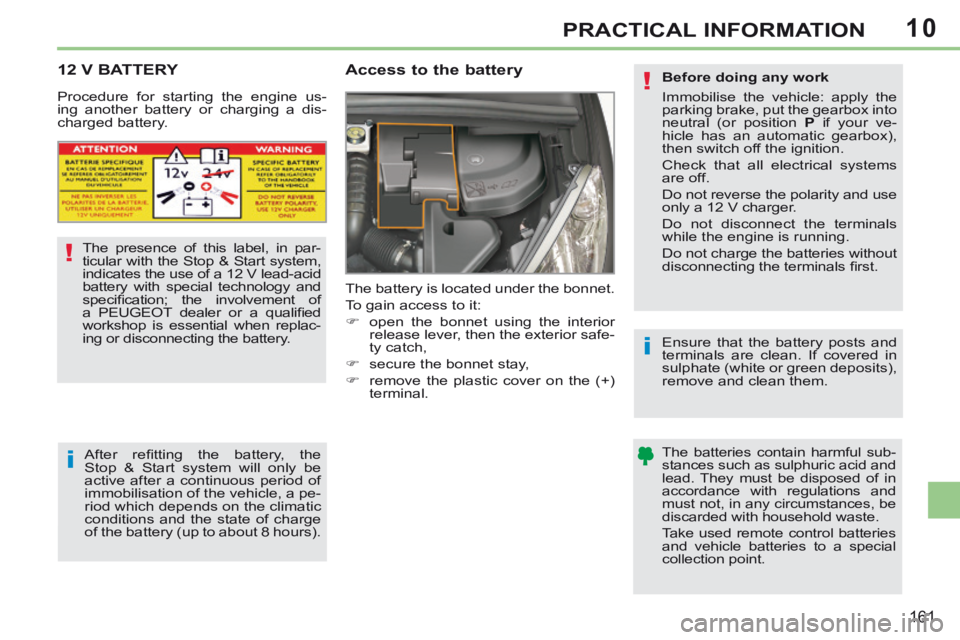
The battery is located under the bonnet.
To gain access to it:
open the bonnet using the interior release lever, then the exterior safe-
ty catch,
secure the bonnet stay,
remove the plastic cover on the (+) terminal.
The presence of this label, in par-
ticular with the Stop & Start system,
indicates the use of a 12 V lead-acid
battery with special technology and
specifi cation; the involvement of
a PEUGEOT dealer or a qualifi ed
workshop is essential when replac-
ing or disconnecting the battery.
After refi tting the battery, the
Stop & Start system will only be
active after a continuous period of
immobilisation of the vehicle, a pe-
riod which depends on the climatic
conditions and the state of charge
of the battery (up to about 8 hours).
Procedure for starting the engine us-
ing another battery or charging a dis-
charged battery.
Before doing any work
Immobilise the vehicle: apply the
parking brake, put the gearbox into
neutral (or position
P if your ve-
hicle has an automatic gearbox),
then switch off the ignition.
Check that all electrical systems
are off.
Do not reverse the polarity and use
only a 12 V charger.
Do not disconnect the terminals
while the engine is running.
Do not charge the batteries without
disconnecting the terminals fi rst.
Ensure that the battery posts and
terminals are clean. If covered in
sulphate (white or green deposits),
remove and clean them.
The batteries contain harmful sub-
stances such as sulphuric acid and
lead. They must be disposed of in
accordance with regulations and
must not, in any circumstances, be
discarded with household waste.
Take used remote control batteries
and vehicle batteries to a special
collection point.
Page 164 of 268
10
i
!
162
PRACTICAL INFORMATION
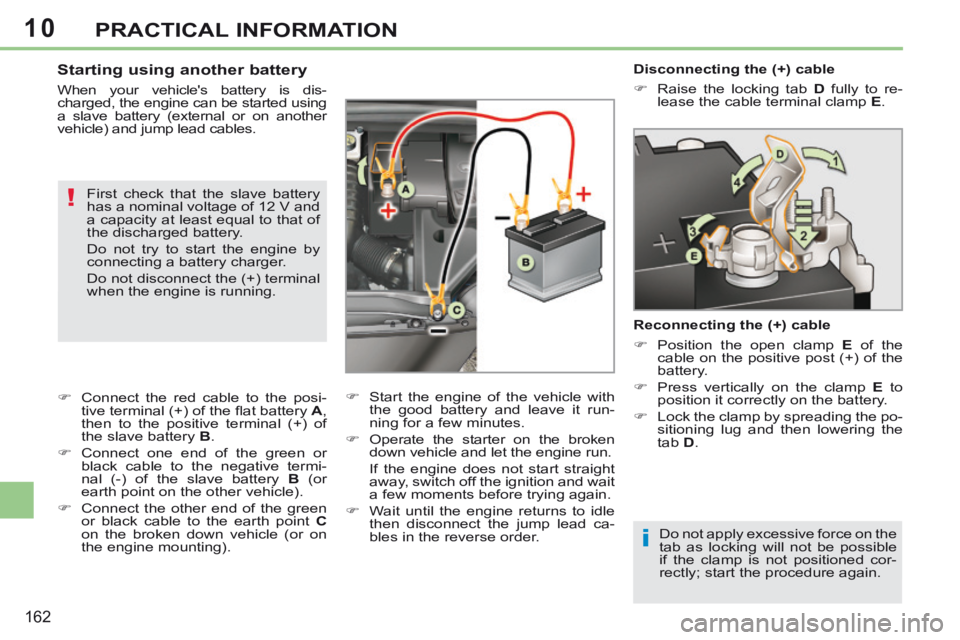
Disconnecting the (+) cable
Raise the locking tab D fully to re-
lease the cable terminal clamp E .
Reconnecting the (+) cable
Position the open clamp E of the
cable on the positive post (+) of the
battery.
Press vertically on the clamp E to
position it correctly on the battery.
Lock the clamp by spreading the po- sitioning lug and then lowering the
tab D .
Do not apply excessive force on the
tab as locking will not be possible
if the clamp is not positioned cor-
rectly; start the procedure again. Starting using another battery
When your vehicle's battery is dis-
charged, the engine can be started using
a slave battery (external or on another
v ehicle) and jump lead cables. First check that the slave battery
has a nominal voltage of 12 V and
a capacity at least equal to that of
the discharged battery.
Do not try to start the engine by
connecting a battery charger.
Do not disconnect the (+) terminal
when the engine is running.
Connect the red cable to the posi- tive terminal (+) of the fl at battery A ,
then to the positive terminal (+) of
the slave battery B .
Connect one end of the green or black cable to the negative termi-
nal (-) of the slave battery B (or
earth point on the other vehicle).
Connect the other end of the green or black cable to the earth point C
on the broken down vehicle (or on
the engine mounting). Start the engine of the vehicle with
the good battery and leave it run-
ning for a few minutes.
Operate the starter on the broken down vehicle and let the engine run .
If the engine does not start straight away, switch off the ignition and wait
a few moments before trying again.
Wait until the engine returns to idle then disconnect the jump lead ca-
bles in the reverse order.
Page 165 of 268
10
i
i
!
!
i
163
PRACTICAL INFORMATION
With Stop & Start, the battery does
not have to be disconnected for
charging.
Charging the battery using
a battery charger
When your vehicle's battery is dis-
charged or when the vehicle is to be
out of use for a prolonged period, you
can charge the battery using a battery
charger.
Contact a PEUGEOT dealer or a quali-
fi ed workshop for the specifi cation of
chargers compatible with your battery.
Before disconnecting
Go to the battery.
Close the retractable roof.
Check that the doors and boot are closed but not locked.
Switch off the ignition and wait for at least four minutes.
If the vehicle is to not going to be used for
more than a month, it is recommended
that the battery be disconnected.
Charging
Disconnect the (+) terminal.
Follow the instructions for use pro-vided by the manufacturer of the
charger.
Connect the charger's red cable to the (+) terminal of the battery, then
the black cable to the (-) terminal.
Once the battery is fully charged, disconnect the charger cables in re-
verse order.
Charging should be carried out in
a well-ventilated area and away
from naked fl ames and sources of
sparks, so as to avoid any risk of
explosion and fi re.
Do not try to charge a frozen bat-
tery; fi rst thaw it out so as to avoid
the risk of explosion.
If the battery had frozen, before
charging, have it checked by a
PEUGEOT dealer or qualifi ed
workshop who will ensure that
the internal components have not
been damaged and that the casing
is not cracked, which would cause
a leak of toxic and corrosive acid.
Some functions are not available
if the battery is not suffi ciently
charged. Reinitialisation after
reconnection
After any reconnection of the battery,
switch on the ignition and wait at least
one minute before starting, to allow time
for the initialisation of the electronic sys-
tems.
By referring to the corresponding sec-
tions, you should set or initialise the fol-
lowing systems yourself:
- remote control,
- electric windows and automatic par- tial opening of door glasses,
- time and date,
- audio and navigation system set- tings.
Check that no alert message or
warning lamp comes on after
switching on the ignition.
However, if minor problems persist
after carrying out these operations,
contact a PEUGEOT dealer or a
qualifi ed workshop.
Page 166 of 268
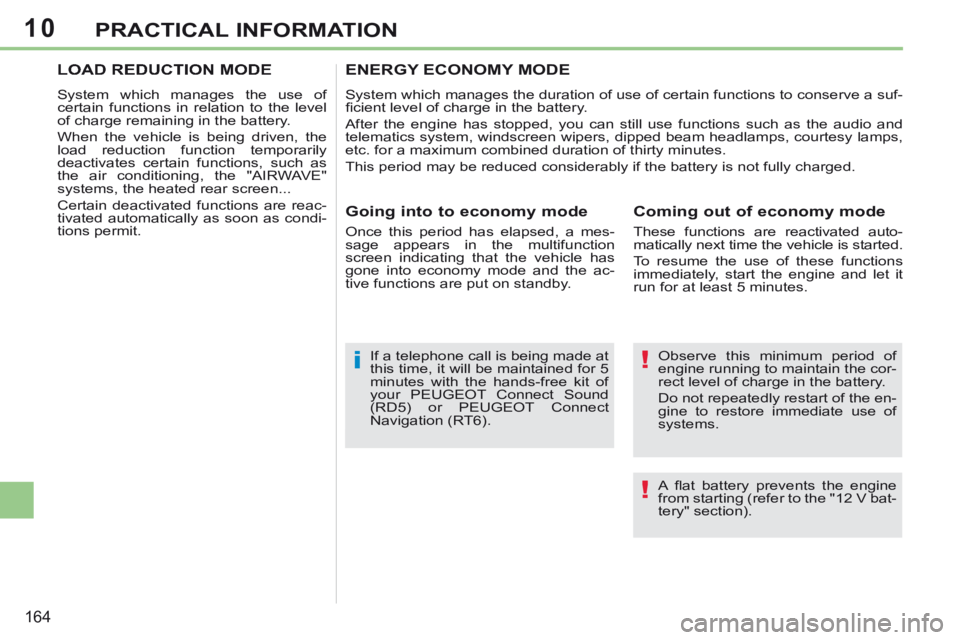
10
!
!i
164
PRACTICAL INFORMATION
Observe this minimum period of
engine running to maintain the cor-
rect level of charge in the battery.
Do not repeatedly restart of the en-
gine to restore immediate use of
systems.
If a telephone call is being made at
this time, it will be maintained for 5
minutes with the hands-free kit of
your
PEUGEOT Connect Sound
(RD5) or PEUGEOT Connect
Navigation (RT6).
ENERGY ECONOMY MODE
System which manages the duration of use of certain functions to conserv\
e a suf-
fi cient level of charge in the battery.
After the engine has stopped, you can still use functions such as the au\
dio and
telematics system, windscreen wipers, dipped beam headlamps, courtesy lamps,
etc. for a maximum combined duration of thirty minutes.
This period may be reduced considerably if the battery is not fully char\
ged.
Coming out of economy mode
These functions are reactivated auto-
matically next time the vehicle is started.
To resume the use of these functions
immediately, start the engine and let it
run for at least 5 minutes.
Going into to economy mode
Once this period has elapsed, a mes-
sage appears in the multifunction
screen indicating that the vehicle has
gone into economy mode and the ac-
tive functions are put on standby.
LOAD REDUCTION MODE
System which manages the use of
certain functions in relation to the level
of charge remaining in the battery.
When the vehicle is being driven, the
load reduction function temporarily
deactivates certain functions, such as
the air conditioning, the "AIRWAVE"
systems, the heated rear screen...
Certain deactivated functions are reac-
tivated automatically as soon as condi-
tions permit.
A fl at battery prevents the engine
from starting (refer to the "12 V bat-
tery" section).
Page 180 of 268
178
EMERGENCY OR ASSISTANCE CALL
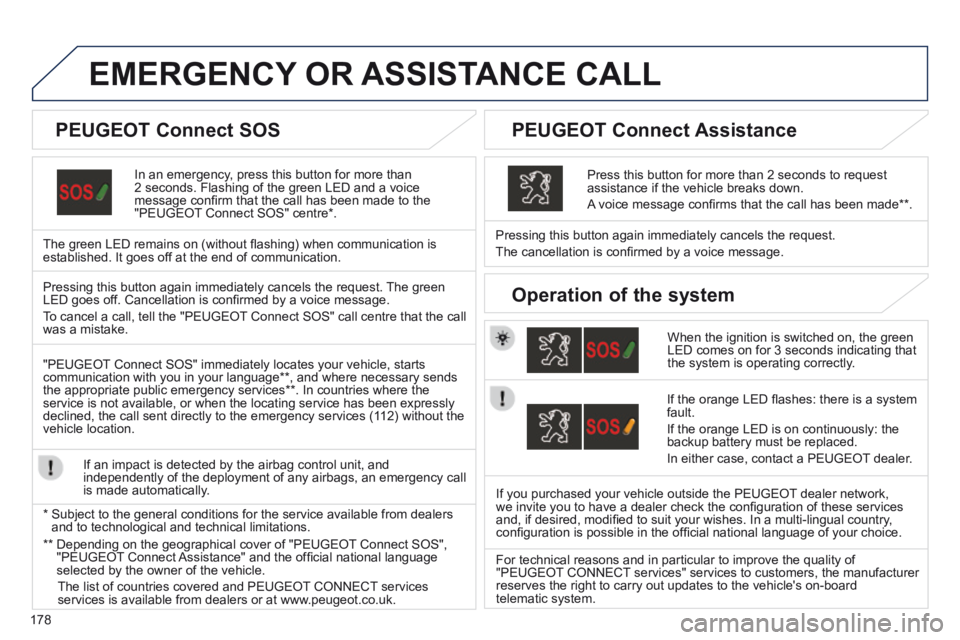
In an emergency, press this button for more than 2 seconds. Flashing of the green LED and a voice message confi rm that the call has been made to the "PEUGEOT Connect SOS" centre * .
The green LED remains on (without fl ashing) when communication is established. It goes off at the end of communication.
When the ignition is switched on, the green LED comes on for 3 seconds indicating that the system is operating correctly.
Pressing this button again immediately cancels the request.
The cancellation is confi rmed by a voice message.
Press this button for more than 2 seconds to request assistance if the vehicle breaks down.
A voice message confi rms that the call has been made ** .
Pressing this button again immediately cancels the request. The green LED goes off. Cancellation is confi rmed by a voice message .
To cancel a call, tell the "PEUGEOT Connect SOS" call centre that the call was a mistake.
"PEUGEOT Connect SOS" immediately locates your vehicle, starts communication with you in your language ** , and where necessary sends the appropriate public emergency services ** . In countries where the service is not available, or when the locating service has been expressl\
y declined, the call sent directly to the emergency services (112) without the vehicle location.
If an impact is detected by the airbag control unit, and independently of the deployment of any airbags, an emergency call is made automatically.
* Subject to the general conditions for the service available from dealers\
and to technological and technical limitations.
If the orange LED fl ashes: there is a system fault.
If the orange LED is on continuously: the backup battery must be replaced.
In either case, contact a PEUGEOT dealer.
If you purchased your vehicle outside the PEUGEOT dealer network, we invite you to have a dealer check the confi guration of these services and, if desired, modifi ed to suit your wishes. In a multi-lingual country, confi guration is possible in the offi cial national language of your choice.
For technical reasons and in particular to improve the quality of "PEUGEOT CONNECT services" services to customers, the manufacturer reserves the right to carry out updates to the vehicle's on-board telematic system.
PEUGEOT Connect SOS PEUGEOT Connect Assistance
Operation of the system
** Depending on the geographical cover of "PEUGEOT Connect SOS", "PEUGEOT Connect Assistance" and the offi cial national language selected by the owner of the vehicle.
The list of countries covered and PEUGEOT CONNECT services services is available from dealers or at www.peugeot.co.uk.
Page 181 of 268
179
The system is protected in such a way that it will only operate in your vehicle.
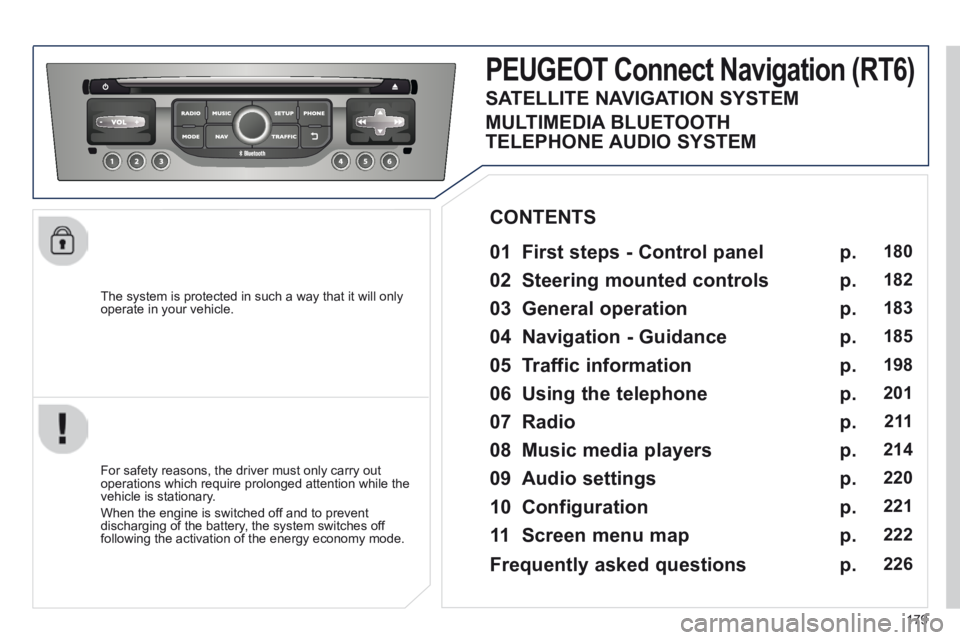
PEUGEOT Connect Navigation (RT6)
01 First steps - Control panel
For safety reasons, the driver must only carry out operations which require prolonged attention while the vehicle is stationary.
When the engine is switched off and to prevent discharging of the battery, the system switches off following the activation of the energy economy mode.
CONTENTS
02 Steering mounted controls
03 General operation
04 Navigation - Guidance
05 Traffic information
06 Using the telephone
07 Radio
08 Music media players
09 Audio settings
10 Configuration
11 Screen menu map
p.
p.
p.
p.
p.
p.
p.
p.
p.
p.
p.
180
182
183
185
198
201
2 11
214
220
221
222
SATELLITE NAVIGATION SYSTEM
MULTIMEDIA BLUETOOTH
TELEPHONE AUDIO SYSTEM
Frequently asked questions p. 226
Page 233 of 268
231
FREQUENTLY ASKED QUESTIONS
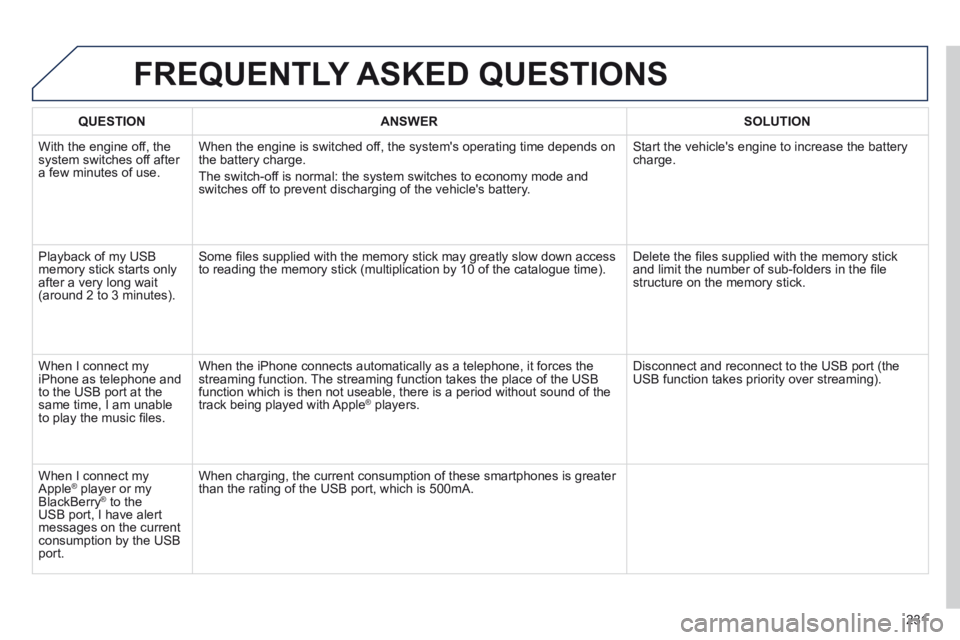
QUESTION ANSWER SOLUTION
With the engine off, the system switches off after a few minutes of use.
When the engine is switched off, the system's operating time depends on the battery charge.
The switch-off is normal: the system switches to economy mode and switches off to prevent discharging of the vehicle's battery.
Start the vehicle's engine to increase the battery charge.
Playback of my USB memory stick starts only after a very long wait (around 2 to 3 minutes).
Some fi les supplied with the memory stick may greatly slow down access to reading the memory stick (multiplication by 10 of the catalogue time\
). Delete the fi les supplied with the memory stick and limit the number of sub-folders in the fi le structure on the memory stick.
When I connect my iPhone as telephone and to the USB port at the same time, I am unable to play the music fi les.
When the iPhone connects automatically as a telephone, it forces the streaming function. The streaming function takes the place of the USB function which is then not useable, there is a period without sound of t\
he track being played with Apple ® players. ® players. ®
Disconnect and reconnect to the USB port (the USB function takes priority over streaming).
When I connect my Apple ® player or my ® player or my ®
BlackBerry ® to the ® to the ®
USB port, I have alert messages on the current consumption by the USB port.
When charging, the current consumption of these smartphones is greater than the rating of the USB port, which is 500mA.
Page 235 of 268
233
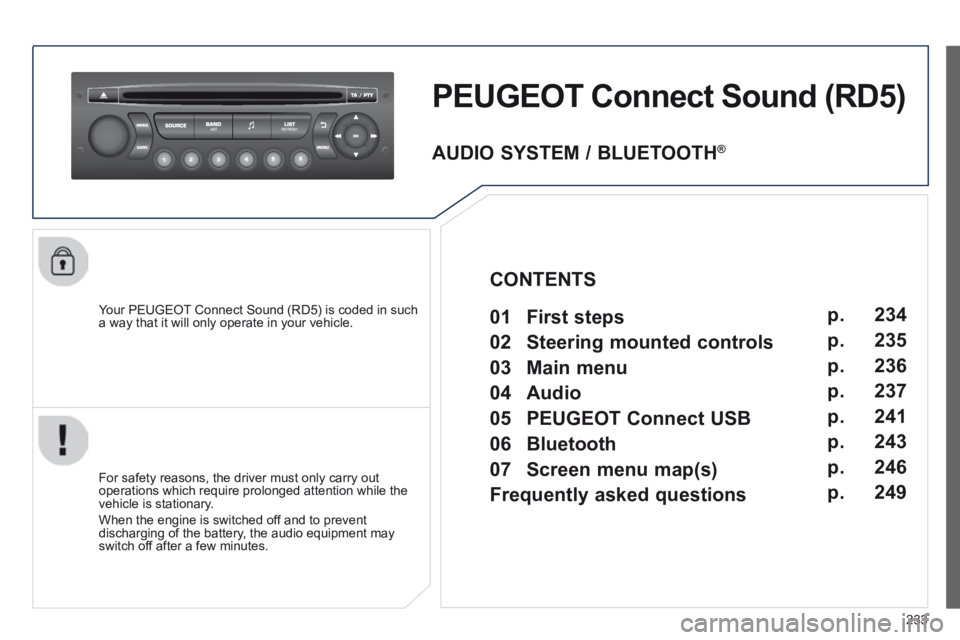
PEUGEOT Connect Sound (RD5)
Your PEUGEOT Connect Sound (RD5) is coded in such a way that it will only operate in your vehicle.
For safety reasons, the driver must only carry out operations which require prolonged attention while the vehicle is stationary.
When the engine is switched off and to prevent discharging of the battery, the audio equipment may switch off after a few minutes.
AUDIO SYSTEM / BLUETOOTH ®
01 First steps
02 Steering mounted controls
03 Main menu
04 Audio
05 PEUGEOT Connect USB
06 Bluetooth
07 Screen menu map(s)
Frequently asked questions p.
p.
p.
p.
p.
p.
p.
p.
234
235
236
237
241
243
246
249
CONTENTS
Page 251 of 268
249
FREQUENTLY ASKED QUESTIONS
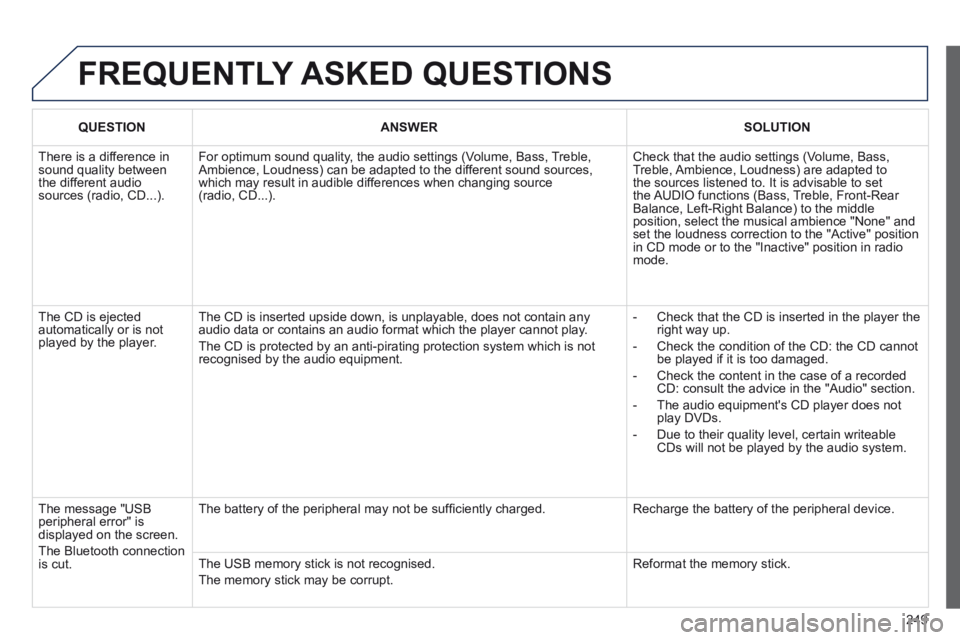
QUESTION ANSWER SOLUTION
There is a difference in sound quality between the different audio sources (radio, CD...).
For optimum sound quality, the audio settings (Volume, Bass, Treble, Ambience, Loudness) can be adapted to the different sound sources, which may result in audible differences when changing source (radio, CD...).
Check that the audio settings (Volume, Bass, Treble, Ambience, Loudness) are adapted to the sources listened to. It is advisable to set the AUDIO functions (Bass, Treble, Front-Rear Balance, Left-Right Balance) to the middle position, select the musical ambience "None" and set the loudness correction to the "Active" position in CD mode or to the "Inactive" position in radio mode.
The CD is ejected automatically or is not played by the player.
The CD is inserted upside down, is unplayable, does not contain any audio data or contains an audio format which the player cannot play.
The CD is protected by an anti-pirating protection system which is not recognised by the audio equipment.
- Check that the CD is inserted in the player the right way up.
- Check the condition of the CD: the CD cannot be played if it is too damaged.
- Check the content in the case of a recorded CD: consult the advice in the "Audio" section.
- The audio equipment's CD player does not play DVDs.
- Due to their quality level, certain writeable CDs will not be played by the audio system.
The message "USB peripheral error" is displayed on the screen.
The Bluetooth connection is cut.
The battery of the peripheral may not be suffi ciently charged. Recharge the battery of the peripheral device.
The USB memory stick is not recognised.
The memory stick may be corrupt.
Reformat the memory stick.