lighting PEUGEOT 308 CC DAG 2010 User Guide
[x] Cancel search | Manufacturer: PEUGEOT, Model Year: 2010, Model line: 308 CC DAG, Model: PEUGEOT 308 CC DAG 2010Pages: 280, PDF Size: 19.14 MB
Page 20 of 280
1
!
23
INSTRUMENTS and CONTROLS
The warning lamps may come on
continuously or fl ash.
Certain warning lamps may come
on in two different modes. Only by
relating the type of lighting to the
operating status of the vehicle can
it be ascertained whether the situ-
ation is normal or whether a fault
has occurred.
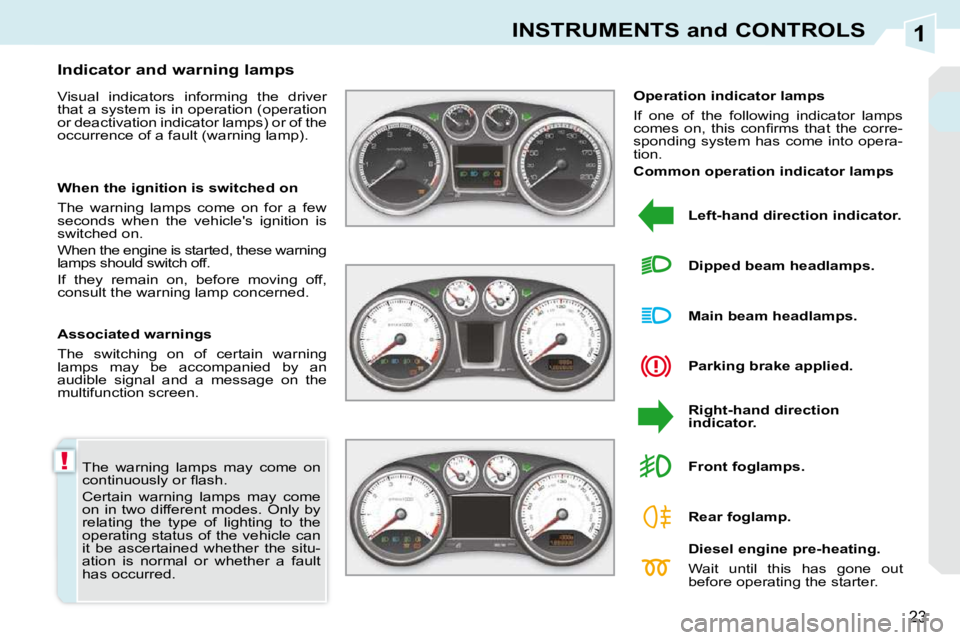
Indicator and warning lamps
Visual indicators informing the driver
that a system is in operation (operation
or deactivation indicator lamps) or of the
occurrence of a fault (warning lamp).
Associated warnings
The switching on of certain warning
lamps may be accompanied by an
audible signal and a message on the
multifunction screen.
Operation indicator lamps
If one of the following indicator lamps
comes on, this confi rms that the corre-
sponding system has come into opera-
tion.
Left-hand direction indicator.
Parking brake applied.
Right-hand direction
indicator.
Main beam headlamps.
Dipped beam headlamps.
Diesel engine pre-heating.
Wait until this has gone out
before operating the starter.
Front foglamps.
Rear foglamp.
When the ignition is switched on
The warning lamps come on for a few
seconds when the vehicle's ignition is
switched on.
When the engine is started, these warning
lamps should switch off.
If they remain on, before moving off,
consult the warning lamp concerned.
Common operation indicator lamps
Page 23 of 280
1
!
26
INSTRUMENTS and CONTROLS
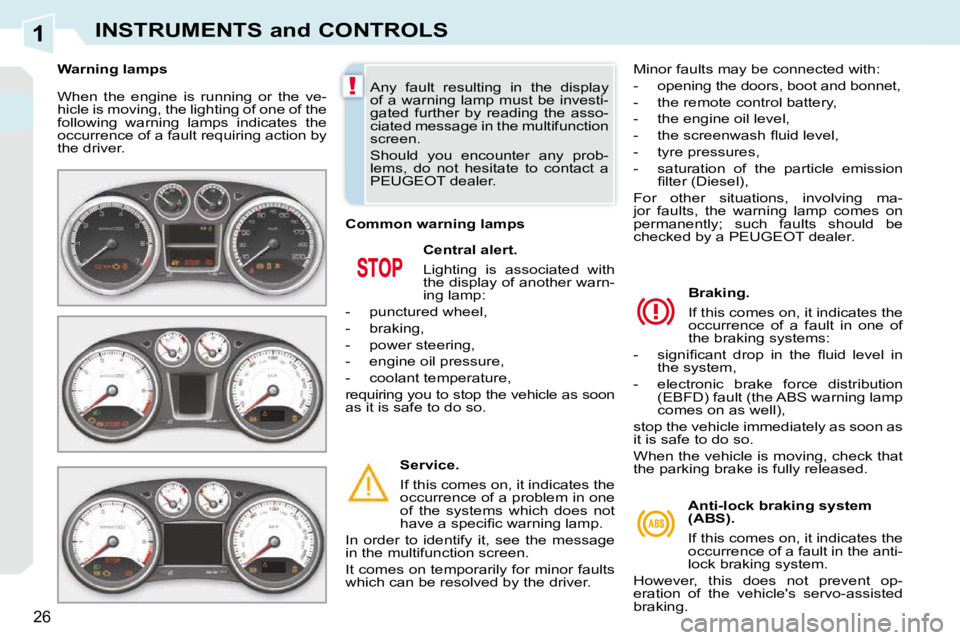
When the engine is running or the ve-
hicle is moving, the lighting of one of the
following warning lamps indicates the
occurrence of a fault requiring action by
the driver. Central alert.
Lighting is associated with
the display of another warn-
ing lamp:
- punctured wheel,
- braking,
- power steering,
- engine oil pressure,
- coolant temperature,
requiring you to stop the vehicle as soon
as it is safe to do so.
Service.
If this comes on, it indicates the
occurrence of a problem in one
of the systems which does not
have a specifi c warning lamp.
In order to identify it, see the message
in the multifunction screen.
It comes on temporarily for minor faults
which can be resolved by the driver. Braking.
If this comes on, it indicates the
occurrence of a fault in one of
the braking systems:
- signifi cant drop in the fl uid level in the system,
- electronic brake force distribution (EBFD) fault (the ABS warning lamp
comes on as well),
stop the vehicle immediately as soon as
it is safe to do so.
When the vehicle is moving, check that
the parking brake is fully released.
Any fault resulting in the display
of a warning lamp must be investi-
gated further by reading the asso-
ciated message in the multifunction
screen.
Should you encounter any prob-
lems, do not hesitate to contact a
PEUGEOT dealer.
Warning lamps
Anti-lock braking system
(ABS).
If this comes on, it indicates the
occurrence of a fault in the anti-
lock braking system.
However, this does not prevent op-
eration of the vehicle's servo-assisted
braking.
Common warning lamps
Minor faults may be connected with:
- opening the doors, boot and bonnet,
- the remote control battery,
- the engine oil level,
- the screenwash fl uid level,
- tyre pressures,
- saturation of the particle emission
fi lter (Diesel),
For other situations, involving ma-
jor faults, the warning lamp comes on
permanently; such faults should be
checked by a PEUGEOT dealer.
Page 27 of 280
1
AUTO
PRND
30
INSTRUMENTS and CONTROLS
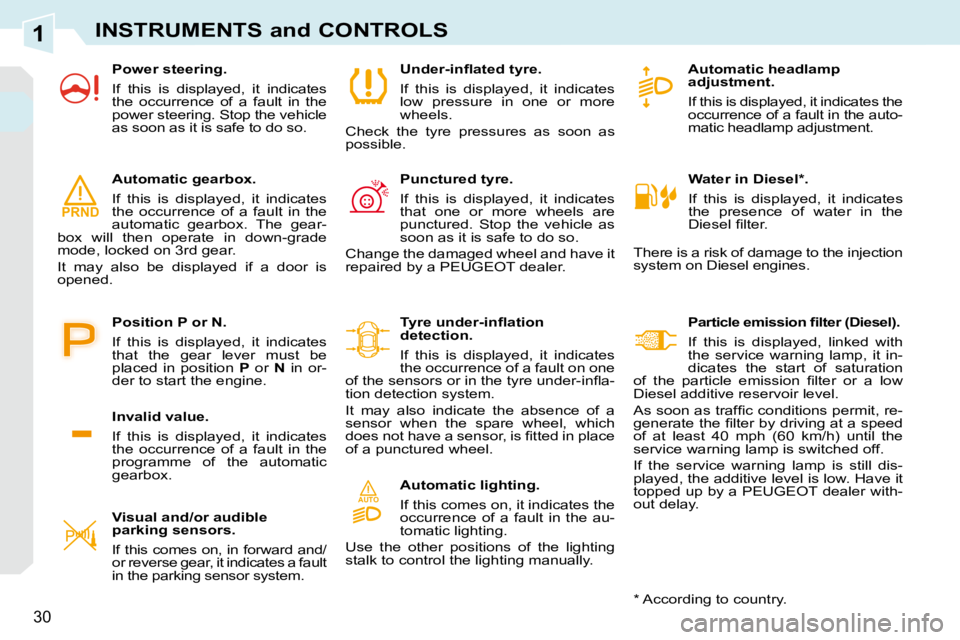
Water in Diesel * .
If this is displayed, it indicates
the presence of water in the
Diesel fi lter.
There is a risk of damage to the injection
system on Diesel engines. Automatic headlamp
adjustment.
If this is displayed, it indicates the
occurrence of a fault in the auto-
matic headlamp adjustment.
Particle emission fi lter (Diesel).
If this is displayed, linked with
the service warning lamp, it in-
dicates the start of saturation
of the particle emission fi lter or a low
Diesel additive reservoir level.
As soon as traffi c conditions permit, re-
generate the fi lter by driving at a speed
of at least 40 mph (60 km/h) until the
service warning lamp is switched off.
If the service warning lamp is still dis-
played, the additive level is low. Have it
topped up by a PEUGEOT dealer with-
out delay.
Under-infl ated tyre.
If this is displayed, it indicates
low pressure in one or more
wheels.
Check the tyre pressures as soon as
possible.
Punctured tyre.
If this is displayed, it indicates
that one or more wheels are
punctured. Stop the vehicle as
soon as it is safe to do so.
Change the damaged wheel and have it
repaired by a PEUGEOT dealer.
Tyre under-infl ation
detection.
If this is displayed, it indicates
the occurrence of a fault on one
of the sensors or in the tyre under-infl a-
tion detection system.
It may also indicate the absence of a
sensor when the spare wheel, which
does not have a sensor, is fi tted in place
of a punctured wheel.
Automatic lighting.
If this comes on, it indicates the
occurrence of a fault in the au-
tomatic lighting.
Use the other positions of the lighting
stalk to control the lighting manually.
Visual and/or audible
parking sensors.
If this comes on, in forward and/
or reverse gear, it indicates a fault
in the parking sensor system.
Automatic gearbox.
If this is displayed, it indicates
the occurrence of a fault in the
automatic gearbox. The gear-
box will then operate in down-grade
mode, locked on 3rd gear.
It may also be displayed if a door is
opened.
Invalid value.
If this is displayed, it indicates
the occurrence of a fault in the
programme of the automatic
gearbox.
Position P or N.
If this is displayed, it indicates
that the gear lever must be
placed in position
P or N in or-
der to start the engine.
* According to country.
Power steering.
If this is displayed, it indicates
the occurrence of a fault in the
power steering. Stop the vehicle
as soon as it is safe to do so.
Page 33 of 280
1
36
INSTRUMENTS and CONTROLS
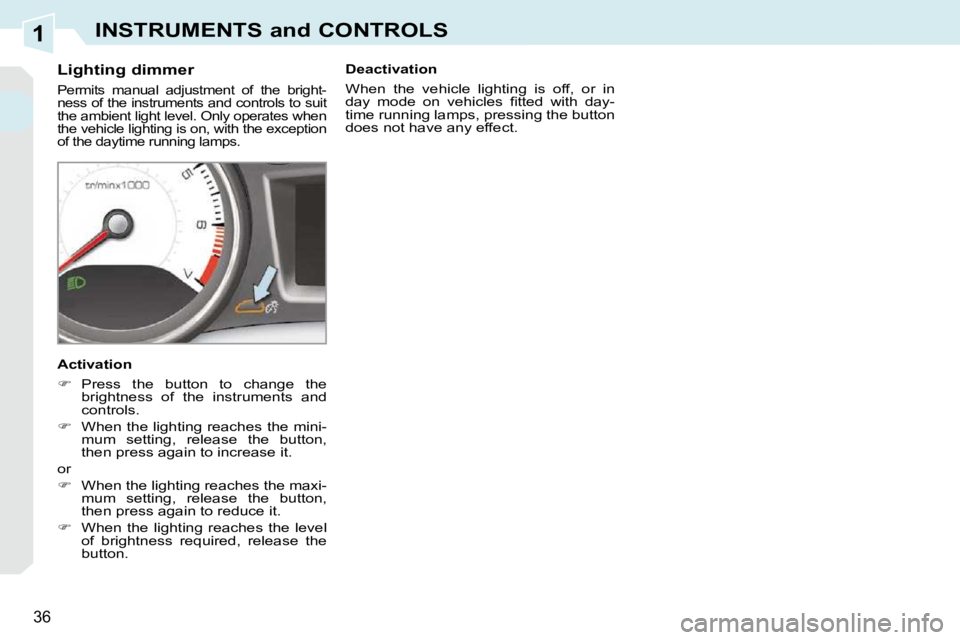
Lighting dimmer
Permits manual adjustment of the bright-
ness of the instruments and controls to suit
the ambient light level. Only operates when
the vehicle lighting is on, with the exception
of the daytime running lamps.
Activation
Press the button to change the
brightness of the instruments and
controls.
When the lighting reaches the mini-
mum setting, release the button,
then press again to increase it.
or
When the lighting reaches the maxi-
mum setting, release the button,
then press again to reduce it.
When the lighting reaches the level
of brightness required, release the
button. Deactivation
When the vehicle lighting is off, or in
day mode on vehicles fi tted with day-
time running lamps, pressing the button
does not have any effect.
Page 34 of 280
2
37
MULTIFUNCTION SCREENS
Main menu "Audio functions" menu
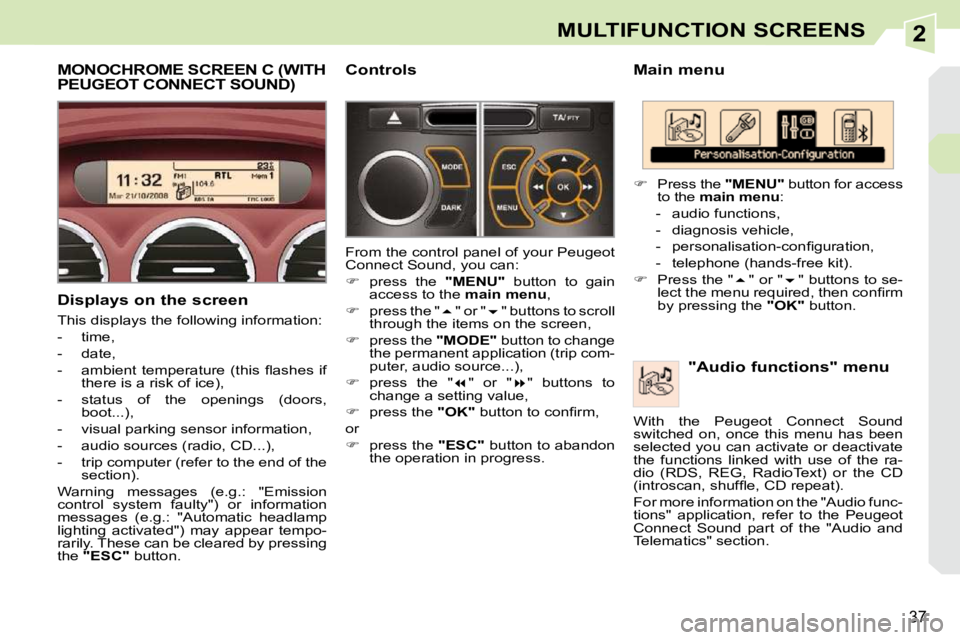
Press the "MENU" button for access
to the main menu :
- audio functions,
- diagnosis vehicle,
- personalisation-confi guration,
- telephone (hands-free kit).
Press the " " or " " buttons to se-
lect the menu required, then confi rm
by pressing the "OK" button.
With the Peugeot Connect Sound
switched on, once this menu has been
selected you can activate or deactivate
the functions linked with use of the ra-
dio (RDS, REG, RadioText) or the CD
(introscan, shuffl e, CD repeat).
For more information on the "Audio func-
tions" application, refer to the Peugeot
Connect Sound part of the "Audio and
Telematics" section.
MONOCHROME SCREEN C (WITH PEUGEOT CONNECT SOUND)
Displays on the screen
This displays the following information:
- time,
- date,
- ambient temperature (this fl ashes if there is a risk of ice),
- status of the openings (doors, boot...),
- visual parking sensor information,
- audio sources (radio, CD...),
- trip computer (refer to the end of the section).
Warning messages (e.g.: "Emission
control system faulty") or information
messages (e.g.: "Automatic headlamp
lighting activated") may appear tempo-
rarily. These can be cleared by pressing
the "ESC" button. Controls
From the control panel of your Peugeot
Connect Sound, you can:
press the "MENU" button to gain
access to the main menu ,
press the " " or " " buttons to scroll
through the items on the screen,
press the "MODE" button to change
the permanent application (trip com-
puter, audio source...),
press the " " or " " buttons to
change a setting value,
press the "OK" button to confi rm,
or
press the "ESC" button to abandon
the operation in progress.
Page 35 of 280
2MULTIFUNCTION SCREENS
"Diagnosis vehicle"
menu
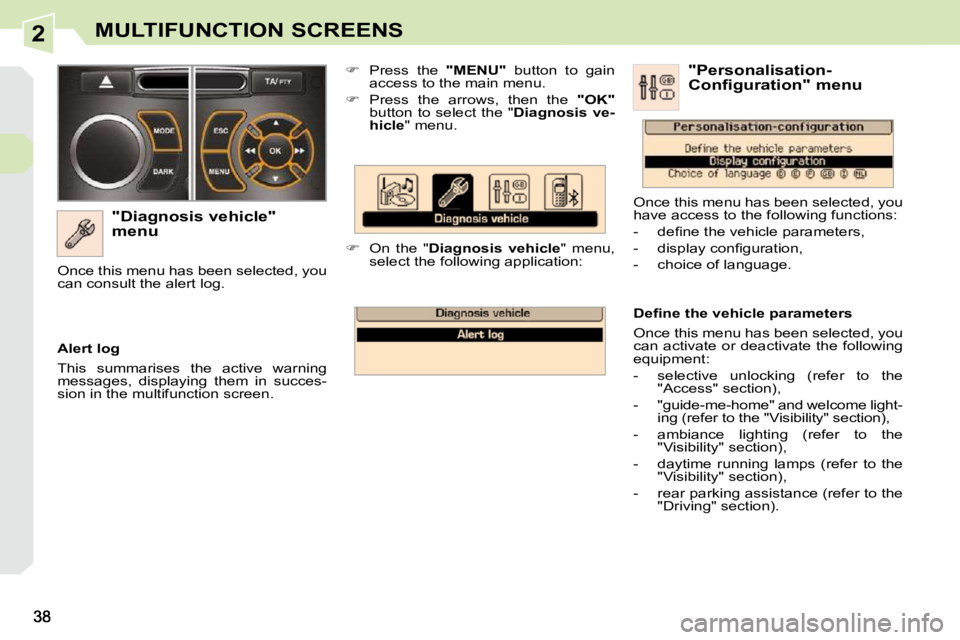
Press the "MENU" button to gain
access to the main menu.
Press the arrows, then the "OK"
button to select the " Diagnosis ve-
hicle " menu.
On the " Diagnosis vehicle " menu,
select the following application:
Alert log
This summarises the active warning
messages, displaying them in succes-
sion in the multifunction screen.
Once this menu has been selected, you
can consult the alert log.
Defi ne the vehicle parameters
Once this menu has been selected, you
can activate or deactivate the following
equipment:
- selective unlocking (refer to the
"Access" section),
- "guide-me-home" and welcome light- ing (refer to the "Visibility" section),
- ambiance lighting (refer to the "Visibility" section),
- daytime running lamps (refer to the "Visibility" section),
- rear parking assistance (refer to the "Driving" section). "Personalisation-
Configuration" menu
Once this menu has been selected, you
have access to the following functions:
- defi ne the vehicle parameters,
- display confi guration,
- choice of language.
Page 36 of 280
2
!
39
MULTIFUNCTION SCREENS
For safety reasons, confi guration
of the multifunction screen by the
driver must be done only when sta-
tionary. "Telephone" menu
Display confi guration
Once this menu has been selected, you
have access to the following settings:
- brightness-video setting,
- date and time setting,
- choice of units.
Choice of language
Once this menu has been selected,
you can change the language used by
the display (Deutsch, English, Espanol,
Français, Italiano, Nederlands,
Portugues, Portugues-Brasil, Türkçe * ).
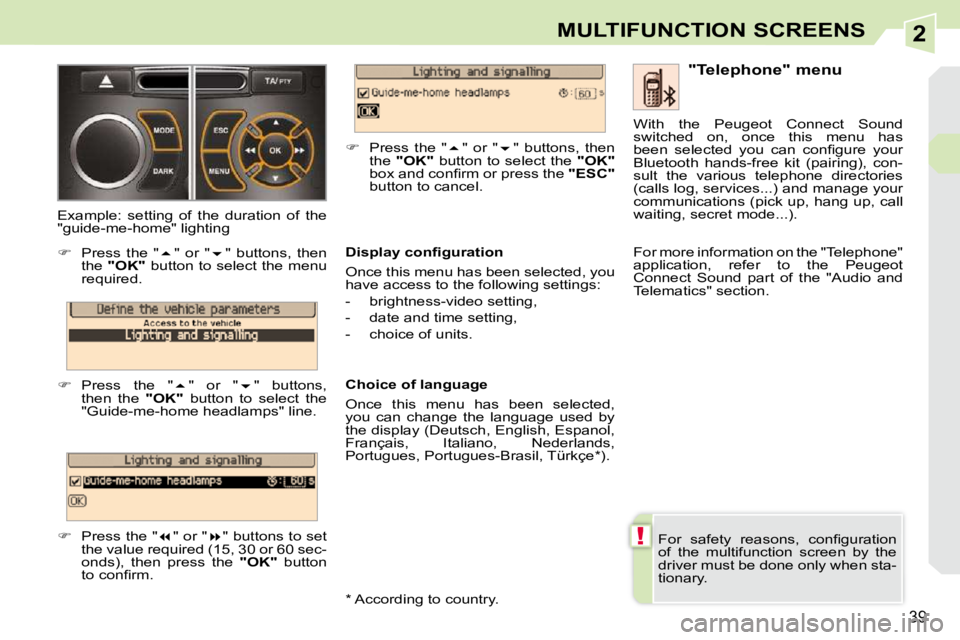
Example: setting of the duration of the
"guide-me-home" lighting
Press the " " or " " buttons, then
the "OK" button to select the menu
required.
Press the " " or " " buttons,
then the "OK" button to select the
"Guide-me-home headlamps" line.
Press the " " or " " buttons to set
the value required (15, 30 or 60 sec-
onds), then press the "OK" button
to confi rm.
Press the " " or " " buttons, then
the "OK" button to select the "OK"
box and confi rm or press the "ESC"
button to cancel. With the Peugeot Connect Sound
switched on, once this menu has
been selected you can confi gure your
Bluetooth hands-free kit (pairing), con-
sult the various telephone directories
(calls log, services...) and manage your
communications (pick up, hang up, call
waiting, secret mode...).
For more information on the "Telephone"
application, refer to the Peugeot
Connect Sound part of the "Audio and
Telematics" section.
* According to country.
Page 38 of 280
2
!
41
MULTIFUNCTION SCREENS
"SETUP" menu
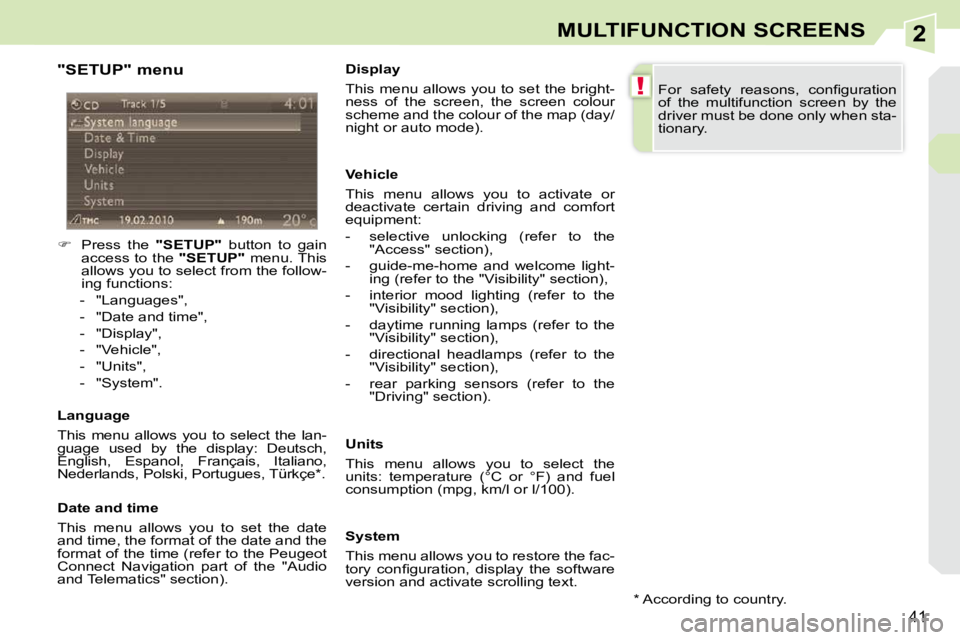
Press the "SETUP" button to gain
access to the "SETUP" menu. This
allows you to select from the follow-
ing functions:
- "Languages",
- "Date and time",
- "Display",
- "Vehicle",
- "Units",
- "System".
Language
This menu allows you to select the lan-
guage used by the display: Deutsch,
English, Espanol, Français, Italiano,
Nederlands, Polski, Portugues, Türkçe * .
Date and time
This menu allows you to set the date
and time, the format of the date and the
format of the time (refer to the Peugeot
Connect Navigation part of the "Audio
and Telematics" section). Display
This menu allows you to set the bright-
ness of the screen, the screen colour
scheme and the colour of the map (day/
night or auto mode).
Vehicle
This menu allows you to activate or
deactivate certain driving and comfort
equipment:
- selective unlocking (refer to the
"Access" section),
- guide-me-home and welcome light- ing (refer to the "Visibility" section),
- interior mood lighting (refer to the "Visibility" section),
- daytime running lamps (refer to the "Visibility" section),
- directional headlamps (refer to the "Visibility" section),
- rear parking sensors (refer to the "Driving" section).
Units
This menu allows you to select the
units: temperature (°C or °F) and fuel
consumption (mpg, km/l or l/100).
System
This menu allows you to restore the fac-
tory confi guration, display the software
version and activate scrolling text. For safety reasons, confi guration
of the multifunction screen by the
driver must be done only when sta-
tionary.
* According to country.
Page 67 of 280
4
!
i
i
66
ACCESS
Deadlocking renders the exterior and
interior door controls inoperative.
It also deactivates the manual cen-
tral control button.
Therefore, never leave anyone inside
the vehicle when it is deadlocked.
If one of the doors or the boot is still
open, the central locking does not
take place.
After unlocking the vehicle, if none
of the openings - door or boot - are
opened within thirty seconds, the
vehicle will lock itself again auto-
matically.
Deadlocking using the remote
control Deadlocking using the key
The folding and unfolding of the
door mirrors using the remote
control can be deactivated by a
PEUGEOT dealer.
Press the closed padlock
to lock the vehicle com-
pletely.
Press the closed padlock
again within fi ve seconds
to deadlock the vehicle.
Locking the vehicle
Press the closed padlock
to lock the vehicle com-
pletely.
Normal locking using the key
Turn the key to the right in the driv-
er's door lock to lock the vehicle
completely.
Normal locking using the remote
control
Deadlocking is confi rmed by fi xed
lighting of the direction indicators for
approximately two seconds.
According to version, the door mirrors
fold at the same time.
Locking is confi rmed by fi xed lighting of
the direction indicators for approximately
two seconds.
The central locking also locks the glove
box and the front armrest compartment.
According to version, the door mirrors
fold at the same time.
Turn the key to the right in the driver's
door lock to lock the vehicle com-
pletely.
Turn the key to the right again within
fi ve seconds to deadlock the vehicle.
Page 68 of 280
4
67
ACCESS
Locating your vehicle
Press the closed padlock
to locate your locked ve-
hicle in a car park. Electronic engine immobiliser
The key contains an electronic chip
which has a special code. When the
ignition is switched on, this code must
be recognised in order for starting to be
possible.
This electronic engine immobiliser locks
the engine management system a few
minutes after the ignition is switched off
and prevents starting of the engine by
anyone who does not have the key.
Anti-theft protection
In the event of a malfunction,
you are informed by lighting of
this warning lamp, an audible
signal and a message on the
multifunction screen.
In this case, your vehicle does not start;
contact a PEUGEOT dealer as soon as
possible.
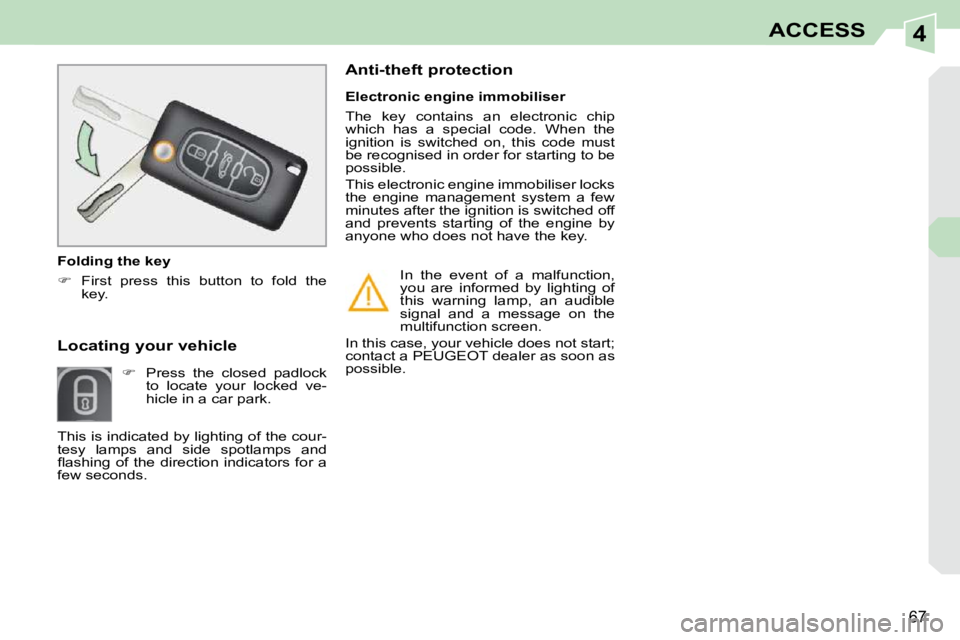
Folding the key
First press this button to fold the
key.
This is indicated by lighting of the cour-
tesy lamps and side spotlamps and
fl ashing of the direction indicators for a
few seconds.