light PEUGEOT 308 SW BL 2010 User Guide
[x] Cancel search | Manufacturer: PEUGEOT, Model Year: 2010, Model line: 308 SW BL, Model: PEUGEOT 308 SW BL 2010Pages: 336, PDF Size: 21.2 MB
Page 25 of 336
i
23
INSTRUMENTS and CONTROLS
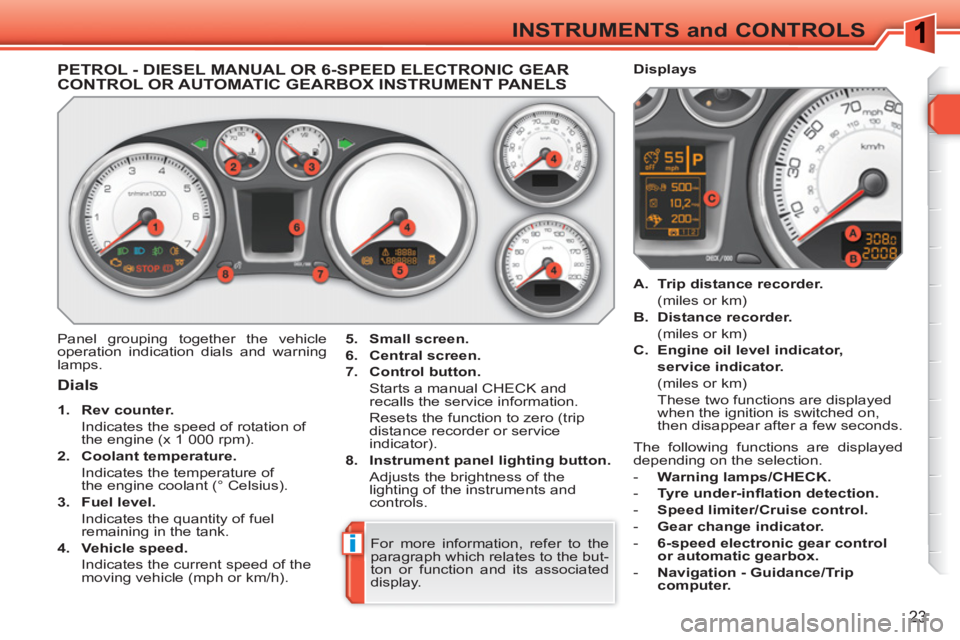
PETROL - DIESEL MANUAL OR 6-SPEED ELECTRONIC GEARCONTROL OR AUTOMATIC GEARBOX INSTRUMENT PANELS
Panel grouping together the vehicle
operation indication dials and warning
lamps.
5.
Small screen.
6.
Central screen.
7.
Control button.
Starts a manual CHECK and
recalls the service information.
Resets the function to zero (trip
distance recorder or service
indicator).
8.
Instrument panel lighting button.
Adjusts the brightness of the
lighting of the instruments and
controls.
Dials
1.
Rev counter.
Indicates the speed of rotation of
the engine (x 1 000 rpm).
2.
Coolant temperature.
Indicates the temperature of
the engine coolant (° Celsius).
3.
Fuel level.
Indicates the quantity of fuel
remaining in the tank.
4.
Vehicle speed.
Indicates the current speed of the
moving vehicle (mph or km/h).
A.
Trip distance recorder.
(miles or km)
B.
Distance recorder.
(miles or km)
C.
Engine oil level indicator,
service indicator.
(miles or km)
These two functions are displayed
when the ignition is switched on,
then disappear after a few seconds.
Displays
For more information, refer to the
paragraph which relates to the but-
ton or function and its associated
display. The following functions are displayed
depending on the selection.
- Warning lamps/CHECK.
- Tyre under-infl ation detection.
- Speed limiter/Cruise control.
- Gear change indicator.
- 6-speed electronic gear control
or automatic gearbox.
- Navigation - Guidance/Trip
computer.
Page 26 of 336
i
24
INSTRUMENTS and CONTROLS
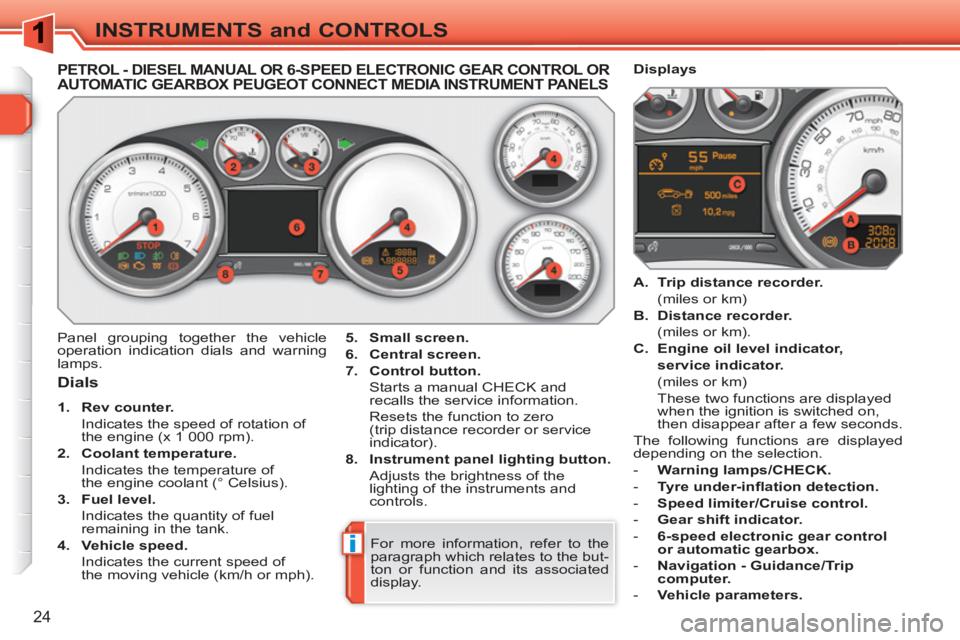
PETROL - DIESEL MANUAL OR 6-SPEED ELECTRONIC GEAR CONTROL ORAUTOMATIC GEARBOX PEUGEOT CONNECT MEDIA INSTRUMENT PANELS
Dials
1.
Rev counter.
Indicates the speed of rotation of
the engine (x 1 000 rpm).
2.
Coolant temperature.
Indicates the temperature of
the engine coolant (° Celsius).
3.
Fuel level.
Indicates the quantity of fuel
remaining in the tank.
4.
Vehicle speed.
Indicates the current speed of
the moving vehicle (km/h or mph).
A.
Trip distance recorder.
(miles or km)
B.
Distance recorder.
(miles or km).
C.
Engine oil level indicator,
service indicator.
(miles or km)
These two functions are displayed
when the ignition is switched on,
then disappear after a few seconds.
The following functions are displayed
depending on the selection.
- Warning lamps/CHECK.
- Tyre under-infl ation detection.
- Speed limiter/Cruise control.
- Gear shift indicator.
- 6-speed electronic gear control
or automatic gearbox.
- Navigation - Guidance/Trip
computer.
- Vehicle parameters.
Panel grouping together the vehicle
operation indication dials and warning
lamps.
Displays
5.
Small screen.
6.
Central screen.
7.
Control button.
Starts a manual CHECK and
recalls the service information.
Resets the function to zero
(trip distance recorder or service
indicator).
8.
Instrument panel lighting button.
Adjusts the brightness of the
lighting of the instruments and
controls.
For more information, refer to the
paragraph which relates to the but-
ton or function and its associated
display.
Page 27 of 336
i
25
INSTRUMENTS and CONTROLS
*
According to country.
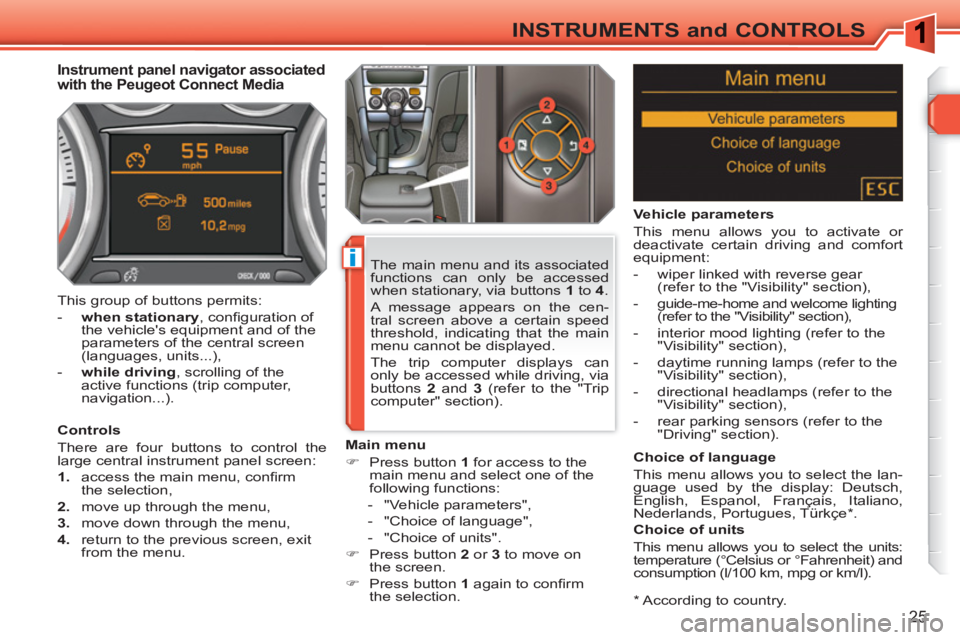
Instrument panel navigator associated
with the Peugeot Connect Media
Controls
There are four buttons to control the
large central instrument panel screen:
1.
access the main menu, confi rm
the selection,
2.
move up through the menu,
3.
move down through the menu,
4.
return to the previous screen, exit
from the menu.
Main menu
)
Press button 1
for access to the
main menu and select one of the
following functions:
- "Vehicle parameters",
- "Choice of language",
- "Choice of units".
)
Press button 2
or 3
to move on
the screen.
)
Press button 1
again to confi rm
the selection.
The main menu and its associated
functions can only be accessed
when stationary, via buttons 1
to 4
.
A message appears on the cen-
tral screen above a certain speed
threshold, indicating that the main
menu cannot be displayed.
The trip computer displays can
only be accessed while driving, via
buttons 2
and 3
(refer to the "Trip
computer" section). This group of buttons permits:
- when stationary
, confi guration of
the vehicle's equipment and of the
parameters of the central screen
(languages, units...),
- while driving
, scrolling of the
active functions (trip computer,
navigation...).
Vehicle parameters
This menu allows you to activate or
deactivate certain driving and comfort
equipment:
- wiper linked with reverse gear
(refer to the "Visibility" section),
- guide-me-home and welcome lighting
(refer to the "Visibility" section),
- interior mood lighting (refer to the
"Visibility" section),
- daytime running lamps (refer to the
"Visibility" section),
- directional headlamps (refer to the
"Visibility" section),
- rear parking sensors (refer to the
"Driving" section).
Choice of language
This menu allows you to select the lan-
guage used by the display: Deutsch,
English, Espanol, Français, Italiano,
Nederlands, Portugues, Türkçe * .
Choice of units
This menu allows you to select the units:
temperature (°Celsius or °Fahrenheit) and
consumption (l/100 km, mpg or km/l).
Page 28 of 336
!
26
INSTRUMENTS and CONTROLS
The warning lamps may come on
continuously or fl ash.
Certain warning lamps may come
on in two different modes. Only by
relating the type of lighting to the
operating status of the vehicle can
it be ascertained whether the situ-
ation is normal or whether a fault
has occurred.
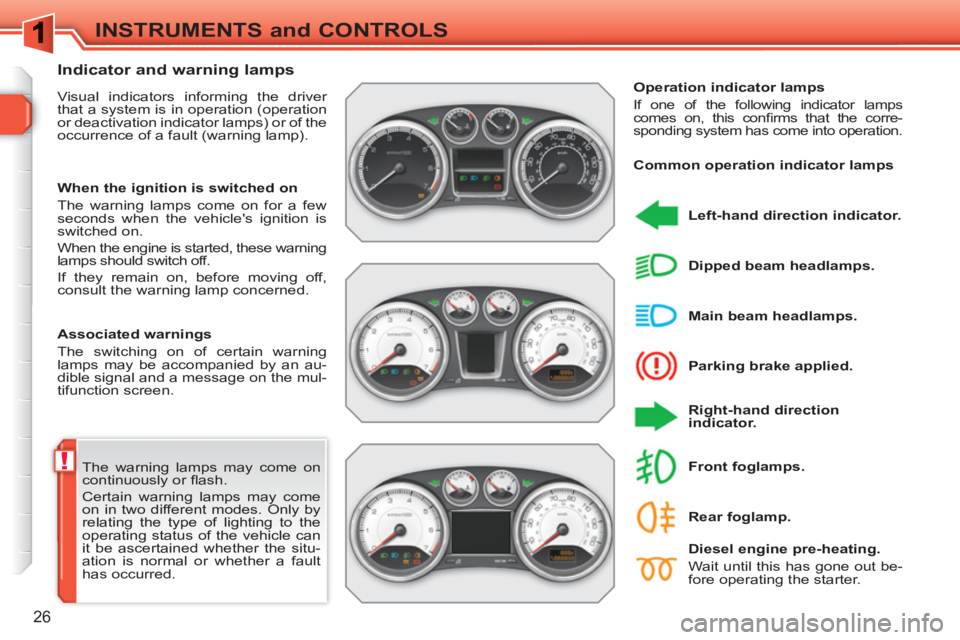
Indicator and warning lamps
Visual indicators informing the driver
that a system is in operation (operation
or deactivation indicator lamps) or of the
occurrence of a fault (warning lamp).
Associated warnings
The switching on of certain warning
lamps may be accompanied by an au-
dible signal and a message on the mul-
tifunction screen.
Operation indicator lamps
If one of the following indicator lamps
comes on, this confi rms that the corre-
sponding system has come into operation.
Left-hand direction indicator.
Parking brake applied.
Right-hand direction
indicator.
Main beam headlamps.
Dipped beam headlamps.
Diesel engine pre-heating.
Wait until this has gone out be-
fore operating the starter.
Front foglamps.
When the ignition is switched on
The warning lamps come on for a few
seconds when the vehicle's ignition is
switched on.
When the engine is started, these warning
lamps should switch off.
If they remain on, before moving off,
consult the warning lamp concerned.
Common operation indicator lamps
Rear foglamp.
Page 30 of 336
28
INSTRUMENTS and CONTROLS
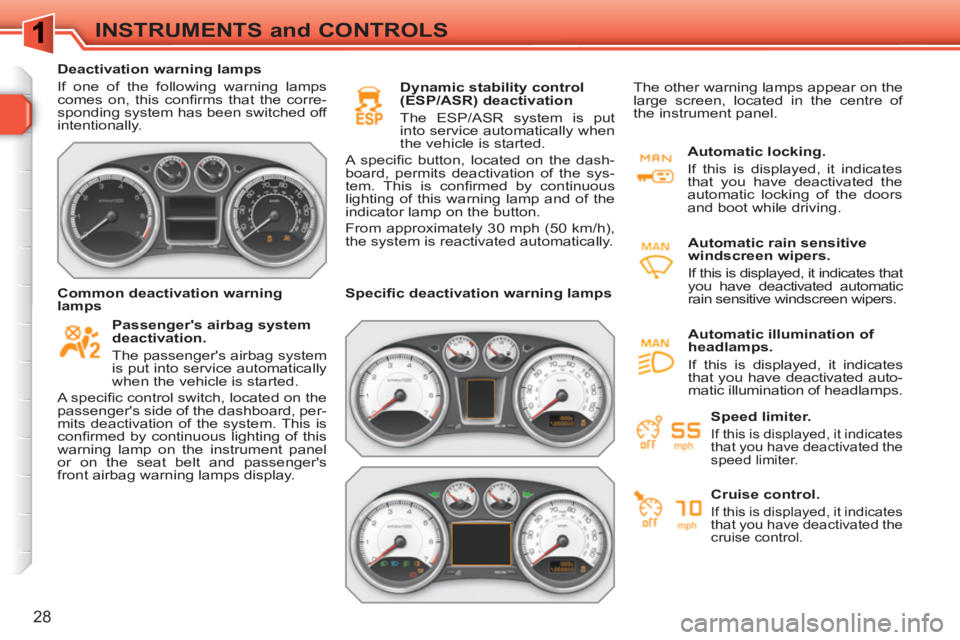
Deactivation warning lamps
If one of the following warning lamps
comes on, this confi rms that the corre-
sponding system has been switched off
intentionally.
Passenger's airbag system
deactivation.
The passenger's airbag system
is put into service automatically
when the vehicle is started.
A specifi c control switch, located on the
passenger's side of the dashboard, per-
mits deactivation of the system. This is
confi rmed by continuous lighting of this
warning lamp on the instrument panel
or on the seat belt and passenger's
front airbag warning lamps display.
Dynamic stability control
(ESP/ASR) deactivation
The ESP/ASR system is put
into service automatically when
the vehicle is started.
A specifi c button, located on the dash-
board, permits deactivation of the sys-
tem. This is confi rmed by continuous
lighting of this warning lamp and of the
indicator lamp on the button.
From approximately 30 mph (50 km/h),
the system is reactivated automatically.
Common deactivation warning
lamps
Specifi c deactivation warning lamps
Automatic locking.
If this is displayed, it indicates
that you have deactivated the
automatic locking of the doors
and boot while driving.
Automatic rain sensitive
windscreen wipers.
If this is displayed, it indicates that
you have deactivated automatic
rain sensitive windscreen wipers. The other warning lamps appear on the
large screen, located in the centre of
the instrument panel.
Speed limiter.
If this is displayed, it indicates
that you have deactivated the
speed limiter.
Cruise control.
If this is displayed, it indicates
that you have deactivated the
cruise control.
Automatic illumination of
headlamps.
If this is displayed, it indicates
that you have deactivated auto-
matic illumination of headlamps.
Page 31 of 336
!
29
INSTRUMENTS and CONTROLS
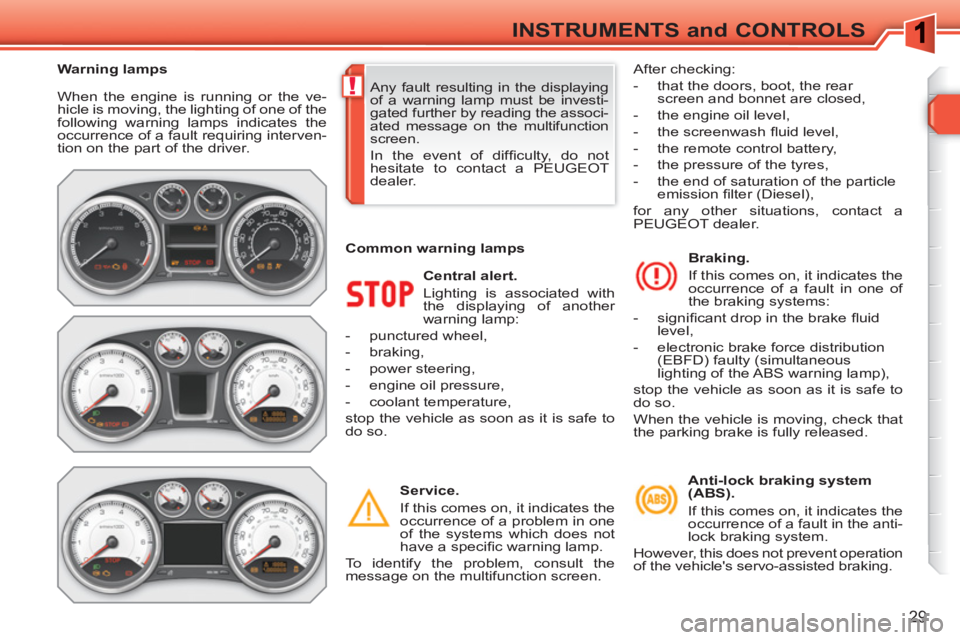
When the engine is running or the ve-
hicle is moving, the lighting of one of the
following warning lamps indicates the
occurrence of a fault requiring interven-
tion on the part of the driver.
Central alert.
Lighting is associated with
the displaying of another
warning lamp:
- punctured wheel,
- braking,
- power steering,
- engine oil pressure,
- coolant temperature,
stop the vehicle as soon as it is safe to
do so.
Service.
If this comes on, it indicates the
occurrence of a problem in one
of the systems which does not
have a specifi c warning lamp.
To identify the problem, consult the
message on the multifunction screen.
Braking.
If this comes on, it indicates the
occurrence of a fault in one of
the braking systems:
- signifi cant drop in the brake fl uid
level,
- electronic brake force distribution
(EBFD) faulty (simultaneous
lighting of the ABS warning lamp),
stop the vehicle as soon as it is safe to
do so.
When the vehicle is moving, check that
the parking brake is fully released. Any fault resulting in the displaying
of a warning lamp must be investi-
gated further by reading the associ-
ated message on the multifunction
screen.
In the event of diffi culty, do not
hesitate to contact a PEUGEOT
dealer.
Warning lamps
Common warning lamps After checking:
- that the doors, boot, the rear
screen and bonnet are closed,
- the engine oil level,
- the screenwash fl uid level,
- the remote control battery,
- the pressure of the tyres,
- the end of saturation of the particle
emission
fi lter (Diesel),
for any other situations, contact a
PEUGEOT dealer.
Anti-lock braking system
(ABS).
If this comes on, it indicates the
occurrence of a fault in the anti-
lock braking system.
However, this does not prevent operation
of the vehicle's servo-assisted braking.
Page 34 of 336
!
32
INSTRUMENTS and CONTROLS
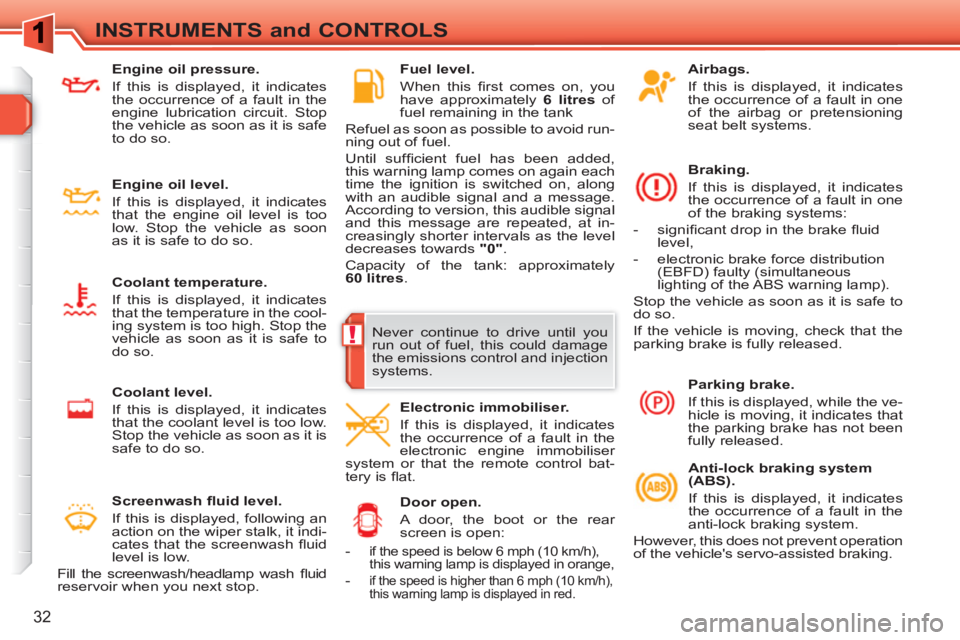
Airbags.
If this is displayed, it indicates
the occurrence of a fault in one
of the airbag or pretensioning
seat belt systems.
Braking.
If this is displayed, it indicates
the occurrence of a fault in one
of the braking systems:
- signifi cant drop in the brake fl uid
level,
- electronic brake force distribution
(EBFD) faulty (simultaneous
lighting of the ABS warning lamp).
Stop the vehicle as soon as it is safe to
do so.
If the vehicle is moving, check that the
parking brake is fully released.
Anti-lock braking system
(ABS).
If this is displayed, it indicates
the occurrence of a fault in the
anti-lock braking system.
However, this does not prevent operation
of the vehicle's servo-assisted braking.
Door open.
A door, the boot or the rear
screen is open:
Parking brake.
If this is displayed, while the ve-
hicle is moving, it indicates that
the parking brake has not been
fully released.
Electronic immobiliser.
If this is displayed, it indicates
the occurrence of a fault in the
electronic engine immobiliser
system or that the remote control bat-
tery is fl at.
Fuel level.
When this fi rst comes on, you
have approximately 6 litres
of
fuel remaining in the tank
Refuel as soon as possible to avoid run-
ning out of fuel.
Until suffi cient fuel has been added,
this warning lamp comes on again each
time the ignition is switched on, along
with an audible signal and a message.
According to version, this audible signal
and this message are repeated, at in-
creasingly shorter intervals as the level
decreases towards "0"
.
Capacity of the tank: approximately
60 litres
.
Screenwash fl uid level.
If this is displayed, following an
action on the wiper stalk, it indi-
cates that the screenwash fl uid
level is low.
Fill the screenwash/headlamp wash fl uid
reservoir when you next stop.
-
if the speed is below 6 mph (10 km/h),
this warning lamp is displayed in orange,
- if the speed is higher than 6 mph (10 km/h),
this warning lamp is displayed in red.
Never continue to drive until you
run out of fuel, this could damage
the emissions control and injection
systems.
Engine oil pressure.
If this is displayed, it indicates
the occurrence of a fault in the
engine lubrication circuit. Stop
the vehicle as soon as it is safe
to do so.
Engine oil level.
If this is displayed, it indicates
that the engine oil level is too
low. Stop the vehicle as soon
as it is safe to do so.
Coolant temperature.
If this is displayed, it indicates
that the temperature in the cool-
ing system is too high. Stop the
vehicle as soon as it is safe to
do so.
Coolant level.
If this is displayed, it indicates
that the coolant level is too low.
Stop the vehicle as soon as it is
safe to do so.
Page 35 of 336
33
INSTRUMENTS and CONTROLS
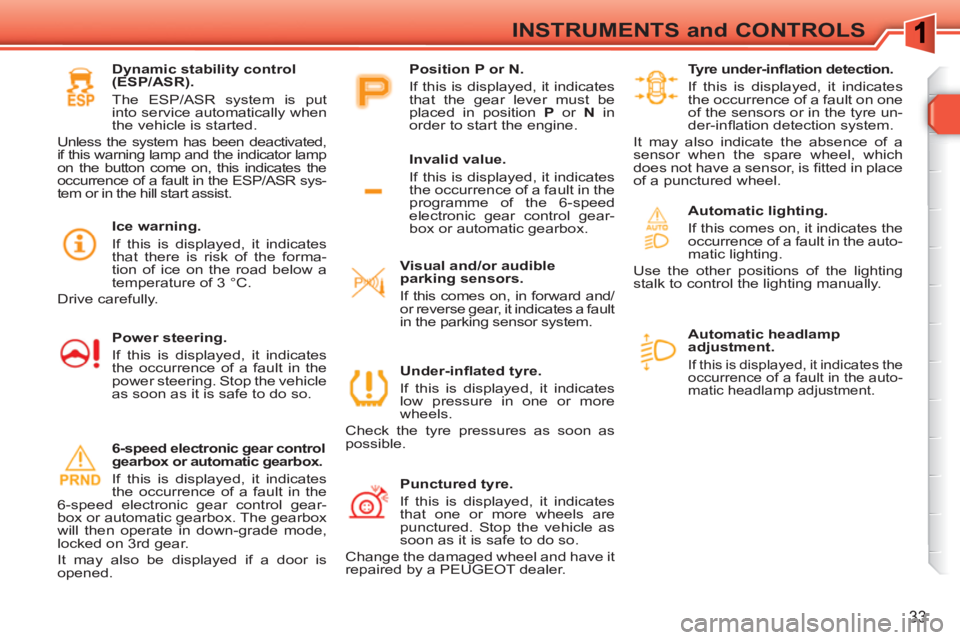
Automatic headlamp
adjustment.
If this is displayed, it indicates the
occurrence of a fault in the auto-
matic headlamp adjustment.
Under-infl ated tyre.
If this is displayed, it indicates
low pressure in one or more
wheels.
Check the tyre pressures as soon as
possible.
Punctured tyre.
If this is displayed, it indicates
that one or more wheels are
punctured. Stop the vehicle as
soon as it is safe to do so.
Change the damaged wheel and have it
repaired by a PEUGEOT dealer.
Tyre under-infl ation detection.
If this is displayed, it indicates
the occurrence of a fault on one
of the sensors or in the tyre un-
der-infl ation detection system.
It may also indicate the absence of a
sensor when the spare wheel, which
does not have a sensor, is fi tted in place
of a punctured wheel.
Automatic lighting.
If this comes on, it indicates the
occurrence of a fault in the auto-
matic lighting.
Use the other positions of the lighting
stalk to control the lighting manually.
Visual and/or audible
parking sensors.
If this comes on, in forward and/
or reverse gear, it indicates a fault
in the parking sensor system.
6-speed electronic gear control
gearbox or automatic gearbox.
If this is displayed, it indicates
the occurrence of a fault in the
6-speed electronic gear control gear-
box or automatic gearbox. The gearbox
will then operate in down-grade mode,
locked on 3rd gear.
It may also be displayed if a door is
opened.
Invalid value.
If this is displayed, it indicates
the occurrence of a fault in the
programme of the 6-speed
electronic gear control gear-
box or automatic gearbox.
Position P or N.
If this is displayed, it indicates
that the gear lever must be
placed in position P
or N
in
order to start the engine.
Dynamic stability control
(ESP/ASR).
The ESP/ASR system is put
into service automatically when
the vehicle is started.
Unless the system has been deactivated,
if this warning lamp and the indicator lamp
on the button come on, this indicates the
occurrence of a fault in the ESP/ASR sys-
tem or in the hill start assist.
Power steering.
If this is displayed, it indicates
the occurrence of a fault in the
power steering. Stop the vehicle
as soon as it is safe to do so.
Ice warning.
If this is displayed, it indicates
that there is risk of the forma-
tion of ice on the road below a
temperature of 3 °C.
Drive carefully.
Page 41 of 336
39
INSTRUMENTS and CONTROLS
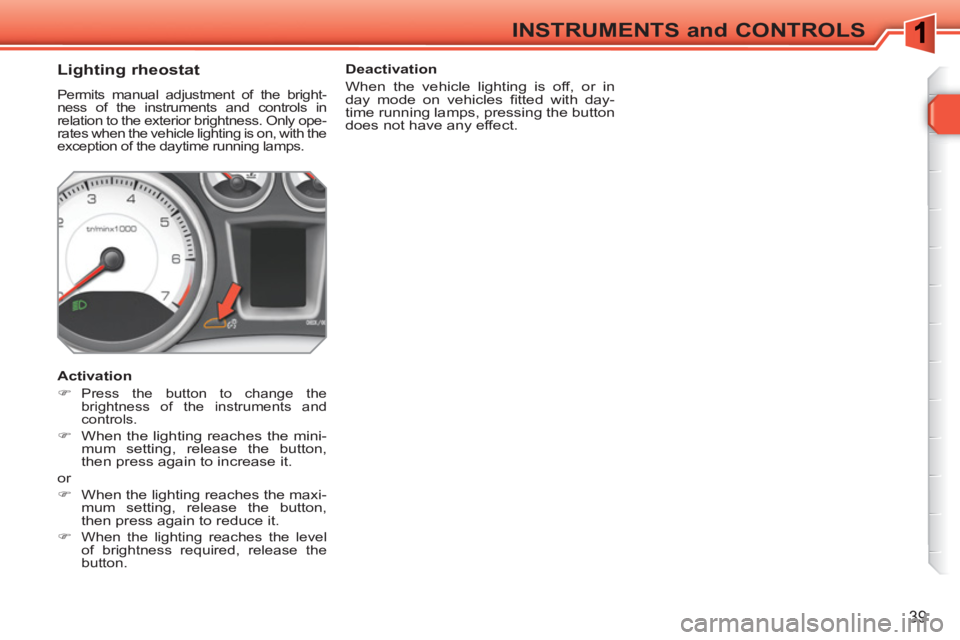
Lighting rheostat
Permits manual adjustment of the bright-
ness of the instruments and controls in
relation to the exterior brightness. Only ope-
rates when the vehicle lighting is on, with the
exception of the daytime running lamps.
Activation
)
Press the button to change the
brightness of the instruments and
controls.
)
When the lighting reaches the mini-
mum setting, release the button,
then press again to increase it.
or
)
When the lighting reaches the maxi-
mum setting, release the button,
then press again to reduce it.
)
When the lighting reaches the level
of brightness required, release the
button.
Deactivation
When the vehicle lighting is off, or in
day mode on vehicles fi tted with day-
time running lamps, pressing the button
does not have any effect.
Page 43 of 336
!
41
MULTIFUNCTION SCREENS
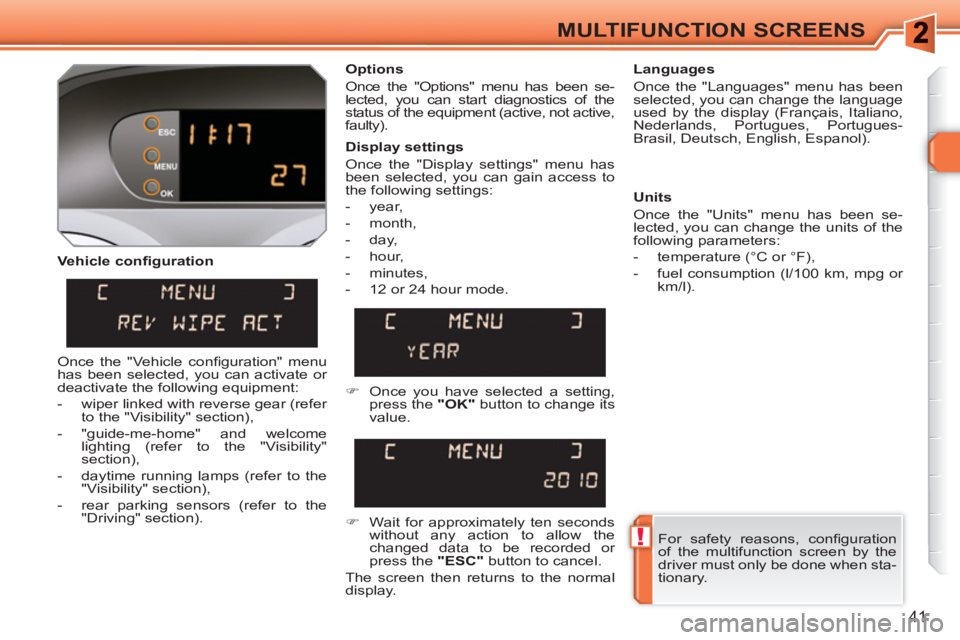
Vehicle confi guration
Options
Once the "Options" menu has been se-
lected, you can start diagnostics of the
status of the equipment (active, not active,
faulty).
Languages
Once the "Languages" menu has been
selected, you can change the language
used by the display (Français, Italiano,
Nederlands, Portugues, Portugues-
Brasil, Deutsch, English, Espanol).
Display settings
Once the "Display settings" menu has
been selected, you can gain access to
the following settings:
- year,
- month,
- day,
- hour,
- minutes,
- 12 or 24 hour mode.
Units
Once the "Units" menu has been se-
lected, you can change the units of the
following parameters:
- temperature (°C or °F),
- fuel consumption (l/100 km, mpg or
km/l).
)
Once you have selected a setting,
press the "OK"
button to change its
value.
)
Wait for approximately ten seconds
without any action to allow the
changed data to be recorded or
press the "ESC"
button to cancel.
The screen then returns to the normal
display.
Once the "Vehicle confi guration" menu
has been selected, you can activate or
deactivate the following equipment:
- wiper linked with reverse gear (refer
to the "Visibility" section),
- "guide-me-home" and welcome
lighting (refer to the "Visibility"
section),
- daytime running lamps (refer to the
"Visibility" section),
- rear parking sensors (refer to the
"Driving" section).
For safety reasons, confi guration
of the multifunction screen by the
driver must only be done when sta-
tionary.