light PEUGEOT 308 SW BL 2010 Manual PDF
[x] Cancel search | Manufacturer: PEUGEOT, Model Year: 2010, Model line: 308 SW BL, Model: PEUGEOT 308 SW BL 2010Pages: 336, PDF Size: 21.2 MB
Page 227 of 336
1
225
TECHNICAL DATA
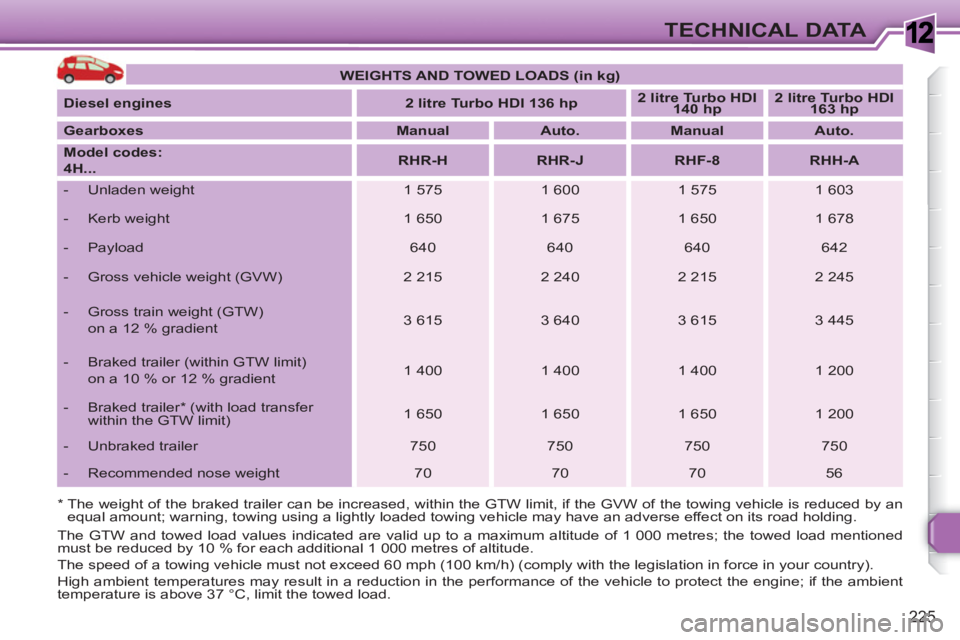
* The weight of the braked trailer can be increased, within the GTW limit, if the GVW of the towing vehicle is reduced by an
equal amount; warning, towing using a lightly loaded towing vehicle may have an adverse effect on its road holding.
The GTW and towed load values indicated are valid up to a maximum altitude of 1 000 metres; the towed load mentioned
must be reduced by 10 % for each additional 1 000 metres of altitude.
The speed of a towing vehicle must not exceed 60 mph (100 km/h) (comply with the legislation in force in your country).
High ambient temperatures may result in a reduction in the performance of the vehicle to protect the engine; if the ambient
temperature is above 37 °C, limit the towed load.
WEIGHTS AND TOWED LOADS (in kg)
Diesel engines
2 litre Turbo HDI 136 hp
2 litre Turbo HDI
140 hp
2 litre Turbo HDI
163 hp
Gearboxes
Manual
Auto.
Manual
Auto.
Model codes:
4H...
RHR-H
RHR-J
RHF-8
RHH-A
- Unladen weight
1 575
1 600
1 575
1 603
- Kerb weight
1 650
1 675
1 650
1 678
- Payload
640
640
640
642
- Gross vehicle weight (GVW)
2 215
2 240
2 215
2 245
- Gross train weight (GTW)
on a 12 % gradient
3 615
3 640
3 615
3 445
- Braked trailer (within GTW limit)
on a 10 % or 12 % gradient
1 400
1 400
1 400
1 200
- Braked trailer * (with load transfer
within the GTW limit)
1 650
1 650
1 650
1 200
- Unbraked trailer
750
750
750
750
- Recommended nose weight
70
70
70
56
Page 242 of 336
240
NAV
03
ABCDEF5JKL4GHI68TUV7PQRS90*#
RADIOMEDIANAVESCTRAFFICSETUPADDRBOOK
2ABC3DEF5JKL4GHI6MNO8TUV7PQRS9WXYZ0*#
1RADIOMEDIANAVESCTRAFFICSETUPADDRBOOK
1
2
3
6
5
4
2ABC3DEF5JKL4GHI6MNO8TUV7PQRS9WXYZ0*#
1RADIOMEDIANAVESCTRAFFICSETUPADDRBOOK
2ABC3DEF5JKL4GHI6MNO8TUV7PQRS9WXYZ0*#
1RADIOMEDIANAVESCTRAFFICSETUPADDRBOOK
2ABC3DEF5JKL4GHI6MNO8TUV7PQRS9WXYZ0*#
1RADIOMEDIANAVESCTRAFFICSETUPADDRBOOK
2ABC3DEF5JKL4GHI6MNO8TUV7PQRS9WXYZ0*#
1RADIOMEDIANAVESCTRAFFICSETUPADDRBOOK
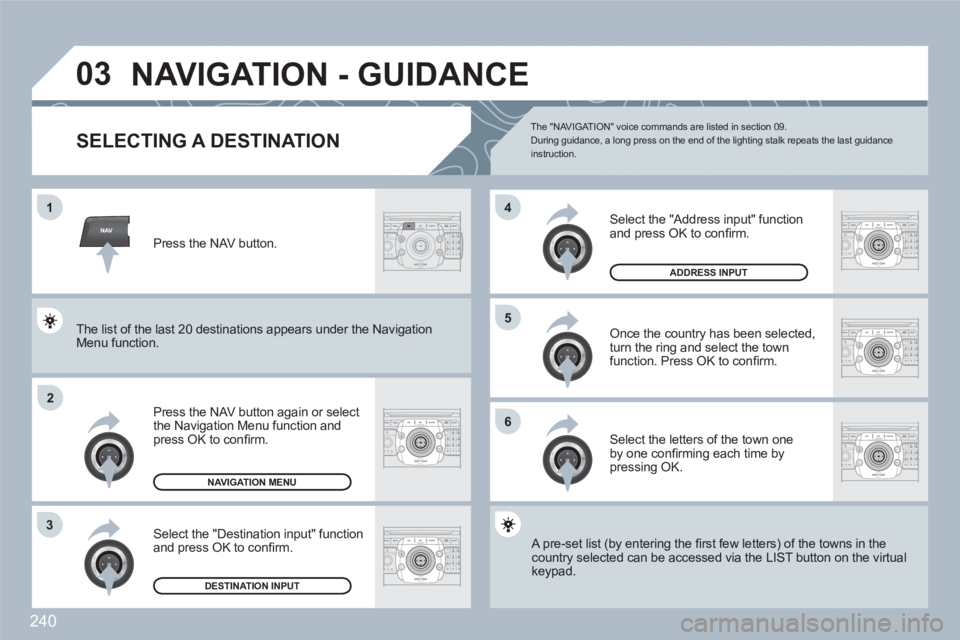
NAVIGATION - GUIDANCE
SELECTING A DESTINATION
Press the NAV button again or select the Navigation Menu function and press OK to confi rm.
Select the "Destination input" function and press OK to confi rm.
Press the NAV button.
Select the letters of the town one by one confi rming each time by pressing OK.
Once the country has been selected,turn the ring and select the townfunction. Press OK to confi rm.
NAVIGATION MENU
DESTINATION INPUT
A pre-set list (by entering the fi rst few letters) of the towwns in the country selected can be accessed via the LIST button on the virtual keypad.
Select the "Address input" function and press OK to confi rm.
ADDRESS INPUT
The list of the last 20 destinations appears under the NNavigationMenu function.
The "NAVIGAT ION" voice commands are listed in section 09. During guidance, a long press on the end of the lighting stalk repeats the last guidance instruction.
Page 263 of 336
261
09 VOICE COMMANDS AND STEERING MOUNTED CONTROLS
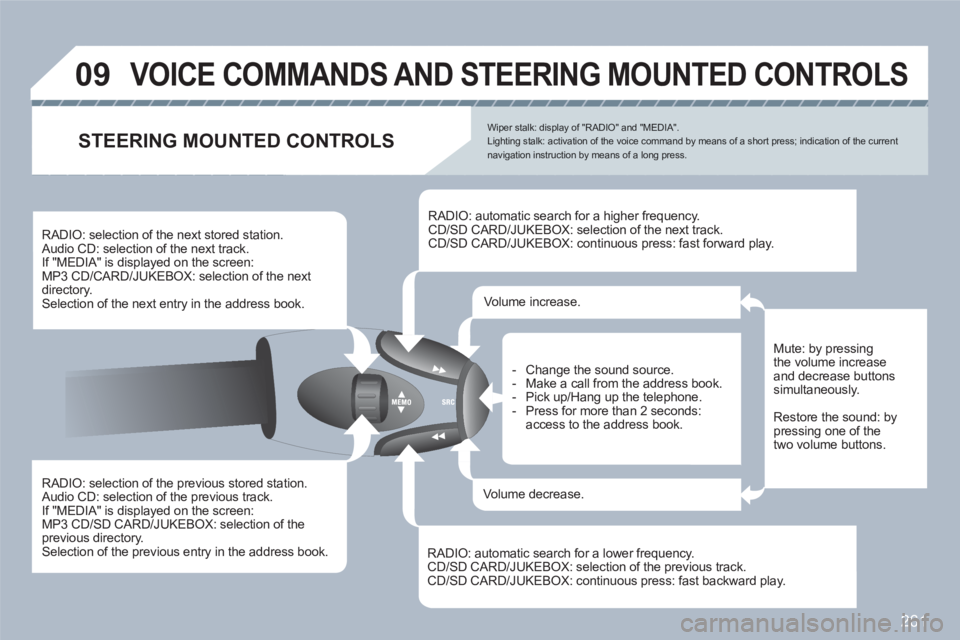
RADIO: selection of the previous stored station. Audio CD: selection of the previous track.
If "MEDIA" is displayed on the screen:
MP3 CD/SD CARD/JUKEBOX: selection of the previous directory. Selection of the previous entry in the address book.
RADIO: selection of the next stored station. Audio CD: selection of the next track.
If "MEDIA" is displayed on the screen:
MP3 CD/CARD/JUKEBOX: selection of the nextdirectory. Selection of the next entry in the address book.
RADIO: automatic search for a higher frequency. CD/SD CARD/JUKEBOX: selection of the next track.
CD/SD CARD/JUKEBOX: continuous press: fast forward play.
RADIO: automatic search for a lower frequency. CD/SD CARD/JUKEBOX: selection of the previous track. CD/SD CARD/JUKEBOX: continuous press: fast backward play.
- Change the sound source.
- Make a call from the address book.
- Pick up/Hang up the telephone.
- Press for more than 2 seconds:access to the address book.
Volume increase.
Volume decrease.
STEERING MOUNTED CONTROLS
Mute: by pressingthe volume increase and decrease buttonssimultaneously.
Restore the sound: by pressing one of thetwo volume buttons.
Wiper stalk: display of "RADIO" and "MEDIA".Lighting stalk: activation of the voice command by means of a short press; indication of the current navigation instruction by means of a long press.
Page 264 of 336
262
TU PQRS
0*
11
SETUPABCDEF5JKL4GHI68TUV7PQRS90*#
MEDIANAVESCTRAFFICADDRBOOKSETUP
22
09
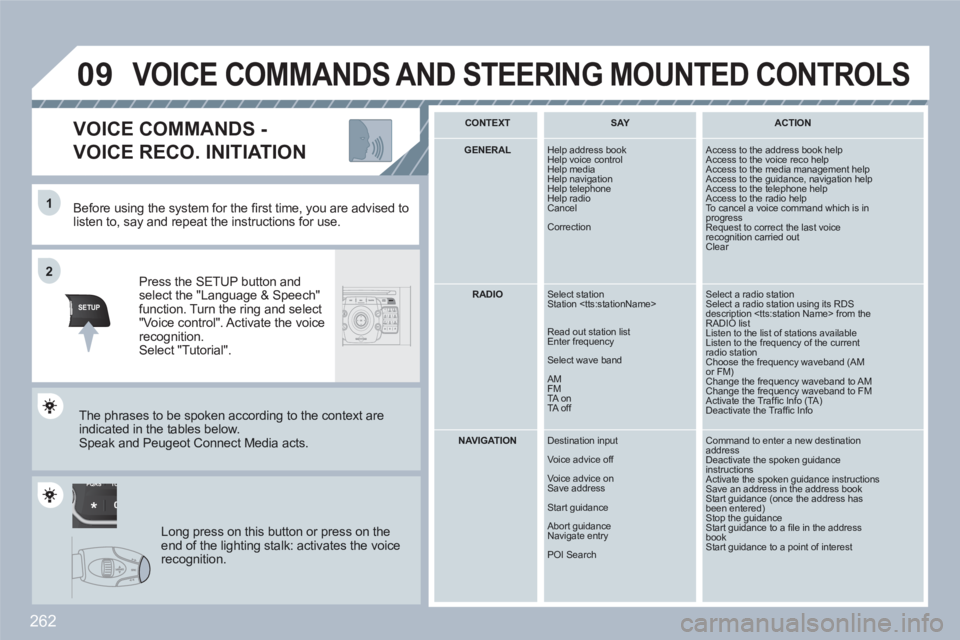
Before using the system for the fi rst time, you are advised tolisten to, say and repeat the instructions for use.
Press the SETUP button andselect the "Language & Speech"function. Turn the ring and select"Voice control". Activate the voicerecognition.Select "Tutorial".
VOICE COMMANDS -
VOICE RECO. INITIATION
The phrases to be spoken according to the context are indicated in the tables below.
Speak and Peugeot Connect Media acts.
Long press on this button or press on theend of the lighting stalk: activates the voicerecognition.
CONTEXT
SAY
ACTION
GENERAL
Help address book
Help voice control
Help media Help navigation
Help telephone
Help radio Cancel
Correction
Access to the address book help Access to the voice reco help Access to the media management help Access to the guidance, navigation help Access to the telephone help Access to the radio help To cancel a voice command which is inprogress Request to correct the last voicerecognition carried outClear
RADIO
Select station
Station
Read out station list
Enter frequency
Select wave band
AM
FM
TA on
TA off
Select a radio station Select a radio station using its RDS description
NAVIGATION
Destination input
Voice advice off
Voice advice on
Save address
Start guidance
Abort guidance
Navigate entry
POI Search
Command to enter a new destination addressDeactivate the spoken guidanceinstructions Activate the spoken guidance instructions Save an address in the address bookStart guidance (once the address hasbeen entered)Stop the guidance Start guidance to a fi le in the address bookStart guidance to a point of interest
VOICE COMMANDS AND STEERING MOUNTED CONTROLS
Page 269 of 336
267
SETUP
1
2
3
4
3
4
2
3
3
3
3
2
3
4
4
4
4
2
4
3
2
4
4
3
4
4
3
3
3
4
4
4
4
4
4
4
4
3
4
4
5
5
5
4
5
5
3
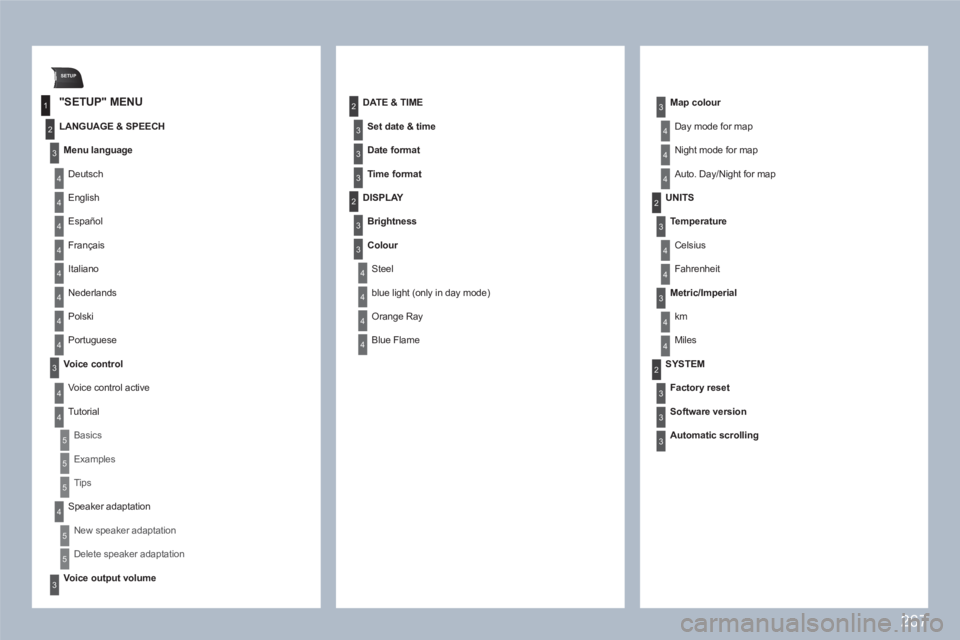
"SETUP" MENU
LANGUAGE & SPEECH
Menu language
Deutsch
English
Español
Français
Italiano
Nederlands
Polski
Portuguese
Voice control
Voice control active
Tutorial
Basics
Examples
Tips
Speaker adaptation
New speaker adaptation
Delete speaker adaptation
Voice output volume
DATE & TIME
Set date & time
Date format
Time format
DISPLAY
Brightness
Colour
Steel
blue light (only in day mode)
Orange Ray
Blue Flame
Map colour
Day mode for map
Night mode for map
Auto. Day/Night for map
UNITS
Te mperature
Celsius
Fahrenheit
Metric/Imperial
km
Miles
SYSTEM
Factory reset
Software version
Automatic scrolling
Page 280 of 336
278
7
8
9
10
03
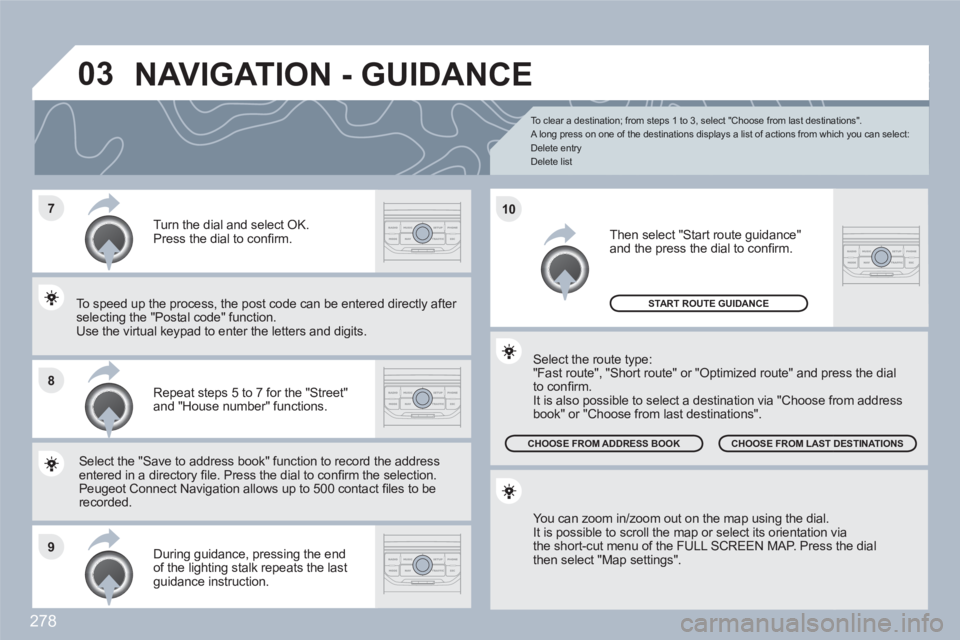
To clear a destination; from steps 1 to 3, select "Choose from last destinations".
A long press on one of the destinations displays a list of actions from which you can select:
Delete entry
Delete list
Repeat steps 5 to 7 for the "Street" and "House number" functions.
Turn the dial and select OK. Press the dial to confi rm.
Select the "Save to address book" function to record tthe address entered in a directory fi le. Press the dial to confi rm thee selection. Peugeot Connect Navigation allows up to 500 contact fi les to berecorded.
To speed up the process, the post code can be entereed directly after selecting the "Postal code" function. Use the virtual keypad to enter the letters and digits.
Then select "Start route guidance" and the press the dial to confi rm.
During guidance, pressing the end of the lighting stalk repeats the last guidance instruction.
You can zoom in/zoom out on the map using the dial.
It is possible to scroll the map or select its orientation vvia the short-cut menu of the FULL SCREEN MAP. Press the dialthen select "Map settings".
Select the route type:
"Fast route", "Short route" or "Optimized route" and preess the dial to confi rm.
It is also possible to select a destination via "Choose frrom address book" or "Choose from last destinations".
CHOOSE FROM LAST DESTINATIONS CHOOSE FROM ADDRESS BOOK
START ROUTE GUIDANCE
NAVIGATION - GUIDANCE
Page 304 of 336
302
11
22
10101111
133144155
33445566778899
122
01 FIRST STEPS
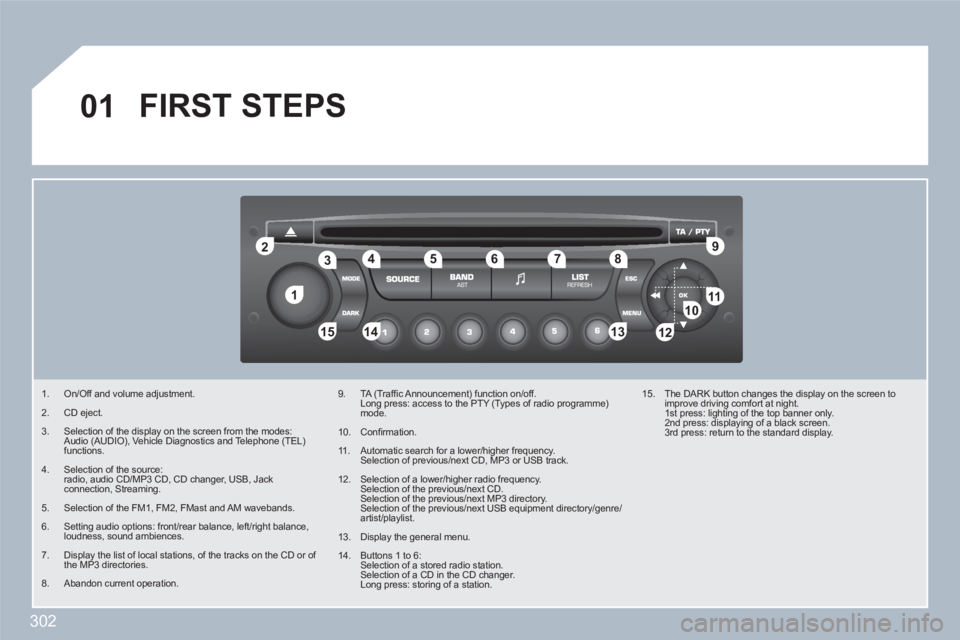
1. On/Off and volume adjustment.
2. CD eject.
3. Selection of the display on the screen from the modes: Audio (AUDIO), Vehicle Diagnostics and Telephone (TEL) functions.
4. Selection of the source: radio, audio CD/MP3 CD, CD changer, USB, Jack connection, Streaming.
5. Selection of the FM1, FM2, FMast and AM wavebands.
6. Setting audio options: front/rear balance, left/right balance, loudness, sound ambiences.
7. Display the list of local stations, of the tracks on the CD or of the MP3 directories.
8. Abandon current operation.
9. TA (Traffi c Announcement) function on/off. Long press: access to the PTY (Types of radio programme)mode.
10. Confi rmation.
11 . Automatic search for a lower/higher frequency. Selection of previous/next CD, MP3 or USB track.
12. Selection of a lower/higher radio frequency. Selection of the previous/next CD. Selection of the previous/next MP3 directory. Selection of the previous/next USB equipment directory/genre/artist/playlist.
13. Display the general menu.
14. Buttons 1 to 6: Selection of a stored radio station. Selection of a CD in the CD changer. Long press: storing of a station.
15. The DARK button changes the display on the screen toimprove driving comfort at night. 1st press: lighting of the top banner only. 2nd press: displaying of a black screen. 3rd press: return to the standard display.
Page 320 of 336
EXTERIOR
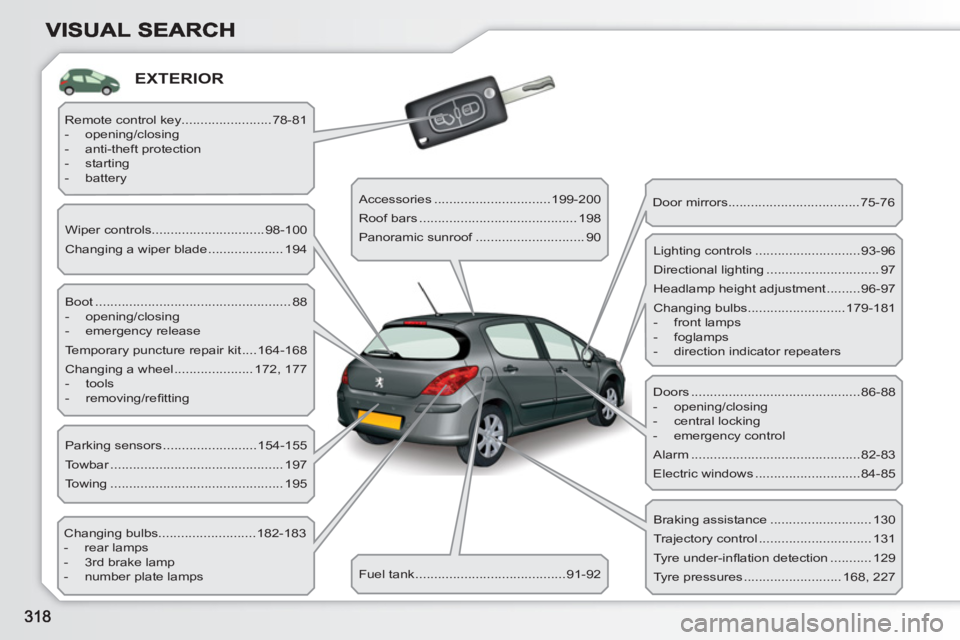
Boot .................................................... 88
- opening/closing
- emergency release
Temporary puncture repair kit ....164-168
Changing a wheel ..................... 172, 177
- tools
- removing/refi tting Wiper controls..............................98-100
Changing a wiper blade .................... 194
Changing bulbs..........................182-183
- rear lamps
- 3rd brake lamp
- number plate lamps Parking sensors .........................154-155
Towbar .............................................. 197
Towing .............................................. 195 Remote control key........................78-81
- opening/closing
- anti-theft protection
- starting
- battery
Accessories ...............................199-200
Roof bars .......................................... 198
Panoramic sunroof ............................. 90
Fuel tank ........................................91-92 Door mirrors ...................................75-76
Doors .............................................86-88
- opening/closing
- central locking
- emergency control
Alarm .............................................82-83
Electric windows ............................84-85 Lighting controls ............................93-96
Directional lighting .............................. 97
Headlamp height adjustment .........96-97
Changing bulbs..........................179-181
- front lamps
- foglamps
- direction indicator repeaters
Braking assistance ........................... 130
Trajectory control .............................. 131
Tyre under-infl ation detection ........... 129
Tyre pressures .......................... 168, 227
Page 321 of 336
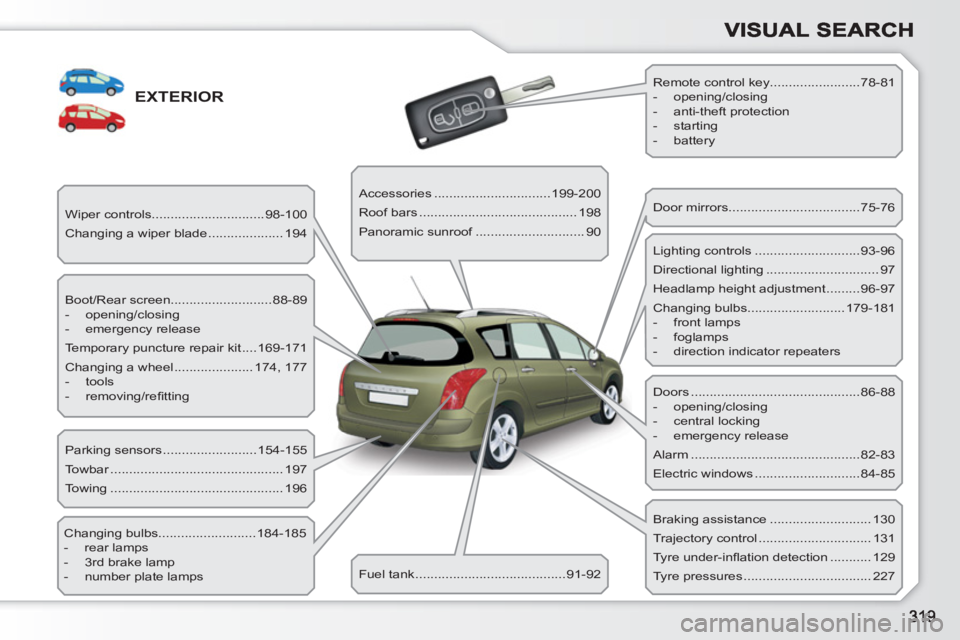
EXTERIOR
Boot/Rear screen...........................88-89
- opening/closing
- emergency release
Temporary puncture repair kit ....169-171
Changing a wheel ..................... 174, 177
- tools
- removing/refi tting Wiper controls..............................98-100
Changing a wiper blade .................... 194
Changing bulbs..........................184-185
- rear lamps
- 3rd brake lamp
- number plate lamps Parking sensors .........................154-155
Towbar .............................................. 197
Towing .............................................. 196 Remote control key........................78-81
- opening/closing
- anti-theft protection
- starting
- battery
Accessories ...............................199-200
Roof bars .......................................... 198
Panoramic sunroof ............................. 90
Fuel tank ........................................91-92 Door mirrors ...................................75-76
Doors .............................................86-88
- opening/closing
- central locking
- emergency release
Alarm .............................................82-83
Electric windows ............................84-85 Lighting controls ............................93-96
Directional lighting .............................. 97
Headlamp height adjustment .........96-97
Changing bulbs..........................179-181
- front lamps
- foglamps
- direction indicator repeaters
Braking assistance ........................... 130
Trajectory control .............................. 131
Tyre under-infl ation detection ........... 129
Tyre pressures .................................. 227
Page 325 of 336
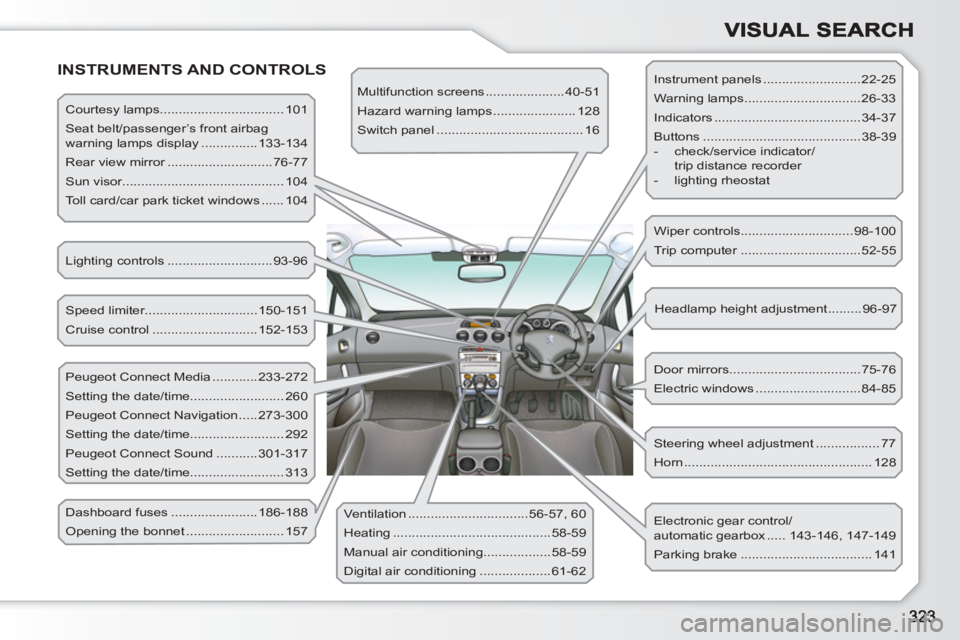
INSTRUMENTS AND CONTROLS
Courtesy lamps................................. 101
Seat belt/passenger’s front airbag
warning lamps display ...............133-134
Rear view mirror ............................76-77
Sun visor........................................... 104
Toll card/car park ticket windows ...... 104
Lighting controls ............................93-96
Speed limiter..............................150-151
Cruise control ............................152-153
Peugeot Connect Media ............233-272
Setting the date/time......................... 260
Peugeot Connect Navigation .....273-300
Setting the date/time......................... 292
Peugeot Connect Sound ...........301-317
Setting the date/time......................... 313
Dashboard fuses .......................186-188
Opening the bonnet .......................... 157 Ventilation ................................56-57, 60
Heating ..........................................58-59
Manual air conditioning..................58-59
Digital air conditioning ...................61-62 Multifunction screens .....................40-51
Hazard warning lamps ...................... 128
Switch panel ....................................... 16
Steering wheel adjustment ................. 77
Horn .................................................. 128 Door mirrors ...................................75-76
Electric windows ............................84-85 Headlamp height adjustment .........96-97 Wiper controls..............................98-100
Trip computer ................................52-55
Electronic gear control/
automatic gearbox ..... 143-146, 147-149
Parking brake ................................... 141 Instrument panels ..........................22-25
Warning lamps ...............................26-33
Indicators .......................................34-37
Buttons ..........................................38-39
- check/service indicator/
trip distance recorder
- lighting rheostat