navigation Peugeot 308 SW BL 2012.5 - RHD (UK, Australia) User Guide
[x] Cancel search | Manufacturer: PEUGEOT, Model Year: 2012.5, Model line: 308 SW BL, Model: Peugeot 308 SW BL 2012.5Pages: 382, PDF Size: 17.71 MB
Page 61 of 382
2
59
MULTIFUNCTION SCREENS
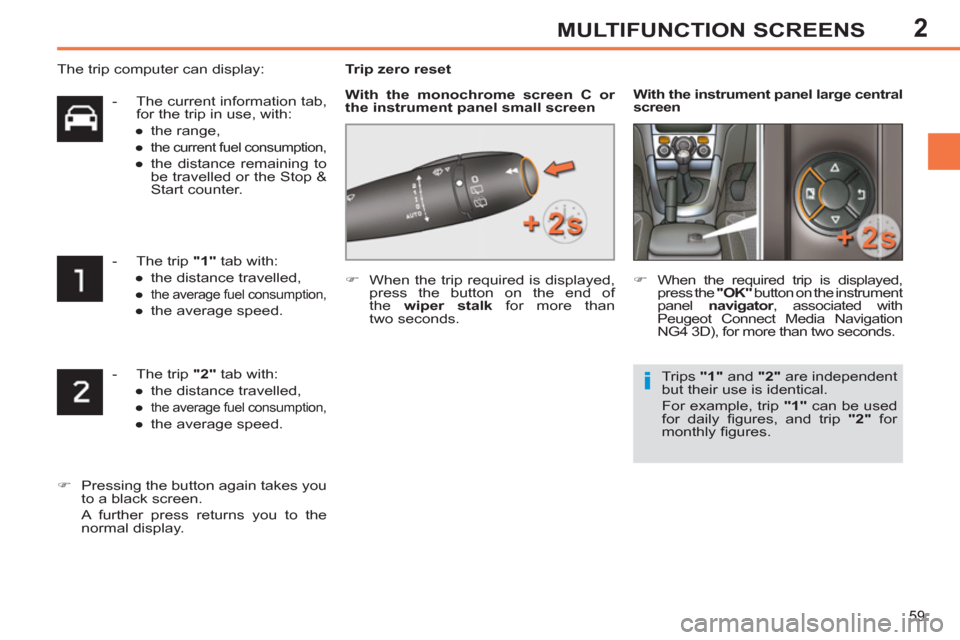
- The trip "2"
tab with:
●
the distance travelled,
●
the average fuel consumption,
●
the average speed.
)
Pressing the button again takes you
to a black screen.
A further press returns you to the
normal display.
- The current information tab,
for the trip in use, with:
●
the range,
●
the current fuel consumption,
●
the distance remaining to
be travelled or the Stop &
Start counter.
- The trip "1"
tab with:
●
the distance travelled,
●
the average fuel consumption,
●
the average speed.
Trip zero reset
)
When the trip required is displayed,
press the button on the end of
the wiper stalk
for more than
two seconds.
)
When the required trip is displayed,
press the "OK"
button on the instrument
panel navigator
, associated with
Peugeot Connect Media Navigation
NG4 3D), for more than two seconds.
With the instrument panel
large central
screen
Trips "1"
and "2"
are independent
but their use is identical.
For example, trip "1"
can be used
for daily fi gures, and trip "2"
for
monthly fi gures.
The trip computer can display:
With the monochrome screen C or
the instrument panel small screen
Page 211 of 382
11
209
PRACTICAL INFORMATION
Charging
)
Disconnect the (+) terminal.
)
Follow the instructions for use
provided by the manufacturer of the
charger.
)
Connect the charger's red cable to
the (+) terminal of the battery, then
the black cable to the (-) terminal.
)
Once the battery is fully charged,
disconnect the charger cables in
reverse order.
Charging should be carried out in
a well-ventilated area and away
from naked fl ames and sources of
sparks, so as to avoid any risk of
explosion and fi re.
Do not try to charge a frozen bat-
tery; fi rst thaw it out so as to avoid
the risk of explosion.
If the battery had frozen, before
charging, have it checked by a
PEUGEOT dealer or qualifi ed
workshop who will ensure that
the internal components have not
been damaged and that the casing
is not cracked, which would cause
a leak of toxic and corrosive acid.
Reinitialisation after
reconnection
After any reconnection of the battery,
switch on the ignition and wait at least one
minute before starting, to allow time for the
initialisation of the electronic systems.
By referring to the corresponding sec-
tions, you should set or initialise the
following systems yourself:
- remote control,
- one-touch electric windows,
- panoramic sunroof blind,
- time and date,
- audio and navigation system settings.
Check that no alert message or
warning lamp comes on after
switching on the ignition.
However, if minor problems persist
after carrying out these operations,
contact a PEUGEOT dealer or a
qualifi ed workshop.
The Stop & Start battery does not
have to be disconnected for charging.
Charging the battery using a
battery charger
Before disconnecting
)
Go to the battery.
)
Check that the doors and boot are
closed but not locked.
)
Switch off the ignition and wait for at
least four minutes.
If the vehicle is to not going to be used
for more than a month, it is recommend-
ed that the battery be disconnected.
When your vehicle's battery is dis-
charged or when the vehicle is to be
out of use for a prolonged period, you
can charge the battery using a battery
charger.
Contact a PEUGEOT dealer or a quali-
fi ed workshop for the specifi cation of
chargers compatible with your battery.
Page 212 of 382
11
210
PRACTICAL INFORMATION
A fl at battery prevents the engine
from starting (refer to the corre-
sponding section).
If the telephone is being used at
this time:
- it will be maintained for ten minutes
with the hands-free kit of your
Peugeot Connect Sound (RD5),
- it will be maintained for ten
minutes with the Peugeot Connect
Navigation (RT6) or the Peugeot
Connect Media Navigation (NG4
3D), then it will transfer to your
telephone depending on the
telephone model.
ENERGY ECONOMY MODE
System which manages the duration of
use of certain functions to conserve a
suffi cient level of charge in the battery.
After the engine has stopped, you can
still use functions such as the audio and
telematics system, windscreen wip-
ers, dipped beam headlamps, courtesy
lamps, etc. for a maximum combined
duration of thirty minutes.
This period may be greatly reduced if
the battery is not fully charged.
Exiting economy mode
These functions are reactivated auto-
matically next time the vehicle is driven.
To restore the use of these functions im-
mediately, start the engine and let it run
for at least fi ve minutes.
Switching to economy mode
Once this time has elapsed, a message
appears in the screen indicating that
the vehicle has switched to economy
mode and the active functions are put
on standby.
LOAD REDUCTION MODE
System which manages the use of cer-
tain functions according to the level of
charge remaining in the battery.
When the vehicle is being driven, the load
reduction function temporarily deactivates
certain functions, such as the air condi-
tioning, the heated rear screen...
The deactivated functions are reactivat-
ed automatically as soon as conditions
permit.
Page 220 of 382
11
218
PRACTICAL INFORMATION
The fi tting of electrical equipment or
accessories which are not recom-
mended by PEUGEOT may result
in a failure of your vehicle's elec-
tronic system and excessive electri-
cal consumption.
Please note this precaution. You
are advised to contact a PEUGEOT
representative to be shown the
range of recommended equipment
and accessories.
Depending on the legislation in
force in the country, it may be com-
pulsory to have a high visibility
safety vest, warning triangle and
spare bulbs and fuses available in
the vehicle.
"Mulitmedia":
audio systems, satellite navigation sys-
tems, Bluetooth system, speakers, DVD
player, USB Box, Wi-Fi on board...
Installation of radio
communication transmitters
Before installing any after-market
radio communication transmitter,
you can contact a PEUGEOT dealer
for the specifi cation of transmitters
which can be fi tted (frequency, maxi-
mum power, aerial position, specifi c
installation requirements), in line with
the Vehicle Electromagnetic Com-
patibility Directive (2004/104/EC).
By visting a PEUGEOT dealer, you can
also obtain products for cleaning and main-
tenance (exterior and interior) - including
products from the "TECHNATURE" range,
products for topping up (screenwash...),
paint touch-up pens and aerosols for
the exact colour of your vehicle, refi lls
(sealant cartridge for the temporary
puncture repair kit...) ...
Page 249 of 382
247
2ABC3DEF5JKL4GHI6MNO8TUV7PQRS9WXYZ0*#
1
RADIO MEDIANAV ESC TRAFFIC
SETUPADDR
BOOK
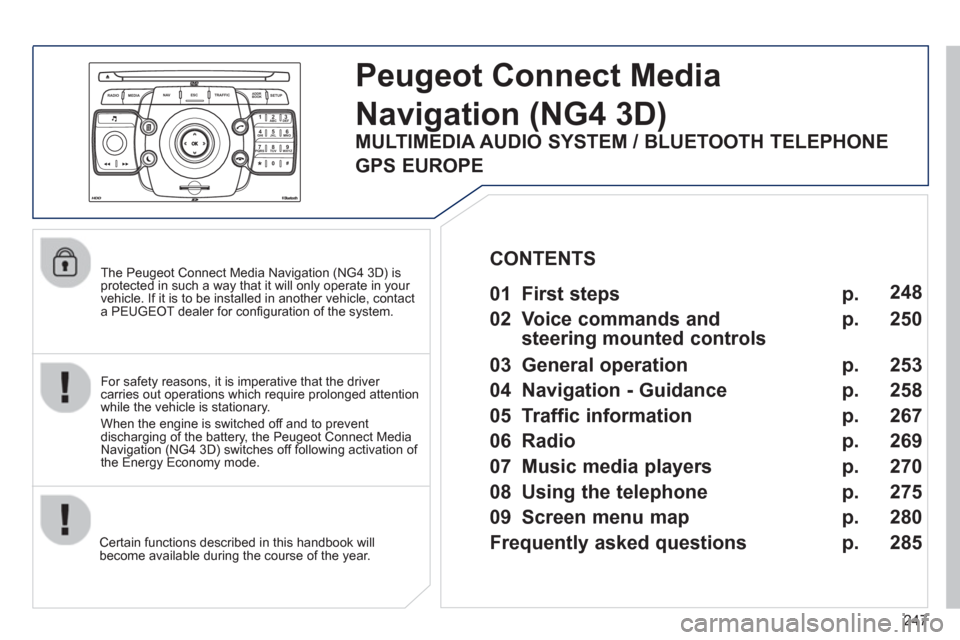
The Peugeot Connect Media Navigation (NG4 3D) is protected in such a way that it will only operate in your
vehicle. If it is to be installed in another vehicle, contact
a PEUGEOT dealer for confi guration of the system.
Certain functions described in this handbook will
become available during the course of the year.
Peugeot Connect Media
Navigation(NG4 3D)
For safety reasons, it is imperative that the driver carries out operations which require prolonged attention
while the vehicle is stationary.
When the en
gine is switched off and to prevent
discharging of the battery, the Peugeot Connect MediaNavigation (NG4 3D) switches off following activation of
the Energy Economy mode.
01 First steps
02 Voice commands and
steering mounted controls
03 General operation
04 Navigation - Guidance
05 Traffic information
06 Radio
07 Music media players
08 Using the telephone
09
Screen menu map
Frequently asked questions p.
p.
p.
p.
p.
p.
p.
p.
p.
p. 248
250
253
258
267
2
69
270
275
280
285
CONTENTS
MULTIMEDIA AUDIO SYSTEM / BLUETOOTH TELEPHONE
GPS EUROPE
Page 250 of 382
248
01FIRST STEPS
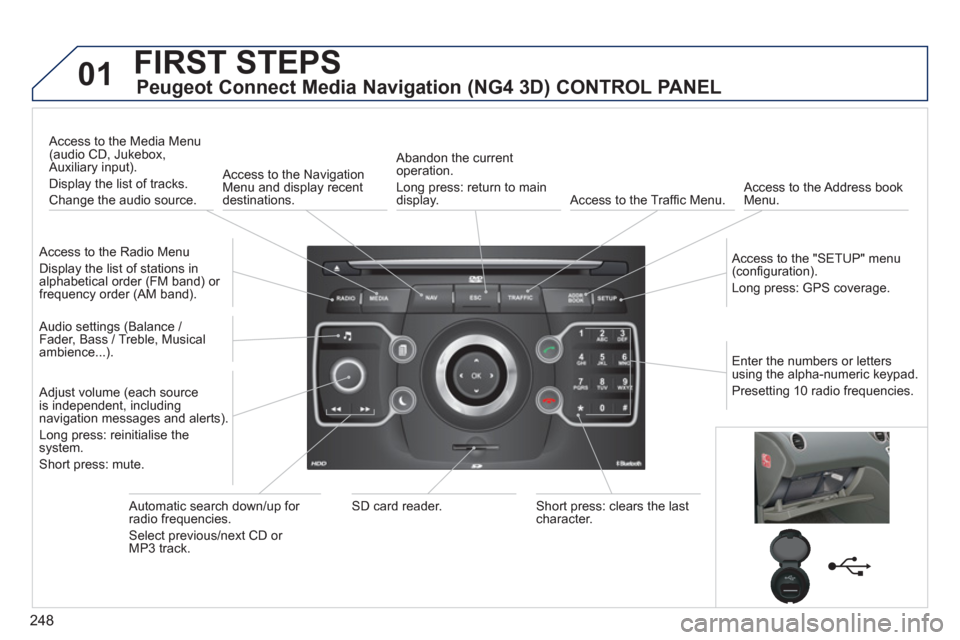
Peugeot Connect Media Navigation (NG4 3D) CONTROL PANEL
Access to the Radio Menu
Display the list of stations in
alphabetical order (FM band) or frequency order (AM band).
Access to the Media Menu(audio CD, Jukebox,
Auxiliary input).
Display the list o
f tracks.
Change the audio source.
Access to the NavigationMenu and display recentdestinations.
Abandon the current
operation.
Long press: return to main
displa
y. Access to the Traffi c Menu.
Access to the Address book Menu.
A
ccess to the "SETUP" menu (confi guration).
Lon
g press: GPS coverage.
Audio settings (Balance /
Fader, Bass / Treble, Musical
ambience...
).
Adjust volume (each source
is independent, including
navigation messages and alerts).
Lon
g press: reinitialise thesystem.
Short press: mute.
Automatic search down/up for radio frequencies.
Select
previous/next CD or MP3 track.
SD card reader.Short press: clears the last character.
Enter the numbers or lettersusing the alpha-numeric keypad.
Presettin
g 10 radio frequencies.
Page 251 of 382
249
01FIRST STEPS
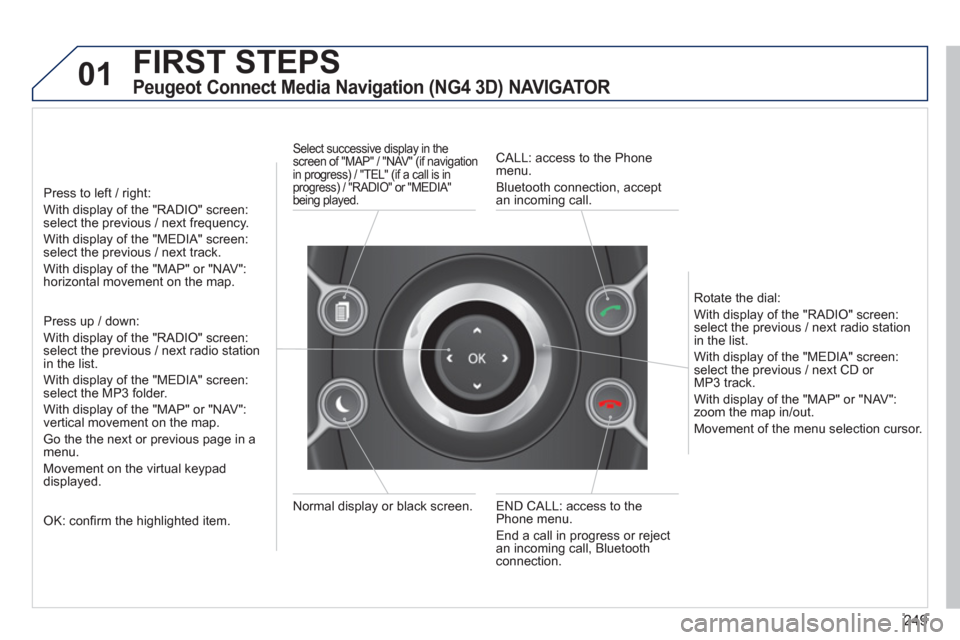
Peugeot Connect Media Navigation (NG4 3D) NAVIGATOR
Press to left / right:
With display of the "RADIO" screen: select the previous / next frequency.
With display of the "MEDIA" screen: select the previous / next track.
With display of the "MAP" or "NAV":horizontal movement on the map.
Press up / down:
With display of the "RADIO" screen: select the previous / next radio stationin the list.
With display of the "MEDIA" screen: select the MP3 folder.
With display of the "MAP" or "NAV":
vertical movement on the map.
Go the the next or previous pa
ge in a menu.
Movement on the virtual keypad
displayed.
OK: confi rm the highlighted item.
END CALL: access to the Phone menu.
End a call in pro
gress or reject
an incoming call, Bluetooth connection. Normal displa
y or black screen.
Select successive display in the screen of "MAP" / "NAV" (if navigation
in progress) / "TEL" (if a call is in
progress) / "RADIO" or "MEDIA"
being played.
CALL: access to the Phonemenu.
Bluetooth connection, accept
an incomin
g call.
R
otate the dial:
With displa
y of the "RADIO" screen: select the previous / next radio station
in the list.
With displa
y of the "MEDIA" screen: select the previous / next CD or MP3 track.
With displa
y of the "MAP" or "NAV":zoom the map in/out.
M
ovement of the menu selection cursor.
Page 252 of 382
250
02
SETUP2ABC3DEF5JKL4GHI6MNO8TUV7PQRS9WXYZ0*#
1NAV ESC TRAFFICADDR
BOOKSETUP
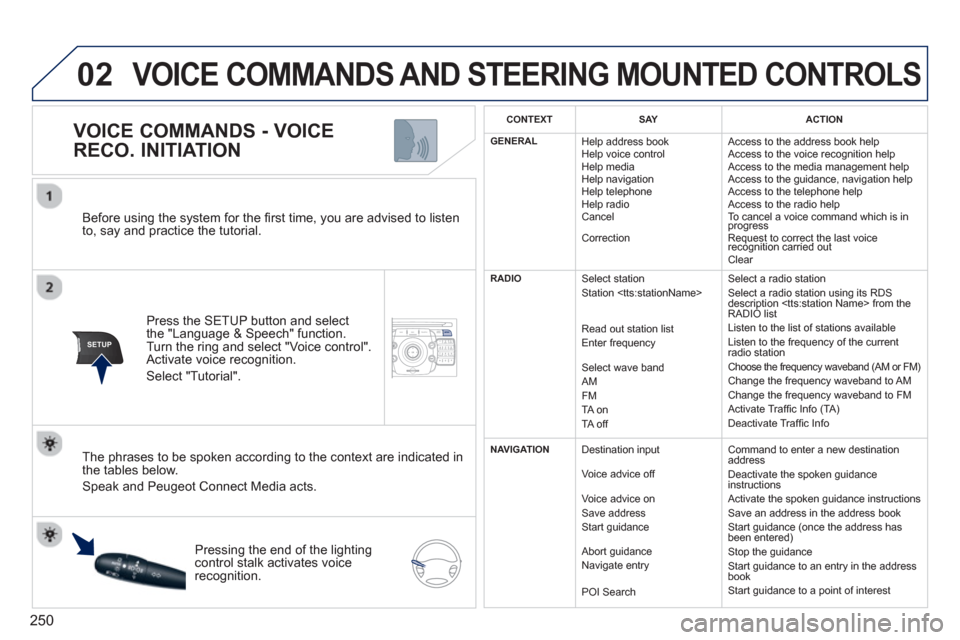
Before using the system for the fi rst time, you are advised to listen
to, say and practice the tutorial.
Press the
SETUP button and select
the "Language & Speech" function.Turn the ring and select "Voice control". Activate voice recognition.
Select "Tutorial".
VOICE COMMANDS - VOICE
RECO. INITIATION
The phrases to be spoken according to the context are indicated in
the tables below.
Speak and Peugeot Connect Media acts.
Pressing the end o
f the lightingcontrol stalk activates voice
recognition.
CONTEXTSAYACTION
GENERAL
Help address book
Help voice control
Help media
Help navi
gation
Help telephone
Help radio
Cancel
Correction Access to the address book help
Access to the voice reco
gnition help
Access to the media management help
Access to the guidance, navigation help
Access to the telephone help Access to the radio help To cancel a voice command which is inprogress
Request to correct the last voice recognition carried outq
Clear
RADIO
Select station
Station
R
ead out station list
Enter frequency
Select wave band AMFM
TA on
TA off Select a radio station
Select a radio station usin
g its RDS
description
Listen to the list of stations available
Listen to the frequency of the current
radio station Choose the frequency waveband (AM or FM) Change the frequency waveband to AM
Change the frequency waveband to FM
Activate Traffi c Info (TA)
D
eactivate Traffi c Info
NAVIGATION
Destination input
V
oice advice off
Voice advice on
Save address
Start
guidance
Abort
guidance
Navigate entry
POI Search Command to enter a new destination
address
Deactivate the spoken guidance instructions
Activate the spoken guidance instructions
Save an address in the address book
Start
guidance (once the address has
been entered)
Stop the guidance
Start guidance to an entry in the address
book
Start guidance to a point of interest
VOICE COMMANDS AND STEERING MOUNTED CONTROLS
Page 254 of 382
252
02 VOICE COMMANDS AND STEERING MOUNTED CONTROLS
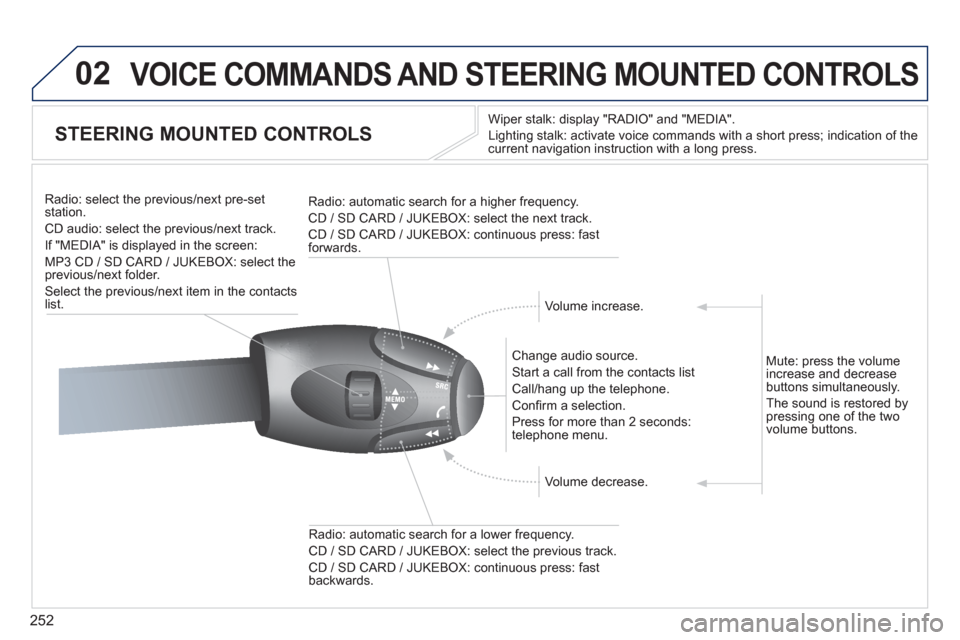
STEERING MOUNTED CONTROLS
Wiper stalk: display "RADIO" and "MEDIA".
Li
ghting stalk: activate voice commands with a short press; indication of the current navigation instruction with a long press
.
Change audio source.
Start a call from the contacts list
Call/han
g up the telephone.
Confi rm a selection.
Pr
ess for more than 2 seconds:
telephone menu.
Radio: automatic search for a lower frequenc
y.
CD / SD CARD / JUKEBOX: select the previous track.
CD / SD CARD / JUKEBOX: continuous press: fast backwards. Radio: select the previous
/next pre-setstation.
CD audio: select the previous/next track .
If "MEDIA" is displa
yed in the screen:
MP
3 CD / SD CARD / JUKEBOX: select the
previous/next folder.
Select the previous/next item in the contacts list.
Radio: automatic search
for a higher frequency.
CD / SD CARD / JUKEBOX: select the next track.
CD / SD CARD / JUKEBOX: continuous press: fast
forwards.
Volume increase.
Volume decrease. Mute: press the volume
increase and decreasebuttons simultaneously.
The sound is restored b
y pressing one of the two
volume buttons.
Page 255 of 382
253
03
SETUP
TRAFFIC
MEDIA
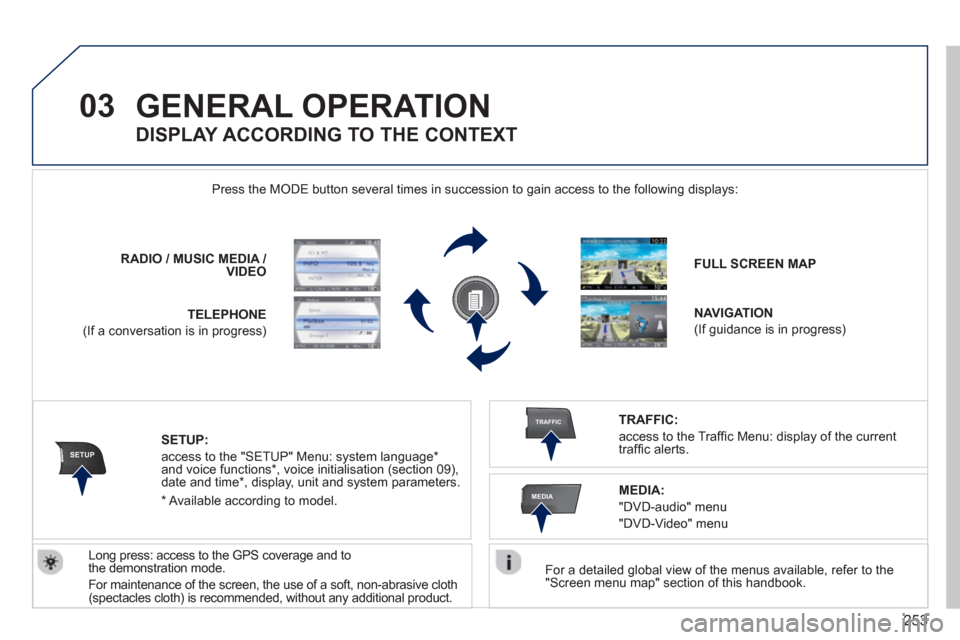
GENERAL OPERATION
For a detailed global view of the menus available, refer to the "Screen menu map" section of this handbook.
Press the M
ODE button several times in succession to gain access to the following displays:
Lon
g press: access to the GPS coverage and to
the demonstration mode.
For maintenance o
f the screen, the use of a soft, non-abrasive cloth (spectacles cloth) is recommended, without any additional product. RADIO
/MUSICMEDIA / VIDEO
TELEPHONE
(If a conversation is in progress)
FULL SCREEN MAP
NAVIGATION
(If guidance is in progress)
SETUP:
access to the "SETUP" Menu: system language *
and voice functions * , voice initialisation (section 09),
date and time * , display, unit and system parameters.
TRAFFIC:
access to the Traffi c Menu: display of the current
traffi c alerts.
DISPLAY ACCORDING TO THE CONTEXT
MEDIA:
"DVD-audio" menu
"DVD-Video" menu
*
Available accordin
g to model.