ignition PEUGEOT 308 SW BL 2012 Manual PDF
[x] Cancel search | Manufacturer: PEUGEOT, Model Year: 2012, Model line: 308 SW BL, Model: PEUGEOT 308 SW BL 2012Pages: 382, PDF Size: 17.71 MB
Page 279 of 382
277
08
2ABC3DEF5JKL4GHI6MNO8TUV7PQRS9WXYZ0*#
1RADIO MEDIANAV ESC TRAFFIC
SETUPADDR
BOOK
*
The services available via the telephone depend on the network, the SIM card and the compatibility of the Bluetooth equipment used. Refer toyour telephone's manual and your operator to check which services you have access to. A list of mobile telephones which offer the best range of services is available from dealers.
USING THE TELEPHONE
CONNECTING A BLUETOOTH
TELEPHONE
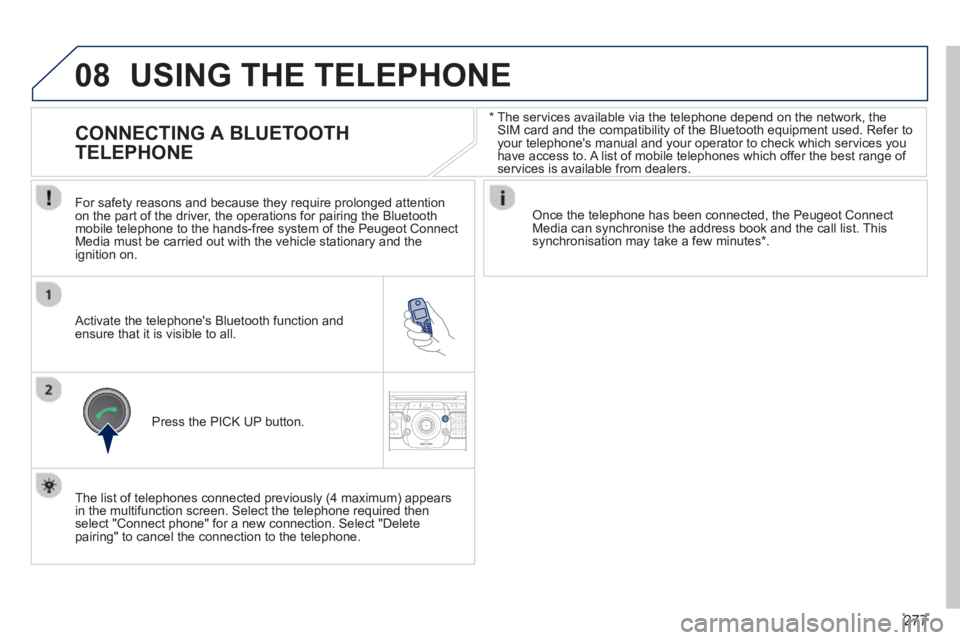
For safety reasons and because they require prolonged attention
on the part of the driver, the operations for pairing the Bluetoothmobile telephone to the hands-free system of the Peugeot ConnectMedia must be carried out with the vehicle stationary and the
ignition on.
Activate the telephone's Bluetooth function and ensure that it is visible to all.
Once the telephone has been connected, the Peugeot Connect Media can synchronise the address book and the call list. This synchronisation may take a few minutes * .
Press the PI
CK UP button.
The list of telephones connected previousl
y (4 maximum) appears
in the multifunction screen. Select the telephone required then
select "Connect phone" for a new connection. Select "Delete pairing" to cancel the connection to the telephone.
Page 317 of 382
315
06
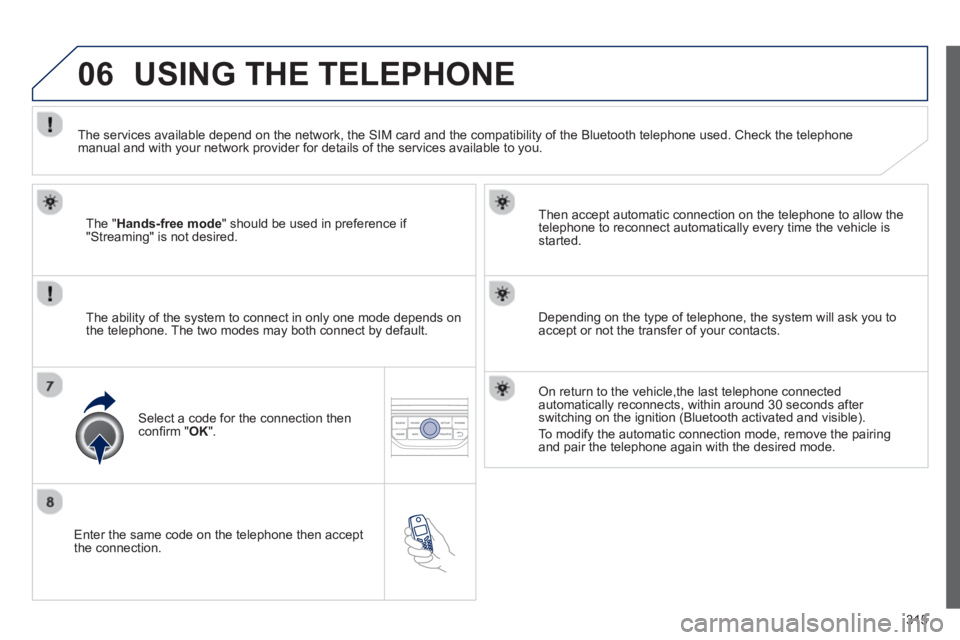
Enter the same code on the telephone then accept
the connection.
Then accept automatic connection on the telephone to allow the
te
lephone to reconnect automatically every time the vehicle is started.
The abilit
y of the system to connect in only one mode depends on
the telephone. The two modes may both connect by default.
USING THE TELEPHONE
The "Hands-free mode
" should be used in preference if "Streaming" is not desired.
The services available depend on the network, the
SIM card and the compatibility of the Bluetooth telephone used. Check the telephone manual and with your network provider for details of the services available to you.
Select a code for the connection thenconfi rm "OK".
Depending on the type of telephone, the system will ask you to
accept or not the transfer of your contacts.
On return to the vehicle,the last telephone connected
automatically reconnects, within around 30 seconds after switching on the ignition (Bluetooth activated and visible).
To modi
fy the automatic connection mode, remove the pairingand pair the telephone again with the desired mode.
Page 330 of 382
328
08MUSIC MEDIA PLAYERS
Insert the CD in the player, insert the USBmemory stick in the USB player or connect theUSB peripheral to the USB port using a suitablecable (not supplied)
The system builds playlists (in temporarymemory), an operation which can take froma few seconds to several minutes at the fi rstconnection.
R
educe the number of non-music fi les and the number of folders to reduce the waiting time.
The pla
ylists are updated every time the ignition
is switched off or connection of a USB memory stick. However, the system memorises these
lists and if they are not modifi ed, the loadingtime will be shorter.
Pla
y starts automatically after a period which
depends on the capacity of the USB memory stick. SELECTION OF SOURCE
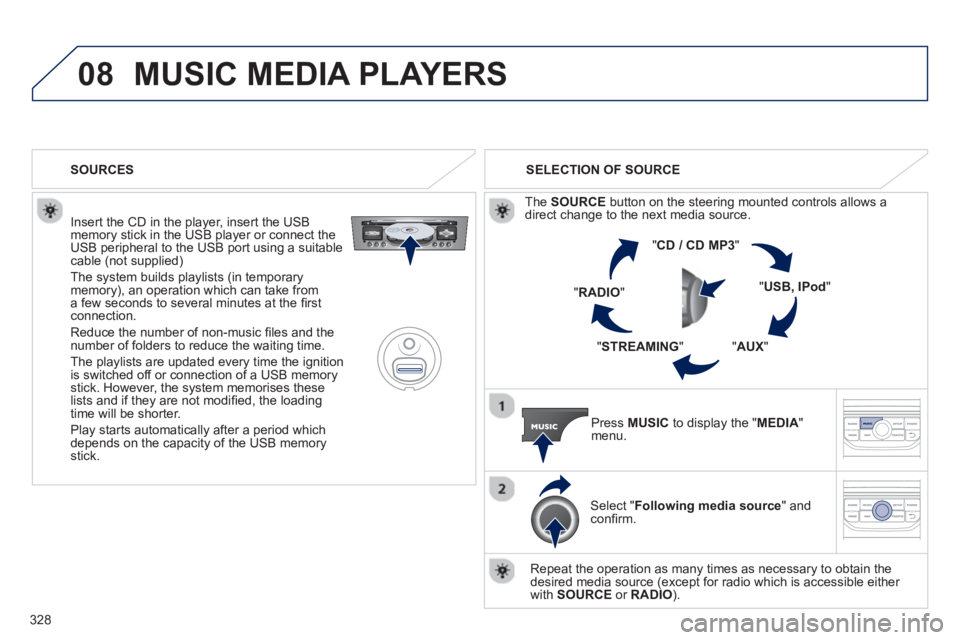
Th
e SOURCE
button on the steering mounted controls allows adirect change to the next media source.
" CD / CD MP
3
"
"
USB, IPod"
"AUX
" "
STREAMING
" "RADIO
"
Pr
ess MUSICto display the "MEDIA
" menu.
Select "Following media source " and confi rm.
Repeat the operation as many times as necessary to obtain the
desired media source (except for radio which is accessible either
with SOURCE
or RADIO). SOURCES
Page 354 of 382
352
05
The system puts together playlists (temporary memory) createdover a period which depends on the capacity of the USB device.
The other sources are available durin
g this time.
The pla
ylists are updated each time the ignition is switched off or each time a USB memory stick is connected.
When connectin
g for the fi rst time, the classifi cation suggested
is by folder. When you reconnect, the classifi cation selected
previously is retained.
Connect the memory stick to the port, directly or using a lead. If the audio equipment is switched
on, the USB source is detected as soon as it
is connected. Pla
y begins automatically after a
delay which depends on the capacity of the USB memory stick.
The
fi le formats supported are .mp3 (mpeg1 layer 3 only), .wma (standard 9 only, 128 kbits/seccompression), .wav and .ogg.
Certain playlist formats are supported (.m3u, ...).
On reconnection of the previous memory stickused, play is resumed automatically with the last
track played.
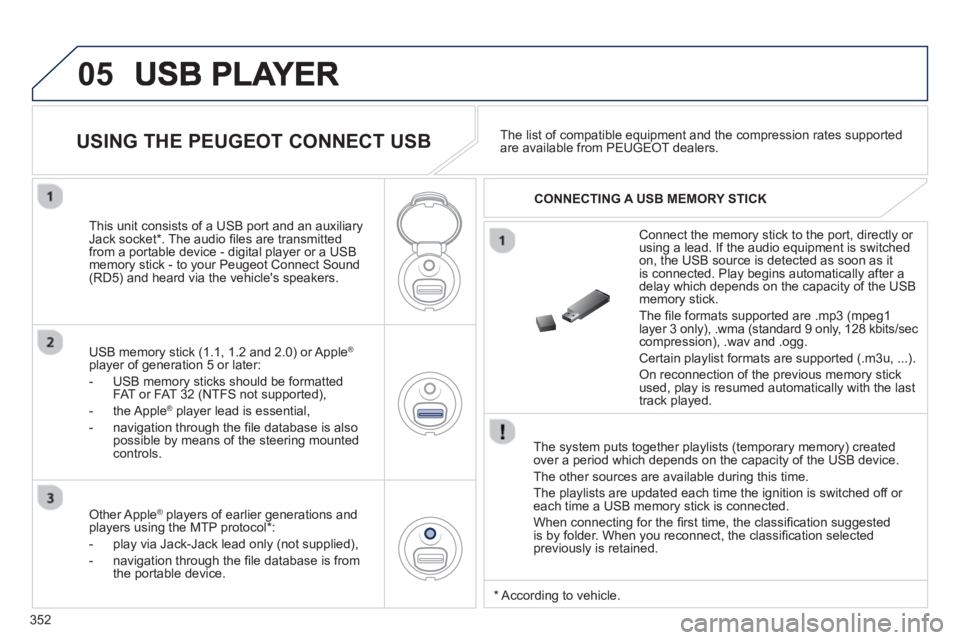
This unit consists o
f a USB port and an auxiliaryJack socket * . The audio fi les are transmitted
from a portable device - digital player or a USBmemory stick - to your Peugeot Connect Sound (RD5) and heard via the vehicle's speakers.
USB memor
y stick (1.1, 1.2 and 2.0) or Apple®
player of generation 5 or later:
- U
SB memory sticks should be formattedFAT or FAT 32 (NTFS not supported),
- the Apple ®player lead is essential,
- navi
gation through the fi le database is also
possible by means of the steering mountedcontrols.The list o
f compatible equipment and the compression rates supported are available from PEUGEOT dealers.
USING THE PEUGEOT CONNECT USB
CONNECTING A USB MEMORY STICK
Other Apple®
players of earlier generations and®
players using the MTP protocol * :
- pla
y via Jack-Jack lead only (not supplied),
- navi
gation through the fi le database is from
the portable device.
*
Accordin
g to vehicle.
Page 357 of 382
355
06BLUETOOTH
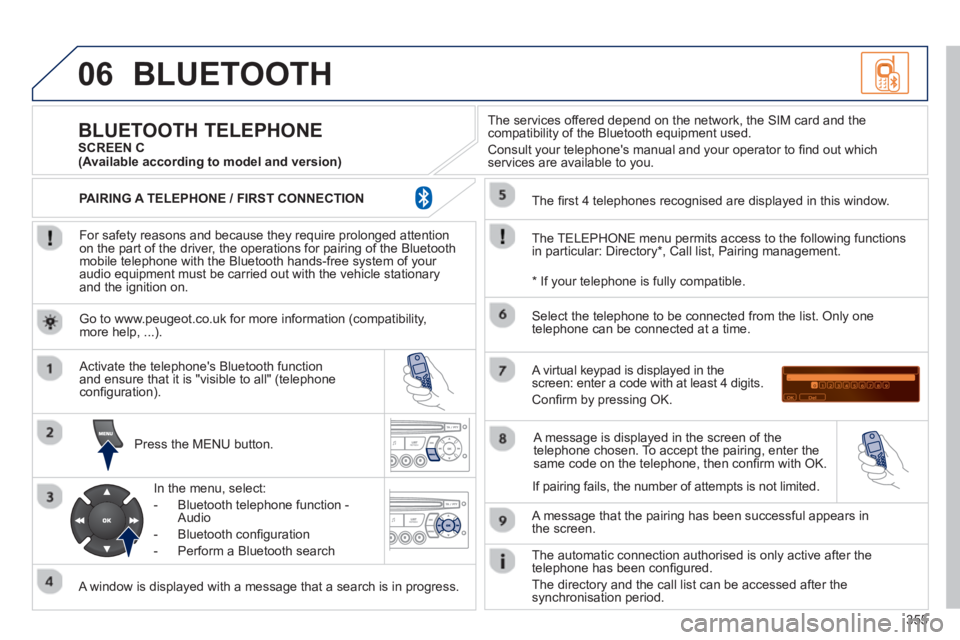
For safety reasons and because they require prolonged attentionon the part of the driver, the operations for pairing of the Bluetooth mobile telephone with the Bluetooth hands-free system of your
audio equipment must be carried out with the vehicle stationary
and the ignition on.
Pr
ess the MENU button.
A window is displayed with a message that a search is in progress.
Activate the telephone's Bluetooth
function
and ensure that it is "visible to all" (telephone confi guration).
In the menu, select:
- Bluetooth telephone
function -
Audio
- Bluetooth confi
guration
- P
erform a Bluetooth search
The services o
ffered depend on the network, the SIM card and thecompatibility of the Bluetooth equipment used.
Consult your telephone's manual and your operator to fi nd out which
services are available to you.
BLUETOOTH TELEPHONE SCREEN C
The TELEPH
ONE menu permits access to the following functions
in particular: Directory * , Call list, Pairing management.
The
fi rst 4 telephones recognised are displayed in this window.
A virtual ke
ypad is displayed in thescreen: enter a code with at least 4 digits.
Confi rm by pressing OK.
A messa
ge that the pairing has been successful appears in
the screen.
Select the telephone to be connected from the list. Only one
telephone can be connected at a time.
A messa
ge is displayed in the screen of the
telephone chosen. To accept the pairing, enter the same code on the telephone, then confi rm with OK.
The automatic connection authorised is onl
y active after the
telephone has been confi gured.
The directory and the call list can be accessed a
fter thesynchronisation period.
(Available according to model and version)
*
If your telephone is fully compatible.
I
f pairing fails, the number of attempts is not limited. Go to www.peu
geot.co.uk for more information (compatibility, more help, ...).
PAIRING A TELEPHONE / FIR
ST CONNECTION
Page 359 of 382
357
06
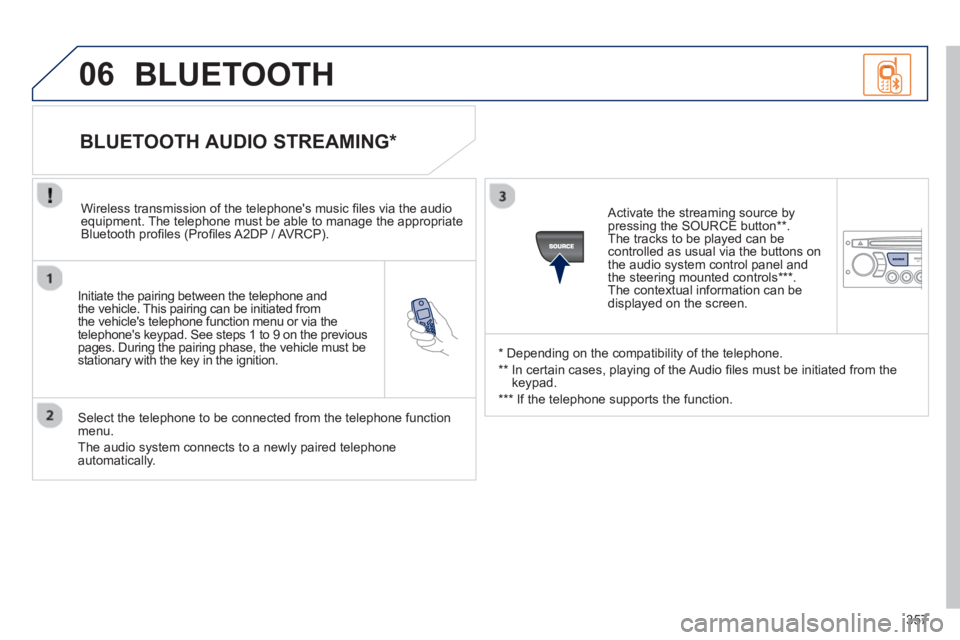
Initiate the pairing between the telephone and
the vehicle. This pairing can be initiated from
the vehicle's telephone function menu or via the
telephone's ke
ypad. See steps 1 to 9 on the previouspages. During the pairing phase, the vehicle must bestationary with the key in the ignition.
Select the telephone to be connected from the telephone function
menu.
The audio system connects to a newly paired telephone automatically.
BLUETOOTH AUDIO STREAMING *
Wireless transmission of the telephone's music fi les via the audioequipment. The telephone must be able to manage the appropriate
Bluetooth profi les (Profi les A2DP / AV RCP).
*
Depending on the compatibility of the telephone.
**
In certain cases, playing of the Audio fi les must be initiated from the
keypad.
***
If the tele
phone supports the function.
Activate the streamin
g source by
pressing the SOURCE button ** .The tracks to be played can becontrolled as usual via the buttons on
the audio system control panel andthe steering mounted controls *** .
The contextual information can bedisplayed on the screen.
BLUETOOTH
Page 376 of 382
374
ALPHABETICAL INDEX
Main beam.............................99,194, 195Maintenance...........................................23Map reading lamps...............................108Markings, identification.........................241Mat........................................................114Menu, main...........................................348Mini fuel level..........................................96Mirror, rear view......................................82
Navigation............................258, 297, 298Net........................................................122Number plate lamps.....................197, 199
Oil filter.................................................r176Oil level...........................................42, 174Opening the bonnet ..............................170Opening the boot..............................83,94Opening the doors............................83,91Opening the panoramic sunroof blind....95Opening the retractable screen..............56Operation indicator lamps................35,38
Jack ..............................................187,189JACK socket .................................331,352Jukebox (copy) .....................................272Jukebox (playing) .................................273
Keeping childrensafe..................125, 128, 133-135,146Key in ignition warning...........................85Key with remote control..............83,84,86
Labels, identification.............................241Lamps, warning andindicator..........................r29, 33, 35, 38LED daytime running lamps.................101Level, brake fluid..................................174Level, headlamp wash..................106, 174Level, power steering fluid...................174Levels and checks.........................172-175Lighting, guide-me home..............102, 103Lighting, interior............................r108, 109Lighting bulbs (replacement)..........194,197,199, 200Lighting control stalk...............................99Lighting dimmer......................................r44Lighting on reminder.............................100Loading.....................................23, 78, 216Load reduction mode............................210Load space cover.........................r119, 122Locating your vehicle..............................84Locking from the inside..........................92Long objects, transporting..............78, 115Luggage retaining strap........116, 118, 121
J
K
L
M
N
O
Identification plates...............................241Ignition....................................................85Indicators, direction..............................137Inflating accessories (using the kit)......178Inflating tyres..........................................23Inputs for audio system.....................274, 331, 352,354Instrument panel lighting........................44Instrument panels.......................25-28,43Instrument panel screen...........25-27,151Interior fittings.......................................110Interior mood lighting............................109ISOFIX child seats................131, 133-135ISOFIX mountings................................131
IMirrors, door.....................................r80,81Misfuel prevention ..................................98Modularity, seats.....................................78Mountings for ISOFIX seats .................131MP3 CD................................................351Music media players.....................270, 326
Paint colour code..................................241Panoramic glass sunroof........................f95Parcel shelf, rear..................................r117Parking brake ...............................150, 177Parking sensors, front..........................168Parking sensors, rear...........................r167Particle emission filter..................r175, 176
P