Connect sound Peugeot 308 SW BL 2013 User Guide
[x] Cancel search | Manufacturer: PEUGEOT, Model Year: 2013, Model line: 308 SW BL, Model: Peugeot 308 SW BL 2013Pages: 382, PDF Size: 17.75 MB
Page 342 of 382
340
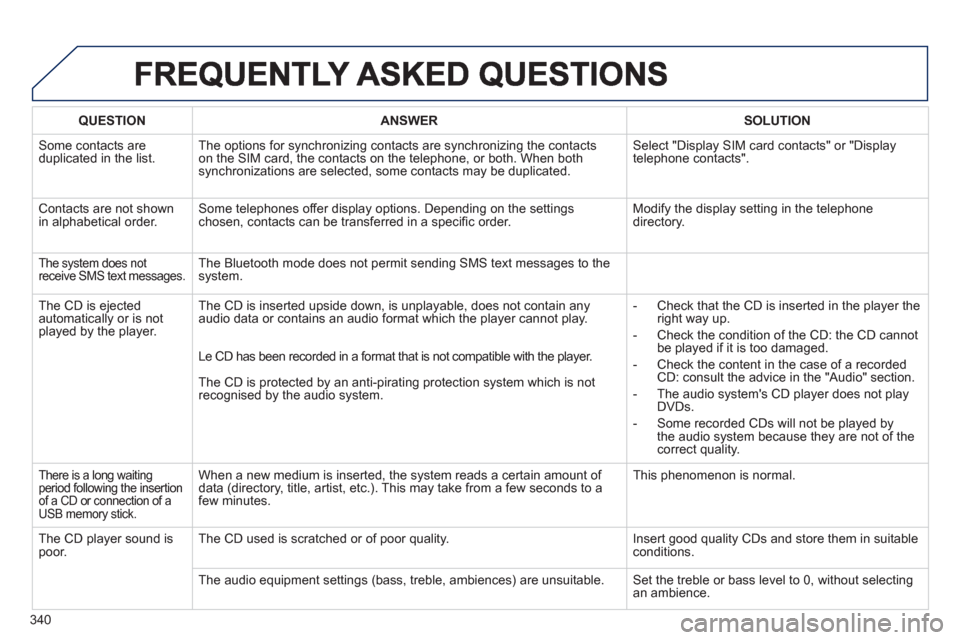
QUESTIONANSWERSOLUTION
Some contacts areduplicated in the list.The options for synchronizing contacts are synchronizing the contacts
on the SIM card, the contacts on the telephone, or both. When both
synchronizations are selected, some contacts may be duplicated. Select "Displa
y SIM card contacts" or "Displaytelephone contacts".
Contacts are not shown in alphabetical order.Some telephones offer display options. Depending on the settingschosen, contacts can be transferred in a specifi c order. Modify the display setting in the telephone directory.
The system does not
receive SMS text messages. The Bluetooth mode does not permit sending SMS text messages to the
system.
The CD is e
jected
automatically or is not played by the player. The CD is inserted upside down, is unpla
yable, does not contain any audio data or contains an audio format which the player cannot play.
- Check that the CD is inserted in the player the
right way up.
-
Check the condition of the CD: the CD cannot
be played if it is too damaged.
-
Check the content in the case of a recordedCD: consult the advice in the "Audio" section.
- The audio s
ystem's CD player does not play
DVDs.
-
Some recorded CDs will not be played by
the audio system because they are not of thecorrect quality. Le CD has been recorded in a format that is not compatible with the pla
yer.
The
CD is protected by an anti-pirating protection system which is not recognised by the audio system.
There is a long waiting
period following the insertion
of a CD or connection of aUSB memory stick.
When a new medium is inserted, the system reads a certain amount of
data (directory, title, artist, etc.). This may take from a few seconds to a
few minutes. This phenomenon is normal.
The CD pla
yer sound ispoor.The CD used is scratched or of poor quality. Insert good quality CDs and store them in suitable conditions.
The audio equipment settin
gs (bass, treble, ambiences) are unsuitable. Set the treble or bass level to 0, without selectingan ambience.
Page 343 of 382
341
FREQUENTLY ASKED QUESTIONS
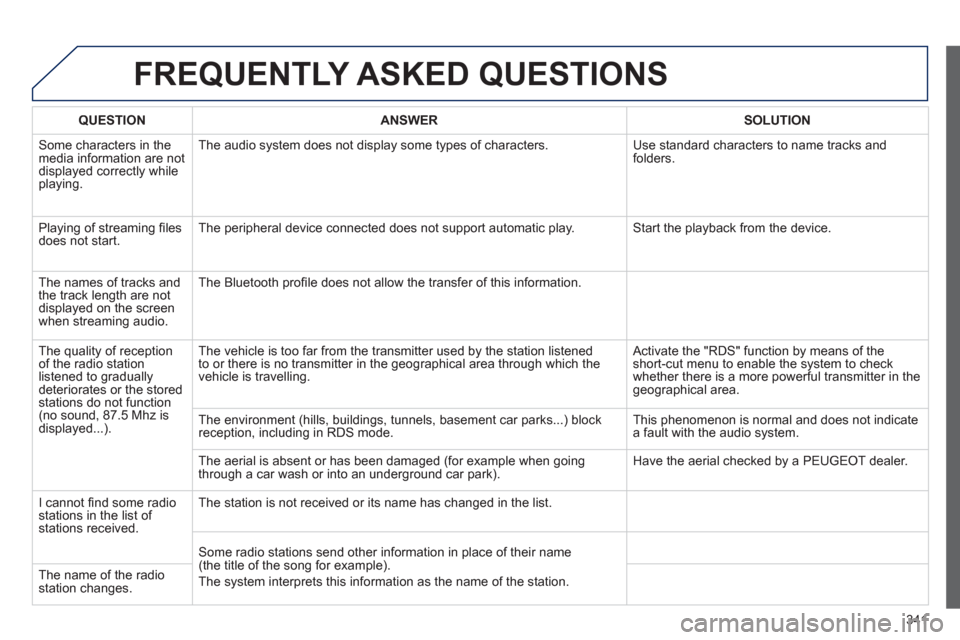
QUESTIONANSWER SOLUTION
Some characters in themedia information are not
displayed correctly while playing. The audio s
ystem does not display some types of characters. Use standard characters to name tracks andfolders.
Pla
ying of streaming fi lesdoes not start. The peripheral device connected does not support automatic play. Start the playback from the device.
Th
e names of tracks and
the track length are not
displayed on the screen
when streaming audio. The Bluetooth pro
fi le does not allow the transfer of this information.
The qualit
y of receptionof the radio station listened to graduallydeteriorates or the stored stations do not function(no sound, 87.5 Mhz is
displayed...). The vehicle is too far from the transmitter used b
y the station listened
to or there is no transmitter in the geographical area through which the
vehicle is travelling.
Activate the "RDS" function by means of theshort-cut menu to enable the system to check
whether there is a more powerful transmitter in thegeographical area.
The environment
(hills, buildings, tunnels, basement car parks...) block reception, including in RDS mode. This phenomenon is normal and does not indicate
a fault with the audio system.
The aerial is absent or has been dama
ged (for example when goingthrough a car wash or into an underground car park). Have the aerial checked by a PEUGEOT dealer.
I
cannot fi nd some radiostations in the list of stations received.The station is not received or its name has chan
ged in the list.
Some radio stations send other information in place of their name (the title of the song for example).
The system interprets this in
formation as the name of the station. The name of the radio station changes.
Page 345 of 382
343
FREQUENTLY ASKED QUESTIONS
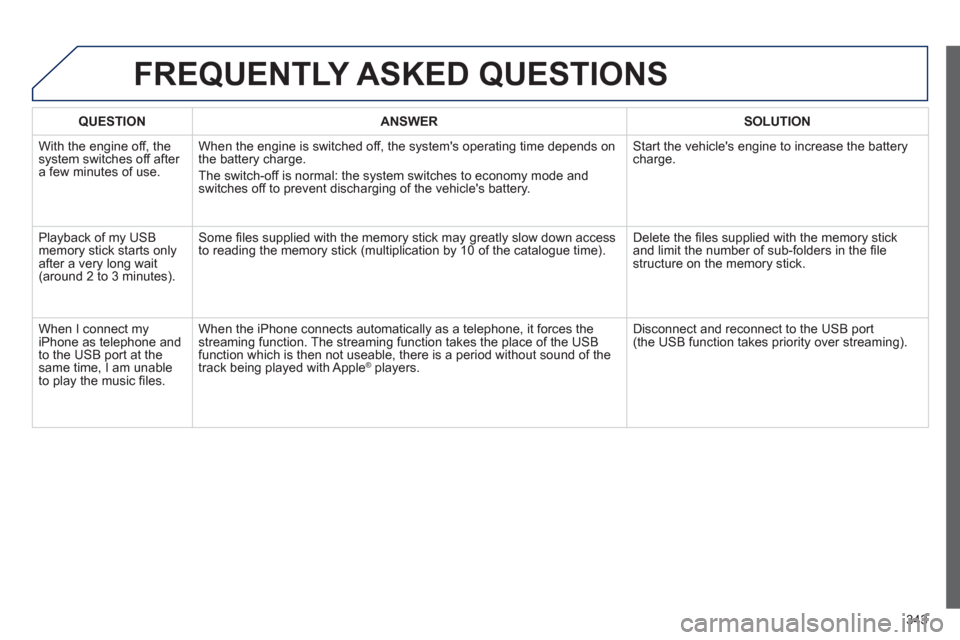
QUESTIONANSWER SOLUTION
With the engine off, the system switches off after a few minutes of use.When the engine is switched o
ff, the system's operating time depends on
the battery charge.
The switch-o
ff is normal: the system switches to economy mode and
switches off to prevent discharging of the vehicle's battery.
Start the vehicle's engine to increase the batterycharge.
Pla
yback of my USB memory stick starts only
after a very long wait (around 2 to 3 minutes).
Some fi les supplied with the memory stick may greatly slow down access
to reading the memory stick (multiplication by 10 of the catalogue time). Delete the fi les supplied with the memory stickand limit the number of sub-folders in the fi le structure on the memory stick.
When I connect myiPhone as telephone and
to the USB port at thesame time, I am unable
to play the music fi les. When the iPhone connects automaticall
y as a telephone, it forces the
streaming function. The streaming function takes the place of the USBfunction which is then not useable, there is a period without sound of the
track being played with AppleÆ players.Æ
Disconnect and reconnect to the USB port(the USB function takes priority over streaming).
Page 347 of 382
345
(RD5)
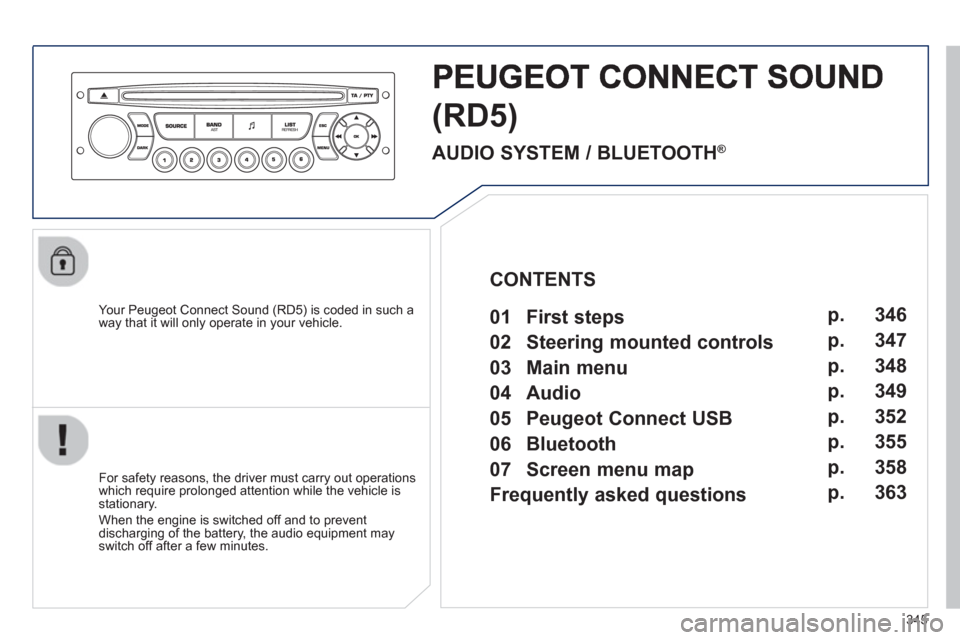
Your Peugeot Connect Sound (RD5) is coded in such a
way that it will only operate in your vehicle.
For safet
y reasons, the driver must carry out operations
which require prolonged attention while the vehicle is stationary.
When the en
gine is switched off and to prevent
discharging of the battery, the audio equipment mayswitch off after a few minutes.
AUDIO SYSTEM / BLUETOOTH ®
01 First steps
02 Steering mounted controls
03 Main menu
04 Audio
05 Peugeot Connect USB
06 Bluetooth
07 Screen menu map
Frequently asked questions p.
p.
p.
p.
p.
p.
p.
p. 346
347
348
349
352
355
358
363
CONTENTS
Page 354 of 382
352
05
The system puts together playlists (temporary memory) createdover a period which depends on the capacity of the USB device.
The other sources are available durin
g this time.
The pla
ylists are updated each time the ignition is switched off or each time a USB memory stick is connected.
When connectin
g for the fi rst time, the classifi cation suggested
is by folder. When you reconnect, the classifi cation selected
previously is retained.
Connect the memory stick to the port, directly or using a lead. If the audio equipment is switched
on, the USB source is detected as soon as it
is connected. Pla
y begins automatically after a
delay which depends on the capacity of the USB memory stick.
The
fi le formats supported are .mp3 (mpeg1 layer 3 only), .wma (standard 9 only, 128 kbits/seccompression), .wav and .ogg.
Certain playlist formats are supported (.m3u, ...).
On reconnection of the previous memory stickused, play is resumed automatically with the last
track played.
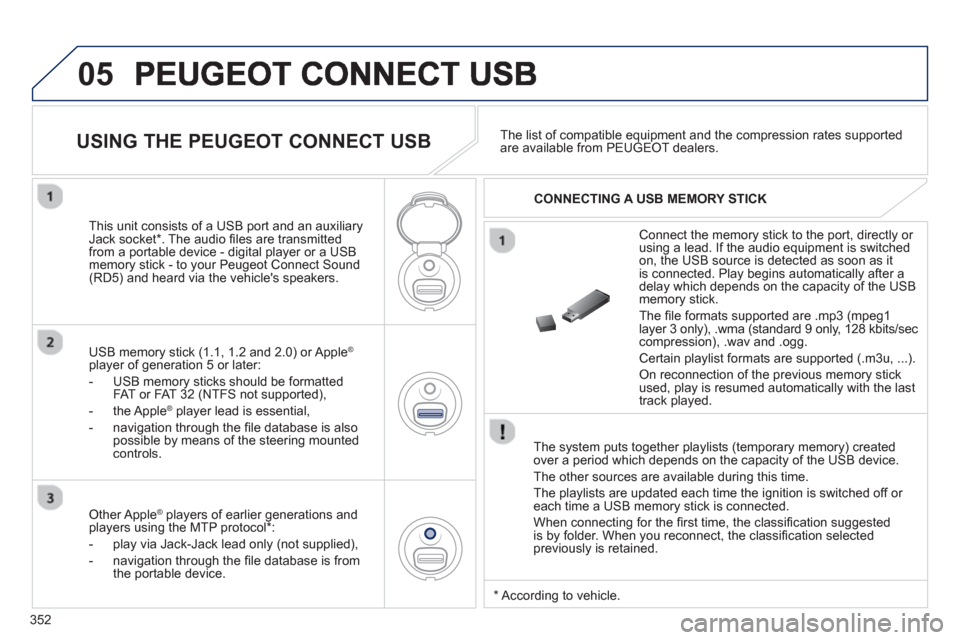
This unit consists o
f a USB port and an auxiliaryJack socket * . The audio fi les are transmitted
from a portable device - digital player or a USBmemory stick - to your Peugeot Connect Sound (RD5) and heard via the vehicle's speakers.
USB memor
y stick (1.1, 1.2 and 2.0) or Apple®
player of generation 5 or later:
- U
SB memory sticks should be formattedFAT or FAT 32 (NTFS not supported),
- the Apple ®player lead is essential,
- navi
gation through the fi le database is also
possible by means of the steering mountedcontrols.The list o
f compatible equipment and the compression rates supported are available from PEUGEOT dealers.
USING THE PEUGEOT CONNECT USB
CONNECTING A USB MEMORY STICK
Other Apple®
players of earlier generations and®
players using the MTP protocol * :
- pla
y via Jack-Jack lead only (not supplied),
- navi
gation through the fi le database is from
the portable device.
*
Accordin
g to vehicle.
Page 365 of 382
363
FREQUENTLY ASKED QUESTIONS
QUESTIONANSWERSOLUTION
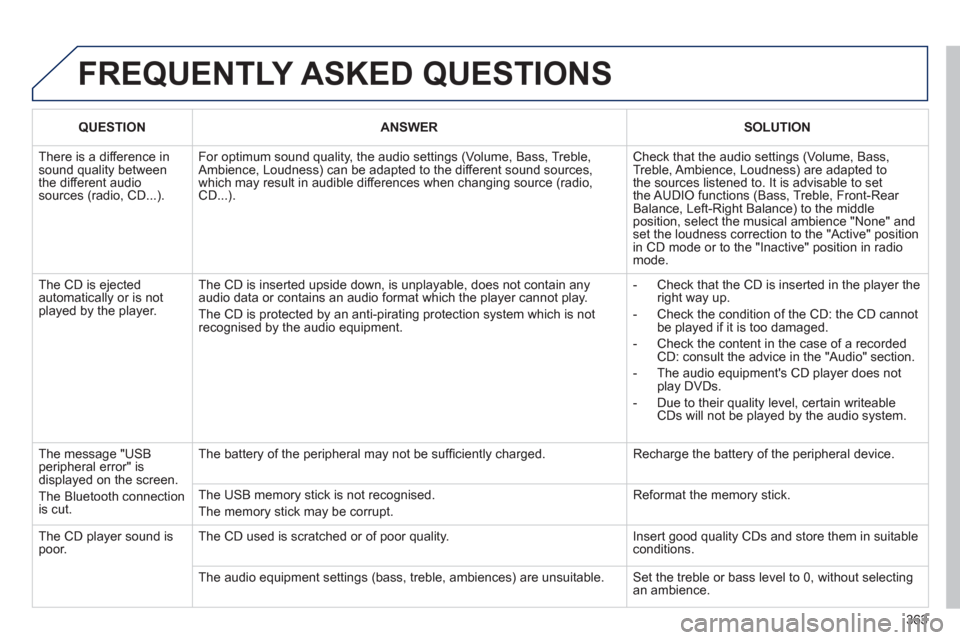
There is a difference in sound quality betweenthe different audiosources (radio, CD...).
For optimum sound quality, the audio settings (Volume, Bass, Treble, Ambience, Loudness) can be adapted to the different sound sources,which may result in audible differences when changing source (radio,CD...).
Check that the audio settings (Volume, Bass, Treble, Ambience, Loudness) are adapted tothe sources listened to. It is advisable to setthe AUDIO functions (Bass, Treble, Front-Rear Balance, Left-Right Balance) to the middle position, select the musical ambience "None" and set the loudness correction to the "Active" position in CD mode or to the "Inactive" position in radio mode.
The CD is ejected automatically or is not played by the player.
The CD is inserted upside down, is unplayable, does not contain any audio data or contains an audio format which the player cannot play.
The CD is protected by an anti-pirating protection system which is not recognised by the audio equipment.
- Check that the CD is inserted in the player the right way up.
- Check the condition of the CD: the CD cannot be played if it is too damaged.
- Check the content in the case of a recordedCD: consult the advice in the "Audio" section.
- The audio equipment's CD player does notplay DVDs.
- Due to their quality level, certain writeableCDs will not be played by the audio system.
The message "USB peripheral error" isdisplayed on the screen.
The Bluetooth connectionis cut.
The battery of the peripheral may not be suffi ciently charged.
Recharge the battery of the peripheral device.
The USB memory stick is not recognised.
The memory stick may be corrupt.
Reformat the memory stick.
The CD player sound ispoor.The CD used is scratched or of poor quality.
Insert good quality CDs and store them in suitable conditions.
The audio equipment settings (bass, treble, ambiences) are unsuitable. Set the treble or bass level to 0, without selectingan ambience.
Page 372 of 382
370
VISUAL SEARCH
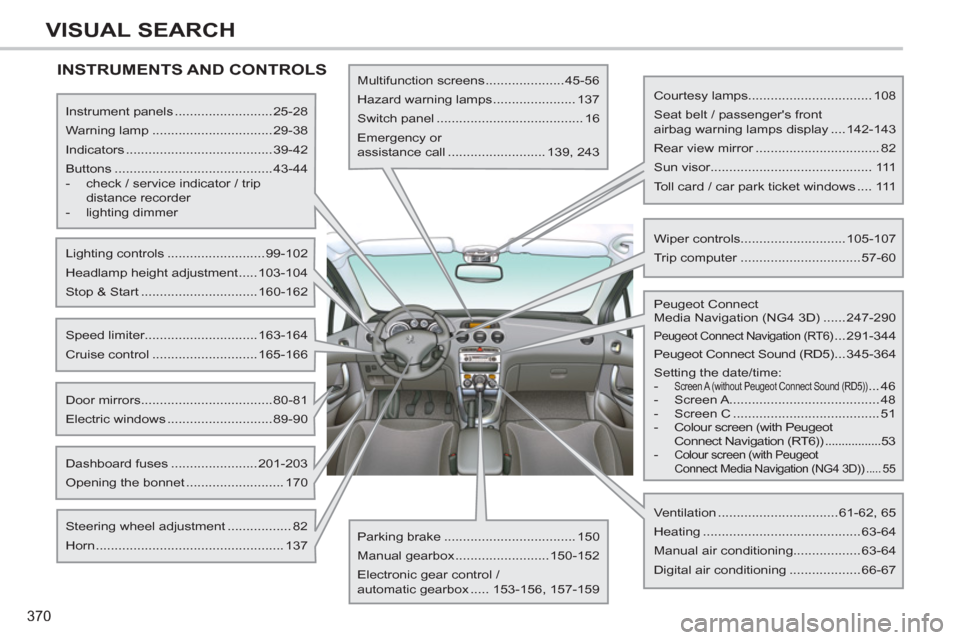
INSTRUMENTS AND CONTROLS
Instrument panels ..........................25-28
Warning lamp ................................29-38
Indicators .......................................39-42
Buttons ..........................................43-44
- check / service indicator / trip
distance recorder
- lighting dimmer
Lighting controls ..........................99-102
Headlamp height adjustment .....103-104
Stop & Start ...............................160-162
Door mirrors ...................................80-81
Electric windows ............................89-90
Speed limiter..............................163-164
Cruise control ............................165-166
Dashboard fuses .......................201-203
Opening the bonnet .......................... 170
Multifunction screens .....................45-56
Hazard warning lamps ...................... 137
Switch panel ....................................... 16
Emergency or
assistance call .......................... 139, 243
Steering wheel adjustment ................. 82
Horn .................................................. 137
Parking brake ................................... 150
Manual gearbox .........................150-152
Electronic gear control /
automatic gearbox ..... 153-156, 157-159
Ventilation ................................61-62, 65
Heating ..........................................63-64
Manual air conditioning..................63-64
Digital air conditioning ...................66-67
Peugeot Connect
Media Navigation (NG4 3D) ......247-290
Peugeot Connect Navigation (RT6) ...291-344
Peugeot Connect Sound (RD5) ...345-364
Setting the date/time:
-
Screen A (without Peugeot Connect Sound (RD5)) ... 46
- Screen A ........................................ 48
- Screen C ....................................... 51
- Colour screen (with Peugeot
Connect Navigation (RT6)) .................53
- Colour screen (with Peugeot
Connect Media Navigation (NG4 3D)) ..... 55
Courtesy lamps................................. 108
Seat belt / passenger's front
airbag warning lamps display ....142-143
Rear view mirror ................................. 82
Sun visor........................................... 111
Toll card / car park ticket windows .... 111
Wiper controls............................105-107
Trip computer ................................57-60
Page 376 of 382
374
ALPHABETICAL INDEX
Navigation............................258,297, 298Net ........................................................122Number plate lamps .....................197, 199
Oil filter.................................................r176Oil level...........................................42, 174Opening the bonnet..............................170Opening the boot..............................83,94Opening the doors............................83,91Opening the panoramic sunroof blind....95Opening the retractable screen..............56Operation indicator lamps................35,38
Paint colour code..................................241Panoramic glass sunroof........................f95Parcel shelf, rear..................................r117Parking brake ...............................150, 177Parking sensors, front..........................168Parking sensors, rear...........................r167Particle emission filter..................r175, 176Passenger compartment filter..............r176PEUGEOT call button..........................245PEUGEOT CONNECT ASSISTA NCE.....244
Peugeot Connect Media Navigation(NG4 3D) ...28, 54, 58, 247, 250, 253, 280Peugeot Connect Navigation(RT6)..........................................52, 291PEUGEOT CONNECT SOS........244, 245Peugeot Connect Sound (RD5) ..............................345, 358, 360PEUGEOT services ..............................245PIN code ...............................................278Player, CD MP3....................................351POIs (updating) ....................................265Port, USB .....................................112, 352Priming the fuel system ........................171
Main beam.............................99,194, 195Maintenance...........................................23Map reading lamps...............................108Markings, identification.........................241Mat........................................................114Menu, main...........................................348Mini fuel level..........................................96Mirror, rear view......................................82Mirrors, door.....................................r80, 81Misfuel prevention..................................98Modularity, seats.....................................78Mountings for ISOFIX seats.................131MP3 CD................................................351Music media players.....................270, 326
Keepingchildren safe....125, 128, 133-135,146Key in ignition warning...........................85Key with remote control..............83,84,86
Labels, identification .............................241Lamps,warning and indicator.....r29,33,35,38LED daytime running lamps.................101Level, brake fluid..................................174Level, headlamp wash..................106,174
Level, power steering fluid ...................174Levels and checks.........................172-175Lighting, guide-me home..............102,103Lighting, interior............................r108,109Lighting bulbs(replacement)..........194, 197, 199,200Lighting control stalk...............................99Lighting dimmer......................................r44Lighting on reminder.............................100Loading.....................................23,78,216
Load reduction mode............................210Load space cover.........................r119, 122Locating your vehicle..............................84
Locking from the inside..........................92Long objects, transporting ..............78, 115Luggage retaining strap........116, 118, 121
K
L
M
N
O
P
Jack..............................................187,189JACK socket.................................331,352Jukebox (copy).....................................272Jukebox (playing).................................273
J