start stop button Peugeot 308 SW BL 2013 User Guide
[x] Cancel search | Manufacturer: PEUGEOT, Model Year: 2013, Model line: 308 SW BL, Model: Peugeot 308 SW BL 2013Pages: 382, PDF Size: 17.75 MB
Page 289 of 382

287
QUESTIONANSWERSOLUTION
"TA" is selected. However, certain traffi c jams along the route arenot indicated in real time.
On starting, it is several minutes before the system begins to receive thetraffi c information.
Wait until the traffi c information is being received correctly (displaying of the traffi c information symbols on the map).
In certain countries, only major routes (motorways...) are listed for thetraffi c information.
This phenomenon is normal. The system isdependent on the traffi c information available.
The time taken to calculate a route sometimes seems longer than usual.
The performance of the system may slow down temporarily if a CD/DVDis being copied onto the Jukebox at the same time as a route is being calculated.
Wait until the CD/DVD has been copied or stop the copying before starting the guidance function.
I receive a speed camera alert for a speed camera which is not on my route.
The system announces all speed cameras positioned in a cone located in front of the vehicle. It may detect speed cameras located on nearby or parallel roads.
Zoom in on the map to view the exact position of the speed camera.
The speed camera audible warning does not work.
The audible warning is not active. Activate the audible warning on Navigation Menu,Settings, Set parameters for risk areas.
The alert volume is set to minimum.
Increase the volume of the alert when passing aspeed camera.
Does the emergency call function work without a SIM card?
No, as certain national regulations impose the presence of a SIM card inorder to make an emergency call.
Insert a valid SIM card in the slot.
The altitude is not displayed. On starting, the initialisation of the GPS may take up to 3 minutes toreceive more than 4 satellites correctly.
Wait until the system has started up completely. Check that there is a GPS coverage of at least4 satellites (long press on the SETUP button, then select "GPS coverage").
Depending on the geographical environment (tunnel...) or the weather, the conditions of reception of the GPS signal may vary.
This phenomenon is normal. The system isdependent on the conditions of reception of the GPS signal.
Page 366 of 382
364
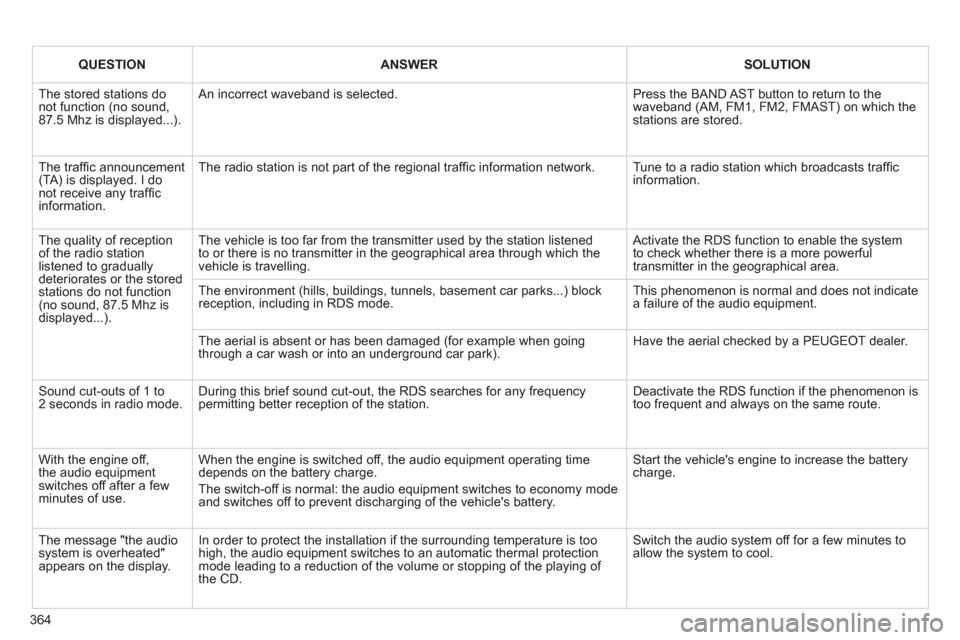
QUESTIONANSWERSOLUTION
The stored stations donot function (no sound, 87.5 Mhz is displayed...).
An incorrect waveband is selected.
Press the BAND AST button to return to the waveband (AM, FM1, FM2, FMAST) on which thestations are stored.
The traffi c announcement(TA) is displayed. I donot receive any traffi c information.
The radio station is not part of the regional traffi c information network.
Tune to a radio station which broadcasts traffi c information.
The quality of receptionof the radio station listened to graduallydeteriorates or the stored stations do not function(no sound, 87.5 Mhz is displayed...).
The vehicle is too far from the transmitter used by the station listenedto or there is no transmitter in the geographical area through which the vehicle is travelling.
Activate the RDS function to enable the system to check whether there is a more powerful transmitter in the geographical area.
The environment (hills, buildings, tunnels, basement car parks...) block reception, including in RDS mode. This phenomenon is normal and does not indicate a failure of the audio equipment.
The aerial is absent or has been damaged (for example when goingthrough a car wash or into an underground car park).
Have the aerial checked by a PEUGEOT dealer.
Sound cut-outs of 1 to2 seconds in radio mode.During this brief sound cut-out, the RDS searches for any frequency permitting better reception of the station.
Deactivate the RDS function if the phenomenon is too frequent and always on the same route.
With the engine off, the audio equipment switches off after a few minutes of use.
When the engine is switched off, the audio equipment operating timedepends on the battery charge.
The switch-off is normal: the audio equipment switches to economy mode and switches off to prevent discharging of the vehicle's battery.
Start the vehicle's engine to increase the batterycharge.
The message "the audio system is overheated" appears on the display.
In order to protect the installation if the surrounding temperature is toohigh, the audio equipment switches to an automatic thermal protectionmode leading to a reduction of the volume or stopping of the playing of the CD.
Switch the audio system off for a few minutes toallow the system to cool.
Page 372 of 382
370
VISUAL SEARCH
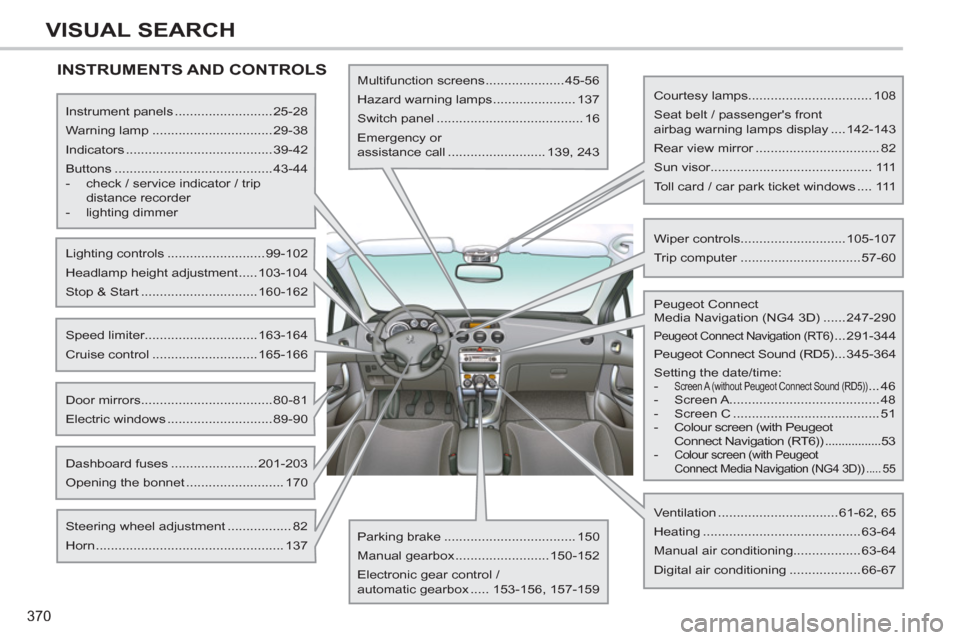
INSTRUMENTS AND CONTROLS
Instrument panels ..........................25-28
Warning lamp ................................29-38
Indicators .......................................39-42
Buttons ..........................................43-44
- check / service indicator / trip
distance recorder
- lighting dimmer
Lighting controls ..........................99-102
Headlamp height adjustment .....103-104
Stop & Start ...............................160-162
Door mirrors ...................................80-81
Electric windows ............................89-90
Speed limiter..............................163-164
Cruise control ............................165-166
Dashboard fuses .......................201-203
Opening the bonnet .......................... 170
Multifunction screens .....................45-56
Hazard warning lamps ...................... 137
Switch panel ....................................... 16
Emergency or
assistance call .......................... 139, 243
Steering wheel adjustment ................. 82
Horn .................................................. 137
Parking brake ................................... 150
Manual gearbox .........................150-152
Electronic gear control /
automatic gearbox ..... 153-156, 157-159
Ventilation ................................61-62, 65
Heating ..........................................63-64
Manual air conditioning..................63-64
Digital air conditioning ...................66-67
Peugeot Connect
Media Navigation (NG4 3D) ......247-290
Peugeot Connect Navigation (RT6) ...291-344
Peugeot Connect Sound (RD5) ...345-364
Setting the date/time:
-
Screen A (without Peugeot Connect Sound (RD5)) ... 46
- Screen A ........................................ 48
- Screen C ....................................... 51
- Colour screen (with Peugeot
Connect Navigation (RT6)) .................53
- Colour screen (with Peugeot
Connect Media Navigation (NG4 3D)) ..... 55
Courtesy lamps................................. 108
Seat belt / passenger's front
airbag warning lamps display ....142-143
Rear view mirror ................................. 82
Sun visor........................................... 111
Toll card / car park ticket windows .... 111
Wiper controls............................105-107
Trip computer ................................57-60