fuel type Peugeot 308 SW BL 2013 Owner's Manual
[x] Cancel search | Manufacturer: PEUGEOT, Model Year: 2013, Model line: 308 SW BL, Model: Peugeot 308 SW BL 2013Pages: 382, PDF Size: 17.75 MB
Page 25 of 382
23
ECO-DRIVING
Eco-driving is a range of everyday practices that allow the motorist to optimise their fuel consumption and CO2 emissions.
Optimise the use of your
gearbox
With a manual gearbox, move off gen-
tly, change up without waiting and
drive by changing up quite soon. If
your vehicle has the system, the gear
shift indicator invites you to change up;
it is displayed in the instrument panel,
follow its instructions.
With an automatic or electronic gear-
box, stay in Drive "D"
or Auto "A"
, ac-
cording to the type of gearbox, without
pressing the accelerator pedal heavily
or suddenly.
Drive smoothly
Maintain a safe distance between ve-
hicles, use engine braking rather than
the brake pedal, and press the accel-
erator progressively. These practices
contribute towards a reduction in fuel
consumption and CO
2 emissions and
also helps reduce the background traf-
fi c noise.
If your vehicle has cruise control, make
use of the system at speeds above
25 mph (40 km/h) when the traffi c is
fl owing well.
Control the use of your
electrical equipment
Before moving off, if the passenger
compartment is too warm, ventilate it by
opening the windows and air vents be-
fore using the air conditioning.
Above 30 mph (50 km/h), close the win-
dows and leave the air vents open.
Remember to make use of equipment
that can help keep the temperature in
the passenger compartment down (sun-
roof and window blinds...).
Switch off the air conditioning, unless
it has automatic digital regulation, as
soon as the desired temperature is at-
tained.
Switch off the demisting and defrosting
controls, if not automatic.
Switch off the heated seat as soon as
possible.
Switch off the headlamps and front fo-
glamps when the level of light does not
require their use.
Avoid running the engine before moving
off, particularly in winter; your vehicle will
warm up much faster while driving.
As a passenger, if you avoid connecting
your multimedia devices (fi lm, music,
video game...), you will contribute to-
wards limiting the consumption of elec-
trical energy, and so of fuel.
Disconnect your portable devices be-
fore leaving the vehicle.
Page 27 of 382
1
25
INSTRUMENTS and CONTROLS
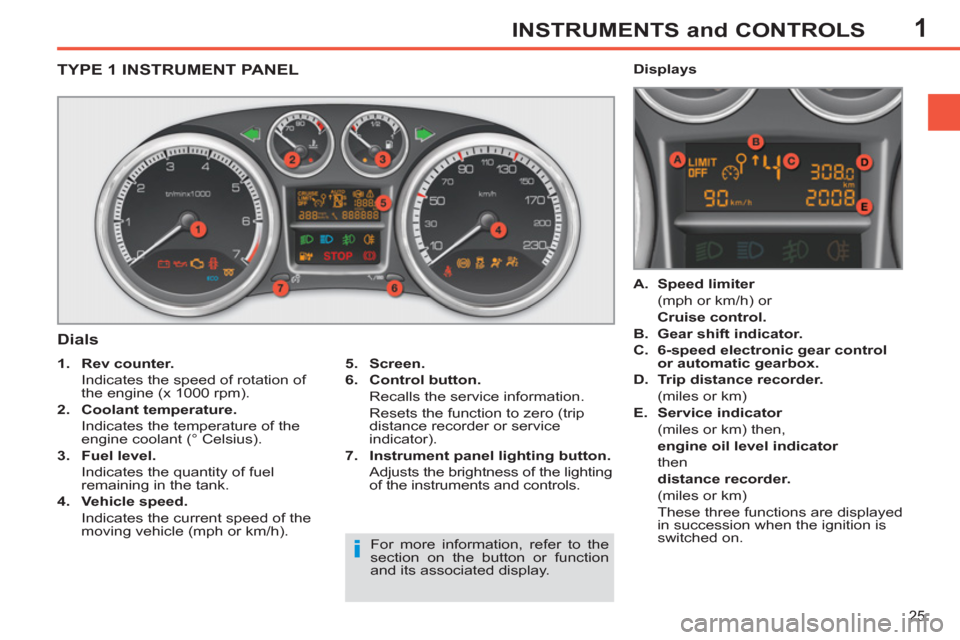
TYPE 1 INSTRUMENT PANEL
Dials
5.
Screen.
6.
Control button.
Recalls the service information.
Resets the function to zero (trip
distance recorder or service
indicator).
7.
Instrument panel lighting button.
Adjusts the brightness of the lighting
of the instruments and controls.
1.
Rev counter.
Indicates the speed of rotation of
the engine (x 1000 rpm).
2.
Coolant temperature.
Indicates the temperature of the
engine coolant (° Celsius).
3.
Fuel level.
Indicates the quantity of fuel
remaining in the tank.
4.
Vehicle speed.
Indicates the current speed of the
moving vehicle (mph or km/h).
A.
Speed limiter
(mph or km/h) or
Cruise control.
B.
Gear shift indicator.
C.
6-speed electronic gear control
or automatic gearbox.
D.
Trip distance recorder.
(miles or km)
E.
Service indicator
(miles or km) then,
engine oil level indicator
then
distance recorder.
(miles or km)
These three functions are displayed
in succession when the ignition is
switched on.
Displays
For more information, refer to the
section on the button or function
and its associated display.
Page 28 of 382
1INSTRUMENTS and CONTROLS
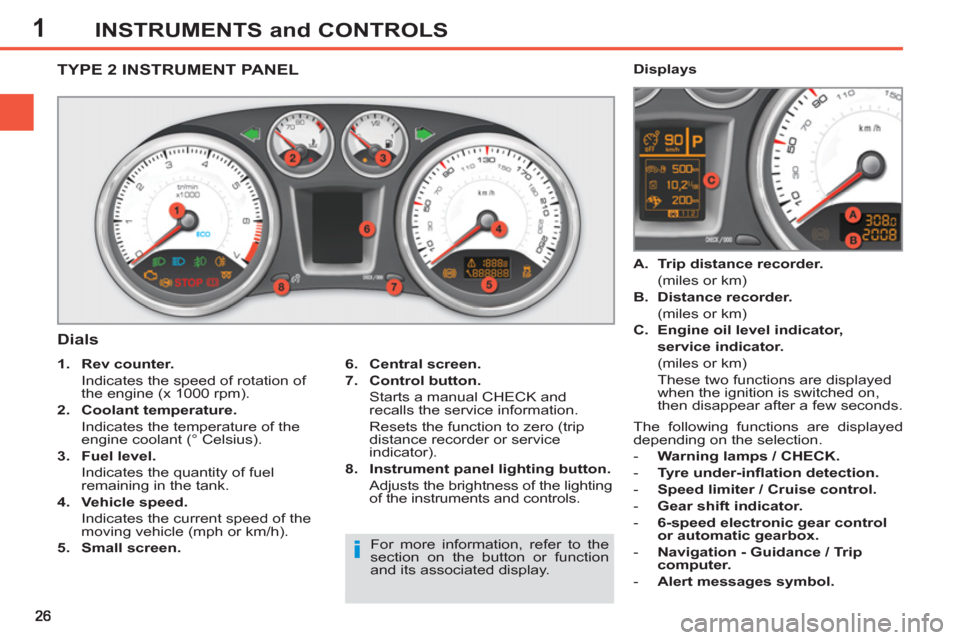
TYPE 2 INSTRUMENT PANEL
Dials
6.
Central screen.
7.
Control button.
Starts a manual CHECK and
recalls the service information.
Resets the function to zero (trip
distance recorder or service
indicator).
8.
Instrument panel lighting button.
Adjusts the brightness of the lighting
of the instruments and controls.
1.
Rev counter.
Indicates the speed of rotation of
the engine (x 1000 rpm).
2.
Coolant temperature.
Indicates the temperature of the
engine coolant (° Celsius).
3.
Fuel level.
Indicates the quantity of fuel
remaining in the tank.
4.
Vehicle speed.
Indicates the current speed of the
moving vehicle (mph or km/h).
5.
Small screen.
A.
Trip distance recorder.
(miles or km)
B.
Distance recorder.
(miles or km)
C.
Engine oil level indicator,
service indicator.
(miles or km)
These two functions are displayed
when the ignition is switched on,
then disappear after a few seconds.
Displays
For more information, refer to the
section on the button or function
and its associated display. The following functions are displayed
depending on the selection.
- Warning lamps / CHECK.
- Tyre under-infl ation detection.
- Speed limiter / Cruise control.
- Gear shift indicator.
- 6-speed electronic gear control
or automatic gearbox.
- Navigation - Guidance / Trip
computer.
- Alert messages symbol.
Page 29 of 382
1INSTRUMENTS and CONTROLS
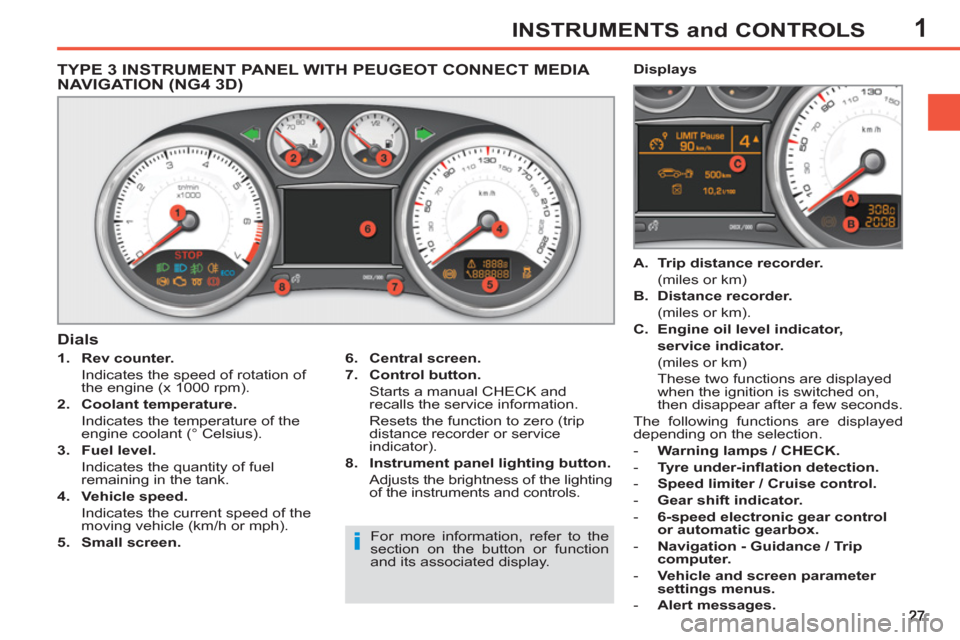
TYPE 3 INSTRUMENT PANEL WITH PEUGEOT CONNECT MEDIA
NAVIGATION (NG4 3D)
1.
Rev counter.
Indicates the speed of rotation of
the engine (x 1000 rpm).
2.
Coolant temperature.
Indicates the temperature of the
engine coolant (° Celsius).
3.
Fuel level.
Indicates the quantity of fuel
remaining in the tank.
4.
Vehicle speed.
Indicates the current speed of the
moving vehicle (km/h or mph).
5.
Small screen.
A.
Trip distance recorder.
(miles or km)
B.
Distance recorder.
(miles or km).
C.
Engine oil level indicator,
service indicator.
(miles or km)
These two functions are displayed
when the ignition is switched on,
then disappear after a few seconds.
The following functions are displayed
depending on the selection.
- Warning lamps / CHECK.
- Tyre under-infl ation detection.
- Speed limiter / Cruise control.
- Gear shift indicator.
- 6-speed electronic gear control
or automatic gearbox.
- Navigation - Guidance / Trip
computer.
- Vehicle and screen parameter
settings menus.
- Alert messages.
Dials
Displays
6.
Central screen.
7.
Control button.
Starts a manual CHECK and
recalls the service information.
Resets the function to zero (trip
distance recorder or service
indicator).
8.
Instrument panel lighting button.
Adjusts the brightness of the lighting
of the instruments and controls.
For more information, refer to the
section on the button or function
and its associated display.
Page 55 of 382
2
53
MULTIFUNCTION SCREENS
)
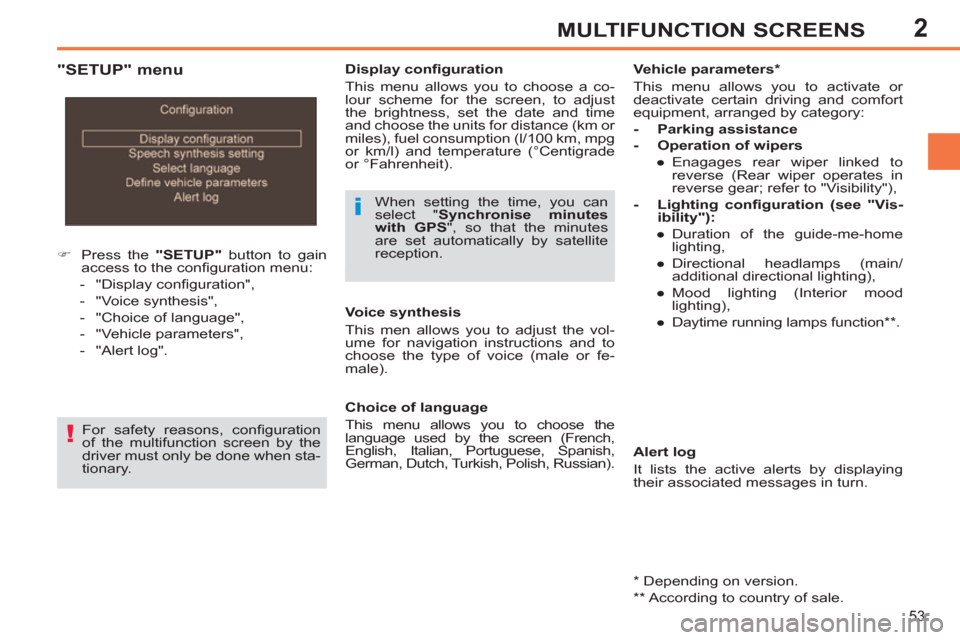
Press the "SETUP"
button to gain
access to the confi guration menu:
- "Display confi guration",
- "Voice synthesis",
- "Choice of language",
- "Vehicle parameters",
- "Alert log".
Display confi guration
This menu allows you to choose a co-
lour scheme for the screen, to adjust
the brightness, set the date and time
and choose the units for distance (km or
miles), fuel consumption (l/100 km, mpg
or km/l) and temperature (°Centigrade
or °Fahrenheit).
When setting the time, you can
select " Synchronise minutes
with GPS
", so that the minutes
are set automatically by satellite
reception.
For safety reasons, confi guration
of the multifunction screen by the
driver must only be done when sta-
tionary.
Alert log
It lists the active alerts by displaying
their associated messages in turn.
Choice of language
This menu allows you to choose the
language used by the screen (French,
English, Italian, Portuguese, Spanish,
German, Dutch, Turkish, Polish, Russian).
Voice synthesis
This men allows you to adjust the vol-
ume for navigation instructions and to
choose the type of voice (male or fe-
male).
Vehicle parameters *
This menu allows you to activate or
deactivate certain driving and comfort
equipment, arranged by category:
- Parking assistance
- Operation of wipers
●
Enagages rear wiper linked to
reverse (Rear wiper operates in
reverse gear; refer to "Visibility"),
- Lighting confi guration (see "Vis-
ibility"):
●
Duration of the guide-me-home
lighting,
●
Directional headlamps (main/
additional directional lighting),
●
Mood lighting (Interior mood
lighting),
●
Daytime running lamps function ** .
"SETUP" menu
*
Depending on version.
**
According to country of sale.
Page 98 of 382
4
96
ACCESS
More than 5 litres of fuel must be add-
ed in order to be registered by the fuel
gauge. FUEL TANK
Capacity of the tank: approximately
60 litres.
The key cannot be removed from
the lock until the cap is put back on
the tank.
Opening the cap may cause an in-
rush of air. This vacuum, which is
perfectly normal, is caused by the
sealing of the fuel system.
Low fuel level
Operating fault
A fuel gauge malfunction is indicated by
the return of the fuel gauge needle to
zero.
Have it checked by a PEUGEOT dealer
or a qualifi ed workshop.
Filling
A label affi xed to the inside of the fl ap
reminds you of the type of fuel to be
used according to your engine. When the low fuel level is
reached, this warning lamp
comes on on the instrument
panel, accompanied by an
audible signal and an alert message.
When it fi rst comes on, you have ap-
proximately 6 litres
of fuel remaining.
Until suffi cient fuel has been added, this
warning lamp comes on every time the
ignition is switched on, accompanied
by an audible signal and a message.
When driving, this audible signal and
the display of the alert message are re-
peated with increasing frequency as the
fuel level drops towards "0"
.
Refuel as soon as possible to avoid run-
ning out of fuel.
If you run out of fuel (Diesel), refer also
to the "Checks" section.
With Stop & Start, never refuel with
the system in STOP mode; you
must switch off the ignition with the
key.
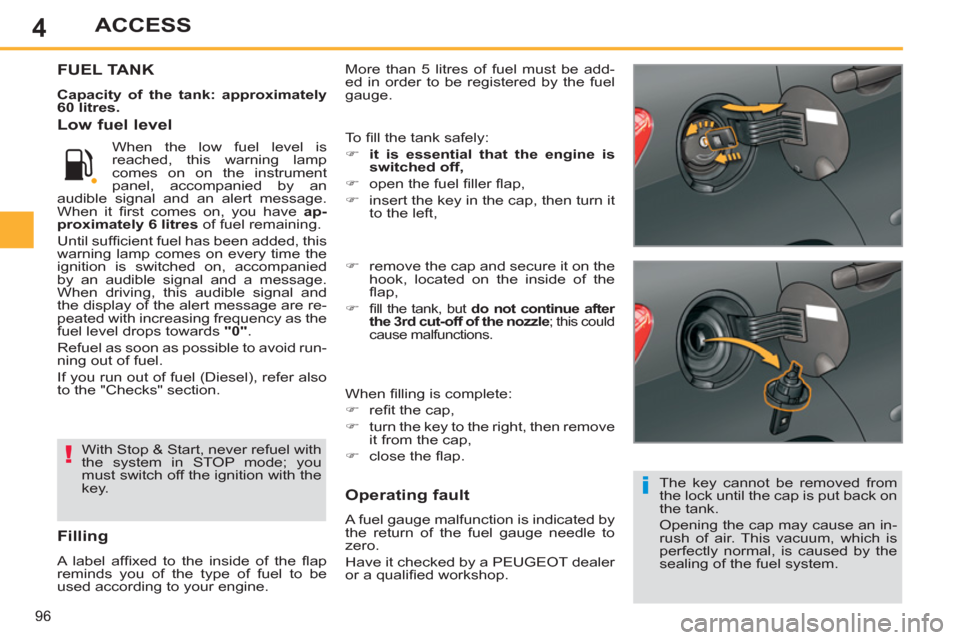
)
remove the cap and secure it on the
hook, located on the inside of the
fl ap,
)
fi ll the tank, but do not continue after
the 3rd cut-off of the nozzle
; this could
cause malfunctions.
When fi lling is complete:
)
refi t the cap,
)
turn the key to the right, then remove
it from the cap,
)
close the fl ap.
To fi ll the tank safely:
)
it is essential that the engine is
switched off,
)
open the fuel fi ller fl ap,
)
insert the key in the cap, then turn it
to the left,
Page 99 of 382
4ACCESS
Quality of the fuel used for
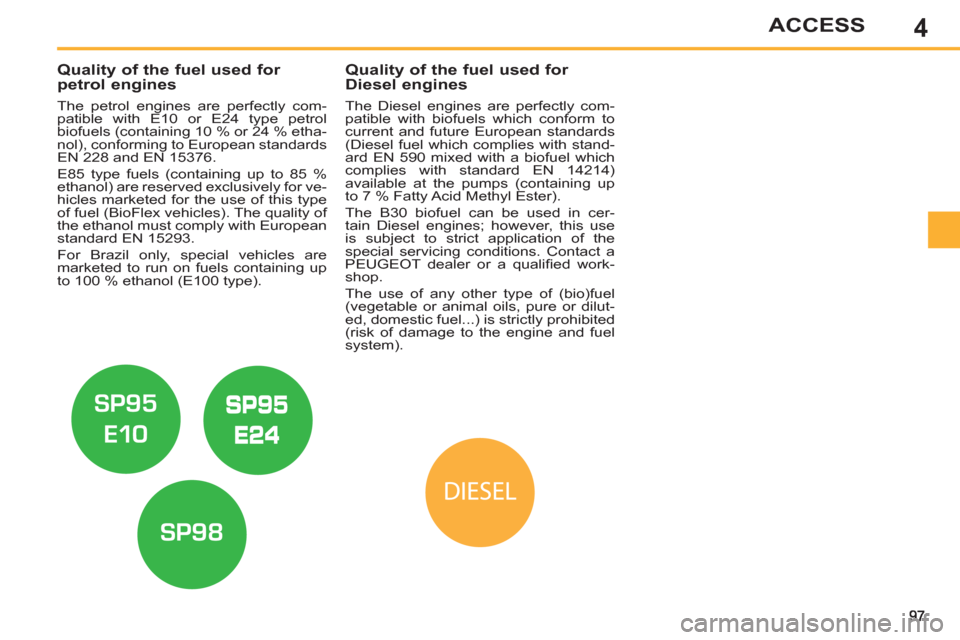
petrol engines
The petrol engines are perfectly com-
patible with E10 or E24 type petrol
biofuels (containing 10 % or 24 % etha-
nol), conforming to European standards
EN 228 and EN 15376.
E85 type fuels (containing up to 85 %
ethanol) are reserved exclusively for ve-
hicles marketed for the use of this type
of fuel (BioFlex vehicles). The quality of
the ethanol must comply with European
standard EN 15293.
For Brazil only, special vehicles are
marketed to run on fuels containing up
to 100 % ethanol (E100 type).
Quality of the fuel used for
Diesel engines
The Diesel engines are perfectly com-
patible with biofuels which conform to
current and future European standards
(Diesel fuel which complies with stand-
ard EN 590 mixed with a biofuel which
complies with standard EN 14214)
available at the pumps (containing up
to 7 % Fatty Acid Methyl Ester).
The B30 biofuel can be used in cer-
tain Diesel engines; however, this use
is subject to strict application of the
special servicing conditions. Contact a
PEUGEOT dealer or a qualifi ed work-
shop.
The use of any other type of (bio)fuel
(vegetable or animal oils, pure or dilut-
ed, domestic fuel...) is strictly prohibited
(risk of damage to the engine and fuel
system).
Page 100 of 382
4
98
ACCESS
MISFUEL PREVENTION(DIESEL) *
Mechanical device which prevents fi lling
the tank of a Diesel vehicle with petrol. It
avoids the risk of engine damage that can
result from fi lling with the wrong fuel.
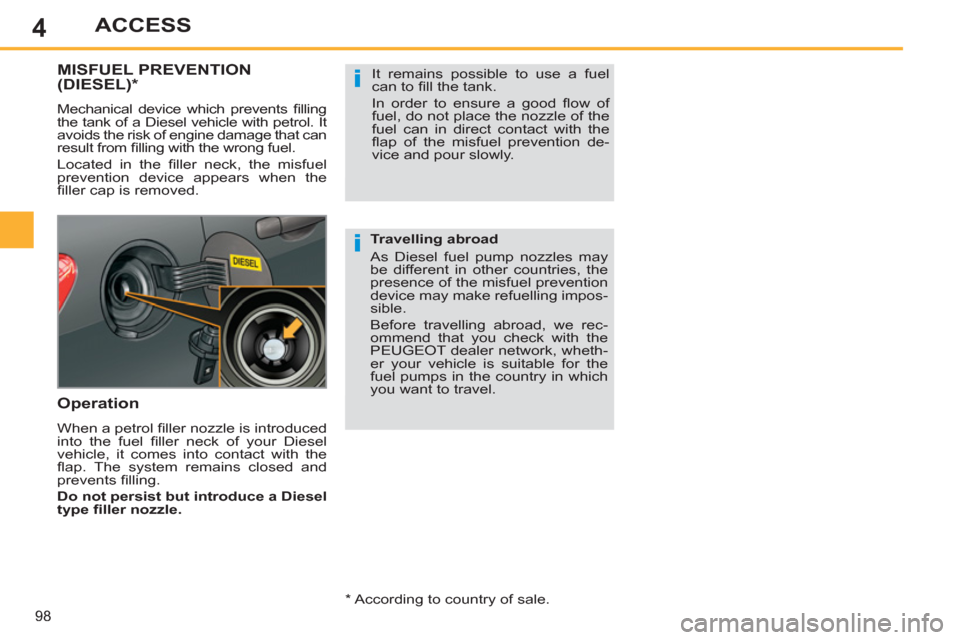
Located in the fi ller neck, the misfuel
prevention device appears when the
fi ller cap is removed.
Operation
When a petrol fi ller nozzle is introduced
into the fuel fi ller neck of your Diesel
vehicle, it comes into contact with the
fl ap. The system remains closed and
prevents fi lling.
Do not persist but introduce a Diesel
type fi ller nozzle.
It remains possible to use a fuel
can to fi ll the tank.
In order to ensure a good fl ow of
fuel, do not place the nozzle of the
fuel can in direct contact with the
fl ap of the misfuel prevention de-
vice and pour slowly.
Travelling abroad
As Diesel fuel pump nozzles may
be different in other countries, the
presence of the misfuel prevention
device may make refuelling impos-
sible.
Before travelling abroad, we rec-
ommend that you check with the
PEUGEOT dealer network, wheth-
er your vehicle is suitable for the
fuel pumps in the country in which
you want to travel.
*
According to country of sale.