buttons Peugeot 308 SW BL Dag 2008 User Guide
[x] Cancel search | Manufacturer: PEUGEOT, Model Year: 2008, Model line: 308 SW BL Dag, Model: Peugeot 308 SW BL Dag 2008Pages: 260, PDF Size: 12.09 MB
Page 222 of 260
225
11
22
33
44
SOURCE
BAND
MENU
ESC
MENU LIST
ESC
MENU LIST
ESC
MENU LIST
11
22
33
44
LIST
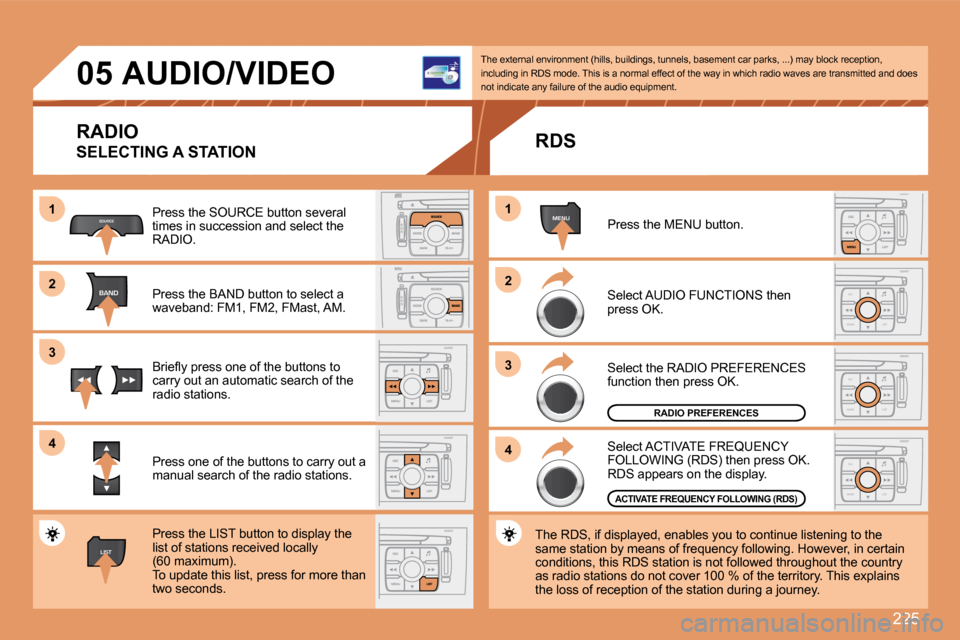
05 AUDIO/VIDEO
RADIO
SELECTING A STATION
Press the SOURCE button several times in succession and select the RADIO.
Press the BAND button to select a waveband: FM1, FM2, FMast, AM.
Briefl y press one of the buttons to carry out an automatic search of the radio stations.
Press one of the buttons to carry out a manual search of the radio stations.
Press the LIST button to display the list of stations received locally(60 maximum). To update this list, press for more than two seconds.
The external environment (hills, buildings, tunnel s, basement car parks, ...) may block reception, including in RDS mode. This is a normal effect of t he way in which radio waves are transmitted and doe s not indicate any failure of the audio equipment.
RDS
Select ACTIVATE FREQUENCY FOLLOWING (RDS) then press OK. RDS appears on the display.
Select the RADIO PREFERENCES function then press OK.
Select AUDIO FUNCTIONS then press OK.
Press the MENU button.
The RDS, if displayed, enables you to continue lis tening to the same station by means of frequency following. Howev er, in certain conditions, this RDS station is not followed throughout the country as radio stations do not cover 100 % of the territory. This explains the loss of reception of the station during a journey.
RADIO PREFERENCES
ACTIVATE FREQUENCY FOLLOWING (RDS)
Page 223 of 260
226
SOURCE
LIST
S
O
SSOURCE
MODE BAND ESC
2
abc
5
jkl
8
tuv 3
def
6
mno
9
wxyz
1 4
ghi
7
pqrs0 # MENU LIST
TA
PTY
DARK
11
22
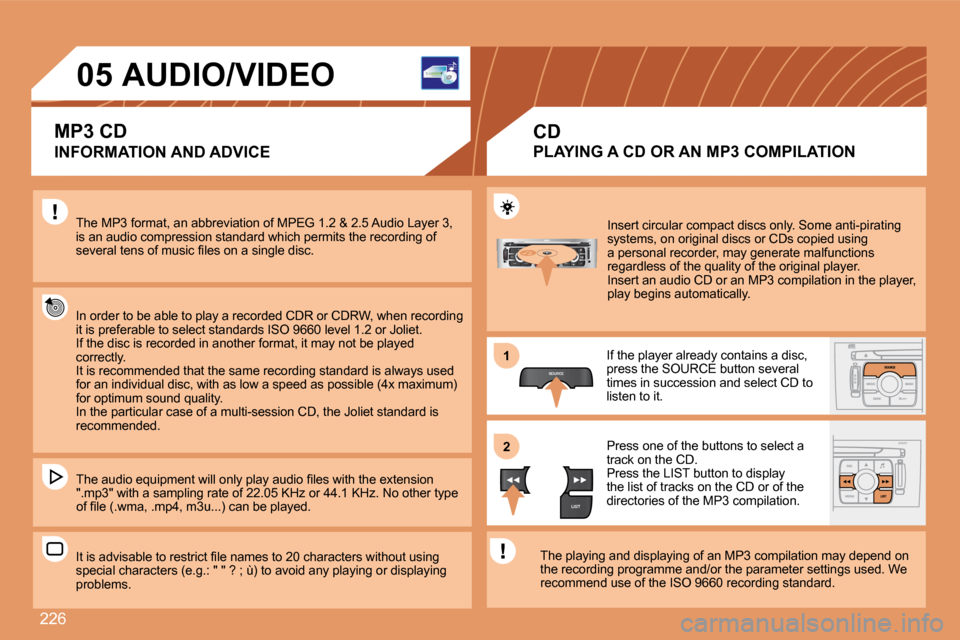
05 AUDIO/VIDEO
INFORMATION AND ADVICE
The MP3 format, an abbreviation of MPEG 1.2 & 2.5 Audio Layer 3, is an audio compression standard which permits the recording of several tens of music fi les on a single disc.
In order to be able to play a recorded CDR or CDRW , when recording it is preferable to select standards ISO 9660 level 1.2 or Joliet. If the disc is recorded in another format, it may not be played correctly. It is recommended that the same recording standard is always used for an individual disc, with as low a speed as possible (4x maximum) for optimum sound quality. In the particular case of a multi-session CD, the Joliet standard is recommended.
The audio equipment will only play audio fi les wit h the extension ".mp3" with a sampling rate of 22.05 KHz or 44.1 KH z. No other type of fi le (.wma, .mp4, m3u...) can be played.
It is advisable to restrict fi le names to 20 characters without using special characters (e.g.: " " ? ; ù) to avoid any p laying or displaying problems.
CD
Insert circular compact discs only. Some anti-pirating systems, on original discs or CDs copied using a personal recorder, may generate malfunctions regardless of the quality of the original player. Insert an audio CD or an MP3 compilation in the pl ayer, play begins automatically.
If the player already contains a disc, press the SOURCE button several times in succession and select CD to listen to it.
Press one of the buttons to select a track on the CD. Press the LIST button to display the list of tracks on the CD or of the directories of the MP3 compilation.
The playing and displaying of an MP3 compilation m ay depend on the recording programme and/or the parameter settin gs used. We recommend use of the ISO 9660 recording standard.
MP3 CD
PLAYING A CD OR AN MP3 COMPILATION
Page 228 of 260
231
11
SOURCE
22
2
abc
5
jkl
8
tuv 3
def
6
mno
9
wxyz
1 4
ghi
7
pqrs
0 #
2
abc
5
jkl
8
tuv
3
def
9
wxyz
1 4
ghi
r
7
pqs
0 #6mnomno
SOURCE
11
33
22
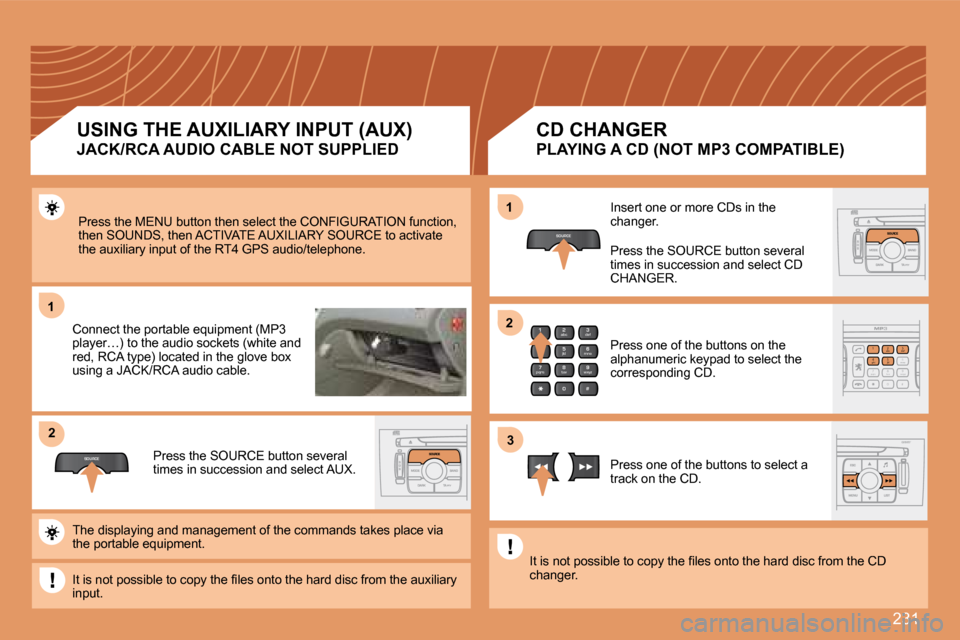
Press the MENU button then select the CONFIGURATIO N function, then SOUNDS, then ACTIVATE AUXILIARY SOURCE to acti vate the auxiliary input of the RT4 GPS audio/telephone.
Connect the portable equipment (MP3 player…) to the audio sockets (white and red, RCA type) located in the glove box using a JACK/RCA audio cable.
Press the SOURCE button several times in succession and select AUX.
Insert one or more CDs in the changer.
Press the SOURCE button several times in succession and select CD CHANGER.
Press one of the buttons on the alphanumeric keypad to select the corresponding CD.
Press one of the buttons to select a track on the CD.
The displaying and management of the commands take s place via the portable equipment.
It is not possible to copy the fi les onto the hard disc from the auxiliary input.
It is not possible to copy the fi les onto the hard disc from the CD changer.
USING THE AUXILIARY INPUT (AUX)
JACK/RCA AUDIO CABLE NOT SUPPLIED
CD CHANGER
PLAYING A CD (NOT MP3 COMPATIBLE)
Page 232 of 260
235
07
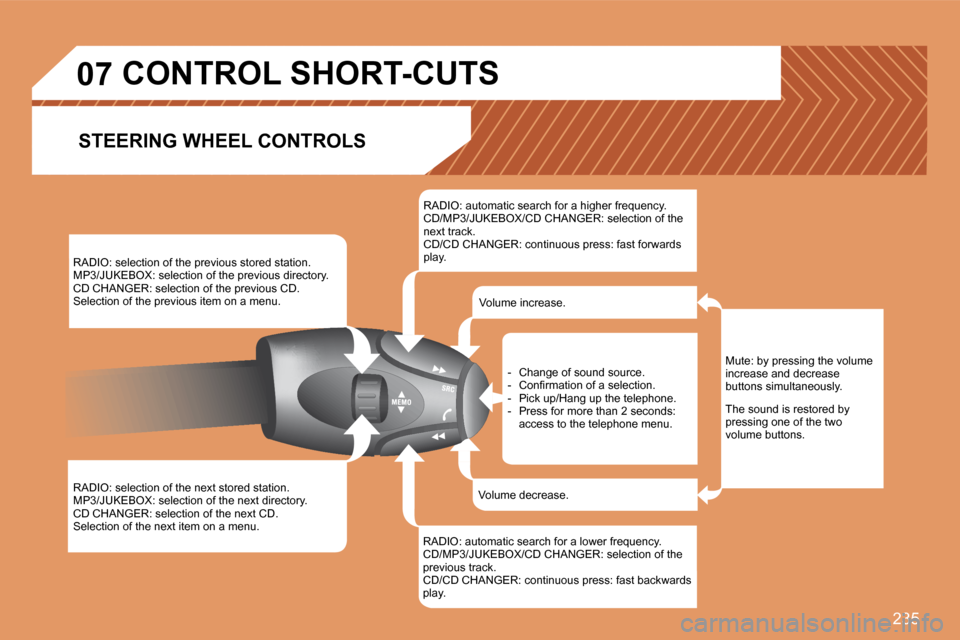
RADIO: selection of the previous stored station. MP3/JUKEBOX: selection of the previous directory. CD CHANGER: selection of the previous CD. Selection of the previous item on a menu.
RADIO: selection of the next stored station. MP3/JUKEBOX: selection of the next directory. CD CHANGER: selection of the next CD. Selection of the next item on a menu.
RADIO: automatic search for a higher frequency. CD/MP3/JUKEBOX/CD CHANGER: selection of the next track. CD/CD CHANGER: continuous press: fast forwards play.
RADIO: automatic search for a lower frequency. CD/MP3/JUKEBOX/CD CHANGER: selection of the previous track. CD/CD CHANGER: continuous press: fast backwards play.
- Change of sound source. - Confi rmation of a selection. - Pick up/Hang up the telephone. - Press for more than 2 seconds: access to the telephone menu.
Volume increase.
Volume decrease.
CONTROL SHORT-CUTS
STEERING WHEEL CONTROLS
Mute: by pressing the volume increase and decrease buttons simultaneously.
The sound is restored by pressing one of the two volume buttons.
Page 243 of 260
243
11
22
10101111
131314141515
33445566778899
1212
01 FIRST STEPS
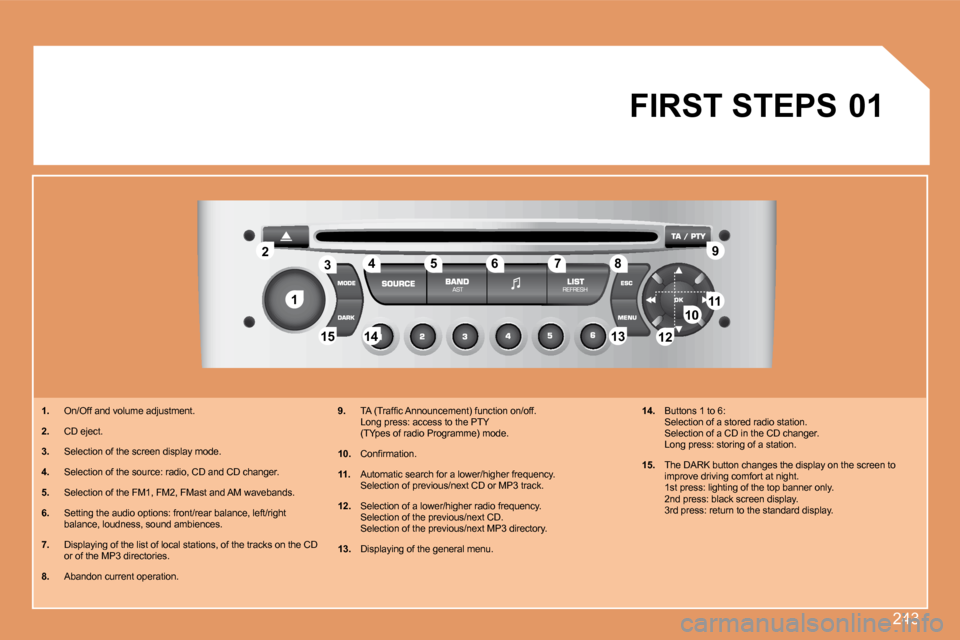
1. On/Off and volume adjustment.
2. CD eject.
3. Selection of the screen display mode.
4. Selection of the source: radio, CD and CD changer.
5. Selection of the FM1, FM2, FMast and AM wavebands.
6. Setting the audio options: front/rear balance, left/right balance, loudness, sound ambiences.
7. Displaying of the list of local stations, of the tracks on the CD or of the MP3 directories.
8. Abandon current operation.
9. TA (Traffi c Announcement) function on/off. Long press: access to the PTY (TYpes of radio Programme) mode.
10. Confi rmation.
11. Automatic search for a lower/higher frequency. Selection of previous/next CD or MP3 track.
12. Selection of a lower/higher radio frequency. Selection of the previous/next CD. Selection of the previous/next MP3 directory.
13. Displaying of the general menu.
14. Buttons 1 to 6: Selection of a stored radio station. Selection of a CD in the CD changer. Long press: storing of a station.
15. The DARK button changes the display on the screen to improve driving comfort at night. 1st press: lighting of the top banner only.2nd press: black screen display. 3rd press: return to the standard display.
Page 245 of 260
245
11
22
33
44
2
44
33
11
03 AUDIO
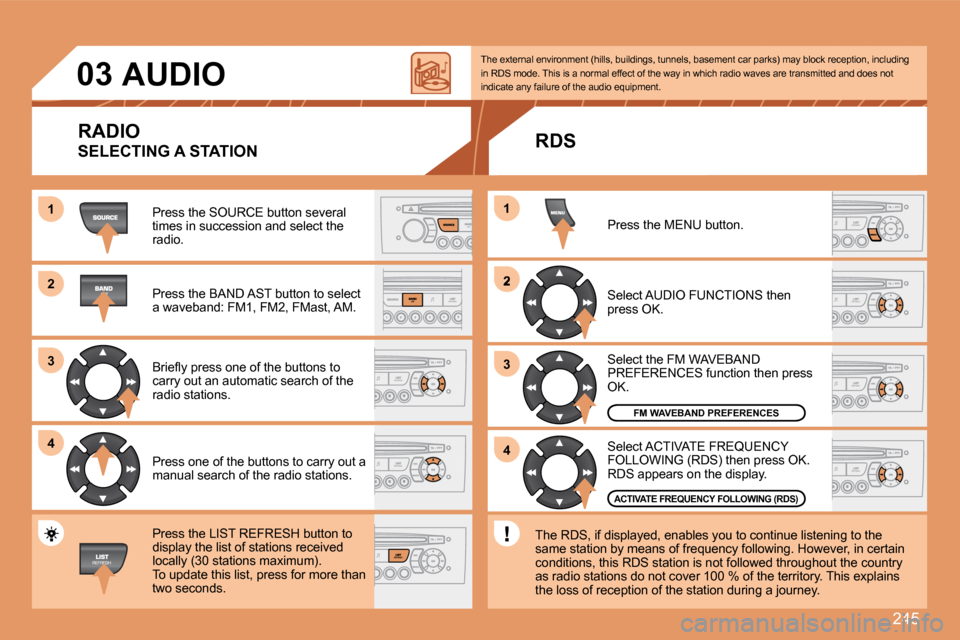
Press the SOURCE button several times in succession and select the radio.
Press the BAND AST button to select a waveband: FM1, FM2, FMast, AM.
Briefl y press one of the buttons to carry out an automatic search of the radio stations.
Press one of the buttons to carry out a manual search of the radio stations.
Press the LIST REFRESH button to display the list of stations received locally (30 stations maximum). To update this list, press for more than two seconds.
Select ACTIVATE FREQUENCY FOLLOWING (RDS) then press OK. RDS appears on the display.
Select the FM WAVEBAND PREFERENCES function then press OK.
Select AUDIO FUNCTIONS then press OK.
Press the MENU button.
FM WAVEBAND PREFERENCES
ACTIVATE FREQUENCY FOLLOWING (RDS)
The external environment (hills, buildings, tunnels, basement car parks) may block reception, includi ng in RDS mode. This is a normal effect of the way in which radio waves are transmitted and does not indicate any failure of the audio equipment.
RDS
The RDS, if displayed, enables you to continue lis tening to the same station by means of frequency following. Howev er, in certain conditions, this RDS station is not followed throughout the country as radio stations do not cover 100 % of the territory. This explains the loss of reception of the station during a journey.
RADIO
SELECTING A STATION
Page 246 of 260
246
11
22
1
22
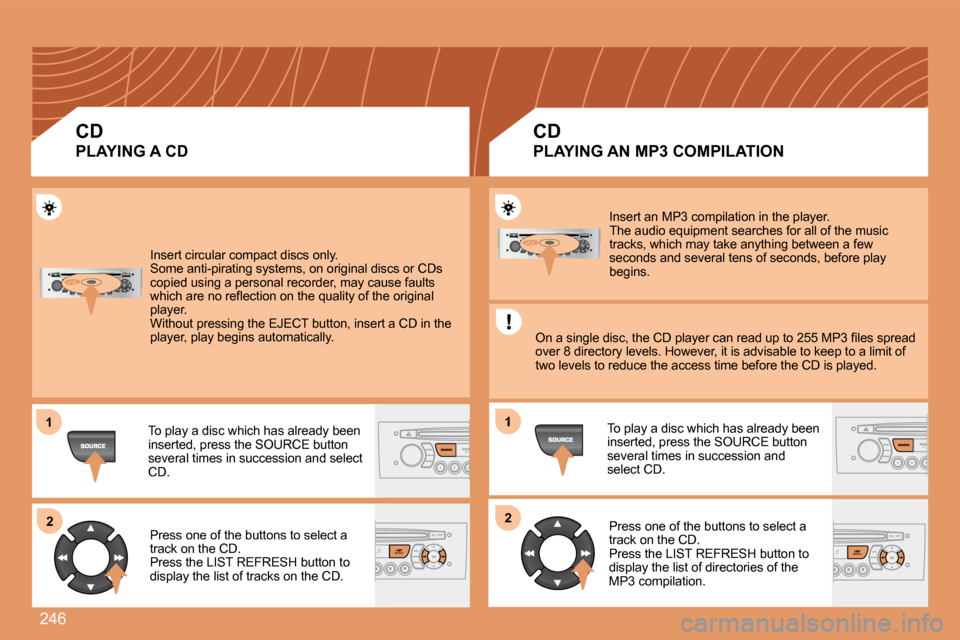
Insert circular compact discs only. Some anti-pirating systems, on original discs or CDs copied using a personal recorder, may cause faults which are no refl ection on the quality of the original player. Without pressing the EJECT button, insert a CD in the player, play begins automatically.
To play a disc which has already been inserted, press the SOURCE button several times in succession and select CD.
Press one of the buttons to select a track on the CD. Press the LIST REFRESH button to display the list of tracks on the CD.
Insert an MP3 compilation in the player. The audio equipment searches for all of the music tracks, which may take anything between a few seconds and several tens of seconds, before play begins.
On a single disc, the CD player can read up to 255 MP3 fi les spread over 8 directory levels. However, it is advisable to keep to a limit of two levels to reduce the access time before the CD is played.
To play a disc which has already been inserted, press the SOURCE button several times in succession and select CD.
Press one of the buttons to select a track on the CD. Press the LIST REFRESH button to display the list of directories of the MP3 compilation.
CD
PLAYING A CD
CD
PLAYING AN MP3 COMPILATION
Page 247 of 260
247
11
22
33
The MP3 format, an abbreviation of MPEG 1.2 & 2.5 Audio Layer 3, is an audio compression standard which permits the recording of several tens of music fi les on a single disc. The playing and displaying of an MP3 compilation may depend on the recording programme and/or the parameters used.
In order to be able to play a recorded CDR or CDRW, when recording select standards ISO 9660 level 1.2 or Joliet. If the disc is recorded in another format, it may not be played correctly. It is recommended that the same recording standard is always used for an individual disc, with as low a speed as possible for optimum sound quality. In the particular case of a multi-session CD, the Joliet standard is recommended.
The audio equipment will only play fi les with the extension ".mp3".No other type of fi le (.wma, .mp4...) can be played .
It is advisable to restrict fi le names to 20 characters without using special characters (e.g.: " " ? ; ù) to avoid any p laying or displaying problems.
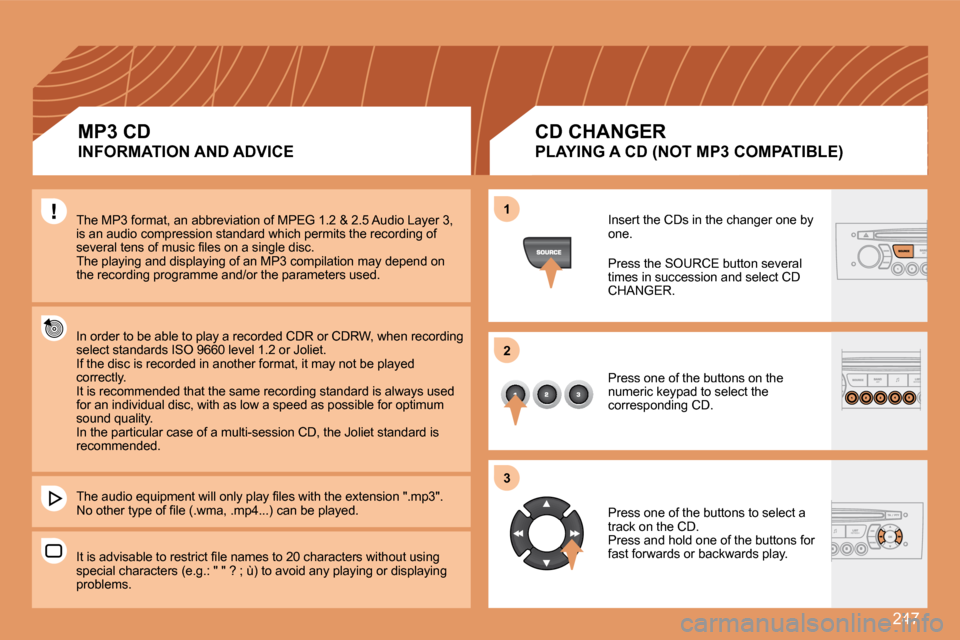
Insert the CDs in the changer one by one.
Press the SOURCE button several times in succession and select CD CHANGER.
Press one of the buttons on the numeric keypad to select the corresponding CD.
Press one of the buttons to select a track on the CD. Press and hold one of the buttons for fast forwards or backwards play.
MP3 CD
INFORMATION AND ADVICE
CD CHANGER
PLAYING A CD (NOT MP3 COMPATIBLE)
Page 250 of 260
250
05
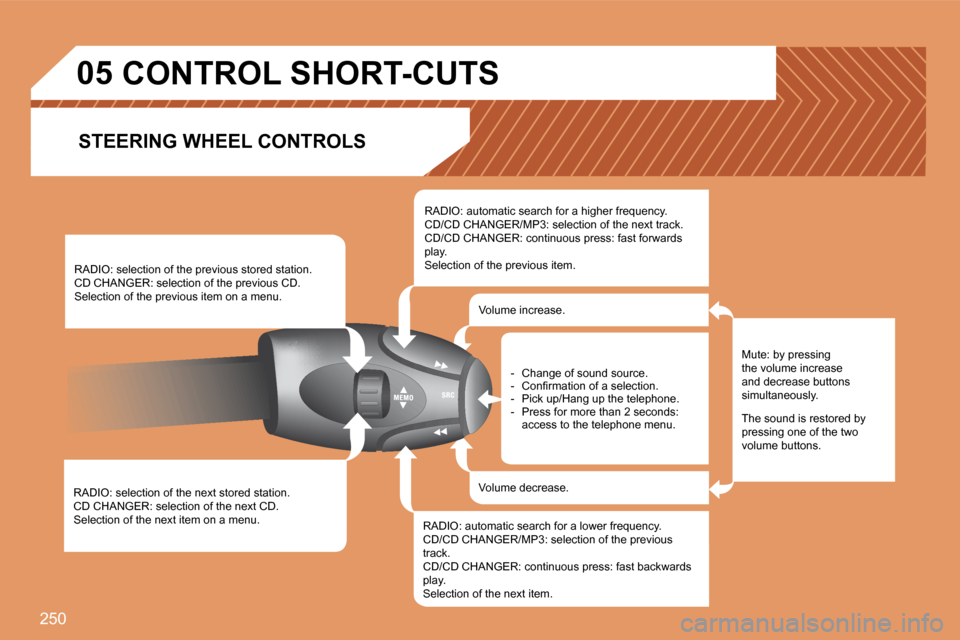
RADIO: selection of the next stored station. CD CHANGER: selection of the next CD. Selection of the next item on a menu.
RADIO: selection of the previous stored station. CD CHANGER: selection of the previous CD. Selection of the previous item on a menu.
RADIO: automatic search for a higher frequency. CD/CD CHANGER/MP3: selection of the next track. CD/CD CHANGER: continuous press: fast forwards play. Selection of the previous item.
RADIO: automatic search for a lower frequency. CD/CD CHANGER/MP3: selection of the previous track. CD/CD CHANGER: continuous press: fast backwards play. Selection of the next item.
Volume increase.
Volume decrease.
CONTROL SHORT-CUTS
Mute: by pressing the volume increase and decrease buttons simultaneously.
The sound is restored by pressing one of the two volume buttons.
- Change of sound source. - Confi rmation of a selection. - Pick up/Hang up the telephone. - Press for more than 2 seconds: access to the telephone menu.
STEERING WHEEL CONTROLS