key PEUGEOT 4007 2009.5. Owner's Manual
[x] Cancel search | Manufacturer: PEUGEOT, Model Year: 2009.5., Model line: 4007, Model: PEUGEOT 4007 2009.5.Pages: 230, PDF Size: 16.57 MB
Page 127 of 230
7
DRIVING
"Normal" automatic mode
Select position D .
"D" appears on the instrument panel
display.
The gearbox then operates in automatic
mode, without any action on the part of
the driver.
To optimise driving comfort and obtain
the most suitable gear, avoid sharp vari-
ations in the pressure on the accelerator
pedal.
"Temporary" manual mode
In the automatic mode, you can resume
control temporarily at any time using
the steering wheel controls.
The use of these controls permits man-
ual selection of the gears in situations
which require a faster changedown than
that offered in automatic mode (arrival
at a roundabout, exit from a car park
with a steep gradient, overtaking...).
The gearbox engages the gear re-
quested if the engine speed permits it.
The gear engaged appears.
To return to the automatic mode, press
the back of the "+/OFF" control for at
least 2 seconds. "Sport" automatic mode
From the automatic mode, you can en-
gage the "Sport" mode.
With the vehicle moving or stationary,
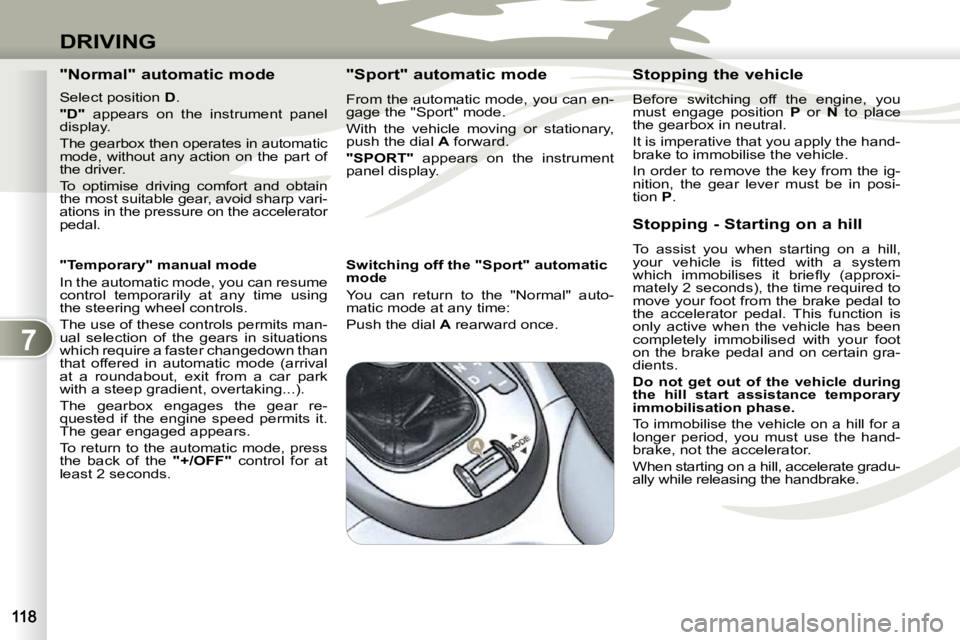
push the dial
A forward.
"SPORT" appears on the instrument
panel display.
Switching off the "Sport" automatic
mode
You can return to the "Normal" auto-
matic mode at any time:
Push the dial A rearward once. Stopping the vehicle
Before switching off the engine, you
must engage position
P or N to place
the gearbox in neutral.
It is imperative that you apply the hand-
brake to immobilise the vehicle.
In order to remove the key from the ig-
nition, the gear lever must be in posi-
tion P .
Stopping - Starting on a hill
To assist you when starting on a hill,
your vehicle is fi tted with a system
which immobilises it briefl y (approxi-
mately 2 seconds), the time required to
move your foot from the brake pedal to
the accelerator pedal. This function is
only active when the vehicle has been
completely immobilised with your foot
on the brake pedal and on certain gra-
dients.
Do not get out of the vehicle during
the hill start assistance temporary
immobilisation phase.
To immobilise the vehicle on a hill for a
longer period, you must use the hand-
brake, not the accelerator.
When starting on a hill, accelerate gradu-
ally while releasing the handbrake.
Page 156 of 230
9
PRACTICAL INFORMATION
Fascia fuses
The fuse boxes are placed in the lower
part of the fascia behind the glove box.
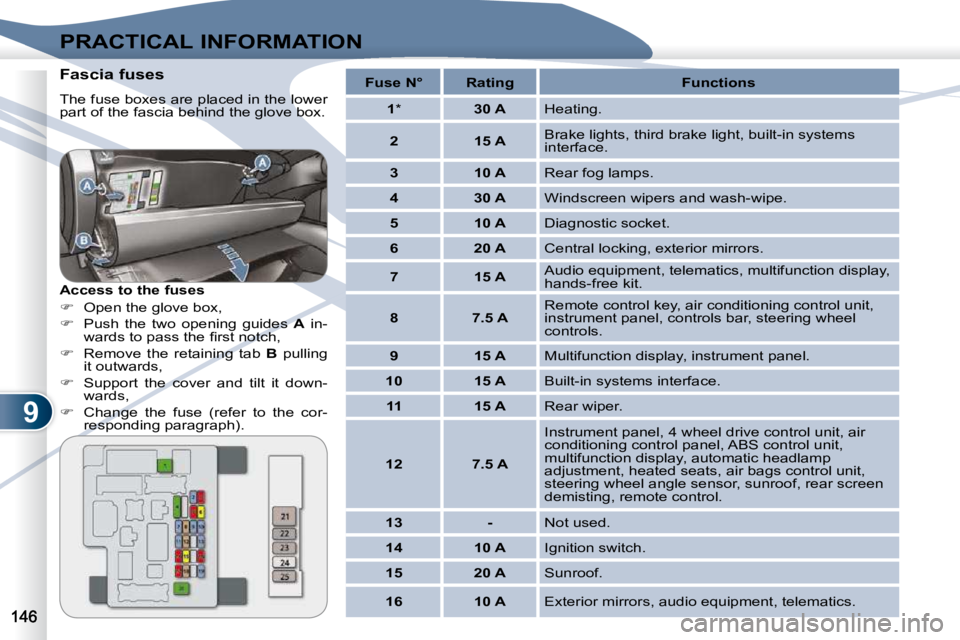
Access to the fuses
Open the glove box,
Push the two opening guides A in-
wards to pass the fi rst notch,
Remove the retaining tab B pulling
it outwards,
Support the cover and tilt it down-
wards,
Change the fuse (refer to the cor-
responding paragraph).
Fuse N° Rating Functions
1 * 30 A Heating.
2 15 A Brake lights, third brake light, built-in systems
interface.
3 10 A Rear fog lamps.
4 30 A Windscreen wipers and wash-wipe.
5 10 A Diagnostic socket.
6 20 A Central locking, exterior mirrors.
7 15 A Audio equipment, telematics, multifunction display,
hands-free kit.
8 7.5 A Remote control key, air conditioning control unit,
instrument panel, controls bar, steering wheel
controls.
9 15 A Multifunction display, instrument panel.
10 15 A Built-in systems interface.
11 15 A Rear wiper.
12 7.5 A Instrument panel, 4 wheel drive control unit, air
conditioning control panel, ABS control unit,
multifunction display, automatic headlamp
adjustment, heated seats, air bags control unit,
steering wheel angle sensor, sunroof, rear screen
demisting, remote control.
13 - Not used.
14 10 A Ignition switch.
15 20 A Sunroof.
16 10 A Exterior mirrors, audio equipment, telematics.
Page 195 of 230
![PEUGEOT 4007 2009.5. Owners Manual 11
AUDIO EQUIPMENT and TELEMATICS
Press Explanations Result
Press the MENU button.
Press [Address/Junction]. Press [Country] and enter the name of the country using the touch keypad.
When](/img/29/76800/w960_76800-194.png "PEUGEOT 4007 2009.5. Owners Manual 11
AUDIO EQUIPMENT and TELEMATICS
Press Explanations Result
Press the MENU button.
Press [Address/Junction]. Press [Country] and enter the name of the country using the touch keypad.
When")
11
AUDIO EQUIPMENT and TELEMATICS
Press Explanations Result
Press the MENU button.
Press [Address/Junction]. Press [Country] and enter the name of the country using the touch keypad.
When a character of the name of the country is entered, if 5 countries or
fewer are recognised, you can select a country from a list which is dis-
played or press [List].
You can select one of the 5 most recently selected countries by
pressing [Last 5] on the "Country" line.
Press [City] then [Keyword] and enter the name of the city usin g the touch
keypad.
When a character of the name of the city is entere d, if 5 cities or fewer are
recognised, you can select a city from a list which is displayed or press
[List].
You can select a city using the post code.
Press [Post Code] and enter the number.
You can select one of the 5 most recently selected cities by pressing
[Last 5] on the "City" line.
Entering an address and activating guidance (1/2)
Page 196 of 230
![PEUGEOT 4007 2009.5. Owners Manual 11
AUDIO EQUIPMENT and TELEMATICS
Entering an address and activating guidance (2/2) Press Explanations Result
Press [Street] and enter the name of a street using the touch keypad.
When a c](/img/29/76800/w960_76800-195.png "PEUGEOT 4007 2009.5. Owners Manual 11
AUDIO EQUIPMENT and TELEMATICS
Entering an address and activating guidance (2/2) Press Explanations Result
Press [Street] and enter the name of a street using the touch keypad.
When a c")
11
AUDIO EQUIPMENT and TELEMATICS
Entering an address and activating guidance (2/2) Press Explanations Result
Press [Street] and enter the name of a street using the touch keypad.
When a character of the name of the street is entered, if 5 streets or fewer
are recognised, you can select a street from a list which is displa yed or
press [List].
Press [House #] and enter the number of the house using the touch keypad.
You can enter the name of a junction instead of the numb er
of the street. Press [Junction] and select the name from a
list which is displayed.
This is what you obtain once all of the information has b een entered:
If you agree with the information press [Set], otherwise press one of the
buttons to correct.
Press [Start] to start the navigation.
/
Page 218 of 230
11
AUDIO EQUIPMENT and TELEMATICS
Time and date, language, unit,
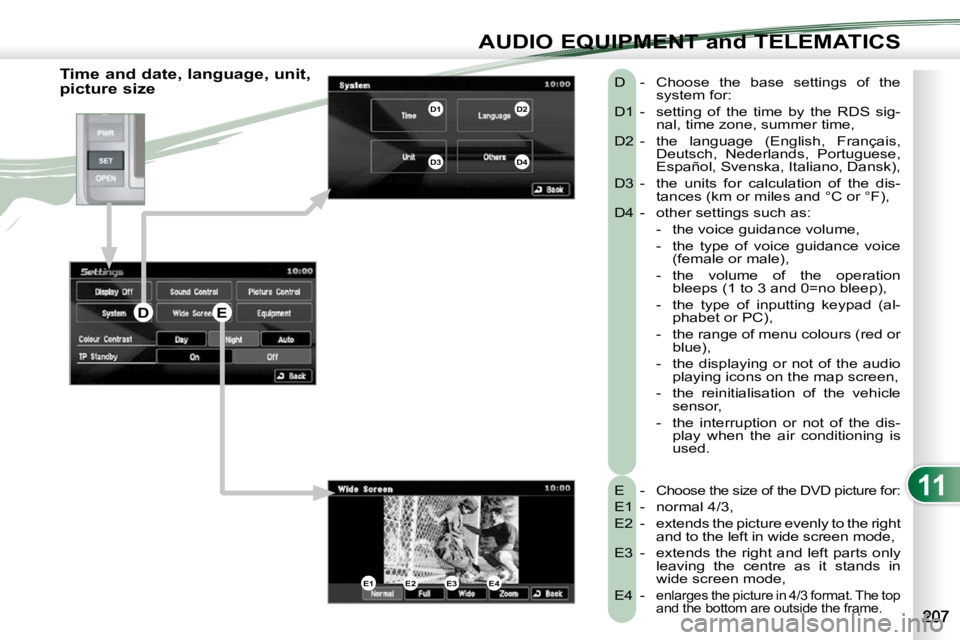
picture size E -
Choose the size of the DVD picture for:
E1 - normal 4/3,
E2 - extends the picture evenly to the right and to the left in wide screen mode,
E3 - extends the right and left parts only leaving the centre as it stands in
wide screen mode,
E4 -
enlarges the picture in 4/3 format. The top
and the bottom are outside the frame.
D - Choose the base settings of the system for:
D1 - setting of the time by the RDS sig- nal, time zone, summer time,
D2 - the language (English, Français, Deutsch, Nederlands, Portuguese,
Español, Svenska, Italiano, Dansk),
D3 - the units for calculation of the dis- tances (km or miles and °C or °F),
D4 - other settings such as: - the voice guidance volume,
- the type of voice guidance voice (female or male),
- the volume of the operation bleeps (1 to 3 and 0=no bleep),
- the type of inputting keypad (al- phabet or PC),
- the range of menu colours (red or blue),
- the displaying or not of the audio playing icons on the map screen,
- the reinitialisation of the vehicle sensor,
- the interruption or not of the dis- play when the air conditioning is
used.
E1E2E3E4
D1D2
D3D4
DE
Page 221 of 230
11
AUDIO EQUIPMENT and TELEMATICS
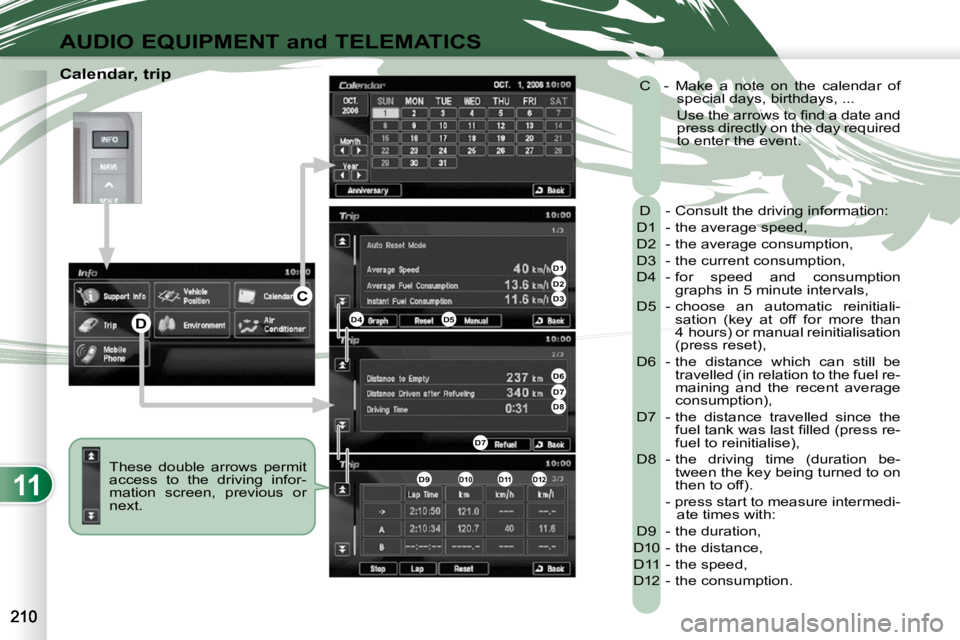
Calendar, trip These double arrows permit
access to the driving infor-
mation screen, previous or
next. D - Consult the driving information:
D1 - the average speed,
D2 - the average consumption,
D3 - the current consumption,
D4 - for speed and consumption graphs in 5 minute intervals,
D5 - choose an automatic reinitiali- sation (key at off for more than
4 hours) or manual reinitialisation
(press reset),
D6 - the distance which can still be travelled (in relation to the fuel re-
maining and the recent average
consumption),
D7 - the distance travelled since the fuel tank was last fi lled (press re-
fuel to reinitialise),
D8 - the driving time (duration be- tween the key being turned to on
then to off).
- press start to measure intermedi- ate times with:
D9 - the duration,
D10 - the distance,
D11 - the speed,
D12 - the consumption.
C - Make a note on the calendar of
special days, birthdays, ...
Use the arrows to fi nd a date and press directly on the day required
to enter the event.
D1D2D3
D4D5
D6D7D8
D7
D9D10D11D12
D
C