audio PEUGEOT 4007 2009 Owner's Manual
[x] Cancel search | Manufacturer: PEUGEOT, Model Year: 2009, Model line: 4007, Model: PEUGEOT 4007 2009Pages: 230, PDF Size: 16.57 MB
Page 184 of 230
11
AUDIO EQUIPMENT and TELEMATICS
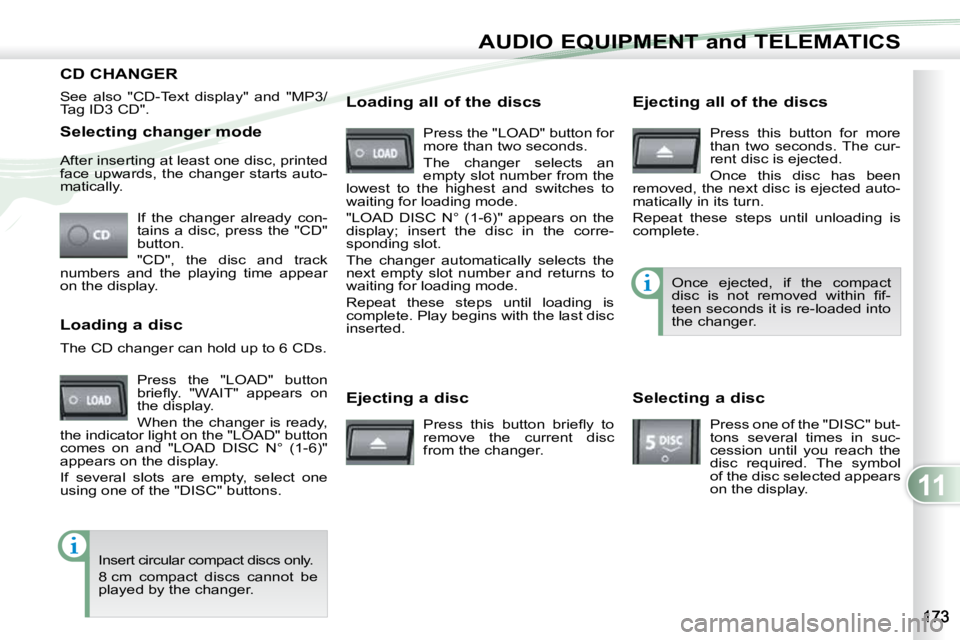
Selecting changer mode If the changer already con-
tains a disc, press the "CD"
button.
"CD", the disc and track
numbers and the playing time appear
on the display.
After inserting at least one disc, printed
face upwards, the changer starts auto-
matically.
Ejecting a disc Press this button briefl y to
remove the current disc
from the changer. Once ejected, if the compact
disc is not removed within fi f-
teen seconds it is re-loaded into
the changer.
Loading a disc
Press the "LOAD" button
briefl y. "WAIT" appears on
the display.
When the changer is ready,
the indicator light on the "LOAD" button
comes on and "LOAD DISC N° (1-6)"
appears on the display.
If several slots are empty, select one
using one of the "DISC" buttons.
The CD changer can hold up to 6 CDs.
Insert circular compact discs only.
8 cm compact discs cannot be
played by the changer. Loading all of the discs Ejecting all of the discs
Press this button for more
than two seconds. The cur-
rent disc is ejected.
Once this disc has been
removed, the next disc is ejected auto-
matically in its turn.
Repeat these steps until unloading is
complete.
Selecting a disc
Press one of the "DISC" but-
tons several times in suc-
cession until you reach the
disc required. The symbol
of the disc selected appears
on the display.
See also "CD-Text display" and "MP3/
Tag ID3 CD".
Press the "LOAD" button for
more than two seconds.
The changer selects an
empty slot number from the
lowest to the highest and switches to
waiting for loading mode.
"LOAD DISC N° (1-6)" appears on the
display; insert the disc in the corre-
sponding slot.
The changer automatically selects the
next empty slot number and returns to
waiting for loading mode.
Repeat these steps until loading is
complete. Play begins with the last disc
inserted.
CD CHANGER
Page 185 of 230
11
AUDIO EQUIPMENT and TELEMATICS
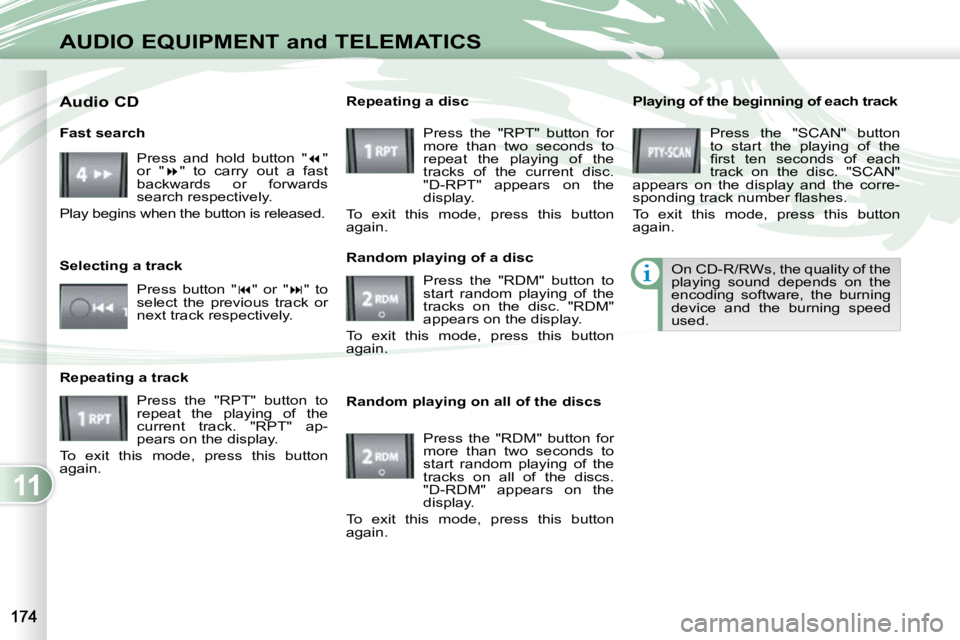
Playing of the beginning of each track Press the "SCAN" button
to start the playing of the
fi rst ten seconds of each
track on the disc. "SCAN"
appears on the display and the corre-
sponding track number fl ashes.
To exit this mode, press this button
again.
On CD-R/RWs, the quality of the
playing sound depends on the
encoding software, the burning
device and the burning speed
used.
Random playing on all of the discs Press the "RDM" button for
more than two seconds to
start random playing of the
tracks on all of the discs.
"D-RDM" appears on the
display.
To exit this mode, press this button
again.
Fast search
Press and hold button " "
or " " to carry out a fast
backwards or forwards
search respectively.
Play begins when the button is released.
Selecting a track
Press button " " or " " to
select the previous track or
next track respectively.
Repeating a track Press the "RPT" button to
repeat the playing of the
current track. "RPT" ap-
pears on the display.
To exit this mode, press this button
again. Random playing of a disc
Press the "RDM" button to
start random playing of the
tracks on the disc. "RDM"
appears on the display.
To exit this mode, press this button
again.
Repeating a disc
Press the "RPT" button for
more than two seconds to
repeat the playing of the
tracks of the current disc.
"D-RPT" appears on the
display.
To exit this mode, press this button
again.
Audio CD
Page 186 of 230
11
AUDIO EQUIPMENT and TELEMATICS
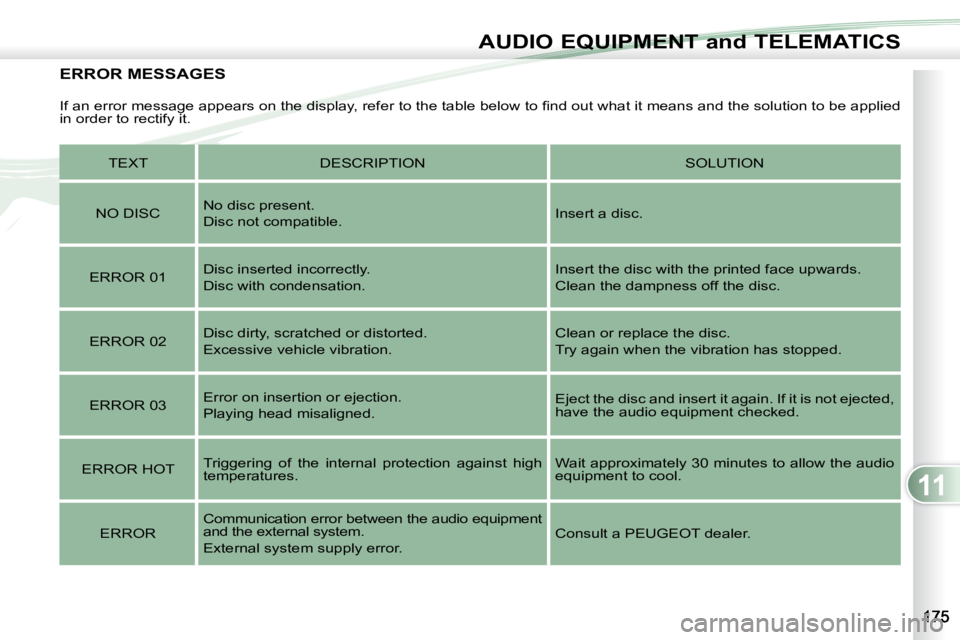
ERROR MESSAGES
If an error message appears on the display, refer to the table below to fi nd out what it means and the solution to be applied
in order to rectify it.
TEXT DESCRIPTION SOLUTION
NO DISC No disc present.
Disc not compatible.
Insert a disc.
ERROR 01 Disc inserted incorrectly.
Disc with condensation. Insert the disc with the printed face upwards.
Clean the dampness off the disc.
ERROR 02 Disc dirty, scratched or distorted.
Excessive vehicle vibration. Clean or replace the disc.
Try again when the vibration has stopped.
ERROR 03 Error on insertion or ejection.
Playing head misaligned. Eject the disc and insert it again. If it is not ejected,
have the audio equipment checked.
ERROR HOT Triggering of the internal protection against high
temperatures. Wait approximately 30 minutes to allow the audio
equipment to cool.
ERROR Communication error between the audio equipment
and the external system.
External system supply error. Consult a PEUGEOT dealer.
Page 187 of 230
11
AUDIO EQUIPMENT and TELEMATICS
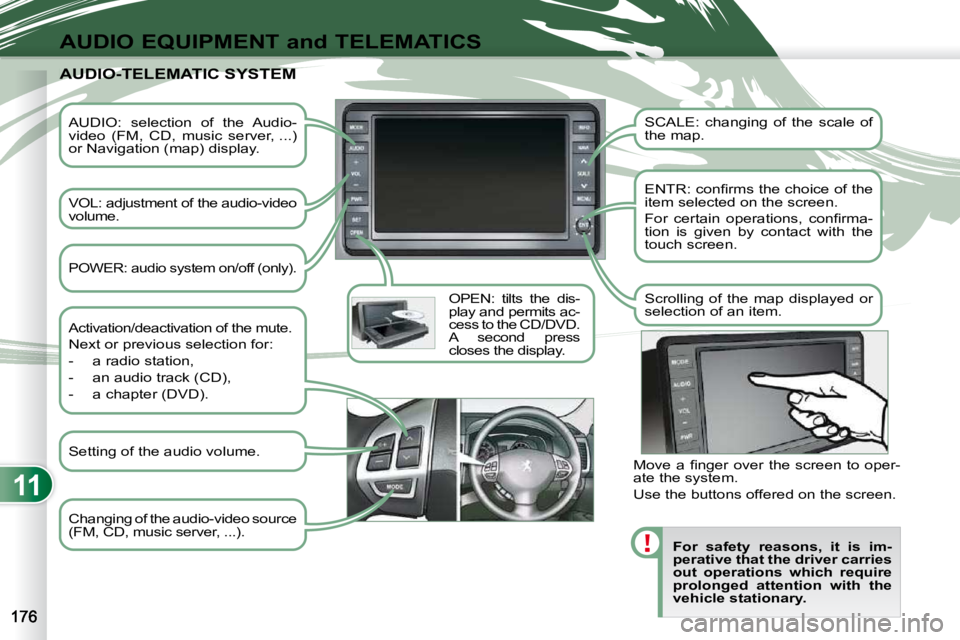
AUDIO: selection of the Audio-
video (FM, CD, music server, ...)
or Navigation (map) display.
VOL: adjustment of the audio-video
volume. OPEN: tilts the dis-
play and permits ac-
cess to the CD/DVD.
A second press
closes the display. SCALE: changing of the scale of
the map.
ENTR: confi rms the choice of the
item selected on the screen.
For certain operations, confi rma-
tion is given by contact with the
touch screen.
Scrolling of the map displayed or
selection of an item.
For safety reasons, it is im-
perative that the driver carries
out operations which require
prolonged attention with the
vehicle stationary.
AUDIO-TELEMATIC SYSTEM AUDIO-TELEMATIC SYSTEM
Changing of the audio-video source
(FM, CD, music server, ...).
Activation/deactivation of the mute.
Next or previous selection for:
- a radio station,
- an audio track (CD),
- a chapter (DVD).
Move a fi nger over the screen to oper-
ate the system.
Use the buttons offered on the screen.
POWER: audio system on/off (only).
Setting of the audio volume.
Page 188 of 230
11
AUDIO EQUIPMENT and TELEMATICS
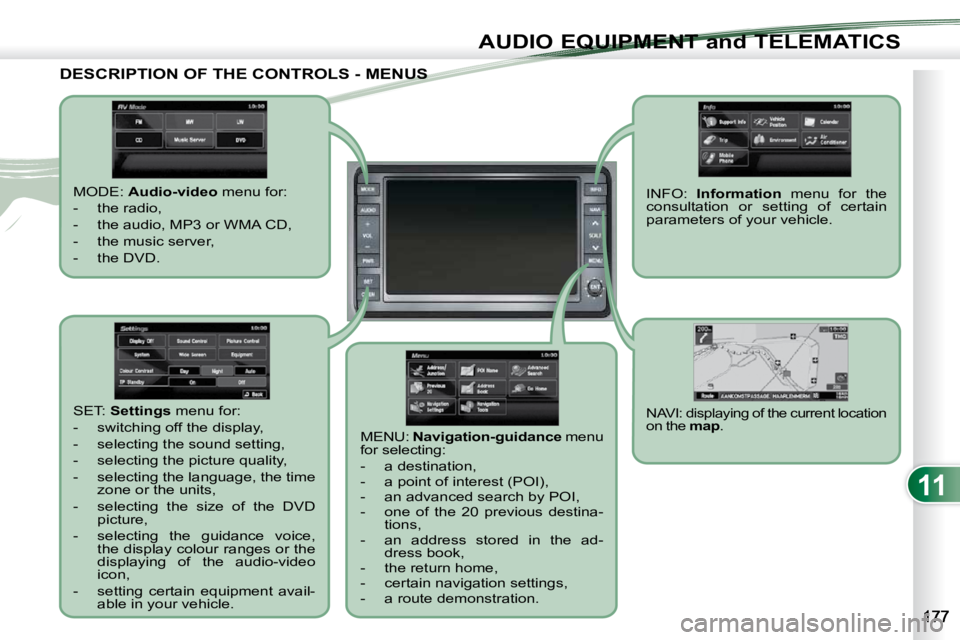
DESCRIPTION OF THE CONTROLS - MENUS DESCRIPTION OF THE CONTROLS - MENUS
MODE: Audio-video menu for:
- the radio,
- the audio, MP3 or WMA CD,
- the music server,
- the DVD.
MENU: Navigation-guidance menu
for selecting:
- a destination,
- a point of interest (POI),
- an advanced search by POI,
- one of the 20 previous destina- tions,
- an address stored in the ad- dress book,
- the return home,
- certain navigation settings,
- a route demonstration.
NAVI: displaying of the current location
on the map . SET: Settings menu for:
- switching off the display,
- selecting the sound setting,
- selecting the picture quality,
- selecting the language, the time zone or the units,
- selecting the size of the DVD picture,
- selecting the guidance voice, the display colour ranges or the
displaying of the audio-video
icon,
- setting certain equipment avail- able in your vehicle. INFO:
Information menu for the
consultation or setting of certain
parameters of your vehicle.
Page 189 of 230
11
AUDIO EQUIPMENT and TELEMATICS
NAVIGATION - GUIDANCE NAVIGATION - GUIDANCE
What is the navigation system and
the GPS?
The satellite navigation system guides
the driver to the destination that he has
set in accordance with a chosen route.
Initially, it searches for the destination
required by the user, then it calculates
the route and fi nally it provides the visu-
al and audible guidance instructions. What precautions should be
observed in order to use the system
under good conditions?
Do not place anything on or near the
GPS aerial.
Do not use any digital communication
equipment (personal computers, etc.)
near the GPS aerial.
Do not affi x any refl ective fi lms or fi lms
containing carbon to the window.
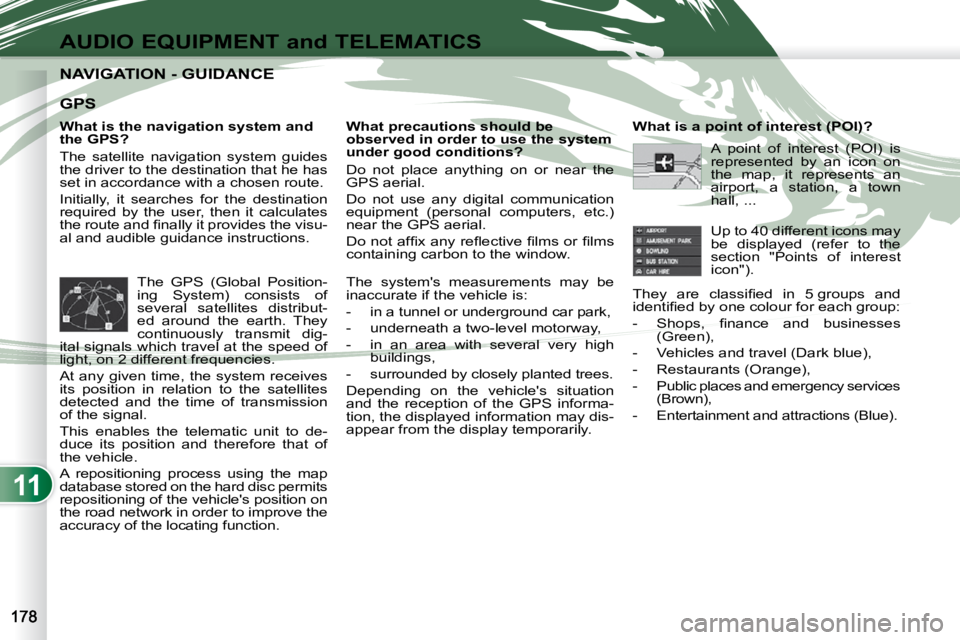
The GPS (Global Position-
ing System) consists of
several satellites distribut-
ed around the earth. They
continuously transmit dig-
ital signals which travel at the speed of
light, on 2 different frequencies.
At any given time, the system receives
its position in relation to the satellites
detected and the time of transmission
of the signal.
This enables the telematic unit to de-
duce its position and therefore that of
the vehicle.
A repositioning process using the map
database stored on the hard disc permits
repositioning of the vehicle's position on
the road network in order to improve the
accuracy of the locating function. What is a point of interest (POI)?
Up to 40 different icons may
be displayed (refer to the
section "Points of interest
icon").
They are classifi ed in 5 groups and
identifi ed by one colour for each group:
- Shops, fi nance and businesses (Green),
- Vehicles and travel (Dark blue),
- Restaurants (Orange),
- Public places and emergency services (Brown),
- Entertainment and attractions (Blue).
GPS
The system's measurements may be
inaccurate if the vehicle is:
- in a tunnel or underground car park,
- underneath a two-level motorway,
- in an area with several very high buildings,
- surrounded by closely planted trees.
Depending on the vehicle's situation
and the reception of the GPS informa-
tion, the displayed information may dis-
appear from the display temporarily. A point of interest (POI) is
represented by an icon on
the map, it represents an
airport, a station, a town
hall, ...
Page 190 of 230
11
AUDIO EQUIPMENT and TELEMATICS
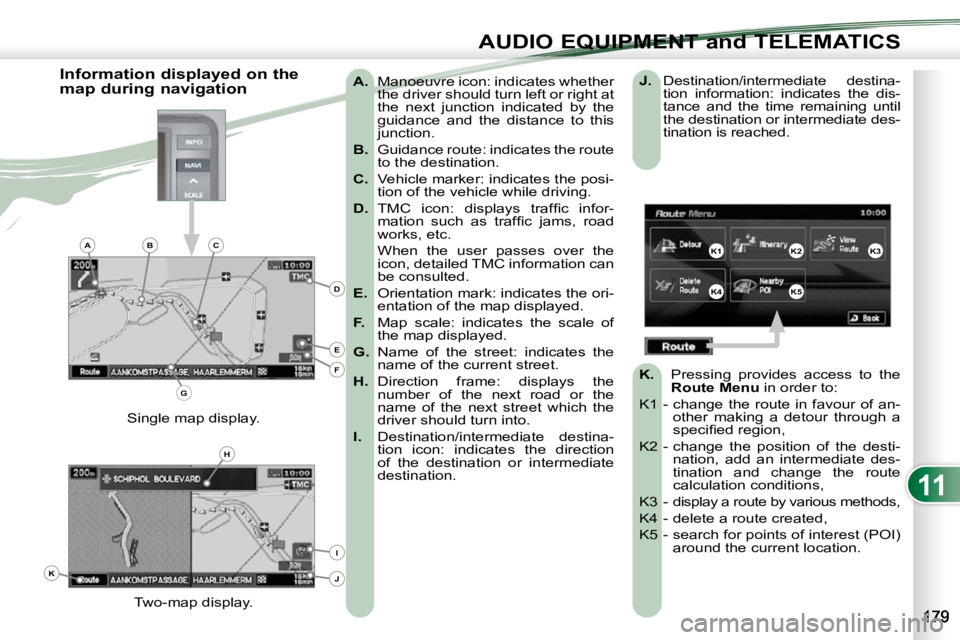
A. Manoeuvre icon: indicates whether
the driver should turn left or right at
the next junction indicated by the
guidance and the distance to this
junction.
B. Guidance route: indicates the route
to the destination.
C. Vehicle marker: indicates the posi-
tion of the vehicle while driving.
D. TMC icon: displays traffi c infor-
mation such as traffi c jams, road
works, etc.
When the user passes over the icon, detailed TMC information can
be consulted.
E. Orientation mark: indicates the ori-
entation of the map displayed.
F. Map scale: indicates the scale of
the map displayed.
G. Name of the street: indicates the
name of the current street.
H. Direction frame: displays the
number of the next road or the
name of the next street which the
driver should turn into.
I. Destination/intermediate destina-
tion icon: indicates the direction
of the destination or intermediate
destination.
Two-map display.
Single map display.
Information displayed on the
map during navigation
J. Destination/intermediate destina-
tion information: indicates the dis-
tance and the time remaining until
the destination or intermediate des-
tination is reached.
K. Pressing provides access to the
Route Menu in order to:
K1 - change the route in favour of an- other making a detour through a
specifi ed region,
K2 - change the position of the desti- nation, add an intermediate des-
tination and change the route
calculation conditions,
K3 - display a route by various methods,
K4 - delete a route created,
K5 - search for points of interest (POI) around the current location.
K1K2K3
K4K5
K
H
E
F
BCA
D
G
I
J
Page 191 of 230
11
AUDIO EQUIPMENT and TELEMATICS
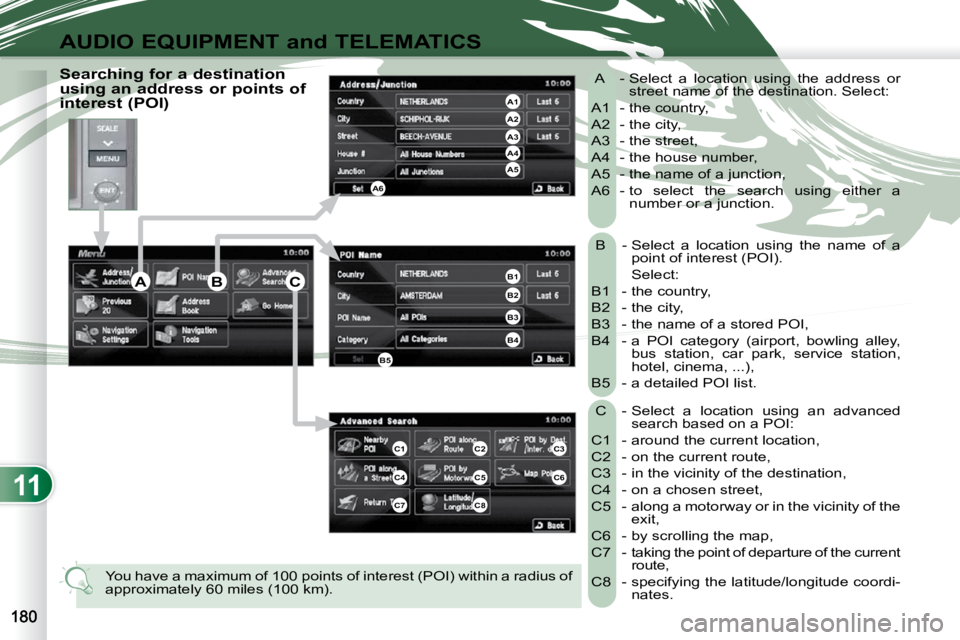
B - Select a location using the name of a point of interest (POI).
Select:
B1 - the country,
B2 - the city,
B3 - the name of a stored POI,
B4 - a POI category (airport, bowling alley, bus station, car park, service station,
hotel, cinema, ...),
B5 - a detailed POI list.
C - Select a location using an advanced search based on a POI:
C1 - around the current location,
C2 - on the current route,
C3 - in the vicinity of the destination,
C4 - on a chosen street,
C5 - along a motorway or in the vicinity of the exit,
C6 - by scrolling the map,
C7 - taking the point of departure of the current route,
C8 - specifying the latitude/longitude coordi- nates.
A - Select a location using the address or
street name of the destination. Select:
A1 - the country,
A2 - the city,
A3 - the street,
A4 - the house number,
A5 - the name of a junction,
A6 - to select the search using either a number or a junction.
You have a maximum of 100 points of interest (POI) within a ra dius of
approximately 60 miles (100 km).
Searching for a destination
using an address or points of
interest (POI)
C3
C6
ABC
A4
A3
A2
A1
A6
A5
B1
B2
B3
B4
B5
C1C2
C4C5
C7C8
Page 192 of 230
11
AUDIO EQUIPMENT and TELEMATICS
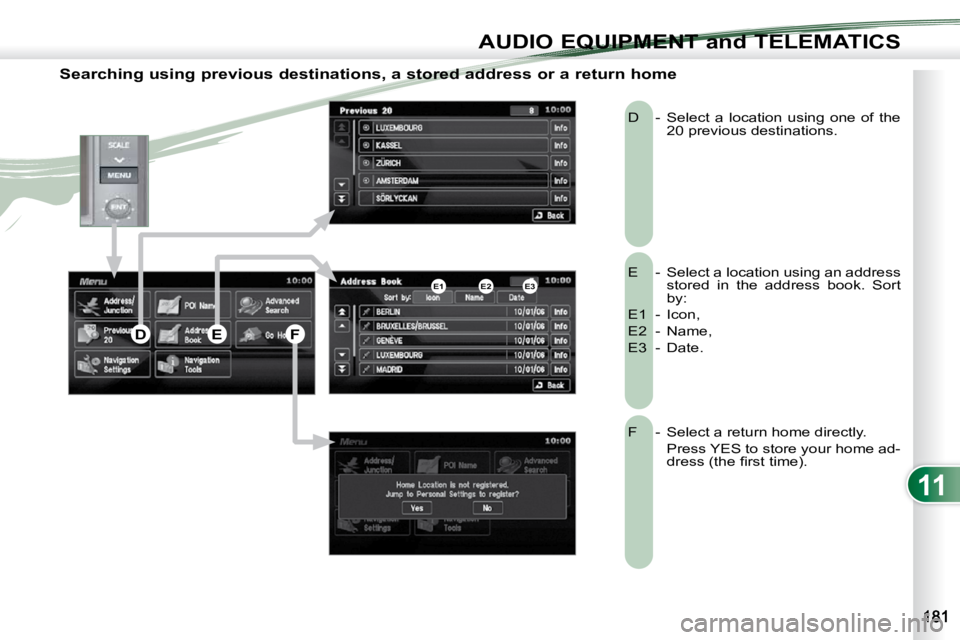
Searching using previous destinations, a stored address or a return home
E - Select a location using an address stored in the address book. Sort
by:
E1 - Icon,
E2 - Name,
E3 - Date.
D - Select a location using one of the
20 previous destinations.
F - Select a return home directly.
Press YES to store your home ad- dress (the fi rst time).
E2E1E3
DEF
Page 193 of 230
11
AUDIO EQUIPMENT and TELEMATICS
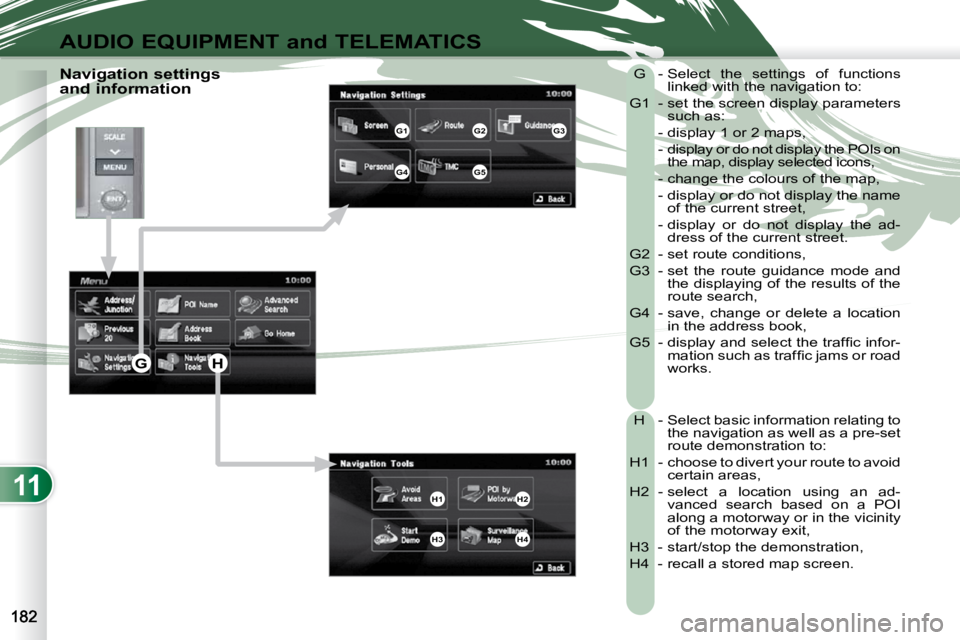
Navigation settings
and information G - Select the settings of functions
linked with the navigation to:
G1 - set the screen display parameters such as:
- display 1 or 2 maps,
- display or do not display the POIs on the map, display selected icons,
- change the colours of the map,
- display or do not display the name of the current street,
- display or do not display the ad- dress of the current street.
G2 - set route conditions,
G3 - set the route guidance mode and the displaying of the results of the
route search,
G4 - save, change or delete a location in the address book,
G5 - display and select the traffi c infor- mation such as traffi c jams or road
works.
H - Select basic information relating to the navigation as well as a pre-set
route demonstration to:
H1 - choose to divert your route to avoid certain areas,
H2 - select a location using an ad- vanced search based on a POI
along a motorway or in the vicinity
of the motorway exit,
H3 - start/stop the demonstration,
H4 - recall a stored map screen.
G1G2G3
G4G5
H1H2
H3H4
GH