Time PEUGEOT 4007 2010 Service Manual
[x] Cancel search | Manufacturer: PEUGEOT, Model Year: 2010, Model line: 4007, Model: PEUGEOT 4007 2010Pages: 215, PDF Size: 15.37 MB
Page 174 of 215
11
AUDIO EQUIPMENT and TELEMATICS
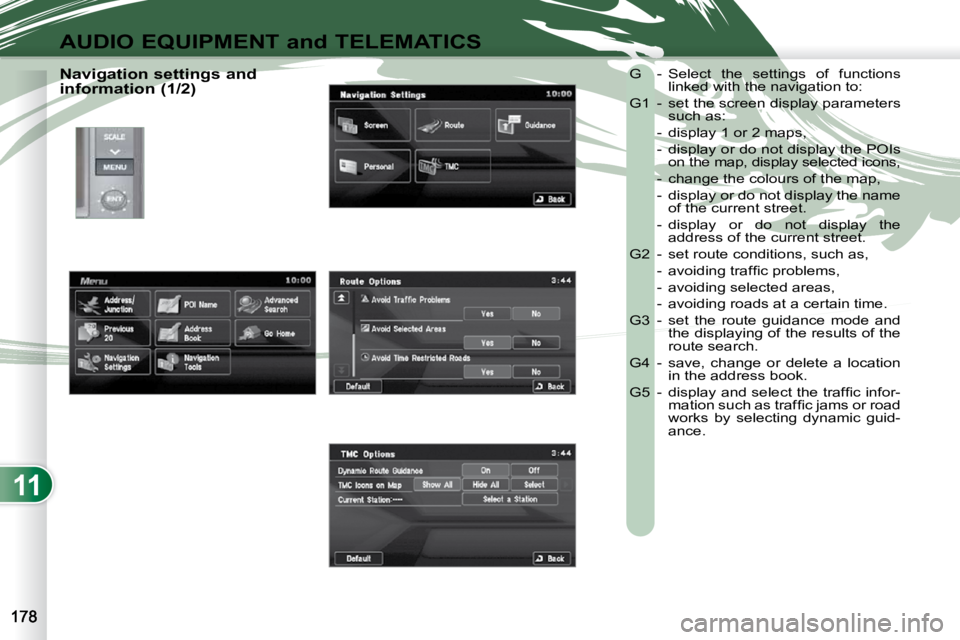
Navigation settings and
information (1/2) G - Select the settings of functions
linked with the navigation to:
G1 - set the screen display parameters such as:
- display 1 or 2 maps,
- display or do not display the POIs on the map, display selected icons,
- change the colours of the map,
- display or do not display the name of the current street.
- display or do not display the address of the current street.
G2 - set route conditions, such as,
- avoiding traffi c problems,
- avoiding selected areas,
- avoiding roads at a certain time.
G3 - set the route guidance mode and the displaying of the results of the
route search.
G4 - save, change or delete a location in the address book.
G5 - display and select the traffi c infor- mation such as traffi c jams or road
works by selecting dynamic guid-
ance.
Page 180 of 215
11
AUDIO EQUIPMENT and TELEMATICS
AUDIO-VIDEO AUDIO-VIDEO
What is RDS? RDS station following Traffi c information function
Your radio automatically checks
and selects the best frequency
for the radio station to which it is
tuned (if the station broadcasts on se-
veral transmitters or frequencies).
The frequency of a radio station covers
approximately 30 miles (50 km). The
change from one frequency to another
explains the loss of reception during a
journey.
If the station to which you are listening
does not have several frequencies in
the region in which you are currently
located, you can deactivate the auto-
matic frequency following.
Radio, RDS, AF, REG, TP, PTY
Radio Data System (RDS) func-
tion on the FM waveband permits:
- tuning to the same station while travelling through different regions
(if the transmitters of this station
cover the area through which you
are travelling),
- temporary tuning to traffi c informa- tion announcements,
-
display of the name of the station, etc...
Most FM stations use RDS.
These stations transmit non-audible
data in addition to their programmes.
The data transmitted in this way allows
you access to various functions, mainly
displaying of the name of the station,
temporary tuning to traffi c information
announcements or automatic station
following.
RDS allows you to continue listening to the
same station by means of the frequency
following. However, in certain conditions,
this RDS frequency following cannot be
provided throughout the country. Radio
stations do not cover the whole country,
which explains the loss of reception of the
station during a journey. The Traffic Program (TP) function
permits automatic and temporary
switching to an FM station broad-
casting traffi c information.
The radio station or the source that you
are listening to at this point is paused.
Once the traffi c information has ended,
the system switches back to the radio
station or the source that you were lis-
tening to initially.
Regional following mode Some stations are organised in
a network.
In different regions, they broad-
cast different or shared programmes de-
pending on the time of day.
You can follow:
- a regional station only,
- the entire network, with the possibility that you will be listening to a different
programme. Programme types
Some stations offer the option
of listening to a themed type of
programme as a priority, select-
ed from the list available below:
NEWS, AFFAIRS, INFOS, SPORT,
EDUCATE, DRAMA, CULTURE,
SCIENCE, VARIED, POP M, ROCK M,
EASY M, LIGHT M, CLASSICS, OTHER M,
WEATHER, FINANCE, CHILDREN,
SOCIAL, RELIGION, PHONE IN, TRAVEL,
LEISURE, JAZZ, COUNTRY, NATION M,
OLDIES, FOLK M, DOCUMENT.
Page 185 of 215

11
AUDIO EQUIPMENT and TELEMATICS
Information displayed in CD mode and recording a CD
A. The name of the album is displayed
for the track currently being played.
B. The name of the artist is displayed for
the album currently being played.
C. The playing time of the track cur-
rently being played is displayed.
D. The playing mode currently selected
is displayed.
E. Position of the cursor and total
number of tracks on the album.
F. Displays the item currently selected.
G. To scroll up or down through the
tracks.
Press and hold for fast backwards or forwards playing of a track.
H. Displays the number and the name of
the track. While driving, they are not
available and cannot be selected.
I. To display the secondary menu.
J. Move the cursor onto the track cur-
rently being played.
K. The number and the name of the
track currently being played are dis-
played.
L. During recording, this symbol is
displayed in red and it switches off
when all recording operations are
complete. The number indicates the
percentage of the total number of
tracks on the CD already recorded
onto the hard disc. 00 % when only
one track has been recorded.
M. The tracks which have not been re-
corded are displayed in blue.
No symbol is displayed for tracks which have been recorded.
The CD button is only active if the player
contains a CD.
Press Open to return the screen to the
vertical position.
Page 191 of 215
11
AUDIO EQUIPMENT and TELEMATICS
Information displayed in Music Server mode
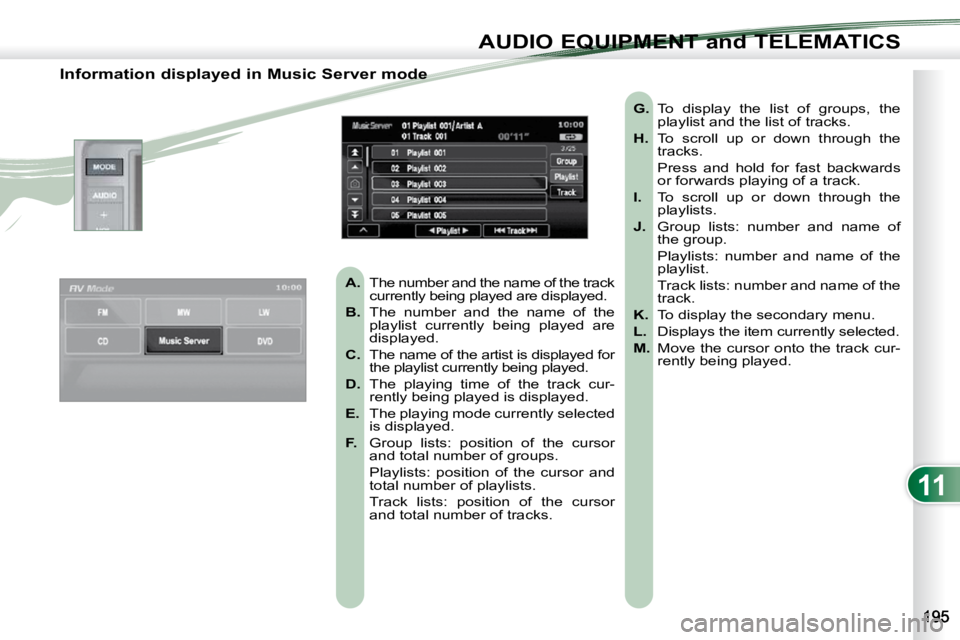
A. The number and the name of the track
currently being played are displayed.
B. The number and the name of the
playlist currently being played are
displayed.
C. The name of the artist is displayed for
the playlist currently being played.
D. The playing time of the track cur-
rently being played is displayed.
E. The playing mode currently selected
is displayed.
F. Group lists: position of the cursor
and total number of groups.
Playlists: position of the cursor and total number of playlists.
Track lists: position of the cursor and total number of tracks.
G. To display the list of groups, the
playlist and the list of tracks.
H. To scroll up or down through the
tracks.
Press and hold for fast backwards or forwards playing of a track.
I. To scroll up or down through the
playlists.
J. Group lists: number and name of
the group.
Playlists: number and name of the playlist.
Track lists: number and name of the track.
K. To display the secondary menu.
L. Displays the item currently selected.
M. Move the cursor onto the track cur-
rently being played.
Page 195 of 215
11
AUDIO EQUIPMENT and TELEMATICS
Information displayed in MP3/WMA CD mode
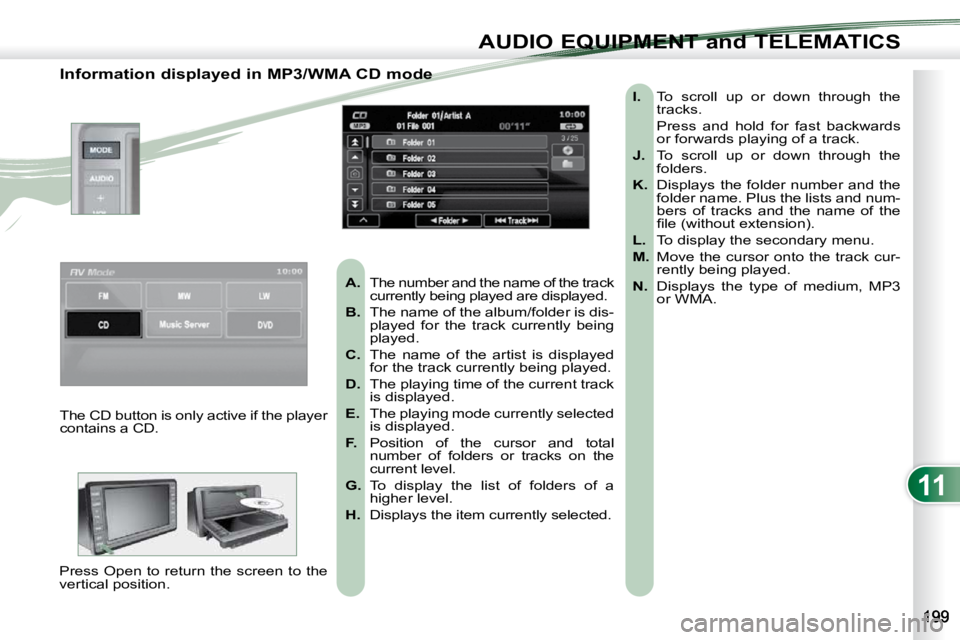
A. The number and the name of the track
currently being played are displayed.
B. The name of the album/folder is dis-
played for the track currently being
played.
C. The name of the artist is displayed
for the track currently being played.
D. The playing time of the current track
is displayed.
E. The playing mode currently selected
is displayed.
F. Position of the cursor and total
number of folders or tracks on the
current level.
G. To display the list of folders of a
higher level.
H. Displays the item currently selected.
I. To scroll up or down through the
tracks.
Press and hold for fast backwards or forwards playing of a track.
J. To scroll up or down through the
folders.
K. Displays the folder number and the
folder name. Plus the lists and num-
bers of tracks and the name of the
fi le (without extension).
L. To display the secondary menu.
M. Move the cursor onto the track cur-
rently being played.
N. Displays the type of medium, MP3
or WMA.
The CD button is only active if the player
contains a CD.
Press Open to return the screen to the
vertical position.
Page 196 of 215
11
AUDIO EQUIPMENT and TELEMATICS
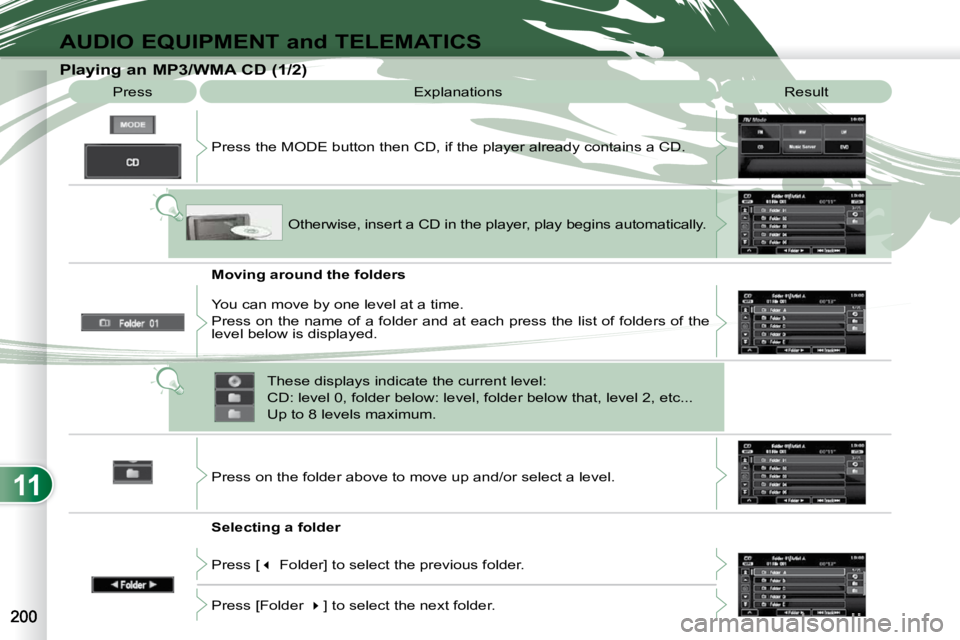
Playing an MP3/WMA CD (1/2) Press Explanations Result
Press the MODE button then CD, if the player already contains a CD.
Moving around the folders
Selecting a folder Otherwise, insert a CD in the player, play begins
automatically.
You can move by one level at a time.
Press on the name of a folder and at each press the list of f olders of the
level below is displayed.
Press on the folder above to move up and/or select a level.
Press [ Folder] to select the previous folder.
Press [Folder ] to select the next folder.
These displays indicate the current level:
CD: level 0, folder below: level, folder below that, l
evel 2, etc...
Up to 8 levels maximum.
Page 198 of 215
11
AUDIO EQUIPMENT and TELEMATICS
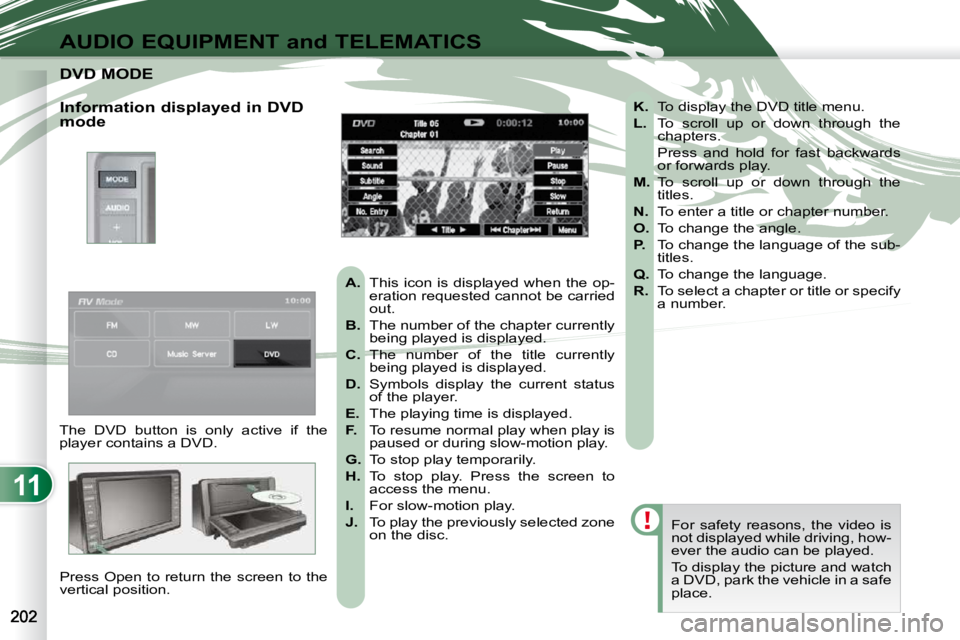
DVD MODE DVD MODE
The DVD button is only active if the
player contains a DVD. Press Open to return the screen to the
vertical position. For safety reasons, the video is
not displayed while driving, how-
ever the audio can be played.
To display the picture and watch
a DVD, park the vehicle in a safe
place.
K. To display the DVD title menu.
L. To scroll up or down through the
chapters.
Press and hold for fast backwards or forwards play.
M. To scroll up or down through the
titles.
N. To enter a title or chapter number.
O. To change the angle.
P. To change the language of the sub-
titles.
Q. To change the language.
R. To select a chapter or title or specify
a number.
A. This icon is displayed when the op-
eration requested cannot be carried
out.
B. The number of the chapter currently
being played is displayed.
C. The number of the title currently
being played is displayed.
D. Symbols display the current status
of the player.
E. The playing time is displayed.
F. To resume normal play when play is
paused or during slow-motion play.
G. To stop play temporarily.
H. To stop play. Press the screen to
access the menu.
I. For slow-motion play.
J. To play the previously selected zone
on the disc.
Information displayed in DVD
mode
Page 201 of 215
11
AUDIO EQUIPMENT and TELEMATICS
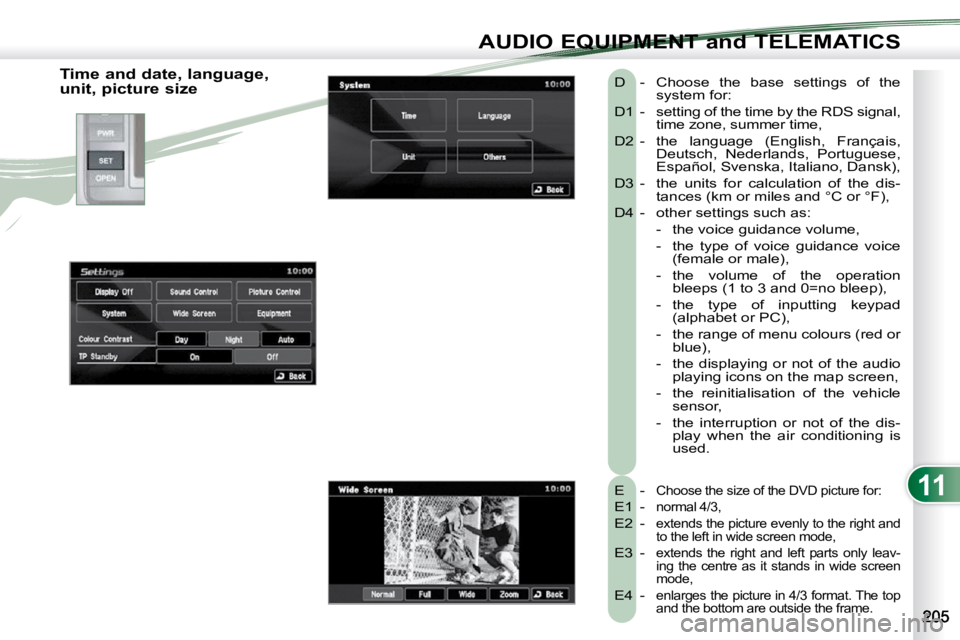
Time and date, language,
unit, picture size E -
Choose the size of the DVD picture for:
E1 - normal 4/3,
E2 - extends the picture evenly to the right and
to the left in wide screen mode,
E3 - extends the right and left parts only leav-
ing the centre as it stands in wide screen
mode,
E4 - enlarges the picture in 4/3 format. The top
and the bottom are outside the frame.
D - Choose the base settings of the system for:
D1 - setting of the time by the RDS signal, time zone, summer time,
D2 - the language (English, Français, Deutsch, Nederlands, Portuguese,
Español, Svenska, Italiano, Dansk),
D3 - the units for calculation of the dis- tances (km or miles and °C or °F),
D4 - other settings such as:
- the voice guidance volume,
- the type of voice guidance voice (female or male),
- the volume of the operation bleeps (1 to 3 and 0=no bleep),
- the type of inputting keypad (alphabet or PC),
- the range of menu colours (red or blue),
- the displaying or not of the audio playing icons on the map screen,
- the reinitialisation of the vehicle sensor,
- the interruption or not of the dis- play when the air conditioning is
used.
Page 204 of 215
11
AUDIO EQUIPMENT and TELEMATICS
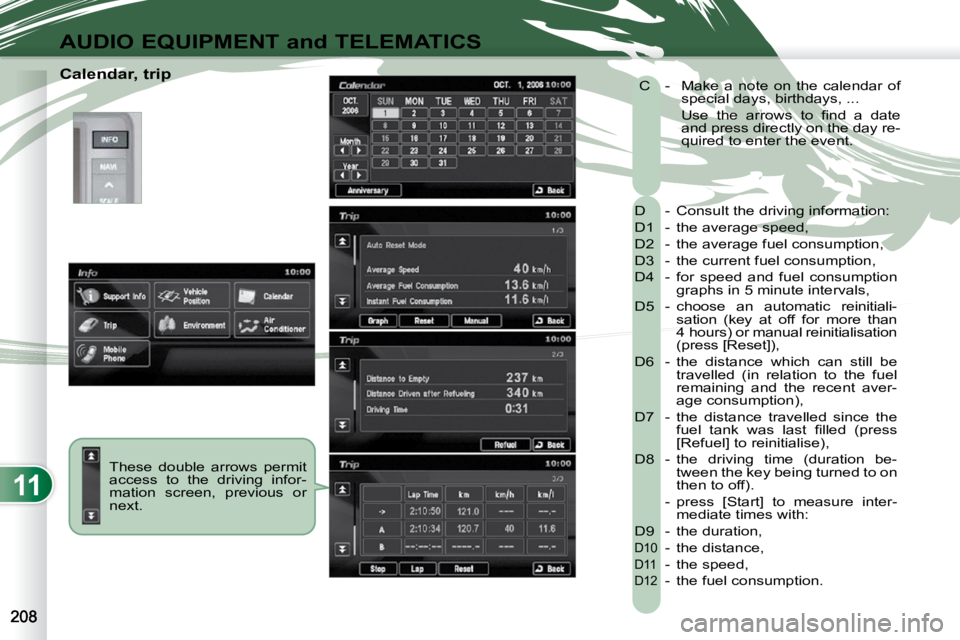
Calendar, trip These double arrows permit
access to the driving infor-
mation screen, previous or
next. D - Consult the driving information:
D1 - the average speed,
D2 - the average fuel consumption,
D3 - the current fuel consumption,
D4 - for speed and fuel consumption
graphs in 5 minute intervals,
D5 - choose an automatic reinitiali- sation (key at off for more than
4 hours) or manual reinitialisation
(press [Reset]),
D6 - the distance which can still be travelled (in relation to the fuel
remaining and the recent aver-
age consumption),
D7 - the distance travelled since the fuel tank was last fi lled (press
[Refuel] to reinitialise),
D8 - the driving time (duration be- tween the key being turned to on
then to off).
- press [Start] to measure inter- mediate times with:
D9 - the duration,
D10 - the distance,
D11 - the speed,
D12 - the fuel consumption.
C - Make a note on the calendar of
special days, birthdays, ...
Use the arrows to fi nd a date and press directly on the day re-
quired to enter the event.
Page 209 of 215
11
AUDIO EQUIPMENT and TELEMATICS
Matching your Bluetooth®
telephone
The system can register up to 7 Bluetooth®
compatible mobile telephones.
The telephone which has the highest
level of priority is connected automati-
cally.
It is absolutely essential that the vehicle
is parked in a safe place with the park-
ing brake applied.
1 - Press the SPEAK button.
7 - Say a 4-digit number which will be recorded as the match-
ing code. 12 - After the audible signal, allo-
cate a name to the telephone
by saying the name of your
choice.
13 - The system says "Allocate an order of priority between 1 and 7. One is
the highest level of priority".
If the system does not detect the
Bluetooth ®
compatible mobile
telephone, the matching proc-
ess stops accompanied by an
audible signal.
If you select a level of priority
which has already been allo-
cated to another telephone, the
system asks you if you wish to
replace this level of priority.
Remember this matching code as
you must enter it in the telephone
in one of the following steps of
the matching procedure.
9 - The system says "Start the match- ing procedure on the telephone.
Consult the instructions in the
telephone manual".
2 - Say "Confi gure".
3 - Say "Matching options".
5 - Say "Match a telephone". 8 - The system confi rms the va-
lidity of the number spoken,
answer "Yes". Say "No" to re-
turn to step 7.
10 - Consult your mobile tele- phone's user manual and
enter the matching code
recorded in step 7 in the
telephone. 14 - Say a number between 1 and
7 to establish the level of pri-
ority of the mobile telephone.
15 - The system says and confi rms the
16 - Answer
17 - The systems says "Matching com- plete" then emits an audible signal
and deactivates the voice recogni-
tion.
4 - The system says "Do you wish to
match a telephone, delete a tele-
phone or obtain the list of matched
telephones?".
6 - The systems says "Please say the 4 digits of a matching code". If the code is incorrect, the system
locks. To clear the code:
- check that the telephone's
voice recognition is not acti-
vated,
- with the ignition on and the audio system active, press
the HANG UP button for
2 seconds, 3 times in suc-
cession.
11 - When it detects a Bluetooth ®
com-
patible mobile telephone, the system
says "Please say the name of the
telephone after the bleep".