ignition PEUGEOT 4008 2012 User Guide
[x] Cancel search | Manufacturer: PEUGEOT, Model Year: 2012, Model line: 4008, Model: PEUGEOT 4008 2012Pages: 332, PDF Size: 9.17 MB
Page 35 of 332
1
33
Instruments and controls
Screen 1Screen 2CauseSolution - ActionObservations
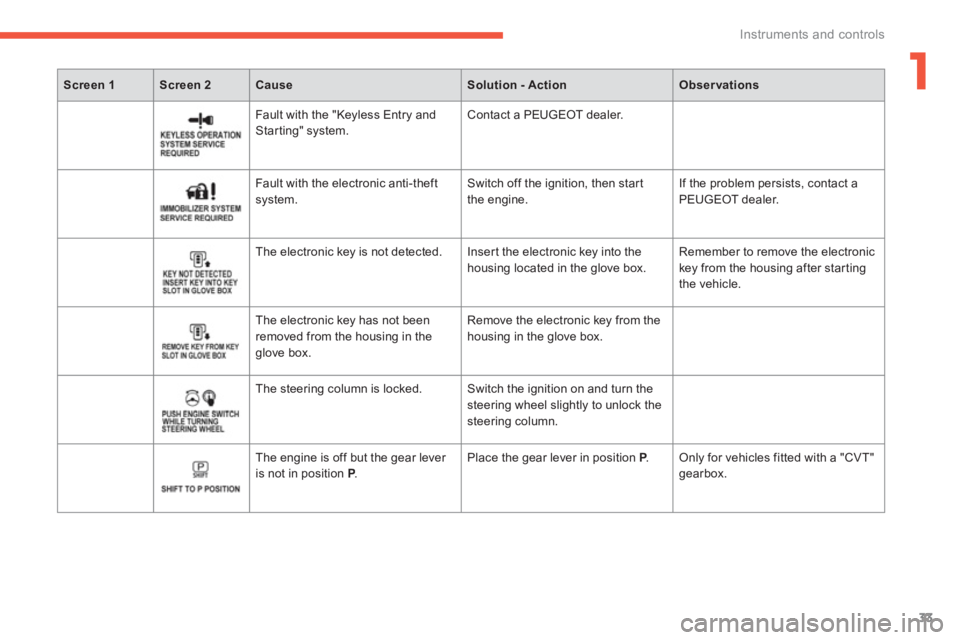
Fault with the "Keyless Entry andStarting" system. Contact a PEUGEOT dealer.
F
ault with the electronic anti-theftsystem. Switch off the ignition, then star t
the engine. If the problem persists, contact a
PEUGEOT dealer.
The electronic key is not detected. Inser t the electronic key into the
housin
g located in the glove box. Remember to remove the electronickey from the housing after star ting
the vehicle.
The electronic ke
y has not been removed from the housing in the glove box. Remove the electronic ke
y from the
housing in the glove box.
The steering column is locked. Switch the ignition on and turn the
steering wheel slightly to unlock the
steering column.
The en
gine is off but the gear lever
is not in position P . P Place the gear lever in position P.P Only for vehicles fitted with a "CVT"gearbox.
Page 37 of 332
1
35
Instruments and controls
Screen 1Screen 2CauseSolution - ActionObservations
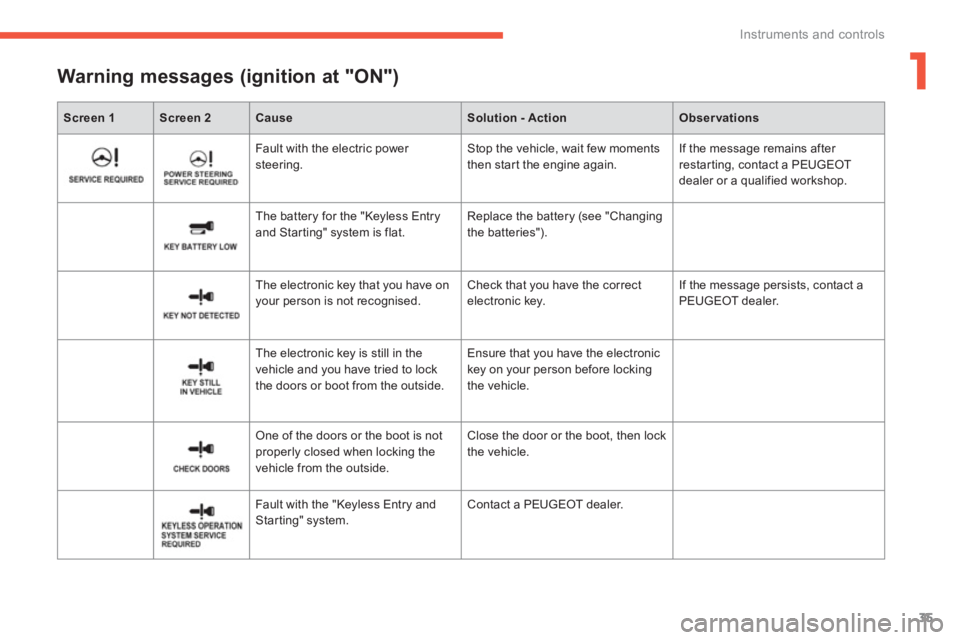
Warning messages (ignition at "ON")
Fault with the electric power steering. Stop the vehicle, wait few moments
then start the engine again. If the message remains after
restarting, contact a PEUGEOT
dealer or a qualified workshop.
The batter
y for the "Keyless Entry and Starting" system is flat. Replace the battery (see "Changingthe batteries").
The electronic ke
y that you have onyour person is not recognised. Check that you have the correctelectronic key. If the message persists, contact a
PEUGEOT dealer.
The electronic ke
y is still in the
vehicle and you have tried to lock
the doors or boot from the outside. Ensure that
you have the electronickey on your person before lockingthe vehicle.
One of the doors or the boot is not properly closed when locking the
vehicle from the outside. Close the door or the boot, then lock
the vehicle.
Fault with the "Ke
yless Entry andStarting" system. Contact a PEUGEOT dealer.
Page 38 of 332
36
Instruments and controls
Screen 1Screen 2CauseSolution - ActionObservations
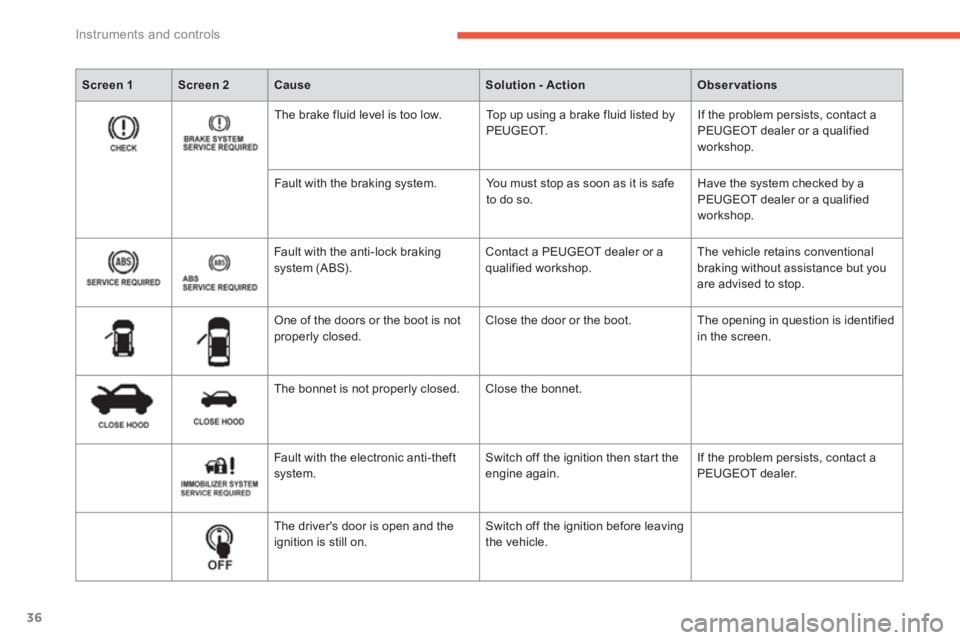
The brake fluid level is too low. Top up using a brake fluid listed by
PEUGEOT. If the problem persists, contact a PEUGEOT dealer or a qualified workshop.
Fault with the brakin
g system. You must stop as soon as it is safe
to do so. Have the system checked by a PEUGEOT dealer or a qualified workshop.
Fault with the anti-lock braking
s
ystem (ABS). Contact a PEUGEOT dealer or a qualified workshop. The vehicle retains conventional
braking without assistance but you
are advised to stop.
One of the doors or the boot is notproperly closed. Close the door or the boot. The opening in question is identified
in the screen.
The bonnet is not properly closed. Close the bonnet.
F
ault with the electronic anti-theft
system. Switch off the ignition then start the engine again. If the problem persists, contact a
PEUGEOT dealer.
The driver's door is open and theignition is still on. Switch off the ignition before leavingthe vehicle.
Page 43 of 332
1
41
Instruments and controls
Screen 1Screen 2SystemObservations
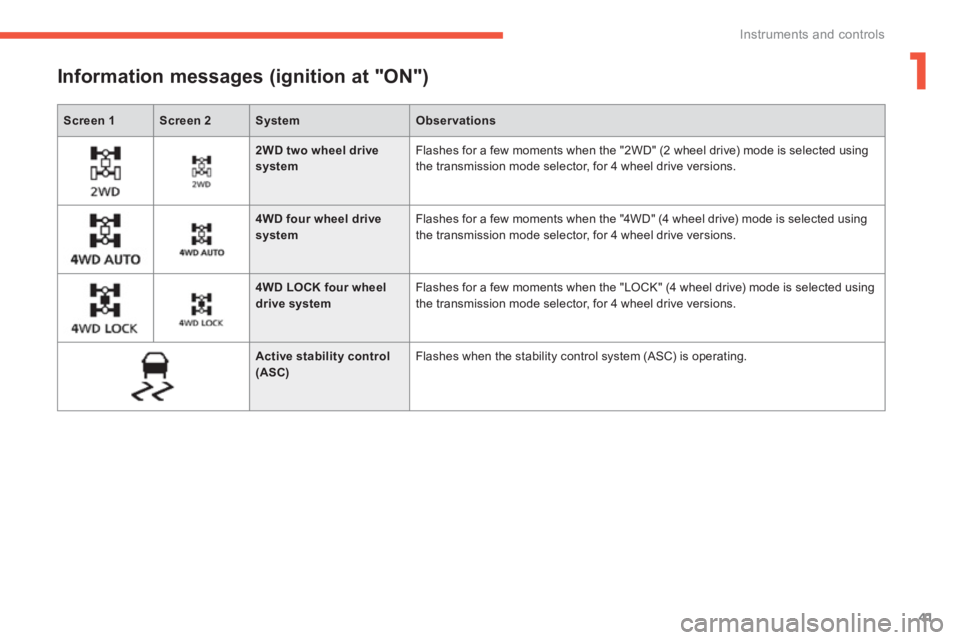
Information messages (ignition at "ON")
2WD two wheel drive system
Flashes for a few moments when the "2WD" (2 wheel drive) mode is selected usingthe transmission mode selector, for 4 wheel drive versions.
4WD four wheel drive system
Flashes for a few moments when the "4WD" (4 wheel drive) mode is selected using
the transmission mode selector, for 4 wheel drive versions.
4WD LOCK four wheel drive system Flashes for a few moments when the "LOCK" (4 wheel drive) mode is selected usingthe transmission mode selector, for 4 wheel drive versions.
Active stability control (ASC)
Flashes when the stability control system (ASC) is operating.
Page 44 of 332
42
Instruments and controls
Screen 2SystemCauseObservationsSolution - Action
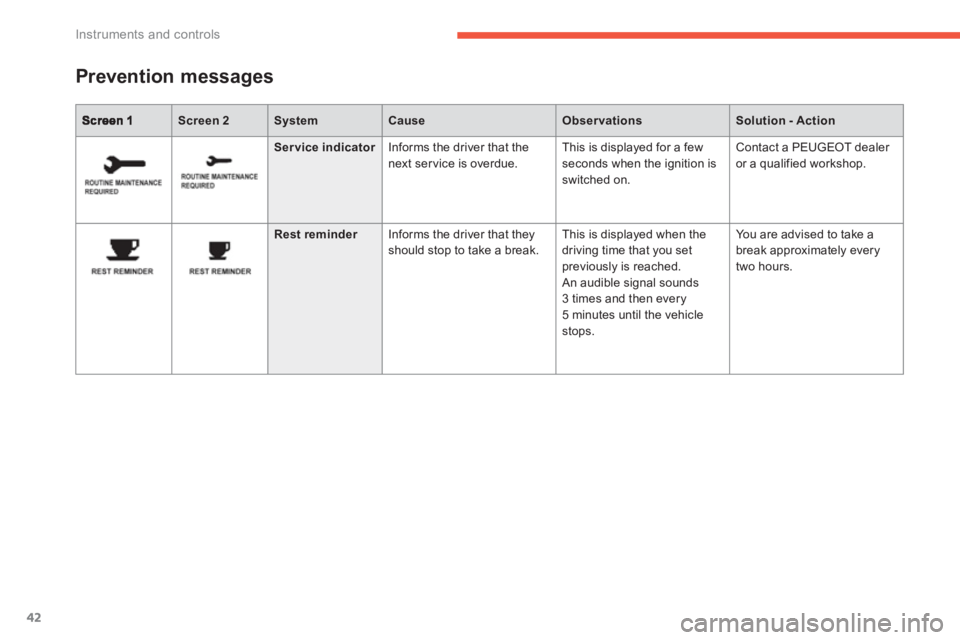
Prevention messages
Ser vice indicatorInforms the driver that the
next service is overdue. This is displa
yed for a few
seconds when the ignition is switched on.
Contact a PEUGEOT dealer
or a quali
fied workshop.
Rest reminderInforms the driver that they
should stop to take a break. This is displayed when the
driving time that you set
previousl
y is reached. An audible signal sounds 3 times and then every 5 minutes until the vehiclestops.
Yo u are advised to take a
break approximately every
tw
o hours.
Page 45 of 332
1
43
Instruments and controls
Tr i p c o m p u t e r
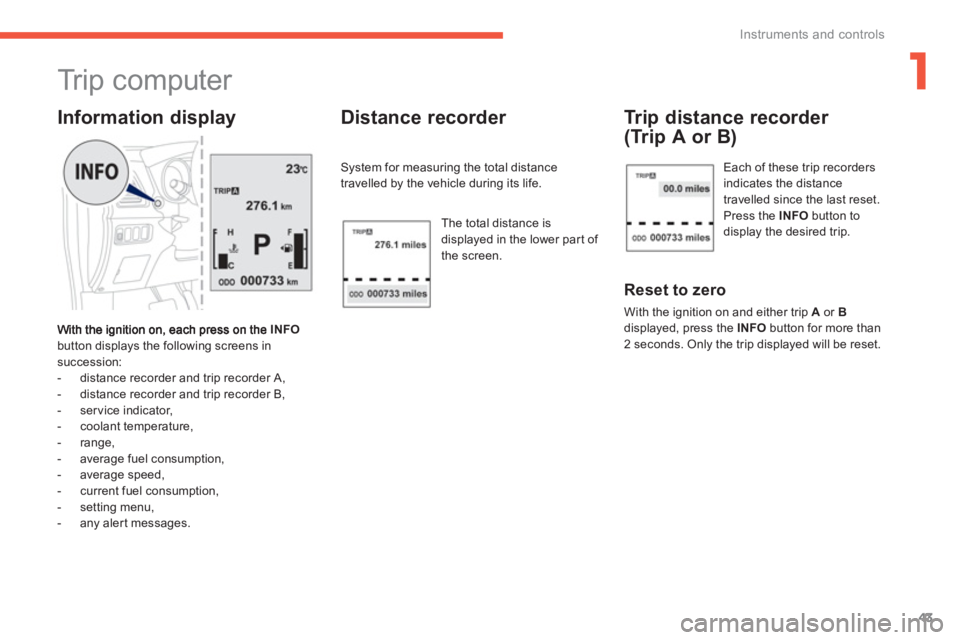
INFO
button displays the following screens in succession:
- distance recorder and trip recorder A,
- distance recorder and trip recorder B,
- service indicator,
- coolant temperature,
- range,
- average fuel consumption,
- average speed,
- current fuel consumption,
- settin
g menu,
- any aler t messages.
Information display Distance recorder
System for measuring the total distance
travelled by the vehicle during its life.
Th
e total distance is
displayed in the lower part of
the screen.
Trip distance recorder
(Trip A or B)
Reset to zero
With the ignition on and either trip Aor Bdisplayed, press the INFObutton for more than
2 seconds. Only the trip displayed will be reset.
Each of these trip recordersindicates the distance
travelled since the last reset.
Press the INFObutton todisplay the desired trip.
Page 47 of 332
1
45
Instruments and controls
Resetting the service indicator to zero
After a certain distance and a certain time, the display of "---"
is reset automatically and the display indicatesthe time remaining before the nextservice is due.
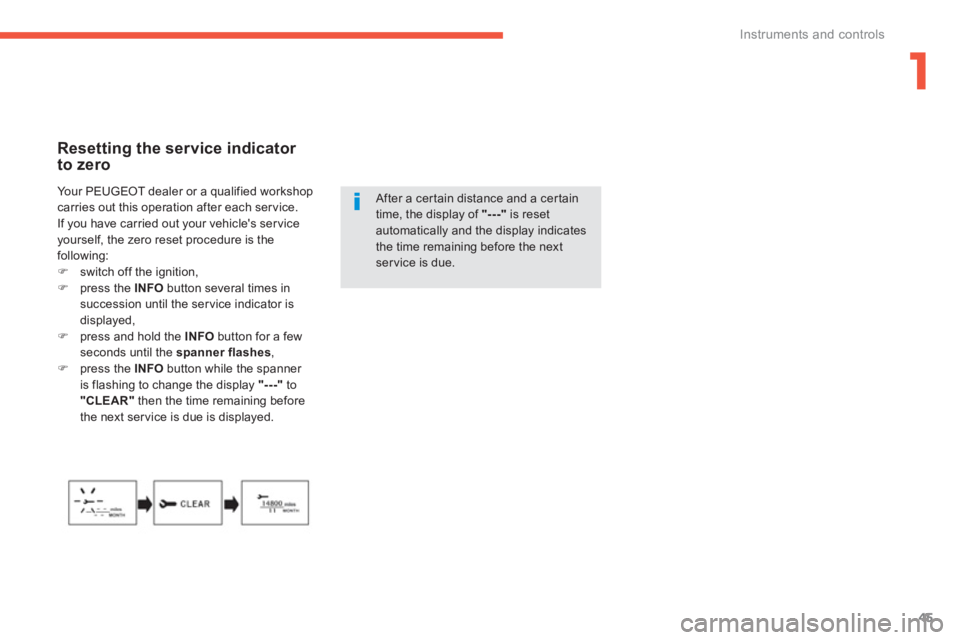
Yo u r P E U
GEOT dealer or a qualified workshopcarries out this operation after each ser vice.
If you have carried out your vehicle's ser vice yourself, the zero reset procedure is the
following:)switch off the ignition,)press the INFO
button several times in succession until the service indicator is displayed,)press and hold the INFO
button for a few seconds until the spanner flashes,)press the INFO
button while the spanner
is flashing to change the display "---" to"CLEAR"then the time remaining before
the next ser vice is due is displayed.
Page 49 of 332
1
47
Instruments and controls
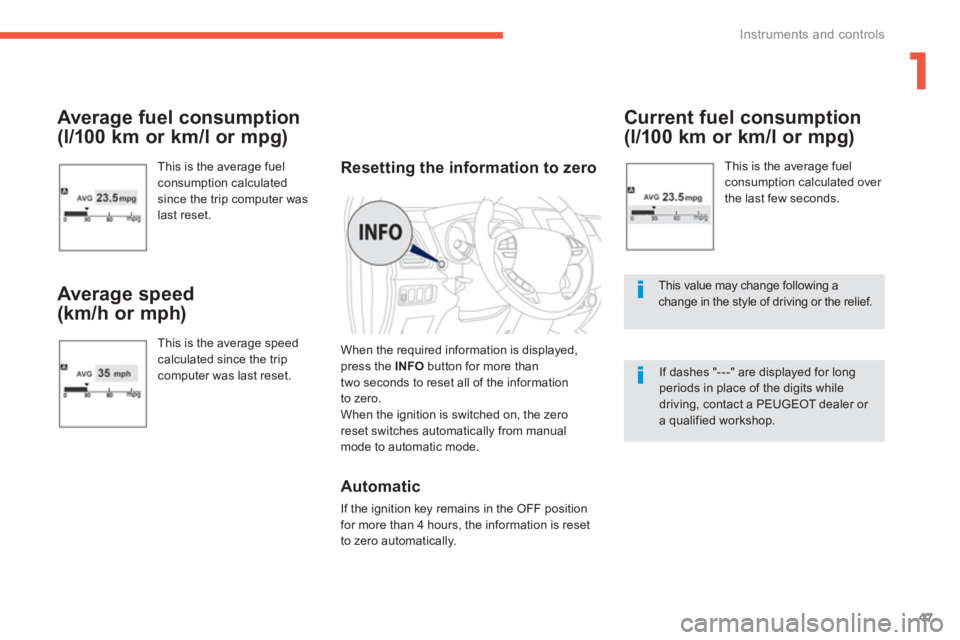
Average fuel consumption
(l/100 km or km/l or mpg)
This is the average fuel consumption calculatedsince the trip computer was
last reset.
Average speed
(km/h or mph)
This is the average speedcalculated since the tripcomputer was last reset.
Current fuel consumption
(l/100 km or km/l or mpg)
This is the average fuel consumption calculated over
the last few seconds.
This value may change following achange in the style of driving or the relief.
If dashes "---" are displayed for long periods in place of the digits while driving, contact a PEUGEOT dealer or a qualified workshop.
Resetting the information to zero
When the required information is displayed, press the INFO
button for more than
two seconds to reset all of the information
to zero.
When the ignition is switched on, the zero
reset switches automatically from manual mode to automatic mode.
Automatic
If the ignition key remains in the OFF position
for more than 4 hours, the information is reset
to zero automaticall
y.
Page 50 of 332
48
Instruments and controls
The various menus may change between the type 1
instrument panel and the type 2 instrument panel.
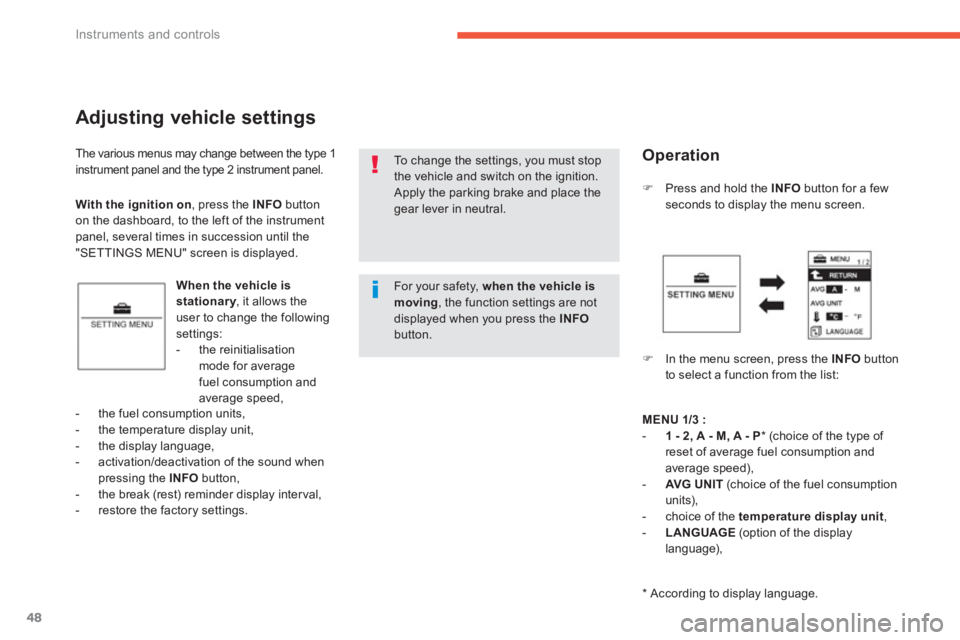
Adjusting vehicle settings
When the vehicle is stationary, it allows theyuser to change the following settings:
- the reinitialisation mode for average fuel consumption andaverage speed,
)Press and hold the INFObutton for a fewseconds to display the menu screen.
)In the menu screen, press the INFO
button
to select a function from the list:
- the
fuel consumption units,
- the temperature displa
y unit,
- the display language,
- activation/deactivation of the sound whenpressing the INFO
button,- the break (rest) reminder display interval,
- restore the factory settings.
To change the settings, you must stopthe vehicle and switch on the ignition.
Apply the parking brake and place the gear lever in neutral. With the ignition on
, press the INFObutton
on the dashboard, to the left of the instrumentpanel, several times in succession until the
"SETTINGS MENU" screen is displayed.
Operation
MENU1/3:-1 - 2, A - M, A - P*
(choice of the type of reset of average fuel consumption andaverage speed),
- AVG UNIT(choice of the fuel consumption
units),
- choice of the temperature display unit,-LANGUAGE(option of the display
language),
*
According to display language.
For your safety, when the vehicle is moving
, the function settings are not displayed when you press the INFObutton.
Page 57 of 332
1
55
Instruments and controls
If no action is carried out within 10 seconds, the system will exit the "Functions setting mode" menuautomatically.
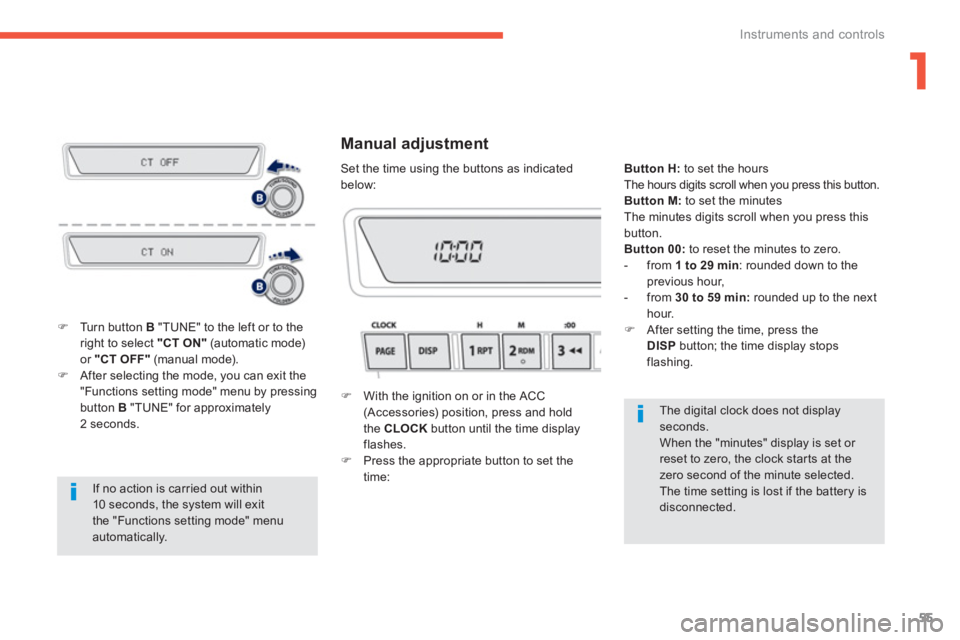
)Turn button B
"TUNE" to the left or to theright to select "CT ON"
(automatic mode)or "CT OFF"(manual mode). )After selecting the mode, you can exit the "Functions setting mode" menu by pressingbutton B
"TUNE" for approximately2 seconds.
The digital clock does not display seconds.
When the "minutes" display is set or reset to zero, the clock starts at the zero second of the minute selected.
The time setting is lost if the battery is disconnected.
Manual adjustment
)
With the ignition on or in the ACC (Accessories) position, press and hold
the CLOCK
button until the time displayflashes.)
Press the appropriate button to set the
time:
ButtonH:to set the hours The hours digits scroll when you press this button. Button M:
to set the minutes
The minutes digits scroll when you press this button.
Button 00:to reset the minutes to zero.
- from 1 to 29 min:
rounded down to theprevious hour,
- from 30 to 59 min:
rounded up to the nexthour.)
After setting the time, press theDISPbutton; the time display stops flashing.
Set the time using the buttons as indicated below: